
Lock Computer and Turn Off Monitor - Add to Desktop Context Menu

How to Add "Lock Computer and Turn Off Monitor" to the Context Menu in Windows

   Information
This tutorial will show you how to add Lock Computer and Turn Off Monitor to the desktop context menu in Windows 7 and Windows 8.

When used by a user, it will lock the computer and turn off the display (monitors). To return to Windows, you would just need to move the mouse or press a key on the keyboard to turn on the display (monitors) again, then log on from the lock computer screen.

   Note
You must be logged in as an administrator to be able to add this to the desktop context menu, but all users on the computer will be able to use the context menu.


EXAMPLE: "Lock Computer and Turn Off Monitor" added to Desktop Context Menu
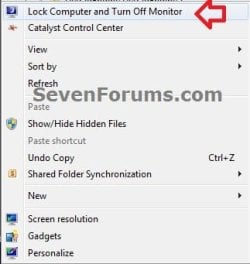
Example.jpg
Here's How:
1. Do either step 2 or 3 below for what you would like to do.

2. To Add "Lock Computer and Turn Off Monitor" to Context Menu
A) Download the 32-bit or 64-bit version of NirCmd at the bottom of the website below that is the same as your 32-bit or 64-bit Windows, and save the ZIP file to your desktop.
NirCmd - Windows command line tool
B) Open the downloaded ZIP file, and extract (drag and drop) the nircmd.exe file to your desktop, and unblock the file.

C) Click/tap on the Download button below to download the .bat file below, and save the .bat to your desktop.
Turn_Off_Monitor_and_Lock_Computer.bat


Download


D) Unblock the .bat file.

E) Move both the unblocked nircmd.exe file and unblocked Turn_Off_Monitor_and_Lock_Computer.bat file into your C:\Windows\System32 folder, and approve (Continue-Yes).
NOTE: The .bat file must have this exact name. Rename if needed.

F) Click/tap on the Download button below to download the .reg file below, and save the .reg file to your desktop.
Add_Lock-Computer_Turn_Off_Monitor_to_Context_Menu.reg


Download


G) Double click/tap on the downloaded REG file to merge it, then click/tap on Run, Yes (UAC), Yes, and OK when prompted to approve the merge.
3. To Remove "Lock Computer and Turn Off Monitor" from Context Menu
A) Click/tap on the Download button below to download the file below.
Remove_Lock-Computer_Turn_Off_Monitor_from_Context_Menu.reg


Download


B) Double click/tap on the downloaded REG file to merge it, then click/tap on Run, Yes (UAC), Yes, and OK when prompted to approve the merge.

C) In Windows Explorer (Windows 7) or File Explorer (Windows 8), navigate to C:\Windows\System32, and delete the nircmd.exe and Turn_Off_Monitor_and_Lock_Computer.bat files.

That's it,
Shawn


Attachments

Last edited:
You must spread some Reputation around before giving it to Brink again.

Well, this said i do Rep you here myself for that one click on my desktop!:)
 

My Computer My Computer

At a glance

Windows 7 Professional SP1 - x64 [Non-UEFI Boot]Ivy Bridge Core i5 3570K (Delidded)G.Skill "Ares" DDR3 PC3-12800 - 1600MHz (16Gb)Asus Dual-RX480-O4G
Computer type
PC/Desktop
Computer Manufacturer/Model Number
Custom Build
OS
Windows 7 Professional SP1 - x64 [Non-UEFI Boot]
CPU
Ivy Bridge Core i5 3570K (Delidded)
Motherboard
Asus P8Z77-V LE PLUS
Memory
G.Skill "Ares" DDR3 PC3-12800 - 1600MHz (16Gb)
Graphics Card(s)
Asus Dual-RX480-O4G
Sound Card
Creative Sound Blaster Z w/5.1 sound system
Monitor(s) Displays
Asus IPS 23"
Screen Resolution
16/9
Hard Drives
Internal:
500Go Sata 6Gb/s (x2)
500Go Sata 3Gb/s (x2)
SSD 60Go Sata 6Gb/s
PSU
In Win C 900W Series 80+ Platinum
Case
Thermaltake Chaser A71
Cooling
Custom Water Cooling Loop
Keyboard
Cooler Master QuickFire XTi
Mouse
Razer Imperator 2012 (4G)
Antivirus
MSE
Browser
IE 11.0.xxx Rtm
Other Info
"Raid0" with Intel Smart Response Technology (HDD/SSD)
Thank you NoN. :)
 

My Computer My Computer

At a glance

64-bit Windows 11 Pro for WorkstationsIntel i7-8700K OC'd to 5 GHz64 GB (4x16GB) G.SKILL TridentZ RGB DDR4 3600...ASUS ROG-STRIX-GTX1080TI-O11G-GAMING
Computer type
PC/Desktop
Computer Manufacturer/Model Number
Self built custom
OS
64-bit Windows 11 Pro for Workstations
CPU
Intel i7-8700K OC'd to 5 GHz
Motherboard
ASUS ROG Maximus XI Formula Z390
Memory
64 GB (4x16GB) G.SKILL TridentZ RGB DDR4 3600 MHz
Graphics Card(s)
ASUS ROG-STRIX-GTX1080TI-O11G-GAMING
Sound Card
Integrated
Monitor(s) Displays
2 x Samsung Odyssey G7 27"
Screen Resolution
2560x1440
Hard Drives
1TB Samsung 990 PRO M.2,
4TB Samsung 990 PRO PRO M.2,
TerraMaster F8 SSD Plus NAS
PSU
Seasonic Prime Titanium 850W
Case
Thermaltake Core P3
Cooling
Corsair Hydro H115i
Keyboard
Logitech wireless K800
Mouse
Logitech MX Master 4
Internet Speed
2 Gb/s Download and 100 Mb/s Upload
Antivirus
Malwarebyte Anti-Malware Premium
Browser
Google Chrome
Other Info
Logitech Z625 speaker system,
Logitech BRIO 4K Pro webcam,
HP Color LaserJet Pro MFP M477fdn,
APC SMART-UPS RT 1000 XL - SURT1000XLI,
Galaxy S23 Plus phone
Windows + L to lock screen and...

How is that different from hitting Windows + L to lock the screen (in effect)? Namely my screens did not turn off but just went dark with center screen going to unlock screen.
 
Last edited:

My Computer My Computer

At a glance

Windows 7 Home Premium x64AMD Phenom II X4 960T, (4 CPUs), ~3.0 GHz8192MB RAMAMD Radeon HD 6700 Series (0x67BA) Internal D...
Computer type
PC/Desktop
Computer Manufacturer/Model Number
HP, p7-1020
OS
Windows 7 Home Premium x64
CPU
AMD Phenom II X4 960T, (4 CPUs), ~3.0 GHz
Motherboard
FOXCONN 2AB1
Memory
8192MB RAM
Graphics Card(s)
AMD Radeon HD 6700 Series (0x67BA) Internal DAC (400MH), 754
Hard Drives
WDC WD15 EARS-60MVWB0 Sata Disk Device
Antivirus
AVG Free 2013
Browser
Chrome Version 26.0.1410.43 m
Hello T C, and welcome to Seven Forums.

Normally when you just lock your computer, you will only see the lock screen. The display doesn't turn off automatically until after some idle time has passed.

This will lock your computer and turn off your display(s) instantly. Just like when your display(s) turn off normally, any movement of the mouse, touchpad, or pressing a key will have the display(s) automatically turn back on to see the lock screen to be able log back in.

You may have inadvertently moved or pressed something right after clicking on the context menu to turn the display back on. While on the lock screen, it is normal for only your main display to on and not your other displays. The other displays only turn on while in Windows. Sometimes you may have another on during boot, but not always.

If you are sure that you didn't move or press anything, then you may have missed a step in the tutorial, or downloaded the wrong NirCmd 64-bit file for your 64-bit Windows 7.

Hope this helps, :)
Shawn
 

My Computer My Computer

At a glance

64-bit Windows 11 Pro for WorkstationsIntel i7-8700K OC'd to 5 GHz64 GB (4x16GB) G.SKILL TridentZ RGB DDR4 3600...ASUS ROG-STRIX-GTX1080TI-O11G-GAMING
Computer type
PC/Desktop
Computer Manufacturer/Model Number
Self built custom
OS
64-bit Windows 11 Pro for Workstations
CPU
Intel i7-8700K OC'd to 5 GHz
Motherboard
ASUS ROG Maximus XI Formula Z390
Memory
64 GB (4x16GB) G.SKILL TridentZ RGB DDR4 3600 MHz
Graphics Card(s)
ASUS ROG-STRIX-GTX1080TI-O11G-GAMING
Sound Card
Integrated
Monitor(s) Displays
2 x Samsung Odyssey G7 27"
Screen Resolution
2560x1440
Hard Drives
1TB Samsung 990 PRO M.2,
4TB Samsung 990 PRO PRO M.2,
TerraMaster F8 SSD Plus NAS
PSU
Seasonic Prime Titanium 850W
Case
Thermaltake Core P3
Cooling
Corsair Hydro H115i
Keyboard
Logitech wireless K800
Mouse
Logitech MX Master 4
Internet Speed
2 Gb/s Download and 100 Mb/s Upload
Antivirus
Malwarebyte Anti-Malware Premium
Browser
Google Chrome
Other Info
Logitech Z625 speaker system,
Logitech BRIO 4K Pro webcam,
HP Color LaserJet Pro MFP M477fdn,
APC SMART-UPS RT 1000 XL - SURT1000XLI,
Galaxy S23 Plus phone
Same process in a shortcut?

Hey Shawn - Thank you so much for this! It's EXACTLY what I wanted.

One question... Is it possible to have this exact same process (lock computer and turn off monitors) in a desktop icon and/or a shortcut key? If so, let me know how to go about doing that.

Thanks!
PDI
 

My Computer My Computer

At a glance

Windows 7 64 bit
Computer type
PC/Desktop
OS
Windows 7 64 bit
Hello PDI, and welcome to Seven Forums.

Since you already added the context menu, you could create a shortcut of the .bat file from step 2 on your desktop, and be able to change the shortcut's icon and shortcut key. :)
 

My Computer My Computer

At a glance

64-bit Windows 11 Pro for WorkstationsIntel i7-8700K OC'd to 5 GHz64 GB (4x16GB) G.SKILL TridentZ RGB DDR4 3600...ASUS ROG-STRIX-GTX1080TI-O11G-GAMING
Computer type
PC/Desktop
Computer Manufacturer/Model Number
Self built custom
OS
64-bit Windows 11 Pro for Workstations
CPU
Intel i7-8700K OC'd to 5 GHz
Motherboard
ASUS ROG Maximus XI Formula Z390
Memory
64 GB (4x16GB) G.SKILL TridentZ RGB DDR4 3600 MHz
Graphics Card(s)
ASUS ROG-STRIX-GTX1080TI-O11G-GAMING
Sound Card
Integrated
Monitor(s) Displays
2 x Samsung Odyssey G7 27"
Screen Resolution
2560x1440
Hard Drives
1TB Samsung 990 PRO M.2,
4TB Samsung 990 PRO PRO M.2,
TerraMaster F8 SSD Plus NAS
PSU
Seasonic Prime Titanium 850W
Case
Thermaltake Core P3
Cooling
Corsair Hydro H115i
Keyboard
Logitech wireless K800
Mouse
Logitech MX Master 4
Internet Speed
2 Gb/s Download and 100 Mb/s Upload
Antivirus
Malwarebyte Anti-Malware Premium
Browser
Google Chrome
Other Info
Logitech Z625 speaker system,
Logitech BRIO 4K Pro webcam,
HP Color LaserJet Pro MFP M477fdn,
APC SMART-UPS RT 1000 XL - SURT1000XLI,
Galaxy S23 Plus phone
Thanks Shawn! I will do that.
 

My Computer My Computer

At a glance

Windows 7 64 bit
Computer type
PC/Desktop
OS
Windows 7 64 bit
You're most welcome. :)
 

My Computer My Computer

At a glance

64-bit Windows 11 Pro for WorkstationsIntel i7-8700K OC'd to 5 GHz64 GB (4x16GB) G.SKILL TridentZ RGB DDR4 3600...ASUS ROG-STRIX-GTX1080TI-O11G-GAMING
Computer type
PC/Desktop
Computer Manufacturer/Model Number
Self built custom
OS
64-bit Windows 11 Pro for Workstations
CPU
Intel i7-8700K OC'd to 5 GHz
Motherboard
ASUS ROG Maximus XI Formula Z390
Memory
64 GB (4x16GB) G.SKILL TridentZ RGB DDR4 3600 MHz
Graphics Card(s)
ASUS ROG-STRIX-GTX1080TI-O11G-GAMING
Sound Card
Integrated
Monitor(s) Displays
2 x Samsung Odyssey G7 27"
Screen Resolution
2560x1440
Hard Drives
1TB Samsung 990 PRO M.2,
4TB Samsung 990 PRO PRO M.2,
TerraMaster F8 SSD Plus NAS
PSU
Seasonic Prime Titanium 850W
Case
Thermaltake Core P3
Cooling
Corsair Hydro H115i
Keyboard
Logitech wireless K800
Mouse
Logitech MX Master 4
Internet Speed
2 Gb/s Download and 100 Mb/s Upload
Antivirus
Malwarebyte Anti-Malware Premium
Browser
Google Chrome
Other Info
Logitech Z625 speaker system,
Logitech BRIO 4K Pro webcam,
HP Color LaserJet Pro MFP M477fdn,
APC SMART-UPS RT 1000 XL - SURT1000XLI,
Galaxy S23 Plus phone
Is there any way to only turn off the monitor without locking the computer?
 

My Computer My Computer

At a glance

Windows 7 Home Premium 32bitIntel Core i3-2328M2 GB RAMIntel HD Graphics 3000
Computer type
Laptop
Computer Manufacturer/Model Number
HP
OS
Windows 7 Home Premium 32bit
CPU
Intel Core i3-2328M
Memory
2 GB RAM
Graphics Card(s)
Intel HD Graphics 3000
Hard Drives
500 GB
Internet Speed
About 200 KB/s
Antivirus
Microsoft Security Essentials
Browser
Mozilla Firefox

My Computer My Computer

At a glance

64-bit Windows 11 Pro for WorkstationsIntel i7-8700K OC'd to 5 GHz64 GB (4x16GB) G.SKILL TridentZ RGB DDR4 3600...ASUS ROG-STRIX-GTX1080TI-O11G-GAMING
Computer type
PC/Desktop
Computer Manufacturer/Model Number
Self built custom
OS
64-bit Windows 11 Pro for Workstations
CPU
Intel i7-8700K OC'd to 5 GHz
Motherboard
ASUS ROG Maximus XI Formula Z390
Memory
64 GB (4x16GB) G.SKILL TridentZ RGB DDR4 3600 MHz
Graphics Card(s)
ASUS ROG-STRIX-GTX1080TI-O11G-GAMING
Sound Card
Integrated
Monitor(s) Displays
2 x Samsung Odyssey G7 27"
Screen Resolution
2560x1440
Hard Drives
1TB Samsung 990 PRO M.2,
4TB Samsung 990 PRO PRO M.2,
TerraMaster F8 SSD Plus NAS
PSU
Seasonic Prime Titanium 850W
Case
Thermaltake Core P3
Cooling
Corsair Hydro H115i
Keyboard
Logitech wireless K800
Mouse
Logitech MX Master 4
Internet Speed
2 Gb/s Download and 100 Mb/s Upload
Antivirus
Malwarebyte Anti-Malware Premium
Browser
Google Chrome
Other Info
Logitech Z625 speaker system,
Logitech BRIO 4K Pro webcam,
HP Color LaserJet Pro MFP M477fdn,
APC SMART-UPS RT 1000 XL - SURT1000XLI,
Galaxy S23 Plus phone

My Computer My Computer

At a glance

Windows 7 Home Premium 32bitIntel Core i3-2328M2 GB RAMIntel HD Graphics 3000
Computer type
Laptop
Computer Manufacturer/Model Number
HP
OS
Windows 7 Home Premium 32bit
CPU
Intel Core i3-2328M
Memory
2 GB RAM
Graphics Card(s)
Intel HD Graphics 3000
Hard Drives
500 GB
Internet Speed
About 200 KB/s
Antivirus
Microsoft Security Essentials
Browser
Mozilla Firefox
You're most welcome. :)
 

My Computer My Computer

At a glance

64-bit Windows 11 Pro for WorkstationsIntel i7-8700K OC'd to 5 GHz64 GB (4x16GB) G.SKILL TridentZ RGB DDR4 3600...ASUS ROG-STRIX-GTX1080TI-O11G-GAMING
Computer type
PC/Desktop
Computer Manufacturer/Model Number
Self built custom
OS
64-bit Windows 11 Pro for Workstations
CPU
Intel i7-8700K OC'd to 5 GHz
Motherboard
ASUS ROG Maximus XI Formula Z390
Memory
64 GB (4x16GB) G.SKILL TridentZ RGB DDR4 3600 MHz
Graphics Card(s)
ASUS ROG-STRIX-GTX1080TI-O11G-GAMING
Sound Card
Integrated
Monitor(s) Displays
2 x Samsung Odyssey G7 27"
Screen Resolution
2560x1440
Hard Drives
1TB Samsung 990 PRO M.2,
4TB Samsung 990 PRO PRO M.2,
TerraMaster F8 SSD Plus NAS
PSU
Seasonic Prime Titanium 850W
Case
Thermaltake Core P3
Cooling
Corsair Hydro H115i
Keyboard
Logitech wireless K800
Mouse
Logitech MX Master 4
Internet Speed
2 Gb/s Download and 100 Mb/s Upload
Antivirus
Malwarebyte Anti-Malware Premium
Browser
Google Chrome
Other Info
Logitech Z625 speaker system,
Logitech BRIO 4K Pro webcam,
HP Color LaserJet Pro MFP M477fdn,
APC SMART-UPS RT 1000 XL - SURT1000XLI,
Galaxy S23 Plus phone
Is there any way to only turn off the monitor without locking the computer?

You can turn off the monitor the workstation without a 3rd party program with a PowerShell-script: Make a MonitorOff.ps1 for example in C:\ and create a shortcut with this target: C:\Windows\System32\WindowsPowerShell\v1.0\powershell.exe -ExecutionPolicy UnRestricted -File C:\MonitorOff.ps1

Paste the following code inside the .ps1 file:

Code:
# Turn display off by calling WindowsAPI.
 
# SendMessage(HWND_BROADCAST,WM_SYSCOMMAND, SC_MONITORPOWER, POWER_OFF)
# HWND_BROADCAST    0xffff
# WM_SYSCOMMAND    0x0112
# SC_MONITORPOWER    0xf170
# POWER_OFF          0x0002
 
Add-Type -TypeDefinition '
using System;
using System.Runtime.InteropServices;
 
namespace Utilities {
    public static class Display
    {
        [DllImport("user32.dll", CharSet = CharSet.Auto)]
        private static extern IntPtr SendMessage(
            IntPtr hWnd,
            UInt32 Msg,
            IntPtr wParam,
            IntPtr lParam
        );
 
        public static void PowerOff ()
        {
            SendMessage(
                (IntPtr)0xffff, // HWND_BROADCAST
                0x0112,            // WM_SYSCOMMAND
                (IntPtr)0xf170, // SC_MONITORPOWER
                (IntPtr)0x0002  // POWER_OFF
            );
        }
    }
}
'
[Utilities.Display]::PowerOff()
 
 
if ($Host.Name -eq 'ConsoleHost') {Stop-Process $PID}
 
Last edited by a moderator:

My Computer My Computer

At a glance

Windows 10 Education
Computer type
PC/Desktop
OS
Windows 10 Education
Can we use this in Windows 10 operating system.
 

My Computer My Computer

At a glance

Windows 7Asus2 GB RAM512 MB
Computer type
PC/Desktop
Computer Manufacturer/Model Number
Asus
OS
Windows 7
CPU
Asus
Motherboard
Intel Dual Core
Memory
2 GB RAM
Graphics Card(s)
512 MB
Monitor(s) Displays
15 inch CFT
Hard Drives
Seagate 160 GB
Keyboard
Logitech
Mouse
Zebronic
Internet Speed
8 MB/S
Antivirus
Bit defender
Browser
Chrome
Hello Sara, :)

I haven't tested this in Windows 10 yet, but it should work.
 

My Computer My Computer

At a glance

64-bit Windows 11 Pro for WorkstationsIntel i7-8700K OC'd to 5 GHz64 GB (4x16GB) G.SKILL TridentZ RGB DDR4 3600...ASUS ROG-STRIX-GTX1080TI-O11G-GAMING
Computer type
PC/Desktop
Computer Manufacturer/Model Number
Self built custom
OS
64-bit Windows 11 Pro for Workstations
CPU
Intel i7-8700K OC'd to 5 GHz
Motherboard
ASUS ROG Maximus XI Formula Z390
Memory
64 GB (4x16GB) G.SKILL TridentZ RGB DDR4 3600 MHz
Graphics Card(s)
ASUS ROG-STRIX-GTX1080TI-O11G-GAMING
Sound Card
Integrated
Monitor(s) Displays
2 x Samsung Odyssey G7 27"
Screen Resolution
2560x1440
Hard Drives
1TB Samsung 990 PRO M.2,
4TB Samsung 990 PRO PRO M.2,
TerraMaster F8 SSD Plus NAS
PSU
Seasonic Prime Titanium 850W
Case
Thermaltake Core P3
Cooling
Corsair Hydro H115i
Keyboard
Logitech wireless K800
Mouse
Logitech MX Master 4
Internet Speed
2 Gb/s Download and 100 Mb/s Upload
Antivirus
Malwarebyte Anti-Malware Premium
Browser
Google Chrome
Other Info
Logitech Z625 speaker system,
Logitech BRIO 4K Pro webcam,
HP Color LaserJet Pro MFP M477fdn,
APC SMART-UPS RT 1000 XL - SURT1000XLI,
Galaxy S23 Plus phone
I am going to use it on my Windows 10 PC. if it is work properly, I will post my experience here.
 

My Computer My Computer

At a glance

Windows 7Asus2 GB RAM512 MB
Computer type
PC/Desktop
Computer Manufacturer/Model Number
Asus
OS
Windows 7
CPU
Asus
Motherboard
Intel Dual Core
Memory
2 GB RAM
Graphics Card(s)
512 MB
Monitor(s) Displays
15 inch CFT
Hard Drives
Seagate 160 GB
Keyboard
Logitech
Mouse
Zebronic
Internet Speed
8 MB/S
Antivirus
Bit defender
Browser
Chrome
Back
Top