Browser running slow or timing out, however internet is working fine.

Psych0viper

New member
Local time
12:22 PM
Messages
16
I recently moved, before the move my computer worked fine, browsers were quick to connect to websites, etc. After the move, my computer seems to work just fine, until you open a browser. This issue happens with Chrome/Firefox/IE, when trying to visit websites it takes a couple minutes for them to load, and about 50% of the time the connection times out. However, games such as League of Legends works smooth with no connection errors.

I have tried the following:

1) changing the DNS to Google DNS (didn't help, if anything it made it worse)
2) Factory Reset (no difference after this)
3) network.dns.disablePrefetchf
4) Ipconfig/flushDNS

Computer Specs:

Operating System
Windows 7 Home Premium 64-bit SP1
CPU
Intel Core i5 2320 @ 3.00GHz 37 °C
Sandy Bridge 32nm Technology
RAM
8.00GB Dual-Channel DDR3 @ 665MHz (9-9-9-24)
Motherboard
PEGATRON CORPORATION 2AC2 (CPU 1) 33 °C
Graphics
Generic Non-PnP Monitor (1024x768@60Hz)
Intel HD Graphics Family (HP)
Storage
1863GB Hitachi HDS723020BLA642 (SATA) 34 °C
Optical Drives
hp DVD A DH16ABSH
Audio
Realtek High Definition Audio

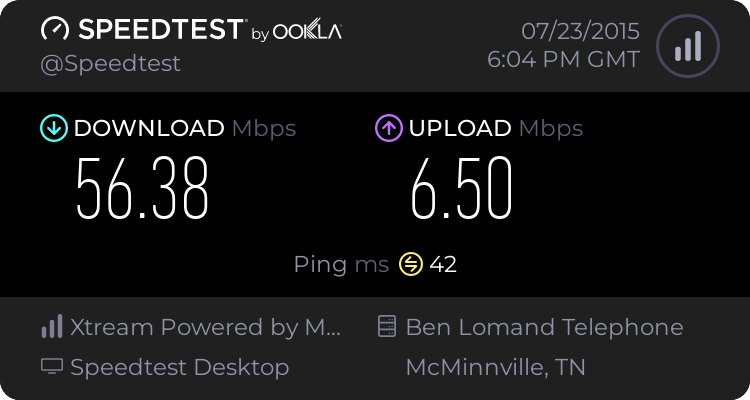
Speedtest.net Results:
 

My Computer My Computer

At a glance

Windows 7 home premium 64-bit SP1Intel Core i5 23208.00GB Dual-Channel DDR3Intel HD graphics family
Computer type
PC/Desktop
Computer Manufacturer/Model Number
HP p7-1205
OS
Windows 7 home premium 64-bit SP1
CPU
Intel Core i5 2320
Motherboard
PEGATRON CORPORATION 2AC2 (CPU 1)
Memory
8.00GB Dual-Channel DDR3
Graphics Card(s)
Intel HD graphics family
Hard Drives
1863GB Hitachi HDS723020BLA642 (SATA)
Antivirus
avast
Browser
Firefox/Chrome

My Computer My Computer

At a glance

Windows 7 Ultimate x64 SP1AMD Phenom 2 1090T2x8GB Kingston HyperX Fury Black 1600Mhz Unga...MSI GTX 970 Gaming 4G
Computer type
PC/Desktop
Computer Manufacturer/Model Number
Custom Build
OS
Windows 7 Ultimate x64 SP1
CPU
AMD Phenom 2 1090T
Motherboard
Gigabyte GA-890FXA-UD5
Memory
2x8GB Kingston HyperX Fury Black 1600Mhz Unganged
Graphics Card(s)
MSI GTX 970 Gaming 4G
Sound Card
Realtek On-Board HD 7.1 Audio / Logitech G35
Monitor(s) Displays
3xAcer GD245HQ
Screen Resolution
1920x1080
Hard Drives
Samsung 850 Pro 512GB SSD - OS /
WD Caviar Black SATA 3 - 1 TBx2 - Dynamic RAID 0 /
WD Caviar Green SATA 2 - 640GBx2 - Dynamic RAID 0 /
WD Caviar Green SATA 2 - 640GB - Internal Backup /
Seagate Barracude SATA 3 - 3TB - External Backup/ Sync
PSU
HighPower 1000W
Case
Cooler Master HAF 932
Cooling
Noctua NH-D14
Keyboard
Logitech G19
Mouse
Logitech G500
Internet Speed
100/4 Mbit Cable (100GB quota)
Antivirus
ZoneAlarm Extreme Security / MBAM Pro / MBAE Free / SAS Free
Browser
IE 11 - Firefox - Chrome
Other Info
Logitech F710/ G27/ G940/ Z5500 // TrackIR 5 // Nvidia 3D Surround Vision
Not sure what you mean by Safe Mode with Networking.

However, I tried the clean startup, and it didn't change the load times at all.

Any other advice?
 

My Computer My Computer

At a glance

Windows 7 home premium 64-bit SP1Intel Core i5 23208.00GB Dual-Channel DDR3Intel HD graphics family
Computer type
PC/Desktop
Computer Manufacturer/Model Number
HP p7-1205
OS
Windows 7 home premium 64-bit SP1
CPU
Intel Core i5 2320
Motherboard
PEGATRON CORPORATION 2AC2 (CPU 1)
Memory
8.00GB Dual-Channel DDR3
Graphics Card(s)
Intel HD graphics family
Hard Drives
1863GB Hitachi HDS723020BLA642 (SATA)
Antivirus
avast
Browser
Firefox/Chrome
When you start PC, after the initial BIOS screen (HP logo perhaps), right before Windows start to load press F8 and keep tapping it until you get to Advanced Boot Options. Then select Safe Mode with Networking.

See http://www.sevenforums.com/tutorials/69585-safe-mode.html for various methods to enter it.
 

My Computer My Computer

At a glance

Windows 7 Ultimate x64 SP1AMD Phenom 2 1090T2x8GB Kingston HyperX Fury Black 1600Mhz Unga...MSI GTX 970 Gaming 4G
Computer type
PC/Desktop
Computer Manufacturer/Model Number
Custom Build
OS
Windows 7 Ultimate x64 SP1
CPU
AMD Phenom 2 1090T
Motherboard
Gigabyte GA-890FXA-UD5
Memory
2x8GB Kingston HyperX Fury Black 1600Mhz Unganged
Graphics Card(s)
MSI GTX 970 Gaming 4G
Sound Card
Realtek On-Board HD 7.1 Audio / Logitech G35
Monitor(s) Displays
3xAcer GD245HQ
Screen Resolution
1920x1080
Hard Drives
Samsung 850 Pro 512GB SSD - OS /
WD Caviar Black SATA 3 - 1 TBx2 - Dynamic RAID 0 /
WD Caviar Green SATA 2 - 640GBx2 - Dynamic RAID 0 /
WD Caviar Green SATA 2 - 640GB - Internal Backup /
Seagate Barracude SATA 3 - 3TB - External Backup/ Sync
PSU
HighPower 1000W
Case
Cooler Master HAF 932
Cooling
Noctua NH-D14
Keyboard
Logitech G19
Mouse
Logitech G500
Internet Speed
100/4 Mbit Cable (100GB quota)
Antivirus
ZoneAlarm Extreme Security / MBAM Pro / MBAE Free / SAS Free
Browser
IE 11 - Firefox - Chrome
Other Info
Logitech F710/ G27/ G940/ Z5500 // TrackIR 5 // Nvidia 3D Surround Vision
Tested it in Safe Mode with Networking, and still no improvements.
 

My Computer My Computer

At a glance

Windows 7 home premium 64-bit SP1Intel Core i5 23208.00GB Dual-Channel DDR3Intel HD graphics family
Computer type
PC/Desktop
Computer Manufacturer/Model Number
HP p7-1205
OS
Windows 7 home premium 64-bit SP1
CPU
Intel Core i5 2320
Motherboard
PEGATRON CORPORATION 2AC2 (CPU 1)
Memory
8.00GB Dual-Channel DDR3
Graphics Card(s)
Intel HD graphics family
Hard Drives
1863GB Hitachi HDS723020BLA642 (SATA)
Antivirus
avast
Browser
Firefox/Chrome
The clue here could be "Moved house" - personally I've had issues with master sockets (needed re-wiring) and external telephone line cabling that needed replacing. Also try a router reset. Are you hard wirng your router or using a wireless connection? If wireless try switching channels or else use a cable to connect your machinr to the router. Also try changing the cable as it might be damaged.
 

My Computer My Computer

At a glance

Microsoft Windows 7 Home Premium 64-bit 7601 ...AMD C-60 APU with Radeon(tm) HD Graphics4.00 GBAMD Radeon HD 6290 Graphics
Computer type
Laptop
Computer Manufacturer/Model Number
ASUS
OS
Microsoft Windows 7 Home Premium 64-bit 7601 Multiprocessor Free Service Pack 1
CPU
AMD C-60 APU with Radeon(tm) HD Graphics
Motherboard
ASUSTeK COMPUTER INC. X501U
Memory
4.00 GB
Graphics Card(s)
AMD Radeon HD 6290 Graphics
Sound Card
(1) AMD High Definition Audio Device (2) Realtek High Defi
Screen Resolution
1366 x 768 x 32 bits (4294967296 colors) @ 60 Hz
Hard Drives
Hitachi HTS545050A7E380 SATA Disk Device
Antivirus
Comodo CIS & FW, SecureAplus App Whitelisting, Threatfire
Browser
Cyberfox 64bit, Opera 64bit, Airfox
Other Info
Spy-The-Spy, HitmanPro.Alert, Norton Connect Safe, MJRegWatcher, BitDefender TrafficLight, Voodoo Shield, Zemana AntiMalware
The wiring is perfectly fine, as we have other computers hooked to the same modem/router. I am currently wired into the router, but have also tried being wired directly into the modem. The other PC's have no problems with their browsers or connections. I have also tried different Ethernet Cables.
 

My Computer My Computer

At a glance

Windows 7 home premium 64-bit SP1Intel Core i5 23208.00GB Dual-Channel DDR3Intel HD graphics family
Computer type
PC/Desktop
Computer Manufacturer/Model Number
HP p7-1205
OS
Windows 7 home premium 64-bit SP1
CPU
Intel Core i5 2320
Motherboard
PEGATRON CORPORATION 2AC2 (CPU 1)
Memory
8.00GB Dual-Channel DDR3
Graphics Card(s)
Intel HD graphics family
Hard Drives
1863GB Hitachi HDS723020BLA642 (SATA)
Antivirus
avast
Browser
Firefox/Chrome
Hardware issue?

I have tried the following:

1) changing the DNS to Google DNS (didn't help, if anything it made it worse)
2) Factory Reset (no difference after this)
3) network.dns.disablePrefetchf
4) Ipconfig/flushDNS

2) Factory Reset (no difference after this)

If router and cabling are okay then surely it must be a hardware issue. That's not something I can help with but maybe others will have ideas.
 

My Computer My Computer

At a glance

Microsoft Windows 7 Home Premium 64-bit 7601 ...AMD C-60 APU with Radeon(tm) HD Graphics4.00 GBAMD Radeon HD 6290 Graphics
Computer type
Laptop
Computer Manufacturer/Model Number
ASUS
OS
Microsoft Windows 7 Home Premium 64-bit 7601 Multiprocessor Free Service Pack 1
CPU
AMD C-60 APU with Radeon(tm) HD Graphics
Motherboard
ASUSTeK COMPUTER INC. X501U
Memory
4.00 GB
Graphics Card(s)
AMD Radeon HD 6290 Graphics
Sound Card
(1) AMD High Definition Audio Device (2) Realtek High Defi
Screen Resolution
1366 x 768 x 32 bits (4294967296 colors) @ 60 Hz
Hard Drives
Hitachi HTS545050A7E380 SATA Disk Device
Antivirus
Comodo CIS & FW, SecureAplus App Whitelisting, Threatfire
Browser
Cyberfox 64bit, Opera 64bit, Airfox
Other Info
Spy-The-Spy, HitmanPro.Alert, Norton Connect Safe, MJRegWatcher, BitDefender TrafficLight, Voodoo Shield, Zemana AntiMalware
I guess it is time to try the ZenMate again :p

Please browse to https://zenmate.com/ with Chrome or Firefox and install it. (No registration needed)

Enable ZenMate within the browser you used (shield icon at top right) and see how the browser acts.
 

My Computer My Computer

At a glance

Windows 7 Ultimate x64 SP1AMD Phenom 2 1090T2x8GB Kingston HyperX Fury Black 1600Mhz Unga...MSI GTX 970 Gaming 4G
Computer type
PC/Desktop
Computer Manufacturer/Model Number
Custom Build
OS
Windows 7 Ultimate x64 SP1
CPU
AMD Phenom 2 1090T
Motherboard
Gigabyte GA-890FXA-UD5
Memory
2x8GB Kingston HyperX Fury Black 1600Mhz Unganged
Graphics Card(s)
MSI GTX 970 Gaming 4G
Sound Card
Realtek On-Board HD 7.1 Audio / Logitech G35
Monitor(s) Displays
3xAcer GD245HQ
Screen Resolution
1920x1080
Hard Drives
Samsung 850 Pro 512GB SSD - OS /
WD Caviar Black SATA 3 - 1 TBx2 - Dynamic RAID 0 /
WD Caviar Green SATA 2 - 640GBx2 - Dynamic RAID 0 /
WD Caviar Green SATA 2 - 640GB - Internal Backup /
Seagate Barracude SATA 3 - 3TB - External Backup/ Sync
PSU
HighPower 1000W
Case
Cooler Master HAF 932
Cooling
Noctua NH-D14
Keyboard
Logitech G19
Mouse
Logitech G500
Internet Speed
100/4 Mbit Cable (100GB quota)
Antivirus
ZoneAlarm Extreme Security / MBAM Pro / MBAE Free / SAS Free
Browser
IE 11 - Firefox - Chrome
Other Info
Logitech F710/ G27/ G940/ Z5500 // TrackIR 5 // Nvidia 3D Surround Vision
Not exactly sure how/why but ZenMate is actually helping speed up my browser. It still isn't quite as speedy as it should be, but MUCH better than it was before. Thank you GokAy!

I will continue using this for a day or so, and if it keeps its speed up i will mark it resolved.
 

My Computer My Computer

At a glance

Windows 7 home premium 64-bit SP1Intel Core i5 23208.00GB Dual-Channel DDR3Intel HD graphics family
Computer type
PC/Desktop
Computer Manufacturer/Model Number
HP p7-1205
OS
Windows 7 home premium 64-bit SP1
CPU
Intel Core i5 2320
Motherboard
PEGATRON CORPORATION 2AC2 (CPU 1)
Memory
8.00GB Dual-Channel DDR3
Graphics Card(s)
Intel HD graphics family
Hard Drives
1863GB Hitachi HDS723020BLA642 (SATA)
Antivirus
avast
Browser
Firefox/Chrome
I only suggest ZenMate for testing purposes here. I do use it myself, but only for websites I can't reach otherwise. It is better if we could find the real reason why there is a slow down, even though I have no idea at the moment. Just to make sure, are you connected to the USA server with ZenMate? You will see a flag when you open the ZenMate config from the shield icon.
 
Last edited:

My Computer My Computer

At a glance

Windows 7 Ultimate x64 SP1AMD Phenom 2 1090T2x8GB Kingston HyperX Fury Black 1600Mhz Unga...MSI GTX 970 Gaming 4G
Computer type
PC/Desktop
Computer Manufacturer/Model Number
Custom Build
OS
Windows 7 Ultimate x64 SP1
CPU
AMD Phenom 2 1090T
Motherboard
Gigabyte GA-890FXA-UD5
Memory
2x8GB Kingston HyperX Fury Black 1600Mhz Unganged
Graphics Card(s)
MSI GTX 970 Gaming 4G
Sound Card
Realtek On-Board HD 7.1 Audio / Logitech G35
Monitor(s) Displays
3xAcer GD245HQ
Screen Resolution
1920x1080
Hard Drives
Samsung 850 Pro 512GB SSD - OS /
WD Caviar Black SATA 3 - 1 TBx2 - Dynamic RAID 0 /
WD Caviar Green SATA 2 - 640GBx2 - Dynamic RAID 0 /
WD Caviar Green SATA 2 - 640GB - Internal Backup /
Seagate Barracude SATA 3 - 3TB - External Backup/ Sync
PSU
HighPower 1000W
Case
Cooler Master HAF 932
Cooling
Noctua NH-D14
Keyboard
Logitech G19
Mouse
Logitech G500
Internet Speed
100/4 Mbit Cable (100GB quota)
Antivirus
ZoneAlarm Extreme Security / MBAM Pro / MBAE Free / SAS Free
Browser
IE 11 - Firefox - Chrome
Other Info
Logitech F710/ G27/ G940/ Z5500 // TrackIR 5 // Nvidia 3D Surround Vision
Yes, I am connected to the USA ZenMate server.


Attachments

  • Screenshot_1.png
    Screenshot_1.png
    15.5 KB · Views: 27
Last edited:

My Computer My Computer

At a glance

Windows 7 home premium 64-bit SP1Intel Core i5 23208.00GB Dual-Channel DDR3Intel HD graphics family
Computer type
PC/Desktop
Computer Manufacturer/Model Number
HP p7-1205
OS
Windows 7 home premium 64-bit SP1
CPU
Intel Core i5 2320
Motherboard
PEGATRON CORPORATION 2AC2 (CPU 1)
Memory
8.00GB Dual-Channel DDR3
Graphics Card(s)
Intel HD graphics family
Hard Drives
1863GB Hitachi HDS723020BLA642 (SATA)
Antivirus
avast
Browser
Firefox/Chrome
Still could use some help with this issue, the massive slowdown on the browsers is next to unbearable. ZenMate helps some, but is still slow with it, cuts the wait time in 1/2. However, this is just a band-aid, and I would love to be able to figure out the issue at hand. Thank you in advance for your assistance.
 

My Computer My Computer

At a glance

Windows 7 home premium 64-bit SP1Intel Core i5 23208.00GB Dual-Channel DDR3Intel HD graphics family
Computer type
PC/Desktop
Computer Manufacturer/Model Number
HP p7-1205
OS
Windows 7 home premium 64-bit SP1
CPU
Intel Core i5 2320
Motherboard
PEGATRON CORPORATION 2AC2 (CPU 1)
Memory
8.00GB Dual-Channel DDR3
Graphics Card(s)
Intel HD graphics family
Hard Drives
1863GB Hitachi HDS723020BLA642 (SATA)
Antivirus
avast
Browser
Firefox/Chrome
Go to speedtest.net and perform a standard test and a ping test (may be called jitter too). Share the results here please.
 

My Computer My Computer

At a glance

Windows 7 Ultimate x64 SP1AMD Phenom 2 1090T2x8GB Kingston HyperX Fury Black 1600Mhz Unga...MSI GTX 970 Gaming 4G
Computer type
PC/Desktop
Computer Manufacturer/Model Number
Custom Build
OS
Windows 7 Ultimate x64 SP1
CPU
AMD Phenom 2 1090T
Motherboard
Gigabyte GA-890FXA-UD5
Memory
2x8GB Kingston HyperX Fury Black 1600Mhz Unganged
Graphics Card(s)
MSI GTX 970 Gaming 4G
Sound Card
Realtek On-Board HD 7.1 Audio / Logitech G35
Monitor(s) Displays
3xAcer GD245HQ
Screen Resolution
1920x1080
Hard Drives
Samsung 850 Pro 512GB SSD - OS /
WD Caviar Black SATA 3 - 1 TBx2 - Dynamic RAID 0 /
WD Caviar Green SATA 2 - 640GBx2 - Dynamic RAID 0 /
WD Caviar Green SATA 2 - 640GB - Internal Backup /
Seagate Barracude SATA 3 - 3TB - External Backup/ Sync
PSU
HighPower 1000W
Case
Cooler Master HAF 932
Cooling
Noctua NH-D14
Keyboard
Logitech G19
Mouse
Logitech G500
Internet Speed
100/4 Mbit Cable (100GB quota)
Antivirus
ZoneAlarm Extreme Security / MBAM Pro / MBAE Free / SAS Free
Browser
IE 11 - Firefox - Chrome
Other Info
Logitech F710/ G27/ G940/ Z5500 // TrackIR 5 // Nvidia 3D Surround Vision
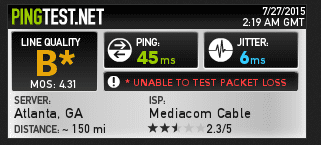
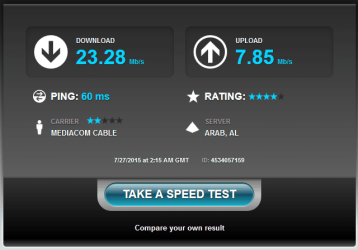
First try on speedtest.net have 90 seconds: Screenshot by Lightshot (with ZenMate off)
Second Try resulted int the same thing.
 

Attachments

  • pingtest1.png
    pingtest1.png
    9.4 KB · Views: 21
  • speedtest1.png
    speedtest1.png
    15.9 KB · Views: 21
Last edited:

My Computer My Computer

At a glance

Windows 7 home premium 64-bit SP1Intel Core i5 23208.00GB Dual-Channel DDR3Intel HD graphics family
Computer type
PC/Desktop
Computer Manufacturer/Model Number
HP p7-1205
OS
Windows 7 home premium 64-bit SP1
CPU
Intel Core i5 2320
Motherboard
PEGATRON CORPORATION 2AC2 (CPU 1)
Memory
8.00GB Dual-Channel DDR3
Graphics Card(s)
Intel HD graphics family
Hard Drives
1863GB Hitachi HDS723020BLA642 (SATA)
Antivirus
avast
Browser
Firefox/Chrome
Is the Pingtest with ZenMate? I am trying to see your normal connection, so please re-run it with ZenMate off. Try re-loading few times if it doesn't work.
SpeedTest failing isn't helping either. And still you can launch LoL and it is working fine as in no waiting until it starts to load or something?
The SpeedTest in your first post, is that from your new home?

Did you try a different network cable? And a different port on router?

Lets see if it is hardware or OS issue: Please download and make bootable DVD/USB of Linux Mint MATE, boot with it (no installation needed) and see if websites load alright. If they do, we can concentrate on resetting some configuration within Windows.

Edit: Please attach the screenshots here on SevenForums as described in http://www.sevenforums.com/tutorials/9733-screenshots-files-upload-post-seven-forums.html, it is easier to follow that way, and better in the long term as 3rd party sites delete such files after a while.
 

My Computer My Computer

At a glance

Windows 7 Ultimate x64 SP1AMD Phenom 2 1090T2x8GB Kingston HyperX Fury Black 1600Mhz Unga...MSI GTX 970 Gaming 4G
Computer type
PC/Desktop
Computer Manufacturer/Model Number
Custom Build
OS
Windows 7 Ultimate x64 SP1
CPU
AMD Phenom 2 1090T
Motherboard
Gigabyte GA-890FXA-UD5
Memory
2x8GB Kingston HyperX Fury Black 1600Mhz Unganged
Graphics Card(s)
MSI GTX 970 Gaming 4G
Sound Card
Realtek On-Board HD 7.1 Audio / Logitech G35
Monitor(s) Displays
3xAcer GD245HQ
Screen Resolution
1920x1080
Hard Drives
Samsung 850 Pro 512GB SSD - OS /
WD Caviar Black SATA 3 - 1 TBx2 - Dynamic RAID 0 /
WD Caviar Green SATA 2 - 640GBx2 - Dynamic RAID 0 /
WD Caviar Green SATA 2 - 640GB - Internal Backup /
Seagate Barracude SATA 3 - 3TB - External Backup/ Sync
PSU
HighPower 1000W
Case
Cooler Master HAF 932
Cooling
Noctua NH-D14
Keyboard
Logitech G19
Mouse
Logitech G500
Internet Speed
100/4 Mbit Cable (100GB quota)
Antivirus
ZoneAlarm Extreme Security / MBAM Pro / MBAE Free / SAS Free
Browser
IE 11 - Firefox - Chrome
Other Info
Logitech F710/ G27/ G940/ Z5500 // TrackIR 5 // Nvidia 3D Surround Vision
Those tests were performed with ZenMate Off, it just took a few times to get it to work. Also, Yes LoL is still working fine with no lag spikes what-so-ever. The SpeedTest in the first post is from my new home, I let speedtest auto-select the location on that one, and the most recent i picked the closest one so it would be less than 100 miles. I have tried different ports on my router, along with trying it straight into the modem itself. I have tried different network cables as well. I will download Linux Mint MATE a little later this afternoon and update you with the results. Thank you for your help thus far, it is greatly appreciated.
 

My Computer My Computer

At a glance

Windows 7 home premium 64-bit SP1Intel Core i5 23208.00GB Dual-Channel DDR3Intel HD graphics family
Computer type
PC/Desktop
Computer Manufacturer/Model Number
HP p7-1205
OS
Windows 7 home premium 64-bit SP1
CPU
Intel Core i5 2320
Motherboard
PEGATRON CORPORATION 2AC2 (CPU 1)
Memory
8.00GB Dual-Channel DDR3
Graphics Card(s)
Intel HD graphics family
Hard Drives
1863GB Hitachi HDS723020BLA642 (SATA)
Antivirus
avast
Browser
Firefox/Chrome
Are you using a VPN service by the way? speedtest is supposed to select a close by server by selecting a low ping server.

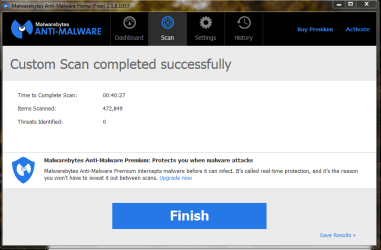
Can you please add a Malwarebytes Anti-Malware scan to list of to-do's (enable root-kit scanning too, settings - detection) just in case.

Also paste result of "ipconfig -all" here. Run it in cmd.
 

My Computer My Computer

At a glance

Windows 7 Ultimate x64 SP1AMD Phenom 2 1090T2x8GB Kingston HyperX Fury Black 1600Mhz Unga...MSI GTX 970 Gaming 4G
Computer type
PC/Desktop
Computer Manufacturer/Model Number
Custom Build
OS
Windows 7 Ultimate x64 SP1
CPU
AMD Phenom 2 1090T
Motherboard
Gigabyte GA-890FXA-UD5
Memory
2x8GB Kingston HyperX Fury Black 1600Mhz Unganged
Graphics Card(s)
MSI GTX 970 Gaming 4G
Sound Card
Realtek On-Board HD 7.1 Audio / Logitech G35
Monitor(s) Displays
3xAcer GD245HQ
Screen Resolution
1920x1080
Hard Drives
Samsung 850 Pro 512GB SSD - OS /
WD Caviar Black SATA 3 - 1 TBx2 - Dynamic RAID 0 /
WD Caviar Green SATA 2 - 640GBx2 - Dynamic RAID 0 /
WD Caviar Green SATA 2 - 640GB - Internal Backup /
Seagate Barracude SATA 3 - 3TB - External Backup/ Sync
PSU
HighPower 1000W
Case
Cooler Master HAF 932
Cooling
Noctua NH-D14
Keyboard
Logitech G19
Mouse
Logitech G500
Internet Speed
100/4 Mbit Cable (100GB quota)
Antivirus
ZoneAlarm Extreme Security / MBAM Pro / MBAE Free / SAS Free
Browser
IE 11 - Firefox - Chrome
Other Info
Logitech F710/ G27/ G940/ Z5500 // TrackIR 5 // Nvidia 3D Surround Vision
I am not using a VPN service. From my experience the Arab, AL server has been flaky on performance. Before I moved i would check speeds from time to time, to make sure my speeds weren't being throttled by comcast. The arab server sometimes would give me higher pings and slower dl/ul speed outputs than McMinnville, TN. That is most likely the reason it had a better ping the on the first post.

IPCONFIG -ALL OUTPUT
Microsoft Windows [Version 6.1.7601]
Copyright (c) 2009 Microsoft Corporation. All rights reserved.

C:\Windows\system32>ipconfig -all

Windows IP Configuration

Host Name . . . . . . . . . . . . : Rodger-HP
Primary Dns Suffix . . . . . . . :
Node Type . . . . . . . . . . . . : Hybrid
IP Routing Enabled. . . . . . . . : No
WINS Proxy Enabled. . . . . . . . : No

Wireless LAN adapter Wireless Network Connection:

Connection-specific DNS Suffix . :
Description . . . . . . . . . . . : 802.11n Wireless LAN Card
Physical Address. . . . . . . . . : 74-DE-2B-DB-E2-73
DHCP Enabled. . . . . . . . . . . : Yes
Autoconfiguration Enabled . . . . : Yes
Link-local IPv6 Address . . . . . : fe80::914f:ea96:12c4:d44d%14(Preferred)
IPv4 Address. . . . . . . . . . . : 10.0.0.8(Preferred)
Subnet Mask . . . . . . . . . . . : 255.255.255.0
Lease Obtained. . . . . . . . . . : Sunday, July 26, 2015 5:58:36 PM
Lease Expires . . . . . . . . . . : Tuesday, July 28, 2015 8:33:57 AM
Default Gateway . . . . . . . . . : 10.0.0.1
DHCP Server . . . . . . . . . . . : 10.0.0.1
DHCPv6 IAID . . . . . . . . . . . : 262963474
DHCPv6 Client DUID. . . . . . . . : 00-01-00-01-1D-36-71-DC-38-60-77-B9-29-A6

DNS Servers . . . . . . . . . . . : 10.0.0.1
NetBIOS over Tcpip. . . . . . . . : Enabled

Ethernet adapter Local Area Connection:

Connection-specific DNS Suffix . :
Description . . . . . . . . . . . : Realtek PCIe GBE Family Controller
Physical Address. . . . . . . . . : 38-60-77-B9-29-A6
DHCP Enabled. . . . . . . . . . . : Yes
Autoconfiguration Enabled . . . . : Yes
Link-local IPv6 Address . . . . . : fe80::bdf1:77ae:9cf0:b204%13(Preferred)
IPv4 Address. . . . . . . . . . . : 10.0.0.10(Preferred)
Subnet Mask . . . . . . . . . . . : 255.255.255.0
Lease Obtained. . . . . . . . . . : Sunday, July 26, 2015 5:58:40 PM
Lease Expires . . . . . . . . . . : Tuesday, July 28, 2015 8:33:57 AM
Default Gateway . . . . . . . . . : 10.0.0.1
DHCP Server . . . . . . . . . . . : 10.0.0.1
DHCPv6 IAID . . . . . . . . . . . : 272130167
DHCPv6 Client DUID. . . . . . . . : 00-01-00-01-1D-36-71-DC-38-60-77-B9-29-A6

DNS Servers . . . . . . . . . . . : 8.8.8.8
8.8.4.4
NetBIOS over Tcpip. . . . . . . . : Enabled

Tunnel adapter isatap.{8471D005-8BC9-4B68-BE56-A47D2AF92AEC}:

Media State . . . . . . . . . . . : Media disconnected
Connection-specific DNS Suffix . :
Description . . . . . . . . . . . : Microsoft ISATAP Adapter
Physical Address. . . . . . . . . : 00-00-00-00-00-00-00-E0
DHCP Enabled. . . . . . . . . . . : No
Autoconfiguration Enabled . . . . : Yes

Tunnel adapter Local Area Connection* 9:

Media State . . . . . . . . . . . : Media disconnected
Connection-specific DNS Suffix . :
Description . . . . . . . . . . . : Microsoft 6to4 Adapter
Physical Address. . . . . . . . . : 00-00-00-00-00-00-00-E0
DHCP Enabled. . . . . . . . . . . : No
Autoconfiguration Enabled . . . . : Yes

Tunnel adapter Local Area Connection* 12:

Media State . . . . . . . . . . . : Media disconnected
Connection-specific DNS Suffix . :
Description . . . . . . . . . . . : Microsoft Teredo Tunneling Adapter
Physical Address. . . . . . . . . : 00-00-00-00-00-00-00-E0
DHCP Enabled. . . . . . . . . . . : No
Autoconfiguration Enabled . . . . : Yes

Tunnel adapter isatap.{C0A51165-40FC-4D25-A45F-CB271267BCF2}:

Media State . . . . . . . . . . . : Media disconnected
Connection-specific DNS Suffix . :
Description . . . . . . . . . . . : Microsoft ISATAP Adapter #2
Physical Address. . . . . . . . . : 00-00-00-00-00-00-00-E0
DHCP Enabled. . . . . . . . . . . : No
Autoconfiguration Enabled . . . . : Yes

C:\Windows\system32>
 

Attachments

  • malwarebyte1.png
    malwarebyte1.png
    26.4 KB · Views: 0

My Computer My Computer

At a glance

Windows 7 home premium 64-bit SP1Intel Core i5 23208.00GB Dual-Channel DDR3Intel HD graphics family
Computer type
PC/Desktop
Computer Manufacturer/Model Number
HP p7-1205
OS
Windows 7 home premium 64-bit SP1
CPU
Intel Core i5 2320
Motherboard
PEGATRON CORPORATION 2AC2 (CPU 1)
Memory
8.00GB Dual-Channel DDR3
Graphics Card(s)
Intel HD graphics family
Hard Drives
1863GB Hitachi HDS723020BLA642 (SATA)
Antivirus
avast
Browser
Firefox/Chrome
Checking the ipconfig, (normally this shouldn't cause a problem) since both wireless and wired is connected same time, there is no knowing which one is used (normally wired is preferred over wireless - has a lower metric).

Try with both alone:
- Try with wireless disabled.
- Try pulling the cable and connect wireless.

Please don't forget Linux too :)
 

My Computer My Computer

At a glance

Windows 7 Ultimate x64 SP1AMD Phenom 2 1090T2x8GB Kingston HyperX Fury Black 1600Mhz Unga...MSI GTX 970 Gaming 4G
Computer type
PC/Desktop
Computer Manufacturer/Model Number
Custom Build
OS
Windows 7 Ultimate x64 SP1
CPU
AMD Phenom 2 1090T
Motherboard
Gigabyte GA-890FXA-UD5
Memory
2x8GB Kingston HyperX Fury Black 1600Mhz Unganged
Graphics Card(s)
MSI GTX 970 Gaming 4G
Sound Card
Realtek On-Board HD 7.1 Audio / Logitech G35
Monitor(s) Displays
3xAcer GD245HQ
Screen Resolution
1920x1080
Hard Drives
Samsung 850 Pro 512GB SSD - OS /
WD Caviar Black SATA 3 - 1 TBx2 - Dynamic RAID 0 /
WD Caviar Green SATA 2 - 640GBx2 - Dynamic RAID 0 /
WD Caviar Green SATA 2 - 640GB - Internal Backup /
Seagate Barracude SATA 3 - 3TB - External Backup/ Sync
PSU
HighPower 1000W
Case
Cooler Master HAF 932
Cooling
Noctua NH-D14
Keyboard
Logitech G19
Mouse
Logitech G500
Internet Speed
100/4 Mbit Cable (100GB quota)
Antivirus
ZoneAlarm Extreme Security / MBAM Pro / MBAE Free / SAS Free
Browser
IE 11 - Firefox - Chrome
Other Info
Logitech F710/ G27/ G940/ Z5500 // TrackIR 5 // Nvidia 3D Surround Vision
Back
Top