

Hi there
Having been messing around with this for a few days - the BEST it seems to be solution for running Virtual Machines on smaller (and larger) amounts of memory is to use a combination of vmware server and W2008 R2 server.
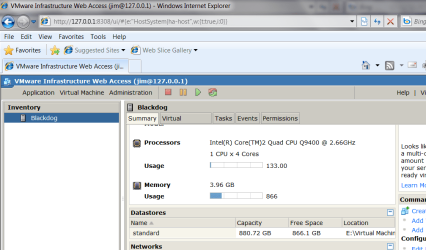
The screen shot shows that the base overhead of W2008 R2 server is just a measly 880 MB. With W7 X-64 Ultimate the base overhead was around 1.8GB a saving of 1GB in REAL RAM (on a 4GB machine) so well worth it.
I also enabled SOUND and AERO themes on the server so you can save even more if you don't need these.
To make a Server OS more "User Friendly" for a home user you can change a lot of the features that make it behave more like a desktop or a normal user workstation..
Here's some tips for this
http://www.win2008r2workstation.com/win2008r2/multiboot-installation
and the available memory used after starting vmware server
Cheers
jimbo
Having been messing around with this for a few days - the BEST it seems to be solution for running Virtual Machines on smaller (and larger) amounts of memory is to use a combination of vmware server and W2008 R2 server.
The screen shot shows that the base overhead of W2008 R2 server is just a measly 880 MB. With W7 X-64 Ultimate the base overhead was around 1.8GB a saving of 1GB in REAL RAM (on a 4GB machine) so well worth it.
I also enabled SOUND and AERO themes on the server so you can save even more if you don't need these.
To make a Server OS more "User Friendly" for a home user you can change a lot of the features that make it behave more like a desktop or a normal user workstation..
Here's some tips for this
http://www.win2008r2workstation.com/win2008r2/multiboot-installation
and the available memory used after starting vmware server
Cheers
jimbo
Attachments
My Computer
- Computer type
- PC/Desktop
- Computer Manufacturer/Model Number
- Custom built, several laptops HP/ASUS
- OS
- Linux CENTOS 7 / various Windows OS'es and servers
- CPU
- Intel i7 Intel i5
- Memory
- 8GB, 16GB
- Graphics Card(s)
- On Motherboard
- Sound Card
- Realtek HD audio
- Monitor(s) Displays
- Apple Cinema display, Samsung LCD
- Screen Resolution
- 1920 X 1080
- Hard Drives
- 4 X 1TB SATA
- Mouse
- Toshiba wireless laser
- Internet Speed
- > 20MB up