The Search Data is not clearing properly in Chrome

grungychick

New member
Local time
6:27 PM
Messages
22
Location
Missouri
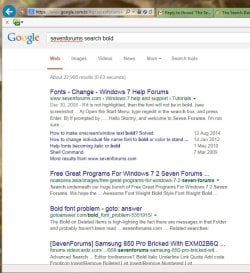
For the last few days, the search data in Google Chrome has been failing to clear all the way. I have all the boxes checked off and set to begining of time. I did not have an issue with clearing data up until a few days ago. Now, the half the search is coming up in bold. I will attach a screen shot. Also, is there a new version of Chrome out by any chance? Any help is appreciated here. Thank you
 

Attachments
  • boldsearch.png
    boldsearch.png
    32.9 KB · Views: 0

My Computer My Computer

At a glance

Windows 7 64bit Home Premium
Computer type
PC/Desktop
Computer Manufacturer/Model Number
Gateway
OS
Windows 7 64bit Home Premium
Keyboard
Microsoft
Mouse
Gateway
Antivirus
Trend Mirco
Browser
Internet Explorer 10
Now Internet Explorer is coming up in half bold in the searches.
I don't understand why it doing this for.
I even resetted the internet connection. Still didn't help.
Perhaps, there is a temp file that didn't delete in the folders somewhere?

Also, there is this Icon Cache: Data Base File that 7.863 kb. Is this anything, i should be concerned about?
 

Attachments

  • ieboldsearch.png
    ieboldsearch.png
    27.9 KB · Views: 2
Last edited:

My Computer My Computer

At a glance

Windows 7 64bit Home Premium
Computer type
PC/Desktop
Computer Manufacturer/Model Number
Gateway
OS
Windows 7 64bit Home Premium
Keyboard
Microsoft
Mouse
Gateway
Antivirus
Trend Mirco
Browser
Internet Explorer 10
Is anybody going to help me out?
I don't understand, why this is occuring for.
 

My Computer My Computer

At a glance

Windows 7 64bit Home Premium
Computer type
PC/Desktop
Computer Manufacturer/Model Number
Gateway
OS
Windows 7 64bit Home Premium
Keyboard
Microsoft
Mouse
Gateway
Antivirus
Trend Mirco
Browser
Internet Explorer 10
Maybe the search engine changed the format of the search returns.

Don't worry about the icon cache database file.
 

My Computer My Computer

At a glance

W7 Pro SP1 64biti78GBIntel HD Graphics
Computer type
Laptop
Computer Manufacturer/Model Number
Employer provided Dell Latitude
OS
W7 Pro SP1 64bit
CPU
i7
Memory
8GB
Graphics Card(s)
Intel HD Graphics
Hard Drives
crappy SSD
Antivirus
Employer mandated Symantec Endpoint Protection
Browser
Pale Moon 64bit, IE11 64bit & Chrome 64bit
I figured out my own issue.
First, i did a system restore. Then, i unplugged the router for good amount of time.
It seemed to solve my issue for now.
I just had a bad connection. This is why the searches were displaying bold keywords in the context.
The only things that should be highlighted in searches are the title, url and snippet.

If i have anymore issues, i will report back.
 

My Computer My Computer

At a glance

Windows 7 64bit Home Premium
Computer type
PC/Desktop
Computer Manufacturer/Model Number
Gateway
OS
Windows 7 64bit Home Premium
Keyboard
Microsoft
Mouse
Gateway
Antivirus
Trend Mirco
Browser
Internet Explorer 10
Glad that is is solved for you.

Just out of curiosity, what search engine was used to make those screenshots?
Google? Bing?
 

My Computer My Computer

At a glance

W7 Pro SP1 64biti78GBIntel HD Graphics
Computer type
Laptop
Computer Manufacturer/Model Number
Employer provided Dell Latitude
OS
W7 Pro SP1 64bit
CPU
i7
Memory
8GB
Graphics Card(s)
Intel HD Graphics
Hard Drives
crappy SSD
Antivirus
Employer mandated Symantec Endpoint Protection
Browser
Pale Moon 64bit, IE11 64bit & Chrome 64bit
My issue is not resolved. It must be something else.
The data search history is still not clearing. It's happening in IE and in Chrome.

UsernameIssues, the screen shot on the first post is Chrome and the second screen shot is IE10.

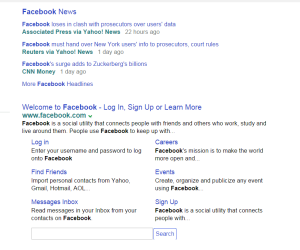
This attachment is how the search is supposed to look like and it's not appearing that way.
 

Attachments

  • googleshotsearch.png
    googleshotsearch.png
    9.1 KB · Views: 20

My Computer My Computer

At a glance

Windows 7 64bit Home Premium
Computer type
PC/Desktop
Computer Manufacturer/Model Number
Gateway
OS
Windows 7 64bit Home Premium
Keyboard
Microsoft
Mouse
Gateway
Antivirus
Trend Mirco
Browser
Internet Explorer 10
Tried running a CCleaner scan?
 

My Computer My Computer

At a glance

Windows 7 Ultimate x64 SP1AMD Phenom 2 1090T2x8GB Kingston HyperX Fury Black 1600Mhz Unga...MSI GTX 970 Gaming 4G
Computer type
PC/Desktop
Computer Manufacturer/Model Number
Custom Build
OS
Windows 7 Ultimate x64 SP1
CPU
AMD Phenom 2 1090T
Motherboard
Gigabyte GA-890FXA-UD5
Memory
2x8GB Kingston HyperX Fury Black 1600Mhz Unganged
Graphics Card(s)
MSI GTX 970 Gaming 4G
Sound Card
Realtek On-Board HD 7.1 Audio / Logitech G35
Monitor(s) Displays
3xAcer GD245HQ
Screen Resolution
1920x1080
Hard Drives
Samsung 850 Pro 512GB SSD - OS /
WD Caviar Black SATA 3 - 1 TBx2 - Dynamic RAID 0 /
WD Caviar Green SATA 2 - 640GBx2 - Dynamic RAID 0 /
WD Caviar Green SATA 2 - 640GB - Internal Backup /
Seagate Barracude SATA 3 - 3TB - External Backup/ Sync
PSU
HighPower 1000W
Case
Cooler Master HAF 932
Cooling
Noctua NH-D14
Keyboard
Logitech G19
Mouse
Logitech G500
Internet Speed
100/4 Mbit Cable (100GB quota)
Antivirus
ZoneAlarm Extreme Security / MBAM Pro / MBAE Free / SAS Free
Browser
IE 11 - Firefox - Chrome
Other Info
Logitech F710/ G27/ G940/ Z5500 // TrackIR 5 // Nvidia 3D Surround Vision
My issue is not resolved. It must be something else.
The data search history is still not clearing. It's happening in IE and in Chrome.

UsernameIssues, the screen shot on the first post is Chrome and the second screen shot is IE10.

This attachment is how the search is supposed to look like and it's not appearing that way.
The screen shot on the first post is Chrome showing search returns from some search engine. If you did not change that search engine, then the search returns are from Google.

...and the second screen shot is IE10 showing search returns from some search engine. If you did not change that search engine, then the search returns are from Bing.

I was just wondering what search engines we were working with here so that I could test things on my end.
 

My Computer My Computer

At a glance

W7 Pro SP1 64biti78GBIntel HD Graphics
Computer type
Laptop
Computer Manufacturer/Model Number
Employer provided Dell Latitude
OS
W7 Pro SP1 64bit
CPU
i7
Memory
8GB
Graphics Card(s)
Intel HD Graphics
Hard Drives
crappy SSD
Antivirus
Employer mandated Symantec Endpoint Protection
Browser
Pale Moon 64bit, IE11 64bit & Chrome 64bit

My Computer My Computer

At a glance

Windows 7 Ultimate x64 SP1AMD Phenom 2 1090T2x8GB Kingston HyperX Fury Black 1600Mhz Unga...MSI GTX 970 Gaming 4G
Computer type
PC/Desktop
Computer Manufacturer/Model Number
Custom Build
OS
Windows 7 Ultimate x64 SP1
CPU
AMD Phenom 2 1090T
Motherboard
Gigabyte GA-890FXA-UD5
Memory
2x8GB Kingston HyperX Fury Black 1600Mhz Unganged
Graphics Card(s)
MSI GTX 970 Gaming 4G
Sound Card
Realtek On-Board HD 7.1 Audio / Logitech G35
Monitor(s) Displays
3xAcer GD245HQ
Screen Resolution
1920x1080
Hard Drives
Samsung 850 Pro 512GB SSD - OS /
WD Caviar Black SATA 3 - 1 TBx2 - Dynamic RAID 0 /
WD Caviar Green SATA 2 - 640GBx2 - Dynamic RAID 0 /
WD Caviar Green SATA 2 - 640GB - Internal Backup /
Seagate Barracude SATA 3 - 3TB - External Backup/ Sync
PSU
HighPower 1000W
Case
Cooler Master HAF 932
Cooling
Noctua NH-D14
Keyboard
Logitech G19
Mouse
Logitech G500
Internet Speed
100/4 Mbit Cable (100GB quota)
Antivirus
ZoneAlarm Extreme Security / MBAM Pro / MBAE Free / SAS Free
Browser
IE 11 - Firefox - Chrome
Other Info
Logitech F710/ G27/ G940/ Z5500 // TrackIR 5 // Nvidia 3D Surround Vision

My Computer My Computer

At a glance

Windows 7 64bit Home Premium
Computer type
PC/Desktop
Computer Manufacturer/Model Number
Gateway
OS
Windows 7 64bit Home Premium
Keyboard
Microsoft
Mouse
Gateway
Antivirus
Trend Mirco
Browser
Internet Explorer 10
Doesn't matter wired or wireless, there is a DNS setting in both. Try with CCleaner first anyway :)
 

My Computer My Computer

At a glance

Windows 7 Ultimate x64 SP1AMD Phenom 2 1090T2x8GB Kingston HyperX Fury Black 1600Mhz Unga...MSI GTX 970 Gaming 4G
Computer type
PC/Desktop
Computer Manufacturer/Model Number
Custom Build
OS
Windows 7 Ultimate x64 SP1
CPU
AMD Phenom 2 1090T
Motherboard
Gigabyte GA-890FXA-UD5
Memory
2x8GB Kingston HyperX Fury Black 1600Mhz Unganged
Graphics Card(s)
MSI GTX 970 Gaming 4G
Sound Card
Realtek On-Board HD 7.1 Audio / Logitech G35
Monitor(s) Displays
3xAcer GD245HQ
Screen Resolution
1920x1080
Hard Drives
Samsung 850 Pro 512GB SSD - OS /
WD Caviar Black SATA 3 - 1 TBx2 - Dynamic RAID 0 /
WD Caviar Green SATA 2 - 640GBx2 - Dynamic RAID 0 /
WD Caviar Green SATA 2 - 640GB - Internal Backup /
Seagate Barracude SATA 3 - 3TB - External Backup/ Sync
PSU
HighPower 1000W
Case
Cooler Master HAF 932
Cooling
Noctua NH-D14
Keyboard
Logitech G19
Mouse
Logitech G500
Internet Speed
100/4 Mbit Cable (100GB quota)
Antivirus
ZoneAlarm Extreme Security / MBAM Pro / MBAE Free / SAS Free
Browser
IE 11 - Firefox - Chrome
Other Info
Logitech F710/ G27/ G940/ Z5500 // TrackIR 5 // Nvidia 3D Surround Vision
My issue is not resolved. It must be something else.
The data search history is still not clearing. It's happening in IE and in Chrome.

UsernameIssues, the screen shot on the first post is Chrome and the second screen shot is IE10.

This attachment is how the search is supposed to look like and it's not appearing that way.
The screen shot on the first post is Chrome showing search returns from some search engine. If you did not change that search engine, then the search returns are from Google.

...and the second screen shot is IE10 showing search returns from some search engine. If you did not change that search engine, then the search returns are from Bing.

I was just wondering what search engines we were working with here so that I could test things on my end.


The search engine i have been using for both is Yahoo. Chrome is set to Yahoo not Google. IE10 is using Yahoo and Bing.
 

My Computer My Computer

At a glance

Windows 7 64bit Home Premium
Computer type
PC/Desktop
Computer Manufacturer/Model Number
Gateway
OS
Windows 7 64bit Home Premium
Keyboard
Microsoft
Mouse
Gateway
Antivirus
Trend Mirco
Browser
Internet Explorer 10
The Yahoo server may have a corrupt layout/formatting file (css or whatever it may be called?). Tried setting a different Yahoo server as default search (if there is such an option).
 

My Computer My Computer

At a glance

Windows 7 Ultimate x64 SP1AMD Phenom 2 1090T2x8GB Kingston HyperX Fury Black 1600Mhz Unga...MSI GTX 970 Gaming 4G
Computer type
PC/Desktop
Computer Manufacturer/Model Number
Custom Build
OS
Windows 7 Ultimate x64 SP1
CPU
AMD Phenom 2 1090T
Motherboard
Gigabyte GA-890FXA-UD5
Memory
2x8GB Kingston HyperX Fury Black 1600Mhz Unganged
Graphics Card(s)
MSI GTX 970 Gaming 4G
Sound Card
Realtek On-Board HD 7.1 Audio / Logitech G35
Monitor(s) Displays
3xAcer GD245HQ
Screen Resolution
1920x1080
Hard Drives
Samsung 850 Pro 512GB SSD - OS /
WD Caviar Black SATA 3 - 1 TBx2 - Dynamic RAID 0 /
WD Caviar Green SATA 2 - 640GBx2 - Dynamic RAID 0 /
WD Caviar Green SATA 2 - 640GB - Internal Backup /
Seagate Barracude SATA 3 - 3TB - External Backup/ Sync
PSU
HighPower 1000W
Case
Cooler Master HAF 932
Cooling
Noctua NH-D14
Keyboard
Logitech G19
Mouse
Logitech G500
Internet Speed
100/4 Mbit Cable (100GB quota)
Antivirus
ZoneAlarm Extreme Security / MBAM Pro / MBAE Free / SAS Free
Browser
IE 11 - Firefox - Chrome
Other Info
Logitech F710/ G27/ G940/ Z5500 // TrackIR 5 // Nvidia 3D Surround Vision
I tried setting Google as default in Chrome. I saw bolded keywords in there, too. So Maybe, it's some kind of a format file from Google Chrome affecting the Yahoo Search. Whatever happens on Google Chrome is affecting the Yahoo Search on IE10 as well. I have Yahoo search set as default on both Browsers. This started happening in Chrome 43 Stabled Version, just a few months ago. It wasn't this bad before, but now it is.
 

My Computer My Computer

At a glance

Windows 7 64bit Home Premium
Computer type
PC/Desktop
Computer Manufacturer/Model Number
Gateway
OS
Windows 7 64bit Home Premium
Keyboard
Microsoft
Mouse
Gateway
Antivirus
Trend Mirco
Browser
Internet Explorer 10

My Computer My Computer

At a glance

Windows 7 Ultimate x64 SP1AMD Phenom 2 1090T2x8GB Kingston HyperX Fury Black 1600Mhz Unga...MSI GTX 970 Gaming 4G
Computer type
PC/Desktop
Computer Manufacturer/Model Number
Custom Build
OS
Windows 7 Ultimate x64 SP1
CPU
AMD Phenom 2 1090T
Motherboard
Gigabyte GA-890FXA-UD5
Memory
2x8GB Kingston HyperX Fury Black 1600Mhz Unganged
Graphics Card(s)
MSI GTX 970 Gaming 4G
Sound Card
Realtek On-Board HD 7.1 Audio / Logitech G35
Monitor(s) Displays
3xAcer GD245HQ
Screen Resolution
1920x1080
Hard Drives
Samsung 850 Pro 512GB SSD - OS /
WD Caviar Black SATA 3 - 1 TBx2 - Dynamic RAID 0 /
WD Caviar Green SATA 2 - 640GBx2 - Dynamic RAID 0 /
WD Caviar Green SATA 2 - 640GB - Internal Backup /
Seagate Barracude SATA 3 - 3TB - External Backup/ Sync
PSU
HighPower 1000W
Case
Cooler Master HAF 932
Cooling
Noctua NH-D14
Keyboard
Logitech G19
Mouse
Logitech G500
Internet Speed
100/4 Mbit Cable (100GB quota)
Antivirus
ZoneAlarm Extreme Security / MBAM Pro / MBAE Free / SAS Free
Browser
IE 11 - Firefox - Chrome
Other Info
Logitech F710/ G27/ G940/ Z5500 // TrackIR 5 // Nvidia 3D Surround Vision
Google does use bold for keywords used in search, see mine:

View attachment 366992

Do you have a System Restore point that you can restore from before the issue? http://www.sevenforums.com/tutorials/700-system-restore.html

I did a system restore point going back to the earliest date, which was July 7th.
It did not solve my issue.

If Google Search has Bolded keywords. Then, it has to be a code of some kind that is coming from Chrome that is affecting both browsers, esp when it comes to clearing the search data.

I never had an issue clearing search data in the past. This is pretty recent issue that started happening in the Chrome 43 version.
 

My Computer My Computer

At a glance

Windows 7 64bit Home Premium
Computer type
PC/Desktop
Computer Manufacturer/Model Number
Gateway
OS
Windows 7 64bit Home Premium
Keyboard
Microsoft
Mouse
Gateway
Antivirus
Trend Mirco
Browser
Internet Explorer 10
Just checked Yahoo search, and it is formatting the keywords as bold too. Maybe you had an add on that changed these behavior which stopped functioning?
 

My Computer My Computer

At a glance

Windows 7 Ultimate x64 SP1AMD Phenom 2 1090T2x8GB Kingston HyperX Fury Black 1600Mhz Unga...MSI GTX 970 Gaming 4G
Computer type
PC/Desktop
Computer Manufacturer/Model Number
Custom Build
OS
Windows 7 Ultimate x64 SP1
CPU
AMD Phenom 2 1090T
Motherboard
Gigabyte GA-890FXA-UD5
Memory
2x8GB Kingston HyperX Fury Black 1600Mhz Unganged
Graphics Card(s)
MSI GTX 970 Gaming 4G
Sound Card
Realtek On-Board HD 7.1 Audio / Logitech G35
Monitor(s) Displays
3xAcer GD245HQ
Screen Resolution
1920x1080
Hard Drives
Samsung 850 Pro 512GB SSD - OS /
WD Caviar Black SATA 3 - 1 TBx2 - Dynamic RAID 0 /
WD Caviar Green SATA 2 - 640GBx2 - Dynamic RAID 0 /
WD Caviar Green SATA 2 - 640GB - Internal Backup /
Seagate Barracude SATA 3 - 3TB - External Backup/ Sync
PSU
HighPower 1000W
Case
Cooler Master HAF 932
Cooling
Noctua NH-D14
Keyboard
Logitech G19
Mouse
Logitech G500
Internet Speed
100/4 Mbit Cable (100GB quota)
Antivirus
ZoneAlarm Extreme Security / MBAM Pro / MBAE Free / SAS Free
Browser
IE 11 - Firefox - Chrome
Other Info
Logitech F710/ G27/ G940/ Z5500 // TrackIR 5 // Nvidia 3D Surround Vision
Just checked Yahoo search, and it is formatting the keywords as bold too. Maybe you had an add on that changed these behavior which stopped functioning?

I can look through my addons and programs to see if anything download or was added.

Maybe, Yahoo is the issue. Should i file a report with Yahoo, then? Let them know about the issue.
 

My Computer My Computer

At a glance

Windows 7 64bit Home Premium
Computer type
PC/Desktop
Computer Manufacturer/Model Number
Gateway
OS
Windows 7 64bit Home Premium
Keyboard
Microsoft
Mouse
Gateway
Antivirus
Trend Mirco
Browser
Internet Explorer 10
Since I don't know how it behaved before, I can't say anything. However, while searching I came across a thread in Yahoo Answers, I believe it is you? It is possible they changed the formatting.
 

My Computer My Computer

At a glance

Windows 7 Ultimate x64 SP1AMD Phenom 2 1090T2x8GB Kingston HyperX Fury Black 1600Mhz Unga...MSI GTX 970 Gaming 4G
Computer type
PC/Desktop
Computer Manufacturer/Model Number
Custom Build
OS
Windows 7 Ultimate x64 SP1
CPU
AMD Phenom 2 1090T
Motherboard
Gigabyte GA-890FXA-UD5
Memory
2x8GB Kingston HyperX Fury Black 1600Mhz Unganged
Graphics Card(s)
MSI GTX 970 Gaming 4G
Sound Card
Realtek On-Board HD 7.1 Audio / Logitech G35
Monitor(s) Displays
3xAcer GD245HQ
Screen Resolution
1920x1080
Hard Drives
Samsung 850 Pro 512GB SSD - OS /
WD Caviar Black SATA 3 - 1 TBx2 - Dynamic RAID 0 /
WD Caviar Green SATA 2 - 640GBx2 - Dynamic RAID 0 /
WD Caviar Green SATA 2 - 640GB - Internal Backup /
Seagate Barracude SATA 3 - 3TB - External Backup/ Sync
PSU
HighPower 1000W
Case
Cooler Master HAF 932
Cooling
Noctua NH-D14
Keyboard
Logitech G19
Mouse
Logitech G500
Internet Speed
100/4 Mbit Cable (100GB quota)
Antivirus
ZoneAlarm Extreme Security / MBAM Pro / MBAE Free / SAS Free
Browser
IE 11 - Firefox - Chrome
Other Info
Logitech F710/ G27/ G940/ Z5500 // TrackIR 5 // Nvidia 3D Surround Vision
Back
Top