Sound crackling, clicking etc. when playing sounds

Repa24

New member
Local time
5:20 PM
Messages
9
Hello there,

I just got myself registered and I have some problems with my sound which now exist for ~ 6 months.

1. Problem:
You could describe the problem as a sound clicking or crackling. Those appear in various situations, for example when playing a MP3, videos from YT, gamesounds and so on. Mostly they occur when the sound starts or ends (for example a cut in a film), even the simple windows-sound when adjusting the volume has this problem, when i rappidly klick on the volume-slider.

Things i tried, nothing of them helped:

Reinstalled Windows 7 two times, bought a new headset (QH-95), bought two different soundcards (Asus Xonar D1 and Asus Xonar U7), bought a new mainboard (ASRock Z77 Pro3, same as my old one), updated all drivers (reinstalled windows), checked the sound with the Latency Check-programm (everything is green), tried playing the sounds without soundcard (Asus Xonar D1) , changed sound frequienzies, played audio without WiFi on, played audio without any devices (apart from headset and mouse) and defragmentaded my harddrive.

There is still no solution until this day. I slowly start to belive i'm the only one who can hear those sounds, it's just crazy and and the same time also depressing.

Examples of videos where the crackling appears for me:

5:29 - 6:00 (continiously)
https://youtu.be/DxAgB3EI2vk?t=5m29s

1:08 - 1:15 (continiously)
https://youtu.be/HIvQvIEsHZM?t=1m8s

1:21 - 1:22 when he starts driving over the kerb (again, "at-the-start-of-a-sound-clicking")
https://youtu.be/iYlQ_OD68Gc

Video made by me; right after the downshifts 0:10 - ...
https://www.youtube.com/watch?v=sEMhWOz6y-c


2. Problem


This should be easier to resolve: Sometimes i get, out of the nowwhere, extremley loud "white noise", example: https://www.youtube.com/watch?v=1KaOrSuWZeM.
After i stop the audio (for example Youtube-video), the problem stops.
Also, my right headphone sometimes stops working, but it can't be the headset because it works perfectly on my smartphone and on other devices. After a restart of windows the problem is solved.

PC Specs:

ASRock Z77 Pro3
Intel i5 3570k (was overclocked, but resetted it)
8 GB RAM
ASUS HD 7950
1 TB HardDrive
Thermalright HR-02 Macho (CPU-cooler)

Senneheiser PC360
Asus Xonar D1

Logitech G400 (Mouse)
Logitech G510 (Keyboard)
Logitech Driving Force GT (Wheel)

Now it's your turn. Those are the most frustrating PC-problems i ever had, hopefully somebody can help me. :(

Regards,
Florian
 

My Computer My Computer

At a glance

Windows 7 Home Premium 64biti5 3570k8GBASUS HD7950
Computer type
PC/Desktop
Computer Manufacturer/Model Number
Custom Build
OS
Windows 7 Home Premium 64bit
CPU
i5 3570k
Motherboard
ASRock Z77Pro3
Memory
8GB
Graphics Card(s)
ASUS HD7950
Sound Card
Xonar D1
Screen Resolution
1920x1080
Hard Drives
SSD Samsung 120GB Evo
Case
Bitfenix Shinubi
Cooling
Thermalright HR-02 Macho
Keyboard
G510
Mouse
G400
Antivirus
GData
Browser
Firefox
Hello and welcome Florian mate sorry for the wait but it is a strange problem.

Now what immediately pops up for me is you equipment on an electrical circuit that is quite close to anything that uses microwave devices - phones, ovens, wireless communications or even wired communication stuff ? ham radio??

Now another thing that I think of is the sound card sitting snuggly in that slot and are the connecting cables also a snug fit?

Now I suggest you clean the slots and sticks cards etc first. I also have to assue all drivers are up to date?

SLOT CLEANING

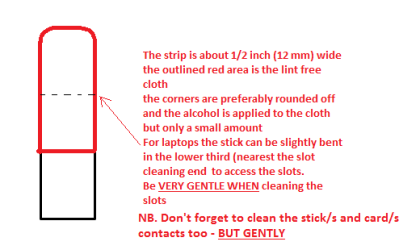
Now as for the slots toclean them use a strip of old credit card (or any card thin enough some arebetter than others ) about 1/2 inch wide nip the corners off one end - preferably round them off hold a piece of thin lint free cloth over theend dab on some form of alcohol - isopropyl alcohol (what we swab the skin withbefore an injection) is good and GENTLYswipe along the slots.

This can also be done for the GPU slot/s andalso the contacts of the sticks or cards - not the stick but some lint freecloth of course. See my pic for the stick but please be very gentle doing it ifyou are in any doubt - please ask before doing it but I use this all the timeand have yet to damage anything.

Lastly but not necessarily the end can you read my ditty and post back your findings


Using HW Info

PART A:

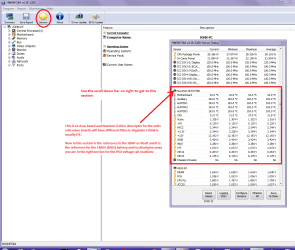
You can test the volts on the PSU with HW Info HWiNFO, HWiNFO32/64 - Download < download the right bit version and close the right handwindow select Sensors and scroll down to the power section where you will seewhat the volts are doing see my pic. In my pic the section (Nuvoton) with VBATT is a dead give awayyou are in the section for the rail voltages. There are other section titlesand one that pops up often is ITE

Now the voltage on the different rails have to be within 5% =+/-of what is required or the machine will not work properly if at all.

See this for the rail voltage info

http://www.tomshardware.com/reviews/power-supply-specifications-atx-reference,3061.html (Section 2.)

The original right hand window shows the machine running and ishandy for that but for looking at the components in some detail close it anduse the main left hand side panel

FOR OTHER COMPONENTS

PART B:

Open each small square with + in it on the section thecomponents are in and then click on the individual component/s (it will highlight in blue) - in the righthand side will appear all sorts of details including brands speeds and otheressential info that particular device. See pic for example.

Use PART A: It may seen an odd ask but PSU's are more of a problem than most would like to think


Attachments

  • STICK CLEANER.PNG
    STICK CLEANER.PNG
    6.1 KB · Views: 72
  • HW INFO DESKTOP PSU.PNG
    HW INFO DESKTOP PSU.PNG
    52.6 KB · Views: 5

My Computer My Computer

At a glance

Desk1 7 Home Prem / Desk2 10 Pro / Main lap A...Desk1 i5 3750K / Laptop i7 GTX 860M / Desk2 i...Desk1 8GB (1866) / Desk2 16GB (1333) / Laptop...Desk 1& 2NVidia GTX 650 & Laptops on board Intel
Computer type
PC/Desktop
Computer Manufacturer/Model Number
Own build (new) Desk1 / Asus ROG Win 7 / Desk2 1st build
OS
Desk1 7 Home Prem / Desk2 10 Pro / Main lap Asus ROG 10 Pro 2 laptop Toshiba 7 Pro Asus P2520 7 & 10
CPU
Desk1 i5 3750K / Laptop i7 GTX 860M / Desk2 i5 2500
Motherboard
Desk1 Asus P877-V / Desk2 Gigabyte H67 UD3H / Laptop ?
Memory
Desk1 8GB (1866) / Desk2 16GB (1333) / Laptop 8Gb DDR3
Graphics Card(s)
Desk 1& 2NVidia GTX 650 & Laptops on board Intel
Sound Card
Desk 1 & 2 -XONAR DG Realtek High Def audio Laptop
Monitor(s) Displays
Desk 1 Benq HD 2450 / Desk2 Philips 24" / Laptop 17.5"
Screen Resolution
1920x1080 D1 & D2 & Laptop 1
Hard Drives
Desk1 Samsung 120GB 830 SSD
Asus ROG 256GB 850 Pro SSD
Desk2 Samsung 840 256 SSD
Toshiba 120GB EVO
PSU
Desk 1 Corsair HX 1050/ Laptop ? / Desk 2 Corsair HX 650
Case
Desk 1 Cooler HAF XM ? Toshiba laptop / Desk2 Coolermaster
Cooling
Fans on all Desk1 -2 Desk2 - all Coolermasters 5 Laptop ?
Keyboard
Desk 1 MS Sidewinder X6 Desk 2 MS Sidewinder X 4
Mouse
Desk 1&2 - Gigabyte MS 900 gamer - laptop - Logitec wireless
Internet Speed
ADSL2+
Other Info
One other Desktop (tester) and spare Toshba laptop both with SSD's
Running Kaspersky 2016 ISS on all machines config'd identically
Logitec audio stereo systems on each machine (x3)
Canon MG5250MFC
Router/modem TP-Link running WPA2SK
First of all, thanks for the answer! :)

I skipped the slot-cleaning part because I have doubts if that works because the mainboard is acutally pretty new (since 2 months) which is the same as the old one. So the issue shouldn't refer to "dirty slots".

I also read your link and used the tool to show the voltages. For me the values look good (CPU, +12V, +3.3V, +5V, the same when i have a game running), but you should maybe have a look on the values because i'm not very experienced in this.

voltagepc12sjp.png
 

My Computer My Computer

At a glance

Windows 7 Home Premium 64biti5 3570k8GBASUS HD7950
Computer type
PC/Desktop
Computer Manufacturer/Model Number
Custom Build
OS
Windows 7 Home Premium 64bit
CPU
i5 3570k
Motherboard
ASRock Z77Pro3
Memory
8GB
Graphics Card(s)
ASUS HD7950
Sound Card
Xonar D1
Screen Resolution
1920x1080
Hard Drives
SSD Samsung 120GB Evo
Case
Bitfenix Shinubi
Cooling
Thermalright HR-02 Macho
Keyboard
G510
Mouse
G400
Antivirus
GData
Browser
Firefox
Sorry late reply mate had problems myself the PSU we can rule out as the rail volts check out ok and would not be supplying the board with bag values and in any case it has that inbuilt circuitry that will not let the machine fire up if any of the rails were bad. It is just sometimes the values can be a just that little low or high to throw things out.

The slots point taken the card contacts though just check them.

Now it just needs to keep looking .
 

My Computer My Computer

At a glance

Desk1 7 Home Prem / Desk2 10 Pro / Main lap A...Desk1 i5 3750K / Laptop i7 GTX 860M / Desk2 i...Desk1 8GB (1866) / Desk2 16GB (1333) / Laptop...Desk 1& 2NVidia GTX 650 & Laptops on board Intel
Computer type
PC/Desktop
Computer Manufacturer/Model Number
Own build (new) Desk1 / Asus ROG Win 7 / Desk2 1st build
OS
Desk1 7 Home Prem / Desk2 10 Pro / Main lap Asus ROG 10 Pro 2 laptop Toshiba 7 Pro Asus P2520 7 & 10
CPU
Desk1 i5 3750K / Laptop i7 GTX 860M / Desk2 i5 2500
Motherboard
Desk1 Asus P877-V / Desk2 Gigabyte H67 UD3H / Laptop ?
Memory
Desk1 8GB (1866) / Desk2 16GB (1333) / Laptop 8Gb DDR3
Graphics Card(s)
Desk 1& 2NVidia GTX 650 & Laptops on board Intel
Sound Card
Desk 1 & 2 -XONAR DG Realtek High Def audio Laptop
Monitor(s) Displays
Desk 1 Benq HD 2450 / Desk2 Philips 24" / Laptop 17.5"
Screen Resolution
1920x1080 D1 & D2 & Laptop 1
Hard Drives
Desk1 Samsung 120GB 830 SSD
Asus ROG 256GB 850 Pro SSD
Desk2 Samsung 840 256 SSD
Toshiba 120GB EVO
PSU
Desk 1 Corsair HX 1050/ Laptop ? / Desk 2 Corsair HX 650
Case
Desk 1 Cooler HAF XM ? Toshiba laptop / Desk2 Coolermaster
Cooling
Fans on all Desk1 -2 Desk2 - all Coolermasters 5 Laptop ?
Keyboard
Desk 1 MS Sidewinder X6 Desk 2 MS Sidewinder X 4
Mouse
Desk 1&2 - Gigabyte MS 900 gamer - laptop - Logitec wireless
Internet Speed
ADSL2+
Other Info
One other Desktop (tester) and spare Toshba laptop both with SSD's
Running Kaspersky 2016 ISS on all machines config'd identically
Logitec audio stereo systems on each machine (x3)
Canon MG5250MFC
Router/modem TP-Link running WPA2SK
Hello there,

I just got myself registered and I have some problems with my sound which now exist for ~ 6 months.

1. Problem:
You could describe the problem as a sound clicking or crackling. Those appear in various situations, for example when playing a MP3, videos from YT, gamesounds and so on. Mostly they occur when the sound starts or ends (for example a cut in a film), even the simple windows-sound when adjusting the volume has this problem, when i rappidly klick on the volume-slider.

Things i tried, nothing of them helped:

Reinstalled Windows 7 two times, bought a new headset (QH-95), bought two different soundcards (Asus Xonar D1 and Asus Xonar U7), bought a new mainboard (ASRock Z77 Pro3, same as my old one), updated all drivers (reinstalled windows), checked the sound with the Latency Check-programm (everything is green), tried playing the sounds without soundcard (Asus Xonar D1) , changed sound frequienzies, played audio without WiFi on, played audio without any devices (apart from headset and mouse) and defragmentaded my harddrive.

There is still no solution until this day. I slowly start to belive i'm the only one who can hear those sounds, it's just crazy and and the same time also depressing.

Examples of videos where the crackling appears for me:

5:29 - 6:00 (continiously)
https://youtu.be/DxAgB3EI2vk?t=5m29s

1:08 - 1:15 (continiously)
https://youtu.be/HIvQvIEsHZM?t=1m8s

1:21 - 1:22 when he starts driving over the kerb (again, "at-the-start-of-a-sound-clicking")
https://youtu.be/iYlQ_OD68Gc

Video made by me; right after the downshifts 0:10 - ...
https://www.youtube.com/watch?v=sEMhWOz6y-c


2. Problem


This should be easier to resolve: Sometimes i get, out of the nowwhere, extremley loud "white noise", example: https://www.youtube.com/watch?v=1KaOrSuWZeM.
After i stop the audio (for example Youtube-video), the problem stops.
Also, my right headphone sometimes stops working, but it can't be the headset because it works perfectly on my smartphone and on other devices. After a restart of windows the problem is solved.

PC Specs:

ASRock Z77 Pro3
Intel i5 3570k (was overclocked, but resetted it)
8 GB RAM
ASUS HD 7950
1 TB HardDrive
Thermalright HR-02 Macho (CPU-cooler)

Senneheiser PC360
Asus Xonar D1

Logitech G400 (Mouse)
Logitech G510 (Keyboard)
Logitech Driving Force GT (Wheel)

Now it's your turn. Those are the most frustrating PC-problems i ever had, hopefully somebody can help me. :(

Regards,
Florian


It looks like we have the same issue although root cause may be different... I have popping like in your first link, recorded here: https://app.box.com/s/0gutgyjmpn8gbcuwz9r0nz0lqa7de1dq

I've been trying to sort it out for a while (1 months) and tried quite a few things (will list them later - it's rather long list) to no avail but worth noting is that this issue occurs regardless of sound hardware: onboard (realtek), 2 internal sound cards, spdif external dac, 2 x usb external dacs. Which makes me think that it's some kind of Windows resource conflict (resource sharing?) is causing all this.


-
 

My Computer My Computer

At a glance

windows 7 64 bit / windows 10 64 biti5 3570k8gbgtx 970 sli
Computer type
PC/Desktop
Computer Manufacturer/Model Number
custom build
OS
windows 7 64 bit / windows 10 64 bit
CPU
i5 3570k
Motherboard
asus p7z77-v
Memory
8gb
Graphics Card(s)
gtx 970 sli
Hard Drives
samsung ssd 840 pro
skywalker991, would you please start your own thread about your issue. Just go here http://www.sevenforums.com/sound-audio/ and press the big orange New Thread button. It is too confusing to have more than 1 OP in a thread.
 

My Computers My Computers

  • At a glance

    Windows 11 ProRyzen 9 5900X32GB G Skill DDR4-3600EVGA RTX 3080 FTW 3 Ultra
    Computer type
    PC/Desktop
    Computer Manufacturer/Model Number
    ALWAYS UNDER CONSTRUCTION
    OS
    Windows 11 Pro
    CPU
    Ryzen 9 5900X
    Motherboard
    Asus X570 Crosshair Viii Hero
    Memory
    32GB G Skill DDR4-3600
    Graphics Card(s)
    EVGA RTX 3080 FTW 3 Ultra
    Sound Card
    On Board/Sennheiser PC37X Headset
    Monitor(s) Displays
    3 X Asus 27"
    Screen Resolution
    2560x1440
    Hard Drives
    2 X 1 TB NVME drives
    PSU
    EVGA 850
    Case
    Phanteks Eclipse P400A
    Cooling
    EVGA 280 AIO
    Keyboard
    Logitech G510s/ Logitech G13
    Mouse
    Logitech G502
    Internet Speed
    24/1
    Antivirus
    ESET/MBAM Pro/SAS Pro
    Browser
    Chrome/ Firefox/ Edge
  • At a glance

    Windows 11 ProIntel Ultra 9 288V32 GB LPDDR5X 8533
    Computer type
    Laptop
    System Manufacturer/Model Number
    Dell 16 Plus
    OS
    Windows 11 Pro
    CPU
    Intel Ultra 9 288V
    Memory
    32 GB LPDDR5X 8533
    Monitor(s) Displays
    16" Mini-LED HDR600 Touch 90 Hz
    Screen Resolution
    2560X1600
    Hard Drives
    1 TB NVME

My Computer My Computer

At a glance

windows 7 64 bit / windows 10 64 biti5 3570k8gbgtx 970 sli
Computer type
PC/Desktop
Computer Manufacturer/Model Number
custom build
OS
windows 7 64 bit / windows 10 64 bit
CPU
i5 3570k
Motherboard
asus p7z77-v
Memory
8gb
Graphics Card(s)
gtx 970 sli
Hard Drives
samsung ssd 840 pro
No problem, just trying to keep things straight.
 

My Computers My Computers

  • At a glance

    Windows 11 ProRyzen 9 5900X32GB G Skill DDR4-3600EVGA RTX 3080 FTW 3 Ultra
    Computer type
    PC/Desktop
    Computer Manufacturer/Model Number
    ALWAYS UNDER CONSTRUCTION
    OS
    Windows 11 Pro
    CPU
    Ryzen 9 5900X
    Motherboard
    Asus X570 Crosshair Viii Hero
    Memory
    32GB G Skill DDR4-3600
    Graphics Card(s)
    EVGA RTX 3080 FTW 3 Ultra
    Sound Card
    On Board/Sennheiser PC37X Headset
    Monitor(s) Displays
    3 X Asus 27"
    Screen Resolution
    2560x1440
    Hard Drives
    2 X 1 TB NVME drives
    PSU
    EVGA 850
    Case
    Phanteks Eclipse P400A
    Cooling
    EVGA 280 AIO
    Keyboard
    Logitech G510s/ Logitech G13
    Mouse
    Logitech G502
    Internet Speed
    24/1
    Antivirus
    ESET/MBAM Pro/SAS Pro
    Browser
    Chrome/ Firefox/ Edge
  • At a glance

    Windows 11 ProIntel Ultra 9 288V32 GB LPDDR5X 8533
    Computer type
    Laptop
    System Manufacturer/Model Number
    Dell 16 Plus
    OS
    Windows 11 Pro
    CPU
    Intel Ultra 9 288V
    Memory
    32 GB LPDDR5X 8533
    Monitor(s) Displays
    16" Mini-LED HDR600 Touch 90 Hz
    Screen Resolution
    2560X1600
    Hard Drives
    1 TB NVME

My Computer My Computer

At a glance

windows 7 64 bit / windows 10 64 biti5 3570k8gbgtx 970 sli
Computer type
PC/Desktop
Computer Manufacturer/Model Number
custom build
OS
windows 7 64 bit / windows 10 64 bit
CPU
i5 3570k
Motherboard
asus p7z77-v
Memory
8gb
Graphics Card(s)
gtx 970 sli
Hard Drives
samsung ssd 840 pro
Did you ever get to resolve this?
I'm having the exact error on completely different hardware which makes me think it is a windows issue.
I've also tried and external sound card (soundblaster omni) which just amplifies the noise if anything.
This is a second motherboard as it appeared the first was faulty. (Asus z170-a which had an alc 982)
turns out this is the same.....

Asrock Z170 fatality with realtek alc 1150 soundcard
i5 6600K
16gb ddr4 ram
gtx 970
corsair 240gb ssd

I will create my own thread I just wanted to see if the op had made any progress.
 
Last edited:

My Computer My Computer

At a glance

Win 10 x64
Computer type
PC/Desktop
OS
Win 10 x64
No more progress in the problem, i'll probably buy a new PC with Win10 anways, so let's see how that will work out.
I mean, if it's a windows issue, we can't be the only ones who hear it? That would be strange with Windows being the most used OS, wouldn't it?

Back in the days, when i played Minecraft (yes i know...) i drove with the minecart quietly often (no soundcrackling). When i play Minecraft now and get into a minecart, right at the point where the loop of the minecart-sound stops and begins, i get the pop-sound / crackling noise. Therefore, something must have happened to my PC, software or something else.
 

My Computer My Computer

At a glance

Windows 7 Home Premium 64biti5 3570k8GBASUS HD7950
Computer type
PC/Desktop
Computer Manufacturer/Model Number
Custom Build
OS
Windows 7 Home Premium 64bit
CPU
i5 3570k
Motherboard
ASRock Z77Pro3
Memory
8GB
Graphics Card(s)
ASUS HD7950
Sound Card
Xonar D1
Screen Resolution
1920x1080
Hard Drives
SSD Samsung 120GB Evo
Case
Bitfenix Shinubi
Cooling
Thermalright HR-02 Macho
Keyboard
G510
Mouse
G400
Antivirus
GData
Browser
Firefox
Hmm now just before you rush out and buy another PC for the record I don't really like 10 anyway although this sounds (no pun intended) to me like a hardware issue rather than a software but please run these to get them out of the way


http://www.sevenforums.com/tutorials/1538-sfc-scannow-command-system-file-checker.html

http://www.sevenforums.com/tutorials/433-disk-check.html< if necessary include the /f and /r in the command line as per Option2 >in safe mode if need be

if no go then these

https://www.malwarebytes.org/mwb-download/index.html

http://www.superantispyware.com/

http://www.bleepingcomputer.com/download/adwcleaner/

ADW download from bleepingcomputer delete any rubbish found with the malware scans

NB If anyone is runningKaspersky security it may rant about ADW - just ignore it or disable it for awhile

Now I do know a member I know is really good at this stuff and if we come up with nothing after this then I will ask him for help.

Now I suppose you have checked all cables sockets plugs etc? It would be very unlucky to get two MB's in a row that are bad but not out of the realms of possibilities.
 

My Computer My Computer

At a glance

Desk1 7 Home Prem / Desk2 10 Pro / Main lap A...Desk1 i5 3750K / Laptop i7 GTX 860M / Desk2 i...Desk1 8GB (1866) / Desk2 16GB (1333) / Laptop...Desk 1& 2NVidia GTX 650 & Laptops on board Intel
Computer type
PC/Desktop
Computer Manufacturer/Model Number
Own build (new) Desk1 / Asus ROG Win 7 / Desk2 1st build
OS
Desk1 7 Home Prem / Desk2 10 Pro / Main lap Asus ROG 10 Pro 2 laptop Toshiba 7 Pro Asus P2520 7 & 10
CPU
Desk1 i5 3750K / Laptop i7 GTX 860M / Desk2 i5 2500
Motherboard
Desk1 Asus P877-V / Desk2 Gigabyte H67 UD3H / Laptop ?
Memory
Desk1 8GB (1866) / Desk2 16GB (1333) / Laptop 8Gb DDR3
Graphics Card(s)
Desk 1& 2NVidia GTX 650 & Laptops on board Intel
Sound Card
Desk 1 & 2 -XONAR DG Realtek High Def audio Laptop
Monitor(s) Displays
Desk 1 Benq HD 2450 / Desk2 Philips 24" / Laptop 17.5"
Screen Resolution
1920x1080 D1 & D2 & Laptop 1
Hard Drives
Desk1 Samsung 120GB 830 SSD
Asus ROG 256GB 850 Pro SSD
Desk2 Samsung 840 256 SSD
Toshiba 120GB EVO
PSU
Desk 1 Corsair HX 1050/ Laptop ? / Desk 2 Corsair HX 650
Case
Desk 1 Cooler HAF XM ? Toshiba laptop / Desk2 Coolermaster
Cooling
Fans on all Desk1 -2 Desk2 - all Coolermasters 5 Laptop ?
Keyboard
Desk 1 MS Sidewinder X6 Desk 2 MS Sidewinder X 4
Mouse
Desk 1&2 - Gigabyte MS 900 gamer - laptop - Logitec wireless
Internet Speed
ADSL2+
Other Info
One other Desktop (tester) and spare Toshba laptop both with SSD's
Running Kaspersky 2016 ISS on all machines config'd identically
Logitec audio stereo systems on each machine (x3)
Canon MG5250MFC
Router/modem TP-Link running WPA2SK
Tried all of the things described in your post and reinstalled Windows because of graphic-problems, sound problem is still there.
 

My Computer My Computer

At a glance

Windows 7 Home Premium 64biti5 3570k8GBASUS HD7950
Computer type
PC/Desktop
Computer Manufacturer/Model Number
Custom Build
OS
Windows 7 Home Premium 64bit
CPU
i5 3570k
Motherboard
ASRock Z77Pro3
Memory
8GB
Graphics Card(s)
ASUS HD7950
Sound Card
Xonar D1
Screen Resolution
1920x1080
Hard Drives
SSD Samsung 120GB Evo
Case
Bitfenix Shinubi
Cooling
Thermalright HR-02 Macho
Keyboard
G510
Mouse
G400
Antivirus
GData
Browser
Firefox
Ok Repa I ask him for some ideas:)
 

My Computer My Computer

At a glance

Desk1 7 Home Prem / Desk2 10 Pro / Main lap A...Desk1 i5 3750K / Laptop i7 GTX 860M / Desk2 i...Desk1 8GB (1866) / Desk2 16GB (1333) / Laptop...Desk 1& 2NVidia GTX 650 & Laptops on board Intel
Computer type
PC/Desktop
Computer Manufacturer/Model Number
Own build (new) Desk1 / Asus ROG Win 7 / Desk2 1st build
OS
Desk1 7 Home Prem / Desk2 10 Pro / Main lap Asus ROG 10 Pro 2 laptop Toshiba 7 Pro Asus P2520 7 & 10
CPU
Desk1 i5 3750K / Laptop i7 GTX 860M / Desk2 i5 2500
Motherboard
Desk1 Asus P877-V / Desk2 Gigabyte H67 UD3H / Laptop ?
Memory
Desk1 8GB (1866) / Desk2 16GB (1333) / Laptop 8Gb DDR3
Graphics Card(s)
Desk 1& 2NVidia GTX 650 & Laptops on board Intel
Sound Card
Desk 1 & 2 -XONAR DG Realtek High Def audio Laptop
Monitor(s) Displays
Desk 1 Benq HD 2450 / Desk2 Philips 24" / Laptop 17.5"
Screen Resolution
1920x1080 D1 & D2 & Laptop 1
Hard Drives
Desk1 Samsung 120GB 830 SSD
Asus ROG 256GB 850 Pro SSD
Desk2 Samsung 840 256 SSD
Toshiba 120GB EVO
PSU
Desk 1 Corsair HX 1050/ Laptop ? / Desk 2 Corsair HX 650
Case
Desk 1 Cooler HAF XM ? Toshiba laptop / Desk2 Coolermaster
Cooling
Fans on all Desk1 -2 Desk2 - all Coolermasters 5 Laptop ?
Keyboard
Desk 1 MS Sidewinder X6 Desk 2 MS Sidewinder X 4
Mouse
Desk 1&2 - Gigabyte MS 900 gamer - laptop - Logitec wireless
Internet Speed
ADSL2+
Other Info
One other Desktop (tester) and spare Toshba laptop both with SSD's
Running Kaspersky 2016 ISS on all machines config'd identically
Logitec audio stereo systems on each machine (x3)
Canon MG5250MFC
Router/modem TP-Link running WPA2SK
That'd be nice, thanks! :)
 

My Computer My Computer

At a glance

Windows 7 Home Premium 64biti5 3570k8GBASUS HD7950
Computer type
PC/Desktop
Computer Manufacturer/Model Number
Custom Build
OS
Windows 7 Home Premium 64bit
CPU
i5 3570k
Motherboard
ASRock Z77Pro3
Memory
8GB
Graphics Card(s)
ASUS HD7950
Sound Card
Xonar D1
Screen Resolution
1920x1080
Hard Drives
SSD Samsung 120GB Evo
Case
Bitfenix Shinubi
Cooling
Thermalright HR-02 Macho
Keyboard
G510
Mouse
G400
Antivirus
GData
Browser
Firefox
Repa I have left him a message to look .
 

My Computer My Computer

At a glance

Desk1 7 Home Prem / Desk2 10 Pro / Main lap A...Desk1 i5 3750K / Laptop i7 GTX 860M / Desk2 i...Desk1 8GB (1866) / Desk2 16GB (1333) / Laptop...Desk 1& 2NVidia GTX 650 & Laptops on board Intel
Computer type
PC/Desktop
Computer Manufacturer/Model Number
Own build (new) Desk1 / Asus ROG Win 7 / Desk2 1st build
OS
Desk1 7 Home Prem / Desk2 10 Pro / Main lap Asus ROG 10 Pro 2 laptop Toshiba 7 Pro Asus P2520 7 & 10
CPU
Desk1 i5 3750K / Laptop i7 GTX 860M / Desk2 i5 2500
Motherboard
Desk1 Asus P877-V / Desk2 Gigabyte H67 UD3H / Laptop ?
Memory
Desk1 8GB (1866) / Desk2 16GB (1333) / Laptop 8Gb DDR3
Graphics Card(s)
Desk 1& 2NVidia GTX 650 & Laptops on board Intel
Sound Card
Desk 1 & 2 -XONAR DG Realtek High Def audio Laptop
Monitor(s) Displays
Desk 1 Benq HD 2450 / Desk2 Philips 24" / Laptop 17.5"
Screen Resolution
1920x1080 D1 & D2 & Laptop 1
Hard Drives
Desk1 Samsung 120GB 830 SSD
Asus ROG 256GB 850 Pro SSD
Desk2 Samsung 840 256 SSD
Toshiba 120GB EVO
PSU
Desk 1 Corsair HX 1050/ Laptop ? / Desk 2 Corsair HX 650
Case
Desk 1 Cooler HAF XM ? Toshiba laptop / Desk2 Coolermaster
Cooling
Fans on all Desk1 -2 Desk2 - all Coolermasters 5 Laptop ?
Keyboard
Desk 1 MS Sidewinder X6 Desk 2 MS Sidewinder X 4
Mouse
Desk 1&2 - Gigabyte MS 900 gamer - laptop - Logitec wireless
Internet Speed
ADSL2+
Other Info
One other Desktop (tester) and spare Toshba laptop both with SSD's
Running Kaspersky 2016 ISS on all machines config'd identically
Logitec audio stereo systems on each machine (x3)
Canon MG5250MFC
Router/modem TP-Link running WPA2SK
I've been on travel and haven't done much lately on the forum. I was asked to comment on this.

First thing, run the free DPC Latency Checker and Resplendence Latency Mon and see what they show. They may help to isolate the problem.

I remember this type of problem from years ago when I worked on the Dell forums. Been so long that I don't remember what was done to resolve this.
 

My Computer My Computer

At a glance

Windows 10 64 bitIntel i7 6700K16GB Corsair DominatorIntel CPU Graphics
Computer type
PC/Desktop
Computer Manufacturer/Model Number
My Own Build
OS
Windows 10 64 bit
CPU
Intel i7 6700K
Motherboard
ASUS ROG Maximus VIII Hero
Memory
16GB Corsair Dominator
Graphics Card(s)
Intel CPU Graphics
Sound Card
RealTek
Monitor(s) Displays
27" Dell S2719dgf
Screen Resolution
2560X1440
Hard Drives
1 TB Samsung 850 EVO SSD for Win 10 Pro
500GB Samsung 850 EVO SSD for Win 10 Insider
2 TB drive for backup
PSU
EVGA Supernova 750G2
Case
BeQuiet Silent Base 600
Cooling
Deepcool Captain 120EX
Keyboard
Microsoft Wireless 2000
Mouse
Microsoft wireless
Internet Speed
100 MB/sec (Cable)
Antivirus
Microsoft Defender and Malwarebytes
Browser
Edge/Firefox
Other Info
Cakewalk (Sonar) by BandLab and Studio One 4.1 Pro recording studio software. MOTU 896Mk3 Hybrid recording interface, Frontier Tranzport wireless control unit, Behringer X-Touch Control Surface.
Five USB connected optical drives for CD Audio production using Nero BurningROM
Hello,
first of all, thanks for your help.
I already tried the DPC Latency Checker a while ago, everything was in the green area. I got the same results when i tried it today.

The Latency Mon programm shows those 2 red bars, i'll see what i can do in terms of the described BIOS settings.


latencymonhjp3j.png
 

My Computer My Computer

At a glance

Windows 7 Home Premium 64biti5 3570k8GBASUS HD7950
Computer type
PC/Desktop
Computer Manufacturer/Model Number
Custom Build
OS
Windows 7 Home Premium 64bit
CPU
i5 3570k
Motherboard
ASRock Z77Pro3
Memory
8GB
Graphics Card(s)
ASUS HD7950
Sound Card
Xonar D1
Screen Resolution
1920x1080
Hard Drives
SSD Samsung 120GB Evo
Case
Bitfenix Shinubi
Cooling
Thermalright HR-02 Macho
Keyboard
G510
Mouse
G400
Antivirus
GData
Browser
Firefox
Latency Mon should list programs and which ones are the major causes.

I have two desktops with ASRock motherboards, one is the same as you have (with an i5 3550 and 16GB RAM) and the other is a Z77 Professional Fatal1ty (with an i7 3770 and 16GB of RAM). I don't have any problems with either.
 

My Computer My Computer

At a glance

Windows 10 64 bitIntel i7 6700K16GB Corsair DominatorIntel CPU Graphics
Computer type
PC/Desktop
Computer Manufacturer/Model Number
My Own Build
OS
Windows 10 64 bit
CPU
Intel i7 6700K
Motherboard
ASUS ROG Maximus VIII Hero
Memory
16GB Corsair Dominator
Graphics Card(s)
Intel CPU Graphics
Sound Card
RealTek
Monitor(s) Displays
27" Dell S2719dgf
Screen Resolution
2560X1440
Hard Drives
1 TB Samsung 850 EVO SSD for Win 10 Pro
500GB Samsung 850 EVO SSD for Win 10 Insider
2 TB drive for backup
PSU
EVGA Supernova 750G2
Case
BeQuiet Silent Base 600
Cooling
Deepcool Captain 120EX
Keyboard
Microsoft Wireless 2000
Mouse
Microsoft wireless
Internet Speed
100 MB/sec (Cable)
Antivirus
Microsoft Defender and Malwarebytes
Browser
Edge/Firefox
Other Info
Cakewalk (Sonar) by BandLab and Studio One 4.1 Pro recording studio software. MOTU 896Mk3 Hybrid recording interface, Frontier Tranzport wireless control unit, Behringer X-Touch Control Surface.
Five USB connected optical drives for CD Audio production using Nero BurningROM
Well, the programm-list shows a .exe (sorted by hard pagefaults) which is a part of my antivirus (GDATA). The thing is, even if i uninstalled it, the problem wont go away (already tested that).
I already used the antivirus before i got my soundproblems, so that can't be the problem for sure.
The second process showing high amount of hard pagefaults is svchost.exe which is a process by windows, obviously i can't stop that one.

I still have to check the BIOS settings, let's see what i can do there.
 

My Computer My Computer

At a glance

Windows 7 Home Premium 64biti5 3570k8GBASUS HD7950
Computer type
PC/Desktop
Computer Manufacturer/Model Number
Custom Build
OS
Windows 7 Home Premium 64bit
CPU
i5 3570k
Motherboard
ASRock Z77Pro3
Memory
8GB
Graphics Card(s)
ASUS HD7950
Sound Card
Xonar D1
Screen Resolution
1920x1080
Hard Drives
SSD Samsung 120GB Evo
Case
Bitfenix Shinubi
Cooling
Thermalright HR-02 Macho
Keyboard
G510
Mouse
G400
Antivirus
GData
Browser
Firefox
Back
Top