Installing Windows 10 on Multiple Devices?

DRProcek

New member
Local time
6:24 PM
Messages
15
I realize this is a forum for Windows 7, but I don't know where else to ask this question lol.

Earlier I made a thread about my mom's computer being unable to reinstall Windows 7 after a factory reset. I think I've found a possible fix for this, but I'm not entirely sure.

I'm currently in the process of installing Windows 10 on my own computer via the Windows Creation Tool, and I noticed that it gave me the option to not only install W10 on my own computer, but another's through a Flash Drive as well.

So my question: after I've installed Windows 10 on my own computer, would it be possible to also put a copy onto my flash drive to install Windows 10 on my mom's computer as well? And if so, can I bypass the product key requirement to get to the desktop? I've got some code that I used to grab my own product key in order to install Windows 10 for myself, which I can also use to retrieve my mom's product key if I can get to her desktop to open Notepad.

I've never booted a computer via flash drive, so I don't know whether or not I can do this. I don't have her product key, and I can only get it if I can access her desktop (unless there's another way, because the product key on the back of her laptop is too faded to read).

Thanks in advance!
 

My Computer My Computer

Computer type
PC/Desktop
OS
Windows 7 Home Premium
Once you've made an install flash drive (or DVD or iso) from the Microsoft site, you can use it to upgrade any number of qualifying computers (genuine activated Windows 7 SP1) to Windows 10 without needing a serial. It must be the correct edition ie Windows 7 Home Premium needs a Windows 10 Home flash drive. A sneaky upgrade attempt from Home to Pro will appear to work, but won't activate (you will prob be nagged to buy the correct serial sometime in the future).

https://www.microsoft.com/en-us/software-download/windows10

re : booting from flash - I found that the upgrade didn't work in that scenario. I had to run setup.exe from within Windows 7. If a clean install is your goal, once Windows 10 is installed, you can boot from the install media (flash, DVD etc) and install again, deleting all partitions. You don't need a serial for this, because MS 'remembers' the hardware and activates it accordingly. If you do this, all data and apps are deleted.

Edit - if your mom's computer isn't actually running, you won't be able to upgrade it to W10 for free.
 
Last edited:

My Computer My Computer

Computer type
PC/Desktop
Computer Manufacturer/Model Number
self build
OS
W10 Pro x64, W7 Pro x64 in VMware
CPU
i7 2600K @ 4.4GHz
Motherboard
MSI Z68A-GD80
Memory
8GB Mushkin @ 1600MHz
Graphics Card(s)
Nvidia GTX 750 Ti
Monitor(s) Displays
27" Benq + 27" LG
Screen Resolution
1080p
Hard Drives
500GB 850 Evo SSD + 3 * 2TB Seagate
PSU
EVGA 650 GS modular
Case
Antec 300
Cooling
Seidon 120V v2
Internet Speed
62/18 Mbps
Antivirus
Defender (W10) + MSE (W7)
Browser
Firefox

My Computer My Computer

Computer type
PC/Desktop
Computer Manufacturer/Model Number
Custom assembled by me :}
OS
Win-7-Pro64bit 7-H-Prem-64bit
CPU
i7-5930K 2nd i9-9940x both water blocked VRM's too
Motherboard
ASUS SABERTOOTH X99 2nd ASUS x299 Apex
Memory
Trident-z 3200C14 2nd Trident-z 3600C16
Graphics Card(s)
EVGA 1080ti ftw3 2nd Titan Xp both water blocked
Sound Card
Built-in Realtek
Monitor(s) Displays
1-AOC G2460PG 24"G-Sync 144Hz/ 2nd 1-ASUS VG248QE 24" 144Hz
Screen Resolution
1920 x 1080 144Hz
Hard Drives
2-Samsung M.2 Evo & Evo Plus
2-Samsung 850 EVO 500GB SSD's/ 3-2.5 W.D. Black 1tb-&3-1tb/3-3.5 WD Black 1tb hdd's
PSU
EVGA SuperNOVA 1000-P2 2nd 1200-P2
Case
2-Corsair Obsidian Series 450D Black ATX Mid Tower
Cooling
Custom water loops
Keyboard
Logitech G710+/ 2nd Logitech G910
Mouse
2-RedDragon M901 Perdition 16400 dpi Gaming mouse = wired
Internet Speed
Comcast Ping 19ms 89.31mbps download speed 6.12mbps upload
Antivirus
Malwarebytes Pro/ Superantispyware Pro
Browser
FireFox & Pale moon
Other Info
2nd ASUS X299 Apex/Intel i9-9940x with Custom water loop/7H-Prem-x64/Corsair 450D case/Ram Trident-z 3600C16 4x8gb / Samsung970Evo plus 500gb SSD/Dual ssd EZ swap evo/PSU EVGA SuperNova 1200w-P2 80+Platinum/GPU Titan Xp /8-ML-140 on push-pull on 2-280GTX rads
I downloaded Windows 10 on my computer, and it was just crashing over and over again at different points (most of the time before I could even log in). Safe mode would log in, but even with "Safe Mode with Networking," I didn't actually have networking (however, networking worked just fine in normal mode when the computer would actually get to the desktop without crashing first, but then I'd crash anyway a minute or so later).

I ended up reverting back to Windows 7 (through the "go back to previous build" option) because Windows 10 crashing so much was frustrating me, so now my computer is telling me that my copy of 7 is not genuine. Regardless, I've got Windows 10 downloading to a flash drive for my mom's PC, and we're going to try that. I, however, don't know how to fix the crashing issues with Windows 10 on mine, nor how to even get a genuine version of Windows 7 back.
 

My Computer My Computer

Computer type
PC/Desktop
OS
Windows 7 Home Premium
How far do you get before seeing "not genuine". Do you get to the desktop, or is it before you can get to desktop?
 

My Computers My Computers

System One System Two

  • Computer type
    PC/Desktop
    OS
    7 X64
    CPU
    i5 8400
    Motherboard
    gigabyte b365m ds3h
    Memory
    2x8gb 3200mhz
    Hard Drives
    various
    PSU
    pure power 11 400w cm
    Case
    Coolermaster
    Cooling
    cryorig m9i
  • Computer type
    PC/Desktop
    OS
    7x64
    CPU
    g5400
    Motherboard
    ga b365m ds3h
    Memory
    8gb ddr4 2400
    PSU
    xfx pro 450w
How far do you get before seeing "not genuine". Do you get to the desktop, or is it before you can get to desktop?

The "not genuine" message is just in the corner of my desktop when I log on.

Windows 7
Build 7601
This copy of Windows is not genuine
 

My Computer My Computer

Computer type
PC/Desktop
OS
Windows 7 Home Premium
Yikes this has not been a good couple of days :(
Just for the record what security do both of you have installed ?
 

My Computer My Computer

Computer type
PC/Desktop
Computer Manufacturer/Model Number
Custom assembled by me :}
OS
Win-7-Pro64bit 7-H-Prem-64bit
CPU
i7-5930K 2nd i9-9940x both water blocked VRM's too
Motherboard
ASUS SABERTOOTH X99 2nd ASUS x299 Apex
Memory
Trident-z 3200C14 2nd Trident-z 3600C16
Graphics Card(s)
EVGA 1080ti ftw3 2nd Titan Xp both water blocked
Sound Card
Built-in Realtek
Monitor(s) Displays
1-AOC G2460PG 24"G-Sync 144Hz/ 2nd 1-ASUS VG248QE 24" 144Hz
Screen Resolution
1920 x 1080 144Hz
Hard Drives
2-Samsung M.2 Evo & Evo Plus
2-Samsung 850 EVO 500GB SSD's/ 3-2.5 W.D. Black 1tb-&3-1tb/3-3.5 WD Black 1tb hdd's
PSU
EVGA SuperNOVA 1000-P2 2nd 1200-P2
Case
2-Corsair Obsidian Series 450D Black ATX Mid Tower
Cooling
Custom water loops
Keyboard
Logitech G710+/ 2nd Logitech G910
Mouse
2-RedDragon M901 Perdition 16400 dpi Gaming mouse = wired
Internet Speed
Comcast Ping 19ms 89.31mbps download speed 6.12mbps upload
Antivirus
Malwarebytes Pro/ Superantispyware Pro
Browser
FireFox & Pale moon
Other Info
2nd ASUS X299 Apex/Intel i9-9940x with Custom water loop/7H-Prem-x64/Corsair 450D case/Ram Trident-z 3600C16 4x8gb / Samsung970Evo plus 500gb SSD/Dual ssd EZ swap evo/PSU EVGA SuperNova 1200w-P2 80+Platinum/GPU Titan Xp /8-ML-140 on push-pull on 2-280GTX rads
Yikes this has not been a good couple of days :(
Just for the record what security do both of you have installed ?

We just continually renew the free trial of Avast Antivirus.
 

My Computer My Computer

Computer type
PC/Desktop
OS
Windows 7 Home Premium
Update: Windows 10 has been installed onto my mom's computer, but it isn't activated and her product key is read as invalid (I used some code in a notepad to get the key, and I can paste the code here if needed).

Her computer runs fine, but we're not sure how long before it quits because she can't activate it. Also, I've read that my computer should revert back to Windows 10 after 30 days because I reverted back using Windows.old, but if it does, I still don't know how to stop it from constantly crashing on my computer (it runs perfectly fine on my mom's).
 

My Computer My Computer

Computer type
PC/Desktop
OS
Windows 7 Home Premium

My Computer My Computer

Computer type
PC/Desktop
Computer Manufacturer/Model Number
Custom assembled by me :}
OS
Win-7-Pro64bit 7-H-Prem-64bit
CPU
i7-5930K 2nd i9-9940x both water blocked VRM's too
Motherboard
ASUS SABERTOOTH X99 2nd ASUS x299 Apex
Memory
Trident-z 3200C14 2nd Trident-z 3600C16
Graphics Card(s)
EVGA 1080ti ftw3 2nd Titan Xp both water blocked
Sound Card
Built-in Realtek
Monitor(s) Displays
1-AOC G2460PG 24"G-Sync 144Hz/ 2nd 1-ASUS VG248QE 24" 144Hz
Screen Resolution
1920 x 1080 144Hz
Hard Drives
2-Samsung M.2 Evo & Evo Plus
2-Samsung 850 EVO 500GB SSD's/ 3-2.5 W.D. Black 1tb-&3-1tb/3-3.5 WD Black 1tb hdd's
PSU
EVGA SuperNOVA 1000-P2 2nd 1200-P2
Case
2-Corsair Obsidian Series 450D Black ATX Mid Tower
Cooling
Custom water loops
Keyboard
Logitech G710+/ 2nd Logitech G910
Mouse
2-RedDragon M901 Perdition 16400 dpi Gaming mouse = wired
Internet Speed
Comcast Ping 19ms 89.31mbps download speed 6.12mbps upload
Antivirus
Malwarebytes Pro/ Superantispyware Pro
Browser
FireFox & Pale moon
Other Info
2nd ASUS X299 Apex/Intel i9-9940x with Custom water loop/7H-Prem-x64/Corsair 450D case/Ram Trident-z 3600C16 4x8gb / Samsung970Evo plus 500gb SSD/Dual ssd EZ swap evo/PSU EVGA SuperNova 1200w-P2 80+Platinum/GPU Titan Xp /8-ML-140 on push-pull on 2-280GTX rads
Probably cheaper to buy win7 , then there is a year to get the free upgrade, if wanted.

It shouldn't be necessary, they already have 7 licenses,though something has gone awry.
 

My Computers My Computers

System One System Two

  • Computer type
    PC/Desktop
    OS
    7 X64
    CPU
    i5 8400
    Motherboard
    gigabyte b365m ds3h
    Memory
    2x8gb 3200mhz
    Hard Drives
    various
    PSU
    pure power 11 400w cm
    Case
    Coolermaster
    Cooling
    cryorig m9i
  • Computer type
    PC/Desktop
    OS
    7x64
    CPU
    g5400
    Motherboard
    ga b365m ds3h
    Memory
    8gb ddr4 2400
    PSU
    xfx pro 450w
Which version of win-7 did your mom have installed ?
Your option is to buy 10 Home or pro
Home is the cheapest version about 100.us 64 bit or 32 bit
10 pro is 140.us + tax/ shipping
Microsoft Windows 10 Home - 64-bit - Newegg.com

She is using Windows 7 Home Premium (well, before we installed 10). Either way, we're not paying for something we should have for free. Both of us qualified for Windows 10, and both builds show as genuine (of course now W7 is telling me it is not, but that's another story). I don't mean to sound pretentious, but if we're supposed to have these builds of Windows 10 for free, then paying for Windows 7 all over again (or paying for 10 for whatever reason) is not an option.
 

My Computer My Computer

Computer type
PC/Desktop
OS
Windows 7 Home Premium
I asked for help in a way to recover the activation key for 7
I know there's a utility one can use to do it but can't think of it :(
 

My Computer My Computer

Computer type
PC/Desktop
Computer Manufacturer/Model Number
Custom assembled by me :}
OS
Win-7-Pro64bit 7-H-Prem-64bit
CPU
i7-5930K 2nd i9-9940x both water blocked VRM's too
Motherboard
ASUS SABERTOOTH X99 2nd ASUS x299 Apex
Memory
Trident-z 3200C14 2nd Trident-z 3600C16
Graphics Card(s)
EVGA 1080ti ftw3 2nd Titan Xp both water blocked
Sound Card
Built-in Realtek
Monitor(s) Displays
1-AOC G2460PG 24"G-Sync 144Hz/ 2nd 1-ASUS VG248QE 24" 144Hz
Screen Resolution
1920 x 1080 144Hz
Hard Drives
2-Samsung M.2 Evo & Evo Plus
2-Samsung 850 EVO 500GB SSD's/ 3-2.5 W.D. Black 1tb-&3-1tb/3-3.5 WD Black 1tb hdd's
PSU
EVGA SuperNOVA 1000-P2 2nd 1200-P2
Case
2-Corsair Obsidian Series 450D Black ATX Mid Tower
Cooling
Custom water loops
Keyboard
Logitech G710+/ 2nd Logitech G910
Mouse
2-RedDragon M901 Perdition 16400 dpi Gaming mouse = wired
Internet Speed
Comcast Ping 19ms 89.31mbps download speed 6.12mbps upload
Antivirus
Malwarebytes Pro/ Superantispyware Pro
Browser
FireFox & Pale moon
Other Info
2nd ASUS X299 Apex/Intel i9-9940x with Custom water loop/7H-Prem-x64/Corsair 450D case/Ram Trident-z 3600C16 4x8gb / Samsung970Evo plus 500gb SSD/Dual ssd EZ swap evo/PSU EVGA SuperNova 1200w-P2 80+Platinum/GPU Titan Xp /8-ML-140 on push-pull on 2-280GTX rads
I asked for help in a way to recover the activation key for 7
I know there's a utility one can use to do it but can't think of it :(

I don't know of any utility, but I used a string of code to retrieve the product key from mine and my mom's computers. I grabbed my key when I still had Windows 7, in case I needed it when I got Windows 10 downloaded (I didn't need it though, because I was directly upgrading). I got my mom's key after Windows 10 was installed because I needed her desktop to open Notepad. However, the product key it gave us was invalid, according to Windows 10.

Maybe someone who knows code better than I can look at it. The string is:

Set WshShell = CreateObject("WScript.Shell")
MsgBox ConvertToKey(WshShell.RegRead("HKLM\SOFTWARE\Microsoft\Windows NT\CurrentVersion\DigitalProductId"))

Function ConvertToKey(Key)
Const KeyOffset = 52
i = 28
Chars = "BCDFGHJKMPQRTVWXY2346789"
Do
Cur = 0
x = 14
Do
Cur = Cur * 256
Cur = Key(x + KeyOffset) + Cur
Key(x + KeyOffset) = (Cur \ 24) And 255
Cur = Cur Mod 24
x = x -1
Loop While x >= 0
i = i -1
KeyOutput = Mid(Chars, Cur + 1, 1) & KeyOutput
If (((29 - i) Mod 6) = 0) And (i <> -1) Then
i = i -1
KeyOutput = "-" & KeyOutput
End If
Loop While i >= 0
ConvertToKey = KeyOutput
End Function
 

My Computer My Computer

Computer type
PC/Desktop
OS
Windows 7 Home Premium
If your mum did an upgrade , you need the key from windows.old\windows\system32\config\Software hive
 

My Computers My Computers

System One System Two

  • Computer type
    PC/Desktop
    OS
    7 X64
    CPU
    i5 8400
    Motherboard
    gigabyte b365m ds3h
    Memory
    2x8gb 3200mhz
    Hard Drives
    various
    PSU
    pure power 11 400w cm
    Case
    Coolermaster
    Cooling
    cryorig m9i
  • Computer type
    PC/Desktop
    OS
    7x64
    CPU
    g5400
    Motherboard
    ga b365m ds3h
    Memory
    8gb ddr4 2400
    PSU
    xfx pro 450w
If your mum did an upgrade , you need the key from windows.old\windows\system32\config\Software hive

I didn't know there would be a key in there, but thank you. I'll check it.
 

My Computer My Computer

Computer type
PC/Desktop
OS
Windows 7 Home Premium
If your mum did an upgrade , you need the key from windows.old\windows\system32\config\Software hive

Okay, I followed that path, and I shouldn't have expected to just cleanly find the key lol.

In the software hive is just a document I opened with Notepad. Now I'm looking at the biggest wall of code I've ever seen, where most of the characters aren't even English. So lost.
 

My Computer My Computer

Computer type
PC/Desktop
OS
Windows 7 Home Premium
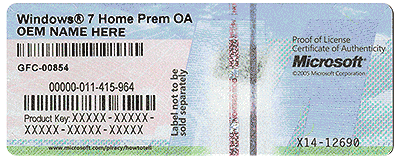
Do you not have one of these on the computer you could use.


COA-Certificate-of-Authenticity.gif
 

My Computer My Computer

Computer type
PC/Desktop
Computer Manufacturer/Model Number
Home made Desktop
OS
Windows 10 Pro. 64/ version 1709 Windows 7 Pro/64
CPU
Intel i7-6800K @ 4.3
Motherboard
ASUS X-99 Deluxe II
Memory
Corsair Platinum 16 gig @2400
Graphics Card(s)
EVGA GTX 1070 OC
Monitor(s) Displays
Asus 27" LED LCD/VE278Q
Screen Resolution
1920-1080 or 1280-720 HDMI
Hard Drives
INTEL SSD 730-240 Gb Sata 3.0/
PSU
EVGA Platium 1200W
Case
Phanteks Luxe Tempered Glass 8 fans/ one radiator
Cooling
XSPC/ Water Cooled CPU
Keyboard
Das 4 Professional
Mouse
Logitech M705/MX Anywhere 2-S
Internet Speed
100 mbits
Antivirus
Microsoft Security Essentials/ Malwarebytes Premium 3.0/ SAS
Browser
I.E. 11 default/Firefox/ ISP Time Warner Cable/Spectrum
Other Info
LG BluRay Burner/
Sound system-KLipsch-THX/
Icy Dock ssd Hot Swap bays.
If your mum did an upgrade , you need the key from windows.old\windows\system32\config\Software hive

Okay, I followed that path, and I shouldn't have expected to just cleanly find the key lol.

In the software hive is just a document I opened with Notepad. Now I'm looking at the biggest wall of code I've ever seen, where most of the characters aren't even English. So lost.

Since you mention upgrade, I think this may work for you, worth a try anyway, it's had some success in the past,

Hi thx1139,

I don't know how to do it in Jelly Bean, but I do with ProduKey:

Your Windows 7 product key is stored in the software registry hive, located here:

C:\Windows\system32\config\software

Please note, software is the file name, not a directory. It has no file extension. Your drive may have a different letter.

This is a little program that will tell you the product keys of the various software installed on your computer. What makes this different, is the ability to load keys from an external registry hive. Exactly what we want
smile.gif.pagespeed.ce.8xZGdnoS_z.gif


So if you download and run ProduKey (by NirSoft):

http://www.nirsoft.n...key_viewer.html

Then press File > Select Source, you will be presented with a new menu. On this, select Load the product keys from an external Software Registry hive and you will be prompted to open a file. Navigate to the software hive on the external drive and open the hive. E.g. D:\Windows\system32\config\software. You should now have your product keys
smile.gif.pagespeed.ce.8xZGdnoS_z.gif


Hope this helped.

Tom
 

My Computer My Computer

Computer type
PC/Desktop
Computer Manufacturer/Model Number
Self Built
OS
Win 10 Pro x64
CPU
Intel I5-2500K @3.3GHz
Motherboard
Asrock P67 Extreme4
Memory
16GB G.Skill Ripjaws X (4x4GB)
Graphics Card(s)
EVGA GeForce 750 Ti SC 2GB
Sound Card
ASUS Xonar DG 5.1 Channels 24-bit 96KHz PCI Interface Sound
Monitor(s) Displays
auria eq2367
Screen Resolution
1920 x 1080
Hard Drives
250GB Samsung 850 EVO SSD
1TB WD Blue
1TB Hitachi
PSU
SeaSonic X 650W 80 Plus Gold
Case
Corsair Obsidian 750D
Cooling
Corsair H60, Three 140mm case fans
Keyboard
Logitech Wireless Keyboard K520
Mouse
Logitech Wireless Mouse M310
Internet Speed
Wave Broadband ~ 100 dn 5 up
Antivirus
Windows Defender, Malwarebytes Premium
Browser
Edge, IE11, Chrome
Other Info
Laptop specs: HP g7-1365dx /
CPU: AMD A6-3420M APU with Radeon(tm) HD Graphics /
RAM: Crucial 8Gb (2x4Gb) /
SSD: Crucial M4-CT128M4SSD2 ATA Device/ FW 000F /
GFX: AMD Radeon HD 6520G /
OS: Windows 10 Pro x64
Do you not have one of these on the computer you could use.


View attachment 368036

I said it in my other thread, but I guess I forgot to say it in this one. The tag with the product key is too faded to read on my mom's, and is entirely ripped on mine.

If your mum did an upgrade , you need the key from windows.old\windows\system32\config\Software hive

Okay, I followed that path, and I shouldn't have expected to just cleanly find the key lol.

In the software hive is just a document I opened with Notepad. Now I'm looking at the biggest wall of code I've ever seen, where most of the characters aren't even English. So lost.

Since you mention upgrade, I think this may work for you, worth a try anyway, it's had some success in the past,

Hi thx1139,

I don't know how to do it in Jelly Bean, but I do with ProduKey:

Your Windows 7 product key is stored in the software registry hive, located here:

C:\Windows\system32\config\software

Please note, software is the file name, not a directory. It has no file extension. Your drive may have a different letter.

This is a little program that will tell you the product keys of the various software installed on your computer. What makes this different, is the ability to load keys from an external registry hive. Exactly what we want
smile.gif.pagespeed.ce.8xZGdnoS_z.gif


So if you download and run ProduKey (by NirSoft):

http://www.nirsoft.n...key_viewer.html

Then press File > Select Source, you will be presented with a new menu. On this, select Load the product keys from an external Software Registry hive and you will be prompted to open a file. Navigate to the software hive on the external drive and open the hive. E.g. D:\Windows\system32\config\software. You should now have your product keys
smile.gif.pagespeed.ce.8xZGdnoS_z.gif


Hope this helped.

Tom

Looks like what SIW2 failed to mention was that to read that section, you need to have that ProduKey program. When I follow that path, I just end up with a big wall of code I have no idea how to read (thousands and thousands of lines).
 

My Computer My Computer

Computer type
PC/Desktop
OS
Windows 7 Home Premium
Back
Top