

This is a "cry wolf" situation that isn't causing me any problem except when it did.
Running Windows 7 64-bit.
I run a, to me, complicated set up where, in addition to my "C" drive, I have three other large internal drives. Except that they're in external enclosures. I'm on a cable connection but also have a Kindle Fire so I set up a local wi-fi so I could access the 'net around my house even when I'm away from my computer. So, for security reasons, I like to shut down as far as possible when I finish here for the day so, for security reasons, I turn off all of those internal drives in enclosures because that's where my sensitive material and most of my data is; I have to leave a small windows presence loaded to run the wi-fi card and the program I use to create my local network, Connectify. What has worked well is to log off myself and the next day I have a logon screen ready to log back on as myself. I don't know why Connectify and my card keep working but apparently Windows' bare bones keeps those things running which suits me well.
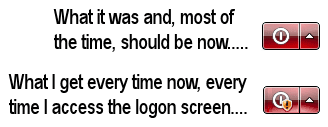
As I say this has worked well except that in the past week my logon screen has a different little box in the lower right corner. It's the standard button for quitting, rebooting and the like if one has changed one's mind. But in the middle is a small shield with an exclamation point. Hovering show that it's telling me updates are waiting and to reboot. I did just that a time or two and there weren't any so I started ignoring it and treating it as if it was the regular box. Then one time I'd forgotten to finish updates and it meant it. Nothing terrible happened except an incomplete boot and it was pretty obvious I really did need to reboot. Which I did and the annoying little button was (and continues to be) still there.
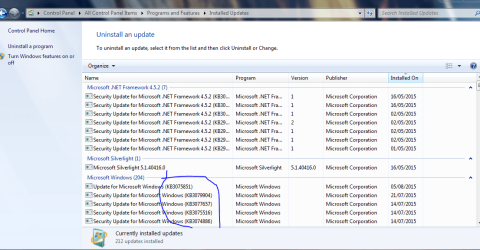
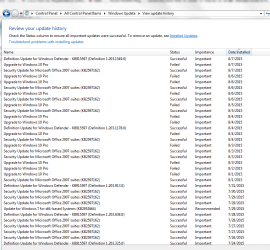
Photos attached.
This is not world-ending. I can live with the inconvenience but I don't like Windows anomalies so I'd rather figure it out. Also, apologies for the wordiness. That's probably a ton more information than y'all needed but I didn't know which parts to leave in and which were superfluous so I presented the whole thing.
Sigh. As usual help is appreciated.
-G.
Running Windows 7 64-bit.
I run a, to me, complicated set up where, in addition to my "C" drive, I have three other large internal drives. Except that they're in external enclosures. I'm on a cable connection but also have a Kindle Fire so I set up a local wi-fi so I could access the 'net around my house even when I'm away from my computer. So, for security reasons, I like to shut down as far as possible when I finish here for the day so, for security reasons, I turn off all of those internal drives in enclosures because that's where my sensitive material and most of my data is; I have to leave a small windows presence loaded to run the wi-fi card and the program I use to create my local network, Connectify. What has worked well is to log off myself and the next day I have a logon screen ready to log back on as myself. I don't know why Connectify and my card keep working but apparently Windows' bare bones keeps those things running which suits me well.
As I say this has worked well except that in the past week my logon screen has a different little box in the lower right corner. It's the standard button for quitting, rebooting and the like if one has changed one's mind. But in the middle is a small shield with an exclamation point. Hovering show that it's telling me updates are waiting and to reboot. I did just that a time or two and there weren't any so I started ignoring it and treating it as if it was the regular box. Then one time I'd forgotten to finish updates and it meant it. Nothing terrible happened except an incomplete boot and it was pretty obvious I really did need to reboot. Which I did and the annoying little button was (and continues to be) still there.
Photos attached.
This is not world-ending. I can live with the inconvenience but I don't like Windows anomalies so I'd rather figure it out. Also, apologies for the wordiness. That's probably a ton more information than y'all needed but I didn't know which parts to leave in and which were superfluous so I presented the whole thing.
Sigh. As usual help is appreciated.
-G.
Attachments
My Computer
At a glance
Windows 7 Professional 64bitIntel Core i3-2020 @ 3.3GHz3.00 GBIntel HD Graphics Family
- Computer Manufacturer/Model Number
- Dell Optiplex 990
- OS
- Windows 7 Professional 64bit
- CPU
- Intel Core i3-2020 @ 3.3GHz
- Memory
- 3.00 GB
- Graphics Card(s)
- Intel HD Graphics Family
- Sound Card
- Realtek High Definition Audio (integrated)
- Monitor(s) Displays
- Dell P2411H Analog (flat screen)
- Screen Resolution
- 1920 x 1080
- Hard Drives
- 300 GB SATA (Internal)
300 GB SATA (External) x 2
LaCie d2 quadra 500 GB
FreeAgency GoFlex Drive (NTFS) 2 TB
- PSU
- Yup
- Case
- Black
- Cooling
- 2 fans
- Keyboard
- Microsoft ComfortCurve 2000
- Mouse
- Microsoft Optical
- Internet Speed
- Apparently a variable. Supposed to be cable modem speed.



 Windows to do an auto update in such state?