What don't you like about Windows 7?

Status
Not open for further replies.
Sorry people, it was just an example, but I meant a full screen thing,
instead of the ancient XP dialogs.

The networkcenter fits perfectly well on my 15,4" lappy screen. :p

Glad to see me going negative has so much effect. :D
 

My Computer My Computer

At a glance

Win7 Build 7600 x86Pentium II 300MHz32mb EDO RAMDiamond Viper
OS
Win7 Build 7600 x86
CPU
Pentium II 300MHz
Motherboard
Asus
Memory
32mb EDO RAM
Graphics Card(s)
Diamond Viper
Sound Card
Soundblaster 16
Monitor(s) Displays
14" AOC CRT 16K color
Screen Resolution
800x600
Hard Drives
300mb Quantum fireball
PSU
110 Watts
Cooling
Passive
Keyboard
Trust Ergonomic
Mouse
Generic
Internet Speed
256K u 128K d
Sorry people, it was just an example, but I meant a full screen thing,
instead of the ancient XP dialogs.

The networkcenter fits perfectly well on my 15,4" lappy screen. :p

Glad to see me going negative has so much effect. :D
Affirmative.
 
I can't stand that it's in my way between Vista and Win 8
 

My Computer My Computer

At a glance

Systems 1 and 2: Windows 7 Enterprise x64, Wi...System 1: i7 [email protected], System 2: AMD FX-41...System 1: 8GB System 2: 8GBSystem 1: ATI FirePro V4800 System 2: Radeon ...
Computer Manufacturer/Model Number
Dell and Custom
OS
Systems 1 and 2: Windows 7 Enterprise x64, Win 8 Developer
CPU
System 1: i7 [email protected], System 2: AMD FX-4100 Zambezi 3.6G
Motherboard
System 1:Dell 06NWYK System 2: ASUS M5A97 AM3+
Memory
System 1: 8GB System 2: 8GB
Graphics Card(s)
System 1: ATI FirePro V4800 System 2: Radeon HD 6850
Sound Card
System 1: onboard System 2: onboard
Monitor(s) Displays
System1: Viewsonic HDMI 24"
Screen Resolution
System 1: 1920x1080 System 2: 1920x1080
Hard Drives
System 1: Mirrored .5B drives System 2: Seagate Barracuda ST1000DM003 1TB 7200 RPM 64MB Cache SATA 6.0Gb/s
Case
System 1: Dell System 2: Cooler Master
Internet Speed
10 MBPS
Why the hell won't these windows hold their size

This is a pisser:confused: Ever since around 4800, IE8 windows won't allow you to train them to open a certain size - using any of the common methods used previously:shock: It is so damn annoying to have this fantastic OS, perhaps the greatest invention since the computer itself, and have such an annoying glitch:eek: So I install the autosizer app and that is even screwier, allowing me to almost get my windows the right size, but not quite:sick: I am about to go Jack Nicholson over this:mad:
 
This is a pisser:confused: Ever since around 4800, IE8 windows won't allow you to train them to open a certain size - using any of the common methods used previously:shock: It is so damn annoying to have this fantastic OS, perhaps the greatest invention since the computer itself, and have such an annoying glitch:eek: So I install the autosizer app and that is even screwier, allowing me to almost get my windows the right size, but not quite:sick: I am about to go Jack Nicholson over this:mad:
Have to be careful now, so I'm just checking: Do you mean IE8 does not remember the window size?

If that is your issue, I have to say it is not correct. It does. The subject was discussed here. Please read the thread.

Kari
 

My Computer My Computer

At a glance

Windows 10 Pro x64 EN-GB1.6 GHz Intel Core i7-720QM Processor6 GBATI Mobility Radeon HD 5850 Graphics
Computer type
Laptop
Computer Manufacturer/Model Number
HP ENVY 17-1150eg
OS
Windows 10 Pro x64 EN-GB
CPU
1.6 GHz Intel Core i7-720QM Processor
Memory
6 GB
Graphics Card(s)
ATI Mobility Radeon HD 5850 Graphics
Sound Card
Beats sound system with integrated subwoofer
Monitor(s) Displays
17" laptop display, 22" LED and 32" Full HD TV through HDMI
Screen Resolution
1600*900 (1), 1920*1080 (2&3)
Hard Drives
Internal: 2 x 500 GB SATA Hard Disk Drive 7200 rpm
External: 2TB for backups, 3TB USB3 network drive for media
Cooling
As Envy runs a bit warm, I have it on a Cooler Master pad
Keyboard
Logitech diNovo Media Desktop Laser (bluetooth)
Mouse
Logitech Performance Mouse MX
Internet Speed
50/10 Mbps VDSL
Antivirus
Windows Defender 4.3.9431.0
Browser
Maxthon 3.5.2., IE11
Basically any element of 7 which reminds me of Vista, at all, could be removed/replaced with something new and/or innovative.

Examples: all programs in start menu (if you have lots of programs there's a scrollbar...ewe), control panel default view, the default UAC with all its annoyances during administrative changes (fortunately this can be adjusted). Copying large files over a network seems to be much slower than in XP.

New features which I don't like (or are redundant): Homegroup and Libraries, most of the new services.

I have lots of positive things to say about 7 but its off topic!
 

My Computer My Computer

At a glance

Windows 7 UltimateCore 2 Quad Q66002GBnVidia GeForce 8600 GT
Computer Manufacturer/Model Number
Me
OS
Windows 7 Ultimate
CPU
Core 2 Quad Q6600
Motherboard
Gigabyte GA-N650SLI-DS4
Memory
2GB
Graphics Card(s)
nVidia GeForce 8600 GT
Sound Card
Realtek HD Audio
Monitor(s) Displays
ViewSonic
Screen Resolution
Large Please
Case
Alienware
Cooling
Zalman
...Examples: all programs in start menu (if you have lots of programs there's a scrollbar...ewe), control panel default view, the default UAC with all its annoyances during administrative changes (fortunately this can be adjusted)...
Develop your own folder structure in the Start Menu to reduce the clutter. Change the Control Panel default view with a mouse click.
 
Ya, I didn't say there was no workaround or alternate setting. I just expected something new and different from M$
 

My Computer My Computer

At a glance

Windows 7 UltimateCore 2 Quad Q66002GBnVidia GeForce 8600 GT
Computer Manufacturer/Model Number
Me
OS
Windows 7 Ultimate
CPU
Core 2 Quad Q6600
Motherboard
Gigabyte GA-N650SLI-DS4
Memory
2GB
Graphics Card(s)
nVidia GeForce 8600 GT
Sound Card
Realtek HD Audio
Monitor(s) Displays
ViewSonic
Screen Resolution
Large Please
Case
Alienware
Cooling
Zalman
Hi there

4 things I don't like about W7.

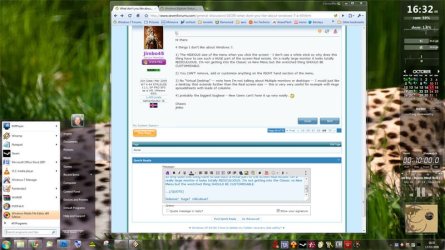
1) The HIDEOUS size of the menu when you click the screen - I don't use a white stick so why does this thing have to use such a HUGE part of the screen Real estate. On a really large monitor it looks totally REDICULUOUS. I'm not getting into the Classic vs New Menu but the wretched thing SHOULD BE CUSTOMISABLE.

2) You CAN'T remove, add or customize anything on the RIGHT hand section of the menu.

3) No "Virtual Desktop" -- note here I'm not talking about Multiple monitors or desktops -- I would just like a desktop that extends further than the Real screen size -- this is very very useful for example with Huge spreadsheets with loads of columns.

4) probably the biggest bugbear - New Users can't hose it up very easily. :D

Cheers
jimbo
 

My Computer My Computer

At a glance

Linux CENTOS 7 / various Windows OS'es and se...Intel i7 Intel i58GB, 16GBOn Motherboard
Computer type
PC/Desktop
Computer Manufacturer/Model Number
Custom built, several laptops HP/ASUS
OS
Linux CENTOS 7 / various Windows OS'es and servers
CPU
Intel i7 Intel i5
Memory
8GB, 16GB
Graphics Card(s)
On Motherboard
Sound Card
Realtek HD audio
Monitor(s) Displays
Apple Cinema display, Samsung LCD
Screen Resolution
1920 X 1080
Hard Drives
4 X 1TB SATA
Mouse
Toshiba wireless laser
Internet Speed
> 20MB up
Hi there

4 things I don't like about W7.

1) The HIDEOUS size of the menu when you click the screen - I don't use a white stick so why does this thing have to use such a HUGE part of the screen Real estate. On a really large monitor it looks totally REDICULUOUS. I'm not getting into the Classic vs New Menu but the wretched thing SHOULD BE CUSTOMISABLE.

2) You CAN'T remove, add or customize anything on the RIGHT hand section of the menu.

3) No "Virtual Desktop" -- note here I'm not talking about Multiple monitors or desktops -- I would just like a desktop that extends further than the Real screen size -- this is very very useful for example with Huge spreadsheets with loads of columns.

4) probably the biggest bugbear - New Users can't hose it up very easily. :D

Cheers
jimbo

What menu are you talking about exactly?

I have a crappy, small monitor and I haven't seen anything that takes up a ridiculous amount of space.
 

My Computer My Computer

At a glance

Windows 7 Ultimate/XP SP3Pentium 4 HT 3.0 Ghz2048MB DDR ECC RAM @ 200Mhz (4x512mb)Nvidia Quadro FX 1100
Computer Manufacturer/Model Number
HP Workstation Xw4100
OS
Windows 7 Ultimate/XP SP3
CPU
Pentium 4 HT 3.0 Ghz
Memory
2048MB DDR ECC RAM @ 200Mhz (4x512mb)
Graphics Card(s)
Nvidia Quadro FX 1100
Sound Card
Max Blaster
Monitor(s) Displays
17" MAG
Screen Resolution
1280*1024
Hard Drives
160GB IDE (WinXP Installation)
13GB IDE
250GB SATA (Win 7 installation & Storage)
PSU
280w
...

1) The HIDEOUS size of the menu when you click the screen - I don't use a white stick so why does this thing have to use such a HUGE part of the screen Real estate. On a really large monitor it looks totally REDICULUOUS. I'm not getting into the Classic vs New Menu but the wretched thing SHOULD BE CUSTOMISABLE.

...

hideous? huge? ridiculous? it doesn't look so bad at 1920x1080...surely it would look smaller with larger higher-res monitors?

but then again, i am getting on a bit, my eyesight isn't what it was, so i like the big icons.
 

Attachments

  • hugee.jpg
    hugee.jpg
    62.9 KB · Views: 49
Last edited:

My Computer My Computer

At a glance

ultimate 64 sp1i5 2500K [email protected]8 gigs GSkill Ripjaws 1600amd hd6950
Computer Manufacturer/Model Number
mickey megabyte 1234
OS
ultimate 64 sp1
CPU
i5 2500K [email protected]
Motherboard
MSI P67A-GD53
Memory
8 gigs GSkill Ripjaws 1600
Graphics Card(s)
amd hd6950
Sound Card
creative x-fi gamer
Monitor(s) Displays
samsung 24"
Screen Resolution
1920x1080
Hard Drives
ocz vertex 2e 60 gig, samsung f3 1tb, buffalo 2tb ext
PSU
antec 550
Case
antec three hundred
Cooling
i'm a cooling fan
Keyboard
saitek eclipse ii
Mouse
logitech g3
Internet Speed
about 4 Mbps
Other Info
i love win7
hideous? huge? ridiculous? it doesn't look so bad at 1920x1080...surely it would look smaller with larger higher-res monitors?

It is wrong to crow about one's screen real estate Mickey :p
 

Attachments

  • desktop.jpg
    desktop.jpg
    50.4 KB · Views: 44

My Computer My Computer

At a glance

Win7x64
Computer Manufacturer/Model Number
Multiple machines in various stages of decomposition.
OS
Win7x64
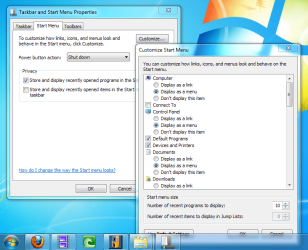
2) You CAN'T remove, add or customize anything on the RIGHT hand section of the menu.

You can customize this, in a limited sort of fashion. Pick "do not display" for certain items.
 

Attachments

  • customize start menu.png
    customize start menu.png
    60 KB · Views: 18

My Computer My Computer

At a glance

Windows 7 UltimateCore 2 Quad Q66002GBnVidia GeForce 8600 GT
Computer Manufacturer/Model Number
Me
OS
Windows 7 Ultimate
CPU
Core 2 Quad Q6600
Motherboard
Gigabyte GA-N650SLI-DS4
Memory
2GB
Graphics Card(s)
nVidia GeForce 8600 GT
Sound Card
Realtek HD Audio
Monitor(s) Displays
ViewSonic
Screen Resolution
Large Please
Case
Alienware
Cooling
Zalman
...

1) The HIDEOUS size of the menu when you click the screen - I don't use a white stick so why does this thing have to use such a HUGE part of the screen Real estate. On a really large monitor it looks totally REDICULUOUS. I'm not getting into the Classic vs New Menu but the wretched thing SHOULD BE CUSTOMISABLE.

...

hideous? huge? ridiculous? it doesn't look so bad at 1920x1080...surely it would look smaller with larger higher-res monitors?

but then again, i am getting on a bit, my eyesight isn't what it was, so i like the big icons.

He did call it a "Menu" so maybe he's used to a mac.

Compared to the entries in the Mac's menu the start menu is freaking huge. But I don't see the problem; it's never bothered me before. The start menu size can be reduced a little.
 

My Computer My Computer

At a glance

Windows 7 Ultimate/XP SP3Pentium 4 HT 3.0 Ghz2048MB DDR ECC RAM @ 200Mhz (4x512mb)Nvidia Quadro FX 1100
Computer Manufacturer/Model Number
HP Workstation Xw4100
OS
Windows 7 Ultimate/XP SP3
CPU
Pentium 4 HT 3.0 Ghz
Memory
2048MB DDR ECC RAM @ 200Mhz (4x512mb)
Graphics Card(s)
Nvidia Quadro FX 1100
Sound Card
Max Blaster
Monitor(s) Displays
17" MAG
Screen Resolution
1280*1024
Hard Drives
160GB IDE (WinXP Installation)
13GB IDE
250GB SATA (Win 7 installation & Storage)
PSU
280w
The absence of quick launch

negative
 

My Computer My Computer

At a glance

Windows 7
OS
Windows 7

My Computer My Computer

At a glance

Windows 10 Pro x64 EN-GB1.6 GHz Intel Core i7-720QM Processor6 GBATI Mobility Radeon HD 5850 Graphics
Computer type
Laptop
Computer Manufacturer/Model Number
HP ENVY 17-1150eg
OS
Windows 10 Pro x64 EN-GB
CPU
1.6 GHz Intel Core i7-720QM Processor
Memory
6 GB
Graphics Card(s)
ATI Mobility Radeon HD 5850 Graphics
Sound Card
Beats sound system with integrated subwoofer
Monitor(s) Displays
17" laptop display, 22" LED and 32" Full HD TV through HDMI
Screen Resolution
1600*900 (1), 1920*1080 (2&3)
Hard Drives
Internal: 2 x 500 GB SATA Hard Disk Drive 7200 rpm
External: 2TB for backups, 3TB USB3 network drive for media
Cooling
As Envy runs a bit warm, I have it on a Cooler Master pad
Keyboard
Logitech diNovo Media Desktop Laser (bluetooth)
Mouse
Logitech Performance Mouse MX
Internet Speed
50/10 Mbps VDSL
Antivirus
Windows Defender 4.3.9431.0
Browser
Maxthon 3.5.2., IE11
No problems so far - hated Vista and loving this.
 

My Computer My Computer

At a glance

DUAL // Windows 7 Ultimate 64 Bit & Mac OS X ...
OS
DUAL // Windows 7 Ultimate 64 Bit & Mac OS X Snow Leopard
Negatives? I can't say "Hello computer" and have it respond "Hello Dave, You must die now cause I am tired of your whiny butt complaining when I BSOD, when really I am just screwing with you to piss you off."

And yes, Win7 seems a bit out dated now and hasn't even been released yet. :D

LOL you do realize most BSOD's are caused by either faulty memory chips, or simply memory that is not best suited for your motherboard right? It seldom has anything to do with windows actually! If it wasn't for BSOD's, your mobo's could have fried by not instantly disabling the hardware when that memory chip shorted or or overvolted (even if it is an occasional glitch)! I am talking the majority, I do realize they BSOD for other reasons, so I am not being ignorant to that.

Aside, I really really need MS to allow a classic mode for networking, so that we can access the network settings like in XP. This automated Home center just p$$$ me off because I need it to be completely manually controlled for my work! I have to keep disabling and re-enabling the nic for it to reset properly. I know it can be done through the monotonous process, but I can't afford the time wasted in that slow a$$ networking center!
 

My Computer My Computer

At a glance

Windows 7 (Build 7068)
OS
Windows 7 (Build 7068)
One more issue:

The Pen Tablet thing.

I use a Wacom Tablet for Photoshop work and Windows 7 is NOT set up to facilitate that at all. They could have made the Tablet PC Components optional upon installation of Windows 7 but no, you have to figure that out for yourself.

They totally wreak havoc on any digital art you try to do by lagging up your tablet and making annoying ripples. I had to jump through hoops to disable it and I never would have known how without this forum.

Having it installed by Default is STUPID. Desktops and regular laptops are VASTLY more numerous than tablet PCs so why on earth would they cater to them? I would have preferred being asked "Would you like to enable windows tablet functionality?" when I first set up windows instead of having to figure out how to disable it later.


Negatives? I can't say "Hello computer" and have it respond "Hello Dave, You must die now cause I am tired of your whiny butt complaining when I BSOD, when really I am just screwing with you to piss you off."

And yes, Win7 seems a bit out dated now and hasn't even been released yet. :D

How ironic that your user name is tepid yet your posts are fiery and volatile.
 

My Computer My Computer

At a glance

Windows 7 Ultimate/XP SP3Pentium 4 HT 3.0 Ghz2048MB DDR ECC RAM @ 200Mhz (4x512mb)Nvidia Quadro FX 1100
Computer Manufacturer/Model Number
HP Workstation Xw4100
OS
Windows 7 Ultimate/XP SP3
CPU
Pentium 4 HT 3.0 Ghz
Memory
2048MB DDR ECC RAM @ 200Mhz (4x512mb)
Graphics Card(s)
Nvidia Quadro FX 1100
Sound Card
Max Blaster
Monitor(s) Displays
17" MAG
Screen Resolution
1280*1024
Hard Drives
160GB IDE (WinXP Installation)
13GB IDE
250GB SATA (Win 7 installation & Storage)
PSU
280w
Status
Not open for further replies.
Back
Top