Windows 7 installer sets its own path as C:\ - cannot install to C:\

Toshiko

New member
Local time
2:01 PM
Messages
14
My Windows 7 installation is many years old, and gone through many hardware changes, software installations and uninstallations, and Windows itself has been getting progressively slower, buggier, and prone to odd crashes and hang ups. I decided to try repairing the installation with my original install disc, but found that my DVD drive is no longer functional. Having used the official ISO from Microsoft to create a bootable USB for my netbook worked swimmingly. For my desktop, not so much.

When booting from USB on my desktop, the Windows 7 installer mounts itself as drive C while detecting my existing Windows installation as being drive D when it is actually and most certainly C. I've tried forcing drive paths from within Windows, changing boot order, switching USB ports, all manner of UEFI options pertaining to USB... and it always sets the installer as C, unable to set the Windows install path to C because C is in use by the installer.

I'm a bit too paranoid to try repairing Windows for fear of it totally screwing everything up with the forced drive path change, and using a drive path other than C for a clean install is, at best, undesirable. Would also prefer not to spend money on a DVD drive that I will in all likelihood use exactly once.

Motherboard (which I'd wager is the culprit) is an embarrassingly flashy ASRock P67 Professional.
 

My Computer My Computer

At a glance

Windows 7 Ultimate x64Intel i5 2500k8GB PC3-12800Radeon HD 6870 1GB
Computer type
PC/Desktop
Computer Manufacturer/Model Number
custom build
OS
Windows 7 Ultimate x64
CPU
Intel i5 2500k
Motherboard
ASRock P67 Professional
Memory
8GB PC3-12800
Graphics Card(s)
Radeon HD 6870 1GB
Hard Drives
1: WD Raptor 74 GB
2: Seagate Barracuda 320 GB
3: WD Caviar 500 GB
4: Seagate 1 TB
5: WD Blue 2 TB
6: WD Blue 3 TB
Antivirus
Microsoft Security Essentials
Browser
Firefox
When booting from USB on my desktop,

That statement contradicts itself.

You don't boot from USB on the desktop.

If you are trying to do a clean install, you shutdown or restart and boot from the USB.
 

My Computer My Computer

At a glance

Win 10 Pro x64Intel I5-2500K @3.3GHz16GB G.Skill Ripjaws X (4x4GB)EVGA GeForce 750 Ti SC 2GB
Computer type
PC/Desktop
Computer Manufacturer/Model Number
Self Built
OS
Win 10 Pro x64
CPU
Intel I5-2500K @3.3GHz
Motherboard
Asrock P67 Extreme4
Memory
16GB G.Skill Ripjaws X (4x4GB)
Graphics Card(s)
EVGA GeForce 750 Ti SC 2GB
Sound Card
ASUS Xonar DG 5.1 Channels 24-bit 96KHz PCI Interface Sound
Monitor(s) Displays
auria eq2367
Screen Resolution
1920 x 1080
Hard Drives
250GB Samsung 850 EVO SSD
1TB WD Blue
1TB Hitachi
PSU
SeaSonic X 650W 80 Plus Gold
Case
Corsair Obsidian 750D
Cooling
Corsair H60, Three 140mm case fans
Keyboard
Logitech Wireless Keyboard K520
Mouse
Logitech Wireless Mouse M310
Internet Speed
Wave Broadband ~ 100 dn 5 up
Antivirus
Windows Defender, Malwarebytes Premium
Browser
Edge, IE11, Chrome
Other Info
Laptop specs: HP g7-1365dx /
CPU: AMD A6-3420M APU with Radeon(tm) HD Graphics /
RAM: Crucial 8Gb (2x4Gb) /
SSD: Crucial M4-CT128M4SSD2 ATA Device/ FW 000F /
GFX: AMD Radeon HD 6520G /
OS: Windows 10 Pro x64
It's not contradictory, you misunderstood what I meant by 'desktop'. I meant 'desktop' as in 'not a laptop or notebook or tablet, but a full tower with a separate monitor'.
 

My Computer My Computer

At a glance

Windows 7 Ultimate x64Intel i5 2500k8GB PC3-12800Radeon HD 6870 1GB
Computer type
PC/Desktop
Computer Manufacturer/Model Number
custom build
OS
Windows 7 Ultimate x64
CPU
Intel i5 2500k
Motherboard
ASRock P67 Professional
Memory
8GB PC3-12800
Graphics Card(s)
Radeon HD 6870 1GB
Hard Drives
1: WD Raptor 74 GB
2: Seagate Barracuda 320 GB
3: WD Caviar 500 GB
4: Seagate 1 TB
5: WD Blue 2 TB
6: WD Blue 3 TB
Antivirus
Microsoft Security Essentials
Browser
Firefox
Maybe I did then, what did you mean by mounting?

That doesn't sound like it was booted to me, that sounds like an attempt at a repair or upgrade install especially since you say it was given a letter.
 

My Computer My Computer

At a glance

Win 10 Pro x64Intel I5-2500K @3.3GHz16GB G.Skill Ripjaws X (4x4GB)EVGA GeForce 750 Ti SC 2GB
Computer type
PC/Desktop
Computer Manufacturer/Model Number
Self Built
OS
Win 10 Pro x64
CPU
Intel I5-2500K @3.3GHz
Motherboard
Asrock P67 Extreme4
Memory
16GB G.Skill Ripjaws X (4x4GB)
Graphics Card(s)
EVGA GeForce 750 Ti SC 2GB
Sound Card
ASUS Xonar DG 5.1 Channels 24-bit 96KHz PCI Interface Sound
Monitor(s) Displays
auria eq2367
Screen Resolution
1920 x 1080
Hard Drives
250GB Samsung 850 EVO SSD
1TB WD Blue
1TB Hitachi
PSU
SeaSonic X 650W 80 Plus Gold
Case
Corsair Obsidian 750D
Cooling
Corsair H60, Three 140mm case fans
Keyboard
Logitech Wireless Keyboard K520
Mouse
Logitech Wireless Mouse M310
Internet Speed
Wave Broadband ~ 100 dn 5 up
Antivirus
Windows Defender, Malwarebytes Premium
Browser
Edge, IE11, Chrome
Other Info
Laptop specs: HP g7-1365dx /
CPU: AMD A6-3420M APU with Radeon(tm) HD Graphics /
RAM: Crucial 8Gb (2x4Gb) /
SSD: Crucial M4-CT128M4SSD2 ATA Device/ FW 000F /
GFX: AMD Radeon HD 6520G /
OS: Windows 10 Pro x64
Okay. When you put the Windows 7 installation DVD in your DVD drive and reboot your computer, assuming the DVD drive has boot priority, it will boot up the Windows 7 installer. The installer will be ostensibly be mounted to a non-C drive path - D, or E, for example.

In my case, I cannot use my original Windows 7 installer because my DVD drive is kaput. I had to re-use a bootable USB image that I previously made for my netbook. On my netbook, the USB image mounts itself as D (which is the expected and sane behavior). On my [full tower desktop PC], the USB image mounts itself as C, and the installer claims it has found an existing Windows installation on drive D rather than its actual installation path of C:\Windows.
 

My Computer My Computer

At a glance

Windows 7 Ultimate x64Intel i5 2500k8GB PC3-12800Radeon HD 6870 1GB
Computer type
PC/Desktop
Computer Manufacturer/Model Number
custom build
OS
Windows 7 Ultimate x64
CPU
Intel i5 2500k
Motherboard
ASRock P67 Professional
Memory
8GB PC3-12800
Graphics Card(s)
Radeon HD 6870 1GB
Hard Drives
1: WD Raptor 74 GB
2: Seagate Barracuda 320 GB
3: WD Caviar 500 GB
4: Seagate 1 TB
5: WD Blue 2 TB
6: WD Blue 3 TB
Antivirus
Microsoft Security Essentials
Browser
Firefox
Interesting. I don't get any lettered drive path when I boot an installer. Maybe someone else has seen this.
 

My Computer My Computer

At a glance

Win 10 Pro x64Intel I5-2500K @3.3GHz16GB G.Skill Ripjaws X (4x4GB)EVGA GeForce 750 Ti SC 2GB
Computer type
PC/Desktop
Computer Manufacturer/Model Number
Self Built
OS
Win 10 Pro x64
CPU
Intel I5-2500K @3.3GHz
Motherboard
Asrock P67 Extreme4
Memory
16GB G.Skill Ripjaws X (4x4GB)
Graphics Card(s)
EVGA GeForce 750 Ti SC 2GB
Sound Card
ASUS Xonar DG 5.1 Channels 24-bit 96KHz PCI Interface Sound
Monitor(s) Displays
auria eq2367
Screen Resolution
1920 x 1080
Hard Drives
250GB Samsung 850 EVO SSD
1TB WD Blue
1TB Hitachi
PSU
SeaSonic X 650W 80 Plus Gold
Case
Corsair Obsidian 750D
Cooling
Corsair H60, Three 140mm case fans
Keyboard
Logitech Wireless Keyboard K520
Mouse
Logitech Wireless Mouse M310
Internet Speed
Wave Broadband ~ 100 dn 5 up
Antivirus
Windows Defender, Malwarebytes Premium
Browser
Edge, IE11, Chrome
Other Info
Laptop specs: HP g7-1365dx /
CPU: AMD A6-3420M APU with Radeon(tm) HD Graphics /
RAM: Crucial 8Gb (2x4Gb) /
SSD: Crucial M4-CT128M4SSD2 ATA Device/ FW 000F /
GFX: AMD Radeon HD 6520G /
OS: Windows 10 Pro x64

My Computer My Computer

At a glance

Windows 10 Pro X64Intel Quad Core i7-4770 @ 3.4Ghz16.0GB PC3-12800 DDR3 SDRAM 1600 MHzIntel Integrated HD Graphics
Computer type
PC/Desktop
Computer Manufacturer/Model Number
Lenovo IdeaCenter 450
OS
Windows 10 Pro X64
CPU
Intel Quad Core i7-4770 @ 3.4Ghz
Memory
16.0GB PC3-12800 DDR3 SDRAM 1600 MHz
Graphics Card(s)
Intel Integrated HD Graphics
Sound Card
Realtek HD Audio
Monitor(s) Displays
HP 22" LCD
Screen Resolution
1680 x 1050
Hard Drives
250GB Samsung EVO SATA-3 SSD
2TB Seagate ST2000DM001 SATA-2
1.5TB Seagate ST3150041AS SATA
Keyboard
Dell USB
Mouse
Lenovo USB
Internet Speed
Cable via Road Runner 3MB Upload, 30MB Download
Antivirus
Windows Defender, MBAM Pro, MBAE
Browser
Seamonkey
Other Info
UEFI/GPT
PLDS DVD-RW DH16AERSH
> hdd0 main partition is listed as D:\
> Windows installation is listed as found at D:\Windows
> use menu to attempt to change hdd0 partition to C:\
> get error saying C:\ is in use by GRMCULXFRER_EN_DVD (Windows 7 installer)
> cannot change installer drive path because it is the current operating system in use.

Also, I cannot follow the reinstall instructions for reasons I hoped were obvious by this point. Repairing yields the same issue when computer reboots. USB is C:\ and it needs to be literally any other drive path, because my OS drive is C:\ and it should stay that way, lest the whole registry be borked beyond recognition with incorrect filepaths and so forth.
 
Last edited:

My Computer My Computer

At a glance

Windows 7 Ultimate x64Intel i5 2500k8GB PC3-12800Radeon HD 6870 1GB
Computer type
PC/Desktop
Computer Manufacturer/Model Number
custom build
OS
Windows 7 Ultimate x64
CPU
Intel i5 2500k
Motherboard
ASRock P67 Professional
Memory
8GB PC3-12800
Graphics Card(s)
Radeon HD 6870 1GB
Hard Drives
1: WD Raptor 74 GB
2: Seagate Barracuda 320 GB
3: WD Caviar 500 GB
4: Seagate 1 TB
5: WD Blue 2 TB
6: WD Blue 3 TB
Antivirus
Microsoft Security Essentials
Browser
Firefox

My Computer My Computer

At a glance

Windows 10 Pro X64Intel Quad Core i7-4770 @ 3.4Ghz16.0GB PC3-12800 DDR3 SDRAM 1600 MHzIntel Integrated HD Graphics
Computer type
PC/Desktop
Computer Manufacturer/Model Number
Lenovo IdeaCenter 450
OS
Windows 10 Pro X64
CPU
Intel Quad Core i7-4770 @ 3.4Ghz
Memory
16.0GB PC3-12800 DDR3 SDRAM 1600 MHz
Graphics Card(s)
Intel Integrated HD Graphics
Sound Card
Realtek HD Audio
Monitor(s) Displays
HP 22" LCD
Screen Resolution
1680 x 1050
Hard Drives
250GB Samsung EVO SATA-3 SSD
2TB Seagate ST2000DM001 SATA-2
1.5TB Seagate ST3150041AS SATA
Keyboard
Dell USB
Mouse
Lenovo USB
Internet Speed
Cable via Road Runner 3MB Upload, 30MB Download
Antivirus
Windows Defender, MBAM Pro, MBAE
Browser
Seamonkey
Other Info
UEFI/GPT
PLDS DVD-RW DH16AERSH

My Computer My Computer

At a glance

Win 10 Pro x64Intel I5-2500K @3.3GHz16GB G.Skill Ripjaws X (4x4GB)EVGA GeForce 750 Ti SC 2GB
Computer type
PC/Desktop
Computer Manufacturer/Model Number
Self Built
OS
Win 10 Pro x64
CPU
Intel I5-2500K @3.3GHz
Motherboard
Asrock P67 Extreme4
Memory
16GB G.Skill Ripjaws X (4x4GB)
Graphics Card(s)
EVGA GeForce 750 Ti SC 2GB
Sound Card
ASUS Xonar DG 5.1 Channels 24-bit 96KHz PCI Interface Sound
Monitor(s) Displays
auria eq2367
Screen Resolution
1920 x 1080
Hard Drives
250GB Samsung 850 EVO SSD
1TB WD Blue
1TB Hitachi
PSU
SeaSonic X 650W 80 Plus Gold
Case
Corsair Obsidian 750D
Cooling
Corsair H60, Three 140mm case fans
Keyboard
Logitech Wireless Keyboard K520
Mouse
Logitech Wireless Mouse M310
Internet Speed
Wave Broadband ~ 100 dn 5 up
Antivirus
Windows Defender, Malwarebytes Premium
Browser
Edge, IE11, Chrome
Other Info
Laptop specs: HP g7-1365dx /
CPU: AMD A6-3420M APU with Radeon(tm) HD Graphics /
RAM: Crucial 8Gb (2x4Gb) /
SSD: Crucial M4-CT128M4SSD2 ATA Device/ FW 000F /
GFX: AMD Radeon HD 6520G /
OS: Windows 10 Pro x64
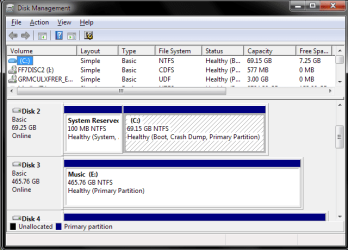
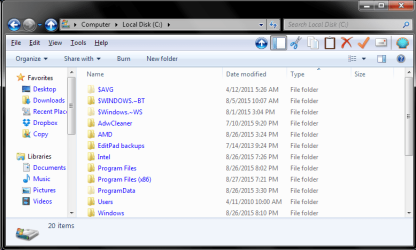
Two screens, for double the assurance. I can take a picture of the installer if I must.
 

Attachments

  • Screenshot 2015-08-27 22.09.31.png
    Screenshot 2015-08-27 22.09.31.png
    16.7 KB · Views: 19
  • Screenshot 2015-08-27 22.09.54.png
    Screenshot 2015-08-27 22.09.54.png
    28.3 KB · Views: 0

My Computer My Computer

At a glance

Windows 7 Ultimate x64Intel i5 2500k8GB PC3-12800Radeon HD 6870 1GB
Computer type
PC/Desktop
Computer Manufacturer/Model Number
custom build
OS
Windows 7 Ultimate x64
CPU
Intel i5 2500k
Motherboard
ASRock P67 Professional
Memory
8GB PC3-12800
Graphics Card(s)
Radeon HD 6870 1GB
Hard Drives
1: WD Raptor 74 GB
2: Seagate Barracuda 320 GB
3: WD Caviar 500 GB
4: Seagate 1 TB
5: WD Blue 2 TB
6: WD Blue 3 TB
Antivirus
Microsoft Security Essentials
Browser
Firefox
Pleas make it full screen and expand fields so we can see everything. There is a disk above the first one shown that we can't see.
 

My Computer My Computer

At a glance

Windows 10 Pro X64Intel Quad Core i7-4770 @ 3.4Ghz16.0GB PC3-12800 DDR3 SDRAM 1600 MHzIntel Integrated HD Graphics
Computer type
PC/Desktop
Computer Manufacturer/Model Number
Lenovo IdeaCenter 450
OS
Windows 10 Pro X64
CPU
Intel Quad Core i7-4770 @ 3.4Ghz
Memory
16.0GB PC3-12800 DDR3 SDRAM 1600 MHz
Graphics Card(s)
Intel Integrated HD Graphics
Sound Card
Realtek HD Audio
Monitor(s) Displays
HP 22" LCD
Screen Resolution
1680 x 1050
Hard Drives
250GB Samsung EVO SATA-3 SSD
2TB Seagate ST2000DM001 SATA-2
1.5TB Seagate ST3150041AS SATA
Keyboard
Dell USB
Mouse
Lenovo USB
Internet Speed
Cable via Road Runner 3MB Upload, 30MB Download
Antivirus
Windows Defender, MBAM Pro, MBAE
Browser
Seamonkey
Other Info
UEFI/GPT
PLDS DVD-RW DH16AERSH
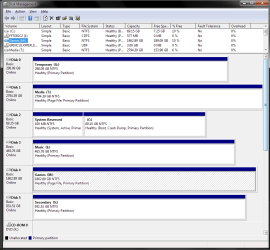
... I can promise you, this isn't going to help. I swear nobody is understanding what I'm saying. But sure:
 

Attachments

  • Screenshot 2015-08-27 22.18.00.png
    Screenshot 2015-08-27 22.18.00.png
    29.8 KB · Views: 2

My Computer My Computer

At a glance

Windows 7 Ultimate x64Intel i5 2500k8GB PC3-12800Radeon HD 6870 1GB
Computer type
PC/Desktop
Computer Manufacturer/Model Number
custom build
OS
Windows 7 Ultimate x64
CPU
Intel i5 2500k
Motherboard
ASRock P67 Professional
Memory
8GB PC3-12800
Graphics Card(s)
Radeon HD 6870 1GB
Hard Drives
1: WD Raptor 74 GB
2: Seagate Barracuda 320 GB
3: WD Caviar 500 GB
4: Seagate 1 TB
5: WD Blue 2 TB
6: WD Blue 3 TB
Antivirus
Microsoft Security Essentials
Browser
Firefox
Unhook all drives and then hook up the drive you want to install Windows 7 so it reads Drive (0). and only that drive. What drive in you picture are you trying to install Windows 7??

If your ISO is on a usb drive make it first to boot.
Now it only has one place to install Windows 7.

In you picture in your post 13 where exactly are you trying to install Windows 7??

I think what is happening is your install is already seeing Windows 7 on a C partition so it is using another letter.
 

My Computer My Computer

At a glance

Windows 10 Pro. 64/ version 1709 Windows 7 Pr...Intel i7-6800K @ 4.3Corsair Platinum 16 gig @2400EVGA GTX 1070 OC
Computer type
PC/Desktop
Computer Manufacturer/Model Number
Home made Desktop
OS
Windows 10 Pro. 64/ version 1709 Windows 7 Pro/64
CPU
Intel i7-6800K @ 4.3
Motherboard
ASUS X-99 Deluxe II
Memory
Corsair Platinum 16 gig @2400
Graphics Card(s)
EVGA GTX 1070 OC
Monitor(s) Displays
Asus 27" LED LCD/VE278Q
Screen Resolution
1920-1080 or 1280-720 HDMI
Hard Drives
INTEL SSD 730-240 Gb Sata 3.0/
PSU
EVGA Platium 1200W
Case
Phanteks Luxe Tempered Glass 8 fans/ one radiator
Cooling
XSPC/ Water Cooled CPU
Keyboard
Das 4 Professional
Mouse
Logitech M705/MX Anywhere 2-S
Internet Speed
100 mbits
Antivirus
Microsoft Security Essentials/ Malwarebytes Premium 3.0/ SAS
Browser
I.E. 11 default/Firefox/ ISP Time Warner Cable/Spectrum
Other Info
LG BluRay Burner/
Sound system-KLipsch-THX/
Icy Dock ssd Hot Swap bays.
Been there. Done that. Didn't even get a t-shirt. This is the result:

> hdd0 main partition is listed as D:\
> Windows installation is listed as found at D:\Windows
> use menu to attempt to change hdd0 partition to C:\
> get error saying C:\ is in use by GRMCULXFRER_EN_DVD (Windows 7 installer)
> cannot change installer drive path because it is the current operating system in use.

The disk numbers were altered when I was swapping SATA cables around in an attempt to get my DVD drive to work again (because it was last plugged into a Marvell-controlled SATA port rather than an Intel-controlled SATA port, and that seemed to cause issues in and of itself). With all drives but the 74 GB Raptor (the OS drive) unplugged, the USB is still occupying C:\ and insisting that Windows is installed at D:\Windows. Unplug the USB key and I will boot into Windows, which is clearly installed at C:\Windows.
 
Last edited:

My Computer My Computer

At a glance

Windows 7 Ultimate x64Intel i5 2500k8GB PC3-12800Radeon HD 6870 1GB
Computer type
PC/Desktop
Computer Manufacturer/Model Number
custom build
OS
Windows 7 Ultimate x64
CPU
Intel i5 2500k
Motherboard
ASRock P67 Professional
Memory
8GB PC3-12800
Graphics Card(s)
Radeon HD 6870 1GB
Hard Drives
1: WD Raptor 74 GB
2: Seagate Barracuda 320 GB
3: WD Caviar 500 GB
4: Seagate 1 TB
5: WD Blue 2 TB
6: WD Blue 3 TB
Antivirus
Microsoft Security Essentials
Browser
Firefox
Are you trying to have two installs of Windows 7 on one computer?

Are you trying to do a Clean Install on the same drive you all ready have Window 7 on. Other wise formating and Installing Windows 7 on Drive (2) after a format.

I'm not understanding what you are trying to end up with and the reason you are trying install Windows 7 again.
 

My Computer My Computer

At a glance

Windows 10 Pro. 64/ version 1709 Windows 7 Pr...Intel i7-6800K @ 4.3Corsair Platinum 16 gig @2400EVGA GTX 1070 OC
Computer type
PC/Desktop
Computer Manufacturer/Model Number
Home made Desktop
OS
Windows 10 Pro. 64/ version 1709 Windows 7 Pro/64
CPU
Intel i7-6800K @ 4.3
Motherboard
ASUS X-99 Deluxe II
Memory
Corsair Platinum 16 gig @2400
Graphics Card(s)
EVGA GTX 1070 OC
Monitor(s) Displays
Asus 27" LED LCD/VE278Q
Screen Resolution
1920-1080 or 1280-720 HDMI
Hard Drives
INTEL SSD 730-240 Gb Sata 3.0/
PSU
EVGA Platium 1200W
Case
Phanteks Luxe Tempered Glass 8 fans/ one radiator
Cooling
XSPC/ Water Cooled CPU
Keyboard
Das 4 Professional
Mouse
Logitech M705/MX Anywhere 2-S
Internet Speed
100 mbits
Antivirus
Microsoft Security Essentials/ Malwarebytes Premium 3.0/ SAS
Browser
I.E. 11 default/Firefox/ ISP Time Warner Cable/Spectrum
Other Info
LG BluRay Burner/
Sound system-KLipsch-THX/
Icy Dock ssd Hot Swap bays.
... I am trying to repair my installation. My motherboard (I am assuming) is wonky as hell and causes the Windows 7 DVD to occupy my C drive path, bumping my hard disk drive with Windows already installed on it from C to D.

Repairing my Windows installation changes C:\Windows to D:\Windows.

My OS drive is being mounted as D by the Windows 7 DVD.

My Windows installation is being compromised by my motherboard's boot priority making my USB key C. It is making my main hard disk drive with boot sector D rather than C.

Windows 7 is installed on C:\Windows, while my D drive is a (non-functional) DVD drive.

I appreciate you all for trying to help me, but you're not listening to what I'm saying.
 

My Computer My Computer

At a glance

Windows 7 Ultimate x64Intel i5 2500k8GB PC3-12800Radeon HD 6870 1GB
Computer type
PC/Desktop
Computer Manufacturer/Model Number
custom build
OS
Windows 7 Ultimate x64
CPU
Intel i5 2500k
Motherboard
ASRock P67 Professional
Memory
8GB PC3-12800
Graphics Card(s)
Radeon HD 6870 1GB
Hard Drives
1: WD Raptor 74 GB
2: Seagate Barracuda 320 GB
3: WD Caviar 500 GB
4: Seagate 1 TB
5: WD Blue 2 TB
6: WD Blue 3 TB
Antivirus
Microsoft Security Essentials
Browser
Firefox
We're listening, try not using the word mount because that doesn't fit what you say you are trying to do.

If you are mounting something then your process is questionable.

"My OS drive is being mounted as D by the Windows 7 DVD" <<< How about some detail on that?
 

My Computer My Computer

At a glance

Win 10 Pro x64Intel I5-2500K @3.3GHz16GB G.Skill Ripjaws X (4x4GB)EVGA GeForce 750 Ti SC 2GB
Computer type
PC/Desktop
Computer Manufacturer/Model Number
Self Built
OS
Win 10 Pro x64
CPU
Intel I5-2500K @3.3GHz
Motherboard
Asrock P67 Extreme4
Memory
16GB G.Skill Ripjaws X (4x4GB)
Graphics Card(s)
EVGA GeForce 750 Ti SC 2GB
Sound Card
ASUS Xonar DG 5.1 Channels 24-bit 96KHz PCI Interface Sound
Monitor(s) Displays
auria eq2367
Screen Resolution
1920 x 1080
Hard Drives
250GB Samsung 850 EVO SSD
1TB WD Blue
1TB Hitachi
PSU
SeaSonic X 650W 80 Plus Gold
Case
Corsair Obsidian 750D
Cooling
Corsair H60, Three 140mm case fans
Keyboard
Logitech Wireless Keyboard K520
Mouse
Logitech Wireless Mouse M310
Internet Speed
Wave Broadband ~ 100 dn 5 up
Antivirus
Windows Defender, Malwarebytes Premium
Browser
Edge, IE11, Chrome
Other Info
Laptop specs: HP g7-1365dx /
CPU: AMD A6-3420M APU with Radeon(tm) HD Graphics /
RAM: Crucial 8Gb (2x4Gb) /
SSD: Crucial M4-CT128M4SSD2 ATA Device/ FW 000F /
GFX: AMD Radeon HD 6520G /
OS: Windows 10 Pro x64
I'll take pictures in the morning. I kind of just want to fall asleep watching Netflix at the moment.

And I'm not sure what else to say other than 'mount' - I'm a tech with a background in data forensics and I deal with Linux all day. I use Windows at home because I like my games to unwind, and Skype (while in its current state undesirable) is decidedly better for me in Windows than Linux.
 

My Computer My Computer

At a glance

Windows 7 Ultimate x64Intel i5 2500k8GB PC3-12800Radeon HD 6870 1GB
Computer type
PC/Desktop
Computer Manufacturer/Model Number
custom build
OS
Windows 7 Ultimate x64
CPU
Intel i5 2500k
Motherboard
ASRock P67 Professional
Memory
8GB PC3-12800
Graphics Card(s)
Radeon HD 6870 1GB
Hard Drives
1: WD Raptor 74 GB
2: Seagate Barracuda 320 GB
3: WD Caviar 500 GB
4: Seagate 1 TB
5: WD Blue 2 TB
6: WD Blue 3 TB
Antivirus
Microsoft Security Essentials
Browser
Firefox
I take you didn't read post #4 by derekimo in post # 2.

That doesn't sound like it was booted to me, that sounds like an attempt at a repair or upgrade install especially since you say it was given a letter.
What you are trying to do is a Repair Install and that is done while you are booted in the Windows 7 you have installed.

From you post #17

... I am trying to repair my installation.

Brink has a tutorial that will guide you. I have used it several times to do Repair Installs.

http://www.sevenforums.com/tutorials/3413-repair-install.html

You would be wised to unhook all the other drives except the one you have Windows 7 on and put that drive in location Drive (0) on the sata port on the motherboard.
 

My Computer My Computer

At a glance

Windows 10 Pro. 64/ version 1709 Windows 7 Pr...Intel i7-6800K @ 4.3Corsair Platinum 16 gig @2400EVGA GTX 1070 OC
Computer type
PC/Desktop
Computer Manufacturer/Model Number
Home made Desktop
OS
Windows 10 Pro. 64/ version 1709 Windows 7 Pro/64
CPU
Intel i7-6800K @ 4.3
Motherboard
ASUS X-99 Deluxe II
Memory
Corsair Platinum 16 gig @2400
Graphics Card(s)
EVGA GTX 1070 OC
Monitor(s) Displays
Asus 27" LED LCD/VE278Q
Screen Resolution
1920-1080 or 1280-720 HDMI
Hard Drives
INTEL SSD 730-240 Gb Sata 3.0/
PSU
EVGA Platium 1200W
Case
Phanteks Luxe Tempered Glass 8 fans/ one radiator
Cooling
XSPC/ Water Cooled CPU
Keyboard
Das 4 Professional
Mouse
Logitech M705/MX Anywhere 2-S
Internet Speed
100 mbits
Antivirus
Microsoft Security Essentials/ Malwarebytes Premium 3.0/ SAS
Browser
I.E. 11 default/Firefox/ ISP Time Warner Cable/Spectrum
Other Info
LG BluRay Burner/
Sound system-KLipsch-THX/
Icy Dock ssd Hot Swap bays.
Back
Top