September 8th 2015 Security Update Release Summary for Windows

Brink

Administrator
Staff member
Local time
1:43 PM
Messages
74,887
Location
Oklahoma

My Computer My Computer

At a glance

64-bit Windows 11 Pro for WorkstationsIntel i7-8700K OC'd to 5 GHz64 GB (4x16GB) G.SKILL TridentZ RGB DDR4 3600...ASUS ROG-STRIX-GTX1080TI-O11G-GAMING
Computer type
PC/Desktop
Computer Manufacturer/Model Number
Self built custom
OS
64-bit Windows 11 Pro for Workstations
CPU
Intel i7-8700K OC'd to 5 GHz
Motherboard
ASUS ROG Maximus XI Formula Z390
Memory
64 GB (4x16GB) G.SKILL TridentZ RGB DDR4 3600 MHz
Graphics Card(s)
ASUS ROG-STRIX-GTX1080TI-O11G-GAMING
Sound Card
Integrated
Monitor(s) Displays
2 x Samsung Odyssey G7 27"
Screen Resolution
2560x1440
Hard Drives
1TB Samsung 990 PRO M.2,
4TB Samsung 990 PRO PRO M.2,
TerraMaster F8 SSD Plus NAS
PSU
Seasonic Prime Titanium 850W
Case
Thermaltake Core P3
Cooling
Corsair Hydro H115i
Keyboard
Logitech wireless K800
Mouse
Logitech MX Master 4
Internet Speed
2 Gb/s Download and 100 Mb/s Upload
Antivirus
Malwarebyte Anti-Malware Premium
Browser
Google Chrome
Other Info
Logitech Z625 speaker system,
Logitech BRIO 4K Pro webcam,
HP Color LaserJet Pro MFP M477fdn,
APC SMART-UPS RT 1000 XL - SURT1000XLI,
Galaxy S23 Plus phone

My Computer My Computer

At a glance

Windows 7 Professional SP1 - x64 [Non-UEFI Boot]Ivy Bridge Core i5 3570K (Delidded)G.Skill "Ares" DDR3 PC3-12800 - 1600MHz (16Gb)Asus Dual-RX480-O4G
Computer type
PC/Desktop
Computer Manufacturer/Model Number
Custom Build
OS
Windows 7 Professional SP1 - x64 [Non-UEFI Boot]
CPU
Ivy Bridge Core i5 3570K (Delidded)
Motherboard
Asus P8Z77-V LE PLUS
Memory
G.Skill "Ares" DDR3 PC3-12800 - 1600MHz (16Gb)
Graphics Card(s)
Asus Dual-RX480-O4G
Sound Card
Creative Sound Blaster Z w/5.1 sound system
Monitor(s) Displays
Asus IPS 23"
Screen Resolution
16/9
Hard Drives
Internal:
500Go Sata 6Gb/s (x2)
500Go Sata 3Gb/s (x2)
SSD 60Go Sata 6Gb/s
PSU
In Win C 900W Series 80+ Platinum
Case
Thermaltake Chaser A71
Cooling
Custom Water Cooling Loop
Keyboard
Cooler Master QuickFire XTi
Mouse
Razer Imperator 2012 (4G)
Antivirus
MSE
Browser
IE 11.0.xxx Rtm
Other Info
"Raid0" with Intel Smart Response Technology (HDD/SSD)
Running windows 7 pro 64-bit.
Have windows update set to manual.
Lately windows update doesn't seem to be responding.
How come Windows security updates are not part of the windows update?
Should I update these security updates from another source???
Thanks for any clarification.
 

My Computer My Computer

At a glance

windows 7 Pro 64 bitmini tower4gnvidia geforce gt730 graphics card
Computer type
PC/Desktop
Computer Manufacturer/Model Number
had the system built by PCsandParts
OS
windows 7 Pro 64 bit
CPU
mini tower
Motherboard
h110m-k (lga1151)
Memory
4g
Graphics Card(s)
nvidia geforce gt730 graphics card
Sound Card
high definition audio device
Monitor(s) Displays
19" dell ultra sharp
Screen Resolution
1280 x 800
Hard Drives
Kingston SSD
PSU
?
Case
?
Cooling
?
Keyboard
standard ps/2 keyboard
Mouse
ps/2 compatible optical
Internet Speed
fiber optics
Antivirus
ESET Smart Security
Browser
IE11
Other Info
no Wifi. Bose speakers, optical drive tsstcorp dvd+-RW
Last edited:

My Computer My Computer

At a glance

Win-7-Pro64bit 7-H-Prem-64biti7-5930K 2nd i9-9940x both water blocked VRM'...Trident-z 3200C14 2nd Trident-z 3600C16EVGA 1080ti ftw3 2nd Titan Xp both water blocked
Computer type
PC/Desktop
Computer Manufacturer/Model Number
Custom assembled by me :}
OS
Win-7-Pro64bit 7-H-Prem-64bit
CPU
i7-5930K 2nd i9-9940x both water blocked VRM's too
Motherboard
ASUS SABERTOOTH X99 2nd ASUS x299 Apex
Memory
Trident-z 3200C14 2nd Trident-z 3600C16
Graphics Card(s)
EVGA 1080ti ftw3 2nd Titan Xp both water blocked
Sound Card
Built-in Realtek
Monitor(s) Displays
1-AOC G2460PG 24"G-Sync 144Hz/ 2nd 1-ASUS VG248QE 24" 144Hz
Screen Resolution
1920 x 1080 144Hz
Hard Drives
2-Samsung M.2 Evo & Evo Plus
2-Samsung 850 EVO 500GB SSD's/ 3-2.5 W.D. Black 1tb-&3-1tb/3-3.5 WD Black 1tb hdd's
PSU
EVGA SuperNOVA 1000-P2 2nd 1200-P2
Case
2-Corsair Obsidian Series 450D Black ATX Mid Tower
Cooling
Custom water loops
Keyboard
Logitech G710+/ 2nd Logitech G910
Mouse
2-RedDragon M901 Perdition 16400 dpi Gaming mouse = wired
Internet Speed
Comcast Ping 19ms 89.31mbps download speed 6.12mbps upload
Antivirus
Malwarebytes Pro/ Superantispyware Pro
Browser
FireFox & Pale moon
Other Info
2nd ASUS X299 Apex/Intel i9-9940x with Custom water loop/7H-Prem-x64/Corsair 450D case/Ram Trident-z 3600C16 4x8gb / Samsung970Evo plus 500gb SSD/Dual ssd EZ swap evo/PSU EVGA SuperNova 1200w-P2 80+Platinum/GPU Titan Xp /8-ML-140 on push-pull on 2-280GTX rads
Maybe the security updates are part of the regular update. Since I am NOT
getting any updates maybe that is the reason.
I ran Mr. Fixit 3 times and still can not get any updates.
I get this window: Windows update and Background intelligent transfer service.
I only highlighted Windows update.
The thing this did not fix is: Problems installing recent updates
 

My Computer My Computer

At a glance

windows 7 Pro 64 bitmini tower4gnvidia geforce gt730 graphics card
Computer type
PC/Desktop
Computer Manufacturer/Model Number
had the system built by PCsandParts
OS
windows 7 Pro 64 bit
CPU
mini tower
Motherboard
h110m-k (lga1151)
Memory
4g
Graphics Card(s)
nvidia geforce gt730 graphics card
Sound Card
high definition audio device
Monitor(s) Displays
19" dell ultra sharp
Screen Resolution
1280 x 800
Hard Drives
Kingston SSD
PSU
?
Case
?
Cooling
?
Keyboard
standard ps/2 keyboard
Mouse
ps/2 compatible optical
Internet Speed
fiber optics
Antivirus
ESET Smart Security
Browser
IE11
Other Info
no Wifi. Bose speakers, optical drive tsstcorp dvd+-RW
Quite a few people have seen stalls in checking for updates recently
Even myself so I don't check for updates manually anymore through the update system option

I just open office word a few minutes ago and used it's word options menu and diagnostics/ check for updates and it showed all of the updates instantly when none were offered before :/

On a 32 bit system I uninstalled MSE and installed Panda and the updates showed up
I uninstalled MSE because it stalled checking for definition updates inside the MSE program :/
 

My Computer My Computer

At a glance

Win-7-Pro64bit 7-H-Prem-64biti7-5930K 2nd i9-9940x both water blocked VRM'...Trident-z 3200C14 2nd Trident-z 3600C16EVGA 1080ti ftw3 2nd Titan Xp both water blocked
Computer type
PC/Desktop
Computer Manufacturer/Model Number
Custom assembled by me :}
OS
Win-7-Pro64bit 7-H-Prem-64bit
CPU
i7-5930K 2nd i9-9940x both water blocked VRM's too
Motherboard
ASUS SABERTOOTH X99 2nd ASUS x299 Apex
Memory
Trident-z 3200C14 2nd Trident-z 3600C16
Graphics Card(s)
EVGA 1080ti ftw3 2nd Titan Xp both water blocked
Sound Card
Built-in Realtek
Monitor(s) Displays
1-AOC G2460PG 24"G-Sync 144Hz/ 2nd 1-ASUS VG248QE 24" 144Hz
Screen Resolution
1920 x 1080 144Hz
Hard Drives
2-Samsung M.2 Evo & Evo Plus
2-Samsung 850 EVO 500GB SSD's/ 3-2.5 W.D. Black 1tb-&3-1tb/3-3.5 WD Black 1tb hdd's
PSU
EVGA SuperNOVA 1000-P2 2nd 1200-P2
Case
2-Corsair Obsidian Series 450D Black ATX Mid Tower
Cooling
Custom water loops
Keyboard
Logitech G710+/ 2nd Logitech G910
Mouse
2-RedDragon M901 Perdition 16400 dpi Gaming mouse = wired
Internet Speed
Comcast Ping 19ms 89.31mbps download speed 6.12mbps upload
Antivirus
Malwarebytes Pro/ Superantispyware Pro
Browser
FireFox & Pale moon
Other Info
2nd ASUS X299 Apex/Intel i9-9940x with Custom water loop/7H-Prem-x64/Corsair 450D case/Ram Trident-z 3600C16 4x8gb / Samsung970Evo plus 500gb SSD/Dual ssd EZ swap evo/PSU EVGA SuperNova 1200w-P2 80+Platinum/GPU Titan Xp /8-ML-140 on push-pull on 2-280GTX rads
Reason I don't update automatically is because of the Windows 10 threat.
I want none of it.
I do not have MSE on my puter.
 

My Computer My Computer

At a glance

windows 7 Pro 64 bitmini tower4gnvidia geforce gt730 graphics card
Computer type
PC/Desktop
Computer Manufacturer/Model Number
had the system built by PCsandParts
OS
windows 7 Pro 64 bit
CPU
mini tower
Motherboard
h110m-k (lga1151)
Memory
4g
Graphics Card(s)
nvidia geforce gt730 graphics card
Sound Card
high definition audio device
Monitor(s) Displays
19" dell ultra sharp
Screen Resolution
1280 x 800
Hard Drives
Kingston SSD
PSU
?
Case
?
Cooling
?
Keyboard
standard ps/2 keyboard
Mouse
ps/2 compatible optical
Internet Speed
fiber optics
Antivirus
ESET Smart Security
Browser
IE11
Other Info
no Wifi. Bose speakers, optical drive tsstcorp dvd+-RW
I didn't say anything about installing updates automatically
I referred to checking for update manually
As the note on the bottom of the settings page suggests windows might install updates when manually checking for new updates.
 

My Computer My Computer

At a glance

Win-7-Pro64bit 7-H-Prem-64biti7-5930K 2nd i9-9940x both water blocked VRM'...Trident-z 3200C14 2nd Trident-z 3600C16EVGA 1080ti ftw3 2nd Titan Xp both water blocked
Computer type
PC/Desktop
Computer Manufacturer/Model Number
Custom assembled by me :}
OS
Win-7-Pro64bit 7-H-Prem-64bit
CPU
i7-5930K 2nd i9-9940x both water blocked VRM's too
Motherboard
ASUS SABERTOOTH X99 2nd ASUS x299 Apex
Memory
Trident-z 3200C14 2nd Trident-z 3600C16
Graphics Card(s)
EVGA 1080ti ftw3 2nd Titan Xp both water blocked
Sound Card
Built-in Realtek
Monitor(s) Displays
1-AOC G2460PG 24"G-Sync 144Hz/ 2nd 1-ASUS VG248QE 24" 144Hz
Screen Resolution
1920 x 1080 144Hz
Hard Drives
2-Samsung M.2 Evo & Evo Plus
2-Samsung 850 EVO 500GB SSD's/ 3-2.5 W.D. Black 1tb-&3-1tb/3-3.5 WD Black 1tb hdd's
PSU
EVGA SuperNOVA 1000-P2 2nd 1200-P2
Case
2-Corsair Obsidian Series 450D Black ATX Mid Tower
Cooling
Custom water loops
Keyboard
Logitech G710+/ 2nd Logitech G910
Mouse
2-RedDragon M901 Perdition 16400 dpi Gaming mouse = wired
Internet Speed
Comcast Ping 19ms 89.31mbps download speed 6.12mbps upload
Antivirus
Malwarebytes Pro/ Superantispyware Pro
Browser
FireFox & Pale moon
Other Info
2nd ASUS X299 Apex/Intel i9-9940x with Custom water loop/7H-Prem-x64/Corsair 450D case/Ram Trident-z 3600C16 4x8gb / Samsung970Evo plus 500gb SSD/Dual ssd EZ swap evo/PSU EVGA SuperNova 1200w-P2 80+Platinum/GPU Titan Xp /8-ML-140 on push-pull on 2-280GTX rads
Still no updates. But there might not be any.
But windows update used to tell me there were no updates available.

My last update was kb3092627
 

My Computer My Computer

At a glance

windows 7 Pro 64 bitmini tower4gnvidia geforce gt730 graphics card
Computer type
PC/Desktop
Computer Manufacturer/Model Number
had the system built by PCsandParts
OS
windows 7 Pro 64 bit
CPU
mini tower
Motherboard
h110m-k (lga1151)
Memory
4g
Graphics Card(s)
nvidia geforce gt730 graphics card
Sound Card
high definition audio device
Monitor(s) Displays
19" dell ultra sharp
Screen Resolution
1280 x 800
Hard Drives
Kingston SSD
PSU
?
Case
?
Cooling
?
Keyboard
standard ps/2 keyboard
Mouse
ps/2 compatible optical
Internet Speed
fiber optics
Antivirus
ESET Smart Security
Browser
IE11
Other Info
no Wifi. Bose speakers, optical drive tsstcorp dvd+-RW
Yep September 1st ?
Either way you're not showing a region where you live and updates aren't delivered to everyone at the same time.
I'm sure they will show up eventually ;)
 

My Computer My Computer

At a glance

Win-7-Pro64bit 7-H-Prem-64biti7-5930K 2nd i9-9940x both water blocked VRM'...Trident-z 3200C14 2nd Trident-z 3600C16EVGA 1080ti ftw3 2nd Titan Xp both water blocked
Computer type
PC/Desktop
Computer Manufacturer/Model Number
Custom assembled by me :}
OS
Win-7-Pro64bit 7-H-Prem-64bit
CPU
i7-5930K 2nd i9-9940x both water blocked VRM's too
Motherboard
ASUS SABERTOOTH X99 2nd ASUS x299 Apex
Memory
Trident-z 3200C14 2nd Trident-z 3600C16
Graphics Card(s)
EVGA 1080ti ftw3 2nd Titan Xp both water blocked
Sound Card
Built-in Realtek
Monitor(s) Displays
1-AOC G2460PG 24"G-Sync 144Hz/ 2nd 1-ASUS VG248QE 24" 144Hz
Screen Resolution
1920 x 1080 144Hz
Hard Drives
2-Samsung M.2 Evo & Evo Plus
2-Samsung 850 EVO 500GB SSD's/ 3-2.5 W.D. Black 1tb-&3-1tb/3-3.5 WD Black 1tb hdd's
PSU
EVGA SuperNOVA 1000-P2 2nd 1200-P2
Case
2-Corsair Obsidian Series 450D Black ATX Mid Tower
Cooling
Custom water loops
Keyboard
Logitech G710+/ 2nd Logitech G910
Mouse
2-RedDragon M901 Perdition 16400 dpi Gaming mouse = wired
Internet Speed
Comcast Ping 19ms 89.31mbps download speed 6.12mbps upload
Antivirus
Malwarebytes Pro/ Superantispyware Pro
Browser
FireFox & Pale moon
Other Info
2nd ASUS X299 Apex/Intel i9-9940x with Custom water loop/7H-Prem-x64/Corsair 450D case/Ram Trident-z 3600C16 4x8gb / Samsung970Evo plus 500gb SSD/Dual ssd EZ swap evo/PSU EVGA SuperNova 1200w-P2 80+Platinum/GPU Titan Xp /8-ML-140 on push-pull on 2-280GTX rads
I've been noticing that the update seems to hang for a long time. Then suddenly it jumps to a certain percentage of completed & eventually the updates install.

Last month I assumed this was because of the big demand for 10, however I see it is doing it again this month. Somethings definitely changed. The updates used to come in at a good speed with no problems.

BTW, thank you MS for adding to my updating time by making me look up every single update to be sure you're not trying to install telemetry software on my PC/Laptops. :mad:
 

My Computer My Computer

At a glance

Win 7 32 Home Premium, Win 7 64 Pro, Win 8.1,...Intel Core 2 Duo 2.93GHzNot much with my ADHDATI Radeon HD 4350
Computer type
PC/Desktop
Computer Manufacturer/Model Number
Dell Hell oh Well
OS
Win 7 32 Home Premium, Win 7 64 Pro, Win 8.1, Win 10
CPU
Intel Core 2 Duo 2.93GHz
Memory
Not much with my ADHD
Graphics Card(s)
ATI Radeon HD 4350
Monitor(s) Displays
24" HDTV/Monitor
Screen Resolution
Blurry after a Scotch or 2
Hard Drives
1 HDD 250 GB, 1 HDD 1 TB, 3 - 1 TB Externals
Case
Don't get on my case...man :D
Cooling
I have an Air Conditioner & Diet Pepsi
Keyboard
Saitek Cyborg
Mouse
10 yr old MS optical mouse that still works
Internet Speed
Never fast enough
Antivirus
Various
Browser
Various
Yes I to remember when we could trust M/S Windows 7 Updates.
Now like you I research ever one of them and still at times can't find complete information on some of them.
 

My Computer My Computer

At a glance

Windows 10 Pro. 64/ version 1709 Windows 7 Pr...Intel i7-6800K @ 4.3Corsair Platinum 16 gig @2400EVGA GTX 1070 OC
Computer type
PC/Desktop
Computer Manufacturer/Model Number
Home made Desktop
OS
Windows 10 Pro. 64/ version 1709 Windows 7 Pro/64
CPU
Intel i7-6800K @ 4.3
Motherboard
ASUS X-99 Deluxe II
Memory
Corsair Platinum 16 gig @2400
Graphics Card(s)
EVGA GTX 1070 OC
Monitor(s) Displays
Asus 27" LED LCD/VE278Q
Screen Resolution
1920-1080 or 1280-720 HDMI
Hard Drives
INTEL SSD 730-240 Gb Sata 3.0/
PSU
EVGA Platium 1200W
Case
Phanteks Luxe Tempered Glass 8 fans/ one radiator
Cooling
XSPC/ Water Cooled CPU
Keyboard
Das 4 Professional
Mouse
Logitech M705/MX Anywhere 2-S
Internet Speed
100 mbits
Antivirus
Microsoft Security Essentials/ Malwarebytes Premium 3.0/ SAS
Browser
I.E. 11 default/Firefox/ ISP Time Warner Cable/Spectrum
Other Info
LG BluRay Burner/
Sound system-KLipsch-THX/
Icy Dock ssd Hot Swap bays.
New 'Telemetry & Customer Experience' traffic causing delays sounds plausible.

I used info from here to pick and choose updates that needed to go. Only found one (didn't note which one) and after reboot, Windows update had a big red X shield and reported that I never have updated. After selecting check for updates, system resources took a major hit for a good period of time. Then, the 'all your data are belong to us' updates became unhidden. I may return to that state and start manually downloading/installing updates from here on. From that link above, I only disabled scheduled tasks, didn't delete.

Was that note at the bottom of Update setup always there or is it new?
 

My Computer My Computer

At a glance

Win 7 Proi3-471016 GB DDR3MSI GTX 950
Computer type
PC/Desktop
Computer Manufacturer/Model Number
myBuild
OS
Win 7 Pro
CPU
i3-4710
Motherboard
Gigabyte GA-B85M-D3H
Memory
16 GB DDR3
Graphics Card(s)
MSI GTX 950
Sound Card
RealTek HD onboard
Monitor(s) Displays
Asus IPS
Screen Resolution
1080
Hard Drives
Samsung 850 EVO
WD Red
PSU
Antec
Case
Antec
Cooling
3 Fans
I believe the note part is new many updates for the update client have been showing up.
 

My Computer My Computer

At a glance

Win-7-Pro64bit 7-H-Prem-64biti7-5930K 2nd i9-9940x both water blocked VRM'...Trident-z 3200C14 2nd Trident-z 3600C16EVGA 1080ti ftw3 2nd Titan Xp both water blocked
Computer type
PC/Desktop
Computer Manufacturer/Model Number
Custom assembled by me :}
OS
Win-7-Pro64bit 7-H-Prem-64bit
CPU
i7-5930K 2nd i9-9940x both water blocked VRM's too
Motherboard
ASUS SABERTOOTH X99 2nd ASUS x299 Apex
Memory
Trident-z 3200C14 2nd Trident-z 3600C16
Graphics Card(s)
EVGA 1080ti ftw3 2nd Titan Xp both water blocked
Sound Card
Built-in Realtek
Monitor(s) Displays
1-AOC G2460PG 24"G-Sync 144Hz/ 2nd 1-ASUS VG248QE 24" 144Hz
Screen Resolution
1920 x 1080 144Hz
Hard Drives
2-Samsung M.2 Evo & Evo Plus
2-Samsung 850 EVO 500GB SSD's/ 3-2.5 W.D. Black 1tb-&3-1tb/3-3.5 WD Black 1tb hdd's
PSU
EVGA SuperNOVA 1000-P2 2nd 1200-P2
Case
2-Corsair Obsidian Series 450D Black ATX Mid Tower
Cooling
Custom water loops
Keyboard
Logitech G710+/ 2nd Logitech G910
Mouse
2-RedDragon M901 Perdition 16400 dpi Gaming mouse = wired
Internet Speed
Comcast Ping 19ms 89.31mbps download speed 6.12mbps upload
Antivirus
Malwarebytes Pro/ Superantispyware Pro
Browser
FireFox & Pale moon
Other Info
2nd ASUS X299 Apex/Intel i9-9940x with Custom water loop/7H-Prem-x64/Corsair 450D case/Ram Trident-z 3600C16 4x8gb / Samsung970Evo plus 500gb SSD/Dual ssd EZ swap evo/PSU EVGA SuperNova 1200w-P2 80+Platinum/GPU Titan Xp /8-ML-140 on push-pull on 2-280GTX rads
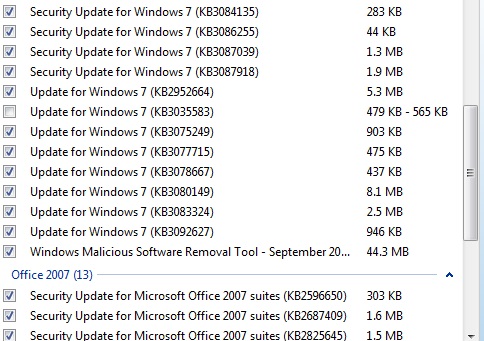
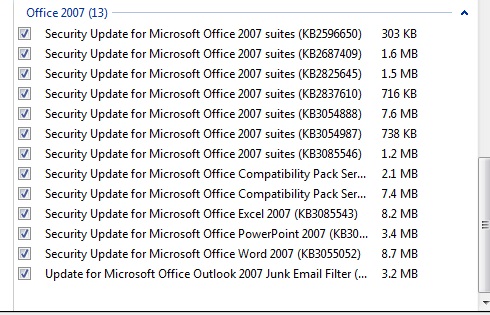
I get 42 important updates.. I'm not sure which to go ahead & install.. and which not to.. Long gone are the days, when I could casually set auto updates & only check in to troubleshoot if there any probs with the upgrades.. Here are my screenshots (any tips folks on what to avoid & what not to ? I don't need w10 & would b happy if no Telemetry as well :p ):

txXHnHU.jpg


UAVHyRD.jpg


qAJmjlL.jpg
 

My Computer My Computer

At a glance

windows 7 ultimate x32T6670,8GB DDR3
Computer type
Laptop
Computer Manufacturer/Model Number
DELL
OS
windows 7 ultimate x32
CPU
T6670,
Motherboard
INTEL CORE 2 DUO, 0TFXK9
Memory
8GB DDR3
Screen Resolution
1366*768
Hard Drives
512GB SSD
Mouse
Logitech M165 w/sidebuttons
Internet Speed
30-150 mb/s
Antivirus
Bitdefender
Browser
FF, Opera GX

My Computer My Computer

At a glance

Win-7-Pro64bit 7-H-Prem-64biti7-5930K 2nd i9-9940x both water blocked VRM'...Trident-z 3200C14 2nd Trident-z 3600C16EVGA 1080ti ftw3 2nd Titan Xp both water blocked
Computer type
PC/Desktop
Computer Manufacturer/Model Number
Custom assembled by me :}
OS
Win-7-Pro64bit 7-H-Prem-64bit
CPU
i7-5930K 2nd i9-9940x both water blocked VRM's too
Motherboard
ASUS SABERTOOTH X99 2nd ASUS x299 Apex
Memory
Trident-z 3200C14 2nd Trident-z 3600C16
Graphics Card(s)
EVGA 1080ti ftw3 2nd Titan Xp both water blocked
Sound Card
Built-in Realtek
Monitor(s) Displays
1-AOC G2460PG 24"G-Sync 144Hz/ 2nd 1-ASUS VG248QE 24" 144Hz
Screen Resolution
1920 x 1080 144Hz
Hard Drives
2-Samsung M.2 Evo & Evo Plus
2-Samsung 850 EVO 500GB SSD's/ 3-2.5 W.D. Black 1tb-&3-1tb/3-3.5 WD Black 1tb hdd's
PSU
EVGA SuperNOVA 1000-P2 2nd 1200-P2
Case
2-Corsair Obsidian Series 450D Black ATX Mid Tower
Cooling
Custom water loops
Keyboard
Logitech G710+/ 2nd Logitech G910
Mouse
2-RedDragon M901 Perdition 16400 dpi Gaming mouse = wired
Internet Speed
Comcast Ping 19ms 89.31mbps download speed 6.12mbps upload
Antivirus
Malwarebytes Pro/ Superantispyware Pro
Browser
FireFox & Pale moon
Other Info
2nd ASUS X299 Apex/Intel i9-9940x with Custom water loop/7H-Prem-x64/Corsair 450D case/Ram Trident-z 3600C16 4x8gb / Samsung970Evo plus 500gb SSD/Dual ssd EZ swap evo/PSU EVGA SuperNova 1200w-P2 80+Platinum/GPU Titan Xp /8-ML-140 on push-pull on 2-280GTX rads
I get 42 important updates.. I'm not sure which to go ahead & install.. and which not to.. Long gone are the days, when I could casually set auto updates & only check in to troubleshoot if there any probs with the upgrades.. Here are my screenshots (any tips folks on what to avoid & what not to ? I don't need w10 & would b happy if no Telemetry as well :p ):

I would install all the security updates related first, then the .net Framework ones, Office.

And will check one by one all the others showed as updates and install by lot of two or three all the ones not related to Windows 10, those you'll have to decide to have them or not by your entire side.

Then install the MSRT when all is complete.
 

My Computer My Computer

At a glance

Windows 7 Professional SP1 - x64 [Non-UEFI Boot]Ivy Bridge Core i5 3570K (Delidded)G.Skill "Ares" DDR3 PC3-12800 - 1600MHz (16Gb)Asus Dual-RX480-O4G
Computer type
PC/Desktop
Computer Manufacturer/Model Number
Custom Build
OS
Windows 7 Professional SP1 - x64 [Non-UEFI Boot]
CPU
Ivy Bridge Core i5 3570K (Delidded)
Motherboard
Asus P8Z77-V LE PLUS
Memory
G.Skill "Ares" DDR3 PC3-12800 - 1600MHz (16Gb)
Graphics Card(s)
Asus Dual-RX480-O4G
Sound Card
Creative Sound Blaster Z w/5.1 sound system
Monitor(s) Displays
Asus IPS 23"
Screen Resolution
16/9
Hard Drives
Internal:
500Go Sata 6Gb/s (x2)
500Go Sata 3Gb/s (x2)
SSD 60Go Sata 6Gb/s
PSU
In Win C 900W Series 80+ Platinum
Case
Thermaltake Chaser A71
Cooling
Custom Water Cooling Loop
Keyboard
Cooler Master QuickFire XTi
Mouse
Razer Imperator 2012 (4G)
Antivirus
MSE
Browser
IE 11.0.xxx Rtm
Other Info
"Raid0" with Intel Smart Response Technology (HDD/SSD)
On my Windows 7 desktop I got 24 but of course some were for Office as well. Hubby had 24 on one machine and 25 on the other, a desktop and laptop both running 7.

Just had a look and there were 9 for this 10 notebook.
 

My Computer My Computer

At a glance

Windows 10 64bit/Windows 10 64bit/Windows 10 ...Intel Pentium J3710 @ 60GHz/Intel B820,1.7GHz...8.00GB DDR3 @ 1599MHz/8GB 2 x 4GB DDR3/8.00GB...Intel HD Graphics/Intel/512MB ATI AMD Radeon ...
Computer type
PC/Desktop
Computer Manufacturer/Model Number
Acer Aspire XC-704 x64 bit/ Asus K55A Notebook PC/HP Envy x360 Convertible 15-bq0xx
OS
Windows 10 64bit/Windows 10 64bit/Windows 10 64bit
CPU
Intel Pentium J3710 @ 60GHz/Intel B820,1.7GHz/AMD A9 Radeon
Motherboard
Acer Aspire XC-704 (SOCKET 0)/Asus/HP 8312 (Socket FP4)
Memory
8.00GB DDR3 @ 1599MHz/8GB 2 x 4GB DDR3/8.00GB Dual-Channel
Graphics Card(s)
Intel HD Graphics/Intel/512MB ATI AMD Radeon R5 Graphics (HP
Sound Card
Realtek High Definition Audio/Onboard/AMD High Definition Au
Monitor(s) Displays
Acer LCD K222HQL /Asus 15.6/Generic PnP Monitor (1920x1080@6
Screen Resolution
1920x1080@59Hz/1366 x 768/1920x1080@60Hz
Hard Drives
1863GBWesternn Digital WDC/Asus/119GB SanDisk SD8SN8U-128G-1006 (SSD)
931GB Hitachi HGST HTS721010A9E630 (SATA)
Keyboard
Microsoft Natural Ergonomic Keyboard 4000 (UK)/Inbuilt/Inbui
Mouse
Microsoft Optical Wheel Mouse/Same plus Touchpad/Same + Pad
Internet Speed
Infinity 2 up to 76 Mbps
Antivirus
MSE/MSE/MSE and all 3 have MalwareBytes Premium
Browser
Edge, Firefox/Edge, Firefox/Edge, Firefox, Chrome
Other Info
Seagate Expansion 500GB External Desktop Drive
Seagate Expansion Portable Drives 500GB and 1TB
Epson XP-332 Wireless Printer
Yes I to remember when we could trust M/S Windows 7 Updates.
Now like you I research ever one of them and still at times can't find complete information on some of them.

If I can't find any information on a patch, then I don't apply it.

If it's important enough for them to include in their updates, then it's important enough for them to include a description of what it is/does.
 

My Computer My Computer

At a glance

Win 7 32 Home Premium, Win 7 64 Pro, Win 8.1,...Intel Core 2 Duo 2.93GHzNot much with my ADHDATI Radeon HD 4350
Computer type
PC/Desktop
Computer Manufacturer/Model Number
Dell Hell oh Well
OS
Win 7 32 Home Premium, Win 7 64 Pro, Win 8.1, Win 10
CPU
Intel Core 2 Duo 2.93GHz
Memory
Not much with my ADHD
Graphics Card(s)
ATI Radeon HD 4350
Monitor(s) Displays
24" HDTV/Monitor
Screen Resolution
Blurry after a Scotch or 2
Hard Drives
1 HDD 250 GB, 1 HDD 1 TB, 3 - 1 TB Externals
Case
Don't get on my case...man :D
Cooling
I have an Air Conditioner & Diet Pepsi
Keyboard
Saitek Cyborg
Mouse
10 yr old MS optical mouse that still works
Internet Speed
Never fast enough
Antivirus
Various
Browser
Various
Windows update grudgingly gave me updates for windows 7 pro 64-bit.

Windows updates hangs at "checking for updates" in windows 7 pro 32-bit.
Haven't been able to get any updates for weeks now. Tried a whole bunch of
things of which nothing worked: Mr Fixit, sfc, changed to get updates but let me decide if
I want to install them.

This is a fresh install of windows 7 pro 32-bit. This is a 7 year old computer and I have
been doing updates on it for years......
 

My Computer My Computer

At a glance

windows 7 Pro 64 bitmini tower4gnvidia geforce gt730 graphics card
Computer type
PC/Desktop
Computer Manufacturer/Model Number
had the system built by PCsandParts
OS
windows 7 Pro 64 bit
CPU
mini tower
Motherboard
h110m-k (lga1151)
Memory
4g
Graphics Card(s)
nvidia geforce gt730 graphics card
Sound Card
high definition audio device
Monitor(s) Displays
19" dell ultra sharp
Screen Resolution
1280 x 800
Hard Drives
Kingston SSD
PSU
?
Case
?
Cooling
?
Keyboard
standard ps/2 keyboard
Mouse
ps/2 compatible optical
Internet Speed
fiber optics
Antivirus
ESET Smart Security
Browser
IE11
Other Info
no Wifi. Bose speakers, optical drive tsstcorp dvd+-RW
Back
Top