Solved Changed location of 'TMP' and 'Temp' in Variables but no Temp files?

BobKoz

New member
Local time
2:44 PM
Messages
31
I know there are posts against and posts for this tweak for relocating the TMP and Temp files in Variables, but more posts say to relocate it OFF an SSD drive.

My Computer is fairly new running OS Windows 7 Premium 64Bit on a 220 gig SSD with 1 tet disk drive for data.

I created a folder on my D:\ [Disk] drive called D:\Windows Temp Files - then went to Advanced system Variables and edited the locations of both my TMP and Temp... Rebooted right away and now it's been over a month but nothing is vissable in the new folder?? [all Hidden and System files are enabled in view] My computer, updates, etc., etc., are running fine..

I checked the new Variable settings I edited and they are both still there: D:\Windows Temp Files
If I remember correctly I think the default use to be: %user profile%\appdata\local\temp < but I'm not possitive!

Can someone answer a quick question,
Thanks,
Bobkoz

Shouldn't I be seeing them in the new folder?
 
Last edited:

My Computer My Computer

At a glance

Windows 7 Premium 64 BitIntel Core i7 4790K 4.0GHz Quad Core 8MBKingston 16GB (2X8GB) DDR3-1600Gigabyte Radeon HD 260X 2GB PCI-Express
Computer type
PC/Desktop
Computer Manufacturer/Model Number
Intel Generic
OS
Windows 7 Premium 64 Bit
CPU
Intel Core i7 4790K 4.0GHz Quad Core 8MB
Motherboard
ASUS Intel H97-Pro Gaming ATX
Memory
Kingston 16GB (2X8GB) DDR3-1600
Graphics Card(s)
Gigabyte Radeon HD 260X 2GB PCI-Express
Hard Drives
Samsung 850 EVO Series 250GB SSD (Drive C:\)
1TB Western Digital Black 7200RPM SATA-3 6 Gbs 64MB Cache (Drive D:\ & E:\)
Antivirus
Trend Micro Maximum Antivirus, Malwarebytes, CCleaner
Browser
FireFox
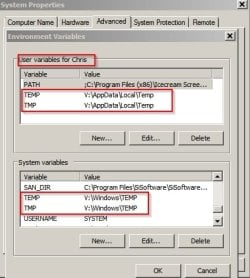
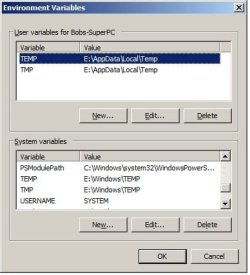
Here's my temp file locations if it helps. Note: Folder structure retained.

Variables.jpg

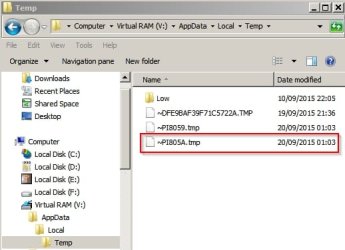
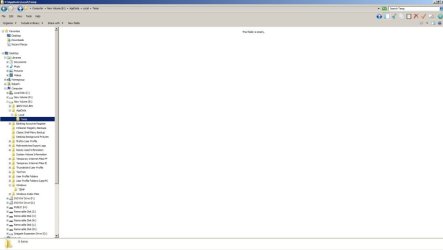
There are no files to display unless they are being written.

Example:

Open one image in an image viewer and a temp file is created.
Variables 2.jpg

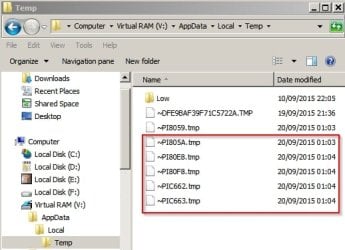
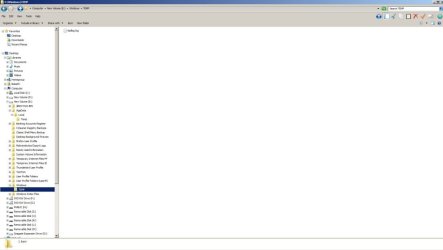
Open a few more images and leave them open - more temp files are created.
Variables 3.jpg

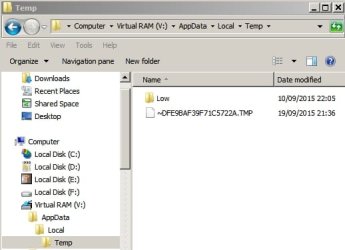
Close all images and temp files are deleted.
Variables 4.jpg
 

My Computer My Computer

At a glance

Microsoft Windows 7 Home Premium 64-bit 7601 ...AMD C-60 APU with Radeon(tm) HD Graphics4.00 GBAMD Radeon HD 6290 Graphics
Computer type
Laptop
Computer Manufacturer/Model Number
ASUS
OS
Microsoft Windows 7 Home Premium 64-bit 7601 Multiprocessor Free Service Pack 1
CPU
AMD C-60 APU with Radeon(tm) HD Graphics
Motherboard
ASUSTeK COMPUTER INC. X501U
Memory
4.00 GB
Graphics Card(s)
AMD Radeon HD 6290 Graphics
Sound Card
(1) AMD High Definition Audio Device (2) Realtek High Defi
Screen Resolution
1366 x 768 x 32 bits (4294967296 colors) @ 60 Hz
Hard Drives
Hitachi HTS545050A7E380 SATA Disk Device
Antivirus
Comodo CIS & FW, SecureAplus App Whitelisting, Threatfire
Browser
Cyberfox 64bit, Opera 64bit, Airfox
Other Info
Spy-The-Spy, HitmanPro.Alert, Norton Connect Safe, MJRegWatcher, BitDefender TrafficLight, Voodoo Shield, Zemana AntiMalware
Hello Callender,

Sorry to say but I have no idea what your talking about?

You say: " Here's my temp file locations if it helps. Note: Folder structure retained.

You didn't type any locations, you only typed "Image Files" - and of course I know how to display image files... But there are never any files in my new TMP or Temp folder E:\Windows Temp Files

OK Tricky -- Now I see you edited/changed your post

I changed my User Variable
But not my System Variable

1) So your telling me after over a month I check every day Windows 7 might not generate any User TMP or Temp Files?
2) And your saying the files it generates are small image files?
3) May I ask why you placed the new locations to a Virtual Drive?


Thanks,
 

My Computer My Computer

At a glance

Windows 7 Premium 64 BitIntel Core i7 4790K 4.0GHz Quad Core 8MBKingston 16GB (2X8GB) DDR3-1600Gigabyte Radeon HD 260X 2GB PCI-Express
Computer type
PC/Desktop
Computer Manufacturer/Model Number
Intel Generic
OS
Windows 7 Premium 64 Bit
CPU
Intel Core i7 4790K 4.0GHz Quad Core 8MB
Motherboard
ASUS Intel H97-Pro Gaming ATX
Memory
Kingston 16GB (2X8GB) DDR3-1600
Graphics Card(s)
Gigabyte Radeon HD 260X 2GB PCI-Express
Hard Drives
Samsung 850 EVO Series 250GB SSD (Drive C:\)
1TB Western Digital Black 7200RPM SATA-3 6 Gbs 64MB Cache (Drive D:\ & E:\)
Antivirus
Trend Micro Maximum Antivirus, Malwarebytes, CCleaner
Browser
FireFox

My Computer My Computer

At a glance

W7 Pro SP1 64biti78GBIntel HD Graphics
Computer type
Laptop
Computer Manufacturer/Model Number
Employer provided Dell Latitude
OS
W7 Pro SP1 64bit
CPU
i7
Memory
8GB
Graphics Card(s)
Intel HD Graphics
Hard Drives
crappy SSD
Antivirus
Employer mandated Symantec Endpoint Protection
Browser
Pale Moon 64bit, IE11 64bit & Chrome 64bit
Hello Callender,

Sorry to say but I have no idea what your talking about?

You say: " Here's my temp file locations if it helps. Note: Folder structure retained.

You didn't type any locations, you only typed "Image Files" - and of course I know how to display image files... But there are never any files in my new TMP or Temp folder E:\Windows Temp Files

OK Tricky -- Now I see you edited/changed your post

I changed my User Variable
But not my System Variable

Folder structure retained just means that I created folders like this:

V:\AppData\Local\Temp
V:\Windows\TEMP

The original standard locations are:

User Variables
TEMP %USERPROFILE%\AppData\Local\Temp
TMP %USERPROFILE%\AppData\Local\Temp


System Variables
TEMP C:\Windows\TEMP
TMP C:\Windows\TEMP

So for your original user variables you have changed

TEMP %USERPROFILE%\AppData\Local\Temp
TMP %USERPROFILE%\AppData\Local\Temp

to

E:\Windows Temp Files

Well it might work but in my opinion it would have been better to use:

TEMP E:\Windows\TEMP
TMP E:\Windows\TEMP

1) So your telling me after over a month I check every day Windows 7 might not generate any User TMP or Temp Files?
2) And your saying the files it generates are small image files?
3) May I ask why you placed the new locations to a Virtual Drive?


Thanks,

1) Most temp files usually only exist on a temporary basis (when in use) and then vanish.
2) No I'm using viewing an image as an example. When an image is viewed a temp file is created. When the image is closed the temp file disappears so you will not see anything in the temp files folder if you check later.
3) Tricky. It's a RAMdisk used for performance reasons (faster read/ write speeds) but I suggest that you don't need such a thing.

Please post a screenshot as requested by Usernameissues.
 

My Computer My Computer

At a glance

Microsoft Windows 7 Home Premium 64-bit 7601 ...AMD C-60 APU with Radeon(tm) HD Graphics4.00 GBAMD Radeon HD 6290 Graphics
Computer type
Laptop
Computer Manufacturer/Model Number
ASUS
OS
Microsoft Windows 7 Home Premium 64-bit 7601 Multiprocessor Free Service Pack 1
CPU
AMD C-60 APU with Radeon(tm) HD Graphics
Motherboard
ASUSTeK COMPUTER INC. X501U
Memory
4.00 GB
Graphics Card(s)
AMD Radeon HD 6290 Graphics
Sound Card
(1) AMD High Definition Audio Device (2) Realtek High Defi
Screen Resolution
1366 x 768 x 32 bits (4294967296 colors) @ 60 Hz
Hard Drives
Hitachi HTS545050A7E380 SATA Disk Device
Antivirus
Comodo CIS & FW, SecureAplus App Whitelisting, Threatfire
Browser
Cyberfox 64bit, Opera 64bit, Airfox
Other Info
Spy-The-Spy, HitmanPro.Alert, Norton Connect Safe, MJRegWatcher, BitDefender TrafficLight, Voodoo Shield, Zemana AntiMalware
From Post#3
There are never any files in my new TMP or Temp folder E:\Windows Temp Files


From Post #1
I created a folder on my D:\ [Disk] drive called D:\Windows Temp Files

So which is it?
D:\Windows Temp Files or E:\Windows Temp Files
 

My Computer My Computer

At a glance

Microsoft Windows 7 Home Premium 64-bit 7601 ...AMD C-60 APU with Radeon(tm) HD Graphics4.00 GBAMD Radeon HD 6290 Graphics
Computer type
Laptop
Computer Manufacturer/Model Number
ASUS
OS
Microsoft Windows 7 Home Premium 64-bit 7601 Multiprocessor Free Service Pack 1
CPU
AMD C-60 APU with Radeon(tm) HD Graphics
Motherboard
ASUSTeK COMPUTER INC. X501U
Memory
4.00 GB
Graphics Card(s)
AMD Radeon HD 6290 Graphics
Sound Card
(1) AMD High Definition Audio Device (2) Realtek High Defi
Screen Resolution
1366 x 768 x 32 bits (4294967296 colors) @ 60 Hz
Hard Drives
Hitachi HTS545050A7E380 SATA Disk Device
Antivirus
Comodo CIS & FW, SecureAplus App Whitelisting, Threatfire
Browser
Cyberfox 64bit, Opera 64bit, Airfox
Other Info
Spy-The-Spy, HitmanPro.Alert, Norton Connect Safe, MJRegWatcher, BitDefender TrafficLight, Voodoo Shield, Zemana AntiMalware
My image software won't do screen capture of system screens, so I typed it out:
Sorry about the confusion with D: and E: drives, they all should be E:\

I decided to keep the same file structure (like you did) as the default path, so I created new folders on my E:\ drive, then edited the Variables for User and System...

Here is the old and new:

OLD > The original default locations are:
User Variables
TEMP %USERPROFILE%\AppData\Local\Temp
TMP %USERPROFILE%\AppData\Local\Temp

NEW > Modified locations:
TEMP E:\AppData\Local\Temp
TMP E:\AppData\Local\Temp

OLD > The original default locations are:
System Variables
%SystemRoot%\TEMP
%SystemRoot%\TEMP

NEW > Modified locations:
TEMP E:\Windows\TEMP
TMP E:\Windows\TEMP


If the above is correct I'll mark this thread as Solved,.
Thanks,
 

My Computer My Computer

At a glance

Windows 7 Premium 64 BitIntel Core i7 4790K 4.0GHz Quad Core 8MBKingston 16GB (2X8GB) DDR3-1600Gigabyte Radeon HD 260X 2GB PCI-Express
Computer type
PC/Desktop
Computer Manufacturer/Model Number
Intel Generic
OS
Windows 7 Premium 64 Bit
CPU
Intel Core i7 4790K 4.0GHz Quad Core 8MB
Motherboard
ASUS Intel H97-Pro Gaming ATX
Memory
Kingston 16GB (2X8GB) DDR3-1600
Graphics Card(s)
Gigabyte Radeon HD 260X 2GB PCI-Express
Hard Drives
Samsung 850 EVO Series 250GB SSD (Drive C:\)
1TB Western Digital Black 7200RPM SATA-3 6 Gbs 64MB Cache (Drive D:\ & E:\)
Antivirus
Trend Micro Maximum Antivirus, Malwarebytes, CCleaner
Browser
FireFox
My image software won't do screen capture of system screens, so I typed it out:
I'll let others comment about the correctness of your changes. As far as getting screenshot of any window, just use the native Windows Print Screen function (e.g. use the Prnt Scrn key*).

If you don't want the entire desktop in the screenshot, then:
While the window of interest is if focus (foreground or highlighted), press and hold the Alt key, press the Prnt Scrn key*, release both.

*on laptops, you might need to use a function key too (Fn key).

Doing those steps should put the screenshot into the Windows clipboard. You can then paste that into MS Paint, save the file and attach it to a post. See this post on how to setup Paint: http://www.sevenforums.com/system-s...en-after-firewall-disabled-2.html#post2678725


That said, there is no need for a screenshot now. What you typed out was fine.


Please test the success of your changes by opening an image file. If your system uses the native Windows Photo Viewer, then you should see temp files in the user temp folder.
 

My Computer My Computer

At a glance

W7 Pro SP1 64biti78GBIntel HD Graphics
Computer type
Laptop
Computer Manufacturer/Model Number
Employer provided Dell Latitude
OS
W7 Pro SP1 64bit
CPU
i7
Memory
8GB
Graphics Card(s)
Intel HD Graphics
Hard Drives
crappy SSD
Antivirus
Employer mandated Symantec Endpoint Protection
Browser
Pale Moon 64bit, IE11 64bit & Chrome 64bit
Looks okay to me. Like Usernameissues suggested look for temp files when opening an image.
 

My Computer My Computer

At a glance

Microsoft Windows 7 Home Premium 64-bit 7601 ...AMD C-60 APU with Radeon(tm) HD Graphics4.00 GBAMD Radeon HD 6290 Graphics
Computer type
Laptop
Computer Manufacturer/Model Number
ASUS
OS
Microsoft Windows 7 Home Premium 64-bit 7601 Multiprocessor Free Service Pack 1
CPU
AMD C-60 APU with Radeon(tm) HD Graphics
Motherboard
ASUSTeK COMPUTER INC. X501U
Memory
4.00 GB
Graphics Card(s)
AMD Radeon HD 6290 Graphics
Sound Card
(1) AMD High Definition Audio Device (2) Realtek High Defi
Screen Resolution
1366 x 768 x 32 bits (4294967296 colors) @ 60 Hz
Hard Drives
Hitachi HTS545050A7E380 SATA Disk Device
Antivirus
Comodo CIS & FW, SecureAplus App Whitelisting, Threatfire
Browser
Cyberfox 64bit, Opera 64bit, Airfox
Other Info
Spy-The-Spy, HitmanPro.Alert, Norton Connect Safe, MJRegWatcher, BitDefender TrafficLight, Voodoo Shield, Zemana AntiMalware
Hey guye, now that I enabled "Windows Photo Viewer" as you suggested using, my photo and image extensions open there by default - This just screwed up my own Photo imaging software. None of my image extensions open in my software as they did this morning, they only open in the good for nothing "Windows Photo Viewer".


i tried going to 'Default Programs" in my Control Panel but my software programs Coral Photo Impact and Photoshop are not listed?' I went to uncheck all the extensions for WPV and they are all greyed out - can't dissociate them.

I turned the dumb program on using a command execution and now I can't find anyway to turn it off or delete it......

Help Please - I need my photo editing software! Why would you want me to use it without asking if I already had image/photo viewers and editors?
 

My Computer My Computer

At a glance

Windows 7 Premium 64 BitIntel Core i7 4790K 4.0GHz Quad Core 8MBKingston 16GB (2X8GB) DDR3-1600Gigabyte Radeon HD 260X 2GB PCI-Express
Computer type
PC/Desktop
Computer Manufacturer/Model Number
Intel Generic
OS
Windows 7 Premium 64 Bit
CPU
Intel Core i7 4790K 4.0GHz Quad Core 8MB
Motherboard
ASUS Intel H97-Pro Gaming ATX
Memory
Kingston 16GB (2X8GB) DDR3-1600
Graphics Card(s)
Gigabyte Radeon HD 260X 2GB PCI-Express
Hard Drives
Samsung 850 EVO Series 250GB SSD (Drive C:\)
1TB Western Digital Black 7200RPM SATA-3 6 Gbs 64MB Cache (Drive D:\ & E:\)
Antivirus
Trend Micro Maximum Antivirus, Malwarebytes, CCleaner
Browser
FireFox
Before changing the file associations, could you at least tell us if the user temp files were shown while Windows Photo Viewer displayed a picture?
 

My Computer My Computer

At a glance

W7 Pro SP1 64biti78GBIntel HD Graphics
Computer type
Laptop
Computer Manufacturer/Model Number
Employer provided Dell Latitude
OS
W7 Pro SP1 64bit
CPU
i7
Memory
8GB
Graphics Card(s)
Intel HD Graphics
Hard Drives
crappy SSD
Antivirus
Employer mandated Symantec Endpoint Protection
Browser
Pale Moon 64bit, IE11 64bit & Chrome 64bit
To enable WPV I found the solution right here on SevenForums:
http://www.sevenforums.com/software/180378-where-windows-photo-viewer-default-location.html

Command line code was:
%SystemRoot%\System32\rundll32.exe "%ProgramFiles%\Windows Photo Viewer\PhotoViewer.dll", ImageView_Fullscreen %1

If I change Command to %0 - Will it turn Off?
%SystemRoot%\System32\rundll32.exe "%ProgramFiles%\Windows Photo Viewer\PhotoViewer.dll", ImageView_Fullscreen %0
 
Last edited:

My Computer My Computer

At a glance

Windows 7 Premium 64 BitIntel Core i7 4790K 4.0GHz Quad Core 8MBKingston 16GB (2X8GB) DDR3-1600Gigabyte Radeon HD 260X 2GB PCI-Express
Computer type
PC/Desktop
Computer Manufacturer/Model Number
Intel Generic
OS
Windows 7 Premium 64 Bit
CPU
Intel Core i7 4790K 4.0GHz Quad Core 8MB
Motherboard
ASUS Intel H97-Pro Gaming ATX
Memory
Kingston 16GB (2X8GB) DDR3-1600
Graphics Card(s)
Gigabyte Radeon HD 260X 2GB PCI-Express
Hard Drives
Samsung 850 EVO Series 250GB SSD (Drive C:\)
1TB Western Digital Black 7200RPM SATA-3 6 Gbs 64MB Cache (Drive D:\ & E:\)
Antivirus
Trend Micro Maximum Antivirus, Malwarebytes, CCleaner
Browser
FireFox
There are NO image files in either of the new folders, I rebooted twice - looked twice - a LOG file was created in the SYSTEM folder but as you can see the USER folder is empty...?

But I was told an image didn't get generated that often?

And they are redirected correctly..

Screen captures:
 

Attachments

  • Untitled.jpg
    Untitled.jpg
    27.8 KB · Views: 16
  • Untitled2.jpg
    Untitled2.jpg
    29.2 KB · Views: 3
  • Untitled3.jpg
    Untitled3.jpg
    29.2 KB · Views: 2

My Computer My Computer

At a glance

Windows 7 Premium 64 BitIntel Core i7 4790K 4.0GHz Quad Core 8MBKingston 16GB (2X8GB) DDR3-1600Gigabyte Radeon HD 260X 2GB PCI-Express
Computer type
PC/Desktop
Computer Manufacturer/Model Number
Intel Generic
OS
Windows 7 Premium 64 Bit
CPU
Intel Core i7 4790K 4.0GHz Quad Core 8MB
Motherboard
ASUS Intel H97-Pro Gaming ATX
Memory
Kingston 16GB (2X8GB) DDR3-1600
Graphics Card(s)
Gigabyte Radeon HD 260X 2GB PCI-Express
Hard Drives
Samsung 850 EVO Series 250GB SSD (Drive C:\)
1TB Western Digital Black 7200RPM SATA-3 6 Gbs 64MB Cache (Drive D:\ & E:\)
Antivirus
Trend Micro Maximum Antivirus, Malwarebytes, CCleaner
Browser
FireFox
Did you have a picture open via Windows Photo Viewer while you looked for TMP files?
 

My Computer My Computer

At a glance

W7 Pro SP1 64biti78GBIntel HD Graphics
Computer type
Laptop
Computer Manufacturer/Model Number
Employer provided Dell Latitude
OS
W7 Pro SP1 64bit
CPU
i7
Memory
8GB
Graphics Card(s)
Intel HD Graphics
Hard Drives
crappy SSD
Antivirus
Employer mandated Symantec Endpoint Protection
Browser
Pale Moon 64bit, IE11 64bit & Chrome 64bit
Of course I did, tried jpg and tiff.......

You can't open Windows Photo Viewer without clicking on an image file..

There is nothing to open in Programs, Accessories, Control Panel, and in my C: drive under both Program files for WPV there are no executable files, mainly DLLs
 

My Computer My Computer

At a glance

Windows 7 Premium 64 BitIntel Core i7 4790K 4.0GHz Quad Core 8MBKingston 16GB (2X8GB) DDR3-1600Gigabyte Radeon HD 260X 2GB PCI-Express
Computer type
PC/Desktop
Computer Manufacturer/Model Number
Intel Generic
OS
Windows 7 Premium 64 Bit
CPU
Intel Core i7 4790K 4.0GHz Quad Core 8MB
Motherboard
ASUS Intel H97-Pro Gaming ATX
Memory
Kingston 16GB (2X8GB) DDR3-1600
Graphics Card(s)
Gigabyte Radeon HD 260X 2GB PCI-Express
Hard Drives
Samsung 850 EVO Series 250GB SSD (Drive C:\)
1TB Western Digital Black 7200RPM SATA-3 6 Gbs 64MB Cache (Drive D:\ & E:\)
Antivirus
Trend Micro Maximum Antivirus, Malwarebytes, CCleaner
Browser
FireFox
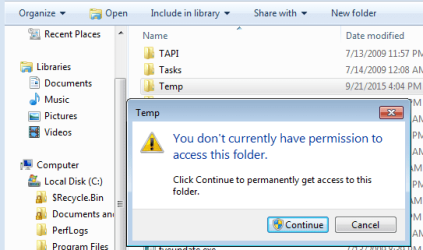
As far as I know, you cannot have Windows Photo Viewer showing a picture without it creating at least one temp file in the user's temp folder. As soon as you close Windows Photo Viewer, the temp file(s) should go away.

Like I said, I'll let others say that you have moved these folders correctly. There are security issues related to these temp folder. By default, an admin user is not even allowed to read the contents of the OS temp folder.

temp.PNG


As far as getting your other apps to be associated with images/pictures: you can use file association of re-install the apps.
 

My Computer My Computer

At a glance

W7 Pro SP1 64biti78GBIntel HD Graphics
Computer type
Laptop
Computer Manufacturer/Model Number
Employer provided Dell Latitude
OS
W7 Pro SP1 64bit
CPU
i7
Memory
8GB
Graphics Card(s)
Intel HD Graphics
Hard Drives
crappy SSD
Antivirus
Employer mandated Symantec Endpoint Protection
Browser
Pale Moon 64bit, IE11 64bit & Chrome 64bit
Help Please - I need my photo editing software! Why would you want me to use it without asking if I already had image/photo viewers and editors?

Well the usual way of opening an image in your non default image viewing program is:

Right Click > Open With > Choose Program

Sorry for not even thinking that it might be an issue.

Tests on my machine show that a temp file is created if an image is opened in other image viewers like Photoshop, Irfanview and a few others that I have installed.

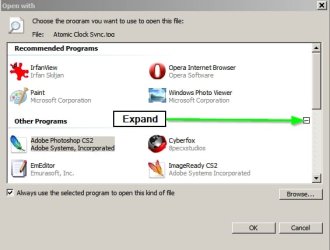
When you right click an image and choose "Open With" > "Choose Default Program" if you expand the [+] sign you should see other programs listed like Photoshop or Coral. If not you can browse for the executable and remember to tick "Always use this program to open this type of file"

Open with.jpg
 

My Computer My Computer

At a glance

Microsoft Windows 7 Home Premium 64-bit 7601 ...AMD C-60 APU with Radeon(tm) HD Graphics4.00 GBAMD Radeon HD 6290 Graphics
Computer type
Laptop
Computer Manufacturer/Model Number
ASUS
OS
Microsoft Windows 7 Home Premium 64-bit 7601 Multiprocessor Free Service Pack 1
CPU
AMD C-60 APU with Radeon(tm) HD Graphics
Motherboard
ASUSTeK COMPUTER INC. X501U
Memory
4.00 GB
Graphics Card(s)
AMD Radeon HD 6290 Graphics
Sound Card
(1) AMD High Definition Audio Device (2) Realtek High Defi
Screen Resolution
1366 x 768 x 32 bits (4294967296 colors) @ 60 Hz
Hard Drives
Hitachi HTS545050A7E380 SATA Disk Device
Antivirus
Comodo CIS & FW, SecureAplus App Whitelisting, Threatfire
Browser
Cyberfox 64bit, Opera 64bit, Airfox
Other Info
Spy-The-Spy, HitmanPro.Alert, Norton Connect Safe, MJRegWatcher, BitDefender TrafficLight, Voodoo Shield, Zemana AntiMalware
1)
Sorry but this makes No sense to me?
As far as getting your other apps to be associated with images/pictures: you can use file association of re-install the apps.

Are you telling me I have to right click on every file with different extensions and change the program that it's associated with? (there must be an easier way)

2)
Variable redirect :

I went to my Users Folder on the C:\ Drive and clicked on my Username > then went to \AppData\Local\Temp

While that was open I opened a second Windows Explorer, then click on an image which opened in Windows Photo Viewer

In the first Windows explorer located in Users\My Username\AppData\Local\Temp -I could see image files being created and after closing the WPV they vanished

> So the new Variable path I placed to the newly created E:\AppData\Local\Temp -Is not working, or should be placed somewhere else to change the users temp files..?
 

My Computer My Computer

At a glance

Windows 7 Premium 64 BitIntel Core i7 4790K 4.0GHz Quad Core 8MBKingston 16GB (2X8GB) DDR3-1600Gigabyte Radeon HD 260X 2GB PCI-Express
Computer type
PC/Desktop
Computer Manufacturer/Model Number
Intel Generic
OS
Windows 7 Premium 64 Bit
CPU
Intel Core i7 4790K 4.0GHz Quad Core 8MB
Motherboard
ASUS Intel H97-Pro Gaming ATX
Memory
Kingston 16GB (2X8GB) DDR3-1600
Graphics Card(s)
Gigabyte Radeon HD 260X 2GB PCI-Express
Hard Drives
Samsung 850 EVO Series 250GB SSD (Drive C:\)
1TB Western Digital Black 7200RPM SATA-3 6 Gbs 64MB Cache (Drive D:\ & E:\)
Antivirus
Trend Micro Maximum Antivirus, Malwarebytes, CCleaner
Browser
FireFox

My Computer My Computer

At a glance

Microsoft Windows 7 Home Premium 64-bit 7601 ...AMD C-60 APU with Radeon(tm) HD Graphics4.00 GBAMD Radeon HD 6290 Graphics
Computer type
Laptop
Computer Manufacturer/Model Number
ASUS
OS
Microsoft Windows 7 Home Premium 64-bit 7601 Multiprocessor Free Service Pack 1
CPU
AMD C-60 APU with Radeon(tm) HD Graphics
Motherboard
ASUSTeK COMPUTER INC. X501U
Memory
4.00 GB
Graphics Card(s)
AMD Radeon HD 6290 Graphics
Sound Card
(1) AMD High Definition Audio Device (2) Realtek High Defi
Screen Resolution
1366 x 768 x 32 bits (4294967296 colors) @ 60 Hz
Hard Drives
Hitachi HTS545050A7E380 SATA Disk Device
Antivirus
Comodo CIS & FW, SecureAplus App Whitelisting, Threatfire
Browser
Cyberfox 64bit, Opera 64bit, Airfox
Other Info
Spy-The-Spy, HitmanPro.Alert, Norton Connect Safe, MJRegWatcher, BitDefender TrafficLight, Voodoo Shield, Zemana AntiMalware
We posted at the same time;
I know how to change the default location by right clicking but what a pain in the ass until all my defaults are changed. I work with 20+ different file types.......

Please ask someone else to help with my user Temp location change?

Thanks!
 

My Computer My Computer

At a glance

Windows 7 Premium 64 BitIntel Core i7 4790K 4.0GHz Quad Core 8MBKingston 16GB (2X8GB) DDR3-1600Gigabyte Radeon HD 260X 2GB PCI-Express
Computer type
PC/Desktop
Computer Manufacturer/Model Number
Intel Generic
OS
Windows 7 Premium 64 Bit
CPU
Intel Core i7 4790K 4.0GHz Quad Core 8MB
Motherboard
ASUS Intel H97-Pro Gaming ATX
Memory
Kingston 16GB (2X8GB) DDR3-1600
Graphics Card(s)
Gigabyte Radeon HD 260X 2GB PCI-Express
Hard Drives
Samsung 850 EVO Series 250GB SSD (Drive C:\)
1TB Western Digital Black 7200RPM SATA-3 6 Gbs 64MB Cache (Drive D:\ & E:\)
Antivirus
Trend Micro Maximum Antivirus, Malwarebytes, CCleaner
Browser
FireFox
Back
Top