Solved Changed location of 'TMP' and 'Temp' in Variables but no Temp files?

1)

While that was open I opened a second Windows Explorer, then click on an image which opened in Windows Photo Viewer

In the first Windows explorer located in Users\My Username\AppData\Local\Temp -I could see image files being created and after closing the WPV they vanished

> So the new Variable path I placed to the newly created E:\AppData\Local\Temp -Is not working, or should be placed somewhere else to change the users temp files..?

I think that you have somehow changed environment variables for another user - possibly.

As far as file types association goes the other way is via Control Panel> Default Programs> Associate A File Type then sort by "Current Default" and scroll down to Windows Photo Viewer then change them that way.
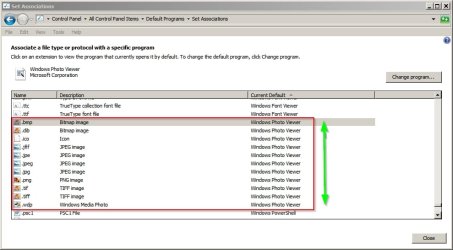

Set Associations.jpg
 

My Computer My Computer

At a glance

Microsoft Windows 7 Home Premium 64-bit 7601 ...AMD C-60 APU with Radeon(tm) HD Graphics4.00 GBAMD Radeon HD 6290 Graphics
Computer type
Laptop
Computer Manufacturer/Model Number
ASUS
OS
Microsoft Windows 7 Home Premium 64-bit 7601 Multiprocessor Free Service Pack 1
CPU
AMD C-60 APU with Radeon(tm) HD Graphics
Motherboard
ASUSTeK COMPUTER INC. X501U
Memory
4.00 GB
Graphics Card(s)
AMD Radeon HD 6290 Graphics
Sound Card
(1) AMD High Definition Audio Device (2) Realtek High Defi
Screen Resolution
1366 x 768 x 32 bits (4294967296 colors) @ 60 Hz
Hard Drives
Hitachi HTS545050A7E380 SATA Disk Device
Antivirus
Comodo CIS & FW, SecureAplus App Whitelisting, Threatfire
Browser
Cyberfox 64bit, Opera 64bit, Airfox
Other Info
Spy-The-Spy, HitmanPro.Alert, Norton Connect Safe, MJRegWatcher, BitDefender TrafficLight, Voodoo Shield, Zemana AntiMalware
Okay so anyone else want to help?
 

My Computer My Computer

At a glance

Microsoft Windows 7 Home Premium 64-bit 7601 ...AMD C-60 APU with Radeon(tm) HD Graphics4.00 GBAMD Radeon HD 6290 Graphics
Computer type
Laptop
Computer Manufacturer/Model Number
ASUS
OS
Microsoft Windows 7 Home Premium 64-bit 7601 Multiprocessor Free Service Pack 1
CPU
AMD C-60 APU with Radeon(tm) HD Graphics
Motherboard
ASUSTeK COMPUTER INC. X501U
Memory
4.00 GB
Graphics Card(s)
AMD Radeon HD 6290 Graphics
Sound Card
(1) AMD High Definition Audio Device (2) Realtek High Defi
Screen Resolution
1366 x 768 x 32 bits (4294967296 colors) @ 60 Hz
Hard Drives
Hitachi HTS545050A7E380 SATA Disk Device
Antivirus
Comodo CIS & FW, SecureAplus App Whitelisting, Threatfire
Browser
Cyberfox 64bit, Opera 64bit, Airfox
Other Info
Spy-The-Spy, HitmanPro.Alert, Norton Connect Safe, MJRegWatcher, BitDefender TrafficLight, Voodoo Shield, Zemana AntiMalware
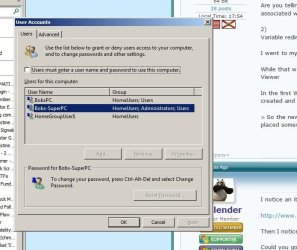
The only User Account I've had open and have been working on is : BobsPC

BobsPC is my default user Windows Boots into

---------------All Users
BobsPC
Bobs-SuperPC
Guest
And the hidden master administrator Windows User
 

Attachments

  • Untitled-6.jpg
    Untitled-6.jpg
    58.6 KB · Views: 11

My Computer My Computer

At a glance

Windows 7 Premium 64 BitIntel Core i7 4790K 4.0GHz Quad Core 8MBKingston 16GB (2X8GB) DDR3-1600Gigabyte Radeon HD 260X 2GB PCI-Express
Computer type
PC/Desktop
Computer Manufacturer/Model Number
Intel Generic
OS
Windows 7 Premium 64 Bit
CPU
Intel Core i7 4790K 4.0GHz Quad Core 8MB
Motherboard
ASUS Intel H97-Pro Gaming ATX
Memory
Kingston 16GB (2X8GB) DDR3-1600
Graphics Card(s)
Gigabyte Radeon HD 260X 2GB PCI-Express
Hard Drives
Samsung 850 EVO Series 250GB SSD (Drive C:\)
1TB Western Digital Black 7200RPM SATA-3 6 Gbs 64MB Cache (Drive D:\ & E:\)
Antivirus
Trend Micro Maximum Antivirus, Malwarebytes, CCleaner
Browser
FireFox
1)
Sorry but this makes No sense to me?
As far as getting your other apps to be associated with images/pictures: you can use file association of or re-install the apps.

Are you telling me I have to right click on every file with different extensions and change the program that it's associated with? (there must be an easier way)
Sorry, I typed "of" instead of "or".

The easier way is to re-install the apps that you want to use. The installation process should create the file associations for you .
 

My Computer My Computer

At a glance

W7 Pro SP1 64biti78GBIntel HD Graphics
Computer type
Laptop
Computer Manufacturer/Model Number
Employer provided Dell Latitude
OS
W7 Pro SP1 64bit
CPU
i7
Memory
8GB
Graphics Card(s)
Intel HD Graphics
Hard Drives
crappy SSD
Antivirus
Employer mandated Symantec Endpoint Protection
Browser
Pale Moon 64bit, IE11 64bit & Chrome 64bit

My Computer My Computer

At a glance

Microsoft Windows 7 Home Premium 64-bit 7601 ...AMD C-60 APU with Radeon(tm) HD Graphics4.00 GBAMD Radeon HD 6290 Graphics
Computer type
Laptop
Computer Manufacturer/Model Number
ASUS
OS
Microsoft Windows 7 Home Premium 64-bit 7601 Multiprocessor Free Service Pack 1
CPU
AMD C-60 APU with Radeon(tm) HD Graphics
Motherboard
ASUSTeK COMPUTER INC. X501U
Memory
4.00 GB
Graphics Card(s)
AMD Radeon HD 6290 Graphics
Sound Card
(1) AMD High Definition Audio Device (2) Realtek High Defi
Screen Resolution
1366 x 768 x 32 bits (4294967296 colors) @ 60 Hz
Hard Drives
Hitachi HTS545050A7E380 SATA Disk Device
Antivirus
Comodo CIS & FW, SecureAplus App Whitelisting, Threatfire
Browser
Cyberfox 64bit, Opera 64bit, Airfox
Other Info
Spy-The-Spy, HitmanPro.Alert, Norton Connect Safe, MJRegWatcher, BitDefender TrafficLight, Voodoo Shield, Zemana AntiMalware
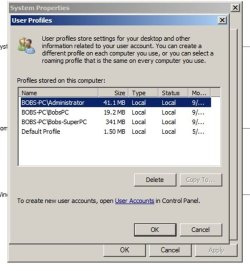
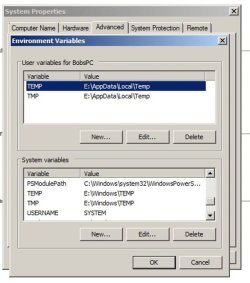
Callender, Thank you for pointing that out - all the times I was on that screen I never took notice that the Variable screen said Bobs-SuperPC even though I was logged into user account BobsPC.

I am new to Windows 7 and changing locations from an SSD to Disk type Hard Drive (I've used WinXP and Disk type drives for the past 10-11 years with only 1 username), I understand your probably burned out on my thread - I think I know the reason why I'm seeing the user Bobs-SuperPC variables instead on the user I'm logged in as (BobsPC). If you or anyone else can confirm what I've found out as being correct or incorrect I would appreciate it?

-------------- Lets start from the beginning when I set up my User Accounts & PC name:

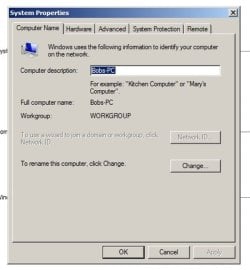
My PC name is: BOBS-PC

My Usernames:
BobsPC > This is my default user account Windows Boots into (Standard User)
Bobs-SuperPC > This is a secondary user with (Administration Rights)
Guest > Created on install - never used (never will be used)
And then there is the Master Administrator Account which I have Hidden (I renamed the user name for security, it is nothing like my other account names)

I think the problem is I was trying to change my Variable Temp locations in an account with only Standard Rights. Every time you go into "Advanced System Settings" any user will get a UAC (User account control) pop-up, and since the username I was logged into only had Standard Rights - (UAC requires Administrative permission), I received a UAC Pop-up from the Administrator "Bobs-SuperPC". And I think that actually brought up the "Advanced System Settings" for the Administrator account "Bobs-SuperPC", so the Temp User locations I added were for Bobs-SuperPC, not BobsPC.

To further try and solve this I changed the user settings on "BobsPC" to Administrator. I brought up Control Panel\Systems and Security\System, then clicked on "Advanced User Settings" - This time the UAC pop-up said "BobsPC". I proceeded to Variables and found my User Location settings were set to Default locations, I changed both Temp & TMP to my custom location. I opened "Windows Explorer" to the new location (still logged in as BobsPC) and it was already populated with files; I tested it further by opening an image file in my photo editing software and it appeared in my custom folder right away, after closing the image it disappeared.

If any of this is not correct please let me know, because then something is corrupted between my users and UAC. I've also added some images from my "Advanced User Settings" for review..
 

Attachments

  • 001.jpg
    001.jpg
    36.9 KB · Views: 5
  • 002.jpg
    002.jpg
    50.5 KB · Views: 5
  • 003.jpg
    003.jpg
    48.1 KB · Views: 5

My Computer My Computer

At a glance

Windows 7 Premium 64 BitIntel Core i7 4790K 4.0GHz Quad Core 8MBKingston 16GB (2X8GB) DDR3-1600Gigabyte Radeon HD 260X 2GB PCI-Express
Computer type
PC/Desktop
Computer Manufacturer/Model Number
Intel Generic
OS
Windows 7 Premium 64 Bit
CPU
Intel Core i7 4790K 4.0GHz Quad Core 8MB
Motherboard
ASUS Intel H97-Pro Gaming ATX
Memory
Kingston 16GB (2X8GB) DDR3-1600
Graphics Card(s)
Gigabyte Radeon HD 260X 2GB PCI-Express
Hard Drives
Samsung 850 EVO Series 250GB SSD (Drive C:\)
1TB Western Digital Black 7200RPM SATA-3 6 Gbs 64MB Cache (Drive D:\ & E:\)
Antivirus
Trend Micro Maximum Antivirus, Malwarebytes, CCleaner
Browser
FireFox
Yes - what you pointed out about the standard vs. admin account is correct. This is why I said, "Yes, the using a standard:user account is safer; however, it can be hard to do/understand certain actions, so it is probably not worth changing to a standard:user account" in this thread: http://www.sevenforums.com/general-...-pc-do-i-need-2-plus-guest-3.html#post3146564

Temporarily changing the standard account to admin is best at times.
 

My Computer My Computer

At a glance

W7 Pro SP1 64biti78GBIntel HD Graphics
Computer type
Laptop
Computer Manufacturer/Model Number
Employer provided Dell Latitude
OS
W7 Pro SP1 64bit
CPU
i7
Memory
8GB
Graphics Card(s)
Intel HD Graphics
Hard Drives
crappy SSD
Antivirus
Employer mandated Symantec Endpoint Protection
Browser
Pale Moon 64bit, IE11 64bit & Chrome 64bit
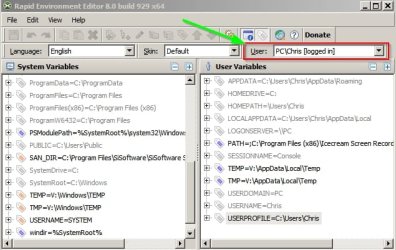
Well perhaps you could check out Rapid Environment Editor. It's portable so runs without installation and I tried it myself yesterday.

Screenshot:

Rapid Environment Editor 8.0 build 929 x64.jpg

Basically you can check user and system variables and set user variables for any user including the logged in user. It's probably the easy solution.

Going back to what Usernameissues suggested:

It might be best to change user variables as you desire but set system variables back to C:\Windows\Temp or %systemroot%\Temp for security reasons although personally I have my own reasons for moving system variables onto a RAMDisk.

:)
 

My Computer My Computer

At a glance

Microsoft Windows 7 Home Premium 64-bit 7601 ...AMD C-60 APU with Radeon(tm) HD Graphics4.00 GBAMD Radeon HD 6290 Graphics
Computer type
Laptop
Computer Manufacturer/Model Number
ASUS
OS
Microsoft Windows 7 Home Premium 64-bit 7601 Multiprocessor Free Service Pack 1
CPU
AMD C-60 APU with Radeon(tm) HD Graphics
Motherboard
ASUSTeK COMPUTER INC. X501U
Memory
4.00 GB
Graphics Card(s)
AMD Radeon HD 6290 Graphics
Sound Card
(1) AMD High Definition Audio Device (2) Realtek High Defi
Screen Resolution
1366 x 768 x 32 bits (4294967296 colors) @ 60 Hz
Hard Drives
Hitachi HTS545050A7E380 SATA Disk Device
Antivirus
Comodo CIS & FW, SecureAplus App Whitelisting, Threatfire
Browser
Cyberfox 64bit, Opera 64bit, Airfox
Other Info
Spy-The-Spy, HitmanPro.Alert, Norton Connect Safe, MJRegWatcher, BitDefender TrafficLight, Voodoo Shield, Zemana AntiMalware
Thanks for the confirmation UsernameIssues !

It didn't seem like that big of a change to need Admin Rights, and no one chimed into the thread to ask what rights my user had, so it didn't hit me until Callender noticed the wrong user name on one of my images. You'll bet I'll be switching it back and forth or leaving it as admin from now on..

Thanks again for confirming,
Bob
 

My Computer My Computer

At a glance

Windows 7 Premium 64 BitIntel Core i7 4790K 4.0GHz Quad Core 8MBKingston 16GB (2X8GB) DDR3-1600Gigabyte Radeon HD 260X 2GB PCI-Express
Computer type
PC/Desktop
Computer Manufacturer/Model Number
Intel Generic
OS
Windows 7 Premium 64 Bit
CPU
Intel Core i7 4790K 4.0GHz Quad Core 8MB
Motherboard
ASUS Intel H97-Pro Gaming ATX
Memory
Kingston 16GB (2X8GB) DDR3-1600
Graphics Card(s)
Gigabyte Radeon HD 260X 2GB PCI-Express
Hard Drives
Samsung 850 EVO Series 250GB SSD (Drive C:\)
1TB Western Digital Black 7200RPM SATA-3 6 Gbs 64MB Cache (Drive D:\ & E:\)
Antivirus
Trend Micro Maximum Antivirus, Malwarebytes, CCleaner
Browser
FireFox
Back
Top