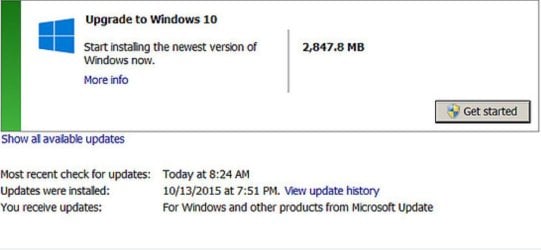
Windows 10 upgrades reportedly appearing as mandatory for some users

M$ is already getting the numbers they wanted via downloads
It will take time to get rest ;)
 

My Computer My Computer

At a glance

Win-7-Pro64bit 7-H-Prem-64biti7-5930K 2nd i9-9940x both water blocked VRM'...Trident-z 3200C14 2nd Trident-z 3600C16EVGA 1080ti ftw3 2nd Titan Xp both water blocked
Computer type
PC/Desktop
Computer Manufacturer/Model Number
Custom assembled by me :}
OS
Win-7-Pro64bit 7-H-Prem-64bit
CPU
i7-5930K 2nd i9-9940x both water blocked VRM's too
Motherboard
ASUS SABERTOOTH X99 2nd ASUS x299 Apex
Memory
Trident-z 3200C14 2nd Trident-z 3600C16
Graphics Card(s)
EVGA 1080ti ftw3 2nd Titan Xp both water blocked
Sound Card
Built-in Realtek
Monitor(s) Displays
1-AOC G2460PG 24"G-Sync 144Hz/ 2nd 1-ASUS VG248QE 24" 144Hz
Screen Resolution
1920 x 1080 144Hz
Hard Drives
2-Samsung M.2 Evo & Evo Plus
2-Samsung 850 EVO 500GB SSD's/ 3-2.5 W.D. Black 1tb-&3-1tb/3-3.5 WD Black 1tb hdd's
PSU
EVGA SuperNOVA 1000-P2 2nd 1200-P2
Case
2-Corsair Obsidian Series 450D Black ATX Mid Tower
Cooling
Custom water loops
Keyboard
Logitech G710+/ 2nd Logitech G910
Mouse
2-RedDragon M901 Perdition 16400 dpi Gaming mouse = wired
Internet Speed
Comcast Ping 19ms 89.31mbps download speed 6.12mbps upload
Antivirus
Malwarebytes Pro/ Superantispyware Pro
Browser
FireFox & Pale moon
Other Info
2nd ASUS X299 Apex/Intel i9-9940x with Custom water loop/7H-Prem-x64/Corsair 450D case/Ram Trident-z 3600C16 4x8gb / Samsung970Evo plus 500gb SSD/Dual ssd EZ swap evo/PSU EVGA SuperNova 1200w-P2 80+Platinum/GPU Titan Xp /8-ML-140 on push-pull on 2-280GTX rads
This all sounds good BUT I got this on 3 of my 4 Win7 computers today:(
 

Attachments

  • win10_NO.jpg
    win10_NO.jpg
    44.6 KB · Views: 1

My Computer My Computer

At a glance

Windows `10 Professional 64bitIntel i5 [email protected]Corsair Vengeance DDR3 1600 16GNVIDIA GeForce GT520 1GHz
Computer type
PC/Desktop
Computer Manufacturer/Model Number
Home Built
OS
Windows `10 Professional 64bit
CPU
Intel i5 [email protected]
Motherboard
MSI P67A-GD55 (MS7681)
Memory
Corsair Vengeance DDR3 1600 16G
Graphics Card(s)
NVIDIA GeForce GT520 1GHz
Sound Card
Realtek High Definition Audio
Monitor(s) Displays
Haans G 241
Screen Resolution
1600X1024
Hard Drives
Crucial MX100 256GB SSD
PSU
OCZ ModXStream Modular High Performance 500 Watt
Case
Rosewill Challenger-U3
Cooling
Just Fans
Keyboard
Kensington K64338B
Mouse
Microsoft wheel mouse 1.1A
Internet Speed
240.0 Mbps
Antivirus
ESET Internet Security
Browser
Firefox
Other Info
SuperAntiSpyware-Pro
Malwarebytes (Premium)
Kerish Doctor
Yep not sure if you can count a upload to a machine most of which is unaware of it happening as a download :)

Show all available updates link and Hide win-10's.
 

My Computer My Computer

At a glance

Win-7-Pro64bit 7-H-Prem-64biti7-5930K 2nd i9-9940x both water blocked VRM'...Trident-z 3200C14 2nd Trident-z 3600C16EVGA 1080ti ftw3 2nd Titan Xp both water blocked
Computer type
PC/Desktop
Computer Manufacturer/Model Number
Custom assembled by me :}
OS
Win-7-Pro64bit 7-H-Prem-64bit
CPU
i7-5930K 2nd i9-9940x both water blocked VRM's too
Motherboard
ASUS SABERTOOTH X99 2nd ASUS x299 Apex
Memory
Trident-z 3200C14 2nd Trident-z 3600C16
Graphics Card(s)
EVGA 1080ti ftw3 2nd Titan Xp both water blocked
Sound Card
Built-in Realtek
Monitor(s) Displays
1-AOC G2460PG 24"G-Sync 144Hz/ 2nd 1-ASUS VG248QE 24" 144Hz
Screen Resolution
1920 x 1080 144Hz
Hard Drives
2-Samsung M.2 Evo & Evo Plus
2-Samsung 850 EVO 500GB SSD's/ 3-2.5 W.D. Black 1tb-&3-1tb/3-3.5 WD Black 1tb hdd's
PSU
EVGA SuperNOVA 1000-P2 2nd 1200-P2
Case
2-Corsair Obsidian Series 450D Black ATX Mid Tower
Cooling
Custom water loops
Keyboard
Logitech G710+/ 2nd Logitech G910
Mouse
2-RedDragon M901 Perdition 16400 dpi Gaming mouse = wired
Internet Speed
Comcast Ping 19ms 89.31mbps download speed 6.12mbps upload
Antivirus
Malwarebytes Pro/ Superantispyware Pro
Browser
FireFox & Pale moon
Other Info
2nd ASUS X299 Apex/Intel i9-9940x with Custom water loop/7H-Prem-x64/Corsair 450D case/Ram Trident-z 3600C16 4x8gb / Samsung970Evo plus 500gb SSD/Dual ssd EZ swap evo/PSU EVGA SuperNova 1200w-P2 80+Platinum/GPU Titan Xp /8-ML-140 on push-pull on 2-280GTX rads
At boot up this morning, my PC received notice that there were 8 important updates to be downloaded and installed. None were W10 that I could see and a check of the machine's update settings remained unchanged (notify me of the updates, but let me choose which to download and install). Again, I have all known W10 upgrade prep updates hidden.
 

My Computer My Computer

At a glance

Windows 7 Home Premium 64 bit SP1i5-2320 @3.00 GHz6GBNVIDIA GeForce 7300 LE
Computer type
PC/Desktop
Computer Manufacturer/Model Number
ASUS
OS
Windows 7 Home Premium 64 bit SP1
CPU
i5-2320 @3.00 GHz
Memory
6GB
Graphics Card(s)
NVIDIA GeForce 7300 LE
Monitor(s) Displays
Acer S200HQL 19.5 LED
Screen Resolution
1280 x 800 (1900 x 900 max)
Hard Drives
Drive 1: 1 TB SATA internal: C drive
Drive 2: 250 GB SATA internal: User Data Backup
Drive 3: 500 GB SATA USB: Full System Backup 1, Father
Drive 4: 500 GB SATA USB: Full System Backup 2, Son
Drive 5: 40 GB IDE USB: Kindle, ASUS Tabl
Keyboard
ASUS KB34211
Mouse
Logitech m325 cordless
Internet Speed
27Mb down, 3 Mb up cable modem w/Netgear R6400 WiFi
Antivirus
NIS, Spybot S&D, CCleaner, Malwarebytes, MSERT, MRT
Browser
FF v44.0.2;IE11 v11.0.9600.18015,uv11.0.23;Chrome v44.0.2403
Other Info
FF has AdBlockPlus and Ghostery plugins,
I know it's hard to believe that most users of computers don't read this forum or forums like this one. They really don't know what is going on and I believe they don't want to know.

They use auto Updates for everything. The system accepts every update of everything and they are happy campers until now.

Auto Updates and lack of knowledge of the user is exactly what Microsoft is depending on to push W-10.
Don't forget that for years "experts" have been telling ordinary users to set Windows Update to "Automatic".
 

My Computer My Computer

At a glance

W7 Ultimate SP1, LM19.2 MATE, W10 Home 1703, ...AMD Phenom II x6 1100T, 3.3 GHz12GB DDR3 1333 G-Skill (4GB x 2), G-Skill (2G...NVIDIA GeForce GTX 660
Computer type
PC/Desktop
Computer Manufacturer/Model Number
n/a
OS
W7 Ultimate SP1, LM19.2 MATE, W10 Home 1703, W10 Pro 1703 VM, #All 64 bit
CPU
AMD Phenom II x6 1100T, 3.3 GHz
Motherboard
ASUS M4A88T-M/USB3 (AM3)
Memory
12GB DDR3 1333 G-Skill (4GB x 2), G-Skill (2GB x 2)
Graphics Card(s)
NVIDIA GeForce GTX 660
Sound Card
Realtek?
Monitor(s) Displays
Samsung S23B350
Screen Resolution
1920x1080
Hard Drives
WD Green 2TB (SATA), WD Green 3TB (SATA), WD Blue 4TB (SATA), WD Blue 6TB (SATA)
PSU
Cooler Master
Case
Antec GX300 Tower
Cooling
3x Antec TRICOOL 120mm Fans
Mouse
Wired Optical
Internet Speed
DSL
Antivirus
Avast
Browser
Pale Moon (64 bit)
Other Info
2018-12-27 Upgraded HDDs
2015-12-10 Upgraded case, graphics card, storage
2015-08-15 Upgraded motherboard & RAM
2015-07-15 Upgraded LM17.1 to LM17.2
You are correct lehnerus2000.

Auto Updates have been recommended for years by many.
I have been preaching Manual Updates for years but I'm no expert.

In my opinion it's more important today to do manual updates than it's ever been. With all the games Microsoft is playing with Updates.
It doesn't take long to do the Manual Updates if one keep up with them.

I check for Windows 7 Updates a couple times a day and all my security programs are checked for updates 3 to 4 times a day. Firefox and Flash Player are checked once a day. Programs I use seldom are check for updates when I open them.

Believe me it's not hard to do and if you keep up on the updates it doesn't take long.
I'm just a no diploma low life home user and I can do it.
Some how people just have to get off their duff and take charge of their computers.
Microsoft would hate to see that happen. In my opinion most users are to damn lazy to do it.
I and Microsoft know that people are not going to take charge of their own computer and they will keep getting a bunch of junk and come complaining.
 

My Computer My Computer

At a glance

Windows 10 Pro. 64/ version 1709 Windows 7 Pr...Intel i7-6800K @ 4.3Corsair Platinum 16 gig @2400EVGA GTX 1070 OC
Computer type
PC/Desktop
Computer Manufacturer/Model Number
Home made Desktop
OS
Windows 10 Pro. 64/ version 1709 Windows 7 Pro/64
CPU
Intel i7-6800K @ 4.3
Motherboard
ASUS X-99 Deluxe II
Memory
Corsair Platinum 16 gig @2400
Graphics Card(s)
EVGA GTX 1070 OC
Monitor(s) Displays
Asus 27" LED LCD/VE278Q
Screen Resolution
1920-1080 or 1280-720 HDMI
Hard Drives
INTEL SSD 730-240 Gb Sata 3.0/
PSU
EVGA Platium 1200W
Case
Phanteks Luxe Tempered Glass 8 fans/ one radiator
Cooling
XSPC/ Water Cooled CPU
Keyboard
Das 4 Professional
Mouse
Logitech M705/MX Anywhere 2-S
Internet Speed
100 mbits
Antivirus
Microsoft Security Essentials/ Malwarebytes Premium 3.0/ SAS
Browser
I.E. 11 default/Firefox/ ISP Time Warner Cable/Spectrum
Other Info
LG BluRay Burner/
Sound system-KLipsch-THX/
Icy Dock ssd Hot Swap bays.
This all sounds good BUT I got this on 3 of my 4 Win7 computers today:(
I'm sure you can get more technically savvy information from others, but my suggestion is pick the restore point created before installation of KB3035583 and do a restore. You will then (hopefully) have your regular Windows Update with a list of fixes (which includes KB3035583). Hide KB3035583, or at least deselect it. (Just to be careful, I also deselected KB2952664 because it seemed to be related to the Win10 stuff.) Then reapply the maintenance.

From other posts on this thread, it sounds like a reissue of a fix unhides it so it would be wise to make sure KB3035583 is unselected every time you apply maintenance.
 

My Computer My Computer

At a glance

Windows 7 x64 ProIntel i7 4771 3.50 GHzKingston DDR3 - 16GBIntel HD Graphics 4600
Computer type
PC/Desktop
Computer Manufacturer/Model Number
Custom built by Puget Systems
OS
Windows 7 x64 Pro
CPU
Intel i7 4771 3.50 GHz
Motherboard
ASUS Z87-A
Memory
Kingston DDR3 - 16GB
Graphics Card(s)
Intel HD Graphics 4600
Sound Card
M-Audio Delta Audiofile 2496
Monitor(s) Displays
Samsung SyncMasterr 2043 BWX
Hard Drives
Samsung SSD 840 PRO
WDC WD1002FAEX-00Z3A0
PSU
built in - part of case - 650 Watt
Case
Fractal Design R4
Cooling
Coolmaster Hyper TX3
Keyboard
Dell PS/2
Mouse
Logitech USB
Internet Speed
50 Mb Cable
Antivirus
Kaspersky Internet Security 2015
Browser
Firefox
I have found myself in the position of not being able to install any W7 updates at all. Currently 19 important and 6 optionals. When I say install, it reverts back to showing me the updates again. I want to hold off the change to W10 for another 6 months. I already have 1 computer on 10240 RTM and one on the current insider edition.

QUESTION: How can I get my W7 machine to install updates again?? Several others have reported the same issue.? Tx

On my W8.1 machine, I have this in the restore section of win updates

I NEVER saw those Windows 10 optional updates.

MS just tries to sneak them in.

You are very lucky.
 

My Computer My Computer

At a glance

Windows `10 Professional 64bitIntel i5 [email protected]Corsair Vengeance DDR3 1600 16GNVIDIA GeForce GT520 1GHz
Computer type
PC/Desktop
Computer Manufacturer/Model Number
Home Built
OS
Windows `10 Professional 64bit
CPU
Intel i5 [email protected]
Motherboard
MSI P67A-GD55 (MS7681)
Memory
Corsair Vengeance DDR3 1600 16G
Graphics Card(s)
NVIDIA GeForce GT520 1GHz
Sound Card
Realtek High Definition Audio
Monitor(s) Displays
Haans G 241
Screen Resolution
1600X1024
Hard Drives
Crucial MX100 256GB SSD
PSU
OCZ ModXStream Modular High Performance 500 Watt
Case
Rosewill Challenger-U3
Cooling
Just Fans
Keyboard
Kensington K64338B
Mouse
Microsoft wheel mouse 1.1A
Internet Speed
240.0 Mbps
Antivirus
ESET Internet Security
Browser
Firefox
Other Info
SuperAntiSpyware-Pro
Malwarebytes (Premium)
Kerish Doctor
...I'm just a no diploma low life home user and I can do it.
Some how people just have to get off their duff and take charge of their computers.
Microsoft would hate to see that happen. In my opinion most users are to damn lazy to do it...

A diploma is just a piece of paper or parchment. Having one is no guarantee of a person's intelligence or ability same as not having one doesn't mean one isn't intelligent or capable of doing things. You're three brain cells are far brighter than you give yourself credit for (my three brain cells, on the other hand... :rolleyes: ).

I don't feel the majority of people's reluctance to take charge of their computers stems so much from laziness as much as from intimidation. Not everything comes easily for everyone. Same as math, for example, comes easily for many people (including me), computers are not easily understood by most people. They can learn to use software, such as word processors, spread sheets, etc. but maintaining them is beyond their ken (heck, it's been a struggle for me). Those people need for the computers to take care of those tasks for them. What's tragic is Nutella and his ilk are abusing the trust of the people who need to have their computers taken care of for them.
 

My Computer My Computer

At a glance

Win 7 Ultimate 64 bitIntel i7-3930KKingston HyperX Genesis 32GB Kit (8x4GB Modul...MSI R7850 Twin Frozr 2GD5/OC Radeon HD 7850 2...
Computer type
PC/Desktop
Computer Manufacturer/Model Number
Custom Build
OS
Win 7 Ultimate 64 bit
CPU
Intel i7-3930K
Motherboard
ASUS P9X79 WS
Memory
Kingston HyperX Genesis 32GB Kit (8x4GB Modules) 1600MHz DDR
Graphics Card(s)
MSI R7850 Twin Frozr 2GD5/OC Radeon HD 7850 2GB 256-bit GDDR
Sound Card
Asus Xonar Essence STX
Monitor(s) Displays
3x Asus VG248QE 24", Vizio 32" TV
Screen Resolution
1920 x 1080, ?
Hard Drives
Samsung 128GB 840 Pro SSD (1),
Samsung 4TB 850 EVO SSDs (4)
Samsung 4TB 850 EVO SSDs (16) external backup drives used in 2.5" hot swap bays in the computer.
PSU
Corsair HX750w
Case
Antec Two Hundred v2 (modified)
Cooling
Cooler Master GeminII S524 120mm (fan replaced with a 140mm)
Keyboard
Logitech G510s
Mouse
Logitech M525 (two in use)
Internet Speed
=< 32Mbps down, 8Mbps up
Antivirus
AVAST!, MBAM, SAS, Spybot S&D (all but MBAM free) Glary Util
Browser
IE11
Other Info
LSI 9211-8i HBA card (8 SATA III ports), 2.5" & 3.5" Hot Swap Bays, HooToo HT-CR001 PCI-E to USB 3.0 Internal Hub + 6 Slot Card Reader, and LG Model CH12LS28 BD-ROM Optical Drive. Also, ScanSnap S1500 ADF duplexing scanner, Canon 9000F flat bed scanner, Corsair SP2500 2.1 speakers, Samsung CLP 415nw laser color printer, Cyberpower PP2200SW UPS
And it comes simply from not knowing.

I don't think I am lazy or ignorant, but ( as a general computer user ( not a Geek ) you simply don't know what is al happening in the background.

As long as the computer works well and preforms all the tasks you are using it for you don't go into the nitty gritty. When something goes wrong and you end up on a forum like this, your eyes open, at least mine did, and you find out what a world of interesting things there are to know about computers and there hardware and software.

In general people have there updates on automatic, I had !

But now whit this Windows 10 being forced on the computer user who is not showing any interest in upgrading, they shoot themselves in the foot big style !

I bet that many people hearing this news finally out in the open are looking up "Windows update" on there computers and trying to change the settings into " Let me choose ..... "
 

My Computer My Computer

At a glance

windows 7 professional 64 bitCPU Genuine Intel (R) CPU [email protected]RAM 3 GBToshiba MK2555 GSX ATA
Computer type
Laptop
Computer Manufacturer/Model Number
HP Presario CQ70
OS
windows 7 professional 64 bit
CPU
CPU Genuine Intel (R) CPU [email protected]
Motherboard
APCI x 64 - based PC
Memory
RAM 3 GB
Graphics Card(s)
Toshiba MK2555 GSX ATA
Sound Card
Conexant High Def Smart Audio 221,
Monitor(s) Displays
monitor Generic PnP.
Screen Resolution
?
Hard Drives
HDAUDIO Soft Data Fax Modern with smart CP
PSU
?
Keyboard
Standard PS/2 keyboard
Mouse
PS/2 Compatible mouse
Antivirus
Hyjackthis and Superanti spyware, Mamb Ccleaner
Browser
Google Chrome
I can tell you I had the registry set to NOT Upgrade...
I would be interested to know what registry setting(s) you have set.

Here you go UNI:
Code:
Windows Registry Editor Version 5.00

[HKEY_LOCAL_MACHINE\SOFTWARE\Policies\Microsoft\Windows\WindowsUpdate]
"DisableOSUpgrade"=dword:00000001
Source: MS KB3080351 How to manage Windows 10 notification and upgrade options

HTH :)
 
Last edited:

My Computer My Computer

At a glance

Win 10 Pro x64, Win 7 Pro x64Intel Core i7-6700HQ Skylake16gb Crucial DDR4NVIDIA GeForce GTX 960M 2 GB
Computer type
Laptop
Computer Manufacturer/Model Number
MSI PE60 6QE
OS
Win 10 Pro x64, Win 7 Pro x64
CPU
Intel Core i7-6700HQ Skylake
Motherboard
MSI MS-16J5
Memory
16gb Crucial DDR4
Graphics Card(s)
NVIDIA GeForce GTX 960M 2 GB
Screen Resolution
1920 x 1080
Hard Drives
Samsung 850 EVO 250 GB M.2 SSD (MZ-N5E250BW)
HGST 1TB @7200 RPM HTS721010A9E630
Case
Plastic
Keyboard
Got one...
Mouse
Yep, one of those too.
Internet Speed
FIOS 75/75
Antivirus
Defender
Browser
Chrome/FFox/Ex-PLODE-r/(L)Edge
Other Info
Defender, Custom Hosts, uBlock, regular backups w/ Macrium (Free)
I don't feel the majority of people's reluctance to take charge of their computers stems so much from laziness as much as from intimidation.
Also earlier operating systems (pre-XP) were very fragile ("Bit Rot", Viruses, etc.).

When I was working as a trainer, I noticed that many people were scared to do anything in case they broke the machine.

When I first started playing around with DOS (early '80s) I opened something called "Edlin.exe" and although I'm sure I didn't execute any commands, I somehow managed to break a floppy full of software. :(
 

My Computer My Computer

At a glance

W7 Ultimate SP1, LM19.2 MATE, W10 Home 1703, ...AMD Phenom II x6 1100T, 3.3 GHz12GB DDR3 1333 G-Skill (4GB x 2), G-Skill (2G...NVIDIA GeForce GTX 660
Computer type
PC/Desktop
Computer Manufacturer/Model Number
n/a
OS
W7 Ultimate SP1, LM19.2 MATE, W10 Home 1703, W10 Pro 1703 VM, #All 64 bit
CPU
AMD Phenom II x6 1100T, 3.3 GHz
Motherboard
ASUS M4A88T-M/USB3 (AM3)
Memory
12GB DDR3 1333 G-Skill (4GB x 2), G-Skill (2GB x 2)
Graphics Card(s)
NVIDIA GeForce GTX 660
Sound Card
Realtek?
Monitor(s) Displays
Samsung S23B350
Screen Resolution
1920x1080
Hard Drives
WD Green 2TB (SATA), WD Green 3TB (SATA), WD Blue 4TB (SATA), WD Blue 6TB (SATA)
PSU
Cooler Master
Case
Antec GX300 Tower
Cooling
3x Antec TRICOOL 120mm Fans
Mouse
Wired Optical
Internet Speed
DSL
Antivirus
Avast
Browser
Pale Moon (64 bit)
Other Info
2018-12-27 Upgraded HDDs
2015-12-10 Upgraded case, graphics card, storage
2015-08-15 Upgraded motherboard & RAM
2015-07-15 Upgraded LM17.1 to LM17.2
KB 3035583 is getting into a bit of a hide and seek !
:)

I had 6 in hidden updates all in a row, then 3 disapeared, now I have 2 waiting to collect dust
 

My Computer My Computer

At a glance

windows 7 professional 64 bitCPU Genuine Intel (R) CPU [email protected]RAM 3 GBToshiba MK2555 GSX ATA
Computer type
Laptop
Computer Manufacturer/Model Number
HP Presario CQ70
OS
windows 7 professional 64 bit
CPU
CPU Genuine Intel (R) CPU [email protected]
Motherboard
APCI x 64 - based PC
Memory
RAM 3 GB
Graphics Card(s)
Toshiba MK2555 GSX ATA
Sound Card
Conexant High Def Smart Audio 221,
Monitor(s) Displays
monitor Generic PnP.
Screen Resolution
?
Hard Drives
HDAUDIO Soft Data Fax Modern with smart CP
PSU
?
Keyboard
Standard PS/2 keyboard
Mouse
PS/2 Compatible mouse
Antivirus
Hyjackthis and Superanti spyware, Mamb Ccleaner
Browser
Google Chrome
I don't feel the majority of people's reluctance to take charge of their computers stems so much from laziness as much as from intimidation.
Also earlier operating systems (pre-XP) were very fragile ("Bit Rot", Viruses, etc.).

When I was working as a trainer, I noticed that many people were scared to do anything in case they broke the machine.

When I first started playing around with DOS (early '80s) I opened something called "Edlin.exe" and although I'm sure I didn't execute any commands, I somehow managed to break a floppy full of software. :(

Heck, I'm still afraid I'm going to break something. That's why I make an image before running updates, installing programs, fooling with settings, blowing my nose, etc. It's saved my ample asset many a time. :o
 

My Computer My Computer

At a glance

Win 7 Ultimate 64 bitIntel i7-3930KKingston HyperX Genesis 32GB Kit (8x4GB Modul...MSI R7850 Twin Frozr 2GD5/OC Radeon HD 7850 2...
Computer type
PC/Desktop
Computer Manufacturer/Model Number
Custom Build
OS
Win 7 Ultimate 64 bit
CPU
Intel i7-3930K
Motherboard
ASUS P9X79 WS
Memory
Kingston HyperX Genesis 32GB Kit (8x4GB Modules) 1600MHz DDR
Graphics Card(s)
MSI R7850 Twin Frozr 2GD5/OC Radeon HD 7850 2GB 256-bit GDDR
Sound Card
Asus Xonar Essence STX
Monitor(s) Displays
3x Asus VG248QE 24", Vizio 32" TV
Screen Resolution
1920 x 1080, ?
Hard Drives
Samsung 128GB 840 Pro SSD (1),
Samsung 4TB 850 EVO SSDs (4)
Samsung 4TB 850 EVO SSDs (16) external backup drives used in 2.5" hot swap bays in the computer.
PSU
Corsair HX750w
Case
Antec Two Hundred v2 (modified)
Cooling
Cooler Master GeminII S524 120mm (fan replaced with a 140mm)
Keyboard
Logitech G510s
Mouse
Logitech M525 (two in use)
Internet Speed
=< 32Mbps down, 8Mbps up
Antivirus
AVAST!, MBAM, SAS, Spybot S&D (all but MBAM free) Glary Util
Browser
IE11
Other Info
LSI 9211-8i HBA card (8 SATA III ports), 2.5" & 3.5" Hot Swap Bays, HooToo HT-CR001 PCI-E to USB 3.0 Internal Hub + 6 Slot Card Reader, and LG Model CH12LS28 BD-ROM Optical Drive. Also, ScanSnap S1500 ADF duplexing scanner, Canon 9000F flat bed scanner, Corsair SP2500 2.1 speakers, Samsung CLP 415nw laser color printer, Cyberpower PP2200SW UPS
I can tell you I had the registry set to NOT Upgrade...
I would be interested to know what registry setting(s) you have set.

Brink's settings here, actually both of them.....

Code:
Windows Registry Editor Version 5.00

; Created by: Shawn Brink
; Windows 10 Forums
; Tutorial: Get Windows 10 Icon - Remove from Taskbar in Windows 7 and 8.1 - Windows 10 Forums


[HKEY_LOCAL_MACHINE\SOFTWARE\Policies\Microsoft\Windows\GWX]
"DisableGwx"=dword:00000001


Windows Registry Editor Version 5.00

; Created by: Shawn Brink
; Windows 10 Forums
; Tutorial: Upgrade to Windows 10 Update - Enable or Disable in Windows 7 or 8.1 - Windows 10 Forums


[HKEY_LOCAL_MACHINE\SOFTWARE\Policies\Microsoft\Windows\WindowsUpdate]
"DisableOSUpgrade"=dword:00000001

It seems they were bypassed and the fact that the previously removed updates were forcibly installed.

So Linux Mint on laptop. Found tutorial on line on "10 things to do once you have installed Mint". Installed Linux Version of Workstation 11 and now copying several Windows VM's over to play with. I have begun my migration away from Microsoft.
 

My Computer My Computer

At a glance

Windows 7 x64 Ultimate and numerous virtual m...AMD FX-8350 Vishera 32nm Technology @ 4.2 GHz...G Skill 32.0GB Dual-Channel DDR3 @ 1204MHz (1...EVGA GeForce GTX 960 4GB Super SC ACX 2.0+ wi...
Computer type
PC/Desktop
Computer Manufacturer/Model Number
Bluethunder II
OS
Windows 7 x64 Ultimate and numerous virtual machines
CPU
AMD FX-8350 Vishera 32nm Technology @ 4.2 GHz default
Motherboard
ASUSTeK COMPUTER INC. SABERTOOTH 990FX R2.0 (Socket 942)
Memory
G Skill 32.0GB Dual-Channel DDR3 @ 1204MHz (11-13-13-31)
Graphics Card(s)
EVGA GeForce GTX 960 4GB Super SC ACX 2.0+ with Back Plate
Sound Card
Creative X-Fi Titanium HD Audiophile PCIe
Monitor(s) Displays
LG L227WTG x 3
Screen Resolution
1680 x 1050 16:10
Hard Drives
238GB Samsung850 PRO SATA Disk Device (SSD)
1863GB Seagate ST2000DM 001-1CH164 (SATA)
1397GB Seagate ST1500DL 003-9VT16L(SATA)
466GB Western Digital WDC WD50 03AZEX-00K1GA0 (SATA) x 2
932GB Seagate ST310005 28AS SATA Disk Device (SATA)
PSU
Enermax Revolution87+ 1000 Watts Gold Certified Power Supply
Case
Rocketfish Full Tower
Cooling
Cooler Master Hyper 212 EVO Push Pull 120mm Fans
Keyboard
Logitech K740
Mouse
Logitech G100S Laser LED + Logitech Gamepad F310
Internet Speed
500 mbs down and 30mbs up
Antivirus
Malwarebytes Pro & Avast and MSE on certain Virtual Machines
Browser
Firefox (Main) Chrome, Internet Explorer (Back Up)
Other Info
Logitech X 230 2.1 Stereo System and 5.1 Yamaha RX V2090
B&W DM6 Monitor Speakers + Center and Surround Speakers
Using Mouse Without Borders (Google it)
I can tell you I had the registry set to NOT Upgrade...
I would be interested to know what registry setting(s) you have set.

Brink's settings here, actually both of them.....

Code:
Windows Registry Editor Version 5.00

; Created by: Shawn Brink
; Windows 10 Forums
; Tutorial: Get Windows 10 Icon - Remove from Taskbar in Windows 7 and 8.1 - Windows 10 Forums


[HKEY_LOCAL_MACHINE\SOFTWARE\Policies\Microsoft\Windows\GWX]
"DisableGwx"=dword:00000001


Windows Registry Editor Version 5.00

; Created by: Shawn Brink
; Windows 10 Forums
; Tutorial: Upgrade to Windows 10 Update - Enable or Disable in Windows 7 or 8.1 - Windows 10 Forums


[HKEY_LOCAL_MACHINE\SOFTWARE\Policies\Microsoft\Windows\WindowsUpdate]
"DisableOSUpgrade"=dword:00000001

It seems they were bypassed and the fact that the previously removed updates were forcibly installed.

So Linux Mint on laptop. Found tutorial on line on "10 things to do once you have installed Mint". Installed Linux Version of Workstation 11 and now copying several Windows VM's over to play with. I have begun my migration away from Microsoft.
Thanks for taking the time to provide that detail. I oversee way too many computers to manually deal with updates. The settings below and Windows Update (WU) set to Auto has installed some (all?) of the W10 updates, but not offered the user W10 via the notification area or via WU.

Code:
Windows Registry Editor Version 5.00

[HKEY_LOCAL_MACHINE\SOFTWARE\Policies\Microsoft\Windows\GWX]
"DisableGWX"=dword:00000001

[HKEY_LOCAL_MACHINE\SOFTWARE\Microsoft\Windows\CurrentVersion\WindowsUpdate\OSUpgrade]
"AllowOSUpgrade"=dword:00000000
"ReservationsAllowed"=dword:00000000

[HKEY_LOCAL_MACHINE\SOFTWARE\Policies\Microsoft\Windows\WindowsUpdate]
"DisableOSUpgrade"=dword:00000001
I did notice the brief time that MS offered W10 as an optional update that had a check by it, but optional updates are not set to auto-install.

I have kept my eye on other operating systems for years, but none of them will work for the organizations that I support. My home users can probably make the switch... but many of them will stay with W7.
 

My Computer My Computer

At a glance

W7 Pro SP1 64biti78GBIntel HD Graphics
Computer type
Laptop
Computer Manufacturer/Model Number
Employer provided Dell Latitude
OS
W7 Pro SP1 64bit
CPU
i7
Memory
8GB
Graphics Card(s)
Intel HD Graphics
Hard Drives
crappy SSD
Antivirus
Employer mandated Symantec Endpoint Protection
Browser
Pale Moon 64bit, IE11 64bit & Chrome 64bit
I have not requested the Windows 10 upgrade. I mind a bit that it has been downloaded into a folder WINDOWS.~BT without my knowledge or asking for it. But I mind a lot that it tried to upgrade itself early on the morning of the 19th without my doing anything to initiate it. Fortunately it failed with error code C1900208. From what I have seen elsewhere this is associated with having antivirus software running, so thank goodness for AVG Free! Leaving aside the dubious tactics of disguising it as an ordinary update, the logic seems twisted as nobody is likely to switch off their AVS to get an upgrade through unless they explicitly want that upgrade.

Now I am worried about other household computers. They all have some form of AVS but it might not stop this seemingly forced upgrade. From memory they are set to Automatic Updates rather than (as on this main computer) Download and Notify, because the users are (even) less techy-savvy than I am.

I've also renamed WINDOWS.~BT but I have no idea whether this would prevent a reoccurrence or simply result in the download being replicated. Seemed worth a try though.

There is some talk that some incompetent at Microsoft accidentally ticked the wrong box, that this was forcing upgrades and that this has now been corrected. In which case immediate problem over

Why don't I just roll with it and take the upgrade? Because I am not happy that my software and hardware will all function after upgrade. Microsoft's own tool says everything is fine but the Epson website says that my all-in-one will be fine as a printer but may not function as a scanner any more. So I do not trust the Microsoft tool. Also, forcibly uninstalling Windows Media Center is an act of vandalism to which I object.
 

My Computer My Computer

At a glance

Windows 7 Professional 64 bit SP1AMD Phenom I x4 9554GbATI Radeon HD4200
Computer type
PC/Desktop
Computer Manufacturer/Model Number
Mesh
OS
Windows 7 Professional 64 bit SP1
CPU
AMD Phenom I x4 955
Motherboard
ASUS M4A785T-M
Memory
4Gb
Graphics Card(s)
ATI Radeon HD4200
Hard Drives
Samsung HD154UI 1.5Tb
Antivirus
AVAST Free
Browser
IE11; Google Chrome

My Computer My Computer

At a glance

Windows 7 Home Premium 64 bit SP1i5-2320 @3.00 GHz6GBNVIDIA GeForce 7300 LE
Computer type
PC/Desktop
Computer Manufacturer/Model Number
ASUS
OS
Windows 7 Home Premium 64 bit SP1
CPU
i5-2320 @3.00 GHz
Memory
6GB
Graphics Card(s)
NVIDIA GeForce 7300 LE
Monitor(s) Displays
Acer S200HQL 19.5 LED
Screen Resolution
1280 x 800 (1900 x 900 max)
Hard Drives
Drive 1: 1 TB SATA internal: C drive
Drive 2: 250 GB SATA internal: User Data Backup
Drive 3: 500 GB SATA USB: Full System Backup 1, Father
Drive 4: 500 GB SATA USB: Full System Backup 2, Son
Drive 5: 40 GB IDE USB: Kindle, ASUS Tabl
Keyboard
ASUS KB34211
Mouse
Logitech m325 cordless
Internet Speed
27Mb down, 3 Mb up cable modem w/Netgear R6400 WiFi
Antivirus
NIS, Spybot S&D, CCleaner, Malwarebytes, MSERT, MRT
Browser
FF v44.0.2;IE11 v11.0.9600.18015,uv11.0.23;Chrome v44.0.2403
Other Info
FF has AdBlockPlus and Ghostery plugins,
Jamis - Thanks for your reply. I have the "Get Windows 10" icon on the RHS of the taskbar, if that is what you mean. If I click on it I have the option to "upgrade now" or close it, which is what I do. Similarly if the nag screen comes up. I didn't see a problem with having the application that gave access to Windows 10 on the computer, as I thought that should not by itself download or attempt to install. I could get rid of it (assuming it won't then come back all by itself) to avoid any risk of inadvertent initiation. Presumably I can get it back if I want it just before the 12 months' free upgrade runs out.

The $WINDOWS~BT folder appears to have been created on my computer on 10th September, though only three sub-directories (boot, efi and support) carry that date. Sub-directory sources was created on 10/9 but modified on 19/10. The other sub-directories have identical dates of creation and modification - late on the 18th or early on the 19th October. It is now titled (almost) $WINDOWS10 cr#pware Windows~BT, which is much more informative but I'm not sure whether renaming the folder would actually stop any inadvertent installation from getting very far.
 

My Computer My Computer

At a glance

Windows 7 Professional 64 bit SP1AMD Phenom I x4 9554GbATI Radeon HD4200
Computer type
PC/Desktop
Computer Manufacturer/Model Number
Mesh
OS
Windows 7 Professional 64 bit SP1
CPU
AMD Phenom I x4 955
Motherboard
ASUS M4A785T-M
Memory
4Gb
Graphics Card(s)
ATI Radeon HD4200
Hard Drives
Samsung HD154UI 1.5Tb
Antivirus
AVAST Free
Browser
IE11; Google Chrome
I can tell you I had the registry set to NOT Upgrade...
I would be interested to know what registry setting(s) you have set.

Here you go UNI:
Code:
Windows Registry Editor Version 5.00

[HKEY_LOCAL_MACHINE\SOFTWARE\Policies\Microsoft\Windows\WindowsUpdate]
"DisableOSUpgrade"=dword:00000001
Source: MS KB3080351 How to manage Windows 10 notification and upgrade options

HTH :)
Thanks. I was looking for W7 users who set the registry not to update and then W7 updated anyway.

I am using some redundant settings:
Code:
Windows Registry Editor Version 5.00

[HKEY_LOCAL_MACHINE\SOFTWARE\Policies\Microsoft\Windows\GWX]
"DisableGWX"=dword:00000001

[HKEY_LOCAL_MACHINE\SOFTWARE\Microsoft\Windows\CurrentVersion\WindowsUpdate\OSUpgrade]
"DisableOSUpgrade"=dword:00000001
"AllowOSUpgrade"=dword:00000000
"ReservationsAllowed"=dword:00000000

[HKEY_LOCAL_MACHINE\SOFTWARE\Policies\Microsoft\Windows\WindowsUpdate]
"DisableOSUpgrade"=dword:00000001
 

My Computer My Computer

At a glance

W7 Pro SP1 64biti78GBIntel HD Graphics
Computer type
Laptop
Computer Manufacturer/Model Number
Employer provided Dell Latitude
OS
W7 Pro SP1 64bit
CPU
i7
Memory
8GB
Graphics Card(s)
Intel HD Graphics
Hard Drives
crappy SSD
Antivirus
Employer mandated Symantec Endpoint Protection
Browser
Pale Moon 64bit, IE11 64bit & Chrome 64bit
Back
Top