Solved HELP! bootmgr is missing right after setup!

winini

New member
Member
Local time
7:38 AM
Messages
25
Location
In my house
(:note:NOTE::note: I am new here so yeah...):focus:
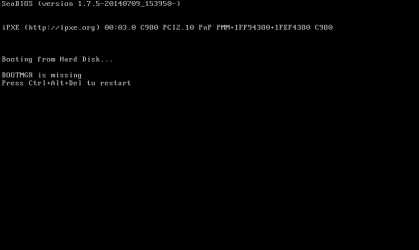
HELP ME!! I've ran into an error about:warn:bootmgr missing:warn:!
Can you help me please!!
I just did a fresh install yesterday and then it just said it!:mad::banghead:
PLEASE HELP!!
Garret S.
 

Attachments

  • Screen Shot 2015-10-25 at 7.58.39 PM.png
    Screen Shot 2015-10-25 at 7.58.39 PM.png
    17.4 KB · Views: 2

My Computer

Computer type
Laptop
Computer Manufacturer/Model Number
HP
OS
Ubuntu 18.04 LTS
CPU
Intel i3-6400
Motherboard
some generic hp motherboard idk
Memory
6GB (about to get upgraded to 8GB)
Graphics Card(s)
Intel Integrated Graphics
Sound Card
some Intel soundchip
Monitor(s) Displays
Dell s2209W
Screen Resolution
1920x1080
Hard Drives
1TB HP HHD
PSU
the battery (its a laptop)
Case
hp plastic laptop case
Cooling
some hp integrated fans
Keyboard
cheap old dell usb keyboard
Mouse
dynex mouse
Internet Speed
15mbps (through my HOA)
Antivirus
Avast Premier
Browser
Chrome (obviously)
Other Info
Planning to get 7, see here: https://www.sevenforums.com/installation-setup/416670-hp-notebook-15-ay009dx-refusing-boot-windows-7-install-media.html#post3406391
(:note:NOTE::note: I am new here so yeah...):focus:
HELP ME!! I've ran into an error about:warn:bootmgr missing:warn:!
Can you help me please!!
I just did a fresh install yesterday and then it just said it!:mad::banghead:
PLEASE HELP!!
Garret S.

Hi, did you do anything prior which could have caused this?
You should be able to repair this quite easily.
You need to boot from a 7 system repair disc or your original install disc. You will need to set the bios boot order to boot from CD.
When the setup screen appears don't choose install but choose "repair your computer" in the bottom left corner of the screen.
You will then be asked to enter your user name and password.
Then you need to select "Startup Repair".

Here's a guide for you:
http://www.sevenforums.com/tutorials/681-startup-repair.html
 
Last edited:

My Computer

Computer type
PC/Desktop
Computer Manufacturer/Model Number
Custom Build
OS
Win 7 Ultimate, Win 8.1 Pro, Linux Mint 19 Cinnamon (All 64-Bit)
CPU
Intel i5 4690K
Motherboard
Gigabyte Z97X-UD3H
Memory
Corsair Vengeance LP 32GB DDR3
Graphics Card(s)
MSI GTX 1060 GAMING X 6GB
Sound Card
Onboard
Hard Drives
Samsung 850 EVO 250GB SSD (x2)
Samsung 860 EVO 1TB SSD (x2)
Crucial MX300 525GB SSD
WD Blue 2TB 5400rpm Intellipark Disabled (x2)
PSU
Corsair HX750i
Case
Phanteks Enthoo Pro
Cooling
CM Hyper 212 EVO on CPU, Noctua Redux NF-P14S 1500rpm (x6)
Keyboard
Corsair K70 RGB LUX
Mouse
Corsair Sabre RGB
Antivirus
Avast Free, MalwareBytes, SAS & CryptoPrevent
Browser
Chrome
Other Info
StarTech PEXESAT322I 2 Port PCI-E SATA Card
ASUS PCE-AC56 Dual-band AC1300 Wireless Card
Akasa FC.Six Manual Fan Controller
And a Partridge in a Pear Tree!
ok thanks:info:
so, I read the log and to the best of my knowledge, it said something about active partition and the System Reserved partition. So, I think it somehow set the C: drive to the default partition in setup instead of the SR partition (:info:fyi:the SR partition is the partition with all the boot files and info.:info:) ps:THANK YOU!

Garret Stand
 

My Computer

Computer type
Laptop
Computer Manufacturer/Model Number
HP
OS
Ubuntu 18.04 LTS
CPU
Intel i3-6400
Motherboard
some generic hp motherboard idk
Memory
6GB (about to get upgraded to 8GB)
Graphics Card(s)
Intel Integrated Graphics
Sound Card
some Intel soundchip
Monitor(s) Displays
Dell s2209W
Screen Resolution
1920x1080
Hard Drives
1TB HP HHD
PSU
the battery (its a laptop)
Case
hp plastic laptop case
Cooling
some hp integrated fans
Keyboard
cheap old dell usb keyboard
Mouse
dynex mouse
Internet Speed
15mbps (through my HOA)
Antivirus
Avast Premier
Browser
Chrome (obviously)
Other Info
Planning to get 7, see here: https://www.sevenforums.com/installation-setup/416670-hp-notebook-15-ay009dx-refusing-boot-windows-7-install-media.html#post3406391
Odd that it created s System Reserved partition and then set the C: drive as active. Usually it just sets the SR as active.

Glad it's resolved anyway! :thumbsup:
 

My Computer

Computer type
PC/Desktop
Computer Manufacturer/Model Number
Custom Build
OS
Win 7 Ultimate, Win 8.1 Pro, Linux Mint 19 Cinnamon (All 64-Bit)
CPU
Intel i5 4690K
Motherboard
Gigabyte Z97X-UD3H
Memory
Corsair Vengeance LP 32GB DDR3
Graphics Card(s)
MSI GTX 1060 GAMING X 6GB
Sound Card
Onboard
Hard Drives
Samsung 850 EVO 250GB SSD (x2)
Samsung 860 EVO 1TB SSD (x2)
Crucial MX300 525GB SSD
WD Blue 2TB 5400rpm Intellipark Disabled (x2)
PSU
Corsair HX750i
Case
Phanteks Enthoo Pro
Cooling
CM Hyper 212 EVO on CPU, Noctua Redux NF-P14S 1500rpm (x6)
Keyboard
Corsair K70 RGB LUX
Mouse
Corsair Sabre RGB
Antivirus
Avast Free, MalwareBytes, SAS & CryptoPrevent
Browser
Chrome
Other Info
StarTech PEXESAT322I 2 Port PCI-E SATA Card
ASUS PCE-AC56 Dual-band AC1300 Wireless Card
Akasa FC.Six Manual Fan Controller
And a Partridge in a Pear Tree!
Back
Top