
Solved Toshiba Satellite C660 WiFi and LAN Driver Problem

ZaphodB

New member
Power User
VIP
Local time
11:06 AM
Messages
203
Hi Folks,

A colleague passed me his poorly laptop (the Toshiba C660-18C of the title) as he is unable to connect to the internet after the re-installation of Windows 7 HP 32-bit.

Story so far...

His computer was slow - full of junk and stuff - so he asked me if I had a Win 7 disk for him to start again with a clean install.

I provided him with a disk and the re-installation went without a hitch - except now there aren't any drivers for the Ethernet NIC or WiFi and so he is unable to connect by either wired connection or wireless.

I've had a look and can't figure out what the problem is.

Device manager doesn't give any info - nothing like 'Realtek PCIe EE Family Controller' or 'Realtek RTL8188CE Wireless LAN 802.11n PCI-E NIC' that appear on my wife's Toshiba C660. Also there is no 'Microsoft Virtual WiFi Miniport Adapter' (not sure if that is needed). There is no description at all of the hardware.

I have found from the Toshiba UK website the following drivers and installed them, but still no joy.
The Network Device ID Registry Setting Tool, Realtek Semiconductor Corporation LAN Driver, Toshiba Wireless LAN Indicator and Toshiba Hardware Setup.

I went with the Realtek drivers as the Toshiba website lists these as 32-bit. The NICs may be Atheros but the only drivers I could find for them were 64-bit (will they still work on a 32-bit OS?) - and these were on Toshiba Australia's support site.

Several websites have links for what seem to be the correct drivers - but these take you to a German site and return a 404 error.

Any help gratefully received. Otherwise, it seems my colleague has bricked his pc?

Cheers

Zaph

Oh , I've also contacted Toshiba UK via email but 24 hrs later and still no response. Are they likely to reply? Machine originally shipped with Windows Vista and CoA on the underside of the machine is unreadable!
 
Last edited:

My Computer My Computer

Computer type
Laptop
Computer Manufacturer/Model Number
DELL Inspiron 1525 / Sony VAIO VGN FW21L / Zoostorm 7877-0095
OS
Windows 7 Home Premium SP1 64-bit (now looking at Linux Mint!)
CPU
Core2 Duo T5750 2GHz/Core2 Duo T5800 2GHz/Core i5 3300 3.1GH
Motherboard
DELL 0U990C / "SONY Corp VAIO" (??) / GA-H61M-DS2 DVI
Memory
4Gb / 4Gb / 8Gb
Graphics Card(s)
Intel 965 Express/ATi Mob Radeon HD 3400/AMD Radeon R7 200
Hard Drives
WD 750Gb Black (WD7500BPKT) - DELL
WD 1Tb Black (WD10JPLX) - SONY
ST 2Tb Barracuda (2000DM001) - Zoostorm
Internet Speed
VM Fibre 100 Mbps
Antivirus
Kaspersky IS 2019 / Kaspersky IS 2019 / Kaspersky IS 2019
Browser
Chrome 76.0.3809 / Chrome 79.0.3945 / Chrome 76.0.3809
Hello Zaph mate I have had a bit to do with Toshibas now you need to find out what manufacturer of the components you are trying to get drivers for becausevery often the mytoshiba site will quote somethims two.


So run this and find out what components are in the computer
Using HW Info
PART A:
You can test the volts on the PSU with HW Info HWiNFO, HWiNFO32/64 - Download < download the right bit version and close the right hand window select Sensors and scroll down to the power section where you will see what the volts are doing see my pic. In my pic the section (Nuvoton) with VBATT is a dead give away you are in the section for the rail voltages. There are other section titles and one that pops up often is ITE
Now the voltage on the different rails have to be within 5% =+/- of what is required or the machine will not work properly if at all.
See this for the rail voltage info
Power Supply 101: A Reference Of Specifications - Power Supplies (Section 2.)
The original right hand window shows the machine running and is handy for that but for looking at the components in some detail close it and use the main left hand side panel
FOR OTHER COMPONENTS
PART B:
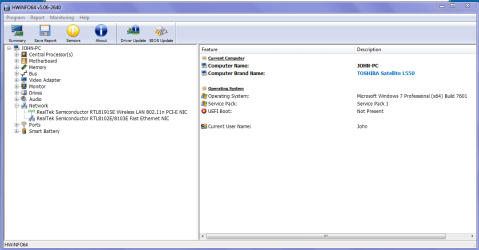
Open each small square with + in it on the section the components are in and then click on the individual component/s (it will highlight in blue) - in the right hand side will appear all sorts of details including brands speeds and other essential info that particular device. See pic for example.
Use PART B: to find that out see pic it is of my Toshiba


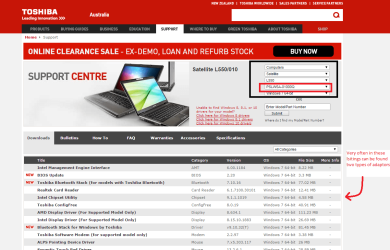
Now also when you find out the manufacturer that component that is being used and look for the driver on that site you are better off using the PART NO on the sticker on the back of the machine see pic
 

Attachments

  • NETWORK.PNG
    NETWORK.PNG
    27.5 KB · Views: 0
  • PART NO.PNG
    PART NO.PNG
    112.5 KB · Views: 0

My Computer My Computer

Computer type
PC/Desktop
Computer Manufacturer/Model Number
Own build (new) Desk1 / Asus ROG Win 7 / Desk2 1st build
OS
Desk1 7 Home Prem / Desk2 10 Pro / Main lap Asus ROG 10 Pro 2 laptop Toshiba 7 Pro Asus P2520 7 & 10
CPU
Desk1 i5 3750K / Laptop i7 GTX 860M / Desk2 i5 2500
Motherboard
Desk1 Asus P877-V / Desk2 Gigabyte H67 UD3H / Laptop ?
Memory
Desk1 8GB (1866) / Desk2 16GB (1333) / Laptop 8Gb DDR3
Graphics Card(s)
Desk 1& 2NVidia GTX 650 & Laptops on board Intel
Sound Card
Desk 1 & 2 -XONAR DG Realtek High Def audio Laptop
Monitor(s) Displays
Desk 1 Benq HD 2450 / Desk2 Philips 24" / Laptop 17.5"
Screen Resolution
1920x1080 D1 & D2 & Laptop 1
Hard Drives
Desk1 Samsung 120GB 830 SSD
Asus ROG 256GB 850 Pro SSD
Desk2 Samsung 840 256 SSD
Toshiba 120GB EVO
PSU
Desk 1 Corsair HX 1050/ Laptop ? / Desk 2 Corsair HX 650
Case
Desk 1 Cooler HAF XM ? Toshiba laptop / Desk2 Coolermaster
Cooling
Fans on all Desk1 -2 Desk2 - all Coolermasters 5 Laptop ?
Keyboard
Desk 1 MS Sidewinder X6 Desk 2 MS Sidewinder X 4
Mouse
Desk 1&2 - Gigabyte MS 900 gamer - laptop - Logitec wireless
Internet Speed
ADSL2+
Other Info
One other Desktop (tester) and spare Toshba laptop both with SSD's
Running Kaspersky 2016 ISS on all machines config'd identically
Logitec audio stereo systems on each machine (x3)
Canon MG5250MFC
Router/modem TP-Link running WPA2SK

My Computer My Computer

Computer type
PC/Desktop
Computer Manufacturer/Model Number
Self Built
OS
Win 10 Pro x64
CPU
Intel I5-2500K @3.3GHz
Motherboard
Asrock P67 Extreme4
Memory
16GB G.Skill Ripjaws X (4x4GB)
Graphics Card(s)
EVGA GeForce 750 Ti SC 2GB
Sound Card
ASUS Xonar DG 5.1 Channels 24-bit 96KHz PCI Interface Sound
Monitor(s) Displays
auria eq2367
Screen Resolution
1920 x 1080
Hard Drives
250GB Samsung 850 EVO SSD
1TB WD Blue
1TB Hitachi
PSU
SeaSonic X 650W 80 Plus Gold
Case
Corsair Obsidian 750D
Cooling
Corsair H60, Three 140mm case fans
Keyboard
Logitech Wireless Keyboard K520
Mouse
Logitech Wireless Mouse M310
Internet Speed
Wave Broadband ~ 100 dn 5 up
Antivirus
Windows Defender, Malwarebytes Premium
Browser
Edge, IE11, Chrome
Other Info
Laptop specs: HP g7-1365dx /
CPU: AMD A6-3420M APU with Radeon(tm) HD Graphics /
RAM: Crucial 8Gb (2x4Gb) /
SSD: Crucial M4-CT128M4SSD2 ATA Device/ FW 000F /
GFX: AMD Radeon HD 6520G /
OS: Windows 10 Pro x64
Just curious, did you install the chipset drivers?

That will most likely enable quite a few things you can't see or use.

Driver Details - Toshiba

This one is another essential after a clean install,

Driver Details - Toshiba

Yep Derek there is a very detailed driver site for Toshibas and that is why we need that PART NO and then what adaptor driver he needs as they do notate two at times this is the site for my older L550 and you can see how you have to lay it out to find the drivers. Support :: Toshiba :: Computers, Laptops/Notebooks, Tablets, Televisions, DVD and Blu-Ray Players, Camcorders, Storage, Accessories, and more you can see from the list what you want and if there are two adaptors for example Realtek or Broadcomm then that is what the HW Info will find what is in that particular machine.
 

Attachments

  • TOSHIBA 2.PNG
    TOSHIBA 2.PNG
    71.2 KB · Views: 1

My Computer My Computer

Computer type
PC/Desktop
Computer Manufacturer/Model Number
Own build (new) Desk1 / Asus ROG Win 7 / Desk2 1st build
OS
Desk1 7 Home Prem / Desk2 10 Pro / Main lap Asus ROG 10 Pro 2 laptop Toshiba 7 Pro Asus P2520 7 & 10
CPU
Desk1 i5 3750K / Laptop i7 GTX 860M / Desk2 i5 2500
Motherboard
Desk1 Asus P877-V / Desk2 Gigabyte H67 UD3H / Laptop ?
Memory
Desk1 8GB (1866) / Desk2 16GB (1333) / Laptop 8Gb DDR3
Graphics Card(s)
Desk 1& 2NVidia GTX 650 & Laptops on board Intel
Sound Card
Desk 1 & 2 -XONAR DG Realtek High Def audio Laptop
Monitor(s) Displays
Desk 1 Benq HD 2450 / Desk2 Philips 24" / Laptop 17.5"
Screen Resolution
1920x1080 D1 & D2 & Laptop 1
Hard Drives
Desk1 Samsung 120GB 830 SSD
Asus ROG 256GB 850 Pro SSD
Desk2 Samsung 840 256 SSD
Toshiba 120GB EVO
PSU
Desk 1 Corsair HX 1050/ Laptop ? / Desk 2 Corsair HX 650
Case
Desk 1 Cooler HAF XM ? Toshiba laptop / Desk2 Coolermaster
Cooling
Fans on all Desk1 -2 Desk2 - all Coolermasters 5 Laptop ?
Keyboard
Desk 1 MS Sidewinder X6 Desk 2 MS Sidewinder X 4
Mouse
Desk 1&2 - Gigabyte MS 900 gamer - laptop - Logitec wireless
Internet Speed
ADSL2+
Other Info
One other Desktop (tester) and spare Toshba laptop both with SSD's
Running Kaspersky 2016 ISS on all machines config'd identically
Logitec audio stereo systems on each machine (x3)
Canon MG5250MFC
Router/modem TP-Link running WPA2SK
Hmm I tracked it down as much as I could and found this Driver Downloads - Computers | Toshiba - Toshiba there looks to be several pages of drivers, but we still need that PART NO to be sure. Plus the HW Info return for the device that needs the driver would be good.
 

My Computer My Computer

Computer type
PC/Desktop
Computer Manufacturer/Model Number
Own build (new) Desk1 / Asus ROG Win 7 / Desk2 1st build
OS
Desk1 7 Home Prem / Desk2 10 Pro / Main lap Asus ROG 10 Pro 2 laptop Toshiba 7 Pro Asus P2520 7 & 10
CPU
Desk1 i5 3750K / Laptop i7 GTX 860M / Desk2 i5 2500
Motherboard
Desk1 Asus P877-V / Desk2 Gigabyte H67 UD3H / Laptop ?
Memory
Desk1 8GB (1866) / Desk2 16GB (1333) / Laptop 8Gb DDR3
Graphics Card(s)
Desk 1& 2NVidia GTX 650 & Laptops on board Intel
Sound Card
Desk 1 & 2 -XONAR DG Realtek High Def audio Laptop
Monitor(s) Displays
Desk 1 Benq HD 2450 / Desk2 Philips 24" / Laptop 17.5"
Screen Resolution
1920x1080 D1 & D2 & Laptop 1
Hard Drives
Desk1 Samsung 120GB 830 SSD
Asus ROG 256GB 850 Pro SSD
Desk2 Samsung 840 256 SSD
Toshiba 120GB EVO
PSU
Desk 1 Corsair HX 1050/ Laptop ? / Desk 2 Corsair HX 650
Case
Desk 1 Cooler HAF XM ? Toshiba laptop / Desk2 Coolermaster
Cooling
Fans on all Desk1 -2 Desk2 - all Coolermasters 5 Laptop ?
Keyboard
Desk 1 MS Sidewinder X6 Desk 2 MS Sidewinder X 4
Mouse
Desk 1&2 - Gigabyte MS 900 gamer - laptop - Logitec wireless
Internet Speed
ADSL2+
Other Info
One other Desktop (tester) and spare Toshba laptop both with SSD's
Running Kaspersky 2016 ISS on all machines config'd identically
Logitec audio stereo systems on each machine (x3)
Canon MG5250MFC
Router/modem TP-Link running WPA2SK
Yeah, I was talking about the chipset drivers John, since it was mentioned in the first post that,

Device manager doesn't give any info - nothing like 'Realtek PCIe EE Family Controller' or 'Realtek RTL8188CE Wireless LAN 802.11n PCI-E NIC' that appear on my wife's Toshiba C660. Also there is no 'Microsoft Virtual WiFi Miniport Adapter' (not sure if that is needed). There is no description at all of the hardware.

The links I posted are from the Toshiba site for that model.

The reason I mention chipset drivers is after a clean install, a lot of devices are not recognized or fully enabled until those are installed.
 

My Computer My Computer

Computer type
PC/Desktop
Computer Manufacturer/Model Number
Self Built
OS
Win 10 Pro x64
CPU
Intel I5-2500K @3.3GHz
Motherboard
Asrock P67 Extreme4
Memory
16GB G.Skill Ripjaws X (4x4GB)
Graphics Card(s)
EVGA GeForce 750 Ti SC 2GB
Sound Card
ASUS Xonar DG 5.1 Channels 24-bit 96KHz PCI Interface Sound
Monitor(s) Displays
auria eq2367
Screen Resolution
1920 x 1080
Hard Drives
250GB Samsung 850 EVO SSD
1TB WD Blue
1TB Hitachi
PSU
SeaSonic X 650W 80 Plus Gold
Case
Corsair Obsidian 750D
Cooling
Corsair H60, Three 140mm case fans
Keyboard
Logitech Wireless Keyboard K520
Mouse
Logitech Wireless Mouse M310
Internet Speed
Wave Broadband ~ 100 dn 5 up
Antivirus
Windows Defender, Malwarebytes Premium
Browser
Edge, IE11, Chrome
Other Info
Laptop specs: HP g7-1365dx /
CPU: AMD A6-3420M APU with Radeon(tm) HD Graphics /
RAM: Crucial 8Gb (2x4Gb) /
SSD: Crucial M4-CT128M4SSD2 ATA Device/ FW 000F /
GFX: AMD Radeon HD 6520G /
OS: Windows 10 Pro x64
c660

My Wifey's is a c660 here in da UK..

Please post a screenshot of Device manager will compare :cool:.

Roy

if your wifes is a Toshiba copy the tempro and Toshiba Update prog to his.
 

My Computer My Computer

Computer type
PC/Desktop
Computer Manufacturer/Model Number
medionl/Aspire 6930G/acer x55a
OS
W7 home premium 32bit/W7HP 64bit/w10 tp insider ring
CPU
E5300 dual core
Motherboard
medion MS7366
Memory
3gb
Graphics Card(s)
Nvidia Geforce 7100 Nforce 630i
Monitor(s) Displays
avixc
Internet Speed
n (isp resticted to 72)
Antivirus
mse/pands
Browser
palemoon
Other Info
Belkin Fd7050 n USB using Railink RT2870 drivers, more upto date
Dear All,

Thanks for the input so far.

Derek - I hadn't installed the chipset drivers (Doh!) or the Intel Management Engine Interface!

These have now been downloaded to a USB stick as the lappy can't access the internet via either wired or wireless means!


ICIT2LOL (John??) - Do I just search for HWiNFO on Google and run it?

I'll post a pic of the machine's label shortly.

Meanwhile - this is what I get in Device Mangler...

device%20manager.jpg


Zaph
 

My Computer My Computer

Computer type
Laptop
Computer Manufacturer/Model Number
DELL Inspiron 1525 / Sony VAIO VGN FW21L / Zoostorm 7877-0095
OS
Windows 7 Home Premium SP1 64-bit (now looking at Linux Mint!)
CPU
Core2 Duo T5750 2GHz/Core2 Duo T5800 2GHz/Core i5 3300 3.1GH
Motherboard
DELL 0U990C / "SONY Corp VAIO" (??) / GA-H61M-DS2 DVI
Memory
4Gb / 4Gb / 8Gb
Graphics Card(s)
Intel 965 Express/ATi Mob Radeon HD 3400/AMD Radeon R7 200
Hard Drives
WD 750Gb Black (WD7500BPKT) - DELL
WD 1Tb Black (WD10JPLX) - SONY
ST 2Tb Barracuda (2000DM001) - Zoostorm
Internet Speed
VM Fibre 100 Mbps
Antivirus
Kaspersky IS 2019 / Kaspersky IS 2019 / Kaspersky IS 2019
Browser
Chrome 76.0.3809 / Chrome 79.0.3945 / Chrome 76.0.3809
My Computer My Computer

Computer type
PC/Desktop
Computer Manufacturer/Model Number
Self Built
OS
Win 10 Pro x64
CPU
Intel I5-2500K @3.3GHz
Motherboard
Asrock P67 Extreme4
Memory
16GB G.Skill Ripjaws X (4x4GB)
Graphics Card(s)
EVGA GeForce 750 Ti SC 2GB
Sound Card
ASUS Xonar DG 5.1 Channels 24-bit 96KHz PCI Interface Sound
Monitor(s) Displays
auria eq2367
Screen Resolution
1920 x 1080
Hard Drives
250GB Samsung 850 EVO SSD
1TB WD Blue
1TB Hitachi
PSU
SeaSonic X 650W 80 Plus Gold
Case
Corsair Obsidian 750D
Cooling
Corsair H60, Three 140mm case fans
Keyboard
Logitech Wireless Keyboard K520
Mouse
Logitech Wireless Mouse M310
Internet Speed
Wave Broadband ~ 100 dn 5 up
Antivirus
Windows Defender, Malwarebytes Premium
Browser
Edge, IE11, Chrome
Other Info
Laptop specs: HP g7-1365dx /
CPU: AMD A6-3420M APU with Radeon(tm) HD Graphics /
RAM: Crucial 8Gb (2x4Gb) /
SSD: Crucial M4-CT128M4SSD2 ATA Device/ FW 000F /
GFX: AMD Radeon HD 6520G /
OS: Windows 10 Pro x64
Yes amte just run the HW Info and then open up the Network+ in the left hand panel it will definitely define the exact device that is being used for wif and Ethernet so you can look for that driver in the Toshiba site.

Now I don't know what you have Googled but I Goolge Toshiba (obviously) and then mytoshiba as per my link if you get that PART NO right you will get the correct driver.
 

My Computer My Computer

Computer type
PC/Desktop
Computer Manufacturer/Model Number
Own build (new) Desk1 / Asus ROG Win 7 / Desk2 1st build
OS
Desk1 7 Home Prem / Desk2 10 Pro / Main lap Asus ROG 10 Pro 2 laptop Toshiba 7 Pro Asus P2520 7 & 10
CPU
Desk1 i5 3750K / Laptop i7 GTX 860M / Desk2 i5 2500
Motherboard
Desk1 Asus P877-V / Desk2 Gigabyte H67 UD3H / Laptop ?
Memory
Desk1 8GB (1866) / Desk2 16GB (1333) / Laptop 8Gb DDR3
Graphics Card(s)
Desk 1& 2NVidia GTX 650 & Laptops on board Intel
Sound Card
Desk 1 & 2 -XONAR DG Realtek High Def audio Laptop
Monitor(s) Displays
Desk 1 Benq HD 2450 / Desk2 Philips 24" / Laptop 17.5"
Screen Resolution
1920x1080 D1 & D2 & Laptop 1
Hard Drives
Desk1 Samsung 120GB 830 SSD
Asus ROG 256GB 850 Pro SSD
Desk2 Samsung 840 256 SSD
Toshiba 120GB EVO
PSU
Desk 1 Corsair HX 1050/ Laptop ? / Desk 2 Corsair HX 650
Case
Desk 1 Cooler HAF XM ? Toshiba laptop / Desk2 Coolermaster
Cooling
Fans on all Desk1 -2 Desk2 - all Coolermasters 5 Laptop ?
Keyboard
Desk 1 MS Sidewinder X6 Desk 2 MS Sidewinder X 4
Mouse
Desk 1&2 - Gigabyte MS 900 gamer - laptop - Logitec wireless
Internet Speed
ADSL2+
Other Info
One other Desktop (tester) and spare Toshba laptop both with SSD's
Running Kaspersky 2016 ISS on all machines config'd identically
Logitec audio stereo systems on each machine (x3)
Canon MG5250MFC
Router/modem TP-Link running WPA2SK
Hi Again

I d/loaded and ran HWiNFO 32 and this is what I got ...


I also photographed the computer's label ...


Hope these help

Zaph

Derek - Installing chipset drivers now...
 

My Computer My Computer

Computer type
Laptop
Computer Manufacturer/Model Number
DELL Inspiron 1525 / Sony VAIO VGN FW21L / Zoostorm 7877-0095
OS
Windows 7 Home Premium SP1 64-bit (now looking at Linux Mint!)
CPU
Core2 Duo T5750 2GHz/Core2 Duo T5800 2GHz/Core i5 3300 3.1GH
Motherboard
DELL 0U990C / "SONY Corp VAIO" (??) / GA-H61M-DS2 DVI
Memory
4Gb / 4Gb / 8Gb
Graphics Card(s)
Intel 965 Express/ATi Mob Radeon HD 3400/AMD Radeon R7 200
Hard Drives
WD 750Gb Black (WD7500BPKT) - DELL
WD 1Tb Black (WD10JPLX) - SONY
ST 2Tb Barracuda (2000DM001) - Zoostorm
Internet Speed
VM Fibre 100 Mbps
Antivirus
Kaspersky IS 2019 / Kaspersky IS 2019 / Kaspersky IS 2019
Browser
Chrome 76.0.3809 / Chrome 79.0.3945 / Chrome 76.0.3809

My Computer My Computer

Computer type
PC/Desktop
Computer Manufacturer/Model Number
Self Built
OS
Win 10 Pro x64
CPU
Intel I5-2500K @3.3GHz
Motherboard
Asrock P67 Extreme4
Memory
16GB G.Skill Ripjaws X (4x4GB)
Graphics Card(s)
EVGA GeForce 750 Ti SC 2GB
Sound Card
ASUS Xonar DG 5.1 Channels 24-bit 96KHz PCI Interface Sound
Monitor(s) Displays
auria eq2367
Screen Resolution
1920 x 1080
Hard Drives
250GB Samsung 850 EVO SSD
1TB WD Blue
1TB Hitachi
PSU
SeaSonic X 650W 80 Plus Gold
Case
Corsair Obsidian 750D
Cooling
Corsair H60, Three 140mm case fans
Keyboard
Logitech Wireless Keyboard K520
Mouse
Logitech Wireless Mouse M310
Internet Speed
Wave Broadband ~ 100 dn 5 up
Antivirus
Windows Defender, Malwarebytes Premium
Browser
Edge, IE11, Chrome
Other Info
Laptop specs: HP g7-1365dx /
CPU: AMD A6-3420M APU with Radeon(tm) HD Graphics /
RAM: Crucial 8Gb (2x4Gb) /
SSD: Crucial M4-CT128M4SSD2 ATA Device/ FW 000F /
GFX: AMD Radeon HD 6520G /
OS: Windows 10 Pro x64
An eventual update of Windows 7 will also help once you can get online. The installation of the chipset drivers as per Derekimo advice is the first place to start.
 

My Computer My Computer

Computer type
PC/Desktop
Computer Manufacturer/Model Number
Golden Mk. I.4
OS
Windows 10 Pro x64 ; Xubuntu x64
CPU
Intel i7 860 @ 2.80 GHz O/C'ed to 4.0GHz
Motherboard
Gigabyte P55A-UD3R Rev.1. Award BIOS F13
Memory
16GB Corsair Vengance DDR3 @ 661 MHz Dual Channel (9-9-9-24)
Graphics Card(s)
EVGA NVidia GTX 560 1024MB
Sound Card
Realtek Integrated
Monitor(s) Displays
Dual Samsung SyncMaster 2494HS
Screen Resolution
1920*1080 and 1920*1080
Hard Drives
1*Samsung 840 EVO 120GB SSD;
1*OCZ Vertex 2 60GB SSD;
2*Samsung F3 SpinPoint 1TB in RAID0;
1*Samsung F1 SpinPoint 1TB;
2*Western Digital 1TB External USB 3.0
1*Western Digital 500GB External USB 3.0
1*Seagate 500GB External USB 2.0
PSU
Thermaltake ToughPower QFan 750W
Case
Thermaltake Element S VK60001W2Z
Cooling
Corsair H60 Water Cooling, 2*230mm and 2*80mm case fans
Keyboard
Logitech G110
Mouse
Logitech MX518
Hi Derek

Installing the csutil chipset drivers made no difference. The Intel Management Engine Interface threw up an error - saying something like a required device wasn't present!

Here's what clicking on the 'Properties' tab of the two 'unknown' network devices in Device Mangler shows...

Device%20Manager%20properties.jpg


Thanks for the link to the Realtek driver - I'd already found that and tried installing it yesterday - but no joy!

I'm seemingly no closer fixing this lappy :(

Zaph
 

My Computer My Computer

Computer type
Laptop
Computer Manufacturer/Model Number
DELL Inspiron 1525 / Sony VAIO VGN FW21L / Zoostorm 7877-0095
OS
Windows 7 Home Premium SP1 64-bit (now looking at Linux Mint!)
CPU
Core2 Duo T5750 2GHz/Core2 Duo T5800 2GHz/Core i5 3300 3.1GH
Motherboard
DELL 0U990C / "SONY Corp VAIO" (??) / GA-H61M-DS2 DVI
Memory
4Gb / 4Gb / 8Gb
Graphics Card(s)
Intel 965 Express/ATi Mob Radeon HD 3400/AMD Radeon R7 200
Hard Drives
WD 750Gb Black (WD7500BPKT) - DELL
WD 1Tb Black (WD10JPLX) - SONY
ST 2Tb Barracuda (2000DM001) - Zoostorm
Internet Speed
VM Fibre 100 Mbps
Antivirus
Kaspersky IS 2019 / Kaspersky IS 2019 / Kaspersky IS 2019
Browser
Chrome 76.0.3809 / Chrome 79.0.3945 / Chrome 76.0.3809
What was the error when trying to install the ethernet driver?
 

My Computer My Computer

Computer type
PC/Desktop
Computer Manufacturer/Model Number
Golden Mk. I.4
OS
Windows 10 Pro x64 ; Xubuntu x64
CPU
Intel i7 860 @ 2.80 GHz O/C'ed to 4.0GHz
Motherboard
Gigabyte P55A-UD3R Rev.1. Award BIOS F13
Memory
16GB Corsair Vengance DDR3 @ 661 MHz Dual Channel (9-9-9-24)
Graphics Card(s)
EVGA NVidia GTX 560 1024MB
Sound Card
Realtek Integrated
Monitor(s) Displays
Dual Samsung SyncMaster 2494HS
Screen Resolution
1920*1080 and 1920*1080
Hard Drives
1*Samsung 840 EVO 120GB SSD;
1*OCZ Vertex 2 60GB SSD;
2*Samsung F3 SpinPoint 1TB in RAID0;
1*Samsung F1 SpinPoint 1TB;
2*Western Digital 1TB External USB 3.0
1*Western Digital 500GB External USB 3.0
1*Seagate 500GB External USB 2.0
PSU
Thermaltake ToughPower QFan 750W
Case
Thermaltake Element S VK60001W2Z
Cooling
Corsair H60 Water Cooling, 2*230mm and 2*80mm case fans
Keyboard
Logitech G110
Mouse
Logitech MX518
Good deal Zaph, it would be interesting to see that Device manager after the chipset drivers are installed.

Following option one in this tutorial after the chipset drivers have been installed would be great too,

http://www.sevenforums.com/tutorials/374583-system-information-file-create-windows.html#Part1

Hi Derek

Installing the csutil chipset drivers made no difference. The Intel Management Engine Interface threw up an error - saying something like a required device wasn't present!

Here's what clicking on the 'Properties' tab of the two 'unknown' network devices in Device Mangler shows...

Device%20Manager%20properties.jpg


Thanks for the link to the Realtek driver - I'd already found that and tried installing it yesterday - but no joy!

I'm seemingly no closer fixing this lappy :(

Zaph

Yeah, unfortunately without the chipset drivers a lot of your devices won't be accessible.

Did you restart after installing the chipset?

That may help, looking at your driver list now, I don't see a management engine so that can be ignored for now.

Here is a different driver based on your updated info,

Driver Details - Toshiba

Although, it would be a big help if you could follow that tutorial I posted and upload that nfo file.

That will give us more detailed info, like device/vendor ID's
 

My Computer My Computer

Computer type
PC/Desktop
Computer Manufacturer/Model Number
Self Built
OS
Win 10 Pro x64
CPU
Intel I5-2500K @3.3GHz
Motherboard
Asrock P67 Extreme4
Memory
16GB G.Skill Ripjaws X (4x4GB)
Graphics Card(s)
EVGA GeForce 750 Ti SC 2GB
Sound Card
ASUS Xonar DG 5.1 Channels 24-bit 96KHz PCI Interface Sound
Monitor(s) Displays
auria eq2367
Screen Resolution
1920 x 1080
Hard Drives
250GB Samsung 850 EVO SSD
1TB WD Blue
1TB Hitachi
PSU
SeaSonic X 650W 80 Plus Gold
Case
Corsair Obsidian 750D
Cooling
Corsair H60, Three 140mm case fans
Keyboard
Logitech Wireless Keyboard K520
Mouse
Logitech Wireless Mouse M310
Internet Speed
Wave Broadband ~ 100 dn 5 up
Antivirus
Windows Defender, Malwarebytes Premium
Browser
Edge, IE11, Chrome
Other Info
Laptop specs: HP g7-1365dx /
CPU: AMD A6-3420M APU with Radeon(tm) HD Graphics /
RAM: Crucial 8Gb (2x4Gb) /
SSD: Crucial M4-CT128M4SSD2 ATA Device/ FW 000F /
GFX: AMD Radeon HD 6520G /
OS: Windows 10 Pro x64
I'm not sure if this is relevant, but is the Windows install a 32 or 64 bit? The chipset and other drivers need to be of the same bitness? Derek?
 

My Computer My Computer

Computer type
PC/Desktop
Computer Manufacturer/Model Number
Golden Mk. I.4
OS
Windows 10 Pro x64 ; Xubuntu x64
CPU
Intel i7 860 @ 2.80 GHz O/C'ed to 4.0GHz
Motherboard
Gigabyte P55A-UD3R Rev.1. Award BIOS F13
Memory
16GB Corsair Vengance DDR3 @ 661 MHz Dual Channel (9-9-9-24)
Graphics Card(s)
EVGA NVidia GTX 560 1024MB
Sound Card
Realtek Integrated
Monitor(s) Displays
Dual Samsung SyncMaster 2494HS
Screen Resolution
1920*1080 and 1920*1080
Hard Drives
1*Samsung 840 EVO 120GB SSD;
1*OCZ Vertex 2 60GB SSD;
2*Samsung F3 SpinPoint 1TB in RAID0;
1*Samsung F1 SpinPoint 1TB;
2*Western Digital 1TB External USB 3.0
1*Western Digital 500GB External USB 3.0
1*Seagate 500GB External USB 2.0
PSU
Thermaltake ToughPower QFan 750W
Case
Thermaltake Element S VK60001W2Z
Cooling
Corsair H60 Water Cooling, 2*230mm and 2*80mm case fans
Keyboard
Logitech G110
Mouse
Logitech MX518
I'm not sure if this is relevant, but is the Windows install a 32 or 64 bit? The chipset and other drivers need to be of the same bitness? Derek?

From the first post it was mentioned it was 32bit,

Hi Folks,

A colleague passed me his poorly laptop (the Toshiba C660-18C of the title) as he is unable to connect to the internet after the re-installation of Windows 7 HP 32-bit.

So I went with that when looking for drivers.
 

My Computer My Computer

Computer type
PC/Desktop
Computer Manufacturer/Model Number
Self Built
OS
Win 10 Pro x64
CPU
Intel I5-2500K @3.3GHz
Motherboard
Asrock P67 Extreme4
Memory
16GB G.Skill Ripjaws X (4x4GB)
Graphics Card(s)
EVGA GeForce 750 Ti SC 2GB
Sound Card
ASUS Xonar DG 5.1 Channels 24-bit 96KHz PCI Interface Sound
Monitor(s) Displays
auria eq2367
Screen Resolution
1920 x 1080
Hard Drives
250GB Samsung 850 EVO SSD
1TB WD Blue
1TB Hitachi
PSU
SeaSonic X 650W 80 Plus Gold
Case
Corsair Obsidian 750D
Cooling
Corsair H60, Three 140mm case fans
Keyboard
Logitech Wireless Keyboard K520
Mouse
Logitech Wireless Mouse M310
Internet Speed
Wave Broadband ~ 100 dn 5 up
Antivirus
Windows Defender, Malwarebytes Premium
Browser
Edge, IE11, Chrome
Other Info
Laptop specs: HP g7-1365dx /
CPU: AMD A6-3420M APU with Radeon(tm) HD Graphics /
RAM: Crucial 8Gb (2x4Gb) /
SSD: Crucial M4-CT128M4SSD2 ATA Device/ FW 000F /
GFX: AMD Radeon HD 6520G /
OS: Windows 10 Pro x64
Ah yes. Cheers Derek.
 

My Computer My Computer

Computer type
PC/Desktop
Computer Manufacturer/Model Number
Golden Mk. I.4
OS
Windows 10 Pro x64 ; Xubuntu x64
CPU
Intel i7 860 @ 2.80 GHz O/C'ed to 4.0GHz
Motherboard
Gigabyte P55A-UD3R Rev.1. Award BIOS F13
Memory
16GB Corsair Vengance DDR3 @ 661 MHz Dual Channel (9-9-9-24)
Graphics Card(s)
EVGA NVidia GTX 560 1024MB
Sound Card
Realtek Integrated
Monitor(s) Displays
Dual Samsung SyncMaster 2494HS
Screen Resolution
1920*1080 and 1920*1080
Hard Drives
1*Samsung 840 EVO 120GB SSD;
1*OCZ Vertex 2 60GB SSD;
2*Samsung F3 SpinPoint 1TB in RAID0;
1*Samsung F1 SpinPoint 1TB;
2*Western Digital 1TB External USB 3.0
1*Western Digital 500GB External USB 3.0
1*Seagate 500GB External USB 2.0
PSU
Thermaltake ToughPower QFan 750W
Case
Thermaltake Element S VK60001W2Z
Cooling
Corsair H60 Water Cooling, 2*230mm and 2*80mm case fans
Keyboard
Logitech G110
Mouse
Logitech MX518
Hi Again

I d/loaded and ran HWiNFO 32 and this is what I got ...


I also photographed the computer's label ...


Hope these help

Zaph

Derek - Installing chipset drivers now...
Yep well you can do as Derek says and / or follow the Toshiba mytoshiba link I showed you pics of earlier when you find it because that is the device and that is the all important PART NO you need to quote.
I should add that it is important because it refers to where the machine was made and where it was made for - in your case that number will flag the UK / Europe driver support.

Edit: In the driver selection options you will see the 32bit or 74bit system select.
 

My Computer My Computer

Computer type
PC/Desktop
Computer Manufacturer/Model Number
Own build (new) Desk1 / Asus ROG Win 7 / Desk2 1st build
OS
Desk1 7 Home Prem / Desk2 10 Pro / Main lap Asus ROG 10 Pro 2 laptop Toshiba 7 Pro Asus P2520 7 & 10
CPU
Desk1 i5 3750K / Laptop i7 GTX 860M / Desk2 i5 2500
Motherboard
Desk1 Asus P877-V / Desk2 Gigabyte H67 UD3H / Laptop ?
Memory
Desk1 8GB (1866) / Desk2 16GB (1333) / Laptop 8Gb DDR3
Graphics Card(s)
Desk 1& 2NVidia GTX 650 & Laptops on board Intel
Sound Card
Desk 1 & 2 -XONAR DG Realtek High Def audio Laptop
Monitor(s) Displays
Desk 1 Benq HD 2450 / Desk2 Philips 24" / Laptop 17.5"
Screen Resolution
1920x1080 D1 & D2 & Laptop 1
Hard Drives
Desk1 Samsung 120GB 830 SSD
Asus ROG 256GB 850 Pro SSD
Desk2 Samsung 840 256 SSD
Toshiba 120GB EVO
PSU
Desk 1 Corsair HX 1050/ Laptop ? / Desk 2 Corsair HX 650
Case
Desk 1 Cooler HAF XM ? Toshiba laptop / Desk2 Coolermaster
Cooling
Fans on all Desk1 -2 Desk2 - all Coolermasters 5 Laptop ?
Keyboard
Desk 1 MS Sidewinder X6 Desk 2 MS Sidewinder X 4
Mouse
Desk 1&2 - Gigabyte MS 900 gamer - laptop - Logitec wireless
Internet Speed
ADSL2+
Other Info
One other Desktop (tester) and spare Toshba laptop both with SSD's
Running Kaspersky 2016 ISS on all machines config'd identically
Logitec audio stereo systems on each machine (x3)
Canon MG5250MFC
Router/modem TP-Link running WPA2SK
Back
Top