Solved Toshiba Satellite C660 WiFi and LAN Driver Problem

My Computer My Computer

Computer type
PC/Desktop
Computer Manufacturer/Model Number
Self Built
OS
Win 10 Pro x64
CPU
Intel I5-2500K @3.3GHz
Motherboard
Asrock P67 Extreme4
Memory
16GB G.Skill Ripjaws X (4x4GB)
Graphics Card(s)
EVGA GeForce 750 Ti SC 2GB
Sound Card
ASUS Xonar DG 5.1 Channels 24-bit 96KHz PCI Interface Sound
Monitor(s) Displays
auria eq2367
Screen Resolution
1920 x 1080
Hard Drives
250GB Samsung 850 EVO SSD
1TB WD Blue
1TB Hitachi
PSU
SeaSonic X 650W 80 Plus Gold
Case
Corsair Obsidian 750D
Cooling
Corsair H60, Three 140mm case fans
Keyboard
Logitech Wireless Keyboard K520
Mouse
Logitech Wireless Mouse M310
Internet Speed
Wave Broadband ~ 100 dn 5 up
Antivirus
Windows Defender, Malwarebytes Premium
Browser
Edge, IE11, Chrome
Other Info
Laptop specs: HP g7-1365dx /
CPU: AMD A6-3420M APU with Radeon(tm) HD Graphics /
RAM: Crucial 8Gb (2x4Gb) /
SSD: Crucial M4-CT128M4SSD2 ATA Device/ FW 000F /
GFX: AMD Radeon HD 6520G /
OS: Windows 10 Pro x64
Yep well you can do as Derek says and / or follow the Toshiba mytoshiba link I showed you pics of earlier when you find it because that is the device and that is the all important PART NO you need to quote.
I should add that it is important because it refers to where the machine was made and where it was made for - in your case that number will flag the UK / Europe driver support.

Edit: In the driver selection options you will see the 32bit or 74bit system select.

Yep, that helped refine to this. Are the results the same as you get John?

Driver Downloads - Computers | Toshiba - Toshiba

2015-11-06_17h58_17.png
 

My Computer My Computer

Computer type
PC/Desktop
Computer Manufacturer/Model Number
Self Built
OS
Win 10 Pro x64
CPU
Intel I5-2500K @3.3GHz
Motherboard
Asrock P67 Extreme4
Memory
16GB G.Skill Ripjaws X (4x4GB)
Graphics Card(s)
EVGA GeForce 750 Ti SC 2GB
Sound Card
ASUS Xonar DG 5.1 Channels 24-bit 96KHz PCI Interface Sound
Monitor(s) Displays
auria eq2367
Screen Resolution
1920 x 1080
Hard Drives
250GB Samsung 850 EVO SSD
1TB WD Blue
1TB Hitachi
PSU
SeaSonic X 650W 80 Plus Gold
Case
Corsair Obsidian 750D
Cooling
Corsair H60, Three 140mm case fans
Keyboard
Logitech Wireless Keyboard K520
Mouse
Logitech Wireless Mouse M310
Internet Speed
Wave Broadband ~ 100 dn 5 up
Antivirus
Windows Defender, Malwarebytes Premium
Browser
Edge, IE11, Chrome
Other Info
Laptop specs: HP g7-1365dx /
CPU: AMD A6-3420M APU with Radeon(tm) HD Graphics /
RAM: Crucial 8Gb (2x4Gb) /
SSD: Crucial M4-CT128M4SSD2 ATA Device/ FW 000F /
GFX: AMD Radeon HD 6520G /
OS: Windows 10 Pro x64
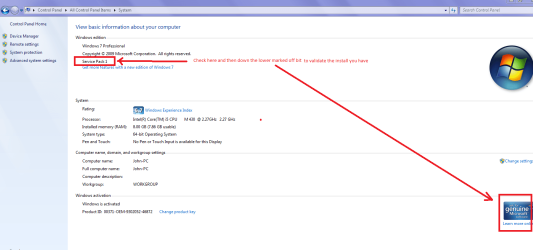
Zaph I just noticed in the HW Info snip you sent the build is 7600 (it might be wrong but unusual)now that is a build without the Service Pack 1 (SP1) can you post some system specs please or just look in Control Panel > System and see what is listed - the pic contains what is in my Toshy and yours should read 7601 SP1
 

Attachments

  • BULD.PNG
    BULD.PNG
    52.8 KB · Views: 0

My Computer My Computer

Computer type
PC/Desktop
Computer Manufacturer/Model Number
Own build (new) Desk1 / Asus ROG Win 7 / Desk2 1st build
OS
Desk1 7 Home Prem / Desk2 10 Pro / Main lap Asus ROG 10 Pro 2 laptop Toshiba 7 Pro Asus P2520 7 & 10
CPU
Desk1 i5 3750K / Laptop i7 GTX 860M / Desk2 i5 2500
Motherboard
Desk1 Asus P877-V / Desk2 Gigabyte H67 UD3H / Laptop ?
Memory
Desk1 8GB (1866) / Desk2 16GB (1333) / Laptop 8Gb DDR3
Graphics Card(s)
Desk 1& 2NVidia GTX 650 & Laptops on board Intel
Sound Card
Desk 1 & 2 -XONAR DG Realtek High Def audio Laptop
Monitor(s) Displays
Desk 1 Benq HD 2450 / Desk2 Philips 24" / Laptop 17.5"
Screen Resolution
1920x1080 D1 & D2 & Laptop 1
Hard Drives
Desk1 Samsung 120GB 830 SSD
Asus ROG 256GB 850 Pro SSD
Desk2 Samsung 840 256 SSD
Toshiba 120GB EVO
PSU
Desk 1 Corsair HX 1050/ Laptop ? / Desk 2 Corsair HX 650
Case
Desk 1 Cooler HAF XM ? Toshiba laptop / Desk2 Coolermaster
Cooling
Fans on all Desk1 -2 Desk2 - all Coolermasters 5 Laptop ?
Keyboard
Desk 1 MS Sidewinder X6 Desk 2 MS Sidewinder X 4
Mouse
Desk 1&2 - Gigabyte MS 900 gamer - laptop - Logitec wireless
Internet Speed
ADSL2+
Other Info
One other Desktop (tester) and spare Toshba laptop both with SSD's
Running Kaspersky 2016 ISS on all machines config'd identically
Logitec audio stereo systems on each machine (x3)
Canon MG5250MFC
Router/modem TP-Link running WPA2SK
Yep well you can do as Derek says and / or follow the Toshiba mytoshiba link I showed you pics of earlier when you find it because that is the device and that is the all important PART NO you need to quote.
I should add that it is important because it refers to where the machine was made and where it was made for - in your case that number will flag the UK / Europe driver support.

Edit: In the driver selection options you will see the 32bit or 74bit system select.

Yep, that helped refine to this. Are the results the same as you get John?

Driver Downloads - Computers | Toshiba - Toshiba

View attachment 375348

No mate I got the same sot of readout that I get out here but the results look similar. Now I am wondering re the build because if you look at the HW Info report it mention build 7600.
 

My Computer My Computer

Computer type
PC/Desktop
Computer Manufacturer/Model Number
Own build (new) Desk1 / Asus ROG Win 7 / Desk2 1st build
OS
Desk1 7 Home Prem / Desk2 10 Pro / Main lap Asus ROG 10 Pro 2 laptop Toshiba 7 Pro Asus P2520 7 & 10
CPU
Desk1 i5 3750K / Laptop i7 GTX 860M / Desk2 i5 2500
Motherboard
Desk1 Asus P877-V / Desk2 Gigabyte H67 UD3H / Laptop ?
Memory
Desk1 8GB (1866) / Desk2 16GB (1333) / Laptop 8Gb DDR3
Graphics Card(s)
Desk 1& 2NVidia GTX 650 & Laptops on board Intel
Sound Card
Desk 1 & 2 -XONAR DG Realtek High Def audio Laptop
Monitor(s) Displays
Desk 1 Benq HD 2450 / Desk2 Philips 24" / Laptop 17.5"
Screen Resolution
1920x1080 D1 & D2 & Laptop 1
Hard Drives
Desk1 Samsung 120GB 830 SSD
Asus ROG 256GB 850 Pro SSD
Desk2 Samsung 840 256 SSD
Toshiba 120GB EVO
PSU
Desk 1 Corsair HX 1050/ Laptop ? / Desk 2 Corsair HX 650
Case
Desk 1 Cooler HAF XM ? Toshiba laptop / Desk2 Coolermaster
Cooling
Fans on all Desk1 -2 Desk2 - all Coolermasters 5 Laptop ?
Keyboard
Desk 1 MS Sidewinder X6 Desk 2 MS Sidewinder X 4
Mouse
Desk 1&2 - Gigabyte MS 900 gamer - laptop - Logitec wireless
Internet Speed
ADSL2+
Other Info
One other Desktop (tester) and spare Toshba laptop both with SSD's
Running Kaspersky 2016 ISS on all machines config'd identically
Logitec audio stereo systems on each machine (x3)
Canon MG5250MFC
Router/modem TP-Link running WPA2SK
Yeah, I'm sure that's because he can't connect to the internet yet to get updates.
 

My Computer My Computer

Computer type
PC/Desktop
Computer Manufacturer/Model Number
Self Built
OS
Win 10 Pro x64
CPU
Intel I5-2500K @3.3GHz
Motherboard
Asrock P67 Extreme4
Memory
16GB G.Skill Ripjaws X (4x4GB)
Graphics Card(s)
EVGA GeForce 750 Ti SC 2GB
Sound Card
ASUS Xonar DG 5.1 Channels 24-bit 96KHz PCI Interface Sound
Monitor(s) Displays
auria eq2367
Screen Resolution
1920 x 1080
Hard Drives
250GB Samsung 850 EVO SSD
1TB WD Blue
1TB Hitachi
PSU
SeaSonic X 650W 80 Plus Gold
Case
Corsair Obsidian 750D
Cooling
Corsair H60, Three 140mm case fans
Keyboard
Logitech Wireless Keyboard K520
Mouse
Logitech Wireless Mouse M310
Internet Speed
Wave Broadband ~ 100 dn 5 up
Antivirus
Windows Defender, Malwarebytes Premium
Browser
Edge, IE11, Chrome
Other Info
Laptop specs: HP g7-1365dx /
CPU: AMD A6-3420M APU with Radeon(tm) HD Graphics /
RAM: Crucial 8Gb (2x4Gb) /
SSD: Crucial M4-CT128M4SSD2 ATA Device/ FW 000F /
GFX: AMD Radeon HD 6520G /
OS: Windows 10 Pro x64
Yeah, I'm sure that's because he can't connect to the internet yet to get updates.
Yep well it just had me wondering re genuine or not and he should have a factory default restore if it was installed by Toshiba. That model is one that comes after my lappy here now (2010) and I am pretty sure it came originally with SP1. But I stand to be corrected.
I have just done a fresh install but it was with an ISO I saved from Greg's tutorial before they disallowed Heidoc.com from using the ISO's.
 

My Computer My Computer

Computer type
PC/Desktop
Computer Manufacturer/Model Number
Own build (new) Desk1 / Asus ROG Win 7 / Desk2 1st build
OS
Desk1 7 Home Prem / Desk2 10 Pro / Main lap Asus ROG 10 Pro 2 laptop Toshiba 7 Pro Asus P2520 7 & 10
CPU
Desk1 i5 3750K / Laptop i7 GTX 860M / Desk2 i5 2500
Motherboard
Desk1 Asus P877-V / Desk2 Gigabyte H67 UD3H / Laptop ?
Memory
Desk1 8GB (1866) / Desk2 16GB (1333) / Laptop 8Gb DDR3
Graphics Card(s)
Desk 1& 2NVidia GTX 650 & Laptops on board Intel
Sound Card
Desk 1 & 2 -XONAR DG Realtek High Def audio Laptop
Monitor(s) Displays
Desk 1 Benq HD 2450 / Desk2 Philips 24" / Laptop 17.5"
Screen Resolution
1920x1080 D1 & D2 & Laptop 1
Hard Drives
Desk1 Samsung 120GB 830 SSD
Asus ROG 256GB 850 Pro SSD
Desk2 Samsung 840 256 SSD
Toshiba 120GB EVO
PSU
Desk 1 Corsair HX 1050/ Laptop ? / Desk 2 Corsair HX 650
Case
Desk 1 Cooler HAF XM ? Toshiba laptop / Desk2 Coolermaster
Cooling
Fans on all Desk1 -2 Desk2 - all Coolermasters 5 Laptop ?
Keyboard
Desk 1 MS Sidewinder X6 Desk 2 MS Sidewinder X 4
Mouse
Desk 1&2 - Gigabyte MS 900 gamer - laptop - Logitec wireless
Internet Speed
ADSL2+
Other Info
One other Desktop (tester) and spare Toshba laptop both with SSD's
Running Kaspersky 2016 ISS on all machines config'd identically
Logitec audio stereo systems on each machine (x3)
Canon MG5250MFC
Router/modem TP-Link running WPA2SK
The first post says he did a clean install, it was probably a non SP1 installer.

It still has to get online to activate/update so that bridge hasn't been crossed yet.
 

My Computer My Computer

Computer type
PC/Desktop
Computer Manufacturer/Model Number
Self Built
OS
Win 10 Pro x64
CPU
Intel I5-2500K @3.3GHz
Motherboard
Asrock P67 Extreme4
Memory
16GB G.Skill Ripjaws X (4x4GB)
Graphics Card(s)
EVGA GeForce 750 Ti SC 2GB
Sound Card
ASUS Xonar DG 5.1 Channels 24-bit 96KHz PCI Interface Sound
Monitor(s) Displays
auria eq2367
Screen Resolution
1920 x 1080
Hard Drives
250GB Samsung 850 EVO SSD
1TB WD Blue
1TB Hitachi
PSU
SeaSonic X 650W 80 Plus Gold
Case
Corsair Obsidian 750D
Cooling
Corsair H60, Three 140mm case fans
Keyboard
Logitech Wireless Keyboard K520
Mouse
Logitech Wireless Mouse M310
Internet Speed
Wave Broadband ~ 100 dn 5 up
Antivirus
Windows Defender, Malwarebytes Premium
Browser
Edge, IE11, Chrome
Other Info
Laptop specs: HP g7-1365dx /
CPU: AMD A6-3420M APU with Radeon(tm) HD Graphics /
RAM: Crucial 8Gb (2x4Gb) /
SSD: Crucial M4-CT128M4SSD2 ATA Device/ FW 000F /
GFX: AMD Radeon HD 6520G /
OS: Windows 10 Pro x64
The first post says he did a clean install, it was probably a non SP1 installer.

It still has to get online to activate/update so that bridge hasn't been crossed yet.
Ok will have to wait then till we hear back;) it just seemed unusual that it might be the pre SP1 version for that model although I have to admit I haven't Googled it to see when it was made.
 

My Computer My Computer

Computer type
PC/Desktop
Computer Manufacturer/Model Number
Own build (new) Desk1 / Asus ROG Win 7 / Desk2 1st build
OS
Desk1 7 Home Prem / Desk2 10 Pro / Main lap Asus ROG 10 Pro 2 laptop Toshiba 7 Pro Asus P2520 7 & 10
CPU
Desk1 i5 3750K / Laptop i7 GTX 860M / Desk2 i5 2500
Motherboard
Desk1 Asus P877-V / Desk2 Gigabyte H67 UD3H / Laptop ?
Memory
Desk1 8GB (1866) / Desk2 16GB (1333) / Laptop 8Gb DDR3
Graphics Card(s)
Desk 1& 2NVidia GTX 650 & Laptops on board Intel
Sound Card
Desk 1 & 2 -XONAR DG Realtek High Def audio Laptop
Monitor(s) Displays
Desk 1 Benq HD 2450 / Desk2 Philips 24" / Laptop 17.5"
Screen Resolution
1920x1080 D1 & D2 & Laptop 1
Hard Drives
Desk1 Samsung 120GB 830 SSD
Asus ROG 256GB 850 Pro SSD
Desk2 Samsung 840 256 SSD
Toshiba 120GB EVO
PSU
Desk 1 Corsair HX 1050/ Laptop ? / Desk 2 Corsair HX 650
Case
Desk 1 Cooler HAF XM ? Toshiba laptop / Desk2 Coolermaster
Cooling
Fans on all Desk1 -2 Desk2 - all Coolermasters 5 Laptop ?
Keyboard
Desk 1 MS Sidewinder X6 Desk 2 MS Sidewinder X 4
Mouse
Desk 1&2 - Gigabyte MS 900 gamer - laptop - Logitec wireless
Internet Speed
ADSL2+
Other Info
One other Desktop (tester) and spare Toshba laptop both with SSD's
Running Kaspersky 2016 ISS on all machines config'd identically
Logitec audio stereo systems on each machine (x3)
Canon MG5250MFC
Router/modem TP-Link running WPA2SK
It doesn't matter what installer is used when doing a clean install, one will require more updating than the other.

The model has nothing to do with it at this point. Except for finding drivers.
 

My Computer My Computer

Computer type
PC/Desktop
Computer Manufacturer/Model Number
Self Built
OS
Win 10 Pro x64
CPU
Intel I5-2500K @3.3GHz
Motherboard
Asrock P67 Extreme4
Memory
16GB G.Skill Ripjaws X (4x4GB)
Graphics Card(s)
EVGA GeForce 750 Ti SC 2GB
Sound Card
ASUS Xonar DG 5.1 Channels 24-bit 96KHz PCI Interface Sound
Monitor(s) Displays
auria eq2367
Screen Resolution
1920 x 1080
Hard Drives
250GB Samsung 850 EVO SSD
1TB WD Blue
1TB Hitachi
PSU
SeaSonic X 650W 80 Plus Gold
Case
Corsair Obsidian 750D
Cooling
Corsair H60, Three 140mm case fans
Keyboard
Logitech Wireless Keyboard K520
Mouse
Logitech Wireless Mouse M310
Internet Speed
Wave Broadband ~ 100 dn 5 up
Antivirus
Windows Defender, Malwarebytes Premium
Browser
Edge, IE11, Chrome
Other Info
Laptop specs: HP g7-1365dx /
CPU: AMD A6-3420M APU with Radeon(tm) HD Graphics /
RAM: Crucial 8Gb (2x4Gb) /
SSD: Crucial M4-CT128M4SSD2 ATA Device/ FW 000F /
GFX: AMD Radeon HD 6520G /
OS: Windows 10 Pro x64
Ok mate I found that site you referenced and this is the info on the machine as/when it was produced and I think yu are probably right it looks to be pre SP1 version Satellite C660-18C - Toshiba
 

My Computer My Computer

Computer type
PC/Desktop
Computer Manufacturer/Model Number
Own build (new) Desk1 / Asus ROG Win 7 / Desk2 1st build
OS
Desk1 7 Home Prem / Desk2 10 Pro / Main lap Asus ROG 10 Pro 2 laptop Toshiba 7 Pro Asus P2520 7 & 10
CPU
Desk1 i5 3750K / Laptop i7 GTX 860M / Desk2 i5 2500
Motherboard
Desk1 Asus P877-V / Desk2 Gigabyte H67 UD3H / Laptop ?
Memory
Desk1 8GB (1866) / Desk2 16GB (1333) / Laptop 8Gb DDR3
Graphics Card(s)
Desk 1& 2NVidia GTX 650 & Laptops on board Intel
Sound Card
Desk 1 & 2 -XONAR DG Realtek High Def audio Laptop
Monitor(s) Displays
Desk 1 Benq HD 2450 / Desk2 Philips 24" / Laptop 17.5"
Screen Resolution
1920x1080 D1 & D2 & Laptop 1
Hard Drives
Desk1 Samsung 120GB 830 SSD
Asus ROG 256GB 850 Pro SSD
Desk2 Samsung 840 256 SSD
Toshiba 120GB EVO
PSU
Desk 1 Corsair HX 1050/ Laptop ? / Desk 2 Corsair HX 650
Case
Desk 1 Cooler HAF XM ? Toshiba laptop / Desk2 Coolermaster
Cooling
Fans on all Desk1 -2 Desk2 - all Coolermasters 5 Laptop ?
Keyboard
Desk 1 MS Sidewinder X6 Desk 2 MS Sidewinder X 4
Mouse
Desk 1&2 - Gigabyte MS 900 gamer - laptop - Logitec wireless
Internet Speed
ADSL2+
Other Info
One other Desktop (tester) and spare Toshba laptop both with SSD's
Running Kaspersky 2016 ISS on all machines config'd identically
Logitec audio stereo systems on each machine (x3)
Canon MG5250MFC
Router/modem TP-Link running WPA2SK
Ok mate I found that site you referenced and this is the info on the machine as/when it was produced and I think yu are probably right it looks to be pre SP1 version Satellite C660-18C - Toshiba

Yeah, that is still pretty much irrelevant when it comes to doing a clean install.

It wouldn't matter either way at this point if the installer was SP1 or not, those are not requirements for doing a clean install.

Can we get back to drivers now?
 

My Computer My Computer

Computer type
PC/Desktop
Computer Manufacturer/Model Number
Self Built
OS
Win 10 Pro x64
CPU
Intel I5-2500K @3.3GHz
Motherboard
Asrock P67 Extreme4
Memory
16GB G.Skill Ripjaws X (4x4GB)
Graphics Card(s)
EVGA GeForce 750 Ti SC 2GB
Sound Card
ASUS Xonar DG 5.1 Channels 24-bit 96KHz PCI Interface Sound
Monitor(s) Displays
auria eq2367
Screen Resolution
1920 x 1080
Hard Drives
250GB Samsung 850 EVO SSD
1TB WD Blue
1TB Hitachi
PSU
SeaSonic X 650W 80 Plus Gold
Case
Corsair Obsidian 750D
Cooling
Corsair H60, Three 140mm case fans
Keyboard
Logitech Wireless Keyboard K520
Mouse
Logitech Wireless Mouse M310
Internet Speed
Wave Broadband ~ 100 dn 5 up
Antivirus
Windows Defender, Malwarebytes Premium
Browser
Edge, IE11, Chrome
Other Info
Laptop specs: HP g7-1365dx /
CPU: AMD A6-3420M APU with Radeon(tm) HD Graphics /
RAM: Crucial 8Gb (2x4Gb) /
SSD: Crucial M4-CT128M4SSD2 ATA Device/ FW 000F /
GFX: AMD Radeon HD 6520G /
OS: Windows 10 Pro x64
Absolutely:)
 

My Computer My Computer

Computer type
PC/Desktop
Computer Manufacturer/Model Number
Own build (new) Desk1 / Asus ROG Win 7 / Desk2 1st build
OS
Desk1 7 Home Prem / Desk2 10 Pro / Main lap Asus ROG 10 Pro 2 laptop Toshiba 7 Pro Asus P2520 7 & 10
CPU
Desk1 i5 3750K / Laptop i7 GTX 860M / Desk2 i5 2500
Motherboard
Desk1 Asus P877-V / Desk2 Gigabyte H67 UD3H / Laptop ?
Memory
Desk1 8GB (1866) / Desk2 16GB (1333) / Laptop 8Gb DDR3
Graphics Card(s)
Desk 1& 2NVidia GTX 650 & Laptops on board Intel
Sound Card
Desk 1 & 2 -XONAR DG Realtek High Def audio Laptop
Monitor(s) Displays
Desk 1 Benq HD 2450 / Desk2 Philips 24" / Laptop 17.5"
Screen Resolution
1920x1080 D1 & D2 & Laptop 1
Hard Drives
Desk1 Samsung 120GB 830 SSD
Asus ROG 256GB 850 Pro SSD
Desk2 Samsung 840 256 SSD
Toshiba 120GB EVO
PSU
Desk 1 Corsair HX 1050/ Laptop ? / Desk 2 Corsair HX 650
Case
Desk 1 Cooler HAF XM ? Toshiba laptop / Desk2 Coolermaster
Cooling
Fans on all Desk1 -2 Desk2 - all Coolermasters 5 Laptop ?
Keyboard
Desk 1 MS Sidewinder X6 Desk 2 MS Sidewinder X 4
Mouse
Desk 1&2 - Gigabyte MS 900 gamer - laptop - Logitec wireless
Internet Speed
ADSL2+
Other Info
One other Desktop (tester) and spare Toshba laptop both with SSD's
Running Kaspersky 2016 ISS on all machines config'd identically
Logitec audio stereo systems on each machine (x3)
Canon MG5250MFC
Router/modem TP-Link running WPA2SK
@ZaphodB
I don't want to overwhelm you with too many requests / questions from all of us trying to help so if i might ask just a couple simple things?

1. As asked earlier, what error do you receive when you tried installing the Realtek ethernet driver?
2. Please provide a Problem Device Report
  • Click the Start Orb, type msinfo32 in the search box. Hit Enter
  • Click the + sign next to Components to expand it
  • Click Problem Devices. Anything appear?
  • If yes, click on it, Ctrl-A to select all, Ctrl-C to copy it, Ctrl-V to paste into next post
  • On the other hand, if no devices are listed, tell me so
 

My Computer My Computer

Computer type
PC/Desktop
Computer Manufacturer/Model Number
Dell Optiplex 360 and Optiplex 755
OS
Desk 1: Win 7 Pro x32; Desk 2: Windows 10 x64
Hard Drives
500GB Crucial SSD in both Desktops
Other Info
Buffalo 6TB NAS, Raid 1
@ZaphodB
I don't want to overwhelm you with too many requests / questions from all of us trying to help so if i might ask just a couple simple things?

1. As asked earlier, what error do you receive when you tried installing the Realtek ethernet driver?
2. Please provide a Problem Device Report
  • Click the Start Orb, type msinfo32 in the search box. Hit Enter
  • Click the + sign next to Components to expand it
  • Click Problem Devices. Anything appear?
  • If yes, click on it, Ctrl-A to select all, Ctrl-C to copy it, Ctrl-V to paste into next post
  • On the other hand, if no devices are listed, tell me so

That was point of this post,

Good deal Zaph, it would be interesting to see that Device manager after the chipset drivers are installed.

Following option one in this tutorial after the chipset drivers have been installed would be great too,

http://www.sevenforums.com/tutorials/374583-system-information-file-create-windows.html#Part1

And again in post #16.
 

My Computer My Computer

Computer type
PC/Desktop
Computer Manufacturer/Model Number
Self Built
OS
Win 10 Pro x64
CPU
Intel I5-2500K @3.3GHz
Motherboard
Asrock P67 Extreme4
Memory
16GB G.Skill Ripjaws X (4x4GB)
Graphics Card(s)
EVGA GeForce 750 Ti SC 2GB
Sound Card
ASUS Xonar DG 5.1 Channels 24-bit 96KHz PCI Interface Sound
Monitor(s) Displays
auria eq2367
Screen Resolution
1920 x 1080
Hard Drives
250GB Samsung 850 EVO SSD
1TB WD Blue
1TB Hitachi
PSU
SeaSonic X 650W 80 Plus Gold
Case
Corsair Obsidian 750D
Cooling
Corsair H60, Three 140mm case fans
Keyboard
Logitech Wireless Keyboard K520
Mouse
Logitech Wireless Mouse M310
Internet Speed
Wave Broadband ~ 100 dn 5 up
Antivirus
Windows Defender, Malwarebytes Premium
Browser
Edge, IE11, Chrome
Other Info
Laptop specs: HP g7-1365dx /
CPU: AMD A6-3420M APU with Radeon(tm) HD Graphics /
RAM: Crucial 8Gb (2x4Gb) /
SSD: Crucial M4-CT128M4SSD2 ATA Device/ FW 000F /
GFX: AMD Radeon HD 6520G /
OS: Windows 10 Pro x64
Hello again folks - offline whilst catching some zzzzzs!

Anyhow the story is this.

My colleague had a Toshiba C660 laptop and he was having some trouble with it being slow. It had a HDD recovery partition which he said that he'd used several times, but the laptop was still too slow. He asked if I had a Win 7 disc so that he could do a clean install, so I burned him a a copy of Windows 7 iso that I'd found on the internet (we're moving house shortly and everything is boxed up - so my genuine retail copy is buried somewhere).

Anyway, two days later, he asks if I can help out because although Win 7 installed OK, he can't access the internet.

Looking at device manager when I got the laptop home, I noticed that both the wired and wireless network adapters had no drivers - and so started my search.

On the Toshiba UK site, I got to the page where Derek posted a pic - post #22 - and downloaded what I thought was relevant to the network adapters - namely The Network Device ID Registry Setting Tool (ndidrst-20110520140848.zip), the Realtek Semiconductor Corporation LAN Driver (lan-20101111150440.zip), the Toshiba Wireless LAN Indicator (wlanindi-20110520140557.zip) and Toshiba Hardware Setup (thws-20101004163306.zip).

After each driver install, I re-booted the machine just to be sure.

When this failed to help, I dug out my genuine retail copy of WIndows 7 Home Premium and re-installed the OS (just in case he had made a mistake or missed a step) and still no network adapters were identified and the relevant drivers installed.

I also couldn't access the Toshiba Recovery Partition (which is apparently still there on the HDD - I tried various methods including booting through Safe Mode and holding down the '0' key whilst turning the machine on).

I then shot off an email to Toshiba UK asking for their help and also posted here to see if you guys could help : )

The OS is currently in the pristine state - Windows 7 Home Premium 32-bit - NO UPDATES have been applied because I can't access the internet in any shape or form.

After your help and advice, I also downloaded and installed the Chipset Drivers (csutil-20120411101804.zip) but when I tried to install the Intel Management Engine Interface - I got an error (I'll edit this post with the details when I've fired the machine up as per your post #15).

Update: Error is 'Can not find support device' (image below)

heci%20error.jpg


Meanwhile Toshiba UK have deigned to reply to my query and gave me the following URL with the words
Thank you for your recent enquiry regarding your Toshiba Satellite Laptop.

We are sorry to hear of the issues you are experiencing. Please follow the link below to download the Wireless LAN driver.
https://extranet.toshiba-tro.de/en-...sslan3gportal/wirelesslandriverdownloads.aspx

However, that website lists 35 LAN drivers - none of which list the adapter (see my post #11 on page 2), which HWiNFO lists as Realtek Semiconductor RTL8101/2/3 Family Fast Ethernet Adapter (as you can see from the drivers highlighted in red in the picture below).

As an aside, would either of the two drivers highlighted in orange help at all? I'm guessing no because the Intel ProSet and WiFi Link are another set of network adapters?!

Toshiba%20LAN%20Driver%20Suggestions.jpg


I have emailed Toshiba back asking if any of these drivers (highlighted in red above) can be used. As t is the weekend, no chance of a reply before Monday at the earliest and probably more likely Tuesday - I'll keep you posted.

Thanks for all of your time and trouble so far trying to help me get this lappy sorted - it is much appreciated!

Zaph

PS Syetem informtion file .NFO to follow!

 
Last edited:

My Computer My Computer

Computer type
Laptop
Computer Manufacturer/Model Number
DELL Inspiron 1525 / Sony VAIO VGN FW21L / Zoostorm 7877-0095
OS
Windows 7 Home Premium SP1 64-bit (now looking at Linux Mint!)
CPU
Core2 Duo T5750 2GHz/Core2 Duo T5800 2GHz/Core i5 3300 3.1GH
Motherboard
DELL 0U990C / "SONY Corp VAIO" (??) / GA-H61M-DS2 DVI
Memory
4Gb / 4Gb / 8Gb
Graphics Card(s)
Intel 965 Express/ATi Mob Radeon HD 3400/AMD Radeon R7 200
Hard Drives
WD 750Gb Black (WD7500BPKT) - DELL
WD 1Tb Black (WD10JPLX) - SONY
ST 2Tb Barracuda (2000DM001) - Zoostorm
Internet Speed
VM Fibre 100 Mbps
Antivirus
Kaspersky IS 2019 / Kaspersky IS 2019 / Kaspersky IS 2019
Browser
Chrome 76.0.3809 / Chrome 79.0.3945 / Chrome 76.0.3809
OK - update.

msinfo32 lists 3 problems - see pic below

msinfo32.jpg


... and the .NFO file is attached to this post : )

Hope this helps,

Zaph
 

Attachments

My Computer My Computer

Computer type
Laptop
Computer Manufacturer/Model Number
DELL Inspiron 1525 / Sony VAIO VGN FW21L / Zoostorm 7877-0095
OS
Windows 7 Home Premium SP1 64-bit (now looking at Linux Mint!)
CPU
Core2 Duo T5750 2GHz/Core2 Duo T5800 2GHz/Core i5 3300 3.1GH
Motherboard
DELL 0U990C / "SONY Corp VAIO" (??) / GA-H61M-DS2 DVI
Memory
4Gb / 4Gb / 8Gb
Graphics Card(s)
Intel 965 Express/ATi Mob Radeon HD 3400/AMD Radeon R7 200
Hard Drives
WD 750Gb Black (WD7500BPKT) - DELL
WD 1Tb Black (WD10JPLX) - SONY
ST 2Tb Barracuda (2000DM001) - Zoostorm
Internet Speed
VM Fibre 100 Mbps
Antivirus
Kaspersky IS 2019 / Kaspersky IS 2019 / Kaspersky IS 2019
Browser
Chrome 76.0.3809 / Chrome 79.0.3945 / Chrome 76.0.3809
Now if you want my final opinion and advice - just buy a new SSD (or spinner if the budget is a problem) and install the ISO you made to it using the original code on the sticker. - or buy an OEM - I would recommend the latter and the 64bit version OEM which will have it's own code.
Do that and then transfer any data to the new install. That is what I did to my Toshibas and I have had three of my own and fixed others doing the same thing because it avoids the tedious Toshiba bloatware. That is invariably offered by Toshiba and also through Windows updates which again I would suggest you monitor carefully to avoid any nonsense with the 10 upgrade.

The choice (and budget) is yours of course but it would circumvent any issues you are now trying to fix.
 

My Computer My Computer

Computer type
PC/Desktop
Computer Manufacturer/Model Number
Own build (new) Desk1 / Asus ROG Win 7 / Desk2 1st build
OS
Desk1 7 Home Prem / Desk2 10 Pro / Main lap Asus ROG 10 Pro 2 laptop Toshiba 7 Pro Asus P2520 7 & 10
CPU
Desk1 i5 3750K / Laptop i7 GTX 860M / Desk2 i5 2500
Motherboard
Desk1 Asus P877-V / Desk2 Gigabyte H67 UD3H / Laptop ?
Memory
Desk1 8GB (1866) / Desk2 16GB (1333) / Laptop 8Gb DDR3
Graphics Card(s)
Desk 1& 2NVidia GTX 650 & Laptops on board Intel
Sound Card
Desk 1 & 2 -XONAR DG Realtek High Def audio Laptop
Monitor(s) Displays
Desk 1 Benq HD 2450 / Desk2 Philips 24" / Laptop 17.5"
Screen Resolution
1920x1080 D1 & D2 & Laptop 1
Hard Drives
Desk1 Samsung 120GB 830 SSD
Asus ROG 256GB 850 Pro SSD
Desk2 Samsung 840 256 SSD
Toshiba 120GB EVO
PSU
Desk 1 Corsair HX 1050/ Laptop ? / Desk 2 Corsair HX 650
Case
Desk 1 Cooler HAF XM ? Toshiba laptop / Desk2 Coolermaster
Cooling
Fans on all Desk1 -2 Desk2 - all Coolermasters 5 Laptop ?
Keyboard
Desk 1 MS Sidewinder X6 Desk 2 MS Sidewinder X 4
Mouse
Desk 1&2 - Gigabyte MS 900 gamer - laptop - Logitec wireless
Internet Speed
ADSL2+
Other Info
One other Desktop (tester) and spare Toshba laptop both with SSD's
Running Kaspersky 2016 ISS on all machines config'd identically
Logitec audio stereo systems on each machine (x3)
Canon MG5250MFC
Router/modem TP-Link running WPA2SK
John, what good is a SSD going to do for the ethernet drivers/connectivity?

@Zaphod : you haven't had any luck installing the chipset drivers again?
 

My Computer My Computer

Computer type
PC/Desktop
Computer Manufacturer/Model Number
Golden Mk. I.4
OS
Windows 10 Pro x64 ; Xubuntu x64
CPU
Intel i7 860 @ 2.80 GHz O/C'ed to 4.0GHz
Motherboard
Gigabyte P55A-UD3R Rev.1. Award BIOS F13
Memory
16GB Corsair Vengance DDR3 @ 661 MHz Dual Channel (9-9-9-24)
Graphics Card(s)
EVGA NVidia GTX 560 1024MB
Sound Card
Realtek Integrated
Monitor(s) Displays
Dual Samsung SyncMaster 2494HS
Screen Resolution
1920*1080 and 1920*1080
Hard Drives
1*Samsung 840 EVO 120GB SSD;
1*OCZ Vertex 2 60GB SSD;
2*Samsung F3 SpinPoint 1TB in RAID0;
1*Samsung F1 SpinPoint 1TB;
2*Western Digital 1TB External USB 3.0
1*Western Digital 500GB External USB 3.0
1*Seagate 500GB External USB 2.0
PSU
Thermaltake ToughPower QFan 750W
Case
Thermaltake Element S VK60001W2Z
Cooling
Corsair H60 Water Cooling, 2*230mm and 2*80mm case fans
Keyboard
Logitech G110
Mouse
Logitech MX518
Hi ICIT2LOL

Regarding your post #4 (in this thread), this was the Australian website I had found (mentioned towards the bottom of my original post).

Unfortunately on the drop-down, I don't get my exact part no (which is PSC0LE-01U00JEN - see pic below).

Aus%20Support%20Site.jpg


The laptop is a friend's and was working fine - albeit slowly - running Windows 7HP. Given the age of the machine (5+ years) and the fact that it is a Celeron processor, he's looking to buy a new one if he can't get this fixed cheaply. He certainly doesn't want to spend several 10's or 100's of £ (or $) either buying a SSD or a new 64-bit copy of Windows 7 for an old machine.

@Golden

No luck I'm afraid. I've tried re-installing the OS separately to see if it would re-detect the hardware and install drivers - no joy. Tried ripping device out of Device Mangler & re-boot to initialise re-detection of hardware - no joy. Tried d/loading and manually installing drivers (see my post #35 above) - no joy.

I'm wondering about seeing if I can easily get into the machine, physically remove the network cards, re-boot & switch off then re-attach the cards and re-boot and see if that works. Having said that, the machine isn't mine and if the network cards are buried inside somewhere (which they are likely to be) then I'll leave it.

There is a good, friendly and cheap PC repair shop not too far away and I'm tempted to refer my colleague there for installation of drivers and/or re-installation of the OS and see what the professionals can do.

I had a notebook repaired by them and a new 500Gb HDD, reinstallation of Win 7 Starter and all the requisite drivers after a catastrophic HDD failure (no physical media - HDD recovery partition) only came to £120 including labour - so I reckon for £25-40 they might be able to sort his machine out. Worth a punt at any rate.

If I can fix it for him (with the help of the kind folks on sevenforums) then great - but it isn't the end of the world if we get nowhere. I just don't like being beaten!

Any further help/advice/suggestions welcome. Meanwhile, I'm going trawling to see what I can find amongst the various Toshiba support websites worldwide.

Cheers for now,

Zaph
 

My Computer My Computer

Computer type
Laptop
Computer Manufacturer/Model Number
DELL Inspiron 1525 / Sony VAIO VGN FW21L / Zoostorm 7877-0095
OS
Windows 7 Home Premium SP1 64-bit (now looking at Linux Mint!)
CPU
Core2 Duo T5750 2GHz/Core2 Duo T5800 2GHz/Core i5 3300 3.1GH
Motherboard
DELL 0U990C / "SONY Corp VAIO" (??) / GA-H61M-DS2 DVI
Memory
4Gb / 4Gb / 8Gb
Graphics Card(s)
Intel 965 Express/ATi Mob Radeon HD 3400/AMD Radeon R7 200
Hard Drives
WD 750Gb Black (WD7500BPKT) - DELL
WD 1Tb Black (WD10JPLX) - SONY
ST 2Tb Barracuda (2000DM001) - Zoostorm
Internet Speed
VM Fibre 100 Mbps
Antivirus
Kaspersky IS 2019 / Kaspersky IS 2019 / Kaspersky IS 2019
Browser
Chrome 76.0.3809 / Chrome 79.0.3945 / Chrome 76.0.3809
I think Derek knows how to use the vendor ID''s as per your screen capture image to locate the correct driver (I'v forgotten how to do that now). My recommendation is to sit it out until he comes back on again, and sees that. I wouldn'y try delving into the laptop innards.

All we need is a functioning ethernet driver, and once on the web, Windows Update will pick up the rest.
 

My Computer My Computer

Computer type
PC/Desktop
Computer Manufacturer/Model Number
Golden Mk. I.4
OS
Windows 10 Pro x64 ; Xubuntu x64
CPU
Intel i7 860 @ 2.80 GHz O/C'ed to 4.0GHz
Motherboard
Gigabyte P55A-UD3R Rev.1. Award BIOS F13
Memory
16GB Corsair Vengance DDR3 @ 661 MHz Dual Channel (9-9-9-24)
Graphics Card(s)
EVGA NVidia GTX 560 1024MB
Sound Card
Realtek Integrated
Monitor(s) Displays
Dual Samsung SyncMaster 2494HS
Screen Resolution
1920*1080 and 1920*1080
Hard Drives
1*Samsung 840 EVO 120GB SSD;
1*OCZ Vertex 2 60GB SSD;
2*Samsung F3 SpinPoint 1TB in RAID0;
1*Samsung F1 SpinPoint 1TB;
2*Western Digital 1TB External USB 3.0
1*Western Digital 500GB External USB 3.0
1*Seagate 500GB External USB 2.0
PSU
Thermaltake ToughPower QFan 750W
Case
Thermaltake Element S VK60001W2Z
Cooling
Corsair H60 Water Cooling, 2*230mm and 2*80mm case fans
Keyboard
Logitech G110
Mouse
Logitech MX518
Back
Top