
Solved Log in goes back to login

copiman

New member
Power User
VIP
Local time
12:51 PM
Messages
261
I have a desktop hp p6837c with 7 Home Premium. When you login it says logging off then goes back to login screen. I can get to safe mode sometimes. Not sure what to do.
 

My Computer My Computer

Computer type
PC/Desktop
Computer Manufacturer/Model Number
All
OS
Windows 7 Home Premium
Other Info
I work on many PCs/Laptops for people to get hands on experience. I am a student at a technical college learning about computers and networks.

My Computer My Computer

Computer type
PC/Desktop
Computer Manufacturer/Model Number
Custom Build
OS
Windows 7 Home Premium 32-Bit - Build 7600 SP1
CPU
Intel Core i3-2120 3.30Ghz
Motherboard
Asus P8Z68-V LX Intel Z68 Socket H2 ATX
Memory
Kingston 4 GB DDR3 1333 mhz
Graphics Card(s)
AMD Radeon HD6670
Sound Card
Sound Blaster Audigy SE 24-Bit
Monitor(s) Displays
Asus VE228
Screen Resolution
1440 X 900
Hard Drives
OCZ Vertex 3 120 GB Sata 3 SSD ==
Kingston SH103/S3 120 G Hyper X 120 GB SSD ==
Western Digital 500 GB Caviar Green 7200 RPM ==
PSU
Corsair CX600M == 600 Watt
Case
NZXT Apollo - Silver with Clear Side Panel
Cooling
Three 120 mm Fans
Keyboard
Microsoft Natural 4000
Mouse
Microsoft Custom Optical 3000
Internet Speed
AT&T Fiber Optic Wireless Network
Antivirus
Microsoft Security Essentials
Browser
Chrome
Other Info
120 mm Blue LED Fan -- Three Blue LED Lazer Light Sticks
Last edited:

My Computer My Computer

Computer type
PC/Desktop
Computer Manufacturer/Model Number
All
OS
Windows 7 Home Premium
Other Info
I work on many PCs/Laptops for people to get hands on experience. I am a student at a technical college learning about computers and networks.
My Computer My Computer

Computer type
PC/Desktop
Computer Manufacturer/Model Number
Custom Build
OS
Windows 7 Home Premium 32-Bit - Build 7600 SP1
CPU
Intel Core i3-2120 3.30Ghz
Motherboard
Asus P8Z68-V LX Intel Z68 Socket H2 ATX
Memory
Kingston 4 GB DDR3 1333 mhz
Graphics Card(s)
AMD Radeon HD6670
Sound Card
Sound Blaster Audigy SE 24-Bit
Monitor(s) Displays
Asus VE228
Screen Resolution
1440 X 900
Hard Drives
OCZ Vertex 3 120 GB Sata 3 SSD ==
Kingston SH103/S3 120 G Hyper X 120 GB SSD ==
Western Digital 500 GB Caviar Green 7200 RPM ==
PSU
Corsair CX600M == 600 Watt
Case
NZXT Apollo - Silver with Clear Side Panel
Cooling
Three 120 mm Fans
Keyboard
Microsoft Natural 4000
Mouse
Microsoft Custom Optical 3000
Internet Speed
AT&T Fiber Optic Wireless Network
Antivirus
Microsoft Security Essentials
Browser
Chrome
Other Info
120 mm Blue LED Fan -- Three Blue LED Lazer Light Sticks
Also, Windows Update KB2097877 has caused problems.
If you have KB2097877 installed, uninstall it and see if that helps.
 

My Computer My Computer

Computer type
PC/Desktop
Computer Manufacturer/Model Number
home built
OS
Multi-Boot W7_Pro_x64 W8.1_Pro_x64 W10_Pro_x64 +Linux_VMs +Chromium_VM
CPU
AMD Athlon II x4 620
Motherboard
Gigabyte GA-MA785G-UD3H
Memory
6GB GSkill DDR2 800
Graphics Card(s)
AMD 4670 GPU + AMD 4200 IGP
Sound Card
on board Realtek ALC889A
Monitor(s) Displays
RCA 40" LCD TV, Insignia 32" LCD TV, HP 15" LCD monitor
Screen Resolution
1680 x 1050
Hard Drives
OCZ Vertex 3 120GB,
Samsung F3 1TB (3),
Several others - WD, Seagate, Hitachi, ...
PSU
Corsair 500 W
Case
Rosewill mid tower
Cooling
CM 90mm rifle
Keyboard
Gyration wireless, Logitech wireless, Dell USB wired
Mouse
Gyration wireless, Logitech wireless, V7 USB wired
Internet Speed
Spectrum - 100Mbps D / 10Mbps U
Antivirus
Avast, MBAM3, EMET, WinPatrol
Browser
Pale Moon, Firefox, IE
Other Info
2 multi-boot PC's
Mainly HTPC/Office/Gen purpose (no gaming).
Trendnet USB KVM.
LG DVD burner/Blue Ray Player.
Tray system for removable SATA backup drives.

Not currently OCd, under-volted.
I use Hybrid sleep, rarely re-boot or shutdown.

Hauppauge HD-PVR, Avermedia PCIe TV Tuner, Hauppauge PCI TV Tuner.

Attachments

  • Disk Management 2.PNG
    Disk Management 2.PNG
    37.4 KB · Views: 4

My Computer My Computer

Computer type
PC/Desktop
Computer Manufacturer/Model Number
All
OS
Windows 7 Home Premium
Other Info
I work on many PCs/Laptops for people to get hands on experience. I am a student at a technical college learning about computers and networks.
Also, Windows Update KB2097877 has caused problems.
If you have KB2097877 installed, uninstall it and see if that helps.

Thanks DavidE. I checked and it is not installed on this PC.


UPDATE: I think you meant KB3097877. I don't have this one either but it was sitting there waiting to be installed. I hid it for now. Just saw a post about it.
 
Last edited:

My Computer My Computer

Computer type
PC/Desktop
Computer Manufacturer/Model Number
All
OS
Windows 7 Home Premium
Other Info
I work on many PCs/Laptops for people to get hands on experience. I am a student at a technical college learning about computers and networks.
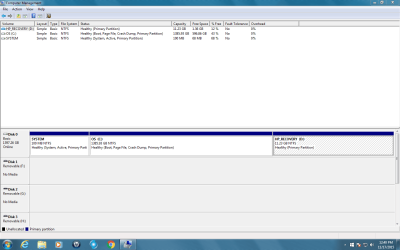
Your Disk Management is OK. Let's go with the User Account fix and see what that does. Go in through you Admin Acct and make a new user account that you will use in the future. Before you delete the others, just see if you can log in with the new account. If not go back in with the Admin Account and delete the old User Accts. Again try to log in with the New User Acct. If nothing, then I would suggest using your Recovery Partition and install Windows 7 again. This will erase all of your files in the PC and make it just like the day your purchased it. Do you have a lot files that you do not want to lose?
 

My Computer My Computer

Computer type
PC/Desktop
Computer Manufacturer/Model Number
Custom Build
OS
Windows 7 Home Premium 32-Bit - Build 7600 SP1
CPU
Intel Core i3-2120 3.30Ghz
Motherboard
Asus P8Z68-V LX Intel Z68 Socket H2 ATX
Memory
Kingston 4 GB DDR3 1333 mhz
Graphics Card(s)
AMD Radeon HD6670
Sound Card
Sound Blaster Audigy SE 24-Bit
Monitor(s) Displays
Asus VE228
Screen Resolution
1440 X 900
Hard Drives
OCZ Vertex 3 120 GB Sata 3 SSD ==
Kingston SH103/S3 120 G Hyper X 120 GB SSD ==
Western Digital 500 GB Caviar Green 7200 RPM ==
PSU
Corsair CX600M == 600 Watt
Case
NZXT Apollo - Silver with Clear Side Panel
Cooling
Three 120 mm Fans
Keyboard
Microsoft Natural 4000
Mouse
Microsoft Custom Optical 3000
Internet Speed
AT&T Fiber Optic Wireless Network
Antivirus
Microsoft Security Essentials
Browser
Chrome
Other Info
120 mm Blue LED Fan -- Three Blue LED Lazer Light Sticks
I created a new user and it had the same issue. I have 43.4G of files that I need to keep. I'm trying to delete an account now and it seems to be taking some time. I selected to keep the files when I chose to delete the user.


UPDATE: It keep the files. I guess I have no other option but to use the recovery partition.
 
Last edited:

My Computer My Computer

Computer type
PC/Desktop
Computer Manufacturer/Model Number
All
OS
Windows 7 Home Premium
Other Info
I work on many PCs/Laptops for people to get hands on experience. I am a student at a technical college learning about computers and networks.
I created a new user and it had the same issue. I have 43.4G of files that I need to keep. I'm trying to delete an account now and it seems to be taking some time. I selected to keep the files when I chose to delete the user.


UPDATE: It keep the files. I guess I have no other option but to use the recovery partition.

There is one thing you can do to save your files. You can get an external disk and clone your whole drive to it. You can then use the Recovery Partition and get your drive like new. You will then have your files and you can just copy them from the external drive to you PC. If you want to do this, I can point you to a good site to buy the drive and show you where to get the free software to clone the files. Let me know.
 

My Computer My Computer

Computer type
PC/Desktop
Computer Manufacturer/Model Number
Custom Build
OS
Windows 7 Home Premium 32-Bit - Build 7600 SP1
CPU
Intel Core i3-2120 3.30Ghz
Motherboard
Asus P8Z68-V LX Intel Z68 Socket H2 ATX
Memory
Kingston 4 GB DDR3 1333 mhz
Graphics Card(s)
AMD Radeon HD6670
Sound Card
Sound Blaster Audigy SE 24-Bit
Monitor(s) Displays
Asus VE228
Screen Resolution
1440 X 900
Hard Drives
OCZ Vertex 3 120 GB Sata 3 SSD ==
Kingston SH103/S3 120 G Hyper X 120 GB SSD ==
Western Digital 500 GB Caviar Green 7200 RPM ==
PSU
Corsair CX600M == 600 Watt
Case
NZXT Apollo - Silver with Clear Side Panel
Cooling
Three 120 mm Fans
Keyboard
Microsoft Natural 4000
Mouse
Microsoft Custom Optical 3000
Internet Speed
AT&T Fiber Optic Wireless Network
Antivirus
Microsoft Security Essentials
Browser
Chrome
Other Info
120 mm Blue LED Fan -- Three Blue LED Lazer Light Sticks
I have a Western Digital My Book External Drive I can use. Normally I just drag the files to it. But if you know of a way to do it I would be very interested. I need to learn as much as I can. I'm a student learning computers and networks.
 

My Computer My Computer

Computer type
PC/Desktop
Computer Manufacturer/Model Number
All
OS
Windows 7 Home Premium
Other Info
I work on many PCs/Laptops for people to get hands on experience. I am a student at a technical college learning about computers and networks.
I have a Western Digital My Book External Drive I can use. Normally I just drag the files to it. But if you know of a way to do it I would be very interested. I need to learn as much as I can. I'm a student learning computers and networks.

You will need about 650 GB of free space on your external drive. Have you got that much? If so, go to this site Macrium Reflect Free and down load Macrium Reflect. It is a free program and one of the best. Install it on your PC and clone the entire C: drive to the external disk. When you have the files there you can launch the Recovery Partition and put the new Windows in your PC. Let me know if you have any questions on the procedure. I will check the site regularly tonight. I will then tell you how to get the cloned files to your new C: drive. Later
 

My Computer My Computer

Computer type
PC/Desktop
Computer Manufacturer/Model Number
Custom Build
OS
Windows 7 Home Premium 32-Bit - Build 7600 SP1
CPU
Intel Core i3-2120 3.30Ghz
Motherboard
Asus P8Z68-V LX Intel Z68 Socket H2 ATX
Memory
Kingston 4 GB DDR3 1333 mhz
Graphics Card(s)
AMD Radeon HD6670
Sound Card
Sound Blaster Audigy SE 24-Bit
Monitor(s) Displays
Asus VE228
Screen Resolution
1440 X 900
Hard Drives
OCZ Vertex 3 120 GB Sata 3 SSD ==
Kingston SH103/S3 120 G Hyper X 120 GB SSD ==
Western Digital 500 GB Caviar Green 7200 RPM ==
PSU
Corsair CX600M == 600 Watt
Case
NZXT Apollo - Silver with Clear Side Panel
Cooling
Three 120 mm Fans
Keyboard
Microsoft Natural 4000
Mouse
Microsoft Custom Optical 3000
Internet Speed
AT&T Fiber Optic Wireless Network
Antivirus
Microsoft Security Essentials
Browser
Chrome
Other Info
120 mm Blue LED Fan -- Three Blue LED Lazer Light Sticks
I guess I have no other option but to use the recovery partition.
Personally i would try a Repair Install before a Recovery or Clean Install.
See this tutorial for more info: http://www.sevenforums.com/tutorials/3413-repair-install.html

I need to learn as much as I can.
I've learned
- Keep periodic System Image backups for the OS+Programs partition (i use Macrium). - Keep all important User Data backed up, and not stored on the [C] partition. - Store User Data on a different partition than the [C] drive (OS+Programs).
 

My Computer My Computer

Computer type
PC/Desktop
Computer Manufacturer/Model Number
home built
OS
Multi-Boot W7_Pro_x64 W8.1_Pro_x64 W10_Pro_x64 +Linux_VMs +Chromium_VM
CPU
AMD Athlon II x4 620
Motherboard
Gigabyte GA-MA785G-UD3H
Memory
6GB GSkill DDR2 800
Graphics Card(s)
AMD 4670 GPU + AMD 4200 IGP
Sound Card
on board Realtek ALC889A
Monitor(s) Displays
RCA 40" LCD TV, Insignia 32" LCD TV, HP 15" LCD monitor
Screen Resolution
1680 x 1050
Hard Drives
OCZ Vertex 3 120GB,
Samsung F3 1TB (3),
Several others - WD, Seagate, Hitachi, ...
PSU
Corsair 500 W
Case
Rosewill mid tower
Cooling
CM 90mm rifle
Keyboard
Gyration wireless, Logitech wireless, Dell USB wired
Mouse
Gyration wireless, Logitech wireless, V7 USB wired
Internet Speed
Spectrum - 100Mbps D / 10Mbps U
Antivirus
Avast, MBAM3, EMET, WinPatrol
Browser
Pale Moon, Firefox, IE
Other Info
2 multi-boot PC's
Mainly HTPC/Office/Gen purpose (no gaming).
Trendnet USB KVM.
LG DVD burner/Blue Ray Player.
Tray system for removable SATA backup drives.

Not currently OCd, under-volted.
I use Hybrid sleep, rarely re-boot or shutdown.

Hauppauge HD-PVR, Avermedia PCIe TV Tuner, Hauppauge PCI TV Tuner.
I guess I have no other option but to use the recovery partition.
Personally i would try a Repair Install before a Recovery or Clean Install.
See this tutorial for more info: http://www.sevenforums.com/tutorials/3413-repair-install.html

I need to learn as much as I can.
I've learned
- Keep periodic System Image backups for the OS+Programs partition (i use Macrium). - Keep all important User Data backed up, and not stored on the [C] partition. - Store User Data on a different partition than the [C] drive (OS+Programs).[/QUOTE] The link you provided indicates it is now impossible to do repair installs with Windows 7. See post # 1925 to 1932 on the link. Let me know what you think. I have an ISO w/ SP1 or if you know of a more current place, I can burn another. Will a repair cause a problem with the recovery partition if it fails? I ask because right now I can back up files, do recovery, do Windows updates, reload files and 3 programs. This is not my PC, it belongs to a friend. I have never done a repair install, just read the tutorial.
 

My Computer My Computer

Computer type
PC/Desktop
Computer Manufacturer/Model Number
All
OS
Windows 7 Home Premium
Other Info
I work on many PCs/Laptops for people to get hands on experience. I am a student at a technical college learning about computers and networks.
I have a Western Digital My Book External Drive I can use. Normally I just drag the files to it. But if you know of a way to do it I would be very interested. I need to learn as much as I can. I'm a student learning computers and networks.

You will need about 650 GB of free space on your external drive. Have you got that much? If so, go to this site Macrium Reflect Free and down load Macrium Reflect. It is a free program and one of the best. Install it on your PC and clone the entire C: drive to the external disk. When you have the files there you can launch the Recovery Partition and put the new Windows in your PC. Let me know if you have any questions on the procedure. I will check the site regularly tonight. I will then tell you how to get the cloned files to your new C: drive. Later

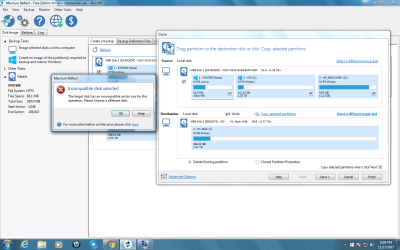
I have plenty of space on the external drive. Installed Macrium. Started the clone and got a Incompatible disk selected. The sector size on the PC drive is 512 and the external is 4096 (I think). Not sure what to do next.
 

Attachments

  • Capture.PNG
    Capture.PNG
    73.2 KB · Views: 4

My Computer My Computer

Computer type
PC/Desktop
Computer Manufacturer/Model Number
All
OS
Windows 7 Home Premium
Other Info
I work on many PCs/Laptops for people to get hands on experience. I am a student at a technical college learning about computers and networks.
I guess I have no other option but to use the recovery partition.
Personally i would try a Repair Install before a Recovery or Clean Install.
See this tutorial for more info: http://www.sevenforums.com/tutorials/3413-repair-install.html

I need to learn as much as I can.
I've learned
- Keep periodic System Image backups for the OS+Programs partition (i use Macrium). - Keep all important User Data backed up, and not stored on the [C] partition. - Store User Data on a different partition than the [C] drive (OS+Programs).[/QUOTE] The link you provided indicates it is now impossible to do repair installs with Windows 7. See post # 1925 to 1932 on the link. Let me know what you think. I have an ISO w/ SP1 or if you know of a more current place, I can burn another. Will a repair cause a problem with the recovery partition if it fails? I ask because right now I can back up files, do recovery, do Windows updates, reload files and 3 programs. This is not my PC, it belongs to a friend. I have never done a repair install, just read the tutorial.[/QUOTE] A W7 ISO w/ SP1 is the latest version. I've never done a Repair Install, so i can't answer specific questions such as "Will a repair cause a problem with the recovery partition if it fails?" I never needed to do a Repair Install because i do periodic System Image backups. I've done many restores on my systems using imaging programs such as Macrium or Acronis. I've got home-built PC's, so i don't have a "Recovery Partition". You can ask questions in the tutorial for better answers and advice from the tutorial author Shawn Brink.
 

My Computer My Computer

Computer type
PC/Desktop
Computer Manufacturer/Model Number
home built
OS
Multi-Boot W7_Pro_x64 W8.1_Pro_x64 W10_Pro_x64 +Linux_VMs +Chromium_VM
CPU
AMD Athlon II x4 620
Motherboard
Gigabyte GA-MA785G-UD3H
Memory
6GB GSkill DDR2 800
Graphics Card(s)
AMD 4670 GPU + AMD 4200 IGP
Sound Card
on board Realtek ALC889A
Monitor(s) Displays
RCA 40" LCD TV, Insignia 32" LCD TV, HP 15" LCD monitor
Screen Resolution
1680 x 1050
Hard Drives
OCZ Vertex 3 120GB,
Samsung F3 1TB (3),
Several others - WD, Seagate, Hitachi, ...
PSU
Corsair 500 W
Case
Rosewill mid tower
Cooling
CM 90mm rifle
Keyboard
Gyration wireless, Logitech wireless, Dell USB wired
Mouse
Gyration wireless, Logitech wireless, V7 USB wired
Internet Speed
Spectrum - 100Mbps D / 10Mbps U
Antivirus
Avast, MBAM3, EMET, WinPatrol
Browser
Pale Moon, Firefox, IE
Other Info
2 multi-boot PC's
Mainly HTPC/Office/Gen purpose (no gaming).
Trendnet USB KVM.
LG DVD burner/Blue Ray Player.
Tray system for removable SATA backup drives.

Not currently OCd, under-volted.
I use Hybrid sleep, rarely re-boot or shutdown.

Hauppauge HD-PVR, Avermedia PCIe TV Tuner, Hauppauge PCI TV Tuner.
I have a Western Digital My Book External Drive I can use. Normally I just drag the files to it. But if you know of a way to do it I would be very interested. I need to learn as much as I can. I'm a student learning computers and networks.

You will need about 650 GB of free space on your external drive. Have you got that much? If so, go to this site Macrium Reflect Free and down load Macrium Reflect. It is a free program and one of the best. Install it on your PC and clone the entire C: drive to the external disk. When you have the files there you can launch the Recovery Partition and put the new Windows in your PC. Let me know if you have any questions on the procedure. I will check the site regularly tonight. I will then tell you how to get the cloned files to your new C: drive. Later

I have plenty of space on the external drive. Installed Macrium. Started the clone and got a Incompatible disk selected. The sector size on the PC drive is 512 and the external is 4096 (I think). Not sure what to do next.


You don't say what size the External Drive is but I am assuming it is a big one. Make a partition of about 1.50 TB on the external drive. Make sure it is empty. Then try to clone again in that partition. Hopefully that will make the sectors sizes right. Let me know.
 
Last edited:

My Computer My Computer

Computer type
PC/Desktop
Computer Manufacturer/Model Number
Custom Build
OS
Windows 7 Home Premium 32-Bit - Build 7600 SP1
CPU
Intel Core i3-2120 3.30Ghz
Motherboard
Asus P8Z68-V LX Intel Z68 Socket H2 ATX
Memory
Kingston 4 GB DDR3 1333 mhz
Graphics Card(s)
AMD Radeon HD6670
Sound Card
Sound Blaster Audigy SE 24-Bit
Monitor(s) Displays
Asus VE228
Screen Resolution
1440 X 900
Hard Drives
OCZ Vertex 3 120 GB Sata 3 SSD ==
Kingston SH103/S3 120 G Hyper X 120 GB SSD ==
Western Digital 500 GB Caviar Green 7200 RPM ==
PSU
Corsair CX600M == 600 Watt
Case
NZXT Apollo - Silver with Clear Side Panel
Cooling
Three 120 mm Fans
Keyboard
Microsoft Natural 4000
Mouse
Microsoft Custom Optical 3000
Internet Speed
AT&T Fiber Optic Wireless Network
Antivirus
Microsoft Security Essentials
Browser
Chrome
Other Info
120 mm Blue LED Fan -- Three Blue LED Lazer Light Sticks
Personally i would try a Repair Install before a Recovery or Clean Install.
See this tutorial for more info: http://www.sevenforums.com/tutorials/3413-repair-install.html

I've learned
- Keep periodic System Image backups for the OS+Programs partition (i use Macrium). - Keep all important User Data backed up, and not stored on the [C] partition. - Store User Data on a different partition than the [C] drive (OS+Programs).[/QUOTE] The link you provided indicates it is now impossible to do repair installs with Windows 7. See post # 1925 to 1932 on the link. Let me know what you think. I have an ISO w/ SP1 or if you know of a more current place, I can burn another. Will a repair cause a problem with the recovery partition if it fails? I ask because right now I can back up files, do recovery, do Windows updates, reload files and 3 programs. This is not my PC, it belongs to a friend. I have never done a repair install, just read the tutorial.[/QUOTE] A W7 ISO w/ SP1 is the latest version. I've never done a Repair Install, so i can't answer specific questions such as "Will a repair cause a problem with the recovery partition if it fails?" I never needed to do a Repair Install because i do periodic System Image backups. I've done many restores on my systems using imaging programs such as Macrium or Acronis. I've got home-built PC's, so i don't have a "Recovery Partition". You can ask questions in the tutorial for better answers and advice from the tutorial author Shawn Brink.[/QUOTE] From your reply I am assuming the Win 7 disk you have is not the one that came with the PC. If that is correct, you will not be able to do a Repair Install with it.
 

My Computer My Computer

Computer type
PC/Desktop
Computer Manufacturer/Model Number
Custom Build
OS
Windows 7 Home Premium 32-Bit - Build 7600 SP1
CPU
Intel Core i3-2120 3.30Ghz
Motherboard
Asus P8Z68-V LX Intel Z68 Socket H2 ATX
Memory
Kingston 4 GB DDR3 1333 mhz
Graphics Card(s)
AMD Radeon HD6670
Sound Card
Sound Blaster Audigy SE 24-Bit
Monitor(s) Displays
Asus VE228
Screen Resolution
1440 X 900
Hard Drives
OCZ Vertex 3 120 GB Sata 3 SSD ==
Kingston SH103/S3 120 G Hyper X 120 GB SSD ==
Western Digital 500 GB Caviar Green 7200 RPM ==
PSU
Corsair CX600M == 600 Watt
Case
NZXT Apollo - Silver with Clear Side Panel
Cooling
Three 120 mm Fans
Keyboard
Microsoft Natural 4000
Mouse
Microsoft Custom Optical 3000
Internet Speed
AT&T Fiber Optic Wireless Network
Antivirus
Microsoft Security Essentials
Browser
Chrome
Other Info
120 mm Blue LED Fan -- Three Blue LED Lazer Light Sticks
Repair install media has to be done with the same version that is installed, that is the main problem most people have.

They are still viable options with the right media though.

This post here has more info on ISO's if you need one,

You can do a torrent download from here for some of the versions: Download Windows 7 ISOs, Legally and for Free

You need to install a torrent client. I looked at the ones suggested and didn't like any except for qTorrent which doesn't try to install a bunch of scamware. I used it to download Windows 7 Pro X86 and X64 and compared the md5 checksums with what they posted and they matched. Now I need to find somewhere to compare them against actual md5 checksum values from Microsoft Downloads or at least MS published.

Good luck.

Edit: Compared them with the MSDN Technet MD5 sums and they match so these are good, safe ISOs to use,

I'm curious why you chose clone instead of image?
 

My Computer My Computer

Computer type
PC/Desktop
Computer Manufacturer/Model Number
Self Built
OS
Win 10 Pro x64
CPU
Intel I5-2500K @3.3GHz
Motherboard
Asrock P67 Extreme4
Memory
16GB G.Skill Ripjaws X (4x4GB)
Graphics Card(s)
EVGA GeForce 750 Ti SC 2GB
Sound Card
ASUS Xonar DG 5.1 Channels 24-bit 96KHz PCI Interface Sound
Monitor(s) Displays
auria eq2367
Screen Resolution
1920 x 1080
Hard Drives
250GB Samsung 850 EVO SSD
1TB WD Blue
1TB Hitachi
PSU
SeaSonic X 650W 80 Plus Gold
Case
Corsair Obsidian 750D
Cooling
Corsair H60, Three 140mm case fans
Keyboard
Logitech Wireless Keyboard K520
Mouse
Logitech Wireless Mouse M310
Internet Speed
Wave Broadband ~ 100 dn 5 up
Antivirus
Windows Defender, Malwarebytes Premium
Browser
Edge, IE11, Chrome
Other Info
Laptop specs: HP g7-1365dx /
CPU: AMD A6-3420M APU with Radeon(tm) HD Graphics /
RAM: Crucial 8Gb (2x4Gb) /
SSD: Crucial M4-CT128M4SSD2 ATA Device/ FW 000F /
GFX: AMD Radeon HD 6520G /
OS: Windows 10 Pro x64
em with the MSDN Technet MD5 sums and they match so these are good, safe ISOs to use,

I'm curious why you chose clone instead of image?

Derekimo -- He is going to clone, so he can save his Docs, run his Recovery Partition and then take the Docs from the clone and reinstall them on his PC. He could not do that with an image.
 

My Computer My Computer

Computer type
PC/Desktop
Computer Manufacturer/Model Number
Custom Build
OS
Windows 7 Home Premium 32-Bit - Build 7600 SP1
CPU
Intel Core i3-2120 3.30Ghz
Motherboard
Asus P8Z68-V LX Intel Z68 Socket H2 ATX
Memory
Kingston 4 GB DDR3 1333 mhz
Graphics Card(s)
AMD Radeon HD6670
Sound Card
Sound Blaster Audigy SE 24-Bit
Monitor(s) Displays
Asus VE228
Screen Resolution
1440 X 900
Hard Drives
OCZ Vertex 3 120 GB Sata 3 SSD ==
Kingston SH103/S3 120 G Hyper X 120 GB SSD ==
Western Digital 500 GB Caviar Green 7200 RPM ==
PSU
Corsair CX600M == 600 Watt
Case
NZXT Apollo - Silver with Clear Side Panel
Cooling
Three 120 mm Fans
Keyboard
Microsoft Natural 4000
Mouse
Microsoft Custom Optical 3000
Internet Speed
AT&T Fiber Optic Wireless Network
Antivirus
Microsoft Security Essentials
Browser
Chrome
Other Info
120 mm Blue LED Fan -- Three Blue LED Lazer Light Sticks
Back
Top