Solved 5TB drive seen as only 560GB - usual fixes don't work

EdB

New member
Local time
10:07 PM
Messages
26
I have a Dell XPS 8300 desktop, Windows 7/64, 12gb RAM. Boot drive is a 500GB SSD, and there's a 2TB SATA drive for data. I'm a photographer, so I need lots of data storage.

I just purchased a Toshiba MD04ACA500 5TB to use as a data drive (NOT boot).

My XPS 8300 can see the drive but insists it contains only 500GB of storage, not 5TB. I've done the following:

  • Run Diskpart from a DOS window;
  • Run Diskmgmt.msc;
  • Run a third party partition tool; and
  • I've also gone through Windows KB 2581408 procedure for adding a large drive.
No matter what I do, the drive is seen as only 560 GB.

Can I get this drive to work with Windows 7 and my Dell system? If so, how? If not, what's the cause?

Any help is much appreciated.
Ed
 

My Computer My Computer

At a glance

Windows 7
OS
Windows 7
Have you tried downloading latest Intel RST driver?
Also download Intel Matrix storage manager and check is full capacity of 5TB hard disk drive shown (just to mention it's capacity will not exactly be 5TB).
 

My Computer My Computer

At a glance

Windows 7 x64 Pro
OS
Windows 7 x64 Pro
All my chipsets are up to date. Any other ideas?
 

My Computer My Computer

At a glance

Windows 7
OS
Windows 7
Most probably your drive is formatted as an MBR drive in which case it can address only one eighth of the total capacity. You need to format it as a GPT drive. ( if you already have any data on it, back it up before initialising and formatting it as a GPT drive.Delete all volumes so that you can initialise it as a GPT drive.)

Are you using the drive as an external drive in an enclosure/dock in which case the enclosure/dock may be incompatible.

Are you ejbSF too? :)
 
Last edited:

My Computer My Computer

At a glance

Windows 7 Home Premium 32 bit
OS
Windows 7 Home Premium 32 bit
All my chipsets are up to date. Any other ideas?

Have you checked hdd capacity with Intel Matrix storage manage?Is proper value shown?

And also do what @jumanji suggested,but I think you can't use GPT as a boot drive (just to keep in mind).
 

My Computer My Computer

At a glance

Windows 7 x64 Pro
OS
Windows 7 x64 Pro

My Computer My Computer

At a glance

Windows 10 Pro x64Intel Core i7 6700KGSkill TridentZ RGB 16GB 3600 16-16-16-36EVGA GTX 980 Ti SC x2
Computer type
PC/Desktop
Computer Manufacturer/Model Number
Skylake Special #666
OS
Windows 10 Pro x64
CPU
Intel Core i7 6700K
Motherboard
Asus Sabertooth Z170 Mark 1
Memory
GSkill TridentZ RGB 16GB 3600 16-16-16-36
Graphics Card(s)
EVGA GTX 980 Ti SC x2
Sound Card
Realtek High Definition
Monitor(s) Displays
AOC G2460PG
Screen Resolution
1920 x 1080 144Hz
Hard Drives
Samsung 860 Pro 256GB, Seagate Barracuda 4TB x2
PSU
EVGA 1000 P2, EVGA White Custom Braided Cables
Case
Corsair Vengeance C70 Gunmetal Black
Cooling
Corsair H100i v2, Corsair ML120 x2, Thermal Grizzly Kryonaut
Keyboard
Logitech G910 Orion Spectrum
Mouse
Logitech G700s
Internet Speed
Verizon Fios Quantum Gateway 75/75
Antivirus
Windows Defender, Malwarebytes Free 3.8.3
Browser
Chrome
Other Info
Corsair SP120 x4, LG Blu-ray Drive, Durabrand HT-395 100 Watt Dolby Digital Amp, Corsair H2100 Wireless 7.1 Headset
Thanks for the replies, but I'm not getting anywhere.

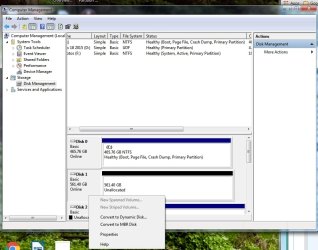
  • The drive is seen as a GPT drive. I've checked time and again with Disk Management, CMD, partition software, and all say it is a GPT drive of 561.40 GB in size. See attached JPG.
  • I've run the procedure in the GPT tutorial literally a dozen times.
  • What is Intel Matrix manage? When I google it, I find a download that won't run on my PC.
  • I'm NOT trying to set up a boot drive! I'm a photographer, take lots of pics, and have them scattered all over the place. I thought this would be the solution.
  • I've installed large drives on this and other systems - though not 5TB in size - with no problems.
  • Question: checking the BIOS, I see drives are set up as ACHI, with the other option being RAID. Is that the problem.

Again, thanks for the help, you guys are the only ones trying to help (Toshiba and Dell: nada) But I'm not getting any work done. If I can't figure this out soon it'll have to go back.

Ed
 

Attachments

  • Clipboard01.jpg
    Clipboard01.jpg
    78.1 KB · Views: 6

My Computer My Computer

At a glance

Windows 7
OS
Windows 7
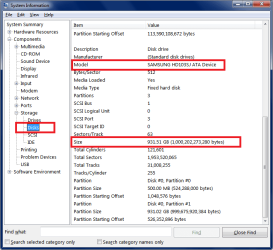
In Start / Search type system information and click on the program to run it.

In System Information look at
System Summary > Components > Storage > Disks

Scroll to your 5TB HD.
Is the info displayed there correct ? (see screen print example below)

Your Disk Management screen print doesn't show all info.
Use this tutorial for how to properly post a maximized DM screen print with all fields re-sized so folks here can see everything:
http://www.sevenforums.com/tutorials/274797-disk-management-post-screen-capture-image.html

My screen print example is for a 1TB Samsung HD i use with this OS for data.

HD_Info.PNG
 

My Computer My Computer

At a glance

Multi-Boot W7_Pro_x64 W8.1_Pro_x64 W10_Pro_x6...AMD Athlon II x4 6206GB GSkill DDR2 800AMD 4670 GPU + AMD 4200 IGP
Computer type
PC/Desktop
Computer Manufacturer/Model Number
home built
OS
Multi-Boot W7_Pro_x64 W8.1_Pro_x64 W10_Pro_x64 +Linux_VMs +Chromium_VM
CPU
AMD Athlon II x4 620
Motherboard
Gigabyte GA-MA785G-UD3H
Memory
6GB GSkill DDR2 800
Graphics Card(s)
AMD 4670 GPU + AMD 4200 IGP
Sound Card
on board Realtek ALC889A
Monitor(s) Displays
RCA 40" LCD TV, Insignia 32" LCD TV, HP 15" LCD monitor
Screen Resolution
1680 x 1050
Hard Drives
OCZ Vertex 3 120GB,
Samsung F3 1TB (3),
Several others - WD, Seagate, Hitachi, ...
PSU
Corsair 500 W
Case
Rosewill mid tower
Cooling
CM 90mm rifle
Keyboard
Gyration wireless, Logitech wireless, Dell USB wired
Mouse
Gyration wireless, Logitech wireless, V7 USB wired
Internet Speed
Spectrum - 100Mbps D / 10Mbps U
Antivirus
Avast, MBAM3, EMET, WinPatrol
Browser
Pale Moon, Firefox, IE
Other Info
2 multi-boot PC's
Mainly HTPC/Office/Gen purpose (no gaming).
Trendnet USB KVM.
LG DVD burner/Blue Ray Player.
Tray system for removable SATA backup drives.

Not currently OCd, under-volted.
I use Hybrid sleep, rarely re-boot or shutdown.

Hauppauge HD-PVR, Avermedia PCIe TV Tuner, Hauppauge PCI TV Tuner.
I would just return it, stop beating yourself on the head :)

When you hook up that drive it should ask you how you want it initialized, that`s it done.
 

My Computer My Computer

At a glance

Windows 10 Pro x64Intel Core i7 6700KGSkill TridentZ RGB 16GB 3600 16-16-16-36EVGA GTX 980 Ti SC x2
Computer type
PC/Desktop
Computer Manufacturer/Model Number
Skylake Special #666
OS
Windows 10 Pro x64
CPU
Intel Core i7 6700K
Motherboard
Asus Sabertooth Z170 Mark 1
Memory
GSkill TridentZ RGB 16GB 3600 16-16-16-36
Graphics Card(s)
EVGA GTX 980 Ti SC x2
Sound Card
Realtek High Definition
Monitor(s) Displays
AOC G2460PG
Screen Resolution
1920 x 1080 144Hz
Hard Drives
Samsung 860 Pro 256GB, Seagate Barracuda 4TB x2
PSU
EVGA 1000 P2, EVGA White Custom Braided Cables
Case
Corsair Vengeance C70 Gunmetal Black
Cooling
Corsair H100i v2, Corsair ML120 x2, Thermal Grizzly Kryonaut
Keyboard
Logitech G910 Orion Spectrum
Mouse
Logitech G700s
Internet Speed
Verizon Fios Quantum Gateway 75/75
Antivirus
Windows Defender, Malwarebytes Free 3.8.3
Browser
Chrome
Other Info
Corsair SP120 x4, LG Blu-ray Drive, Durabrand HT-395 100 Watt Dolby Digital Amp, Corsair H2100 Wireless 7.1 Headset
Of course, if it is a new drive and within vendor's return policy, returning it and getting another one will be the easiest solution.

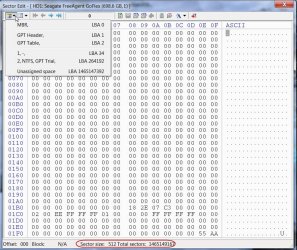
On the other hand if you have the time and inclination to investigate what exactly is happening, I would suggest using bootice and examine it at sector level ( for 64bit version of Windows you have to download the 64 bit version of bootice)

Go through my post here http://www.sevenforums.com/hardware-devices/310295-lost-partitions.html#post2584426 and post the second screenshot in it showing the Partition details. At the bottom you will also see the sector size and also the total number of sectors in the drive.

This is the picture of my HDD (external)

21-11-2015 14-17-16.jpg

After examining if need be we can write zeros to all GPT data sectors and then format it as a GPT drive afresh.

We will be examining LBA 0, LBA 1, LBA 2 as well and some other sectors that hold the backup of LBA1 and LBA2. This is the GPT data.
 

My Computer My Computer

At a glance

Windows 7 Home Premium 32 bit
OS
Windows 7 Home Premium 32 bit
Solved. And the issue wasn't GPT/MBR or anything relating to the drive itself; it was the XPS 8300's Intel Chipset.

Somewhere I learned that Intel RST drivers must be > 10.1

I checked mine via Device Manager and saw mine was only 10.0.x. This, despite Windows 7's Device Manager AND Dell's own driver check software AND IObit's driver update software all telling me the chipset drivers on my system are current.

It took a bit of searching through Intel's byzantine website, but I finally found the right path to the drivers and voila! I have a 5TB drive.

Thanks again for the help, everyone. Much appreciated.
Ed B
 

My Computer My Computer

At a glance

Windows 7
OS
Windows 7
This is not a good omen.

From post #11
IObit's driver update software

I recommend to never install and or use anything from IObits.
Many people that use IObit's programs have to do another install of Windows 7 to get things working proper again.

Just my friendly opinion.
 

My Computer My Computer

At a glance

Windows 10 Pro. 64/ version 1709 Windows 7 Pr...Intel i7-6800K @ 4.3Corsair Platinum 16 gig @2400EVGA GTX 1070 OC
Computer type
PC/Desktop
Computer Manufacturer/Model Number
Home made Desktop
OS
Windows 10 Pro. 64/ version 1709 Windows 7 Pro/64
CPU
Intel i7-6800K @ 4.3
Motherboard
ASUS X-99 Deluxe II
Memory
Corsair Platinum 16 gig @2400
Graphics Card(s)
EVGA GTX 1070 OC
Monitor(s) Displays
Asus 27" LED LCD/VE278Q
Screen Resolution
1920-1080 or 1280-720 HDMI
Hard Drives
INTEL SSD 730-240 Gb Sata 3.0/
PSU
EVGA Platium 1200W
Case
Phanteks Luxe Tempered Glass 8 fans/ one radiator
Cooling
XSPC/ Water Cooled CPU
Keyboard
Das 4 Professional
Mouse
Logitech M705/MX Anywhere 2-S
Internet Speed
100 mbits
Antivirus
Microsoft Security Essentials/ Malwarebytes Premium 3.0/ SAS
Browser
I.E. 11 default/Firefox/ ISP Time Warner Cable/Spectrum
Other Info
LG BluRay Burner/
Sound system-KLipsch-THX/
Icy Dock ssd Hot Swap bays.
And so in the final run, unrealRage was right ( It is a known fact.)

Where we failed was in not giving the link so that you could have compared the versions. https://downloadcenter.intel.com/product/55005/Intel-Rapid-Storage-Technology-Intel-RST-
(unrealRage may please note :))

I have put it here now so that it may help others who run into similar problem. ( Yep, the threads with solved tick mark are of high value in google search and looked into by thousands of searchers.)
 

My Computer My Computer

At a glance

Windows 7 Home Premium 32 bit
OS
Windows 7 Home Premium 32 bit
And so in the final run, unrealRage was right ( It is a known fact.)

Yes, and I didn't give kudos for the solve, so unrealRage, thanks!

Where we failed was in not giving the link so that you could have compared the versions. https://downloadcenter.intel.com/pro...logy-Intel-RST-
(unrealRage may please note )

I don't think you had the fail; it was mine for not double-checking all the info that insisted the drivers were up to date despite them being 4 years old.

I have put it here now so that it may help others who run into similar problem. ( Yep, the threads with solved tick mark are of high value in google search and looked into by thousands of searchers.)

I totally get that. I searched dozens of posts in solving this problem alone. Thanks again.

EdB
 

My Computer My Computer

At a glance

Windows 7
OS
Windows 7
You're welcome but since I was hasty and didn't post any link that would lead you to the right drivers ;this could've been solved way earlier.
Noted!

I am glad that I could help!
 

My Computer My Computer

At a glance

Windows 7 x64 Pro
OS
Windows 7 x64 Pro
Wow. I have the EXACT same problem; "The drive is seen as a GPT drive. I've checked time and again with Disk Management, CMD, partition software, and all say it is a GPT drive of 561.40 GB in size."

I've tried DavidE's suggestion and it shows size: 561.52GB.
It should be showing 4.55TB = 5,000,000...bytes for a 5TB drive.

Read http://www.sevenforums.com/tutorials/26193-convert-mbr-disk-gpt-disk.html on this forum but nothing of that seems to apply. Doesn't seem to work.

Disk property under Computer Management>Disk Management>Property>Volume does show partition style as GUID Partition Table (GPT) so it should be ok for a greater than 2TB drive. It only show unallocated 561.40GB with no extend or anything. I know it is a 5TB drive.

Any suggestions would be appreciated.

FYI, I don't think it's my drivers since I have one 5tb that is showing.
 

My Computer My Computer

At a glance

Windows 7
Computer type
Laptop
Computer Manufacturer/Model Number
samsung chronos
OS
Windows 7
Browser
chrome
1. Is your nondescript 5TB HDD (no name,no manufacturer,no model number - we are not clairvoyant :))
connected internally as in the OP's desktop? If not, the solution here does not apply to you.

2. A 5TB HDD placed in an incompatible enclosure/dock may read only one eighth of the capacity.

3. If you have bought a branded 5TB external drive, it will have the right SATA to USB bridge inside the enclosure to read the full 5 TB whether it is an advanced formatted MBR drive or a GPT initialised and formatted drive.

If this doesn't answer your problem please start a new thread explaining your problem with full details of both your 5TB drives, and how these are connected and also the screenshots which you are talking about.
 

My Computer My Computer

At a glance

Windows 7 Home Premium 32 bit
OS
Windows 7 Home Premium 32 bit
Hahaha. Very Fair. :D

1. It's a seagate oem 5TB.
2. I'm thinking it might be the enclosure. Looking to borrow an enclosure to test this theory in a different setup.
One thing that does confused me is that originally the 5tb did show up in this enclosure. After I reformatted and deleted the volume, this is when I lost the 5TB and only showed 500GB.
3. The drive is oem with a different company enclosure. Not sure of the setup but it does register a 2TB fine in the past.
 

My Computer My Computer

At a glance

Windows 7
Computer type
Laptop
Computer Manufacturer/Model Number
samsung chronos
OS
Windows 7
Browser
chrome
Thanks for the help Jumanji

One possible solution: Segment 5TB drive into 2/2/1TB and format (from an enclosure that recognizes the drive).

Now it seems to work in #2.
 

My Computer My Computer

At a glance

Windows 7
Computer type
Laptop
Computer Manufacturer/Model Number
samsung chronos
OS
Windows 7
Browser
chrome
Good. Thanks for sharing the workaround..

This happens because your enclosure can address only 2TB.

As far as larger than 2TB drives are concerned:

1. There are older motherboards which cannot deal with larger than 2TB drives - motherboard limitation.

2. Even in new motherboards which can handle more than 2TB drives older versions of Intel Rapid Storage Technology Drivers can play spoilsport. Solution is to update to the recent version of IRST driver - this thread.

3. Many older enclosures cannot handle larger than 2 TB drives. I understand that many new enclosures also have this limitation. So one has to be careful when buying new enclosures and make sure that the enclosure can handle more than 2TB drives if he intends using larger than 2TB drives. Otherwise you may have to resort to this workaround. 2 +2 + 2...... Brush up your maths. :) ( May or may not work with all enclosures)

4. You won't run into this problem if you buy branded external drives from the HDD manufacturers instead of third party enclosures + HDD.

( Just yesterday my daughter had purchased a Seagate 3 TB expansion desktop drive. I checked it to ascertain whether it is formatted as a GPT drive or MBR drive. It is formatted as a GPT drive. Earlier all these larger than 2TB external drives came as advanced formatted MBR drives to make it compatible with Windows XP. Since MS no longer supports Windows XP, the manufacturers have started shifting to GPT formatted external drives, in phases. During this interim transition period users may still be buying MBR drives. And it pays to know whether you have an MBR external drive or GPT external drive for if you come for data recovery that is the first question you will face - whether your external drive is MBR or GPT?:) )
 
Last edited:

My Computer My Computer

At a glance

Windows 7 Home Premium 32 bit
OS
Windows 7 Home Premium 32 bit
Back
Top