OK, whats the deal with VLC in Windows 7?!

RhysG

New member
Local time
6:15 AM
Messages
6
I've been looking for solutions to this problem and lurking these, and other, forums for a while hoping for a magic bullet but VLC still has worse playback than WMP12. I don't mind for most things but some files are stubborn or need to be played in VLC, when this happens I lose out on quality. Has anyone got a concrete answer for why this is happening and a solution now or on the horizon?

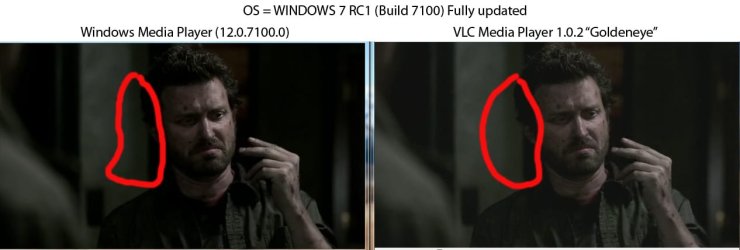
Picture is usually slightly pixellated, washed out and sometimes even choppy in VLC but plays fine in WMP12. I thought it would be best to visually represent the problem so here you go:

2cwv40y.jpg


Has anyone got any ideas how I can fix this problem or should I find another player for those files which WMP can't handle?

Cheers,
Rhys
 

My Computer My Computer

At a glance

Windows 7 RC1 Build 7100Intel E67502GB Kingston 667 DDR28800GTS 512MB (G92)
OS
Windows 7 RC1 Build 7100
CPU
Intel E6750
Motherboard
ASUS P5N-E SLI
Memory
2GB Kingston 667 DDR2
Graphics Card(s)
8800GTS 512MB (G92)
Hard Drives
Samsung 1TB
PSU
Antec SP2 500W
Case
Antec P180
hi RhysG, and welcome to sevenforums, you'll like it here...

i used to use vlc for years and years, until i discovered kmplayer.

so far it's played everything i've thrown at it, including files that vlc baulked at.

you don't need to install any codecs, but can use external ones if you want.

give it a try!
 

My Computer My Computer

At a glance

ultimate 64 sp1i5 2500K [email protected]8 gigs GSkill Ripjaws 1600amd hd6950
Computer Manufacturer/Model Number
mickey megabyte 1234
OS
ultimate 64 sp1
CPU
i5 2500K [email protected]
Motherboard
MSI P67A-GD53
Memory
8 gigs GSkill Ripjaws 1600
Graphics Card(s)
amd hd6950
Sound Card
creative x-fi gamer
Monitor(s) Displays
samsung 24"
Screen Resolution
1920x1080
Hard Drives
ocz vertex 2e 60 gig, samsung f3 1tb, buffalo 2tb ext
PSU
antec 550
Case
antec three hundred
Cooling
i'm a cooling fan
Keyboard
saitek eclipse ii
Mouse
logitech g3
Internet Speed
about 4 Mbps
Other Info
i love win7
hi RhysG, and welcome to sevenforums, you'll like it here...

i used to use vlc for years and years, until i discovered kmplayer.

so far it's played everything i've thrown at it, including files that vlc baulked at.

you don't need to install any codecs, but can use external ones if you want.

give it a try!

Hi Mickey, thanks for the headsup. I just checked KMPlayer out but the playback on that is even worse than VLC - pixellated all to hell! Thanks for the quick reply and input though (are there any settings I should use in KMP to fix pq?).
 

My Computer My Computer

At a glance

Windows 7 RC1 Build 7100Intel E67502GB Kingston 667 DDR28800GTS 512MB (G92)
OS
Windows 7 RC1 Build 7100
CPU
Intel E6750
Motherboard
ASUS P5N-E SLI
Memory
2GB Kingston 667 DDR2
Graphics Card(s)
8800GTS 512MB (G92)
Hard Drives
Samsung 1TB
PSU
Antec SP2 500W
Case
Antec P180
ok, try right-clicking in the main video window, options >> preferences >> video processing

i don't know how yours is set, but try either vmr9 renderless or enhanced video renderer

also have you got the latest drivers for your video card?

good luck!
 

My Computer My Computer

At a glance

ultimate 64 sp1i5 2500K [email protected]8 gigs GSkill Ripjaws 1600amd hd6950
Computer Manufacturer/Model Number
mickey megabyte 1234
OS
ultimate 64 sp1
CPU
i5 2500K [email protected]
Motherboard
MSI P67A-GD53
Memory
8 gigs GSkill Ripjaws 1600
Graphics Card(s)
amd hd6950
Sound Card
creative x-fi gamer
Monitor(s) Displays
samsung 24"
Screen Resolution
1920x1080
Hard Drives
ocz vertex 2e 60 gig, samsung f3 1tb, buffalo 2tb ext
PSU
antec 550
Case
antec three hundred
Cooling
i'm a cooling fan
Keyboard
saitek eclipse ii
Mouse
logitech g3
Internet Speed
about 4 Mbps
Other Info
i love win7
When I used Windows XP SP2, VLC did that for me as well. I did a comparison with VLC vs MPC and i got results the same as in your screenshots. So I'm thinking it's just a problem with VLC.
 

My Computer My Computer

At a glance

Windows 7 x64 OEMIntel e8400 @3Ghz4GBnVidia 9800GT
OS
Windows 7 x64 OEM
CPU
Intel e8400 @3Ghz
Memory
4GB
Graphics Card(s)
nVidia 9800GT
Both samples don't look so great to me. It looks like a 1cd XviD rip. (Am I right?) The only reason you're complaining about VLC is because it is brighter, possibly sharper in the comparison and it's showing you the defects in the encode easier.

In the samples, VLC's brightness seems closer to what it should be than WMP.

Get a good rip or source material to justify comparison.

Try PowerDVD. You'll enjoy it. Or if you're looking to employ filtering (shaders) to lessen the block noise, try Media Player Home Cinema.
 

My Computer My Computer

At a glance

7600.20510 x86P4 550 3.4 GHz HT running at 3.5 GHzOCZ 2 GB(2x1GB) DDR400mHz running @ 414 mHzHIS Radeon HD 3850 IceQ 3 Turbo HDMI Dual DL-...
Computer Manufacturer/Model Number
self built
OS
7600.20510 x86
CPU
P4 550 3.4 GHz HT running at 3.5 GHz
Motherboard
MSI PM8M3-V (MS-7211 v1.x) Micro-ATX mainboard
Memory
OCZ 2 GB(2x1GB) DDR400mHz running @ 414 mHz
Graphics Card(s)
HIS Radeon HD 3850 IceQ 3 Turbo HDMI Dual DL-DVI AGP
Sound Card
MOTU Traveler firewire studio interface 192 kHz 24 bit
Monitor(s) Displays
22" widescreen Acer X223W LCD, 17" Compaq P75 CRT
Screen Resolution
1680x1050 and 1280x1024
Hard Drives
SATA I x2 WD, 400 GB and 120 GB, SATA 2 WD Caviar Black 1 TB
PSU
350W generic
Case
Cybertronpc, it glows blue
Cooling
stock cpu fan, Ice-Q 3 gpu and system, many case fans
Keyboard
Logitch Classical Keyboard 200
Mouse
Logitech Mediaplay cordless
Internet Speed
1792/448 kbits/sec
Other Info
SATA II PCI fake RAID adapter, 1 GB Readyboost, original ATI Remote Wonder (even works with WMC perfectly), Logitech Rumblepad 2 game controller x2
The solution is in the Video Equalizer :D
(Bring down the Brightness a bit and up the contrast a bit too)
and you should achieve the same effect
(The VLC image has a bit of a Sepia effect a bit to it)
 

My Computer My Computer

At a glance

Windows 7 SP1 x64Intel E8400 3.0 GHz4x1 Trascend DDR2 800 MhzGainward 8800GT 512 Mb
Computer type
PC/Desktop
Computer Manufacturer/Model Number
Custom
OS
Windows 7 SP1 x64
CPU
Intel E8400 3.0 GHz
Motherboard
Gigabyte EP45-DS3R
Memory
4x1 Trascend DDR2 800 Mhz
Graphics Card(s)
Gainward 8800GT 512 Mb
Sound Card
Realtek HD Audio 889A
Monitor(s) Displays
LG L204WS
Screen Resolution
1680x1050
Hard Drives
Intel 520 Series 120Gb SSD (System)
Western Digital 6400AAKS 640Gb (Data)
PSU
Cooler Master 650W
Case
Cooler Master Centurion 532
Cooling
2x 12 cm fans
Keyboard
Logitech Wave
Mouse
Logitech G5
Internet Speed
10 Mbit Cable Flat
Antivirus
NOD32 Smart Security
Browser
Google Chrome
I have the same problem with my new system (video card is ATI 4770) windows 7 Final OEM and I noticed that VLC is very pixelated and I try changing the Rendering output and it works with DirectX but I loose the AERO theme while the video is playing..

I read so many different opinion about this problem. Video driver (I have the latest one) software version (I have the latest one) windows 7 bug.. etc.. I have no clue.. so far i'm using the directX output rendering and it works but I still find the quality in XP better ! hopfully a true fix soon...
 

My Computer My Computer

At a glance

Dual boot, XP & SevenAMD Phenom II X3 720BE (No Overclock yet...)4GB Patriot O.C 1600ATI 4770
Computer Manufacturer/Model Number
Brand Part: Asus, AMD, OCZ, ACER, ATI, PIONEER, SEAGATE, WESTERN DIGITAL
OS
Dual boot, XP & Seven
CPU
AMD Phenom II X3 720BE (No Overclock yet...)
Motherboard
Asus M4A78T-E
Memory
4GB Patriot O.C 1600
Graphics Card(s)
ATI 4770
Sound Card
Onboard
Monitor(s) Displays
Acer 22"
Hard Drives
Western Digital Green 1TB Sata II
3 x Seagate 500gb Sata II
1 x External Seagate 500gb E-Sata II
PSU
OCZ ModXtreme Modular 600W
Case
Coolermaster Sileo 500
Cooling
Stock Fan for now...
I have the same problem with my new system (video card is ATI 4770) windows 7 Final OEM and I noticed that VLC is very pixelated and I try changing the Rendering output and it works with DirectX but I loose the AERO theme while the video is playing..

I read so many different opinion about this problem. Video driver (I have the latest one) software version (I have the latest one) windows 7 bug.. etc.. I have no clue.. so far i'm using the directX output rendering and it works but I still find the quality in XP better ! hopfully a true fix soon...

hi Sp3kt3r, and welcome to sevenforums,

try opengl output with vlc - you won't lose your aero....
 

My Computer My Computer

At a glance

ultimate 64 sp1i5 2500K [email protected]8 gigs GSkill Ripjaws 1600amd hd6950
Computer Manufacturer/Model Number
mickey megabyte 1234
OS
ultimate 64 sp1
CPU
i5 2500K [email protected]
Motherboard
MSI P67A-GD53
Memory
8 gigs GSkill Ripjaws 1600
Graphics Card(s)
amd hd6950
Sound Card
creative x-fi gamer
Monitor(s) Displays
samsung 24"
Screen Resolution
1920x1080
Hard Drives
ocz vertex 2e 60 gig, samsung f3 1tb, buffalo 2tb ext
PSU
antec 550
Case
antec three hundred
Cooling
i'm a cooling fan
Keyboard
saitek eclipse ii
Mouse
logitech g3
Internet Speed
about 4 Mbps
Other Info
i love win7
Thx for the welcome :)

You are right.. OpenGL doesn't turn off Aero but with OpenGL my standard resolution DivX movie are worst than DirectX out. The best rendering it's with WMP12. I don't know which rendering output he use but for regular divX he beats everything.
 

My Computer My Computer

At a glance

Dual boot, XP & SevenAMD Phenom II X3 720BE (No Overclock yet...)4GB Patriot O.C 1600ATI 4770
Computer Manufacturer/Model Number
Brand Part: Asus, AMD, OCZ, ACER, ATI, PIONEER, SEAGATE, WESTERN DIGITAL
OS
Dual boot, XP & Seven
CPU
AMD Phenom II X3 720BE (No Overclock yet...)
Motherboard
Asus M4A78T-E
Memory
4GB Patriot O.C 1600
Graphics Card(s)
ATI 4770
Sound Card
Onboard
Monitor(s) Displays
Acer 22"
Hard Drives
Western Digital Green 1TB Sata II
3 x Seagate 500gb Sata II
1 x External Seagate 500gb E-Sata II
PSU
OCZ ModXtreme Modular 600W
Case
Coolermaster Sileo 500
Cooling
Stock Fan for now...
I was bored and stumbled upon this thread again. Have a look at the picture in this post. It's unedited from the o.p. except for the red paint brush to highlight an area. To me, the WMP shows the sample with more block noise than VLC is. Check it.
 

Attachments

  • 2cwv40y.jpg
    2cwv40y.jpg
    57.4 KB · Views: 164

My Computer My Computer

At a glance

7600.20510 x86P4 550 3.4 GHz HT running at 3.5 GHzOCZ 2 GB(2x1GB) DDR400mHz running @ 414 mHzHIS Radeon HD 3850 IceQ 3 Turbo HDMI Dual DL-...
Computer Manufacturer/Model Number
self built
OS
7600.20510 x86
CPU
P4 550 3.4 GHz HT running at 3.5 GHz
Motherboard
MSI PM8M3-V (MS-7211 v1.x) Micro-ATX mainboard
Memory
OCZ 2 GB(2x1GB) DDR400mHz running @ 414 mHz
Graphics Card(s)
HIS Radeon HD 3850 IceQ 3 Turbo HDMI Dual DL-DVI AGP
Sound Card
MOTU Traveler firewire studio interface 192 kHz 24 bit
Monitor(s) Displays
22" widescreen Acer X223W LCD, 17" Compaq P75 CRT
Screen Resolution
1680x1050 and 1280x1024
Hard Drives
SATA I x2 WD, 400 GB and 120 GB, SATA 2 WD Caviar Black 1 TB
PSU
350W generic
Case
Cybertronpc, it glows blue
Cooling
stock cpu fan, Ice-Q 3 gpu and system, many case fans
Keyboard
Logitch Classical Keyboard 200
Mouse
Logitech Mediaplay cordless
Internet Speed
1792/448 kbits/sec
Other Info
SATA II PCI fake RAID adapter, 1 GB Readyboost, original ATI Remote Wonder (even works with WMC perfectly), Logitech Rumblepad 2 game controller x2

Hi torrentg, I realise the quality of the video is sub-par, that certain aspects of the playback may actually appear better in VLC but what I am mostly referring to in my posts is that the OVERALL picture quality appears better, more watchable etc in WMP. The problem is that this difference has only come to the fore since I began using Windows 7 (previously XP SP3) - beforehand VLC would have just as good playback as you see in the screens of WMP.
 

My Computer My Computer

At a glance

Windows 7 RC1 Build 7100Intel E67502GB Kingston 667 DDR28800GTS 512MB (G92)
OS
Windows 7 RC1 Build 7100
CPU
Intel E6750
Motherboard
ASUS P5N-E SLI
Memory
2GB Kingston 667 DDR2
Graphics Card(s)
8800GTS 512MB (G92)
Hard Drives
Samsung 1TB
PSU
Antec SP2 500W
Case
Antec P180
You're not alone mate. I too watch a lot of compressed video files and WMP12 does offer a better picture quality overall than VLC.

No matter what combination of settings in VLC, WMP12 just looks better.
 

My Computer My Computer

At a glance

8 Pro x64i7 3770K 4.6GHz16GB G.Skill Trident X 2666mhzx2 EVGA 780 Ti Superclocked SLI
Computer type
PC/Desktop
Computer Manufacturer/Model Number
Systems by SmartEyeball
OS
8 Pro x64
CPU
i7 3770K 4.6GHz
Motherboard
ASUS P8Z77 WS
Memory
16GB G.Skill Trident X 2666mhz
Graphics Card(s)
x2 EVGA 780 Ti Superclocked SLI
Sound Card
SB X-FI Surround 5.1 PRO USB / ATH-AD900 Headphones
Monitor(s) Displays
x3 Dell U2410 / 58" Samsung
Screen Resolution
5760*1200/ 1920*1200
Hard Drives
2x Intel 520 240GB (RAID 0) * 2x WD Caviar Blacks 2TB (RAID 0) * 2TB WD Caviar Black * Sony Optirac DVD
PSU
Silverstone Strider Evolution 1200W
Case
Thermaltake Level 10 GT Snow Edition
Cooling
Noctua NH-D14
Keyboard
Topre Realforce // Ducky Shine MX Black // Filco Ninja TKL
Mouse
Thermaltake Theron (Highly Recommended) + Razer Imperator
Antivirus
MSE
Browser
IE, FF, WaterFox
Other Info
GT Extreme V2 Sim Racing Cockpit + 40" LCD and K/B Mouse stand ▼
Fanatec CSR Elite Wheel + Clubsport V1 Pedals + CSR shifter/7G-H ▼Saitek X52 Pro ▼ TrackIR 5 Pro
Buttkicker v2 Seat Rumbler with Dedicated 5.1 and Sub Woofer attached to frame ▼
=
Bloody Big Grin
The VLC 1.0.3 Release Candidate fixes this known issue. Worked for me! Here's a direct link to the windows binary:
ftp://ftp.videolan.org/pub/testing/vlc-1.0.3-rc/win32

VideoLAN, Free streaming and multimedia solutions for all OS!
The VLC developers are very glad to offer you the first release candidate of the third minor update of the popular "Goldeneye" version of VLC.
This version brings a few improvements and fixes, and especially fixes an important issue with Windows® 7 that worsened the video quality of the default output of VLC. As Windows® 7 will be available today, the windows maintainers of VLC wanted to sync with this release.
This release candidate provides also updated translations, new deinterlacer filters, fixes for the interface and the WMA Professional support on Windows. Please test this release candidate and report bugs.
 

My Computer My Computer

At a glance

Windows 7
OS
Windows 7
Cheers Goose :)
 

My Computer My Computer

At a glance

8 Pro x64i7 3770K 4.6GHz16GB G.Skill Trident X 2666mhzx2 EVGA 780 Ti Superclocked SLI
Computer type
PC/Desktop
Computer Manufacturer/Model Number
Systems by SmartEyeball
OS
8 Pro x64
CPU
i7 3770K 4.6GHz
Motherboard
ASUS P8Z77 WS
Memory
16GB G.Skill Trident X 2666mhz
Graphics Card(s)
x2 EVGA 780 Ti Superclocked SLI
Sound Card
SB X-FI Surround 5.1 PRO USB / ATH-AD900 Headphones
Monitor(s) Displays
x3 Dell U2410 / 58" Samsung
Screen Resolution
5760*1200/ 1920*1200
Hard Drives
2x Intel 520 240GB (RAID 0) * 2x WD Caviar Blacks 2TB (RAID 0) * 2TB WD Caviar Black * Sony Optirac DVD
PSU
Silverstone Strider Evolution 1200W
Case
Thermaltake Level 10 GT Snow Edition
Cooling
Noctua NH-D14
Keyboard
Topre Realforce // Ducky Shine MX Black // Filco Ninja TKL
Mouse
Thermaltake Theron (Highly Recommended) + Razer Imperator
Antivirus
MSE
Browser
IE, FF, WaterFox
Other Info
GT Extreme V2 Sim Racing Cockpit + 40" LCD and K/B Mouse stand ▼
Fanatec CSR Elite Wheel + Clubsport V1 Pedals + CSR shifter/7G-H ▼Saitek X52 Pro ▼ TrackIR 5 Pro
Buttkicker v2 Seat Rumbler with Dedicated 5.1 and Sub Woofer attached to frame ▼
=
Bloody Big Grin
Cool! Installing it now.
 

My Computer My Computer

At a glance

7600.20510 x86P4 550 3.4 GHz HT running at 3.5 GHzOCZ 2 GB(2x1GB) DDR400mHz running @ 414 mHzHIS Radeon HD 3850 IceQ 3 Turbo HDMI Dual DL-...
Computer Manufacturer/Model Number
self built
OS
7600.20510 x86
CPU
P4 550 3.4 GHz HT running at 3.5 GHz
Motherboard
MSI PM8M3-V (MS-7211 v1.x) Micro-ATX mainboard
Memory
OCZ 2 GB(2x1GB) DDR400mHz running @ 414 mHz
Graphics Card(s)
HIS Radeon HD 3850 IceQ 3 Turbo HDMI Dual DL-DVI AGP
Sound Card
MOTU Traveler firewire studio interface 192 kHz 24 bit
Monitor(s) Displays
22" widescreen Acer X223W LCD, 17" Compaq P75 CRT
Screen Resolution
1680x1050 and 1280x1024
Hard Drives
SATA I x2 WD, 400 GB and 120 GB, SATA 2 WD Caviar Black 1 TB
PSU
350W generic
Case
Cybertronpc, it glows blue
Cooling
stock cpu fan, Ice-Q 3 gpu and system, many case fans
Keyboard
Logitch Classical Keyboard 200
Mouse
Logitech Mediaplay cordless
Internet Speed
1792/448 kbits/sec
Other Info
SATA II PCI fake RAID adapter, 1 GB Readyboost, original ATI Remote Wonder (even works with WMC perfectly), Logitech Rumblepad 2 game controller x2
I'm watching some .avi's now now and it looks much better on default than it did previously.
 

My Computer My Computer

At a glance

8 Pro x64i7 3770K 4.6GHz16GB G.Skill Trident X 2666mhzx2 EVGA 780 Ti Superclocked SLI
Computer type
PC/Desktop
Computer Manufacturer/Model Number
Systems by SmartEyeball
OS
8 Pro x64
CPU
i7 3770K 4.6GHz
Motherboard
ASUS P8Z77 WS
Memory
16GB G.Skill Trident X 2666mhz
Graphics Card(s)
x2 EVGA 780 Ti Superclocked SLI
Sound Card
SB X-FI Surround 5.1 PRO USB / ATH-AD900 Headphones
Monitor(s) Displays
x3 Dell U2410 / 58" Samsung
Screen Resolution
5760*1200/ 1920*1200
Hard Drives
2x Intel 520 240GB (RAID 0) * 2x WD Caviar Blacks 2TB (RAID 0) * 2TB WD Caviar Black * Sony Optirac DVD
PSU
Silverstone Strider Evolution 1200W
Case
Thermaltake Level 10 GT Snow Edition
Cooling
Noctua NH-D14
Keyboard
Topre Realforce // Ducky Shine MX Black // Filco Ninja TKL
Mouse
Thermaltake Theron (Highly Recommended) + Razer Imperator
Antivirus
MSE
Browser
IE, FF, WaterFox
Other Info
GT Extreme V2 Sim Racing Cockpit + 40" LCD and K/B Mouse stand ▼
Fanatec CSR Elite Wheel + Clubsport V1 Pedals + CSR shifter/7G-H ▼Saitek X52 Pro ▼ TrackIR 5 Pro
Buttkicker v2 Seat Rumbler with Dedicated 5.1 and Sub Woofer attached to frame ▼
=
Bloody Big Grin
Glad I saw this thread with the above 1.0.3 RC as I discovered the exact same issue.
I found the following when trying to watch a video yesterday evening:
Winamp plays video like a slide show with out of sync sound
VLC 1.0.2 was really blocky
WMP12 played perfectly :)

Will test 1.0.3 tonight as I use VLC to play my hidef .mkv files and I don't want them to appear blocky.
 

My Computer My Computer

At a glance

Windows 7 Ultimate x642x AMD FX-74 @ 3GHz4GB2x BFG 8800GTX OC
OS
Windows 7 Ultimate x64
CPU
2x AMD FX-74 @ 3GHz
Motherboard
ASUS L1N64-SLI WS
Memory
4GB
Graphics Card(s)
2x BFG 8800GTX OC
Sound Card
Creative X-Fi Fatal1ty
Monitor(s) Displays
HP L2045w
Hard Drives
2x Samsung Spinpoint
PSU
Enermax 1000W
Case
Armor Extreme ATX
Cooling
Air
Quick Fix: MPCHC (Media player Classic Home Cinema) ;)

Simple, straight forward..no fuss..no muss...
 

My Computer My Computer

At a glance

Win7/XPINTEL E8600 @ 4.2GHz8GB PC8500 Corsiar DominatornVidia GTX 280
Computer Manufacturer/Model Number
HomeBrew
OS
Win7/XP
CPU
INTEL E8600 @ 4.2GHz
Motherboard
Asus P5E w/Formula Rampage BIOS
Memory
8GB PC8500 Corsiar Dominator
Graphics Card(s)
nVidia GTX 280
Sound Card
Asus FXII (SoundMax controlled)
Monitor(s) Displays
2 x I-INC 28'
Screen Resolution
1920x1200
Hard Drives
2 x Seagate 1.5TB
PSU
Ultra 700W
Case
Something..with alot of air
Cooling
Tuniq 120 CPU - Several 80mm and one 120MM fan
Keyboard
IBM MODEL M - YA BABY!!! NEVER SAY DIE!
Mouse
MS Intellimouse
Internet Speed
50/5
Thanks for the heads up goose - trying it now.
 

My Computer My Computer

At a glance

Windows 7 RC1 Build 7100Intel E67502GB Kingston 667 DDR28800GTS 512MB (G92)
OS
Windows 7 RC1 Build 7100
CPU
Intel E6750
Motherboard
ASUS P5N-E SLI
Memory
2GB Kingston 667 DDR2
Graphics Card(s)
8800GTS 512MB (G92)
Hard Drives
Samsung 1TB
PSU
Antec SP2 500W
Case
Antec P180
Back
Top