Solved Application Error - Windows Logs - Event ID: 1000 (Win 10 related)

tjg79

New member
Power User
VIP
Local time
3:23 PM
Messages
512
Hello Forum,

I'm getting a error in the Windows Logs - Application that appears to be related to the Win 10 free upgrade push. Without removing all the Win 10 updates to my Win 7 Pro x64 system, I'm looking for a way to resolve the error.

This is a Win 7 clean install return from Win 10.

Does anyone have a solution?
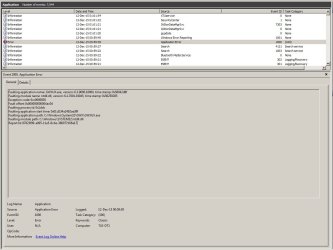
Faulting application name: GWXUX.exe, version: 6.3.9600.18064, time stamp:
0x56042d8f

Faulting module name: ntdll.dll, version: 6.1.7601.19045, time stamp:
0x56259295

Exception code: 0xc0000005

Fault offset: 0x000000000004ac04

Faulting process id: 0x1ddc

Faulting application start time: 0x01d134a2492ae39f

Faulting application path: C:\Windows\System32\GWX\GWXUX.exe

Faulting module path: C:\Windows\SYSTEM32\ntdll.dll

Report Id: 87823f99-a095-11e5-8cbe-386077b56e17

Screen Shot.jpg
 

My Computer My Computer

At a glance

Windows 7 Professional x64 SP1Intel i7-980x @ 3.6GHzCorsair 12GB DDR3 RAM (3x4GB)EVGA NVIDIA GeForce GTX 760 SC
Computer type
PC/Desktop
Computer Manufacturer/Model Number
Custom Build
OS
Windows 7 Professional x64 SP1
CPU
Intel i7-980x @ 3.6GHz
Motherboard
Intel DX58SO
Memory
Corsair 12GB DDR3 RAM (3x4GB)
Graphics Card(s)
EVGA NVIDIA GeForce GTX 760 SC
Sound Card
Intel High Definition 7.1 Audio Subsystem - Realtek ALC889
Monitor(s) Displays
Dual Display - LG Electronics Flatron L227WTG
Screen Resolution
1680 x 1050 60Hz 32-bit
Hard Drives
2 Seagate Constellation ST1000NM0033 1TB SATA 6Gb/s HDDs configured as Intel SATA Array 0, RST RAID 1, Vol. 0 (C:\) & Vol. 1 (D:\), & 2 Seagate Barracuda ST500DM002 500GB SATA 6Gb/s HDDs configured as Intel SATA Array 1 RST RAID 1, Vol. 0 (E:\)
PSU
Corsair HX850W
Case
Antec P182
Cooling
Stock Intel i7-980x Cooling Solution + 4 120mm Case Fans
Keyboard
Microsoft Wireless Multimedia Keyboard 1.1
Mouse
Microsoft Standard Wireless Optical Mouse
Internet Speed
DSL - 3.0 Mb/s download 768 Kb/s upload
Antivirus
ESET Smart Security 12, Defender & SuperAntiSpyware Pro
Browser
Firefox Quantum 64-bit
Other Info
Optical Drives: Pioneer DVR-216R & TSSTcorp SH-S223Q, Anker USB 3.0 PCI-E Card, Hauppauge WinTV-HVR 2250 Dual TV Tuner Board for Windows Media Center, Bose Companion 3 Series II multimedia speaker system, APC Smart-UPS SMT1500
Without removing all the Win 10 updates to my Win 7 Pro x64 system, I'm looking for a way to resolve the error...

...Does anyone have a solution?

I would try to correct the error by running sfc /scannow, if that doesn't fix the problem you may have other file corruption/manifest issues; check the log located in C:\Windows\Logs\CBS\CBS.log. Another possibility would be to uninstall/reinstall KB3035583. Disabling the GWX associated tasks in Task Scheduler is a bit of a problem, see this post for the gory details.

Me? I'd just uninstall KB's 2952664 & 3035583,
nuke.gif
hide them & be done with the Win 10 upgrade nuisance.
shrug.gif
 

My Computer My Computer

At a glance

Win 10 Pro x64, Win 7 Pro x64Intel Core i7-6700HQ Skylake16gb Crucial DDR4NVIDIA GeForce GTX 960M 2 GB
Computer type
Laptop
Computer Manufacturer/Model Number
MSI PE60 6QE
OS
Win 10 Pro x64, Win 7 Pro x64
CPU
Intel Core i7-6700HQ Skylake
Motherboard
MSI MS-16J5
Memory
16gb Crucial DDR4
Graphics Card(s)
NVIDIA GeForce GTX 960M 2 GB
Screen Resolution
1920 x 1080
Hard Drives
Samsung 850 EVO 250 GB M.2 SSD (MZ-N5E250BW)
HGST 1TB @7200 RPM HTS721010A9E630
Case
Plastic
Keyboard
Got one...
Mouse
Yep, one of those too.
Internet Speed
FIOS 75/75
Antivirus
Defender
Browser
Chrome/FFox/Ex-PLODE-r/(L)Edge
Other Info
Defender, Custom Hosts, uBlock, regular backups w/ Macrium (Free)
Well, I've run SFC /scannow several times and it doesn't appear to affect the error. There must be some undetectable, other than the error, corruption issue. Interestingly, KB3035583 failed on the first attempt to install. But, subsequently installed successfully.

I just performed a clean install less than a week ago. During the install, I moved the Users folder and ProgramData folder to the D: using the Microsoft AIK. This is acceptable with Microsoft from what I understand for Win 7. Supposedly, it's not acceptable to move the ProgramData folder with Win 10. I've noticed that after the move, which was successful, and the downloading of updates, which had about 15 initial failures, a duplicate ProgramData folder for Windows Search was created on C:. Perhaps some of these Win 10 upgrade updates are causing the corruption, because my OS configuration wasn't to their liking.
 

My Computer My Computer

At a glance

Windows 7 Professional x64 SP1Intel i7-980x @ 3.6GHzCorsair 12GB DDR3 RAM (3x4GB)EVGA NVIDIA GeForce GTX 760 SC
Computer type
PC/Desktop
Computer Manufacturer/Model Number
Custom Build
OS
Windows 7 Professional x64 SP1
CPU
Intel i7-980x @ 3.6GHz
Motherboard
Intel DX58SO
Memory
Corsair 12GB DDR3 RAM (3x4GB)
Graphics Card(s)
EVGA NVIDIA GeForce GTX 760 SC
Sound Card
Intel High Definition 7.1 Audio Subsystem - Realtek ALC889
Monitor(s) Displays
Dual Display - LG Electronics Flatron L227WTG
Screen Resolution
1680 x 1050 60Hz 32-bit
Hard Drives
2 Seagate Constellation ST1000NM0033 1TB SATA 6Gb/s HDDs configured as Intel SATA Array 0, RST RAID 1, Vol. 0 (C:\) & Vol. 1 (D:\), & 2 Seagate Barracuda ST500DM002 500GB SATA 6Gb/s HDDs configured as Intel SATA Array 1 RST RAID 1, Vol. 0 (E:\)
PSU
Corsair HX850W
Case
Antec P182
Cooling
Stock Intel i7-980x Cooling Solution + 4 120mm Case Fans
Keyboard
Microsoft Wireless Multimedia Keyboard 1.1
Mouse
Microsoft Standard Wireless Optical Mouse
Internet Speed
DSL - 3.0 Mb/s download 768 Kb/s upload
Antivirus
ESET Smart Security 12, Defender & SuperAntiSpyware Pro
Browser
Firefox Quantum 64-bit
Other Info
Optical Drives: Pioneer DVR-216R & TSSTcorp SH-S223Q, Anker USB 3.0 PCI-E Card, Hauppauge WinTV-HVR 2250 Dual TV Tuner Board for Windows Media Center, Bose Companion 3 Series II multimedia speaker system, APC Smart-UPS SMT1500
Me? I'd just uninstall KB's 2952664 & 3035583,
nuke.gif
hide them & be done with the Win 10 upgrade nuisance.
shrug.gif

I think there are more than just two Win 10 upgrade nuisances. I think I've seen a list with about eight or ten. Are they all recommended updates? If so, I could attempt another clean install with Windows update set to on install important and above updates.
 

My Computer My Computer

At a glance

Windows 7 Professional x64 SP1Intel i7-980x @ 3.6GHzCorsair 12GB DDR3 RAM (3x4GB)EVGA NVIDIA GeForce GTX 760 SC
Computer type
PC/Desktop
Computer Manufacturer/Model Number
Custom Build
OS
Windows 7 Professional x64 SP1
CPU
Intel i7-980x @ 3.6GHz
Motherboard
Intel DX58SO
Memory
Corsair 12GB DDR3 RAM (3x4GB)
Graphics Card(s)
EVGA NVIDIA GeForce GTX 760 SC
Sound Card
Intel High Definition 7.1 Audio Subsystem - Realtek ALC889
Monitor(s) Displays
Dual Display - LG Electronics Flatron L227WTG
Screen Resolution
1680 x 1050 60Hz 32-bit
Hard Drives
2 Seagate Constellation ST1000NM0033 1TB SATA 6Gb/s HDDs configured as Intel SATA Array 0, RST RAID 1, Vol. 0 (C:\) & Vol. 1 (D:\), & 2 Seagate Barracuda ST500DM002 500GB SATA 6Gb/s HDDs configured as Intel SATA Array 1 RST RAID 1, Vol. 0 (E:\)
PSU
Corsair HX850W
Case
Antec P182
Cooling
Stock Intel i7-980x Cooling Solution + 4 120mm Case Fans
Keyboard
Microsoft Wireless Multimedia Keyboard 1.1
Mouse
Microsoft Standard Wireless Optical Mouse
Internet Speed
DSL - 3.0 Mb/s download 768 Kb/s upload
Antivirus
ESET Smart Security 12, Defender & SuperAntiSpyware Pro
Browser
Firefox Quantum 64-bit
Other Info
Optical Drives: Pioneer DVR-216R & TSSTcorp SH-S223Q, Anker USB 3.0 PCI-E Card, Hauppauge WinTV-HVR 2250 Dual TV Tuner Board for Windows Media Center, Bose Companion 3 Series II multimedia speaker system, APC Smart-UPS SMT1500
The "Windows 10 Collection" for Windows 7 SP1
(originally compiled by "Skaendo" @ MDL Forum; I've updated it a bit)


KB2952664: Compatibility update for upgrading Windows 7
"This update helps Microsoft make improvements to the current operating system in order to ease the upgrade experience to the latest version of Windows."

KB3021917
: Update to Windows 7 SP1 for performance improvements
"This update performs diagnostics in Windows 7 Service Pack 1 (SP1) in order to determine whether performance issues may be encountered when the latest Windows operating system is installed. Telemetry is sent back to Microsoft for those computers that participate in the Windows Customer Experience Improvement Program (CEIP)."

KB3035583: Update installs Get Windows 10 app in Windows 8.1 and Windows 7 SP1
"This update installs the Get Windows 10 app, which helps users understand their Windows 10 upgrade options and device readiness."

KB3068708
: Update for customer experience and diagnostic telemetry
"This update introduces the Diagnostics and Telemetry tracking service to existing devices. By applying this service, you can add benefits from the latest version of Windows to systems that have not yet upgraded."

KB3075249
: Update that adds telemetry points to consent.exe in Windows 8.1 and Windows 7
"This article describes an update that adds telemetry points to consent.exe in Windows 8.1, Windows RT 8.1, Windows Server 2012 R2, Windows 7 Service Pack 1 (SP1), and Windows Server 2008 R2 SP1. Before you install this update, check out the Prerequisites section."

KB3080149: Update for customer experience and diagnostic telemetry
"This package updates the Diagnostics and Telemetry tracking service to existing devices. This service provides benefits from the latest version of Windows to systems that have not yet upgraded. The update also supports applications that are subscribed to Visual Studio Application Insights."

KB3112343: Windows Update Client for Windows 7 and Windows Server 2008 R2: December 2015

"This update enables support for additional upgrade scenarios from Windows 7 to Windows 10, and provides a smoother experience when you have to retry an operating system upgrade because of certain failure conditions. This update also improves the ability of Microsoft to monitor the quality of the upgrade experience."
--------------------------------------
Superseded Updates:

KB2990214: Update that enables you to upgrade from Windows 7 to a later version of Windows (superseded by KB3050265)
"This article describes an update that enables you to upgrade your computer from Windows 7 Service Pack 1 (SP1) to a later version of Windows."

KB3022345: Update for customer experience and diagnostic telemetry (superseded by KB3068708)
"This update introduces the Diagnostics and Telemetry tracking service to in-market devices. By applying this service, you can add benefits from the latest version of Windows to systems that have not yet been upgraded. The update also supports applications that are subscribed to Visual Studio Application Insights."

KB3050265: Windows Update Client for Windows 7: June 2015 (superseded by KB3065987)
"General improvements are made to support upgrades to a later version of Windows."

KB3065987: Windows Update Client for Windows 7 and Windows Server 2008 R2: July 2015 (superseded by KB3075851)
"This article describes an update that contains some improvements to Windows Update Client in Windows 7 Service Pack 1 (SP1) or Windows Server 2008 R2 SP1. This update is incompatible with Windows Server Update Services (WSUS) servers without the hardening update 2938066."

KB3075851: Windows Update Client for Windows 7 and Windows Server 2008 R2: August 2015 (superseded by KB3083324)
"This article describes an update that contains some improvements to Windows Update Client in Windows 7 Service Pack 1 (SP1) and Windows Server 2008 R2 SP1. This update also resolves an issue in which certain Windows Update operations fail when you install Windows Update Client for Windows 7 and Windows Server 2008 R2: July 2015 (3065987) on Windows 7 Embedded editions."

KB3083324: Windows Update Client for Windows 7 and Windows Server 2008 R2: September 2015 (superseded by KB3083710)
"This article describes an update that contains some improvements to Windows Update Client in Windows 7 Service Pack 1 (SP1) and Windows Server 2008 R2 SP1."

KB3083710: Windows Update Client for Windows 7 and Windows Server 2008 R2: October 2015
"This article describes an update that contains some improvements to Windows Update Client in Windows 7 Service Pack 1 (SP1) and Windows Server 2008 R2 SP1." (superseded by KB3102810)

KB3102810: Installing and searching for updates is slow and high CPU usage occurs in Windows 7 and Windows Server 2008 R2
"This article describes an update that contains some improvements to Windows Update Client in Windows 7 Service Pack 1 (SP1) and Windows Server 2008 R2 SP1."
"The Svchost.exe process occupies 100 percent of CPU usage when you upgrade a Windows Update client to Windows 10." (superseded by KB3112343)

The only update listed above that I've installed is the "latest" update to the Windows Update Client
KB3112343 (which is updated on a monthly basis; see "superseded" list above)... YMMV.
 

My Computer My Computer

At a glance

Win 10 Pro x64, Win 7 Pro x64Intel Core i7-6700HQ Skylake16gb Crucial DDR4NVIDIA GeForce GTX 960M 2 GB
Computer type
Laptop
Computer Manufacturer/Model Number
MSI PE60 6QE
OS
Win 10 Pro x64, Win 7 Pro x64
CPU
Intel Core i7-6700HQ Skylake
Motherboard
MSI MS-16J5
Memory
16gb Crucial DDR4
Graphics Card(s)
NVIDIA GeForce GTX 960M 2 GB
Screen Resolution
1920 x 1080
Hard Drives
Samsung 850 EVO 250 GB M.2 SSD (MZ-N5E250BW)
HGST 1TB @7200 RPM HTS721010A9E630
Case
Plastic
Keyboard
Got one...
Mouse
Yep, one of those too.
Internet Speed
FIOS 75/75
Antivirus
Defender
Browser
Chrome/FFox/Ex-PLODE-r/(L)Edge
Other Info
Defender, Custom Hosts, uBlock, regular backups w/ Macrium (Free)
I think there are more than just two Win 10 upgrade nuisances. I think I've seen a list with about eight or ten. Are they all recommended updates? If so, I could attempt another clean install with Windows update set to on install important and above updates.

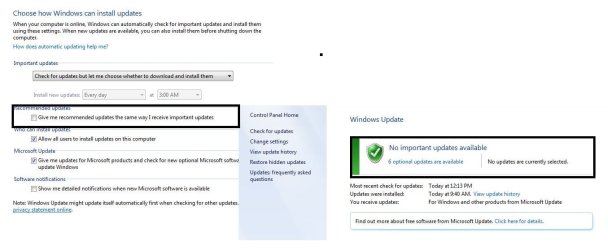
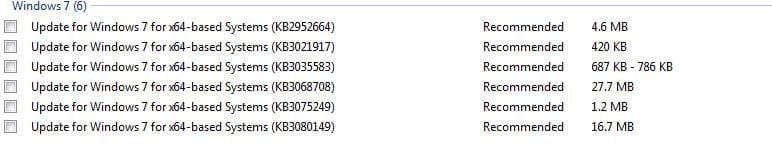
Yes, they're all "Recommended" updates; see my attached hidden updates screenshot: I have six Win 10 Upgrade & Telemetry updates hidden.

hidden.JPG

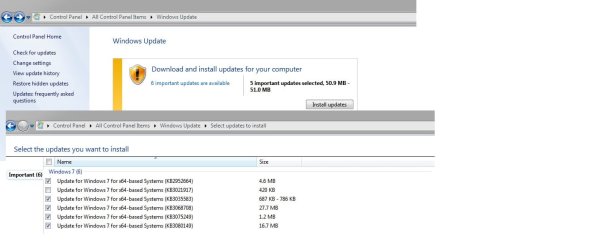
EDIT: When un-hidden they appear as "important":

hide1.jpg

... If you uncheck "Give me recommended updates the same way I receive important" they show up as "unchecked" Optional updates. :confused:

optional1.JPG
 
Last edited:

My Computer My Computer

At a glance

Win 10 Pro x64, Win 7 Pro x64Intel Core i7-6700HQ Skylake16gb Crucial DDR4NVIDIA GeForce GTX 960M 2 GB
Computer type
Laptop
Computer Manufacturer/Model Number
MSI PE60 6QE
OS
Win 10 Pro x64, Win 7 Pro x64
CPU
Intel Core i7-6700HQ Skylake
Motherboard
MSI MS-16J5
Memory
16gb Crucial DDR4
Graphics Card(s)
NVIDIA GeForce GTX 960M 2 GB
Screen Resolution
1920 x 1080
Hard Drives
Samsung 850 EVO 250 GB M.2 SSD (MZ-N5E250BW)
HGST 1TB @7200 RPM HTS721010A9E630
Case
Plastic
Keyboard
Got one...
Mouse
Yep, one of those too.
Internet Speed
FIOS 75/75
Antivirus
Defender
Browser
Chrome/FFox/Ex-PLODE-r/(L)Edge
Other Info
Defender, Custom Hosts, uBlock, regular backups w/ Macrium (Free)
Mods: Please delete.
 

My Computer My Computer

At a glance

Win 10 Pro x64, Win 7 Pro x64Intel Core i7-6700HQ Skylake16gb Crucial DDR4NVIDIA GeForce GTX 960M 2 GB
Computer type
Laptop
Computer Manufacturer/Model Number
MSI PE60 6QE
OS
Win 10 Pro x64, Win 7 Pro x64
CPU
Intel Core i7-6700HQ Skylake
Motherboard
MSI MS-16J5
Memory
16gb Crucial DDR4
Graphics Card(s)
NVIDIA GeForce GTX 960M 2 GB
Screen Resolution
1920 x 1080
Hard Drives
Samsung 850 EVO 250 GB M.2 SSD (MZ-N5E250BW)
HGST 1TB @7200 RPM HTS721010A9E630
Case
Plastic
Keyboard
Got one...
Mouse
Yep, one of those too.
Internet Speed
FIOS 75/75
Antivirus
Defender
Browser
Chrome/FFox/Ex-PLODE-r/(L)Edge
Other Info
Defender, Custom Hosts, uBlock, regular backups w/ Macrium (Free)
OK, I removed those six updates and hid them when they reappeared in Windows Update. After rebooting several times and then checking for updates to confirm they are toast for now, I got a new update: KB2882822. Does this update have anything to do with Win 10 upgrade?

Thanks for all the help.

Regards
 

My Computer My Computer

At a glance

Windows 7 Professional x64 SP1Intel i7-980x @ 3.6GHzCorsair 12GB DDR3 RAM (3x4GB)EVGA NVIDIA GeForce GTX 760 SC
Computer type
PC/Desktop
Computer Manufacturer/Model Number
Custom Build
OS
Windows 7 Professional x64 SP1
CPU
Intel i7-980x @ 3.6GHz
Motherboard
Intel DX58SO
Memory
Corsair 12GB DDR3 RAM (3x4GB)
Graphics Card(s)
EVGA NVIDIA GeForce GTX 760 SC
Sound Card
Intel High Definition 7.1 Audio Subsystem - Realtek ALC889
Monitor(s) Displays
Dual Display - LG Electronics Flatron L227WTG
Screen Resolution
1680 x 1050 60Hz 32-bit
Hard Drives
2 Seagate Constellation ST1000NM0033 1TB SATA 6Gb/s HDDs configured as Intel SATA Array 0, RST RAID 1, Vol. 0 (C:\) & Vol. 1 (D:\), & 2 Seagate Barracuda ST500DM002 500GB SATA 6Gb/s HDDs configured as Intel SATA Array 1 RST RAID 1, Vol. 0 (E:\)
PSU
Corsair HX850W
Case
Antec P182
Cooling
Stock Intel i7-980x Cooling Solution + 4 120mm Case Fans
Keyboard
Microsoft Wireless Multimedia Keyboard 1.1
Mouse
Microsoft Standard Wireless Optical Mouse
Internet Speed
DSL - 3.0 Mb/s download 768 Kb/s upload
Antivirus
ESET Smart Security 12, Defender & SuperAntiSpyware Pro
Browser
Firefox Quantum 64-bit
Other Info
Optical Drives: Pioneer DVR-216R & TSSTcorp SH-S223Q, Anker USB 3.0 PCI-E Card, Hauppauge WinTV-HVR 2250 Dual TV Tuner Board for Windows Media Center, Bose Companion 3 Series II multimedia speaker system, APC Smart-UPS SMT1500
You're welcome. :)

KB2882822
was originally issued Oct 2013 and was one of 9 prerequisite updates for IE11 and as such it has nothing to do with Windows 10; however it was superseded by KB3080149 ...one of the 6 Win 10 Updates you just uninstalled & hid.
 
Last edited:

My Computer My Computer

At a glance

Win 10 Pro x64, Win 7 Pro x64Intel Core i7-6700HQ Skylake16gb Crucial DDR4NVIDIA GeForce GTX 960M 2 GB
Computer type
Laptop
Computer Manufacturer/Model Number
MSI PE60 6QE
OS
Win 10 Pro x64, Win 7 Pro x64
CPU
Intel Core i7-6700HQ Skylake
Motherboard
MSI MS-16J5
Memory
16gb Crucial DDR4
Graphics Card(s)
NVIDIA GeForce GTX 960M 2 GB
Screen Resolution
1920 x 1080
Hard Drives
Samsung 850 EVO 250 GB M.2 SSD (MZ-N5E250BW)
HGST 1TB @7200 RPM HTS721010A9E630
Case
Plastic
Keyboard
Got one...
Mouse
Yep, one of those too.
Internet Speed
FIOS 75/75
Antivirus
Defender
Browser
Chrome/FFox/Ex-PLODE-r/(L)Edge
Other Info
Defender, Custom Hosts, uBlock, regular backups w/ Macrium (Free)
Thanks again, that's good information.

I've allowed the update to install.

My original issue appears totally resolved after removing those six Win 10 upgrade updates and I no longer have to look at that Win 10 Upgrade icon in the system notification area.

I'll mark this thread as solved.

Thanks again for all your help.

Regards
 

My Computer My Computer

At a glance

Windows 7 Professional x64 SP1Intel i7-980x @ 3.6GHzCorsair 12GB DDR3 RAM (3x4GB)EVGA NVIDIA GeForce GTX 760 SC
Computer type
PC/Desktop
Computer Manufacturer/Model Number
Custom Build
OS
Windows 7 Professional x64 SP1
CPU
Intel i7-980x @ 3.6GHz
Motherboard
Intel DX58SO
Memory
Corsair 12GB DDR3 RAM (3x4GB)
Graphics Card(s)
EVGA NVIDIA GeForce GTX 760 SC
Sound Card
Intel High Definition 7.1 Audio Subsystem - Realtek ALC889
Monitor(s) Displays
Dual Display - LG Electronics Flatron L227WTG
Screen Resolution
1680 x 1050 60Hz 32-bit
Hard Drives
2 Seagate Constellation ST1000NM0033 1TB SATA 6Gb/s HDDs configured as Intel SATA Array 0, RST RAID 1, Vol. 0 (C:\) & Vol. 1 (D:\), & 2 Seagate Barracuda ST500DM002 500GB SATA 6Gb/s HDDs configured as Intel SATA Array 1 RST RAID 1, Vol. 0 (E:\)
PSU
Corsair HX850W
Case
Antec P182
Cooling
Stock Intel i7-980x Cooling Solution + 4 120mm Case Fans
Keyboard
Microsoft Wireless Multimedia Keyboard 1.1
Mouse
Microsoft Standard Wireless Optical Mouse
Internet Speed
DSL - 3.0 Mb/s download 768 Kb/s upload
Antivirus
ESET Smart Security 12, Defender & SuperAntiSpyware Pro
Browser
Firefox Quantum 64-bit
Other Info
Optical Drives: Pioneer DVR-216R & TSSTcorp SH-S223Q, Anker USB 3.0 PCI-E Card, Hauppauge WinTV-HVR 2250 Dual TV Tuner Board for Windows Media Center, Bose Companion 3 Series II multimedia speaker system, APC Smart-UPS SMT1500
Back
Top