Acer Aspire One - dosen't detect internal network card

bomberswarm2

New member
Local time
2:52 PM
Messages
11
This is the netbook which I used at school the past 4 years, and when I graduated, we were allowed to keep the netbook. The default Acer OS was reinstalled, which was incredibly slow and had tonnes of bloatware on it, so I installed my own copy of Windows 7 using a USB. After the install was done, there was no network connection, so when I went to connect it to my home network, it said "No wireless network devices installed" which is complete bullshit. Its used a wireless network card built into it to connect to the internet every day for the last 4 years. I went to connect it to my router through an ethernet cord, but it also refused to acknowledge this cord was plugged into it. I then tried it with a different ethernet cord which was using my desktop to connect my Xbox 360 to the internet. I checked the device manager, and there wasn't any tab showing called "network devices". However, under "other devices", it says there is an "Ethernet controller", a "Network controller" and a "PCI simple communications controller". I plugged in a usb wifi adapter, which instantly failed to install as the computer couldn't find any driver,s but then i inserted the USB adaptor i used for my PC, and it installed and connected to the internet. I then tried to find drivers for the "ethernet controller", but it found none. I went to Acer's website and tried to install the Atheros Ethernet driver, but it said that it failed to find any compatible hardware.
I tried to put the small Ethernet adaptor that I had first tried into the computer, but now the computer refused to recognise it at all. If I could install that driver, then it would be acceptable for me to use it with that adaptor plugged in.

How do I fix this problem?
 

My Computer My Computer

At a glance

Windows 7 Professional x64
OS
Windows 7 Professional x64
Try installing the chipset drivers from Acer, that should allow your system to see and install the drivers for other components like your network adapters and card reader, etc.
 

My Computer My Computer

At a glance

Win 10 Pro x64Intel I5-2500K @3.3GHz16GB G.Skill Ripjaws X (4x4GB)EVGA GeForce 750 Ti SC 2GB
Computer type
PC/Desktop
Computer Manufacturer/Model Number
Self Built
OS
Win 10 Pro x64
CPU
Intel I5-2500K @3.3GHz
Motherboard
Asrock P67 Extreme4
Memory
16GB G.Skill Ripjaws X (4x4GB)
Graphics Card(s)
EVGA GeForce 750 Ti SC 2GB
Sound Card
ASUS Xonar DG 5.1 Channels 24-bit 96KHz PCI Interface Sound
Monitor(s) Displays
auria eq2367
Screen Resolution
1920 x 1080
Hard Drives
250GB Samsung 850 EVO SSD
1TB WD Blue
1TB Hitachi
PSU
SeaSonic X 650W 80 Plus Gold
Case
Corsair Obsidian 750D
Cooling
Corsair H60, Three 140mm case fans
Keyboard
Logitech Wireless Keyboard K520
Mouse
Logitech Wireless Mouse M310
Internet Speed
Wave Broadband ~ 100 dn 5 up
Antivirus
Windows Defender, Malwarebytes Premium
Browser
Edge, IE11, Chrome
Other Info
Laptop specs: HP g7-1365dx /
CPU: AMD A6-3420M APU with Radeon(tm) HD Graphics /
RAM: Crucial 8Gb (2x4Gb) /
SSD: Crucial M4-CT128M4SSD2 ATA Device/ FW 000F /
GFX: AMD Radeon HD 6520G /
OS: Windows 10 Pro x64
Try installing the chipset drivers from Acer, that should allow your system to see and install the drivers for other components like your network adapters and card reader, etc.

What chipset driver? As I said, this was owned by my school before me, and I have NO DISCS for it at all. Where can I get this driver?

My netbook is can be found under
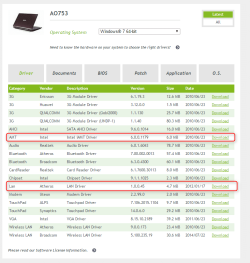
Netbooks and Chromebooks > Aspire One > AO753 here: Download Drivers and Manuals | Acer Official Site
 

My Computer My Computer

At a glance

Windows 7 Professional x64
OS
Windows 7 Professional x64

My Computer My Computer

At a glance

Win 10 Pro x64Intel I5-2500K @3.3GHz16GB G.Skill Ripjaws X (4x4GB)EVGA GeForce 750 Ti SC 2GB
Computer type
PC/Desktop
Computer Manufacturer/Model Number
Self Built
OS
Win 10 Pro x64
CPU
Intel I5-2500K @3.3GHz
Motherboard
Asrock P67 Extreme4
Memory
16GB G.Skill Ripjaws X (4x4GB)
Graphics Card(s)
EVGA GeForce 750 Ti SC 2GB
Sound Card
ASUS Xonar DG 5.1 Channels 24-bit 96KHz PCI Interface Sound
Monitor(s) Displays
auria eq2367
Screen Resolution
1920 x 1080
Hard Drives
250GB Samsung 850 EVO SSD
1TB WD Blue
1TB Hitachi
PSU
SeaSonic X 650W 80 Plus Gold
Case
Corsair Obsidian 750D
Cooling
Corsair H60, Three 140mm case fans
Keyboard
Logitech Wireless Keyboard K520
Mouse
Logitech Wireless Mouse M310
Internet Speed
Wave Broadband ~ 100 dn 5 up
Antivirus
Windows Defender, Malwarebytes Premium
Browser
Edge, IE11, Chrome
Other Info
Laptop specs: HP g7-1365dx /
CPU: AMD A6-3420M APU with Radeon(tm) HD Graphics /
RAM: Crucial 8Gb (2x4Gb) /
SSD: Crucial M4-CT128M4SSD2 ATA Device/ FW 000F /
GFX: AMD Radeon HD 6520G /
OS: Windows 10 Pro x64
Here is the file, after installing the chipset. There was no change to the "manage devices" list.
 

Attachments

My Computer My Computer

At a glance

Windows 7 Professional x64
OS
Windows 7 Professional x64
Did you restart after installing the chipset?

The problem devices listed are these,

Code:
Ethernet Controller	PCI\VEN_1969&DEV_1073&SUBSYS_05591025&REV_C0\4&307155C2&0&00E0	The drivers for this device are not installed.	
Network Controller	PCI\VEN_8086&DEV_0082&SUBSYS_13018086&REV_34\4&20D9F562&0&00E1	The drivers for this device are not installed.	
PCI Simple Communications Controller	PCI\VEN_8086&DEV_3B64&SUBSYS_040E1025&REV_06\3&11583659&0&B0	The drivers for this device are not installed.

Try that chipset driver again if nothing changes after a restart.

These two drivers should fix a couple of those listed above.

2015-12-20_01h21_57.png

I still don't see a wireless network adapter listed, besides the USB one you plugged in.

I'm guessing you didn't have a network cable plugged in during the install, because there are a lot of drivers that are just what comes with the install.
 

My Computer My Computer

At a glance

Win 10 Pro x64Intel I5-2500K @3.3GHz16GB G.Skill Ripjaws X (4x4GB)EVGA GeForce 750 Ti SC 2GB
Computer type
PC/Desktop
Computer Manufacturer/Model Number
Self Built
OS
Win 10 Pro x64
CPU
Intel I5-2500K @3.3GHz
Motherboard
Asrock P67 Extreme4
Memory
16GB G.Skill Ripjaws X (4x4GB)
Graphics Card(s)
EVGA GeForce 750 Ti SC 2GB
Sound Card
ASUS Xonar DG 5.1 Channels 24-bit 96KHz PCI Interface Sound
Monitor(s) Displays
auria eq2367
Screen Resolution
1920 x 1080
Hard Drives
250GB Samsung 850 EVO SSD
1TB WD Blue
1TB Hitachi
PSU
SeaSonic X 650W 80 Plus Gold
Case
Corsair Obsidian 750D
Cooling
Corsair H60, Three 140mm case fans
Keyboard
Logitech Wireless Keyboard K520
Mouse
Logitech Wireless Mouse M310
Internet Speed
Wave Broadband ~ 100 dn 5 up
Antivirus
Windows Defender, Malwarebytes Premium
Browser
Edge, IE11, Chrome
Other Info
Laptop specs: HP g7-1365dx /
CPU: AMD A6-3420M APU with Radeon(tm) HD Graphics /
RAM: Crucial 8Gb (2x4Gb) /
SSD: Crucial M4-CT128M4SSD2 ATA Device/ FW 000F /
GFX: AMD Radeon HD 6520G /
OS: Windows 10 Pro x64
If you can get the ethernet working, then running all your windows updates will help too.

Windows will usually provide all basic drivers to function out of the box if you have a network connected during installation.
 

My Computer My Computer

At a glance

Win 10 Pro x64Intel I5-2500K @3.3GHz16GB G.Skill Ripjaws X (4x4GB)EVGA GeForce 750 Ti SC 2GB
Computer type
PC/Desktop
Computer Manufacturer/Model Number
Self Built
OS
Win 10 Pro x64
CPU
Intel I5-2500K @3.3GHz
Motherboard
Asrock P67 Extreme4
Memory
16GB G.Skill Ripjaws X (4x4GB)
Graphics Card(s)
EVGA GeForce 750 Ti SC 2GB
Sound Card
ASUS Xonar DG 5.1 Channels 24-bit 96KHz PCI Interface Sound
Monitor(s) Displays
auria eq2367
Screen Resolution
1920 x 1080
Hard Drives
250GB Samsung 850 EVO SSD
1TB WD Blue
1TB Hitachi
PSU
SeaSonic X 650W 80 Plus Gold
Case
Corsair Obsidian 750D
Cooling
Corsair H60, Three 140mm case fans
Keyboard
Logitech Wireless Keyboard K520
Mouse
Logitech Wireless Mouse M310
Internet Speed
Wave Broadband ~ 100 dn 5 up
Antivirus
Windows Defender, Malwarebytes Premium
Browser
Edge, IE11, Chrome
Other Info
Laptop specs: HP g7-1365dx /
CPU: AMD A6-3420M APU with Radeon(tm) HD Graphics /
RAM: Crucial 8Gb (2x4Gb) /
SSD: Crucial M4-CT128M4SSD2 ATA Device/ FW 000F /
GFX: AMD Radeon HD 6520G /
OS: Windows 10 Pro x64
I did restart on the chipset installer's prompting, and when i tried to run the setup again, it skipped the screen where the program actually installs, and skipped right to a screen saying "Installation successful". I then installed the two drivers you highlighted, and restarted.
Just to be clear, the computer does have a network card installed. It worked yesterday on the old bloatware infested system, and it worked while in school.
Should I reinstall Windows 7 with the computer plugged into an ethernet cable? I'm not even sure this would work, as currently when an ethernet cable is plugged in, the computer still will not connect to the internet.
What should my next step be?
Thanks
 

My Computer My Computer

At a glance

Windows 7 Professional x64
OS
Windows 7 Professional x64
Update: I just plugged it into the router, and it now connected to my home network. Should I let Windows update it, or try reinstalling Windows with the Ethernet plugged in? If so, do I need to do anything differently (like in the setup options, where i boot from)?
A reminder that the ethernet was not working before the last two drivers were installed, so there is no guarantee it would work in install.
 

My Computer My Computer

At a glance

Windows 7 Professional x64
OS
Windows 7 Professional x64
Update: I just plugged it into the router, and it now connected to my home network. Should I let Windows update it, or try reinstalling Windows with the Ethernet plugged in?...
The installation DVD for the Windows OS does not have all of the software needed to support every possible combination of hardware being made. If you re-install Windows again, you will me right back where you were when you started this thread. You just have to patently work thru finding the right things to install after a fresh OS install. You might want to install this "updater" app from Acer:

acer.png

Let that app scan your hardware. It should locate the stuff that you need to get Wi-Fi going again. Just avoid installing the bloatware that you don't want. After you get Wi-Fi working, you can uninstall that "updater" app.
 

My Computer My Computer

At a glance

W7 Pro SP1 64biti78GBIntel HD Graphics
Computer type
Laptop
Computer Manufacturer/Model Number
Employer provided Dell Latitude
OS
W7 Pro SP1 64bit
CPU
i7
Memory
8GB
Graphics Card(s)
Intel HD Graphics
Hard Drives
crappy SSD
Antivirus
Employer mandated Symantec Endpoint Protection
Browser
Pale Moon 64bit, IE11 64bit & Chrome 64bit
It only found one program - a recovery UI.
 

My Computer My Computer

At a glance

Windows 7 Professional x64
OS
Windows 7 Professional x64
It seems that Acer's update tool is not that good. You might as well uninstall it and wait for derekimo (or others) to help you find the correct files to download.install.
 

My Computer My Computer

At a glance

W7 Pro SP1 64biti78GBIntel HD Graphics
Computer type
Laptop
Computer Manufacturer/Model Number
Employer provided Dell Latitude
OS
W7 Pro SP1 64bit
CPU
i7
Memory
8GB
Graphics Card(s)
Intel HD Graphics
Hard Drives
crappy SSD
Antivirus
Employer mandated Symantec Endpoint Protection
Browser
Pale Moon 64bit, IE11 64bit & Chrome 64bit
Back
Top