Solved (USB) How do I activate USB 2.0 Support on Asus Formula IV

koga99

New member
Local time
6:51 PM
Messages
23
Hello,

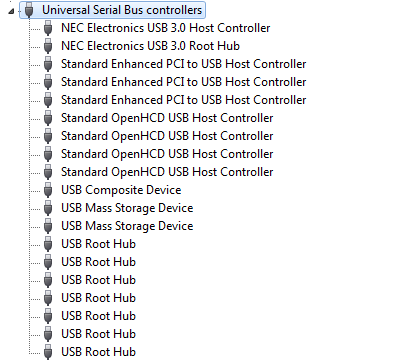
I have a headset that seems to malfunction due to not beeing connected to a USB 2.0 slot. I have checked my Device Manager and these are my USB Slots apparently:
CfJUv9W.png


I googled "Standard OpenHCD USB-Host Controller" and it seems that it is displayed so by Windows itself to guarentee backwards compatability to USB 1.1 and "tranforms" itself into an Advanced USB 2.0 port once a USB 2.0 device is plugged in. For me, however it does not do that.

My motherboard (Asus Formula IV) provides drivers for the USB 3.0 Ports only. I assume the USB 2.0 Drivers are part of the Motherboard Chipset. The manufacturers website, however, only provides me with a link to "AMD Chipset Driver V3.0.762.0 for Windows XP 32/64bit & Vista 32/64bit & Windows7 32/64bit.(WHQL)" from 2010. I installed that, am not sure however if it's outdated.

AidaReport: Paste2.org - Viewing Paste GNDhcFJA
DxDiag: Paste2.org - Viewing Paste ACBv2JDfhttps://drive.google.com/open?id=0B31RVhBGmE0HR3pJNm1yTDNWVGs

How should I procede?
Thanks in advance for any help
 
Last edited:

My Computer My Computer

At a glance

Windows 7 Ultimate x64AMD Phenom II X6 Black Edition 1090T4 x G Skill Ripjaws F3-10666CL9-4GBRLGigabyte GeForce GTX 970
Computer type
PC/Desktop
Computer Manufacturer/Model Number
Custom Build
OS
Windows 7 Ultimate x64
CPU
AMD Phenom II X6 Black Edition 1090T
Motherboard
Asus Crosshair IV Formula
Memory
4 x G Skill Ripjaws F3-10666CL9-4GBRL
Graphics Card(s)
Gigabyte GeForce GTX 970
Screen Resolution
1920x1080
Hard Drives
Drive #1 - Corsair Force GT (111 GB) (System)

Drive #2 - WDC WD3200AAKS-00B3A0 (298 GB) (Data & Installs)
Drive #3 - WD Ext HDD 1021 (931 GB) (Storage)
Antivirus
Eset Smart Security
Browser
Mozilla Firefox
Hi koga99, welcome to the Forum.

You seem to be blaming the computer for your headset malfunction, whereas the problem is more likely to be with the headset.

What is the make of the headset & does the headset have it's own software?.
 

My Computer My Computer

At a glance

Windows 7 Home Premium 64 bit sp1Intel i5 3570 3.4Ghz Ivy Bridge SKT 1155 quad...G-Skill Rip Jaws 16Gb (8x2) DDR3 -1600 PC3 12...Gigabyte NVIDIA GT610 1Gb DDR3 810/1200 PCI-E...
Computer type
PC/Desktop
Computer Manufacturer/Model Number
Self built using existing case
OS
Windows 7 Home Premium 64 bit sp1
CPU
Intel i5 3570 3.4Ghz Ivy Bridge SKT 1155 quad core
Motherboard
Gigabyte Z77-HD3 SKT 1155 2xSata 3, 4x USB 3.0
Memory
G-Skill Rip Jaws 16Gb (8x2) DDR3 -1600 PC3 12800 CL 10 red
Graphics Card(s)
Gigabyte NVIDIA GT610 1Gb DDR3 810/1200 PCI-E 2.0 Silent
Sound Card
NVIDIA High Definition & Realtech High Definition Audio
Monitor(s) Displays
2 x Philips 226V4L 16:9 aspect ratio
Screen Resolution
1920 x 1080 HD
Hard Drives
Samsung 840 Pro 256gb SSD, SATA 3.
Hitachi Touro Portable 1tb, USB 3.0 HDD used for image b/ups.
PSU
Corsair VS450
Case
Codeng
Cooling
PSU fan & CPU fan
Keyboard
Logitech
Mouse
Logitech Wireless trackball M570
Internet Speed
Wireless 3G. 3mg down & 550kb up.
Antivirus
Bitdefender Internet Security 2020
Browser
Opera (Current Version) & Firefox
Other Info
MS Office 2013 Pro. Davis weather station software. MGE Nova 600 avr UPS.
Hi koga99, welcome to the Forum.

You seem to be blaming the computer for your headset malfunction, whereas the problem is more likely to be with the headset.

What is the make of the headset & does the headset have it's own software?.

Hello Ranger4, thanks for the quick reply.

The Headset is a Logitech G430. I opened a thread on their support forums: Re: G430 - Sound disappears when playing a game. - Logitech Forums
I had some theories as to what might be causing it. On other support threads 99% of the replies by Logitech employees are "check if you are truly connected to a USB 2.0 Port" so I checked it out and found that all my USB Ports seem to be USB 1.1. I'm not sure what might be causing that problem.

My leading theory as to what might be causing the Headset problem currently is that the Logitech USB Dongle/External Soundcard deactivates itself briefly whenever I tab out of a game. However, since other people do not have that issue I assume that the problem might be something more local. A faulty USB port is my current hope of fixing that.

//EDIT:
It might be importent to state that I'm currently running on a very, very fresh Win7 installation. I formatted my disk yesterday and installed Windows 7. I have only installed these drivers:
- AMD Chipset
- Lan Drivers
- USB Port Drivers
- Nvidia GTX 970 + Nvidia Expirience
- G430 + LGS
- My peripheral drivers like mouse, keyboard etc.
 

My Computer My Computer

At a glance

Windows 7 Ultimate x64AMD Phenom II X6 Black Edition 1090T4 x G Skill Ripjaws F3-10666CL9-4GBRLGigabyte GeForce GTX 970
Computer type
PC/Desktop
Computer Manufacturer/Model Number
Custom Build
OS
Windows 7 Ultimate x64
CPU
AMD Phenom II X6 Black Edition 1090T
Motherboard
Asus Crosshair IV Formula
Memory
4 x G Skill Ripjaws F3-10666CL9-4GBRL
Graphics Card(s)
Gigabyte GeForce GTX 970
Screen Resolution
1920x1080
Hard Drives
Drive #1 - Corsair Force GT (111 GB) (System)

Drive #2 - WDC WD3200AAKS-00B3A0 (298 GB) (Data & Installs)
Drive #3 - WD Ext HDD 1021 (931 GB) (Storage)
Antivirus
Eset Smart Security
Browser
Mozilla Firefox

My Computer My Computer

At a glance

Windows 10 Pro. 64/ version 1709 Windows 7 Pr...Intel i7-6800K @ 4.3Corsair Platinum 16 gig @2400EVGA GTX 1070 OC
Computer type
PC/Desktop
Computer Manufacturer/Model Number
Home made Desktop
OS
Windows 10 Pro. 64/ version 1709 Windows 7 Pro/64
CPU
Intel i7-6800K @ 4.3
Motherboard
ASUS X-99 Deluxe II
Memory
Corsair Platinum 16 gig @2400
Graphics Card(s)
EVGA GTX 1070 OC
Monitor(s) Displays
Asus 27" LED LCD/VE278Q
Screen Resolution
1920-1080 or 1280-720 HDMI
Hard Drives
INTEL SSD 730-240 Gb Sata 3.0/
PSU
EVGA Platium 1200W
Case
Phanteks Luxe Tempered Glass 8 fans/ one radiator
Cooling
XSPC/ Water Cooled CPU
Keyboard
Das 4 Professional
Mouse
Logitech M705/MX Anywhere 2-S
Internet Speed
100 mbits
Antivirus
Microsoft Security Essentials/ Malwarebytes Premium 3.0/ SAS
Browser
I.E. 11 default/Firefox/ ISP Time Warner Cable/Spectrum
Other Info
LG BluRay Burner/
Sound system-KLipsch-THX/
Icy Dock ssd Hot Swap bays.
Hi Layback Bear,

Yes indeed, however, no matter what port I connect my USB Cables in, they're shown as USB 1.1

//EDIT:
Wait. I must've been reading the Device Manager wrong. I localized it to english and I'm going through it again.

rqHM7jZ.png


I'm not the best with hardware. I thought every entry stands for a single USB port. Can I assume that every port is, indeed, USB 2.0 since there is a Standard Enhanced PCI to USB Host Controller entry?
 
Last edited:

My Computer My Computer

At a glance

Windows 7 Ultimate x64AMD Phenom II X6 Black Edition 1090T4 x G Skill Ripjaws F3-10666CL9-4GBRLGigabyte GeForce GTX 970
Computer type
PC/Desktop
Computer Manufacturer/Model Number
Custom Build
OS
Windows 7 Ultimate x64
CPU
AMD Phenom II X6 Black Edition 1090T
Motherboard
Asus Crosshair IV Formula
Memory
4 x G Skill Ripjaws F3-10666CL9-4GBRL
Graphics Card(s)
Gigabyte GeForce GTX 970
Screen Resolution
1920x1080
Hard Drives
Drive #1 - Corsair Force GT (111 GB) (System)

Drive #2 - WDC WD3200AAKS-00B3A0 (298 GB) (Data & Installs)
Drive #3 - WD Ext HDD 1021 (931 GB) (Storage)
Antivirus
Eset Smart Security
Browser
Mozilla Firefox
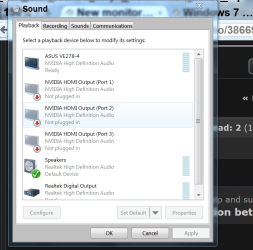
Try leaving you head phone plugged into a usb 2.0 port and then reboot. See if Windows 7 pickup your head phones.
You also my have to choose your head phone as your preferred Play Device.

Display Speakers.PNG
 

My Computer My Computer

At a glance

Windows 10 Pro. 64/ version 1709 Windows 7 Pr...Intel i7-6800K @ 4.3Corsair Platinum 16 gig @2400EVGA GTX 1070 OC
Computer type
PC/Desktop
Computer Manufacturer/Model Number
Home made Desktop
OS
Windows 10 Pro. 64/ version 1709 Windows 7 Pro/64
CPU
Intel i7-6800K @ 4.3
Motherboard
ASUS X-99 Deluxe II
Memory
Corsair Platinum 16 gig @2400
Graphics Card(s)
EVGA GTX 1070 OC
Monitor(s) Displays
Asus 27" LED LCD/VE278Q
Screen Resolution
1920-1080 or 1280-720 HDMI
Hard Drives
INTEL SSD 730-240 Gb Sata 3.0/
PSU
EVGA Platium 1200W
Case
Phanteks Luxe Tempered Glass 8 fans/ one radiator
Cooling
XSPC/ Water Cooled CPU
Keyboard
Das 4 Professional
Mouse
Logitech M705/MX Anywhere 2-S
Internet Speed
100 mbits
Antivirus
Microsoft Security Essentials/ Malwarebytes Premium 3.0/ SAS
Browser
I.E. 11 default/Firefox/ ISP Time Warner Cable/Spectrum
Other Info
LG BluRay Burner/
Sound system-KLipsch-THX/
Icy Dock ssd Hot Swap bays.
Don't know if I can help but will have a look and can provide some info. But I can't see your google docs without asking for permission. You should grant access to everyone so we can see

Your computer has USB 3.0, 2.x and 1.1 controllers
  • Your 3.0 controller has 3.0 in its name
  • By definition, USB 2.x controller names: either have 2.x and/ OR the word enhanced in the controller name. (I did a google translate and see your "erweiterter" controllers - are "enhanced" i.e. your 2.0 controllers)
  • Your OpenHCD controllers must be 1.x
fyi, also note that every host controller has a "root hub". Controllers and their root hub are both on the m/b.

The relationship between USB port on your computer and the controller it connects to is often a dynamic decision that Windows makes upon connection. (Depends on the m/b and how computer ports are built).

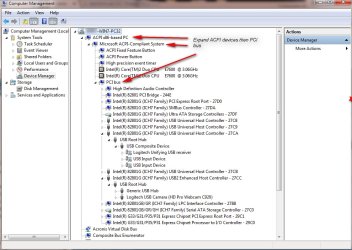
Use Device Manager to view device by connection to see device relationships (and what controller a device connects to)
>Click View->Device by Connection
>Click the + to expand ACPI computer and system. Then expand controllers.
In my case you can see my webcam is connected to a 2.0 controller. My wireless keyboard/mouse receiver is connected to a USB 1.x controller.

The first question is: does you headset connect to the enhanced controller or other type controller? And what is the playback device set to when you tab out of a game?
 

Attachments

  • 2015-12-26_184516.jpg
    2015-12-26_184516.jpg
    102.2 KB · Views: 1

My Computer My Computer

At a glance

Desk 1: Win 7 Pro x32; Desk 2: Windows 10 x64
Computer type
PC/Desktop
Computer Manufacturer/Model Number
Dell Optiplex 360 and Optiplex 755
OS
Desk 1: Win 7 Pro x32; Desk 2: Windows 10 x64
Hard Drives
500GB Crucial SSD in both Desktops
Other Info
Buffalo 6TB NAS, Raid 1
Don't know if I can help but will have a look and can provide some info. But I can't see your google docs without asking for permission. You should grant access to everyone so we can see

Your computer has USB 3.0, 2.x and 1.1 controllers
  • Your 3.0 controller has 3.0 in its name
  • By definition, USB 2.x controller names: either have 2.x and/ OR the word enhanced in the controller name. (I did a google translate and see your "erweiterter" controllers - are "enhanced" i.e. your 2.0 controllers)
  • Your OpenHCD controllers must be 1.x
fyi, also note that every host controller has a "root hub". Controllers and their root hub are both on the m/b.

The relationship between USB port on your computer and the controller it connects to is often a dynamic decision that Windows makes upon connection. (Depends on the m/b and how computer ports are built).

Use Device Manager to view device by connection to see device relationships (and what controller a device connects to)
>Click View->Device by Connection
>Click the + to expand ACPI computer and system. Then expand controllers.
In my case you can see my webcam is connected to a 2.0 controller. My wireless keyboard/mouse receiver is connected to a USB 1.x controller.

The first question is: does you headset connect to the enhanced controller or other type controller? And what is the playback device set to when you tab out of a game?

Sorry, didn't know that. Was looking gfor a way to share text without limited space, pastebin was beeing too picky about that AIDA report. But I found paste2; that one lets me upload... Here goes:

AidaReport: Paste2.org - Viewing Paste GNDhcFJA
DxDiag: Paste2.org - Viewing Paste ACBv2JDf

Obviously the AIDA report has a lot of irrelevant info but who knows, maybe there's something important in there that DxDiag doesn't pick up.

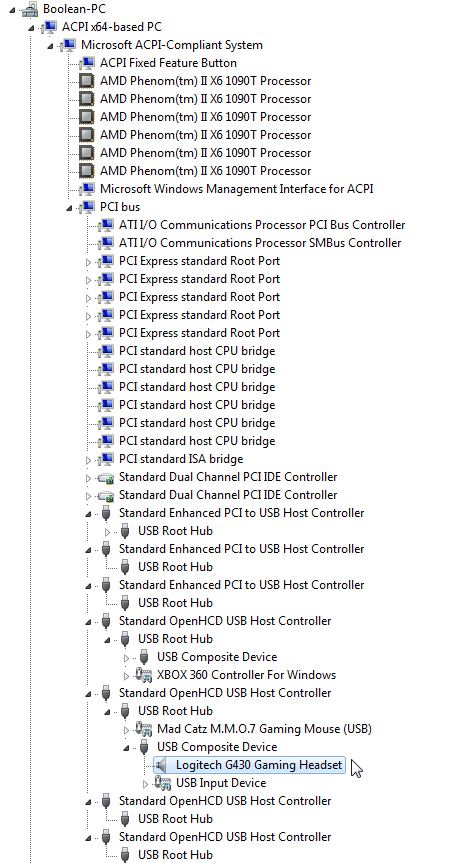
Next, about the Devices by connection view, that is absolutely gorgeous I was wondering if the device manager would be able to show me the hirarchy like that ever since I started using it. Thanks already for that insight. Here is what it looks like for me at the moment:
mOzpEXR.png

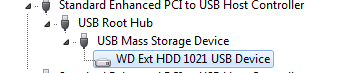
It seems like it is indeed not connected to an "enhanced" controller. But then again, no matter which one I connect it to it always lands in a "standard OpenHCD" controller. Not an enhanced one. Right now my ExtHDD is connected to one of the enhanced controllers:
IzXxEaP.png

But that is actually my USB 3.0 port (it's blue, so it's USB 3.0, right?)
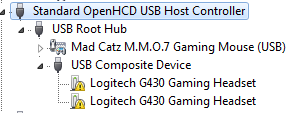
//Edit: I just connected my G430 to what is definately a USB 3.0 Port but it landed in the other, not enhanced, slot.
dc4qseY.png

(The yellow exclamation mark is there because windows is still trying to install the driver for it)

My standard Playback device remains my G430 all the time. BUT, before I wiped my HDD and reinstalled windows I had the Nvidia HD Audio drivers installed and some times it used my Monitors speakers (connected via HDMI cable to my nvidia) as my standard playback. Again, that would only happen whenever I tabbed out of a game and my G430 lost all sound. I assume my Nvidia or the PC would think that I disconnected my headset and it used the only other available output device.

//EDIT: Even though currently there are two things connected to my USB 3.0 ports, they show empty... (I checked the MB manual to see which ports are USB 3.0)
baPOs5W.png


Try leaving you head phone plugged into a usb 2.0 port and then reboot. See if Windows 7 pickup your head phones.
You also my have to choose your head phone as your preferred Play Device.
View attachment 378653

My heaphones are getting picked up by my computer no problem. The problem always was that it's sound gets cut off completely whenever I tabbed out of a game.


P.S.: It might be important to state that the sound only gets cut off whenever I tab out of a game that has it's "Background Audio" disabled. You know, that option that let's you hear the games sounds in the background.
 
Last edited:

My Computer My Computer

At a glance

Windows 7 Ultimate x64AMD Phenom II X6 Black Edition 1090T4 x G Skill Ripjaws F3-10666CL9-4GBRLGigabyte GeForce GTX 970
Computer type
PC/Desktop
Computer Manufacturer/Model Number
Custom Build
OS
Windows 7 Ultimate x64
CPU
AMD Phenom II X6 Black Edition 1090T
Motherboard
Asus Crosshair IV Formula
Memory
4 x G Skill Ripjaws F3-10666CL9-4GBRL
Graphics Card(s)
Gigabyte GeForce GTX 970
Screen Resolution
1920x1080
Hard Drives
Drive #1 - Corsair Force GT (111 GB) (System)

Drive #2 - WDC WD3200AAKS-00B3A0 (298 GB) (Data & Installs)
Drive #3 - WD Ext HDD 1021 (931 GB) (Storage)
Antivirus
Eset Smart Security
Browser
Mozilla Firefox
Double check. It looks like your BIOS is many revs out of date. Try a BIOS update

/* EDIT */
The report back both on your headset as well as if anything now connected to USB 3.0 controller
 

My Computer My Computer

At a glance

Desk 1: Win 7 Pro x32; Desk 2: Windows 10 x64
Computer type
PC/Desktop
Computer Manufacturer/Model Number
Dell Optiplex 360 and Optiplex 755
OS
Desk 1: Win 7 Pro x32; Desk 2: Windows 10 x64
Hard Drives
500GB Crucial SSD in both Desktops
Other Info
Buffalo 6TB NAS, Raid 1
Double check. It looks like your BIOS is many revs out of date. Try a BIOS update

/* EDIT */
The report back both on your headset as well as if anything now connected to USB 3.0 controller

I updated my BIOS yesterday. The last update was from 2012 though. So yeah, my BIOS is/was up to date when I created those screenshots. Is there another way to fix it?

//EDIT:
I used AIDA64s inbuilt driver checker and it gives me these results:
http://biosagentplus.com/result/f25f9db055f7f88edebd50b0fec1f016
( link to jpg in case you can't access the page: http://i.imgur.com/szGuX9Y.png )

So yeah it seems that at least AIDA thinks there are updaes especially regarding the USB ports. But Asus doesn't provide me with the drivers. Last BIOS update they provide me with is from 2012 and the other drivers are all from 2010.

The AIDA update scanner needs me to pay a subscription to see the links so I'm kind of helpless here.

I found AMIs bios update page here: American Megatrends Inc. - BIOS ? UEFI Firmware
But I am not certain if my Motherboard is still supported by their updates. I heard that a wrong update might can the motherboard altogether and I'm not sure if the Formula IV has a backup bios installed to repair damages.

I checked everywhere. ROG themselfs don't provide downloads for the Crosshair IV Formula, asus only provides the 2012 version I already have and my Motherboard doesn't support AMIs update since it's OEM.
 
Last edited:

My Computer My Computer

At a glance

Windows 7 Ultimate x64AMD Phenom II X6 Black Edition 1090T4 x G Skill Ripjaws F3-10666CL9-4GBRLGigabyte GeForce GTX 970
Computer type
PC/Desktop
Computer Manufacturer/Model Number
Custom Build
OS
Windows 7 Ultimate x64
CPU
AMD Phenom II X6 Black Edition 1090T
Motherboard
Asus Crosshair IV Formula
Memory
4 x G Skill Ripjaws F3-10666CL9-4GBRL
Graphics Card(s)
Gigabyte GeForce GTX 970
Screen Resolution
1920x1080
Hard Drives
Drive #1 - Corsair Force GT (111 GB) (System)

Drive #2 - WDC WD3200AAKS-00B3A0 (298 GB) (Data & Installs)
Drive #3 - WD Ext HDD 1021 (931 GB) (Storage)
Antivirus
Eset Smart Security
Browser
Mozilla Firefox
Remember that Windows 7 does not install USB 3.0 drivers like it does USB 2.0 drivers.

You must install the USB 3.0 drivers as a separate operation.
Your motherboard DVD should have the USB 3.0 drivers.

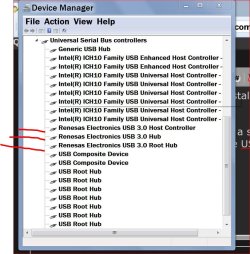
Mine looks like this.

Device manager.JPG
 

My Computer My Computer

At a glance

Windows 10 Pro. 64/ version 1709 Windows 7 Pr...Intel i7-6800K @ 4.3Corsair Platinum 16 gig @2400EVGA GTX 1070 OC
Computer type
PC/Desktop
Computer Manufacturer/Model Number
Home made Desktop
OS
Windows 10 Pro. 64/ version 1709 Windows 7 Pro/64
CPU
Intel i7-6800K @ 4.3
Motherboard
ASUS X-99 Deluxe II
Memory
Corsair Platinum 16 gig @2400
Graphics Card(s)
EVGA GTX 1070 OC
Monitor(s) Displays
Asus 27" LED LCD/VE278Q
Screen Resolution
1920-1080 or 1280-720 HDMI
Hard Drives
INTEL SSD 730-240 Gb Sata 3.0/
PSU
EVGA Platium 1200W
Case
Phanteks Luxe Tempered Glass 8 fans/ one radiator
Cooling
XSPC/ Water Cooled CPU
Keyboard
Das 4 Professional
Mouse
Logitech M705/MX Anywhere 2-S
Internet Speed
100 mbits
Antivirus
Microsoft Security Essentials/ Malwarebytes Premium 3.0/ SAS
Browser
I.E. 11 default/Firefox/ ISP Time Warner Cable/Spectrum
Other Info
LG BluRay Burner/
Sound system-KLipsch-THX/
Icy Dock ssd Hot Swap bays.
Remember that Windows 7 does not install USB 3.0 drivers like it does USB 2.0 drivers.

You must install the USB 3.0 drivers as a separate operation.
Your motherboard DVD should have the USB 3.0 drivers.

Mine looks like this.

View attachment 378692

It does, I installed the USB 3.0 drivers, still nothing. I'm close to replacing my motherboard.
 

My Computer My Computer

At a glance

Windows 7 Ultimate x64AMD Phenom II X6 Black Edition 1090T4 x G Skill Ripjaws F3-10666CL9-4GBRLGigabyte GeForce GTX 970
Computer type
PC/Desktop
Computer Manufacturer/Model Number
Custom Build
OS
Windows 7 Ultimate x64
CPU
AMD Phenom II X6 Black Edition 1090T
Motherboard
Asus Crosshair IV Formula
Memory
4 x G Skill Ripjaws F3-10666CL9-4GBRL
Graphics Card(s)
Gigabyte GeForce GTX 970
Screen Resolution
1920x1080
Hard Drives
Drive #1 - Corsair Force GT (111 GB) (System)

Drive #2 - WDC WD3200AAKS-00B3A0 (298 GB) (Data & Installs)
Drive #3 - WD Ext HDD 1021 (931 GB) (Storage)
Antivirus
Eset Smart Security
Browser
Mozilla Firefox
1. Your DxDiag must've been old. Your recent post shows BIOS v3029 installed - which is the latest from ASUS. I'd stick with that version. (IMO: I sometimes use those "driver update" tools - but only to see what it suggests is out of date. Then I go to the vendor web site to check myself. I only download updated version from vendor sites. "Driver update" tools sometimes point you to driver Beta versions or versions intended for other hardware.)

2. Check your USB 3.0 device on another computer. Verify it connects to USB 3.0 controller on other hardware (So you know the device works right). If you've already updated BIOS and installed the latest USB 3 drivers from ASUS, sounds like a good idea to replace the m/b if it's still under warranty

As for checking which are the 2.0 ports on ASUS. I would think they'd also mark the USB 3.0 ports. Sometimes they're blue. Sometimes you have to look very close to see the USB 3.0 logo. And, for the heck of it, you might try the USB 3 device in every computer USB port

For future reference, here's some more info and another tool I hope you might find useful in the future:
  • You see a limited number of physical USB ports on your computer
  • In contrast, there are usually many, many USB ports on the m/b itself
  • Contrary to popular belief (i was surprised to learn so myself), it's not a 1-1 relationship between physical port on the machine to a port on the m/b. Windows can (most often) dynamically decide the connection from computer port to the m/b port. the USB port to (most) any port on the m/b. I say "most often" because, only sometimes, the way the h/w is build restricts Windows choice

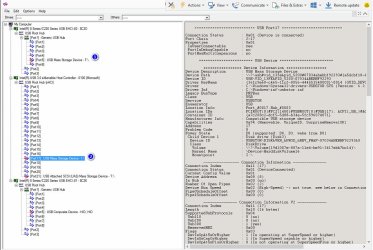
You can also see USB connection detail using USBTreeView. (Scroll down the page to get to the download link).

In my example below, you see ALOT of ports! while there aree only 8 USB ports on the computer. For the example, I have flash drives to two of the USB 3.0 computer ports (You won't see the physical ports represented by the tool. Just the m/b ports the physical ports end up being connected to)
> Device #1 is a USB 2.0 flash drive. Notice, even though it's plugged into a USB 3.0 port, Windows connects it to a USB 2.0 port on the m/b
> Device #2 is a USB 3.0 flash drive. In this case, Windows connects the device to a 3.0 extensible controller as it should when all works right!​
 

Attachments

  • 2015-12-27_174533.jpg
    2015-12-27_174533.jpg
    131.5 KB · Views: 3
  • 2015-12-27_180052.jpg
    2015-12-27_180052.jpg
    1.4 KB · Views: 6
Last edited:

My Computer My Computer

At a glance

Desk 1: Win 7 Pro x32; Desk 2: Windows 10 x64
Computer type
PC/Desktop
Computer Manufacturer/Model Number
Dell Optiplex 360 and Optiplex 755
OS
Desk 1: Win 7 Pro x32; Desk 2: Windows 10 x64
Hard Drives
500GB Crucial SSD in both Desktops
Other Info
Buffalo 6TB NAS, Raid 1
Thanks for all your help ComputerGeek.

I decided to buy a new MB and replace my CPU for better perfomence while I'm at it.
Thinking of going for the Asus X-99 since asus hasn't really let me down quality-wise. I suppose the reason I'm having trouble with my current MB is that it has been unsupported since pretty much 2010.

Just not sure what the difference between the x99-a and the x99-deluxe is... one extra PCI Express 3.0? Meh, this thread is done now. Couldn't really find a solution but I learned a lot at least. Thanks for the USB Tool. I'm pretty sure I'll get to use it at some point
 

My Computer My Computer

At a glance

Windows 7 Ultimate x64AMD Phenom II X6 Black Edition 1090T4 x G Skill Ripjaws F3-10666CL9-4GBRLGigabyte GeForce GTX 970
Computer type
PC/Desktop
Computer Manufacturer/Model Number
Custom Build
OS
Windows 7 Ultimate x64
CPU
AMD Phenom II X6 Black Edition 1090T
Motherboard
Asus Crosshair IV Formula
Memory
4 x G Skill Ripjaws F3-10666CL9-4GBRL
Graphics Card(s)
Gigabyte GeForce GTX 970
Screen Resolution
1920x1080
Hard Drives
Drive #1 - Corsair Force GT (111 GB) (System)

Drive #2 - WDC WD3200AAKS-00B3A0 (298 GB) (Data & Installs)
Drive #3 - WD Ext HDD 1021 (931 GB) (Storage)
Antivirus
Eset Smart Security
Browser
Mozilla Firefox
Back
Top