Password Protect Openoffice Word and Excel Documents?

paulyjames

New member
Member
VIP
Local time
1:25 PM
Messages
657
Is the only way to do this save as again if you already have the document saved then put the password? Is there any issue with putting the same password for all these documents? Let say you have 100 documents that you want to password protect. Obviously you aren't going to have a password for each one right?


Also how does one password protect folders and pictures?


Is it true that if you put a password protect, then no one could open these documents up unless they have the password? I did read that one could open openoffice documents even without password protect.
 

My Computer My Computer

At a glance

Windows 10 Pro
Computer type
Laptop
OS
Windows 10 Pro
I have few issues with this. There is a folder that i have that has a bit of pictures. I put password protect on it. Now the folder looks like a winrar file which i believe is how its suppose to look. Issue is after i put in the password, it opens but issue is all the photos that are shown there... they are all lists. Is it possible to have the folder open up like it should normally? I put in the password so why does it not open up normally then. I have to click on each list item to see certain picture etc.


I also put a password on a certain picture thats in my picture folder. Thus that picture is put separately. So that 1 photo itself has the winrar image on it. And after i put password... it opens up but i still have to click on that list name image for it before it opens. Is there a way to prevent this? Like couldn't i see how the picture already looks after putting in the password?


And for both things. How do i cancel the password so it was the way it was before i put password protect? Cannot find an option to do this.
 

My Computer My Computer

At a glance

Windows 10 Pro
Computer type
Laptop
OS
Windows 10 Pro
anyone?
 

My Computer My Computer

At a glance

Windows 10 Pro
Computer type
Laptop
OS
Windows 10 Pro
Hi:

It might help to know what version of OOo.

Having said that, support for OOo ended years ago.
It has been replaced by LibreOffice and similar products.
And I've never used OOo.

Having said that, a quick internet search turned up these links (I have not investigated any of them, and some are quite old, so these are offered "as is"):

https://forum.openoffice.org/en/forum/viewtopic.php?f=6&t=3863
https://forum.openoffice.org/en/forum/viewtopic.php?f=7&t=55421
How to password protect a Open Office document
OpenOffice.org Writer: Password Protect Your Documents | Worldstart's Tech Tips And Computer Help
https://forum.openoffice.org/en/forum/viewtopic.php?f=9&t=12752
http://www.openoffice.org/documentation/HOW_TO/spreadsheet/calc6_EN.pdf

I hope this helps,

MM
 

My Computer My Computer

At a glance

OEM Windows 7 Ult (x64) SP1Intel Core-i7 3770 @ 3.4 GHz16 GB DDR3 SDRAM @ 1333 MHzNVidia GeForce GT620 1 GB
Computer type
PC/Desktop
Computer Manufacturer/Model Number
Dell Studio XPS 8500
OS
OEM Windows 7 Ult (x64) SP1
CPU
Intel Core-i7 3770 @ 3.4 GHz
Motherboard
"Dell" branded
Memory
16 GB DDR3 SDRAM @ 1333 MHz
Graphics Card(s)
NVidia GeForce GT620 1 GB
Sound Card
THX TruStudio PC
Monitor(s) Displays
Dell U2410 Full HD
Hard Drives
2.0 TB SATA2 @ 7200 RPM
PSU
350W
Keyboard
MS 4000 Ergon - Wired
Mouse
Logitech Anywhere MX
Internet Speed
Cable HSI w/Turbo (router)
Antivirus
KIS-MBAM Premium-MBAE Premium
Browser
Fx (current version); IE
Other Info
And a Win7/64 Pro laptop; And a Win10/64 Pro desktop.
is there a reason when i right click it on properties, it doesnt allow me to encrypt it anymore?
 

My Computer My Computer

At a glance

Windows 10 Pro
Computer type
Laptop
OS
Windows 10 Pro
Hi:

It might help to know what version of OOo.

Having said that, support for OOo ended years ago.
It has been replaced by LibreOffice and similar products.
And I've never used OOo.

Having said that, a quick internet search turned up these links (I have not investigated any of them, and some are quite old, so these are offered "as is"):

https://forum.openoffice.org/en/forum/viewtopic.php?f=6&t=3863
https://forum.openoffice.org/en/forum/viewtopic.php?f=7&t=55421
How to password protect a Open Office document
OpenOffice.org Writer: Password Protect Your Documents | Worldstart's Tech Tips And Computer Help
https://forum.openoffice.org/en/forum/viewtopic.php?f=9&t=12752
http://www.openoffice.org/documentation/HOW_TO/spreadsheet/calc6_EN.pdf

I hope this helps,

MM
https://www.openoffice.org/ OpenOffice 4.1.2 was released October 28, 2015.
 

My Computer My Computer

At a glance

Win10 Pro 64-bitAMD Ryzen 7 3800X32 GB Kingston DDR4-2666MSI nVidia GT 710 (2GB)
Computer type
PC/Desktop
Computer Manufacturer/Model Number
Self-Built
OS
Win10 Pro 64-bit
CPU
AMD Ryzen 7 3800X
Motherboard
Gigabyte X570 UD
Memory
32 GB Kingston DDR4-2666
Graphics Card(s)
MSI nVidia GT 710 (2GB)
Sound Card
Creative Audigy FX 5.1
Monitor(s) Displays
ViewSonic VG2439Smh 24"
Screen Resolution
1920x1080
Hard Drives
3xWD1TB; 1xSeagate 1TB... all spinning rust
PSU
EVGA 100-W1-0500-KR (500w)
Case
SilverStone PS10 (modified)
Cooling
CPU:AMD Wraith Prism. Case:3x Noctua 120mm
Keyboard
Compaq Professional PS/2
Mouse
Microsoft Basic Optical Mouse 2.0
Internet Speed
Fiber 1Gbit/sec down/up
Antivirus
Avast Free
Browser
FF, Chrome
Other Info
2x LG GH24NSC0 DVD burners, Mackie CR3 monitor speakers
OOPS!

Uncle Google let me down.:o
Thanks for the correction, @ovenmaster.

@paulyjames: I hope Uncle Google or someone here can help you.

Cheers,
MM
 

My Computer My Computer

At a glance

OEM Windows 7 Ult (x64) SP1Intel Core-i7 3770 @ 3.4 GHz16 GB DDR3 SDRAM @ 1333 MHzNVidia GeForce GT620 1 GB
Computer type
PC/Desktop
Computer Manufacturer/Model Number
Dell Studio XPS 8500
OS
OEM Windows 7 Ult (x64) SP1
CPU
Intel Core-i7 3770 @ 3.4 GHz
Motherboard
"Dell" branded
Memory
16 GB DDR3 SDRAM @ 1333 MHz
Graphics Card(s)
NVidia GeForce GT620 1 GB
Sound Card
THX TruStudio PC
Monitor(s) Displays
Dell U2410 Full HD
Hard Drives
2.0 TB SATA2 @ 7200 RPM
PSU
350W
Keyboard
MS 4000 Ergon - Wired
Mouse
Logitech Anywhere MX
Internet Speed
Cable HSI w/Turbo (router)
Antivirus
KIS-MBAM Premium-MBAE Premium
Browser
Fx (current version); IE
Other Info
And a Win7/64 Pro laptop; And a Win10/64 Pro desktop.
anyone know?
 

My Computer My Computer

At a glance

Windows 10 Pro
Computer type
Laptop
OS
Windows 10 Pro
any thoughts on zip 7? someone suggested that to me. Im not sure if i even have it or not because i downloaded something like this.


Because when i type 7 in start menu, it shows 7zip file manager. That is it right?


I have an issue with what you mentioned. After i did that, i went to my documents. I see that name of that document twice. That document is in a winrar box... and the document that is by itself as in openoffice word document. The first one the winrar document requires me to put password to open it. However, the other document is the original document and it opens it without asking for a password. Is there a reason for that?


So am i suppose to have to delete the openoffice word document after doing this?


Am i suppose to check encrypt file name after putting in the password for these documents?


I'm confused why these documents after i put password shows up as winrar here.
 

My Computer My Computer

At a glance

Windows 10 Pro
Computer type
Laptop
OS
Windows 10 Pro
If you zip individual files then you will need to add passwords for each zipped file.

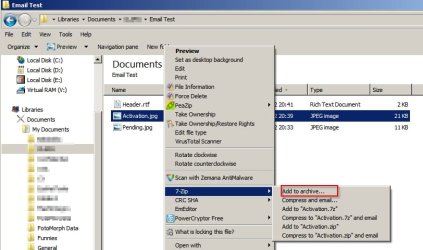
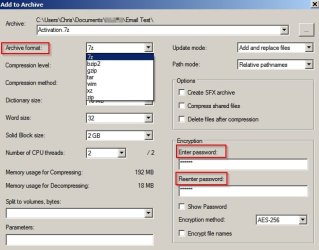
7=Zip file manager. Run it and browse to a file that you want to encrypt (in 7-zip file manager window) then right click.

Add to Archive.jpg

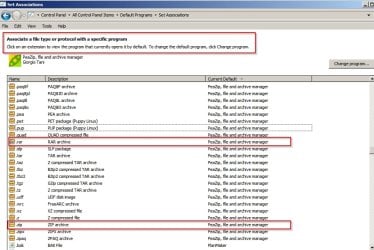
7-zip vs WinRar issue. What is the problem file extension ( .zip .rar ) or something else?

Sounds like a file association problem.

Set Associations.jpg
 

My Computer My Computer

At a glance

Microsoft Windows 7 Home Premium 64-bit 7601 ...AMD C-60 APU with Radeon(tm) HD Graphics4.00 GBAMD Radeon HD 6290 Graphics
Computer type
Laptop
Computer Manufacturer/Model Number
ASUS
OS
Microsoft Windows 7 Home Premium 64-bit 7601 Multiprocessor Free Service Pack 1
CPU
AMD C-60 APU with Radeon(tm) HD Graphics
Motherboard
ASUSTeK COMPUTER INC. X501U
Memory
4.00 GB
Graphics Card(s)
AMD Radeon HD 6290 Graphics
Sound Card
(1) AMD High Definition Audio Device (2) Realtek High Defi
Screen Resolution
1366 x 768 x 32 bits (4294967296 colors) @ 60 Hz
Hard Drives
Hitachi HTS545050A7E380 SATA Disk Device
Antivirus
Comodo CIS & FW, SecureAplus App Whitelisting, Threatfire
Browser
Cyberfox 64bit, Opera 64bit, Airfox
Other Info
Spy-The-Spy, HitmanPro.Alert, Norton Connect Safe, MJRegWatcher, BitDefender TrafficLight, Voodoo Shield, Zemana AntiMalware
You sound very confused.

I have an issue with what you mentioned.

What who mentioned? What did they mention?

RE: Using 7-zip to password protect files.

7zip generally adds the file to a password protected archive (folder) leaving the original intact.

If you can open the password protected archive and view the file then you can delete the original. Test first.

RE: File name. You don't need to encrypt that unless it is private.
 

My Computer My Computer

At a glance

Microsoft Windows 7 Home Premium 64-bit 7601 ...AMD C-60 APU with Radeon(tm) HD Graphics4.00 GBAMD Radeon HD 6290 Graphics
Computer type
Laptop
Computer Manufacturer/Model Number
ASUS
OS
Microsoft Windows 7 Home Premium 64-bit 7601 Multiprocessor Free Service Pack 1
CPU
AMD C-60 APU with Radeon(tm) HD Graphics
Motherboard
ASUSTeK COMPUTER INC. X501U
Memory
4.00 GB
Graphics Card(s)
AMD Radeon HD 6290 Graphics
Sound Card
(1) AMD High Definition Audio Device (2) Realtek High Defi
Screen Resolution
1366 x 768 x 32 bits (4294967296 colors) @ 60 Hz
Hard Drives
Hitachi HTS545050A7E380 SATA Disk Device
Antivirus
Comodo CIS & FW, SecureAplus App Whitelisting, Threatfire
Browser
Cyberfox 64bit, Opera 64bit, Airfox
Other Info
Spy-The-Spy, HitmanPro.Alert, Norton Connect Safe, MJRegWatcher, BitDefender TrafficLight, Voodoo Shield, Zemana AntiMalware
Okay so i opened 7 zip. Then i see a whole bunch of files. I then right click, i see 7zip, click it and add to archive. Then i put password. Then it saves it into a winrar box. And of course the original file is right next to it. That file of course requires no password to open. So i have to delete the original file each time right? Since obviously not doing that would be well the original file without password.


The other method i did was go to my documents. Then right click the document and i see an option to Add to archive. Right next to it is winrar logo when i click 7zip then add to archive. But this page looks a bit different than 7zip but requires password etc. So that means there are 2 ways to password protect... either 7zip then add to archive or just add to archive to winrar?


The thing is whether i do 7zip or winrar, well both of the documents will be saved to the same exact winrar icon right for each document?
 

My Computer My Computer

At a glance

Windows 10 Pro
Computer type
Laptop
OS
Windows 10 Pro
Okay so i opened 7 zip. Then i see a whole bunch of files. I then right click, i see 7zip, click it and add to archive. Then i put password. Then it saves it into a winrar box. And of course the original file is right next to it. That file of course requires no password to open. So i have to delete the original file each time right? Since obviously not doing that would be well the original file without password.


The other method i did was go to my documents. Then right click the document and i see an option to Add to archive. Right next to it is winrar logo when i click 7zip then add to archive. But this page looks a bit different than 7zip but requires password etc. So that means there are 2 ways to password protect... either 7zip then add to archive or just add to archive to winrar?


The thing is whether i do 7zip or winrar, well both of the documents will be saved to the same exact winrar icon right for each document?

I think you need someone who has 7-zip installed to explain it to you. I use an alternative to 7-zip and only use portable 7-zip with no context menu entry.

For the basics see the video tutorial here:

Using the free zip compatible 7-Zip package - Tutorial 3 | Top Windows Tutorials

Note: Format (box) can be changed to other formats so you don't always need to use winrar.

The original files remain and should only be deleted once you are sure that you can open your password protected archive.

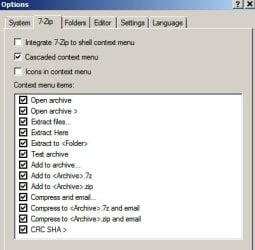
There should be an options menu in 7-zip GUI - something like this:

Options.jpg

That lets you select what you see in the right click context menu when you want to zip a file.

You don't have to use WinRAR. You could just as well use any of the other available formats.

The "add to archive" option should let you choose a format in the next screen.
 

My Computer My Computer

At a glance

Microsoft Windows 7 Home Premium 64-bit 7601 ...AMD C-60 APU with Radeon(tm) HD Graphics4.00 GBAMD Radeon HD 6290 Graphics
Computer type
Laptop
Computer Manufacturer/Model Number
ASUS
OS
Microsoft Windows 7 Home Premium 64-bit 7601 Multiprocessor Free Service Pack 1
CPU
AMD C-60 APU with Radeon(tm) HD Graphics
Motherboard
ASUSTeK COMPUTER INC. X501U
Memory
4.00 GB
Graphics Card(s)
AMD Radeon HD 6290 Graphics
Sound Card
(1) AMD High Definition Audio Device (2) Realtek High Defi
Screen Resolution
1366 x 768 x 32 bits (4294967296 colors) @ 60 Hz
Hard Drives
Hitachi HTS545050A7E380 SATA Disk Device
Antivirus
Comodo CIS & FW, SecureAplus App Whitelisting, Threatfire
Browser
Cyberfox 64bit, Opera 64bit, Airfox
Other Info
Spy-The-Spy, HitmanPro.Alert, Norton Connect Safe, MJRegWatcher, BitDefender TrafficLight, Voodoo Shield, Zemana AntiMalware
thanks. Anyone who uses 7 zip can comment on this?
 

My Computer My Computer

At a glance

Windows 10 Pro
Computer type
Laptop
OS
Windows 10 Pro
Okay since there are no answers:

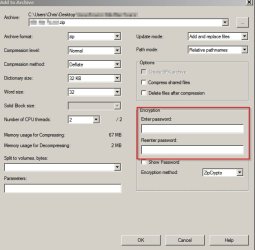
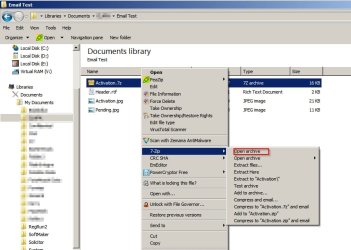
Right click a file that you want to password protect and choose "add to archive"

7zip 1.jpg

Choose required format and choose password. Click Okay.

7zip 2.jpg

Then you see the original file along with the password protected zipped file.

7zip 3.jpg

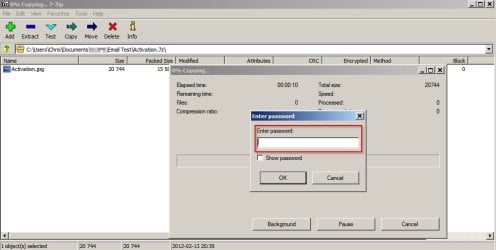
Attempt to open the password protected zipped file by double clicking on it and enter the password when prompted. If you can view the file you can delete the original.

7zip 4.jpg
 

My Computer My Computer

At a glance

Microsoft Windows 7 Home Premium 64-bit 7601 ...AMD C-60 APU with Radeon(tm) HD Graphics4.00 GBAMD Radeon HD 6290 Graphics
Computer type
Laptop
Computer Manufacturer/Model Number
ASUS
OS
Microsoft Windows 7 Home Premium 64-bit 7601 Multiprocessor Free Service Pack 1
CPU
AMD C-60 APU with Radeon(tm) HD Graphics
Motherboard
ASUSTeK COMPUTER INC. X501U
Memory
4.00 GB
Graphics Card(s)
AMD Radeon HD 6290 Graphics
Sound Card
(1) AMD High Definition Audio Device (2) Realtek High Defi
Screen Resolution
1366 x 768 x 32 bits (4294967296 colors) @ 60 Hz
Hard Drives
Hitachi HTS545050A7E380 SATA Disk Device
Antivirus
Comodo CIS & FW, SecureAplus App Whitelisting, Threatfire
Browser
Cyberfox 64bit, Opera 64bit, Airfox
Other Info
Spy-The-Spy, HitmanPro.Alert, Norton Connect Safe, MJRegWatcher, BitDefender TrafficLight, Voodoo Shield, Zemana AntiMalware
Hey guys. Still confused with this as i tried to use 7zip on this. So after i right click on the folder 7zip, add to archive, i then put the password then click okay.


When i go to pictures, i still see that same file there where if you click it... well no password required. Below it... there is the same file except its a winrar file. It has that 3 color box look thus winrar. Then when i click on it, i have to put password. Then there is those files but i cannot view any of them. I have to manually click on each one and it shows extracting to load each one.


I mean shouldn't there be a way where after i put password, i could see all the photos individually showing similar to when i click on the folder that contains the pictures?


I want to be able to click on the file/folder... then put the password, then have the folder open up with a lot of the pictures like normally if i click on a folder. Is that possible or not? Thanks.
 

My Computer My Computer

At a glance

Windows 10 Pro
Computer type
Laptop
OS
Windows 10 Pro
Back
Top