
Solved MSI B85M-P33 Mobo Bios Password Problem

WinS3v3n64Bit

New member
Local time
4:34 PM
Messages
35
Location
Ga
I have tried clearing CMOS by removing battery for 10 mins.
I have since deleted whole windows 7 partition and I'm currently using 14.04 Ubuntu.

Anyways, can someone help me clear my Bios Password somehow? Maybe by using some free bios program?
My Bios has the latest firmware update V4.9 also.

I can click Del upon booting and get into my Bios -but I do not know the bios password.
It's a simple password, just forgot what it is. In the mean time, this bios keeps...:picnic:

Thanks
 
Last edited:

My Computer My Computer

Computer type
PC/Desktop
Computer Manufacturer/Model Number
Self Built,Custom
OS
Windows 7 Home Premium x64 SP1
CPU
Intel Pentium G3420 @ 3.20GHz, Haswell, 1150 Socket
Motherboard
MSI B85M-P33
Memory
PNY 2x4 8GB
Graphics Card(s)
MSI 1GB R7770 Ghz Edition
Sound Card
HDTV Surround Sound
Monitor(s) Displays
Hitachi HDTV 60" and ACER 15"
Screen Resolution
1920 x 1080/1366 x 768
Hard Drives
Seagate Barracuda 1TB ,7200.14, 64mb Cache
PSU
Master Cooler Extreme Power Plus 500w
Case
iMicro CA-IM1627D ATX Mid Tower Case (Black)
Keyboard
onn
Mouse
Sharkk-SK2242 Wired Optical
Internet Speed
Highspeed Cable 1Gb/s
Antivirus
Microsoft Security Essentials
Browser
Chrome 64 Bit and Opera(Gotta Love Their Speed Dial).
Other Info
My Win10 Account:
http://www.tenforums.com/members/windowst3n.html
--------------------------------------------------------------
Private Firewall
Bought parts from Amazon.com
Ground the CMOS via the jumper on the main board.


This is from the manual.
 

Attachments

  • Untitled.png
    Untitled.png
    14.3 KB · Views: 38
  • Untitled2.png
    Untitled2.png
    18.4 KB · Views: 38

My Computer My Computer

Computer type
PC/Desktop
Computer Manufacturer/Model Number
Custom Built By Me.
OS
Windows 10 Pro 64 bit
CPU
AMD FX 9590 8 Core Black Edition
Motherboard
MSI 990FXA GAMING (MS-7893)
Memory
Corsair Vengeance 16GB DDR3
Graphics Card(s)
AMD Radeon (TM) R9 380 Gaming Series
Sound Card
AMD High Definition
Monitor(s) Displays
Samsung 32" 60Hz 4ms Curved PLS LED
Screen Resolution
1920 X 1080
Hard Drives
C: 223 GB SSD = E: 465 GB HDD = F: 931 GB HDD = G: 149 GB HDD = H: 931 GB HDD
PSU
EVGA Supernova NEX750B 750W ATX EPS12V 80PLUS Bronze
Case
Cool Master
Cooling
Noctua NH-D15 Premium Cooler with 2x NF-A15 PWM 140mm Fan
Internet Speed
Fiber Optic: Download 332.7 Mbps / Upload 331.5 Mbps
Antivirus
Windows Defender
Browser
Slimjet (64bit)
Ground the CMOS via the jumper on the main board.


This is from the manual.

On JBAT1 I have only 2 pins for it and they are bare. No sleeve on it to remove and reset.
So how can i do this? Thank you.
 

My Computer My Computer

Computer type
PC/Desktop
Computer Manufacturer/Model Number
Self Built,Custom
OS
Windows 7 Home Premium x64 SP1
CPU
Intel Pentium G3420 @ 3.20GHz, Haswell, 1150 Socket
Motherboard
MSI B85M-P33
Memory
PNY 2x4 8GB
Graphics Card(s)
MSI 1GB R7770 Ghz Edition
Sound Card
HDTV Surround Sound
Monitor(s) Displays
Hitachi HDTV 60" and ACER 15"
Screen Resolution
1920 x 1080/1366 x 768
Hard Drives
Seagate Barracuda 1TB ,7200.14, 64mb Cache
PSU
Master Cooler Extreme Power Plus 500w
Case
iMicro CA-IM1627D ATX Mid Tower Case (Black)
Keyboard
onn
Mouse
Sharkk-SK2242 Wired Optical
Internet Speed
Highspeed Cable 1Gb/s
Antivirus
Microsoft Security Essentials
Browser
Chrome 64 Bit and Opera(Gotta Love Their Speed Dial).
Other Info
My Win10 Account:
http://www.tenforums.com/members/windowst3n.html
--------------------------------------------------------------
Private Firewall
Bought parts from Amazon.com
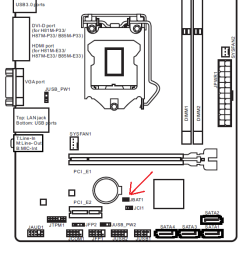
Ground the CMOS via the jumper on the main board.


This is from the manual.
I just used my JUSB_PW2 sleeve to cover it.
I had to remove it before booting of course.
Upon rebooting: "All values have been reset to default values."
I chose F1 to enter setup and it's still requiring password.

Also, I tried doing it again and plus resetting cmos battery.
And still wanting password.
Any other ideas?

Anyone's help on this matter is much appreciated.
It's been kind of hectic thus far.:eek:

Out for tonight. I will check back in the morning for any other suggestions.

Thanks.
 
Last edited:

My Computer My Computer

Computer type
PC/Desktop
Computer Manufacturer/Model Number
Self Built,Custom
OS
Windows 7 Home Premium x64 SP1
CPU
Intel Pentium G3420 @ 3.20GHz, Haswell, 1150 Socket
Motherboard
MSI B85M-P33
Memory
PNY 2x4 8GB
Graphics Card(s)
MSI 1GB R7770 Ghz Edition
Sound Card
HDTV Surround Sound
Monitor(s) Displays
Hitachi HDTV 60" and ACER 15"
Screen Resolution
1920 x 1080/1366 x 768
Hard Drives
Seagate Barracuda 1TB ,7200.14, 64mb Cache
PSU
Master Cooler Extreme Power Plus 500w
Case
iMicro CA-IM1627D ATX Mid Tower Case (Black)
Keyboard
onn
Mouse
Sharkk-SK2242 Wired Optical
Internet Speed
Highspeed Cable 1Gb/s
Antivirus
Microsoft Security Essentials
Browser
Chrome 64 Bit and Opera(Gotta Love Their Speed Dial).
Other Info
My Win10 Account:
http://www.tenforums.com/members/windowst3n.html
--------------------------------------------------------------
Private Firewall
Bought parts from Amazon.com
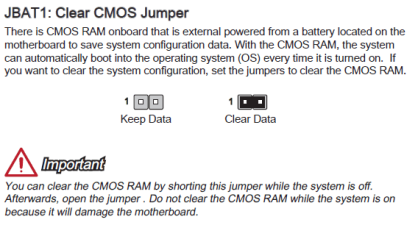
ok I unplugged everything(including cmos battery out and left jbat1 covered) over night.
Same results. Bios still wanting password when trying to enter into bios setup.:confused:
If anyone has a proposed solution for this I will me much obliged. Thanks.
 

My Computer My Computer

Computer type
PC/Desktop
Computer Manufacturer/Model Number
Self Built,Custom
OS
Windows 7 Home Premium x64 SP1
CPU
Intel Pentium G3420 @ 3.20GHz, Haswell, 1150 Socket
Motherboard
MSI B85M-P33
Memory
PNY 2x4 8GB
Graphics Card(s)
MSI 1GB R7770 Ghz Edition
Sound Card
HDTV Surround Sound
Monitor(s) Displays
Hitachi HDTV 60" and ACER 15"
Screen Resolution
1920 x 1080/1366 x 768
Hard Drives
Seagate Barracuda 1TB ,7200.14, 64mb Cache
PSU
Master Cooler Extreme Power Plus 500w
Case
iMicro CA-IM1627D ATX Mid Tower Case (Black)
Keyboard
onn
Mouse
Sharkk-SK2242 Wired Optical
Internet Speed
Highspeed Cable 1Gb/s
Antivirus
Microsoft Security Essentials
Browser
Chrome 64 Bit and Opera(Gotta Love Their Speed Dial).
Other Info
My Win10 Account:
http://www.tenforums.com/members/windowst3n.html
--------------------------------------------------------------
Private Firewall
Bought parts from Amazon.com
If i had this problem i would contact MSI support and ask them why a BIOS reset does not clear the PW on this desktop motherboard.
 

My Computer My Computer

Computer type
PC/Desktop
Computer Manufacturer/Model Number
home built
OS
Multi-Boot W7_Pro_x64 W8.1_Pro_x64 W10_Pro_x64 +Linux_VMs +Chromium_VM
CPU
AMD Athlon II x4 620
Motherboard
Gigabyte GA-MA785G-UD3H
Memory
6GB GSkill DDR2 800
Graphics Card(s)
AMD 4670 GPU + AMD 4200 IGP
Sound Card
on board Realtek ALC889A
Monitor(s) Displays
RCA 40" LCD TV, Insignia 32" LCD TV, HP 15" LCD monitor
Screen Resolution
1680 x 1050
Hard Drives
OCZ Vertex 3 120GB,
Samsung F3 1TB (3),
Several others - WD, Seagate, Hitachi, ...
PSU
Corsair 500 W
Case
Rosewill mid tower
Cooling
CM 90mm rifle
Keyboard
Gyration wireless, Logitech wireless, Dell USB wired
Mouse
Gyration wireless, Logitech wireless, V7 USB wired
Internet Speed
Spectrum - 100Mbps D / 10Mbps U
Antivirus
Avast, MBAM3, EMET, WinPatrol
Browser
Pale Moon, Firefox, IE
Other Info
2 multi-boot PC's
Mainly HTPC/Office/Gen purpose (no gaming).
Trendnet USB KVM.
LG DVD burner/Blue Ray Player.
Tray system for removable SATA backup drives.

Not currently OCd, under-volted.
I use Hybrid sleep, rarely re-boot or shutdown.

Hauppauge HD-PVR, Avermedia PCIe TV Tuner, Hauppauge PCI TV Tuner.
If i had this problem i would contact MSI support and ask them why a BIOS reset does not clear the PW on this desktop motherboard.

I have and they said the normal things we already know of. Remove battery and reset, etc.
 

My Computer My Computer

Computer type
PC/Desktop
Computer Manufacturer/Model Number
Self Built,Custom
OS
Windows 7 Home Premium x64 SP1
CPU
Intel Pentium G3420 @ 3.20GHz, Haswell, 1150 Socket
Motherboard
MSI B85M-P33
Memory
PNY 2x4 8GB
Graphics Card(s)
MSI 1GB R7770 Ghz Edition
Sound Card
HDTV Surround Sound
Monitor(s) Displays
Hitachi HDTV 60" and ACER 15"
Screen Resolution
1920 x 1080/1366 x 768
Hard Drives
Seagate Barracuda 1TB ,7200.14, 64mb Cache
PSU
Master Cooler Extreme Power Plus 500w
Case
iMicro CA-IM1627D ATX Mid Tower Case (Black)
Keyboard
onn
Mouse
Sharkk-SK2242 Wired Optical
Internet Speed
Highspeed Cable 1Gb/s
Antivirus
Microsoft Security Essentials
Browser
Chrome 64 Bit and Opera(Gotta Love Their Speed Dial).
Other Info
My Win10 Account:
http://www.tenforums.com/members/windowst3n.html
--------------------------------------------------------------
Private Firewall
Bought parts from Amazon.com
If the MB is still under warranty would they replace it ?
Did they suggest possibly updating BIOS, if that's possible without knowing the PW ?
I'm not suggesting you do it, just asking if MSI thinks it might fix the problem.
 

My Computer My Computer

Computer type
PC/Desktop
Computer Manufacturer/Model Number
home built
OS
Multi-Boot W7_Pro_x64 W8.1_Pro_x64 W10_Pro_x64 +Linux_VMs +Chromium_VM
CPU
AMD Athlon II x4 620
Motherboard
Gigabyte GA-MA785G-UD3H
Memory
6GB GSkill DDR2 800
Graphics Card(s)
AMD 4670 GPU + AMD 4200 IGP
Sound Card
on board Realtek ALC889A
Monitor(s) Displays
RCA 40" LCD TV, Insignia 32" LCD TV, HP 15" LCD monitor
Screen Resolution
1680 x 1050
Hard Drives
OCZ Vertex 3 120GB,
Samsung F3 1TB (3),
Several others - WD, Seagate, Hitachi, ...
PSU
Corsair 500 W
Case
Rosewill mid tower
Cooling
CM 90mm rifle
Keyboard
Gyration wireless, Logitech wireless, Dell USB wired
Mouse
Gyration wireless, Logitech wireless, V7 USB wired
Internet Speed
Spectrum - 100Mbps D / 10Mbps U
Antivirus
Avast, MBAM3, EMET, WinPatrol
Browser
Pale Moon, Firefox, IE
Other Info
2 multi-boot PC's
Mainly HTPC/Office/Gen purpose (no gaming).
Trendnet USB KVM.
LG DVD burner/Blue Ray Player.
Tray system for removable SATA backup drives.

Not currently OCd, under-volted.
I use Hybrid sleep, rarely re-boot or shutdown.

Hauppauge HD-PVR, Avermedia PCIe TV Tuner, Hauppauge PCI TV Tuner.
If the MB is still under warranty would they replace it ?
Did they suggest possibly updating BIOS, if that's possible without knowing the PW ?
I'm not suggesting you do it, just asking if MSI thinks it might fix the problem.
Thanks for reply.:)
Yes MSI said ship mobo in to them and they would fix the bios problem. Also if need be,
they would replace my motherboard for free. Bios Password is required to Flash it.
But I told them no cause my mobo is fine. Had it a year and half or so with no troubles out of it.
It's just the Bios Password problem.
In the mean time, I'm going to try and guess my password from the normal one's I've used before.
I will mark this as solved if I make the right guess. :)

Furthermore, I just ordered Win7(then I will upgrade to Win10) new disk also and will then be able to find some bios program hopefully
to solve this problem.

Anyone with more suggestions on fixing my bios password problem feel free to help and thanks in advance.:D

Update: I tried unplugging everything and left it this way for over an hour. Thus, and tried even a new battery(computer works) but still asking for password when entering bios. This Bios Password can't be cleared to save me life hehe.:picnic::doh:
I will try programs like this when my new win7 disc arrives:
How to Recover BIOS / CMOS Password Using Free CMOSPwd Utility
Have a great day and thanks again.:)
 
Last edited:

My Computer My Computer

Computer type
PC/Desktop
Computer Manufacturer/Model Number
Self Built,Custom
OS
Windows 7 Home Premium x64 SP1
CPU
Intel Pentium G3420 @ 3.20GHz, Haswell, 1150 Socket
Motherboard
MSI B85M-P33
Memory
PNY 2x4 8GB
Graphics Card(s)
MSI 1GB R7770 Ghz Edition
Sound Card
HDTV Surround Sound
Monitor(s) Displays
Hitachi HDTV 60" and ACER 15"
Screen Resolution
1920 x 1080/1366 x 768
Hard Drives
Seagate Barracuda 1TB ,7200.14, 64mb Cache
PSU
Master Cooler Extreme Power Plus 500w
Case
iMicro CA-IM1627D ATX Mid Tower Case (Black)
Keyboard
onn
Mouse
Sharkk-SK2242 Wired Optical
Internet Speed
Highspeed Cable 1Gb/s
Antivirus
Microsoft Security Essentials
Browser
Chrome 64 Bit and Opera(Gotta Love Their Speed Dial).
Other Info
My Win10 Account:
http://www.tenforums.com/members/windowst3n.html
--------------------------------------------------------------
Private Firewall
Bought parts from Amazon.com
Got my new Win7 Disk in mail today -all is working fine now.
I'm about to install Windows 10 now.
I'm marking this as Solved.
Thanks to all whom gave advise. :D
 

My Computer My Computer

Computer type
PC/Desktop
Computer Manufacturer/Model Number
Self Built,Custom
OS
Windows 7 Home Premium x64 SP1
CPU
Intel Pentium G3420 @ 3.20GHz, Haswell, 1150 Socket
Motherboard
MSI B85M-P33
Memory
PNY 2x4 8GB
Graphics Card(s)
MSI 1GB R7770 Ghz Edition
Sound Card
HDTV Surround Sound
Monitor(s) Displays
Hitachi HDTV 60" and ACER 15"
Screen Resolution
1920 x 1080/1366 x 768
Hard Drives
Seagate Barracuda 1TB ,7200.14, 64mb Cache
PSU
Master Cooler Extreme Power Plus 500w
Case
iMicro CA-IM1627D ATX Mid Tower Case (Black)
Keyboard
onn
Mouse
Sharkk-SK2242 Wired Optical
Internet Speed
Highspeed Cable 1Gb/s
Antivirus
Microsoft Security Essentials
Browser
Chrome 64 Bit and Opera(Gotta Love Their Speed Dial).
Other Info
My Win10 Account:
http://www.tenforums.com/members/windowst3n.html
--------------------------------------------------------------
Private Firewall
Bought parts from Amazon.com
You're welcome and glad to hear you have the issue fixed !

I don't understand why getting a new Win 7 Disk would fix a BIOS password problem :confused:
Can you explain what you did with the new Win 7 Disk to fix the problem ?
 

My Computer My Computer

Computer type
PC/Desktop
Computer Manufacturer/Model Number
home built
OS
Multi-Boot W7_Pro_x64 W8.1_Pro_x64 W10_Pro_x64 +Linux_VMs +Chromium_VM
CPU
AMD Athlon II x4 620
Motherboard
Gigabyte GA-MA785G-UD3H
Memory
6GB GSkill DDR2 800
Graphics Card(s)
AMD 4670 GPU + AMD 4200 IGP
Sound Card
on board Realtek ALC889A
Monitor(s) Displays
RCA 40" LCD TV, Insignia 32" LCD TV, HP 15" LCD monitor
Screen Resolution
1680 x 1050
Hard Drives
OCZ Vertex 3 120GB,
Samsung F3 1TB (3),
Several others - WD, Seagate, Hitachi, ...
PSU
Corsair 500 W
Case
Rosewill mid tower
Cooling
CM 90mm rifle
Keyboard
Gyration wireless, Logitech wireless, Dell USB wired
Mouse
Gyration wireless, Logitech wireless, V7 USB wired
Internet Speed
Spectrum - 100Mbps D / 10Mbps U
Antivirus
Avast, MBAM3, EMET, WinPatrol
Browser
Pale Moon, Firefox, IE
Other Info
2 multi-boot PC's
Mainly HTPC/Office/Gen purpose (no gaming).
Trendnet USB KVM.
LG DVD burner/Blue Ray Player.
Tray system for removable SATA backup drives.

Not currently OCd, under-volted.
I use Hybrid sleep, rarely re-boot or shutdown.

Hauppauge HD-PVR, Avermedia PCIe TV Tuner, Hauppauge PCI TV Tuner.
David I'm also at a loss to understand how a clean install fixed the bios password problem.
I'm not really sure why their is a bios password.
Who put the password in the first place?
Does MSI do such a thing on a Retail motherboard? I wouldn't think so.
 

My Computer My Computer

Computer type
PC/Desktop
Computer Manufacturer/Model Number
Home made Desktop
OS
Windows 10 Pro. 64/ version 1709 Windows 7 Pro/64
CPU
Intel i7-6800K @ 4.3
Motherboard
ASUS X-99 Deluxe II
Memory
Corsair Platinum 16 gig @2400
Graphics Card(s)
EVGA GTX 1070 OC
Monitor(s) Displays
Asus 27" LED LCD/VE278Q
Screen Resolution
1920-1080 or 1280-720 HDMI
Hard Drives
INTEL SSD 730-240 Gb Sata 3.0/
PSU
EVGA Platium 1200W
Case
Phanteks Luxe Tempered Glass 8 fans/ one radiator
Cooling
XSPC/ Water Cooled CPU
Keyboard
Das 4 Professional
Mouse
Logitech M705/MX Anywhere 2-S
Internet Speed
100 mbits
Antivirus
Microsoft Security Essentials/ Malwarebytes Premium 3.0/ SAS
Browser
I.E. 11 default/Firefox/ ISP Time Warner Cable/Spectrum
Other Info
LG BluRay Burner/
Sound system-KLipsch-THX/
Icy Dock ssd Hot Swap bays.
I think the answer may be in the second to last line of the O/P's post #9.
Art.
 

My Computer My Computer

Computer type
PC/Desktop
Computer Manufacturer/Model Number
Home built
OS
Win7 sp1 Pro 64bit / XP sp2 Pro (games only)
CPU
Intel Core 2 Duo E8400 @ 3.00GHz
Motherboard
Intel Corporation DP35DP (CPU1)
Memory
8.00 GB Dual-Channel DDR2 @ 400MHz (5-5-5-18)
Graphics Card(s)
1024MB GeForce GTX 560
Sound Card
NVIDIA High Definition Audio
Monitor(s) Displays
SyncMaster (2048x1152@60Hz)
Hard Drives
240GB Sandisc Extreme Pro SSD
244GB Seagate ST3250410AS
488GB Seagate ST500DM002-1BD142
931GB Western Digital WDC WD1003FZEX
PSU
Corsair 720
Case
ATX
Keyboard
HID Keyboard Device Logitech
Mouse
HID-compliant mouse Microsoft
Other Info
TSSTcorp CDDVDW SH-S223L

HL-DT-ST BD-RE BH12LS35
Back
Top