Which is the best drivers update program for windows 7(Dell Inspiron)?

AddRAM,
Not to hijack the thread...
...but which file or files should download/install for these unknown devices on a Dell Latitude E6430?
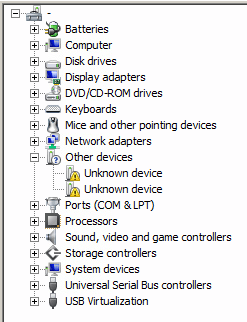
dell.png
 

My Computer My Computer

At a glance

W7 Pro SP1 64biti78GBIntel HD Graphics
Computer type
Laptop
Computer Manufacturer/Model Number
Employer provided Dell Latitude
OS
W7 Pro SP1 64bit
CPU
i7
Memory
8GB
Graphics Card(s)
Intel HD Graphics
Hard Drives
crappy SSD
Antivirus
Employer mandated Symantec Endpoint Protection
Browser
Pale Moon 64bit, IE11 64bit & Chrome 64bit
Can you open them, see there properties ?
 

My Computer My Computer

At a glance

windows 7 professional 64 bitCPU Genuine Intel (R) CPU [email protected]RAM 3 GBToshiba MK2555 GSX ATA
Computer type
Laptop
Computer Manufacturer/Model Number
HP Presario CQ70
OS
windows 7 professional 64 bit
CPU
CPU Genuine Intel (R) CPU [email protected]
Motherboard
APCI x 64 - based PC
Memory
RAM 3 GB
Graphics Card(s)
Toshiba MK2555 GSX ATA
Sound Card
Conexant High Def Smart Audio 221,
Monitor(s) Displays
monitor Generic PnP.
Screen Resolution
?
Hard Drives
HDAUDIO Soft Data Fax Modern with smart CP
PSU
?
Keyboard
Standard PS/2 keyboard
Mouse
PS/2 Compatible mouse
Antivirus
Hyjackthis and Superanti spyware, Mamb Ccleaner
Browser
Google Chrome

My Computer My Computer

At a glance

W7 Pro SP1 64biti78GBIntel HD Graphics
Computer type
Laptop
Computer Manufacturer/Model Number
Employer provided Dell Latitude
OS
W7 Pro SP1 64bit
CPU
i7
Memory
8GB
Graphics Card(s)
Intel HD Graphics
Hard Drives
crappy SSD
Antivirus
Employer mandated Symantec Endpoint Protection
Browser
Pale Moon 64bit, IE11 64bit & Chrome 64bit
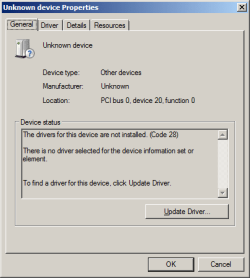
Well, is there no name, are there no details so that you KNOW what it is and not an Unknown Device
 

My Computer My Computer

At a glance

windows 7 professional 64 bitCPU Genuine Intel (R) CPU [email protected]RAM 3 GBToshiba MK2555 GSX ATA
Computer type
Laptop
Computer Manufacturer/Model Number
HP Presario CQ70
OS
windows 7 professional 64 bit
CPU
CPU Genuine Intel (R) CPU [email protected]
Motherboard
APCI x 64 - based PC
Memory
RAM 3 GB
Graphics Card(s)
Toshiba MK2555 GSX ATA
Sound Card
Conexant High Def Smart Audio 221,
Monitor(s) Displays
monitor Generic PnP.
Screen Resolution
?
Hard Drives
HDAUDIO Soft Data Fax Modern with smart CP
PSU
?
Keyboard
Standard PS/2 keyboard
Mouse
PS/2 Compatible mouse
Antivirus
Hyjackthis and Superanti spyware, Mamb Ccleaner
Browser
Google Chrome
Dear UsernameIssues,I've just tried the Dell Update application and it showed me only one driver update(chipset driver,but the version is from 2013!I believe that mostly of the dell drivers have versions newer than 2013,especially the one for the graphics card!So please tell me for another program.
 

My Computer My Computer

At a glance

Windows 7 Ultimate x64 bit
Computer type
Laptop
Computer Manufacturer/Model Number
Dell
OS
Windows 7 Ultimate x64 bit
Well, is there no name, are there no details so that you KNOW what it is and not an Unknown Device
Here is what I see:

dp1.png

dp2.png

dp3.png

dp4.png

http://www.sevenforums.com/member.php?u=189524

Dear UsernameIssues,I've just tried the Dell Update application and it showed me only one driver update(chipset driver,but the version is from 2013!I believe that mostly of the dell drivers have versions newer than 2013,especially the one for the graphics card!So please tell me for another program.
I suggest that you stick with the software that Dell offers. Dell often modifies stuff. The latest software from other sources might not be the best to install on a Dell computer. For example, if I use newer VideoDrivers from other sources, the display dimming/brightness feature does not work as it should.

The Dell update tool is the only one that I can suggest for Dell computers. If you don't want to use that tool, then maybe others know of other tools.http://www.sevenforums.com/member.php?u=189524
 

My Computer My Computer

At a glance

W7 Pro SP1 64biti78GBIntel HD Graphics
Computer type
Laptop
Computer Manufacturer/Model Number
Employer provided Dell Latitude
OS
W7 Pro SP1 64bit
CPU
i7
Memory
8GB
Graphics Card(s)
Intel HD Graphics
Hard Drives
crappy SSD
Antivirus
Employer mandated Symantec Endpoint Protection
Browser
Pale Moon 64bit, IE11 64bit & Chrome 64bit
inspiron7 I have a simple answer that should help you.

If for what ever reason you don't want to follow the instructions and suggestions by the good folks helping you on how to get you needed drivers and still want to use a 3rd part driver program. By all means do so.
It's your computer and you will have to pay the price of not following the suggestion you have been given over and over and over.

You will not get a suggestion for a 3rd party Driver Tool. No sense on keep asking for one. Their is no good fix all driver tools.

I tried one of those Driver Programs one time just to see how it worked. Dumb move on my part.
Never again. Took most of the day to clean up the mess it made.

These good folks are trying to help you and your computer, not hurt you and your computer.

Layback Bear
 

My Computer My Computer

At a glance

Windows 10 Pro. 64/ version 1709 Windows 7 Pr...Intel i7-6800K @ 4.3Corsair Platinum 16 gig @2400EVGA GTX 1070 OC
Computer type
PC/Desktop
Computer Manufacturer/Model Number
Home made Desktop
OS
Windows 10 Pro. 64/ version 1709 Windows 7 Pro/64
CPU
Intel i7-6800K @ 4.3
Motherboard
ASUS X-99 Deluxe II
Memory
Corsair Platinum 16 gig @2400
Graphics Card(s)
EVGA GTX 1070 OC
Monitor(s) Displays
Asus 27" LED LCD/VE278Q
Screen Resolution
1920-1080 or 1280-720 HDMI
Hard Drives
INTEL SSD 730-240 Gb Sata 3.0/
PSU
EVGA Platium 1200W
Case
Phanteks Luxe Tempered Glass 8 fans/ one radiator
Cooling
XSPC/ Water Cooled CPU
Keyboard
Das 4 Professional
Mouse
Logitech M705/MX Anywhere 2-S
Internet Speed
100 mbits
Antivirus
Microsoft Security Essentials/ Malwarebytes Premium 3.0/ SAS
Browser
I.E. 11 default/Firefox/ ISP Time Warner Cable/Spectrum
Other Info
LG BluRay Burner/
Sound system-KLipsch-THX/
Icy Dock ssd Hot Swap bays.
Dear Layback Bear,
I trust you and I trust all of the members of this forum,I'm just a little bit scared of those BSOD's which I got on every boot and were caused by an old extensible host usb 3.0 driver,which after updating with some of those programs(I don't remember its name but I know that it was free),I haven't got a BSOD anymore.
p.s These days the Dell SupportAssist utility after scanning the laptop's hardware and software,found a problem with the webcam!I'm 100 % sure that my webcam works perfectly and the reason for the problem is a faulty and old driver!
That's all!
Best regards!
 

My Computer My Computer

At a glance

Windows 7 Ultimate x64 bit
Computer type
Laptop
Computer Manufacturer/Model Number
Dell
OS
Windows 7 Ultimate x64 bit

My Computer My Computer

At a glance

Windows 10 Pro x64Intel Core i7 6700KGSkill TridentZ RGB 16GB 3600 16-16-16-36EVGA GTX 980 Ti SC x2
Computer type
PC/Desktop
Computer Manufacturer/Model Number
Skylake Special #666
OS
Windows 10 Pro x64
CPU
Intel Core i7 6700K
Motherboard
Asus Sabertooth Z170 Mark 1
Memory
GSkill TridentZ RGB 16GB 3600 16-16-16-36
Graphics Card(s)
EVGA GTX 980 Ti SC x2
Sound Card
Realtek High Definition
Monitor(s) Displays
AOC G2460PG
Screen Resolution
1920 x 1080 144Hz
Hard Drives
Samsung 860 Pro 256GB, Seagate Barracuda 4TB x2
PSU
EVGA 1000 P2, EVGA White Custom Braided Cables
Case
Corsair Vengeance C70 Gunmetal Black
Cooling
Corsair H100i v2, Corsair ML120 x2, Thermal Grizzly Kryonaut
Keyboard
Logitech G910 Orion Spectrum
Mouse
Logitech G700s
Internet Speed
Verizon Fios Quantum Gateway 75/75
Antivirus
Windows Defender, Malwarebytes Free 3.8.3
Browser
Chrome
Other Info
Corsair SP120 x4, LG Blu-ray Drive, Durabrand HT-395 100 Watt Dolby Digital Amp, Corsair H2100 Wireless 7.1 Headset
Why are you so hell bent on finding different drivers ?

Just use the ones found at Dell, and stop being so stubborn :banghead:

How do you know there are newer drivers, where is this driver program getting them from ? Outer space ??

What operating system originally come with this laptop ?

Certainly not Windows 7 Ultimate. Did you buy Windows 7 Ultimate ?

There should be no reason this won`t work.

Product Support | Dell US


Good Luck people
 

My Computer My Computer

At a glance

Windows 10 Pro x64Intel Core i7 6700KGSkill TridentZ RGB 16GB 3600 16-16-16-36EVGA GTX 980 Ti SC x2
Computer type
PC/Desktop
Computer Manufacturer/Model Number
Skylake Special #666
OS
Windows 10 Pro x64
CPU
Intel Core i7 6700K
Motherboard
Asus Sabertooth Z170 Mark 1
Memory
GSkill TridentZ RGB 16GB 3600 16-16-16-36
Graphics Card(s)
EVGA GTX 980 Ti SC x2
Sound Card
Realtek High Definition
Monitor(s) Displays
AOC G2460PG
Screen Resolution
1920 x 1080 144Hz
Hard Drives
Samsung 860 Pro 256GB, Seagate Barracuda 4TB x2
PSU
EVGA 1000 P2, EVGA White Custom Braided Cables
Case
Corsair Vengeance C70 Gunmetal Black
Cooling
Corsair H100i v2, Corsair ML120 x2, Thermal Grizzly Kryonaut
Keyboard
Logitech G910 Orion Spectrum
Mouse
Logitech G700s
Internet Speed
Verizon Fios Quantum Gateway 75/75
Antivirus
Windows Defender, Malwarebytes Free 3.8.3
Browser
Chrome
Other Info
Corsair SP120 x4, LG Blu-ray Drive, Durabrand HT-395 100 Watt Dolby Digital Amp, Corsair H2100 Wireless 7.1 Headset
Dear AddRAM,I am sure that all of the members of this forum including you,who replied to my thread know best,so I would like to thank you for the time you devoted to me and I do apologize if I made you nervous!
But if someone has a new information for that kind of program,I would be grateful if he informs me!
So I would not like to close this thead!
Best regards!
 
Last edited:

My Computer My Computer

At a glance

Windows 7 Ultimate x64 bit
Computer type
Laptop
Computer Manufacturer/Model Number
Dell
OS
Windows 7 Ultimate x64 bit
Well, is there no name, are there no details so that you KNOW what it is and not an Unknown Device
Here is what I see:

View attachment 379348

View attachment 379349

View attachment 379350

View attachment 379351

http://www.sevenforums.com/member.php?u=189524

Dear UsernameIssues,I've just tried the Dell Update application and it showed me only one driver update(chipset driver,but the version is from 2013!I believe that mostly of the dell drivers have versions newer than 2013,especially the one for the graphics card!So please tell me for another program.
I suggest that you stick with the software that Dell offers. Dell often modifies stuff. The latest software from other sources might not be the best to install on a Dell computer. For example, if I use newer VideoDrivers from other sources, the display dimming/brightness feature does not work as it should.

The Dell update tool is the only one that I can suggest for Dell computers. If you don't want to use that tool, then maybe others know of other tools.http://www.sevenforums.com/member.php?u=189524

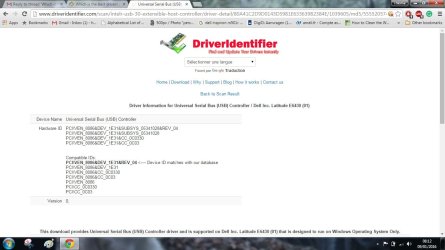
The first one is an USB Controller USB controller Untitled.jpg
 

My Computer My Computer

At a glance

windows 7 professional 64 bitCPU Genuine Intel (R) CPU [email protected]RAM 3 GBToshiba MK2555 GSX ATA
Computer type
Laptop
Computer Manufacturer/Model Number
HP Presario CQ70
OS
windows 7 professional 64 bit
CPU
CPU Genuine Intel (R) CPU [email protected]
Motherboard
APCI x 64 - based PC
Memory
RAM 3 GB
Graphics Card(s)
Toshiba MK2555 GSX ATA
Sound Card
Conexant High Def Smart Audio 221,
Monitor(s) Displays
monitor Generic PnP.
Screen Resolution
?
Hard Drives
HDAUDIO Soft Data Fax Modern with smart CP
PSU
?
Keyboard
Standard PS/2 keyboard
Mouse
PS/2 Compatible mouse
Antivirus
Hyjackthis and Superanti spyware, Mamb Ccleaner
Browser
Google Chrome
Dear AddRAM,I am sure that all of the members of this forum including you,who replied to my thread know best,so I would like to thank you for the time you devoted to me and I do apologize if I made you nervous!
But if someone has a new information for that kind of program,I would be grateful if he informs me!
So I would not like to close this thead!
Best regards!
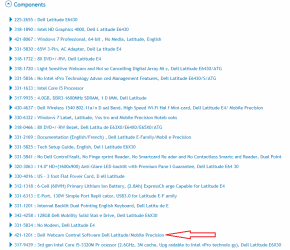
As has already been said (several times) you are best-off going to the Dell Download site and putting-in your model and Service Tag and then reviewing the suggestions there. Note you need to download/haverunning the Dell System Detect util for best results. As for "other" or non-Dell drivers you should consider those only if you have disassembled the laptop and installed some non-Dell hardware.

You're worried about the Webcam driver, but "it works perfectly" so stop worrying.

IMO there is no "update program" on Planet Earth that is better for you than the above, including even the Intel Driver Update Utility, because (as has also been said) Dell does sometimes tweak drivers to their unique hardware designs. And note that an "old" driver (chipset from 2013?) ain't necessarily bad if it matches your particular hardware.

BTW I have a Dell Latitude laptop and have learned the above lessons in the past several months. My laptop ain't broke, so I'm no longer stressed to try to fix it! My only caveat to the above is: if Dell Command | Update (I do hate their confusing util-naming conventions!) is compatible/offered for your PC then you might try using that (v2.1.1 is latest) assuming you find it offered to you from the Dell download site, for your specific Service Tag. It scans your PC and compares to the Dell Update Site and offers/keeps track of drivers and can even be set to do so automatically, though I do not set it that way, preferring to wait and check only if I have a new problem with the computer.
 

My Computer My Computer

At a glance

Windows 7 Professional 64bitIntel Core i7 4600M @ 2.90GHz16.0GB Dual-Channel DDR3 @ 797MHz (11-11-11-28)Intel HD Graphics 4600 (Dell) 2048MB ATI AMD ...
Computer type
Laptop
Computer Manufacturer/Model Number
Dell Latitude E6540 Laptop
OS
Windows 7 Professional 64bit
CPU
Intel Core i7 4600M @ 2.90GHz
Motherboard
Dell Inc. 0CYT5F (SOCKET 0)
Memory
16.0GB Dual-Channel DDR3 @ 797MHz (11-11-11-28)
Graphics Card(s)
Intel HD Graphics 4600 (Dell) 2048MB ATI AMD Radeon HD 8790M
Sound Card
Realtek High Definition Audio
Monitor(s) Displays
HP ZR30w (2560x1600@60Hz)
Hard Drives
256GB LITEONIT LMT-256M6M-41 mm SATA (SSD)
1TB Samsung SSD 860 EVO mSATA SATA (SSD)
2TB USB 3.0 USB Device
115GB SanDisk Ultra Fit USB
Other Info
Multiple Dell E-Port Plus II Port Replicator/Docking Stations 0Y72NH USB 3.0 + 130W AC Adapters
You didn`t make me nervous, didn`t mean to come across like that :)

Just trying to tell you, as everyone else has, that driver update programs are no good and not needed, but you insist, so you may as well try google.

People at this forum do not use driver update programs.
 

My Computer My Computer

At a glance

Windows 10 Pro x64Intel Core i7 6700KGSkill TridentZ RGB 16GB 3600 16-16-16-36EVGA GTX 980 Ti SC x2
Computer type
PC/Desktop
Computer Manufacturer/Model Number
Skylake Special #666
OS
Windows 10 Pro x64
CPU
Intel Core i7 6700K
Motherboard
Asus Sabertooth Z170 Mark 1
Memory
GSkill TridentZ RGB 16GB 3600 16-16-16-36
Graphics Card(s)
EVGA GTX 980 Ti SC x2
Sound Card
Realtek High Definition
Monitor(s) Displays
AOC G2460PG
Screen Resolution
1920 x 1080 144Hz
Hard Drives
Samsung 860 Pro 256GB, Seagate Barracuda 4TB x2
PSU
EVGA 1000 P2, EVGA White Custom Braided Cables
Case
Corsair Vengeance C70 Gunmetal Black
Cooling
Corsair H100i v2, Corsair ML120 x2, Thermal Grizzly Kryonaut
Keyboard
Logitech G910 Orion Spectrum
Mouse
Logitech G700s
Internet Speed
Verizon Fios Quantum Gateway 75/75
Antivirus
Windows Defender, Malwarebytes Free 3.8.3
Browser
Chrome
Other Info
Corsair SP120 x4, LG Blu-ray Drive, Durabrand HT-395 100 Watt Dolby Digital Amp, Corsair H2100 Wireless 7.1 Headset

My Computer My Computer

At a glance

W7 Pro SP1 64biti78GBIntel HD Graphics
Computer type
Laptop
Computer Manufacturer/Model Number
Employer provided Dell Latitude
OS
W7 Pro SP1 64bit
CPU
i7
Memory
8GB
Graphics Card(s)
Intel HD Graphics
Hard Drives
crappy SSD
Antivirus
Employer mandated Symantec Endpoint Protection
Browser
Pale Moon 64bit, IE11 64bit & Chrome 64bit
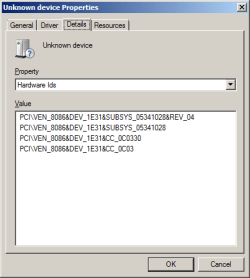
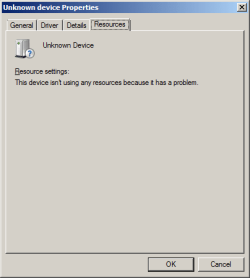
Well, is there no name, are there no details so that you KNOW what it is and not an Unknown Device
Here is what I see:

View attachment 379348

View attachment 379349

View attachment 379350

View attachment 379351

~~~
The first one is an USB Controller View attachment 379392
Thanks for looking that up.

In post #3, the OP mentioned having a problem with USB 3 software. I too had problems with that software; so, I uninstalled it. Doing so created one of the two unknown items that I showed in my screenshot of device manager. The laptop functions fine without that software - so, I have no need to install it again.

I was using the "unknowns" in my screenshot to learn how AddRAM finds what to download/install without using one of Dell's update tools. I'm just curious what the steps are.
 

My Computer My Computer

At a glance

W7 Pro SP1 64biti78GBIntel HD Graphics
Computer type
Laptop
Computer Manufacturer/Model Number
Employer provided Dell Latitude
OS
W7 Pro SP1 64bit
CPU
i7
Memory
8GB
Graphics Card(s)
Intel HD Graphics
Hard Drives
crappy SSD
Antivirus
Employer mandated Symantec Endpoint Protection
Browser
Pale Moon 64bit, IE11 64bit & Chrome 64bit
Dell didn`t include a driver CD ?

I`m shocked :eek:
 

My Computer My Computer

At a glance

Windows 10 Pro x64Intel Core i7 6700KGSkill TridentZ RGB 16GB 3600 16-16-16-36EVGA GTX 980 Ti SC x2
Computer type
PC/Desktop
Computer Manufacturer/Model Number
Skylake Special #666
OS
Windows 10 Pro x64
CPU
Intel Core i7 6700K
Motherboard
Asus Sabertooth Z170 Mark 1
Memory
GSkill TridentZ RGB 16GB 3600 16-16-16-36
Graphics Card(s)
EVGA GTX 980 Ti SC x2
Sound Card
Realtek High Definition
Monitor(s) Displays
AOC G2460PG
Screen Resolution
1920 x 1080 144Hz
Hard Drives
Samsung 860 Pro 256GB, Seagate Barracuda 4TB x2
PSU
EVGA 1000 P2, EVGA White Custom Braided Cables
Case
Corsair Vengeance C70 Gunmetal Black
Cooling
Corsair H100i v2, Corsair ML120 x2, Thermal Grizzly Kryonaut
Keyboard
Logitech G910 Orion Spectrum
Mouse
Logitech G700s
Internet Speed
Verizon Fios Quantum Gateway 75/75
Antivirus
Windows Defender, Malwarebytes Free 3.8.3
Browser
Chrome
Other Info
Corsair SP120 x4, LG Blu-ray Drive, Durabrand HT-395 100 Watt Dolby Digital Amp, Corsair H2100 Wireless 7.1 Headset
Dell didn't give me a driver CD me too!
 

My Computer My Computer

At a glance

Windows 7 Ultimate x64 bit
Computer type
Laptop
Computer Manufacturer/Model Number
Dell
OS
Windows 7 Ultimate x64 bit
Dell didn't give me a driver CD me too!
Neither did I get any disk with my Latitude, and a year later I'm still trying to figure-out the complex Dell website.

It seems to me that if you "go around" Dell Command | Update and then install drivers "by hand" the DCU program doesn't help to iron-out any wrinkles if you installed wrong drivers.

Still, if you go to your model's Downloads page and enter your Service Tag, it does at least present those drivers Dell has officially tested for use with that model. Again, this is assuming you haven't made hardware changes to the laptop.
 

My Computer My Computer

At a glance

Windows 7 Professional 64bitIntel Core i7 4600M @ 2.90GHz16.0GB Dual-Channel DDR3 @ 797MHz (11-11-11-28)Intel HD Graphics 4600 (Dell) 2048MB ATI AMD ...
Computer type
Laptop
Computer Manufacturer/Model Number
Dell Latitude E6540 Laptop
OS
Windows 7 Professional 64bit
CPU
Intel Core i7 4600M @ 2.90GHz
Motherboard
Dell Inc. 0CYT5F (SOCKET 0)
Memory
16.0GB Dual-Channel DDR3 @ 797MHz (11-11-11-28)
Graphics Card(s)
Intel HD Graphics 4600 (Dell) 2048MB ATI AMD Radeon HD 8790M
Sound Card
Realtek High Definition Audio
Monitor(s) Displays
HP ZR30w (2560x1600@60Hz)
Hard Drives
256GB LITEONIT LMT-256M6M-41 mm SATA (SSD)
1TB Samsung SSD 860 EVO mSATA SATA (SSD)
2TB USB 3.0 USB Device
115GB SanDisk Ultra Fit USB
Other Info
Multiple Dell E-Port Plus II Port Replicator/Docking Stations 0Y72NH USB 3.0 + 130W AC Adapters
Back
Top