Solved Which memory stick is "faster", and are the two "compatible"?

dsperber

New member
Guru
Gold Member
VIP
Local time
2:07 PM
Messages
2,752
Location
Marina Del Rey, CA
Which memory stick is "faster", and are the two "compatible"?

I recently received a brand new Lenovo Thinkpad P70, ordered with the basic 8GB of memory. I also ordered an additional 8GB of memory from Crucial, purportedly compatible with the P70. The P70 has four SODIMM memory sockets and can support up to 4x16GB=64GB total non-ECC DDR4 2133MHz storage with its 6th-generation i7-6700HQ/6820HQ Intel CPUs. It also can come with Xeon E3-1505M processor, which can handle 4x16GB=64GB of ECC memory.

I installed the 8GB of Crucial memory into one of the three remaining available memory sockets, not seeing anything in the documentation that it must be in a specific "paired" slot for best performance. In other words, the Lenovo memory came installed in what was slot #3 (located under the keyboard), with what I'm guessing is actually "paired" adjacent slot #1 next to it (also located under the keyboard). But I installed my additional 8GB of memory in what turned out to be slot #4, in an instantly accessible location on the underside of the laptop gotten to immediately after removing the bottom cover. The second adjacent "paired" (to #4) slot on the underside I assume would have been slot #2.

So I ended up with 8GB of memory in each of [what I believe to be] UN-PAIRED slots #3 and #4.

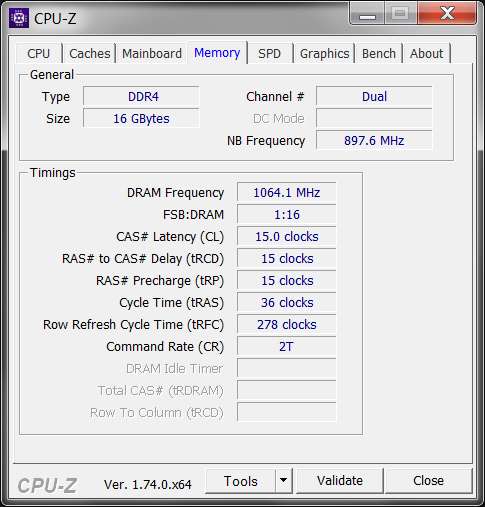
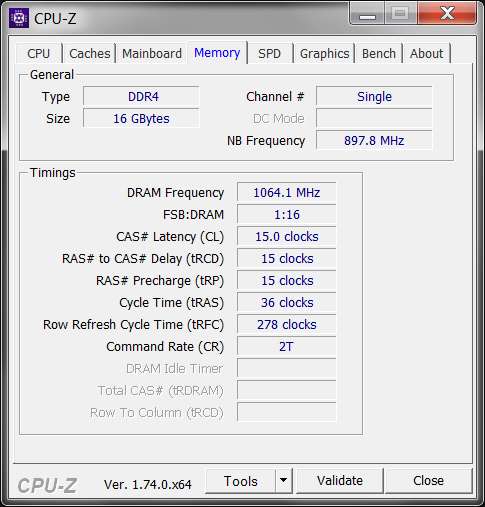
The net result is performance behavior shown by CPUZ as "single" rather than "dual" as I would have expected and certainly wanted to obtain.

The question is why? Is the issue that I didn't add the second 8GB to the corresponding "paired" slot #1 (which would have required me to remove the keyboard to get to), to go along with the Lenovo 8GB of memory which was delivered in slot #3? Or is the issue that the two memory sticks have slightly different timings and therefore the BIOS rejected them for "dual" operation?

To eliminate any possibility that is the different timing values for the two memory sticks which is at fault, I've gone ahead and ordered a second 8GB of Crucial memory, to match the first 8GB I'd already bought. I plan to replace the 8GB of Samsung memory with this second 8GB of Crucial memory, thus having an identical matched pair.

I also plan to move the Crucial memory currently installed in slot #4 (underside of laptop) to instead by in slot #1 (under the keyboard). And I will replace the Samsung memory currently installed in slot #3 (also underside of laptop) with the second stick of Crucial memory. This will then produce a matched pair of memory sticks with identical timing numbers, in adjacent "paired" slots #1 and #3.

Surely that should produce "dual".

But in the meantime I really do have questions as I've posed above.

(a) Is it the choice of the wrong slot that I installed the second 8GB into which is causing the "single" behavior?

(b) Or is it the somewhat different timing values of the two memory cards which is the culprit?

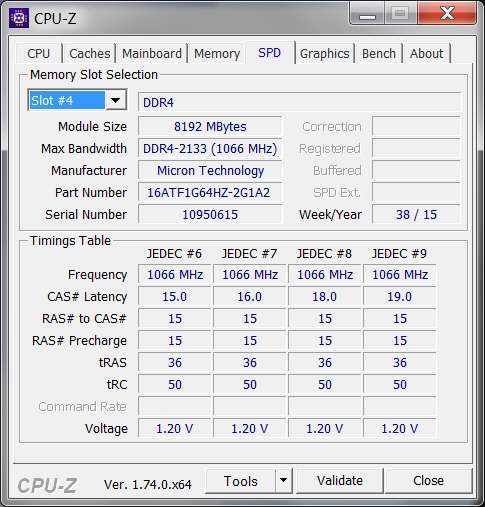
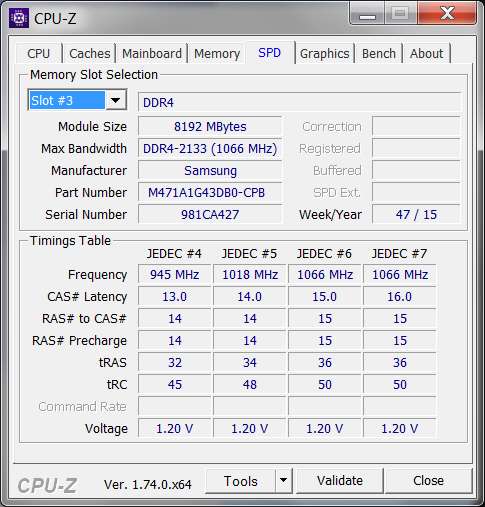
(c) And for my own knowledge, which of the cards (Samsung or Crucial) is the "faster"? Do lower timing numbers imply faster performance, in which case it seems the Samsung memory is faster? Or do higher timing numbers imply faster performance, in which case it seems the Crucial memory is faster?


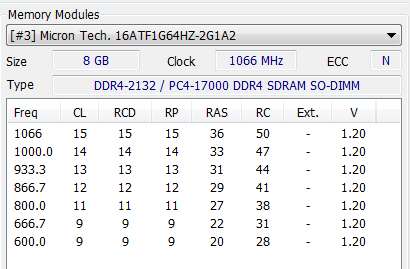
Here are the outputs from CPUZ. Notice 16GB total, but running "single". And then there are the timing values for the Samsung (slot #3) and Crucial (slot #4) memory cards.
vTYaYa.jpg


du4BNm.jpg


TYTKNR.jpg
 

My Computer My Computer

At a glance

Windows 7 Pro x64 (1), Win7 Pro X64 (2)i5-3350p 3.1Ghz/6MB-cache (1); E8400 3.0Ghz/6...8GB PC3-12800 DDR3 (1); 4GB PC3-10600 DDR3 (2)ATI HD7750 (1), (see TV cards); ATI R7 250 (2)
Computer type
PC/Desktop
Computer Manufacturer/Model Number
Home-built, two systems (1) and (2)
OS
Windows 7 Pro x64 (1), Win7 Pro X64 (2)
CPU
i5-3350p 3.1Ghz/6MB-cache (1); E8400 3.0Ghz/6MB-cache (2)
Motherboard
ASUS P8Z77-V Pro (1); ASUS P5Q3 (2)
Memory
8GB PC3-12800 DDR3 (1); 4GB PC3-10600 DDR3 (2)
Graphics Card(s)
ATI HD7750 (1), (see TV cards); ATI R7 250 (2)
Sound Card
Realtek ALC892 HD Audio (1); Realtek ALC1200 HD Audio (2)
Monitor(s) Displays
Eizo HD2441W LCD, Eizo S2433W (1); Eizo 24" S2433W (2)
Screen Resolution
1920x1200, 1920x1200 (1); 1920x1200 (2)
Hard Drives
(1) 1TB SATA-II (7200RPM), 2x2TB SATA-III (7200RPM), 250GB SATA-III (10000RPM) for OS; 2x2TB external USB 3.0

(2) 320GB SATA-II (7200RPM), 750GB SATA-II (7200RPM), 150GB SATA-II (10000RPM) for OS; 2TB external USB 3.0
PSU
Nesteq ECS-6001 600W (1); Nesteq ECS-5001 500W (2)
Case
Acousti-Case 360 (1) and (2)
Cooling
Noctua NH-U12P SE2 for CPU, 2x120mm case fans (1) and (2)
Keyboard
IBM PS/2 (1) and (2)
Mouse
Logitech MX Revolution wireless (1); Microsoft wired (2)
Internet Speed
100mbps down / 10mbps up
Antivirus
Microsoft Security Essentials; Malwarebyte Anti-Malware Pro
Browser
Firefox
Other Info
Ceton InfiniTV 4-tuner cablecard-enabled TV card as well as Hauppauge HVR-2250 OTA/ATSC 2-tuner TV card in (1), running under Win7 WMC
But in the meantime I really do have questions as I've posed above.

(a) Is it the choice of the wrong slot that I installed the second 8GB into which is causing the "single" behavior?
I'm not 100% sure on this one, but yes, it may be the slot choice that is affecting the dual/single state. It also may require two matched pairs to run in dual channel. The third module might be placing it into single channel mode. If you added a fourth module, it might work as dual channel. That's how my motherboard works anyway. Not sure about Lenovo laptops.

(b) Or is it the somewhat different timing values of the two memory cards which is the culprit?
The timing values have no influence on where the sticks run in single or dual channel.

(c) And for my own knowledge, which of the cards (Samsung or Crucial) is the "faster"? Do lower timing numbers imply faster performance, in which case it seems the Samsung memory is faster? Or do higher timing numbers imply faster performance, in which case it seems the Crucial memory is faster?
Lower numbers imply faster performance, especially the first number of the set (The CAS latency). Your Samsungs are CAS 16, and your Crucials are CAS 19. Since all of the memory must be clocked at the same timing, you should set the CAS timing for the Samsung RAM to 19. IN a desktop PC, you could probably tweak the timings a little and get away with 18 or even 17, maybe. But in answer to your question, the Samsung memory is faster, though I don't understand why the Crucial memory has four JEDEC memory profiles, all at 1066 with different timings. I suspect that is a misread from CPU-Z.
 

My Computer My Computer

At a glance

Win 7 Pro x64/Win 10 Pro x64 dual bootAMD FX 8350 Vishera @ 420016 GB Mushkin Blackline DDR3-2400 @ 1866 (9-1...XFX Radeon R9 280 Double D Black Edition
Computer type
PC/Desktop
Computer Manufacturer/Model Number
Mellon Labs (custom build)
OS
Win 7 Pro x64/Win 10 Pro x64 dual boot
CPU
AMD FX 8350 Vishera @ 4200
Motherboard
ASUS M5A97 R2.0
Memory
16 GB Mushkin Blackline DDR3-2400 @ 1866 (9-10-10-10-31)
Graphics Card(s)
XFX Radeon R9 280 Double D Black Edition
Sound Card
Realtek HD Audio on MB. Sounds great.
Monitor(s) Displays
Acer 24", Acer 22"
Screen Resolution
3840 x 1080
Hard Drives
1 x Mushkin Chronos 120 GB SSD (Win 10)
1 x Samsung 850 EVO 250 GB SSD (Win 7)
1 x WD 1TB SATA Blue
1 x WD 1TB SATA Green
PSU
Corsair TX-750
Case
CoolerMaster HAF 912+
Cooling
Coolermaster Seidon 240M Liquid AIO. 6 case fans
Keyboard
Logitech G710+
Mouse
Logitech G500s
Internet Speed
Much better since I got fiber, but still way overpriced.
Antivirus
MSE, Malware Bytes for scanning
Browser
Firefox
Other Info
Corsair VOID USB headphones.

A Mellon Labs X-1 - LCD Smartie driven system status display.

Brought to you by the letter E
Ok. I've done some searching to answer my own question. There is a good detailed explanation of these numbers in this article on RAM timings.

And certainly with mostly similar memory sticks (as these are, in that they are both 1.20v and they are both DDR4-2133mhz) the larger the numbers the slower the memory. So it would appear that the Crucial memory is slightly slower than the Samsung memory.

Here are the relevant definitions from that article:
The operations that these numbers indicate are the following: CL-tRCD-tRP-tRAS-CMD. To understand them, bear in mind that the memory is internally organized as a matrix, where the data are stored at the intersection of the lines and columns.

  • CL: CAS Latency. The time it takes between a command having been sent to the memory and when it begins to reply to it. It is the time it takes between the processor asking for some data from the memory and then returning it.
  • tRCD: RAS to CAS Delay. The time it takes between the activation of the line (RAS) and the column (CAS) where the data are stored in the matrix.
  • tRP: RAS Precharge. The time it takes between disabling the access to a line of data and the beginning of the access to another line of data.
  • tRAS: Active to Precharge Delay. How long the memory has to wait until the next access to the memory can be initiated.
  • CMD: Command Rate. The time it takes between the memory chip having been activated and when the first command may be sent to the memory. Sometimes this value is not announced. It usually is T1 (1 clock cycle) or T2 (2 clock cycles).
As far as why my two memory sticks are behaving in "single" mode, I'm still of the opinion it is the result of using non-adjacent slots (#1 and #3, or #2 and #4) rather than the slight timing differences. Certainly seems like the more plausible explanation.

Again, there is a good discussion of single-channel vs. dual-channel in this thread on another forum. The essence of the discussion there is that dual channel is faster, can be up to 10-15% on Intel. Single channel runs the DRAM as the single 64bit device that it is. In dual channel mode the memory controller sees all the DRAM as a single 128bit device and runs it accordingly.

There is no mention in the discussion about use of "paired slots" being required for "dual", so either it just wasn't brought up or perhaps may no longer be critical with modern BIOS and motherboard architecture. I don't know.


A second discussion on TomsHardware has another perspective on "single" vs."dual".

With a dual channel system, one channel is always available for loading, refreshing, and housekeeping while the other channel is being read. The channels are read alternately, one being read into the buss while the other is being prepared for use, or being written to. What exactly happens is the pervue of the memory controller and it's firmware.

With single channel operation there is always something "waiting in line" while the memory is busy. This limits what operations can be performed, and those generating a "write" instruction have to wait their turn. This makes the buffer (onboard memory) more critical and works it harder.


And another point raised in the TomsHardware article pertains to motherboard/CPU dual-channel memory controller vs. quad-channel memory controller. This article describes the architecture of the i7-6700HQ CPU in my P70.

The Intel Core i7-6700HQ is a quad-core processor based on the Skylake architecture, that has been launched in September 2015. In addition to four CPU cores with Hyper-Threading clocked at 2.6 - 3.5 GHz (4 cores: max. 3.1 GHz, 2 cores: max. 3.3 GHz), the chip also integrates an HD Graphics 530 GPU and a dual-channel DDR4-2133/DDR3L-1600 memory controller. The CPU is manufactured using a 14 nm process with FinFET transistors.

So given that the memory controller is dual-channel, the TomsHardware article says if you had a motherboard/CPU with a quad-channel memory controller, you'd want 4x4GB=16GB RAM instead of 2x8GB=16GB. But if you have dual-channel like most modern-ish PCs, 2x8GB makes more sense.


Bottom line based on what I've found:

(1) with a dual-channel memory controller and given any target total memory size, if that can be accomplished with a 2x memory kit that will be superior to reaching that same memory size using a 4x memory setup.

(2) dual-mode is typically 10-20% faster than single-mode.

(3) for any given memory type (e.g. all DDR4-2133), larger timing values in CPUZ means slower, lower values means faster.
 

My Computer My Computer

At a glance

Windows 7 Pro x64 (1), Win7 Pro X64 (2)i5-3350p 3.1Ghz/6MB-cache (1); E8400 3.0Ghz/6...8GB PC3-12800 DDR3 (1); 4GB PC3-10600 DDR3 (2)ATI HD7750 (1), (see TV cards); ATI R7 250 (2)
Computer type
PC/Desktop
Computer Manufacturer/Model Number
Home-built, two systems (1) and (2)
OS
Windows 7 Pro x64 (1), Win7 Pro X64 (2)
CPU
i5-3350p 3.1Ghz/6MB-cache (1); E8400 3.0Ghz/6MB-cache (2)
Motherboard
ASUS P8Z77-V Pro (1); ASUS P5Q3 (2)
Memory
8GB PC3-12800 DDR3 (1); 4GB PC3-10600 DDR3 (2)
Graphics Card(s)
ATI HD7750 (1), (see TV cards); ATI R7 250 (2)
Sound Card
Realtek ALC892 HD Audio (1); Realtek ALC1200 HD Audio (2)
Monitor(s) Displays
Eizo HD2441W LCD, Eizo S2433W (1); Eizo 24" S2433W (2)
Screen Resolution
1920x1200, 1920x1200 (1); 1920x1200 (2)
Hard Drives
(1) 1TB SATA-II (7200RPM), 2x2TB SATA-III (7200RPM), 250GB SATA-III (10000RPM) for OS; 2x2TB external USB 3.0

(2) 320GB SATA-II (7200RPM), 750GB SATA-II (7200RPM), 150GB SATA-II (10000RPM) for OS; 2TB external USB 3.0
PSU
Nesteq ECS-6001 600W (1); Nesteq ECS-5001 500W (2)
Case
Acousti-Case 360 (1) and (2)
Cooling
Noctua NH-U12P SE2 for CPU, 2x120mm case fans (1) and (2)
Keyboard
IBM PS/2 (1) and (2)
Mouse
Logitech MX Revolution wireless (1); Microsoft wired (2)
Internet Speed
100mbps down / 10mbps up
Antivirus
Microsoft Security Essentials; Malwarebyte Anti-Malware Pro
Browser
Firefox
Other Info
Ceton InfiniTV 4-tuner cablecard-enabled TV card as well as Hauppauge HVR-2250 OTA/ATSC 2-tuner TV card in (1), running under Win7 WMC
Your motherboard has control of Single, Dual, Quad channel according what slots you install the ram.

For dual channel you will need 2, 4, or 6 slots filled. Install in pares or you will end up with single channel.
When ever their is a question on what slots to use confer with the motherboard manual.
I don't know what arrangement Lenovo motherboards require.
I personally don't mix and match ram and don't recommend it. Sometimes it works but most of the time it causes problems.
Matched ram are tested together to assure they play well with each other.

Always install ram as per the motherboard manual to get the best results.
 

My Computer My Computer

At a glance

Windows 10 Pro. 64/ version 1709 Windows 7 Pr...Intel i7-6800K @ 4.3Corsair Platinum 16 gig @2400EVGA GTX 1070 OC
Computer type
PC/Desktop
Computer Manufacturer/Model Number
Home made Desktop
OS
Windows 10 Pro. 64/ version 1709 Windows 7 Pro/64
CPU
Intel i7-6800K @ 4.3
Motherboard
ASUS X-99 Deluxe II
Memory
Corsair Platinum 16 gig @2400
Graphics Card(s)
EVGA GTX 1070 OC
Monitor(s) Displays
Asus 27" LED LCD/VE278Q
Screen Resolution
1920-1080 or 1280-720 HDMI
Hard Drives
INTEL SSD 730-240 Gb Sata 3.0/
PSU
EVGA Platium 1200W
Case
Phanteks Luxe Tempered Glass 8 fans/ one radiator
Cooling
XSPC/ Water Cooled CPU
Keyboard
Das 4 Professional
Mouse
Logitech M705/MX Anywhere 2-S
Internet Speed
100 mbits
Antivirus
Microsoft Security Essentials/ Malwarebytes Premium 3.0/ SAS
Browser
I.E. 11 default/Firefox/ ISP Time Warner Cable/Spectrum
Other Info
LG BluRay Burner/
Sound system-KLipsch-THX/
Icy Dock ssd Hot Swap bays.
But in the meantime I really do have questions as I've posed above.

(a) Is it the choice of the wrong slot that I installed the second 8GB into which is causing the "single" behavior?
I'm not 100% sure on this one, but yes, it may be the slot choice that is affecting the dual/single state. It also may require two matched pairs to run in dual channel. The third module might be placing it into single channel mode. If you added a fourth module, it might work as dual channel. That's how my motherboard works anyway. Not sure about Lenovo laptops.
I may not have expressed what I did clearly enough.

I don't have three memory sticks installed. I only installed a single additional 8GB of Crucial memory in slot #4, to go along with the 8GB factory Samsung memory in slot #3. That is what is giving me 16GB running in "single" mode, most likely due to the choice of slots but possibly due to the slight mismatch in timings.

I've used Samsung+Crucial memory in a number of Lenovo M93p desktop machines and it works perfectly in "dual" mode, but in those machine the Crucial memory provided IDENTICAL timing values. Of course in those machines I also used the "paired DIMM slots" as well.


Now, when the second piece of Crucial memory arrives next week I will REPLACE the Samsung memory in slot #3 with the newly arrived Crucial memory. And I will also MOVE the currently installed first piece of Crucial memory (currently in slot #4) into the "matched pair" location slot #1 adjacent to slot #3 (both under the keyboard).

I am not looking for 3x8GB=24GB. I am simply wanting 2x8GB=16GB but running in "dual mode". And I'm sure I will fijnally achieve that using (a) "paired slots" #1 and #3, and (b) identical matching Crucial memory, albeit they are slightly slower than the Samsung memory provided by Lenovo (at what was about triple the price of memory from Crucial if I'd just ordered all 16GB from Lenovo for the P70 in the first place).

This is the first time I've had any problem with Crucial memory not being an EXACT TIMING VALUES MATCH for the existing installed memory in the computer I was upgrading. I will note this in my feedback to them.
 

My Computer My Computer

At a glance

Windows 7 Pro x64 (1), Win7 Pro X64 (2)i5-3350p 3.1Ghz/6MB-cache (1); E8400 3.0Ghz/6...8GB PC3-12800 DDR3 (1); 4GB PC3-10600 DDR3 (2)ATI HD7750 (1), (see TV cards); ATI R7 250 (2)
Computer type
PC/Desktop
Computer Manufacturer/Model Number
Home-built, two systems (1) and (2)
OS
Windows 7 Pro x64 (1), Win7 Pro X64 (2)
CPU
i5-3350p 3.1Ghz/6MB-cache (1); E8400 3.0Ghz/6MB-cache (2)
Motherboard
ASUS P8Z77-V Pro (1); ASUS P5Q3 (2)
Memory
8GB PC3-12800 DDR3 (1); 4GB PC3-10600 DDR3 (2)
Graphics Card(s)
ATI HD7750 (1), (see TV cards); ATI R7 250 (2)
Sound Card
Realtek ALC892 HD Audio (1); Realtek ALC1200 HD Audio (2)
Monitor(s) Displays
Eizo HD2441W LCD, Eizo S2433W (1); Eizo 24" S2433W (2)
Screen Resolution
1920x1200, 1920x1200 (1); 1920x1200 (2)
Hard Drives
(1) 1TB SATA-II (7200RPM), 2x2TB SATA-III (7200RPM), 250GB SATA-III (10000RPM) for OS; 2x2TB external USB 3.0

(2) 320GB SATA-II (7200RPM), 750GB SATA-II (7200RPM), 150GB SATA-II (10000RPM) for OS; 2TB external USB 3.0
PSU
Nesteq ECS-6001 600W (1); Nesteq ECS-5001 500W (2)
Case
Acousti-Case 360 (1) and (2)
Cooling
Noctua NH-U12P SE2 for CPU, 2x120mm case fans (1) and (2)
Keyboard
IBM PS/2 (1) and (2)
Mouse
Logitech MX Revolution wireless (1); Microsoft wired (2)
Internet Speed
100mbps down / 10mbps up
Antivirus
Microsoft Security Essentials; Malwarebyte Anti-Malware Pro
Browser
Firefox
Other Info
Ceton InfiniTV 4-tuner cablecard-enabled TV card as well as Hauppauge HVR-2250 OTA/ATSC 2-tuner TV card in (1), running under Win7 WMC
Your motherboard has control of Single, Dual, Quad channel according what slots you install the ram.
Per that article describing the architecture of the i7-6700HQ CPU, the memory controller is a dual-channel memory controller.


For dual channel you will need 2, 4, or 6 slots filled.
Correct. The P70 provides 4 slots for memory.


Install in pairs or you will end up with single channel.
Correct. But are all slots the same, so that any 2 can be used as a "pair"? Or are specific slots "paired" and must be used that way, e.g. #1 and #3, or #2 and #4?

If you don't use a specific pair of 2 slots for the 2 sticks of memory (in other words like my #3 and #4) do you lose "dual" capability and force "single"? That's what happens in a desktop motherboard I believe, so why not in a laptop motherboard as well?


When ever their is a question on what slots to use confer with the motherboard manual.
Well really that is the reason I'm having this problem in the first place! The Lenovo manual itself SAYS NOTHING about any considerations regarding memory expansion.

It not only doesn't even show the slot numbers in a graphic or diagram, but it doesn't provide any instructions on which particular 2 or 4 slots to use if you want to use 2 or 4 sticks of memory. It also does not distinguish any conceptual difference or specific "pairing" consideration regarding any of the four memory slots grouped into the two separate "memory slot bays" of two-each bay.

So I'm just proceeding based on experience here, and also from the empirical results from what I've done and from what CPUZ says.


[I personally don't mix and match ram and don't recommend it. Matched ram are tested together to assure they play well with each other.[/quote]Absolutely, 100%. For a new home-built machine I'd obviously by 2x or 4x kits of memory, so as to obtain matched identical pairs.

But in all the years I've been buying memory from Crucial, this is the very first time that the memory they sent me (chosen specifically to be compatible with a specific vendor/make/model) was not ABSOLUTELY IDENTICAL IN ALL TIMING VALUES with the vendor-supplied memory that came in that machine. I will phone Crucial again to discuss this, but I suspect it is due to the brand newness of the P-series Thinkpads that they got this wrong.

Yes, their DDR4-2133 memory "works", but apparently they didn't know Lenovo was going to be using Samsung memory that was slightly faster. Perhaps Lenovo changed design, or Samsung provided slightly faster memory cards, or who knows what.

However this happened it did. I bought the memory that the Crucial site said was the correct upgrade for the P70, and it turns out to be a mismatch with the Lenovo-provided Samsung memory. First time for everything I guess, but it was unexpected and forced me to now buy a second matching 8GB stick from Crucial in order to end up with two identical matching memory sticks.

Always install ram as per the motherboard manual to get the best results.
Sure... if only there had been relevant information in the documentation.
 

My Computer My Computer

At a glance

Windows 7 Pro x64 (1), Win7 Pro X64 (2)i5-3350p 3.1Ghz/6MB-cache (1); E8400 3.0Ghz/6...8GB PC3-12800 DDR3 (1); 4GB PC3-10600 DDR3 (2)ATI HD7750 (1), (see TV cards); ATI R7 250 (2)
Computer type
PC/Desktop
Computer Manufacturer/Model Number
Home-built, two systems (1) and (2)
OS
Windows 7 Pro x64 (1), Win7 Pro X64 (2)
CPU
i5-3350p 3.1Ghz/6MB-cache (1); E8400 3.0Ghz/6MB-cache (2)
Motherboard
ASUS P8Z77-V Pro (1); ASUS P5Q3 (2)
Memory
8GB PC3-12800 DDR3 (1); 4GB PC3-10600 DDR3 (2)
Graphics Card(s)
ATI HD7750 (1), (see TV cards); ATI R7 250 (2)
Sound Card
Realtek ALC892 HD Audio (1); Realtek ALC1200 HD Audio (2)
Monitor(s) Displays
Eizo HD2441W LCD, Eizo S2433W (1); Eizo 24" S2433W (2)
Screen Resolution
1920x1200, 1920x1200 (1); 1920x1200 (2)
Hard Drives
(1) 1TB SATA-II (7200RPM), 2x2TB SATA-III (7200RPM), 250GB SATA-III (10000RPM) for OS; 2x2TB external USB 3.0

(2) 320GB SATA-II (7200RPM), 750GB SATA-II (7200RPM), 150GB SATA-II (10000RPM) for OS; 2TB external USB 3.0
PSU
Nesteq ECS-6001 600W (1); Nesteq ECS-5001 500W (2)
Case
Acousti-Case 360 (1) and (2)
Cooling
Noctua NH-U12P SE2 for CPU, 2x120mm case fans (1) and (2)
Keyboard
IBM PS/2 (1) and (2)
Mouse
Logitech MX Revolution wireless (1); Microsoft wired (2)
Internet Speed
100mbps down / 10mbps up
Antivirus
Microsoft Security Essentials; Malwarebyte Anti-Malware Pro
Browser
Firefox
Other Info
Ceton InfiniTV 4-tuner cablecard-enabled TV card as well as Hauppauge HVR-2250 OTA/ATSC 2-tuner TV card in (1), running under Win7 WMC
I have no idea what is in a Lenovo motherboard manual. Have no reason to know.
My systems have motherboard manuals.
If the manual tell you nothing does the motherboard have 2 colored ram slots.
If so most likely two of the same color will be the proper slots to use for two sticks of ram.

Just try two of the same color and see what happens. It won't hurt anything.
If those two colored slots don't work try the other color.

If that don't work just fill all slots. That has got to work if all the ram module and motherboard slots are working properly.

I would not own a computer without a proper motherboard manual. But that's just me.

What I find here you only have two ram slotsand two m.2 slots.


Page 74 & 78
http://www.ok1.de/thinkpad/HMM/p70_hmm_en_sp40j65113.pdf

Am I looking at the same computer?
 

My Computer My Computer

At a glance

Windows 10 Pro. 64/ version 1709 Windows 7 Pr...Intel i7-6800K @ 4.3Corsair Platinum 16 gig @2400EVGA GTX 1070 OC
Computer type
PC/Desktop
Computer Manufacturer/Model Number
Home made Desktop
OS
Windows 10 Pro. 64/ version 1709 Windows 7 Pro/64
CPU
Intel i7-6800K @ 4.3
Motherboard
ASUS X-99 Deluxe II
Memory
Corsair Platinum 16 gig @2400
Graphics Card(s)
EVGA GTX 1070 OC
Monitor(s) Displays
Asus 27" LED LCD/VE278Q
Screen Resolution
1920-1080 or 1280-720 HDMI
Hard Drives
INTEL SSD 730-240 Gb Sata 3.0/
PSU
EVGA Platium 1200W
Case
Phanteks Luxe Tempered Glass 8 fans/ one radiator
Cooling
XSPC/ Water Cooled CPU
Keyboard
Das 4 Professional
Mouse
Logitech M705/MX Anywhere 2-S
Internet Speed
100 mbits
Antivirus
Microsoft Security Essentials/ Malwarebytes Premium 3.0/ SAS
Browser
I.E. 11 default/Firefox/ ISP Time Warner Cable/Spectrum
Other Info
LG BluRay Burner/
Sound system-KLipsch-THX/
Icy Dock ssd Hot Swap bays.
Without re reading this long thread, yes you need slots 1 and 3 filled or 2 and 4 filled, that is if the laptop works the same as a desktop motherboard.

It`s no problem at all to remove the keyboard, should be no more then 2 screws.
 

My Computer My Computer

At a glance

Windows 10 Pro x64Intel Core i7 6700KGSkill TridentZ RGB 16GB 3600 16-16-16-36EVGA GTX 980 Ti SC x2
Computer type
PC/Desktop
Computer Manufacturer/Model Number
Skylake Special #666
OS
Windows 10 Pro x64
CPU
Intel Core i7 6700K
Motherboard
Asus Sabertooth Z170 Mark 1
Memory
GSkill TridentZ RGB 16GB 3600 16-16-16-36
Graphics Card(s)
EVGA GTX 980 Ti SC x2
Sound Card
Realtek High Definition
Monitor(s) Displays
AOC G2460PG
Screen Resolution
1920 x 1080 144Hz
Hard Drives
Samsung 860 Pro 256GB, Seagate Barracuda 4TB x2
PSU
EVGA 1000 P2, EVGA White Custom Braided Cables
Case
Corsair Vengeance C70 Gunmetal Black
Cooling
Corsair H100i v2, Corsair ML120 x2, Thermal Grizzly Kryonaut
Keyboard
Logitech G910 Orion Spectrum
Mouse
Logitech G700s
Internet Speed
Verizon Fios Quantum Gateway 75/75
Antivirus
Windows Defender, Malwarebytes Free 3.8.3
Browser
Chrome
Other Info
Corsair SP120 x4, LG Blu-ray Drive, Durabrand HT-395 100 Watt Dolby Digital Amp, Corsair H2100 Wireless 7.1 Headset
I may not have expressed what I did clearly enough.

I don't have three memory sticks installed. I only installed a single additional 8GB of Crucial memory in slot #4, to go along with the 8GB factory Samsung memory in slot #3. That is what is giving me 16GB running in "single" mode, most likely due to the choice of slots but possibly due to the slight mismatch in timings.

I've used Samsung+Crucial memory in a number of Lenovo M93p desktop machines and it works perfectly in "dual" mode, but in those machine the Crucial memory provided IDENTICAL timing values. Of course in those machines I also used the "paired DIMM slots" as well.


Now, when the second piece of Crucial memory arrives next week I will REPLACE the Samsung memory in slot #3 with the newly arrived Crucial memory. And I will also MOVE the currently installed first piece of Crucial memory (currently in slot #4) into the "matched pair" location slot #1 adjacent to slot #3 (both under the keyboard).

I am not looking for 3x8GB=24GB. I am simply wanting 2x8GB=16GB but running in "dual mode". And I'm sure I will fijnally achieve that using (a) "paired slots" #1 and #3, and (b) identical matching Crucial memory, albeit they are slightly slower than the Samsung memory provided by Lenovo (at what was about triple the price of memory from Crucial if I'd just ordered all 16GB from Lenovo for the P70 in the first place).

This is the first time I've had any problem with Crucial memory not being an EXACT TIMING VALUES MATCH for the existing installed memory in the computer I was upgrading. I will note this in my feedback to them.
I see what you mean now. Sorry, I thought there were three sticks involved.
 

My Computer My Computer

At a glance

Win 7 Pro x64/Win 10 Pro x64 dual bootAMD FX 8350 Vishera @ 420016 GB Mushkin Blackline DDR3-2400 @ 1866 (9-1...XFX Radeon R9 280 Double D Black Edition
Computer type
PC/Desktop
Computer Manufacturer/Model Number
Mellon Labs (custom build)
OS
Win 7 Pro x64/Win 10 Pro x64 dual boot
CPU
AMD FX 8350 Vishera @ 4200
Motherboard
ASUS M5A97 R2.0
Memory
16 GB Mushkin Blackline DDR3-2400 @ 1866 (9-10-10-10-31)
Graphics Card(s)
XFX Radeon R9 280 Double D Black Edition
Sound Card
Realtek HD Audio on MB. Sounds great.
Monitor(s) Displays
Acer 24", Acer 22"
Screen Resolution
3840 x 1080
Hard Drives
1 x Mushkin Chronos 120 GB SSD (Win 10)
1 x Samsung 850 EVO 250 GB SSD (Win 7)
1 x WD 1TB SATA Blue
1 x WD 1TB SATA Green
PSU
Corsair TX-750
Case
CoolerMaster HAF 912+
Cooling
Coolermaster Seidon 240M Liquid AIO. 6 case fans
Keyboard
Logitech G710+
Mouse
Logitech G500s
Internet Speed
Much better since I got fiber, but still way overpriced.
Antivirus
MSE, Malware Bytes for scanning
Browser
Firefox
Other Info
Corsair VOID USB headphones.

A Mellon Labs X-1 - LCD Smartie driven system status display.

Brought to you by the letter E
Both sticks look like they`re running at 2133, so that`s fine.

The Latency #s on the Micron stick are higher, but the timing #s are the same. So no worries.

Once you get the other Crucial stick you`ll be golden. :)

Personally, I would`ve gotten another Samsung stick, but the difference in numbers is nothing to worry about.
 

My Computer My Computer

At a glance

Windows 10 Pro x64Intel Core i7 6700KGSkill TridentZ RGB 16GB 3600 16-16-16-36EVGA GTX 980 Ti SC x2
Computer type
PC/Desktop
Computer Manufacturer/Model Number
Skylake Special #666
OS
Windows 10 Pro x64
CPU
Intel Core i7 6700K
Motherboard
Asus Sabertooth Z170 Mark 1
Memory
GSkill TridentZ RGB 16GB 3600 16-16-16-36
Graphics Card(s)
EVGA GTX 980 Ti SC x2
Sound Card
Realtek High Definition
Monitor(s) Displays
AOC G2460PG
Screen Resolution
1920 x 1080 144Hz
Hard Drives
Samsung 860 Pro 256GB, Seagate Barracuda 4TB x2
PSU
EVGA 1000 P2, EVGA White Custom Braided Cables
Case
Corsair Vengeance C70 Gunmetal Black
Cooling
Corsair H100i v2, Corsair ML120 x2, Thermal Grizzly Kryonaut
Keyboard
Logitech G910 Orion Spectrum
Mouse
Logitech G700s
Internet Speed
Verizon Fios Quantum Gateway 75/75
Antivirus
Windows Defender, Malwarebytes Free 3.8.3
Browser
Chrome
Other Info
Corsair SP120 x4, LG Blu-ray Drive, Durabrand HT-395 100 Watt Dolby Digital Amp, Corsair H2100 Wireless 7.1 Headset
I have no idea what is in a Lenovo motherboard manual. Have no reason to know.
My systems have motherboard manuals.
This isn't a motherboard that I bought... it's a laptop.

Sure, the various motherboards I've bought myself over the years for the several home-built machines I've constructed came with a very detailed manual. And in particular, the documentation regarding memory is typically quite extensive. but motherboard documentation is a different kettle of fish, intended for a system builder and it needs to provide very explicit details about lots of things. In contrast, a laptop user guide is generally intended for a different category of user.

I agree with you insofar as motherboard documentation. But we're not discussing a motherboard here.


If the manual tell you nothing does the motherboard have 2 colored ram slots.
If so most likely two of the same color will be the proper slots to use for two sticks of ram.

Just try two of the same color and see what happens. It won't hurt anything.
If those two colored slots don't work try the other color.

If that don't work just fill all slots. That has got to work if all the ram module and motherboard slots are working properly.
You're talking about a motherboard here. This isn't how a laptop interior looks.


What I find here you only have two ram slotsand two m.2 slots.

Page 74 & 78
http://www.ok1.de/thinkpad/HMM/p70_hmm_en_sp40j65113.pdf

Am I looking at the same computer?
Yes, that's the hardware maintenance manual for the P70. But you're misinterpreting what you've pointed to. There are two RAM "bays", not two RAM "slots". And each "bay" has two "slots", thus producing a total of four memory "slots".

Page 74 describes one of the two memory bays, in particular this is the one on the underside of the machine accessed simply by removing the bottom cover. This bay has TWO SLOTS... which I've empirically discovered to be #2 and #4.

Page 78 describes the second of the two memory bays, in particular this is the one under the keyboard which must be removed (with three screws) in order to access it. This bay also has TWO SLOTS... which I've empirically discovered to be #1 and #3.

So, two memory bays, each of which has two SODIMM sockets. Total of four memory sockets available.

The M.2 bay is completely separate, and is described starting on page 72. This bay has two PCIe sockets, supporting either one or two PCIe M.2 SSD/NVMe devices (configured either individually or as RAID). This thread is not concerned with the M.2 bay.


Anyway, once I get the second Crucial memory card I will do the requisite "corrective surgery" as I've previously described. Once I've got these identical matching two cards in "paired sockets" #1 and #3 (under the keyboard) I'm sure I will get "dual".
 

My Computer My Computer

At a glance

Windows 7 Pro x64 (1), Win7 Pro X64 (2)i5-3350p 3.1Ghz/6MB-cache (1); E8400 3.0Ghz/6...8GB PC3-12800 DDR3 (1); 4GB PC3-10600 DDR3 (2)ATI HD7750 (1), (see TV cards); ATI R7 250 (2)
Computer type
PC/Desktop
Computer Manufacturer/Model Number
Home-built, two systems (1) and (2)
OS
Windows 7 Pro x64 (1), Win7 Pro X64 (2)
CPU
i5-3350p 3.1Ghz/6MB-cache (1); E8400 3.0Ghz/6MB-cache (2)
Motherboard
ASUS P8Z77-V Pro (1); ASUS P5Q3 (2)
Memory
8GB PC3-12800 DDR3 (1); 4GB PC3-10600 DDR3 (2)
Graphics Card(s)
ATI HD7750 (1), (see TV cards); ATI R7 250 (2)
Sound Card
Realtek ALC892 HD Audio (1); Realtek ALC1200 HD Audio (2)
Monitor(s) Displays
Eizo HD2441W LCD, Eizo S2433W (1); Eizo 24" S2433W (2)
Screen Resolution
1920x1200, 1920x1200 (1); 1920x1200 (2)
Hard Drives
(1) 1TB SATA-II (7200RPM), 2x2TB SATA-III (7200RPM), 250GB SATA-III (10000RPM) for OS; 2x2TB external USB 3.0

(2) 320GB SATA-II (7200RPM), 750GB SATA-II (7200RPM), 150GB SATA-II (10000RPM) for OS; 2TB external USB 3.0
PSU
Nesteq ECS-6001 600W (1); Nesteq ECS-5001 500W (2)
Case
Acousti-Case 360 (1) and (2)
Cooling
Noctua NH-U12P SE2 for CPU, 2x120mm case fans (1) and (2)
Keyboard
IBM PS/2 (1) and (2)
Mouse
Logitech MX Revolution wireless (1); Microsoft wired (2)
Internet Speed
100mbps down / 10mbps up
Antivirus
Microsoft Security Essentials; Malwarebyte Anti-Malware Pro
Browser
Firefox
Other Info
Ceton InfiniTV 4-tuner cablecard-enabled TV card as well as Hauppauge HVR-2250 OTA/ATSC 2-tuner TV card in (1), running under Win7 WMC
Yep, laptops are a different breed, but if 2 and 4 are on the bottom I would think that would put you in dual channel mode, but you have the manual, so you know best.
 

My Computer My Computer

At a glance

Windows 10 Pro x64Intel Core i7 6700KGSkill TridentZ RGB 16GB 3600 16-16-16-36EVGA GTX 980 Ti SC x2
Computer type
PC/Desktop
Computer Manufacturer/Model Number
Skylake Special #666
OS
Windows 10 Pro x64
CPU
Intel Core i7 6700K
Motherboard
Asus Sabertooth Z170 Mark 1
Memory
GSkill TridentZ RGB 16GB 3600 16-16-16-36
Graphics Card(s)
EVGA GTX 980 Ti SC x2
Sound Card
Realtek High Definition
Monitor(s) Displays
AOC G2460PG
Screen Resolution
1920 x 1080 144Hz
Hard Drives
Samsung 860 Pro 256GB, Seagate Barracuda 4TB x2
PSU
EVGA 1000 P2, EVGA White Custom Braided Cables
Case
Corsair Vengeance C70 Gunmetal Black
Cooling
Corsair H100i v2, Corsair ML120 x2, Thermal Grizzly Kryonaut
Keyboard
Logitech G910 Orion Spectrum
Mouse
Logitech G700s
Internet Speed
Verizon Fios Quantum Gateway 75/75
Antivirus
Windows Defender, Malwarebytes Free 3.8.3
Browser
Chrome
Other Info
Corsair SP120 x4, LG Blu-ray Drive, Durabrand HT-395 100 Watt Dolby Digital Amp, Corsair H2100 Wireless 7.1 Headset
Personally, I would've gotten another Samsung stick, but the difference in numbers is nothing to worry about.
In retrospect we would never make mistakes.

Lenovo has priced hardware upgrades for this new thinkpad P50/P70 product line very strangely. They wanted $120 for their additional 8GB, instead of the $45 Crucial asks. That's the only reason why I opted not to get all 16GB from Lenovo, as I assumed the Crucial memory would be identical.

Since I've never purchased Crucial memory to upgrade other Lenovo machines (e.g. M93p desktop) that didn't EXACTLY match the Lenovo-provided Samsung memory timings in those machines, I had no reason to suspect anything different in this case of the P70. I suspect Crucial would also be surprised to see that their memory isn't an exact match for the Samsung memory.

Anyway, once both 8GB memory cards are from Crucial and identical and installed in slots #1 and #3, this case will be closed.
 

My Computer My Computer

At a glance

Windows 7 Pro x64 (1), Win7 Pro X64 (2)i5-3350p 3.1Ghz/6MB-cache (1); E8400 3.0Ghz/6...8GB PC3-12800 DDR3 (1); 4GB PC3-10600 DDR3 (2)ATI HD7750 (1), (see TV cards); ATI R7 250 (2)
Computer type
PC/Desktop
Computer Manufacturer/Model Number
Home-built, two systems (1) and (2)
OS
Windows 7 Pro x64 (1), Win7 Pro X64 (2)
CPU
i5-3350p 3.1Ghz/6MB-cache (1); E8400 3.0Ghz/6MB-cache (2)
Motherboard
ASUS P8Z77-V Pro (1); ASUS P5Q3 (2)
Memory
8GB PC3-12800 DDR3 (1); 4GB PC3-10600 DDR3 (2)
Graphics Card(s)
ATI HD7750 (1), (see TV cards); ATI R7 250 (2)
Sound Card
Realtek ALC892 HD Audio (1); Realtek ALC1200 HD Audio (2)
Monitor(s) Displays
Eizo HD2441W LCD, Eizo S2433W (1); Eizo 24" S2433W (2)
Screen Resolution
1920x1200, 1920x1200 (1); 1920x1200 (2)
Hard Drives
(1) 1TB SATA-II (7200RPM), 2x2TB SATA-III (7200RPM), 250GB SATA-III (10000RPM) for OS; 2x2TB external USB 3.0

(2) 320GB SATA-II (7200RPM), 750GB SATA-II (7200RPM), 150GB SATA-II (10000RPM) for OS; 2TB external USB 3.0
PSU
Nesteq ECS-6001 600W (1); Nesteq ECS-5001 500W (2)
Case
Acousti-Case 360 (1) and (2)
Cooling
Noctua NH-U12P SE2 for CPU, 2x120mm case fans (1) and (2)
Keyboard
IBM PS/2 (1) and (2)
Mouse
Logitech MX Revolution wireless (1); Microsoft wired (2)
Internet Speed
100mbps down / 10mbps up
Antivirus
Microsoft Security Essentials; Malwarebyte Anti-Malware Pro
Browser
Firefox
Other Info
Ceton InfiniTV 4-tuner cablecard-enabled TV card as well as Hauppauge HVR-2250 OTA/ATSC 2-tuner TV card in (1), running under Win7 WMC
Yep, laptops are a different breed, but if 2 and 4 are on the bottom I would think that would put you in dual channel mode, but you have the manual, so you know best.
Once again, the two 8GB memory cards as currently installed are NOT in #2 and #4. Nor are they in #1 and #3. They are in #3 (Samsung) and #4 (Crucial), only because I didn't know there was any special consideration here as the documentation (such as it is) mentioned nothing.

So to avoid bothering with the removal of the keyboard I simply installed the one 8GB of Crucial memory that I'd ordered in the easiest memory bay to access, on the underside of the laptop. I arbitrarily put in one of the two slots there, which turned out to be #4. Since both of these slots were free and available, it was clear to me that the one 8GB of Samsung memory had to be in one of the other two slots under the keyboard, which turned out to be #3. But at the time I didn't realize there might be a consequence of doing what I was doing. Of course had I known there would be a negative consequence (i.e. "single") I would not have done it that way.

I can probably use #2 and #4 (underside of laptop) and get "dual" mode, same as I can use #1 and #3 (under the keyboard). But at the moment the Samsung 8GB is under the keyboard in #3. So regardless of how I fix this, I'm going to have to remove the keyboard to get to that bay which currently holds the 8GB Samsung memory in #3.
 

My Computer My Computer

At a glance

Windows 7 Pro x64 (1), Win7 Pro X64 (2)i5-3350p 3.1Ghz/6MB-cache (1); E8400 3.0Ghz/6...8GB PC3-12800 DDR3 (1); 4GB PC3-10600 DDR3 (2)ATI HD7750 (1), (see TV cards); ATI R7 250 (2)
Computer type
PC/Desktop
Computer Manufacturer/Model Number
Home-built, two systems (1) and (2)
OS
Windows 7 Pro x64 (1), Win7 Pro X64 (2)
CPU
i5-3350p 3.1Ghz/6MB-cache (1); E8400 3.0Ghz/6MB-cache (2)
Motherboard
ASUS P8Z77-V Pro (1); ASUS P5Q3 (2)
Memory
8GB PC3-12800 DDR3 (1); 4GB PC3-10600 DDR3 (2)
Graphics Card(s)
ATI HD7750 (1), (see TV cards); ATI R7 250 (2)
Sound Card
Realtek ALC892 HD Audio (1); Realtek ALC1200 HD Audio (2)
Monitor(s) Displays
Eizo HD2441W LCD, Eizo S2433W (1); Eizo 24" S2433W (2)
Screen Resolution
1920x1200, 1920x1200 (1); 1920x1200 (2)
Hard Drives
(1) 1TB SATA-II (7200RPM), 2x2TB SATA-III (7200RPM), 250GB SATA-III (10000RPM) for OS; 2x2TB external USB 3.0

(2) 320GB SATA-II (7200RPM), 750GB SATA-II (7200RPM), 150GB SATA-II (10000RPM) for OS; 2TB external USB 3.0
PSU
Nesteq ECS-6001 600W (1); Nesteq ECS-5001 500W (2)
Case
Acousti-Case 360 (1) and (2)
Cooling
Noctua NH-U12P SE2 for CPU, 2x120mm case fans (1) and (2)
Keyboard
IBM PS/2 (1) and (2)
Mouse
Logitech MX Revolution wireless (1); Microsoft wired (2)
Internet Speed
100mbps down / 10mbps up
Antivirus
Microsoft Security Essentials; Malwarebyte Anti-Malware Pro
Browser
Firefox
Other Info
Ceton InfiniTV 4-tuner cablecard-enabled TV card as well as Hauppauge HVR-2250 OTA/ATSC 2-tuner TV card in (1), running under Win7 WMC
And when you do remove the keyboard, consider putting both of the new crucial sticks there, that way, if you ever actually decide to add more, you won`t have to remove the keyboard again. But I seriously doubt you`ll ever need more then 16 GB with a laptop.

Just an FYI :)

I understood you have 1 stick under the keyboard and 1 on the bottom. Wherever you put the new Crucials, you`ll be removing the keyboard, it should be no problem :)
 

My Computer My Computer

At a glance

Windows 10 Pro x64Intel Core i7 6700KGSkill TridentZ RGB 16GB 3600 16-16-16-36EVGA GTX 980 Ti SC x2
Computer type
PC/Desktop
Computer Manufacturer/Model Number
Skylake Special #666
OS
Windows 10 Pro x64
CPU
Intel Core i7 6700K
Motherboard
Asus Sabertooth Z170 Mark 1
Memory
GSkill TridentZ RGB 16GB 3600 16-16-16-36
Graphics Card(s)
EVGA GTX 980 Ti SC x2
Sound Card
Realtek High Definition
Monitor(s) Displays
AOC G2460PG
Screen Resolution
1920 x 1080 144Hz
Hard Drives
Samsung 860 Pro 256GB, Seagate Barracuda 4TB x2
PSU
EVGA 1000 P2, EVGA White Custom Braided Cables
Case
Corsair Vengeance C70 Gunmetal Black
Cooling
Corsair H100i v2, Corsair ML120 x2, Thermal Grizzly Kryonaut
Keyboard
Logitech G910 Orion Spectrum
Mouse
Logitech G700s
Internet Speed
Verizon Fios Quantum Gateway 75/75
Antivirus
Windows Defender, Malwarebytes Free 3.8.3
Browser
Chrome
Other Info
Corsair SP120 x4, LG Blu-ray Drive, Durabrand HT-395 100 Watt Dolby Digital Amp, Corsair H2100 Wireless 7.1 Headset
More insight into the specific details of the Samsung vs. Crucial memory, this time from HWINFO:

hBGifU.jpg
24u0BZ.jpg


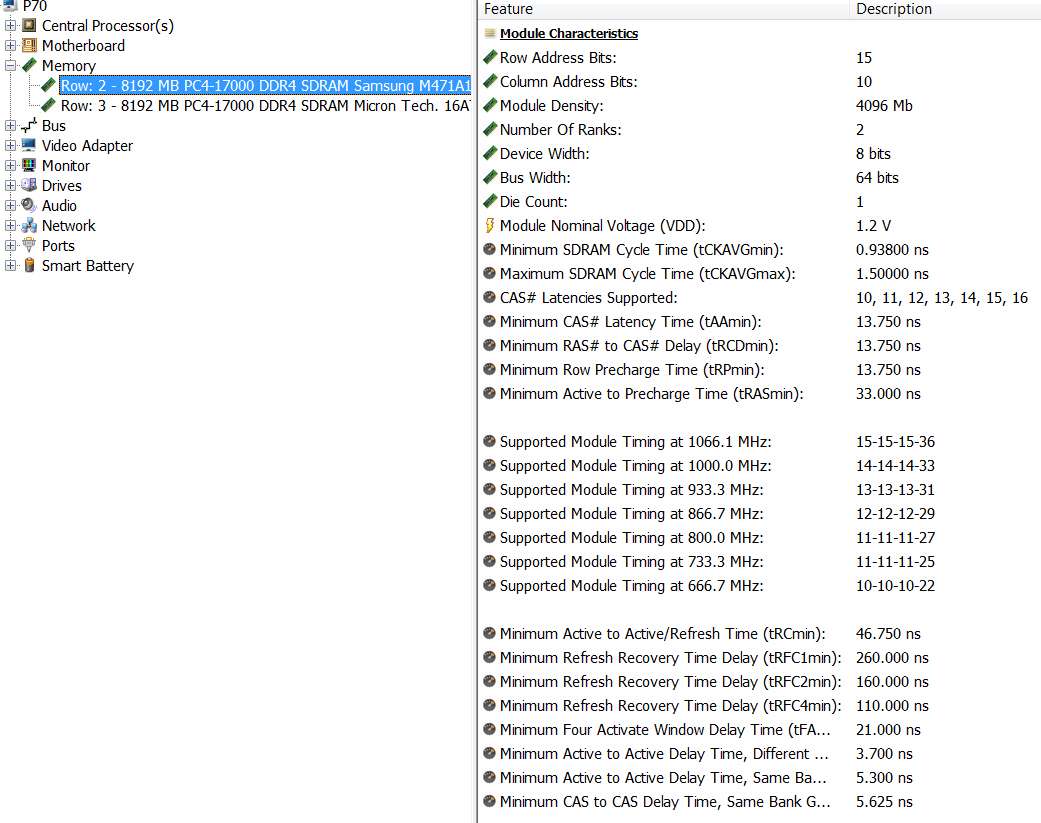
So if I'm reading this correctly, it looks like these ARE essentially identical (certainly at the 1066Mhz that it's running at), except at the lowest frequencies. And even at the lowest frequencies it appears that the Crucial memory is faster, not slower, than the Samsung memory.

Am I not reading this correctly? I wonder why CPUZ reports these numbers very differently for the Crucial memory?


To back up the above charts, here are the memory details from HWINFO.

rdlsnK.jpg


1bc6U8.jpg


Again, does this not appear to back up the characterization that the Crucial memory is the same as, if not better than, the Samsung memory?

So it's even more evident to me that it was the unfortunate choice of the un-paired SODIMM sockets which has caused the memory to operate as "single", not any slight mismatch in memory timings (which now don't appear to be different at all). In fact they do appear to be a match at 1066Mhz.

And if that's true, then tomorrow I will perform surgery on the laptop and move the currently installed Crucial memory from where it is now on the underside of the laptop into the second slot of the other memory bay under the keyboard. My theory is that this is all it should take to get "dual" mode behavior.

If the operation is a success, I will simply return the second 8GB of Crucial memory that I bought last night, since it's not necessary. In fact I now believe the Crucial memory to actually be a "match", so that re-locating it to the proper SODIMM socket will give me "dual" mode operation.

More news tomorrow.
 

My Computer My Computer

At a glance

Windows 7 Pro x64 (1), Win7 Pro X64 (2)i5-3350p 3.1Ghz/6MB-cache (1); E8400 3.0Ghz/6...8GB PC3-12800 DDR3 (1); 4GB PC3-10600 DDR3 (2)ATI HD7750 (1), (see TV cards); ATI R7 250 (2)
Computer type
PC/Desktop
Computer Manufacturer/Model Number
Home-built, two systems (1) and (2)
OS
Windows 7 Pro x64 (1), Win7 Pro X64 (2)
CPU
i5-3350p 3.1Ghz/6MB-cache (1); E8400 3.0Ghz/6MB-cache (2)
Motherboard
ASUS P8Z77-V Pro (1); ASUS P5Q3 (2)
Memory
8GB PC3-12800 DDR3 (1); 4GB PC3-10600 DDR3 (2)
Graphics Card(s)
ATI HD7750 (1), (see TV cards); ATI R7 250 (2)
Sound Card
Realtek ALC892 HD Audio (1); Realtek ALC1200 HD Audio (2)
Monitor(s) Displays
Eizo HD2441W LCD, Eizo S2433W (1); Eizo 24" S2433W (2)
Screen Resolution
1920x1200, 1920x1200 (1); 1920x1200 (2)
Hard Drives
(1) 1TB SATA-II (7200RPM), 2x2TB SATA-III (7200RPM), 250GB SATA-III (10000RPM) for OS; 2x2TB external USB 3.0

(2) 320GB SATA-II (7200RPM), 750GB SATA-II (7200RPM), 150GB SATA-II (10000RPM) for OS; 2TB external USB 3.0
PSU
Nesteq ECS-6001 600W (1); Nesteq ECS-5001 500W (2)
Case
Acousti-Case 360 (1) and (2)
Cooling
Noctua NH-U12P SE2 for CPU, 2x120mm case fans (1) and (2)
Keyboard
IBM PS/2 (1) and (2)
Mouse
Logitech MX Revolution wireless (1); Microsoft wired (2)
Internet Speed
100mbps down / 10mbps up
Antivirus
Microsoft Security Essentials; Malwarebyte Anti-Malware Pro
Browser
Firefox
Other Info
Ceton InfiniTV 4-tuner cablecard-enabled TV card as well as Hauppauge HVR-2250 OTA/ATSC 2-tuner TV card in (1), running under Win7 WMC
Ok. The operation was a success. The patient will play the violin again.

Getting to that second memory bay under the keyboard was certainly not an easy surgery, but I have emerged victorious. I removed the Crucial memory from where I had mistakenly installed it originally in the easy-to-access bay on the underside of the laptop, in what was slot #4. I then reinstalled it in the available second slot which was in fact #1 in the under-the-keyboard bay, along with the Samsung memory already installed by Lenovo in slot #3.

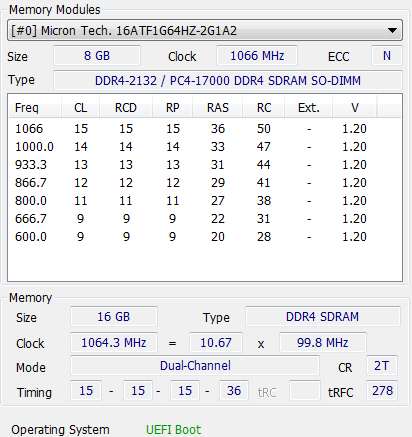
And as is shown by HWINFO, the Samsung and Crucial memory cards are truly identical. And now that they are installed in "paired slots (#1 and #3)" the memory is now behaving in dual-mode.

Kf0wOZ.jpg


I don't know why CPUZ shows things the way it does when looking at the two cards shown in the SPD tab, but CPUZ also confirms that the memory is behaving in dual-mode.

ZPC9jU.jpg


So as it turns out, the Crucial memory is 100% perfectly compatible with the P70 and the Samsung memory. Also, at 1066Mhz both memory cards operate at the identical speed.

I will return the second Crucial memory card I ordered in panic, when I thought "single mode" was because the two cards were not identical and I intended to replace the Samsung card with the second Crucial card in order to have a matched set. Turns out this was untrue, and unnecessary. It was actually that I'd installed the Crucial card in an unpaired slot which was responsible for "single mode".

Case closed.


NOTE: Had I purchased 2x8GB=16GB of memory on the P70 from Lenovo, I'm sure they would have installed both cards in this under-the-keyboard bay. That would have then left the easy-to-access two-slot second memory bay on the underside of the laptop for further expansion (of another two matched cards). It was only that I decided to go with the standard 8GB and save money ($45 vs. $120) by buying my own second 8GB, that I ended up having to go through this keyboard-removal surgery myself, in order to properly utilize the paired-slot #1 (which unfortunately was under the keyboard) in order to accomplish "dual-mode".

Case closed.
 

My Computer My Computer

At a glance

Windows 7 Pro x64 (1), Win7 Pro X64 (2)i5-3350p 3.1Ghz/6MB-cache (1); E8400 3.0Ghz/6...8GB PC3-12800 DDR3 (1); 4GB PC3-10600 DDR3 (2)ATI HD7750 (1), (see TV cards); ATI R7 250 (2)
Computer type
PC/Desktop
Computer Manufacturer/Model Number
Home-built, two systems (1) and (2)
OS
Windows 7 Pro x64 (1), Win7 Pro X64 (2)
CPU
i5-3350p 3.1Ghz/6MB-cache (1); E8400 3.0Ghz/6MB-cache (2)
Motherboard
ASUS P8Z77-V Pro (1); ASUS P5Q3 (2)
Memory
8GB PC3-12800 DDR3 (1); 4GB PC3-10600 DDR3 (2)
Graphics Card(s)
ATI HD7750 (1), (see TV cards); ATI R7 250 (2)
Sound Card
Realtek ALC892 HD Audio (1); Realtek ALC1200 HD Audio (2)
Monitor(s) Displays
Eizo HD2441W LCD, Eizo S2433W (1); Eizo 24" S2433W (2)
Screen Resolution
1920x1200, 1920x1200 (1); 1920x1200 (2)
Hard Drives
(1) 1TB SATA-II (7200RPM), 2x2TB SATA-III (7200RPM), 250GB SATA-III (10000RPM) for OS; 2x2TB external USB 3.0

(2) 320GB SATA-II (7200RPM), 750GB SATA-II (7200RPM), 150GB SATA-II (10000RPM) for OS; 2TB external USB 3.0
PSU
Nesteq ECS-6001 600W (1); Nesteq ECS-5001 500W (2)
Case
Acousti-Case 360 (1) and (2)
Cooling
Noctua NH-U12P SE2 for CPU, 2x120mm case fans (1) and (2)
Keyboard
IBM PS/2 (1) and (2)
Mouse
Logitech MX Revolution wireless (1); Microsoft wired (2)
Internet Speed
100mbps down / 10mbps up
Antivirus
Microsoft Security Essentials; Malwarebyte Anti-Malware Pro
Browser
Firefox
Other Info
Ceton InfiniTV 4-tuner cablecard-enabled TV card as well as Hauppauge HVR-2250 OTA/ATSC 2-tuner TV card in (1), running under Win7 WMC
Back
Top