Solved Firefox Slow

monster528

New member
Member
VIP
Local time
3:55 AM
Messages
106
Mozilla Firefox has been acting strange for a while for me and I am not too sure what to do about it. The main problem is when I go to Netflix and begin loading a TV show or movie for the first 3-5 seconds my entire computer freezes. I tend to play games on my primary monitor while watching netflix on my secondary and it can cause huge issues if a video begins to load.

Another issue I have been having is sometimes Firefox will slow down to crawl; I mean the entire browser not websites I try to load. When I try to move the window or minimize it, it may take as long as 30 seconds to a minute to respond and might go back to slowing down once it quickly catches up.

I tried clearing the cache, reinstalling Firefox, reinstalling Silverlight, and running in safe mode with all add-ons disabled and nothing worked. I also tried running netflix on Internet Explorer and it did not have any issues so im not sure what the problem is

Im using a triple monitor setup (144hz+2 60hz) with an AMD R9 290x with the latest 16.1 Crimson driver and Windows 7 64bit.
 

My Computer My Computer

Computer type
PC/Desktop
OS
Windows 7 64 Bit
CPU
Intel Core i5 4670K 3.4GHz Socket LGA 1150
Motherboard
MSI Z87-G41 PC Mate Socket LGA 1150 ATX Intel Motherboard
Memory
8GB
Graphics Card(s)
ATI HD 6950
Sound Card
ASUS GTX760-DC2OC-2GD5
Hard Drives
1TB
Hi:

Many Firefox problems originate in the user's profile, so reinstalling Firefox (as you tried) often does not resolve the issue.

If Mozilla Safe Mode did not resolve it, either, then the problem may be with your hardware/settings (e.g. hardware acceleration), software conflict (e.g. security applications), or another problem, rather than with a wonky extension. (Mozilla Safe Mode is a helpful diagnostic method, but it doesn't mean there isn't a problem.)

I suggest an orderly progression through the various diagnostic/troubleshooting steps in either or both of these tutorials/links - they do a better job explaining the specific steps than I can:

Firefox- Standard Diagnostic

Firefox - Fix Slowness, Crashing, Errors

Let us know how it goes.

Thanks,
MM
 

My Computer My Computer

Computer type
PC/Desktop
Computer Manufacturer/Model Number
Dell Studio XPS 8500
OS
OEM Windows 7 Ult (x64) SP1
CPU
Intel Core-i7 3770 @ 3.4 GHz
Motherboard
"Dell" branded
Memory
16 GB DDR3 SDRAM @ 1333 MHz
Graphics Card(s)
NVidia GeForce GT620 1 GB
Sound Card
THX TruStudio PC
Monitor(s) Displays
Dell U2410 Full HD
Hard Drives
2.0 TB SATA2 @ 7200 RPM
PSU
350W
Keyboard
MS 4000 Ergon - Wired
Mouse
Logitech Anywhere MX
Internet Speed
Cable HSI w/Turbo (router)
Antivirus
KIS-MBAM Premium-MBAE Premium
Browser
Fx (current version); IE
Other Info
And a Win7/64 Pro laptop; And a Win10/64 Pro desktop.
Hi Monster,
Not really an answer to FF, but try either Palemoon or Waterfox, both FF offshoots see if you have the same problem, hopefully not
The only other thing i can think of, are you running via a vpn/proxy

Roy
 

My Computer My Computer

Computer type
PC/Desktop
Computer Manufacturer/Model Number
medionl/Aspire 6930G/acer x55a
OS
W7 home premium 32bit/W7HP 64bit/w10 tp insider ring
CPU
E5300 dual core
Motherboard
medion MS7366
Memory
3gb
Graphics Card(s)
Nvidia Geforce 7100 Nforce 630i
Monitor(s) Displays
avixc
Internet Speed
n (isp resticted to 72)
Antivirus
mse/pands
Browser
palemoon
Other Info
Belkin Fd7050 n USB using Railink RT2870 drivers, more upto date
Im not going through a vpn or proxy.

I went through each step to try and fix the problem with no success. I ended up uninstalling firefox, deleting the install directory, deleting the appdata folder, running CCleaner, uninstalling a few multimedia programs/plugins, and reinstalling completely fresh.

My guess is as you said Moxie; there might be a conflict with the browser and one of my drivers or software im using.

Im going to switch to Chrome since it seems to be working fine for the time being. In time maybe an update will change something that fixes the problem but im not willing to deal with it until then.

Thank for the quick replies! Have a good day
 

My Computer My Computer

Computer type
PC/Desktop
OS
Windows 7 64 Bit
CPU
Intel Core i5 4670K 3.4GHz Socket LGA 1150
Motherboard
MSI Z87-G41 PC Mate Socket LGA 1150 ATX Intel Motherboard
Memory
8GB
Graphics Card(s)
ATI HD 6950
Sound Card
ASUS GTX760-DC2OC-2GD5
Hard Drives
1TB
Hi, @monster528:

What antivirus/security/firewall software are you running?
Router?
Do you have a custom hosts file?

If you don't want to troubleshoot, then it's hard to provide specific help.:(

BUT:
Have you tried creating a new, virgin, unmodified Firefox profile (IOW only default settings and no added extensions, no imported bookmarks, etc.)?

  • Details about this are here - it will only take a few minutes and would be very helpful:
  • Doing so would not burn any bridges (it would be a "test" profile and you can always go back to your other profile).
  • If the new, clean, vanilla profile has the same issue, then the problem likely lies with something outside Firefox (a global plug-in, a software conflict, hardware, system settings, etc.).
  • If the new profile works OK & resolves the issue, then that narrows down the issue to something in your existing profile (as is quite common).
    • You can then import your bookmarks and begin to customize the new profile with extensions and settings.
  • General advice: always good to backup one's profile before undertaking significant troubleshooting.
Good luck!


MM
 

My Computer My Computer

Computer type
PC/Desktop
Computer Manufacturer/Model Number
Dell Studio XPS 8500
OS
OEM Windows 7 Ult (x64) SP1
CPU
Intel Core-i7 3770 @ 3.4 GHz
Motherboard
"Dell" branded
Memory
16 GB DDR3 SDRAM @ 1333 MHz
Graphics Card(s)
NVidia GeForce GT620 1 GB
Sound Card
THX TruStudio PC
Monitor(s) Displays
Dell U2410 Full HD
Hard Drives
2.0 TB SATA2 @ 7200 RPM
PSU
350W
Keyboard
MS 4000 Ergon - Wired
Mouse
Logitech Anywhere MX
Internet Speed
Cable HSI w/Turbo (router)
Antivirus
KIS-MBAM Premium-MBAE Premium
Browser
Fx (current version); IE
Other Info
And a Win7/64 Pro laptop; And a Win10/64 Pro desktop.
Creating a new profile did not work. Remember I am specifically checking if Netflix locks up my computer so its very easy to check if the problem is resolved.

I am using Microsoft Security Essentials for my anti-virus, nothing else.

I am using a Netgear AC1750 C6300 Modem/Router.

No custom host files.
 

My Computer My Computer

Computer type
PC/Desktop
OS
Windows 7 64 Bit
CPU
Intel Core i5 4670K 3.4GHz Socket LGA 1150
Motherboard
MSI Z87-G41 PC Mate Socket LGA 1150 ATX Intel Motherboard
Memory
8GB
Graphics Card(s)
ATI HD 6950
Sound Card
ASUS GTX760-DC2OC-2GD5
Hard Drives
1TB
Thanks for the update.

If the new, clean, vanilla profile has the same issue, then the problem likely lies with something outside Firefox (a global plug-in, a software conflict, hardware, system settings, etc.).

Have you tried to disable hardware acceleration?
Do you have the most current version of Adobe Flash Player for Firefox?

Other than that, I'd suggest going back to the in-depth troubleshooting suggested in the links in my original reply.

Thanks,
MM
 

My Computer My Computer

Computer type
PC/Desktop
Computer Manufacturer/Model Number
Dell Studio XPS 8500
OS
OEM Windows 7 Ult (x64) SP1
CPU
Intel Core-i7 3770 @ 3.4 GHz
Motherboard
"Dell" branded
Memory
16 GB DDR3 SDRAM @ 1333 MHz
Graphics Card(s)
NVidia GeForce GT620 1 GB
Sound Card
THX TruStudio PC
Monitor(s) Displays
Dell U2410 Full HD
Hard Drives
2.0 TB SATA2 @ 7200 RPM
PSU
350W
Keyboard
MS 4000 Ergon - Wired
Mouse
Logitech Anywhere MX
Internet Speed
Cable HSI w/Turbo (router)
Antivirus
KIS-MBAM Premium-MBAE Premium
Browser
Fx (current version); IE
Other Info
And a Win7/64 Pro laptop; And a Win10/64 Pro desktop.
I wonder if it could be a cache problem? How much RAM do you have and how big is your page file?

Here is something to test - don't know if it will help.

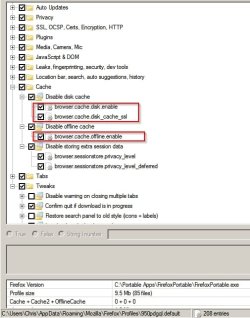
Disable Firefox Disk Cache and force it to cache to RAM.

Try setting these highlighted items to false using about:config

Configure FireFox.jpg
 

My Computer My Computer

Computer type
Laptop
Computer Manufacturer/Model Number
ASUS
OS
Microsoft Windows 7 Home Premium 64-bit 7601 Multiprocessor Free Service Pack 1
CPU
AMD C-60 APU with Radeon(tm) HD Graphics
Motherboard
ASUSTeK COMPUTER INC. X501U
Memory
4.00 GB
Graphics Card(s)
AMD Radeon HD 6290 Graphics
Sound Card
(1) AMD High Definition Audio Device (2) Realtek High Defi
Screen Resolution
1366 x 768 x 32 bits (4294967296 colors) @ 60 Hz
Hard Drives
Hitachi HTS545050A7E380 SATA Disk Device
Antivirus
Comodo CIS & FW, SecureAplus App Whitelisting, Threatfire
Browser
Cyberfox 64bit, Opera 64bit, Airfox
Other Info
Spy-The-Spy, HitmanPro.Alert, Norton Connect Safe, MJRegWatcher, BitDefender TrafficLight, Voodoo Shield, Zemana AntiMalware
Also, how are you connected to the internet? WiFi, cable modem, link speed throughout your network? I once had a similar problem with Amazon Prime (and occaisionaly Netflix) and it was due to a DNS issue with the ISP's supplied Modem/Router. They couldn't make it work right (ARRIS junk) and I went back to a basic cable modem with an external router. The new router and it's firmware do a far better job of parceling out linkages to the communicating devices in our home. What does Task Manager show when your computer slows down? Is it FF or some other service? Just cruious.
 

My Computer My Computer

Computer type
PC/Desktop
Computer Manufacturer/Model Number
ASUS
OS
Windows 7 Home Premium 64 bit SP1
CPU
i5-2320 @3.00 GHz
Memory
6GB
Graphics Card(s)
NVIDIA GeForce 7300 LE
Monitor(s) Displays
Acer S200HQL 19.5 LED
Screen Resolution
1280 x 800 (1900 x 900 max)
Hard Drives
Drive 1: 1 TB SATA internal: C drive
Drive 2: 250 GB SATA internal: User Data Backup
Drive 3: 500 GB SATA USB: Full System Backup 1, Father
Drive 4: 500 GB SATA USB: Full System Backup 2, Son
Drive 5: 40 GB IDE USB: Kindle, ASUS Tabl
Keyboard
ASUS KB34211
Mouse
Logitech m325 cordless
Internet Speed
27Mb down, 3 Mb up cable modem w/Netgear R6400 WiFi
Antivirus
NIS, Spybot S&D, CCleaner, Malwarebytes, MSERT, MRT
Browser
FF v44.0.2;IE11 v11.0.9600.18015,uv11.0.23;Chrome v44.0.2403
Other Info
FF has AdBlockPlus and Ghostery plugins,
Thanks for the update.

If the new, clean, vanilla profile has the same issue, then the problem likely lies with something outside Firefox (a global plug-in, a software conflict, hardware, system settings, etc.).

Have you tried to disable hardware acceleration?
Do you have the most current version of Adobe Flash Player for Firefox?

Other than that, I'd suggest going back to the in-depth troubleshooting suggested in the links in my original reply.

Thanks,
MM

Yes I have tried to disable hardware acceleration. Firefox says Adobe Flash Player is up to date, as well as the other 2 or 3 miscellaneous plugins/addons came with Firefox.

I wonder if it could be a cache problem? How much RAM do you have and how big is your page file?

Here is something to test - don't know if it will help.

Disable Firefox Disk Cache and force it to cache to RAM.

Try setting these highlighted items to false using about:config


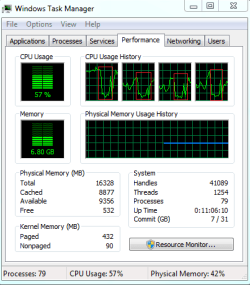
Set all of those to false but it did not make any difference. Posted a picture of my task manager when loading a netflix video on the bottom of this post. 16GB of RAM. You can see my cpu usage tanks when the lock-up happens.

Also, how are you connected to the internet? WiFi, cable modem, link speed throughout your network? I once had a similar problem with Amazon Prime (and occaisionaly Netflix) and it was due to a DNS issue with the ISP's supplied Modem/Router. They couldn't make it work right (ARRIS junk) and I went back to a basic cable modem with an external router. The new router and it's firmware do a far better job of parceling out linkages to the communicating devices in our home. What does Task Manager show when your computer slows down? Is it FF or some other service? Just cruious.

I am using my own modem/router combo it is the Netgear AC1750 C6300. I am connected through WiFi using a Linksys AE2500 N600 Dual-Band Wireless-N USB Adapter. Task manager picture posted on bottom. This issue is only happening with firefox. I switched the chrome and the issue has not come up. Internet Explorer is working perfectly fine as well
 

Attachments

  • Untitled.png
    Untitled.png
    11.4 KB · Views: 35

My Computer My Computer

Computer type
PC/Desktop
OS
Windows 7 64 Bit
CPU
Intel Core i5 4670K 3.4GHz Socket LGA 1150
Motherboard
MSI Z87-G41 PC Mate Socket LGA 1150 ATX Intel Motherboard
Memory
8GB
Graphics Card(s)
ATI HD 6950
Sound Card
ASUS GTX760-DC2OC-2GD5
Hard Drives
1TB
I would try to backup your profile and reset firefox using about:support, that should fix your problems, I do it from time to time and does wonders.

If that doesn't work, I can suggest 3 settings, that are experimental, but may speedup the browser.

layers.offmainthreadcomposition.testing.enabled (set it to true)
browser.tabs.remote.autostart (set it to true)
dom.ipc.processcount (set it to 2 or 4, safe setting is 2, but loking at your CPU chart, 4 might be better for you)

This will enable Electrolysis, that handles the RAM in a more efficent way, also speeds up the browser. This are settings that come from Nightly builds, if you experiment problems with your extensions or crashes, reset back to defaults.

Hope this helps :D
 

My Computer My Computer

Computer type
PC/Desktop
Computer Manufacturer/Model Number
Assembled Desktop PC
OS
Microsoft Windows 7 Home Premium SP1 64-bit Build 7600
CPU
AMD Athlon 64 X2 5200+ Dual Core CPU @ 2.7 Ghz (Brisbane)
Motherboard
PCChips A13G+ v3.0
Memory
2x2 GB DDR2 PC-5300 (667 Mhz) Kingston ValueRAM
Graphics Card(s)
XFX ATI Radeon HD 4350 GPU (512 MB + 512 MB HM)
Sound Card
Realtek High Definition Audio Driver ALC660 @ MCP61S
Monitor(s) Displays
HP S2031 20" LED HD Widescreen Display Monitor
Screen Resolution
1600 x 900 px
Hard Drives
Maxtor Diamond Max 10 (160 GB, 7200 RPM, SATA-II Hard Disk)
Western Digital Scorpion Blue (250 GB, 5400 RPM, SATA-II External Hard Disk - Personal Data)
Toshiba MQ01ABD050 (500 GB, 5400 RPM, SATA-II External Hard Disk - Software & ISOs)
PSU
Pixxo Transformer 850W 80+ Certification PSU
Case
Compaq 5BW353 Case
Cooling
Many solutions, see other info...
Keyboard
Green Leaf (Mitzu) Standard Keyboard
Mouse
Microsoft USB Lasser Pointing Device
Internet Speed
10 MB
Antivirus
Avast Antivirus Free
Browser
Firefox, Chrome, Internet Explorer
Other Info
Windows Experience Index Result: 3.8 of 7.9.

Cooling solutions:
- AVC @ 2000/5000 RPM Copper Heatpipes (For Athlon 64 X2 6000+ CPU used in an Athlon 64 X2 5200+)
- Rear Fan 80 mm @ 2700 RPM for heat extraction
- Manhatan Chipset Cooler @ 4700/7200 RPM (For nVidia Chipset in MoBo)
- Foxconn @ 2500 RPM (Old Pentium III heatsink fan) in XFX ATI Radeon HD 4350
I would try to backup your profile and reset firefox using about:support, that should fix your problems, I do it from time to time and does wonders.

If that doesn't work, I can suggest 3 settings, that are experimental, but may speedup the browser.

layers.offmainthreadcomposition.testing.enabled (set it to true)
browser.tabs.remote.autostart (set it to true)
dom.ipc.processcount (set it to 2 or 4, safe setting is 2, but loking at your CPU chart, 4 might be better for you)

This will enable Electrolysis, that handles the RAM in a more efficent way, also speeds up the browser. This are settings that come from Nightly builds, if you experiment problems with your extensions or crashes, reset back to defaults.

Hope this helps :D

This did not work either unfortunately. But thanks for taking the time! Ill continue to try anything people suggest.
 

My Computer My Computer

Computer type
PC/Desktop
OS
Windows 7 64 Bit
CPU
Intel Core i5 4670K 3.4GHz Socket LGA 1150
Motherboard
MSI Z87-G41 PC Mate Socket LGA 1150 ATX Intel Motherboard
Memory
8GB
Graphics Card(s)
ATI HD 6950
Sound Card
ASUS GTX760-DC2OC-2GD5
Hard Drives
1TB
i see in the subject title that it was solved.

what was the solution?
 

My Computer My Computer

Computer Manufacturer/Model Number
Asus G17
OS
Win 7 Home Premium 64bit
CPU
Intel
I see you try Netflix... which uses HTML5 entirely.

Along with those settings I posted earlier, you can also try:
- layers.async-pan-zoom.enabled: (set this to true)
- media.hardware-video-decoding.failed (if this is set to true, change it to false, do it everytime you update FF)

The last one disables or enables hardware acceleration for decoding H264 videos, which is the standard FF uses, even for places like openload or Youtube. Some VGAs are blacklisted (like in Chrome), so setting the ...decoding.failed to false re-enables hardware accelerations, which smoothens video playback, and should do it for Netflix as well.

If this still doesn't work, try updating your graphics card drivers to something more recent (any 2012 or above drivers may do it for FF and Hardware Acceleration).

Hope this helps.
 

My Computer My Computer

Computer type
PC/Desktop
Computer Manufacturer/Model Number
Assembled Desktop PC
OS
Microsoft Windows 7 Home Premium SP1 64-bit Build 7600
CPU
AMD Athlon 64 X2 5200+ Dual Core CPU @ 2.7 Ghz (Brisbane)
Motherboard
PCChips A13G+ v3.0
Memory
2x2 GB DDR2 PC-5300 (667 Mhz) Kingston ValueRAM
Graphics Card(s)
XFX ATI Radeon HD 4350 GPU (512 MB + 512 MB HM)
Sound Card
Realtek High Definition Audio Driver ALC660 @ MCP61S
Monitor(s) Displays
HP S2031 20" LED HD Widescreen Display Monitor
Screen Resolution
1600 x 900 px
Hard Drives
Maxtor Diamond Max 10 (160 GB, 7200 RPM, SATA-II Hard Disk)
Western Digital Scorpion Blue (250 GB, 5400 RPM, SATA-II External Hard Disk - Personal Data)
Toshiba MQ01ABD050 (500 GB, 5400 RPM, SATA-II External Hard Disk - Software & ISOs)
PSU
Pixxo Transformer 850W 80+ Certification PSU
Case
Compaq 5BW353 Case
Cooling
Many solutions, see other info...
Keyboard
Green Leaf (Mitzu) Standard Keyboard
Mouse
Microsoft USB Lasser Pointing Device
Internet Speed
10 MB
Antivirus
Avast Antivirus Free
Browser
Firefox, Chrome, Internet Explorer
Other Info
Windows Experience Index Result: 3.8 of 7.9.

Cooling solutions:
- AVC @ 2000/5000 RPM Copper Heatpipes (For Athlon 64 X2 6000+ CPU used in an Athlon 64 X2 5200+)
- Rear Fan 80 mm @ 2700 RPM for heat extraction
- Manhatan Chipset Cooler @ 4700/7200 RPM (For nVidia Chipset in MoBo)
- Foxconn @ 2500 RPM (Old Pentium III heatsink fan) in XFX ATI Radeon HD 4350
Back
Top