
PwrCfg/Sleep Mode Issue

Tim. You have 2 Problem Devices showing in your System Info. From what I can find out these are related to the Broadcom Bluetooth device.
Are these part on your HP computer or have you added it.
In my Sysinfo there is nothing listed in my Problem Devices, which I think is what we should be aiming for.

As you can see this is related to USB as well.

I may be on the wrong track here, but those Problem Devices have me concerned.

Just as a test, untick the Broadcom Bluetooth Device in your msconfig Services. In your screen shot of this it shows that device as running, so untick it. Restart your computer, then make sure it's not running, by checking in Services again & see if the computer still has the waking up problem.

Yes, I disabled those Bluetooth associations. Bluetooth Support Service was set to 'manual' in Services.msc, so I disabled it there, as well. The other device is the Broadcom WiFi adapter, which I don't use, either. I use ethernet connection only via the Realtek PCIe GBE Family Controller. I disabled those devices AFTER the printer started to act up.
Here's something interesting- I mentioned earlier that both UEFI and Legacy were enabled from the factory. I must have been wrong, as I went into the BIOS and reset to factory default, and the arrow appears just by the UEFI stage. I apologize for not having a camera handy, however I'll get one out tomorrow and shoot some photos of the AMI BIOS arrangement. Again, I haven't tested anything yet regarding the USB 3.0 interfering with sleep mode. Tomorrow I should be able to get everything caught up...it's 2:10 am here at present, and I know your down under in Oz. So we'll probably catch up sometime tomorrow/today.

Sure appreciate the help here, Bligh- Thank-you.

tim
 

My Computer My Computer

Computer type
PC/Desktop
Computer Manufacturer/Model Number
HP ENVY 700-515xt CTO, with more cam, headers, and 4.11 gears.
OS
Windows 7 Pro SP1 x64
CPU
Intel Haswell i7-4770 3.4GHz
Motherboard
OEM Kaili2 (MSI MS-7826 v2.0)
Memory
G. SKILLS 32GB Ripjaws X Series DDR3 1600 SDRAM
Graphics Card(s)
Integrated HD4600- upgrade coming!
Sound Card
Integrated...for now.
Monitor(s) Displays
Dell ST-2310 Digital
Screen Resolution
I like 1920x1080
Hard Drives
C\:-Samsung 850PRO SSD-256gb, D:\-SG Barracuda 7200 HDD 1 TB (Storage)
PSU
350w OEM (About to become a display in the aquarium!)
Case
ENVY OEM
Cooling
FANS
Keyboard
Logitech and HP- USB.
Mouse
Logitech LS1 (Alltime favorite of mine!) and HP- both USB
Internet Speed
65Mbps Down (min)/4.5Mbps UP- Charter Comm HS cable
Antivirus
avast! Internet Security 2015/MBAM
Browser
Opera, at present. Love that Chromium horsepower!
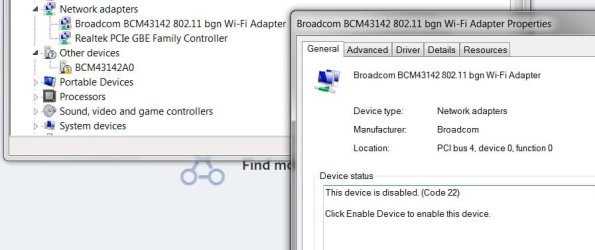
Bligh, here's what those Broadcom devices look like... the WiFi is simply disabled, while the Bluetooth has been removed. I have the Blutooth driver in a dedicated file in the cloud should I need it.
 

Attachments

  • WiFi.jpg
    WiFi.jpg
    38.6 KB · Views: 1
  • Bluetooth.jpg
    Bluetooth.jpg
    37.6 KB · Views: 22

My Computer My Computer

Computer type
PC/Desktop
Computer Manufacturer/Model Number
HP ENVY 700-515xt CTO, with more cam, headers, and 4.11 gears.
OS
Windows 7 Pro SP1 x64
CPU
Intel Haswell i7-4770 3.4GHz
Motherboard
OEM Kaili2 (MSI MS-7826 v2.0)
Memory
G. SKILLS 32GB Ripjaws X Series DDR3 1600 SDRAM
Graphics Card(s)
Integrated HD4600- upgrade coming!
Sound Card
Integrated...for now.
Monitor(s) Displays
Dell ST-2310 Digital
Screen Resolution
I like 1920x1080
Hard Drives
C\:-Samsung 850PRO SSD-256gb, D:\-SG Barracuda 7200 HDD 1 TB (Storage)
PSU
350w OEM (About to become a display in the aquarium!)
Case
ENVY OEM
Cooling
FANS
Keyboard
Logitech and HP- USB.
Mouse
Logitech LS1 (Alltime favorite of mine!) and HP- both USB
Internet Speed
65Mbps Down (min)/4.5Mbps UP- Charter Comm HS cable
Antivirus
avast! Internet Security 2015/MBAM
Browser
Opera, at present. Love that Chromium horsepower!
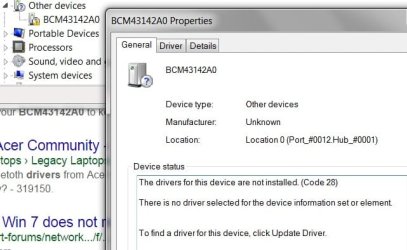
Tim. I don't think the BIOS is causing any problems with this. Usually if there is a BIOS problem the computer wont boot.

There is a yellow flash in Other Devices on that BCM item. You might have to reinstall the whole Broadcom program & then completely uninstall it. Sometimes getting rid of a program can be a difficult. At present it seems that there are remnants of it remaining that seem to be a problem.

Have you checked to see if the sleep problem is still present or has it been fixed.

Yes, we certainly have a time difference, so I usually check the time below your avatar which is your local time to see what time it is at your place.
 

My Computer My Computer

Computer type
PC/Desktop
Computer Manufacturer/Model Number
Self built using existing case
OS
Windows 7 Home Premium 64 bit sp1
CPU
Intel i5 3570 3.4Ghz Ivy Bridge SKT 1155 quad core
Motherboard
Gigabyte Z77-HD3 SKT 1155 2xSata 3, 4x USB 3.0
Memory
G-Skill Rip Jaws 16Gb (8x2) DDR3 -1600 PC3 12800 CL 10 red
Graphics Card(s)
Gigabyte NVIDIA GT610 1Gb DDR3 810/1200 PCI-E 2.0 Silent
Sound Card
NVIDIA High Definition & Realtech High Definition Audio
Monitor(s) Displays
2 x Philips 226V4L 16:9 aspect ratio
Screen Resolution
1920 x 1080 HD
Hard Drives
Samsung 840 Pro 256gb SSD, SATA 3.
Hitachi Touro Portable 1tb, USB 3.0 HDD used for image b/ups.
PSU
Corsair VS450
Case
Codeng
Cooling
PSU fan & CPU fan
Keyboard
Logitech
Mouse
Logitech Wireless trackball M570
Internet Speed
Wireless 3G. 3mg down & 550kb up.
Antivirus
Bitdefender Internet Security 2020
Browser
Opera (Current Version) & Firefox
Other Info
MS Office 2013 Pro. Davis weather station software. MGE Nova 600 avr UPS.
I have been browsing through my motherboard manual. Mine is a Gigabyte GA-Z77-HD3 with American Megatrend technology if that's the right way of describing it, with Intel CPU & chip sets.

If you go into the BIOS & under Power Management, look for PME Event Wake Up. That needs to be set to Enabled, which is the Default setting. Apparently that allows the operating system to control the waking off the computer. If it's set to Disabled the BIOS controls the sleep settings. You need to save that if you changed it.

From what has been happening it would seem that it is probably set as the default.

This is really a stab in the dark, but worth checking out.
 

My Computer My Computer

Computer type
PC/Desktop
Computer Manufacturer/Model Number
Self built using existing case
OS
Windows 7 Home Premium 64 bit sp1
CPU
Intel i5 3570 3.4Ghz Ivy Bridge SKT 1155 quad core
Motherboard
Gigabyte Z77-HD3 SKT 1155 2xSata 3, 4x USB 3.0
Memory
G-Skill Rip Jaws 16Gb (8x2) DDR3 -1600 PC3 12800 CL 10 red
Graphics Card(s)
Gigabyte NVIDIA GT610 1Gb DDR3 810/1200 PCI-E 2.0 Silent
Sound Card
NVIDIA High Definition & Realtech High Definition Audio
Monitor(s) Displays
2 x Philips 226V4L 16:9 aspect ratio
Screen Resolution
1920 x 1080 HD
Hard Drives
Samsung 840 Pro 256gb SSD, SATA 3.
Hitachi Touro Portable 1tb, USB 3.0 HDD used for image b/ups.
PSU
Corsair VS450
Case
Codeng
Cooling
PSU fan & CPU fan
Keyboard
Logitech
Mouse
Logitech Wireless trackball M570
Internet Speed
Wireless 3G. 3mg down & 550kb up.
Antivirus
Bitdefender Internet Security 2020
Browser
Opera (Current Version) & Firefox
Other Info
MS Office 2013 Pro. Davis weather station software. MGE Nova 600 avr UPS.
I have been browsing through my motherboard manual. Mine is a Gigabyte GA-Z77-HD3 with American Megatrend technology if that's the right way of describing it, with Intel CPU & chip sets.

If you go into the BIOS & under Power Management, look for PME Event Wake Up. That needs to be set to Enabled, which is the Default setting. Apparently that allows the operating system to control the waking off the computer. If it's set to Disabled the BIOS controls the sleep settings. You need to save that if you changed it.

From what has been happening it would seem that it is probably set as the default.

This is really a stab in the dark, but worth checking out.

I don't have that setting in my BIOS. Certain items in an OEM machine are locked down in the BIOS, like FSB frequencies and voltages. It's a warranty issue.

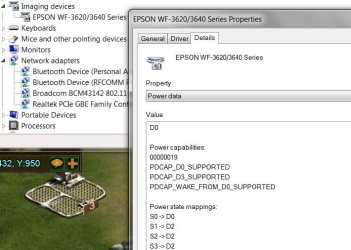
Everything is set back to factory default. I tried the printer in the USB 3.0 port again and attempted to put it to sleep. No go. It freezes, and I have to hit the power button to engage it again. Everything works as it should with the printer plugged into a USB 2.0 port, but then I have to plug the keyboard into the 3.0. All of this is simply strange. Poked around in DvcMgr again and pulled up printer properties and checked out these details- which I don't really understand. Found an item called power data, listing the different sleep states.
Here, have a look-
 

Attachments

  • PwrData.jpg
    PwrData.jpg
    50.4 KB · Views: 1

My Computer My Computer

Computer type
PC/Desktop
Computer Manufacturer/Model Number
HP ENVY 700-515xt CTO, with more cam, headers, and 4.11 gears.
OS
Windows 7 Pro SP1 x64
CPU
Intel Haswell i7-4770 3.4GHz
Motherboard
OEM Kaili2 (MSI MS-7826 v2.0)
Memory
G. SKILLS 32GB Ripjaws X Series DDR3 1600 SDRAM
Graphics Card(s)
Integrated HD4600- upgrade coming!
Sound Card
Integrated...for now.
Monitor(s) Displays
Dell ST-2310 Digital
Screen Resolution
I like 1920x1080
Hard Drives
C\:-Samsung 850PRO SSD-256gb, D:\-SG Barracuda 7200 HDD 1 TB (Storage)
PSU
350w OEM (About to become a display in the aquarium!)
Case
ENVY OEM
Cooling
FANS
Keyboard
Logitech and HP- USB.
Mouse
Logitech LS1 (Alltime favorite of mine!) and HP- both USB
Internet Speed
65Mbps Down (min)/4.5Mbps UP- Charter Comm HS cable
Antivirus
avast! Internet Security 2015/MBAM
Browser
Opera, at present. Love that Chromium horsepower!
You do seem to be getting somewhere with it all set back to factory default. It certainly is odd that when the printer is plugged into a USB 3 port problems arise, but seems to work in a USB 2 port.

Have you tried another USB cable for the printer?. Bad cables can cause all sorts of problems. Might be worth checking as it's a fairly easy one.
 

My Computer My Computer

Computer type
PC/Desktop
Computer Manufacturer/Model Number
Self built using existing case
OS
Windows 7 Home Premium 64 bit sp1
CPU
Intel i5 3570 3.4Ghz Ivy Bridge SKT 1155 quad core
Motherboard
Gigabyte Z77-HD3 SKT 1155 2xSata 3, 4x USB 3.0
Memory
G-Skill Rip Jaws 16Gb (8x2) DDR3 -1600 PC3 12800 CL 10 red
Graphics Card(s)
Gigabyte NVIDIA GT610 1Gb DDR3 810/1200 PCI-E 2.0 Silent
Sound Card
NVIDIA High Definition & Realtech High Definition Audio
Monitor(s) Displays
2 x Philips 226V4L 16:9 aspect ratio
Screen Resolution
1920 x 1080 HD
Hard Drives
Samsung 840 Pro 256gb SSD, SATA 3.
Hitachi Touro Portable 1tb, USB 3.0 HDD used for image b/ups.
PSU
Corsair VS450
Case
Codeng
Cooling
PSU fan & CPU fan
Keyboard
Logitech
Mouse
Logitech Wireless trackball M570
Internet Speed
Wireless 3G. 3mg down & 550kb up.
Antivirus
Bitdefender Internet Security 2020
Browser
Opera (Current Version) & Firefox
Other Info
MS Office 2013 Pro. Davis weather station software. MGE Nova 600 avr UPS.
You do seem to be getting somewhere with it all set back to factory default. It certainly is odd that when the printer is plugged into a USB 3 port problems arise, but seems to work in a USB 2 port.

Have you tried another USB cable for the printer?. Bad cables can cause all sorts of problems. Might be worth checking as it's a fairly easy one.

No, Bligh, I have not... I can't find a USB 3.0 printer cable locally, but did try a new USB 2.0 cable- didn't help.
USB 2.0 and 3.0 are compatible, so I don't know what the deal is. The first of Windows 7 on the SSD, everything worked fine- it was just after the memory module got corrupted and the BSOD's hit that everything went down hill. Like I said, we pulled the memory module that was bad out and sent it and it's match back to G. SKILL, reinstalled Windows 7, got all of the appropriate drivers installed (I have them burned to a CD), verified them with HP, and that's when all this started. Originally, the printer worked fine, as did sleep mode settings with the Samsung SSD and the 32gb's of memory. There is a way to run a CMD and take the printer right out of the picture as far as the sleep mode options is concerned. I don't know how to do it, and I don't have the time to research and experiment. That's why I come here, it's far less time consuming and I learn better in this environment. I really thought Brink would have a solution, but I guess not. Oh well!

Thanks.
 

My Computer My Computer

Computer type
PC/Desktop
Computer Manufacturer/Model Number
HP ENVY 700-515xt CTO, with more cam, headers, and 4.11 gears.
OS
Windows 7 Pro SP1 x64
CPU
Intel Haswell i7-4770 3.4GHz
Motherboard
OEM Kaili2 (MSI MS-7826 v2.0)
Memory
G. SKILLS 32GB Ripjaws X Series DDR3 1600 SDRAM
Graphics Card(s)
Integrated HD4600- upgrade coming!
Sound Card
Integrated...for now.
Monitor(s) Displays
Dell ST-2310 Digital
Screen Resolution
I like 1920x1080
Hard Drives
C\:-Samsung 850PRO SSD-256gb, D:\-SG Barracuda 7200 HDD 1 TB (Storage)
PSU
350w OEM (About to become a display in the aquarium!)
Case
ENVY OEM
Cooling
FANS
Keyboard
Logitech and HP- USB.
Mouse
Logitech LS1 (Alltime favorite of mine!) and HP- both USB
Internet Speed
65Mbps Down (min)/4.5Mbps UP- Charter Comm HS cable
Antivirus
avast! Internet Security 2015/MBAM
Browser
Opera, at present. Love that Chromium horsepower!
I don't think a USB 3 cable is necessary for the printer. You mentioned changing it so that should remove that as a problem area.

After reading your Post 47 I think the problem originated with the loading of drivers, that you mentioned. Windows 7 does not require additional drivers being loaded with it's installation.

Normally you just install Windows 7 from the DVD, get it set up, download & install all the updates & then just add additional software that you might need, including printer software. Peripheral equipment, such as printers usually have the required drivers needed included in the software. There is no need to add additional drivers.

Things like keyboards & mice will operate with the standard Windows 7 drivers.

I know you probably don't have the time or inclination to do a complete uninstall & reinstall of Windows 7, but I think it will ultimately be the only solution, without any additional drivers being added.
 

My Computer My Computer

Computer type
PC/Desktop
Computer Manufacturer/Model Number
Self built using existing case
OS
Windows 7 Home Premium 64 bit sp1
CPU
Intel i5 3570 3.4Ghz Ivy Bridge SKT 1155 quad core
Motherboard
Gigabyte Z77-HD3 SKT 1155 2xSata 3, 4x USB 3.0
Memory
G-Skill Rip Jaws 16Gb (8x2) DDR3 -1600 PC3 12800 CL 10 red
Graphics Card(s)
Gigabyte NVIDIA GT610 1Gb DDR3 810/1200 PCI-E 2.0 Silent
Sound Card
NVIDIA High Definition & Realtech High Definition Audio
Monitor(s) Displays
2 x Philips 226V4L 16:9 aspect ratio
Screen Resolution
1920 x 1080 HD
Hard Drives
Samsung 840 Pro 256gb SSD, SATA 3.
Hitachi Touro Portable 1tb, USB 3.0 HDD used for image b/ups.
PSU
Corsair VS450
Case
Codeng
Cooling
PSU fan & CPU fan
Keyboard
Logitech
Mouse
Logitech Wireless trackball M570
Internet Speed
Wireless 3G. 3mg down & 550kb up.
Antivirus
Bitdefender Internet Security 2020
Browser
Opera (Current Version) & Firefox
Other Info
MS Office 2013 Pro. Davis weather station software. MGE Nova 600 avr UPS.
I don't think a USB 3 cable is necessary for the printer. You mentioned changing it so that should remove that as a problem area.

After reading your Post 47 I think the problem originated with the loading of drivers, that you mentioned. Windows 7 does not require additional drivers being loaded with it's installation.

Normally you just install Windows 7 from the DVD, get it set up, download & install all the updates & then just add additional software that you might need, including printer software. Peripheral equipment, such as printers usually have the required drivers needed included in the software. There is no need to add additional drivers.

Things like keyboards & mice will operate with the standard Windows 7 drivers.

I know you probably don't have the time or inclination to do a complete uninstall & reinstall of Windows 7, but I think it will ultimately be the only solution, without any additional drivers being added.

Right, I don't think the cable is the issue, either.

At this point, no, I don't think I'll do another fresh install, as I'm fed up with the sluggish response getting all the Updates for Windows 7. I already tried uninstall/reinstall on the printer twice, to no avail.
According to everything in SysInfo, all is well.

I can't mark this as solved, because it isn't...however, I could use a USB 2.0 hub and jack the keyboard and mouse to the same USB 2.0 port on the machine, or continue using the keyboard in the USB 3.0 port. This alone illustrates that there's nothing wrong with the Windows 7 installation. The culprit is the printer/USB 3.0 Extensible Host Controller interface, and that has the latest Intel driver signed by HP. Since the keyboard, and other devices work in the same port, it isolates it to the printer. One thing I haven't tried is to use Windows 7 wizard to install the printer- maybe worth a try.

Thanks again, Bligh.

tim
 

My Computer My Computer

Computer type
PC/Desktop
Computer Manufacturer/Model Number
HP ENVY 700-515xt CTO, with more cam, headers, and 4.11 gears.
OS
Windows 7 Pro SP1 x64
CPU
Intel Haswell i7-4770 3.4GHz
Motherboard
OEM Kaili2 (MSI MS-7826 v2.0)
Memory
G. SKILLS 32GB Ripjaws X Series DDR3 1600 SDRAM
Graphics Card(s)
Integrated HD4600- upgrade coming!
Sound Card
Integrated...for now.
Monitor(s) Displays
Dell ST-2310 Digital
Screen Resolution
I like 1920x1080
Hard Drives
C\:-Samsung 850PRO SSD-256gb, D:\-SG Barracuda 7200 HDD 1 TB (Storage)
PSU
350w OEM (About to become a display in the aquarium!)
Case
ENVY OEM
Cooling
FANS
Keyboard
Logitech and HP- USB.
Mouse
Logitech LS1 (Alltime favorite of mine!) and HP- both USB
Internet Speed
65Mbps Down (min)/4.5Mbps UP- Charter Comm HS cable
Antivirus
avast! Internet Security 2015/MBAM
Browser
Opera, at present. Love that Chromium horsepower!
OK Tim, I leave the ball in your court. I can't really offer any more suggestions, other than a complete reinstall minus adding any additional drivers.
 

My Computer My Computer

Computer type
PC/Desktop
Computer Manufacturer/Model Number
Self built using existing case
OS
Windows 7 Home Premium 64 bit sp1
CPU
Intel i5 3570 3.4Ghz Ivy Bridge SKT 1155 quad core
Motherboard
Gigabyte Z77-HD3 SKT 1155 2xSata 3, 4x USB 3.0
Memory
G-Skill Rip Jaws 16Gb (8x2) DDR3 -1600 PC3 12800 CL 10 red
Graphics Card(s)
Gigabyte NVIDIA GT610 1Gb DDR3 810/1200 PCI-E 2.0 Silent
Sound Card
NVIDIA High Definition & Realtech High Definition Audio
Monitor(s) Displays
2 x Philips 226V4L 16:9 aspect ratio
Screen Resolution
1920 x 1080 HD
Hard Drives
Samsung 840 Pro 256gb SSD, SATA 3.
Hitachi Touro Portable 1tb, USB 3.0 HDD used for image b/ups.
PSU
Corsair VS450
Case
Codeng
Cooling
PSU fan & CPU fan
Keyboard
Logitech
Mouse
Logitech Wireless trackball M570
Internet Speed
Wireless 3G. 3mg down & 550kb up.
Antivirus
Bitdefender Internet Security 2020
Browser
Opera (Current Version) & Firefox
Other Info
MS Office 2013 Pro. Davis weather station software. MGE Nova 600 avr UPS.

My Computer My Computer

Computer type
PC/Desktop
Computer Manufacturer/Model Number
Custom
OS
10 Pro x64
CPU
Ryzen 9 3900X
Motherboard
Asrock x370 Tachi
Memory
64GB(4x16GB) DDR4
Graphics Card(s)
EVGA 1080ti FTW3
Sound Card
ASUS Xonar Essence STX (V4 Bursons), ODAC rev B, NFB-11, O2
Monitor(s) Displays
3xASUS PB278Q/R, Optoma HD142X
Screen Resolution
3x1440p, 1080p
Hard Drives
512GB 850 EVO(OS, Programs)
4TB (Movies)
3TB (Downloads)
3TB (Programs)
1TB HDD (Games)
2x6TB R1 (videos)
PSU
AX760
Case
Fractal Define R5
Cooling
NH-D15S
Keyboard
Massdrop Ctrl with Box Navy's
Mouse
G903, Alioth XXL Mat
Internet Speed
280/40
Antivirus
MBAM, ESET
Browser
Canary 64 Bit
Other Info
I also own a Thinkpad P50 Xeon 4K, X220T, X1C5

My Computer My Computer

Computer type
PC/Desktop
Computer Manufacturer/Model Number
HP ENVY 700-515xt CTO, with more cam, headers, and 4.11 gears.
OS
Windows 7 Pro SP1 x64
CPU
Intel Haswell i7-4770 3.4GHz
Motherboard
OEM Kaili2 (MSI MS-7826 v2.0)
Memory
G. SKILLS 32GB Ripjaws X Series DDR3 1600 SDRAM
Graphics Card(s)
Integrated HD4600- upgrade coming!
Sound Card
Integrated...for now.
Monitor(s) Displays
Dell ST-2310 Digital
Screen Resolution
I like 1920x1080
Hard Drives
C\:-Samsung 850PRO SSD-256gb, D:\-SG Barracuda 7200 HDD 1 TB (Storage)
PSU
350w OEM (About to become a display in the aquarium!)
Case
ENVY OEM
Cooling
FANS
Keyboard
Logitech and HP- USB.
Mouse
Logitech LS1 (Alltime favorite of mine!) and HP- both USB
Internet Speed
65Mbps Down (min)/4.5Mbps UP- Charter Comm HS cable
Antivirus
avast! Internet Security 2015/MBAM
Browser
Opera, at present. Love that Chromium horsepower!
OK Tim, I leave the ball in your court. I can't really offer any more suggestions, other than a complete reinstall minus adding any additional drivers.

I sure appreciate all of your help, Bligh- Thank you! :)
 

My Computer My Computer

Computer type
PC/Desktop
Computer Manufacturer/Model Number
HP ENVY 700-515xt CTO, with more cam, headers, and 4.11 gears.
OS
Windows 7 Pro SP1 x64
CPU
Intel Haswell i7-4770 3.4GHz
Motherboard
OEM Kaili2 (MSI MS-7826 v2.0)
Memory
G. SKILLS 32GB Ripjaws X Series DDR3 1600 SDRAM
Graphics Card(s)
Integrated HD4600- upgrade coming!
Sound Card
Integrated...for now.
Monitor(s) Displays
Dell ST-2310 Digital
Screen Resolution
I like 1920x1080
Hard Drives
C\:-Samsung 850PRO SSD-256gb, D:\-SG Barracuda 7200 HDD 1 TB (Storage)
PSU
350w OEM (About to become a display in the aquarium!)
Case
ENVY OEM
Cooling
FANS
Keyboard
Logitech and HP- USB.
Mouse
Logitech LS1 (Alltime favorite of mine!) and HP- both USB
Internet Speed
65Mbps Down (min)/4.5Mbps UP- Charter Comm HS cable
Antivirus
avast! Internet Security 2015/MBAM
Browser
Opera, at present. Love that Chromium horsepower!
Cloud

Hi Tim,
1 of the features of the printer is to back up to cloud, dont know if you use it, or its set.
But if it is or you use it, then check those settings.

Roy
 

My Computer My Computer

Computer type
PC/Desktop
Computer Manufacturer/Model Number
medionl/Aspire 6930G/acer x55a
OS
W7 home premium 32bit/W7HP 64bit/w10 tp insider ring
CPU
E5300 dual core
Motherboard
medion MS7366
Memory
3gb
Graphics Card(s)
Nvidia Geforce 7100 Nforce 630i
Monitor(s) Displays
avixc
Internet Speed
n (isp resticted to 72)
Antivirus
mse/pands
Browser
palemoon
Other Info
Belkin Fd7050 n USB using Railink RT2870 drivers, more upto date
Hi Tim,
1 of the features of the printer is to back up to cloud, dont know if you use it, or its set.
But if it is or you use it, then check those settings.

Roy

Hmmm, don't know, Roy...I've never used it...I'll have to research that, s'posin'.

Thanks for the input- onward and upward!
 

My Computer My Computer

Computer type
PC/Desktop
Computer Manufacturer/Model Number
HP ENVY 700-515xt CTO, with more cam, headers, and 4.11 gears.
OS
Windows 7 Pro SP1 x64
CPU
Intel Haswell i7-4770 3.4GHz
Motherboard
OEM Kaili2 (MSI MS-7826 v2.0)
Memory
G. SKILLS 32GB Ripjaws X Series DDR3 1600 SDRAM
Graphics Card(s)
Integrated HD4600- upgrade coming!
Sound Card
Integrated...for now.
Monitor(s) Displays
Dell ST-2310 Digital
Screen Resolution
I like 1920x1080
Hard Drives
C\:-Samsung 850PRO SSD-256gb, D:\-SG Barracuda 7200 HDD 1 TB (Storage)
PSU
350w OEM (About to become a display in the aquarium!)
Case
ENVY OEM
Cooling
FANS
Keyboard
Logitech and HP- USB.
Mouse
Logitech LS1 (Alltime favorite of mine!) and HP- both USB
Internet Speed
65Mbps Down (min)/4.5Mbps UP- Charter Comm HS cable
Antivirus
avast! Internet Security 2015/MBAM
Browser
Opera, at present. Love that Chromium horsepower!
Back
Top