Windows 7 can't run with memory chips which Memtest86+ finds flawless

robilong

New member
Member
Local time
1:16 PM
Messages
87
Is there any explanation, why Memtest86+ can't find memory problems, while Windows fails with same configuration?
Perhaps some address areas can't be controlled, because these are reserved by system BIOS?

New PC after clean installation of Windows 7 Pro SP1 from original OEM CD.

Windows update fail with error Code 80244019 (Windows could not search for updates
An error occurred while checking for new updates.) Occasionally also other errors.

I also used different hard drives SSD's but no difference.

I run Memtest86+ overnight but no errors.
I repeated W7 clean install many times experimenting with different fixes but none worked.
Update still failed and there were also occasional BSOD's when running W7 without updates.

Finally I obtained 2 Kingston DDR4 sticks for testing and all problems where gone.
I was not very surprised actually because all efforts done so far indicated to hardware malfunction.
I did several new installs for testing but problem definitely was solved with new DIMMs.
Afterwards again test with this previous memory and problem came back...

My conclusion is that Windows 7 can't run with memory chips which Memtest86+ finds flawless.

Any explanations?


Hardware:
Crucial 8GB PC17000 DDR4 KIT2 CT2K4G4DFS8213
Intel I5 3200/6M S1151 BX 6500
Gigabyte B150 S1151 MATX GA-B150M-D3H
 

My Computer My Computer

At a glance

Windows 7 Enterprise 64 bitIntel I5-7608 GBCLUB 3D HD5450 1GB GDDR3 CGAX-54524LI
OS
Windows 7 Enterprise 64 bit
CPU
Intel I5-760
Motherboard
INTEL P55 S1156 DDR3 GLAN RAID BLKDP55WB
Memory
8 GB
Graphics Card(s)
CLUB 3D HD5450 1GB GDDR3 CGAX-54524LI
Hard Drives
WD150HFLS 150GB/10000rpm
WD10EALS Blue 1TB

My Computer My Computer

At a glance

W7 home premium 32bit/W7HP 64bit/w10 tp insid...E5300 dual core3gbNvidia Geforce 7100 Nforce 630i
Computer type
PC/Desktop
Computer Manufacturer/Model Number
medionl/Aspire 6930G/acer x55a
OS
W7 home premium 32bit/W7HP 64bit/w10 tp insider ring
CPU
E5300 dual core
Motherboard
medion MS7366
Memory
3gb
Graphics Card(s)
Nvidia Geforce 7100 Nforce 630i
Monitor(s) Displays
avixc
Internet Speed
n (isp resticted to 72)
Antivirus
mse/pands
Browser
palemoon
Other Info
Belkin Fd7050 n USB using Railink RT2870 drivers, more upto date
Are you still running of the server from your 2013 post, (KMS Activation)??
Roy

This PC is retired and instead KMS activation this old PC used serial key.

Now it's a brand new PC first Windows Pro 7 SP1 OEM installation (Due to problem 15 perhaps already :-).
Different installation (official original) media tested. No activation.
Usually there isn't a problem to download updates before activation.

And so is the case when I change memory chips from Crucial to Kingston.
(same size, same speed, same slots).

But question remains, how can memory pass memtest86+ if windows fails?
Easy explanation would be if there are some reserved areas not accessible for memory tests?
Some irregular read/write operation sequence, not tested by Memetest86+?
 

My Computer My Computer

At a glance

Windows 7 Enterprise 64 bitIntel I5-7608 GBCLUB 3D HD5450 1GB GDDR3 CGAX-54524LI
OS
Windows 7 Enterprise 64 bit
CPU
Intel I5-760
Motherboard
INTEL P55 S1156 DDR3 GLAN RAID BLKDP55WB
Memory
8 GB
Graphics Card(s)
CLUB 3D HD5450 1GB GDDR3 CGAX-54524LI
Hard Drives
WD150HFLS 150GB/10000rpm
WD10EALS Blue 1TB

My Computer My Computer

At a glance

Windows 10 Pro. 64/ version 1709 Windows 7 Pr...Intel i7-6800K @ 4.3Corsair Platinum 16 gig @2400EVGA GTX 1070 OC
Computer type
PC/Desktop
Computer Manufacturer/Model Number
Home made Desktop
OS
Windows 10 Pro. 64/ version 1709 Windows 7 Pro/64
CPU
Intel i7-6800K @ 4.3
Motherboard
ASUS X-99 Deluxe II
Memory
Corsair Platinum 16 gig @2400
Graphics Card(s)
EVGA GTX 1070 OC
Monitor(s) Displays
Asus 27" LED LCD/VE278Q
Screen Resolution
1920-1080 or 1280-720 HDMI
Hard Drives
INTEL SSD 730-240 Gb Sata 3.0/
PSU
EVGA Platium 1200W
Case
Phanteks Luxe Tempered Glass 8 fans/ one radiator
Cooling
XSPC/ Water Cooled CPU
Keyboard
Das 4 Professional
Mouse
Logitech M705/MX Anywhere 2-S
Internet Speed
100 mbits
Antivirus
Microsoft Security Essentials/ Malwarebytes Premium 3.0/ SAS
Browser
I.E. 11 default/Firefox/ ISP Time Warner Cable/Spectrum
Other Info
LG BluRay Burner/
Sound system-KLipsch-THX/
Icy Dock ssd Hot Swap bays.
I recommend completing torchwood request in his post #2


Windows Genuine and Activation Issue Posting Instructions.

Thanks for your time but I replied to honored torchwood, that I'm not running any KMS activation op system.
Could you please indicate what specifically I should check from "windows-genuine-activation" site?

In order to reply, please quote OP, else it's difficult to understand.

W7 Pro SP1 gets updates normally prior to activation and it should be understandable that throwing single use OEM W7 Pro activation code into not working computer configuration is stupid. Do you agree?

If I'm wrong, please enlighten me, what did I have missed.
Thanks.

PS. Besides now, I excavated out this 2013 thread where someone (torchwood?) has mentioned KMS activation. Whoever posted it there, it was irrelevant posting, nothing to do with this 2013 actual thread discussion. And besides computer under question didn't used KMS but serial.
 
Last edited:

My Computer My Computer

At a glance

Windows 7 Enterprise 64 bitIntel I5-7608 GBCLUB 3D HD5450 1GB GDDR3 CGAX-54524LI
OS
Windows 7 Enterprise 64 bit
CPU
Intel I5-760
Motherboard
INTEL P55 S1156 DDR3 GLAN RAID BLKDP55WB
Memory
8 GB
Graphics Card(s)
CLUB 3D HD5450 1GB GDDR3 CGAX-54524LI
Hard Drives
WD150HFLS 150GB/10000rpm
WD10EALS Blue 1TB
What do failed updates have to do with memory ? Obviously the Crucial sticks are garbage, just chuck em :)

1) Does your memory work or not ?

type this in the run box, let it run. mdsched.exe

After it runs you`ll get a popup in the bottom right hand corner telling you if there were any memory problems.

Let us know what the results are.
 

My Computer My Computer

At a glance

Windows 10 Pro x64Intel Core i7 6700KGSkill TridentZ RGB 16GB 3600 16-16-16-36EVGA GTX 980 Ti SC x2
Computer type
PC/Desktop
Computer Manufacturer/Model Number
Skylake Special #666
OS
Windows 10 Pro x64
CPU
Intel Core i7 6700K
Motherboard
Asus Sabertooth Z170 Mark 1
Memory
GSkill TridentZ RGB 16GB 3600 16-16-16-36
Graphics Card(s)
EVGA GTX 980 Ti SC x2
Sound Card
Realtek High Definition
Monitor(s) Displays
AOC G2460PG
Screen Resolution
1920 x 1080 144Hz
Hard Drives
Samsung 860 Pro 256GB, Seagate Barracuda 4TB x2
PSU
EVGA 1000 P2, EVGA White Custom Braided Cables
Case
Corsair Vengeance C70 Gunmetal Black
Cooling
Corsair H100i v2, Corsair ML120 x2, Thermal Grizzly Kryonaut
Keyboard
Logitech G910 Orion Spectrum
Mouse
Logitech G700s
Internet Speed
Verizon Fios Quantum Gateway 75/75
Antivirus
Windows Defender, Malwarebytes Free 3.8.3
Browser
Chrome
Other Info
Corsair SP120 x4, LG Blu-ray Drive, Durabrand HT-395 100 Watt Dolby Digital Amp, Corsair H2100 Wireless 7.1 Headset
What do failed updates have to do with memory ? Obviously the Crucial sticks are garbage, just chuck em :)

type this in the run box, let it run. mdsched.exe
Let us know what the results are.

Really a good point - your advice makes sense.

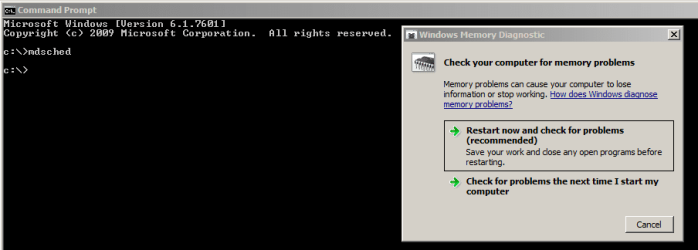
Entering mdsched.exe to command line results in error:
"Check your computer for memory problems - Restart now and check for problems"
(checked more then 1 time)

That's it.
Now we already have a clear fact.
Windows 7 memory diagnostic claims memory has problems and Memtest86+ overnight tests confirm we are going fine - except that Windows 7 can't run on this system.
Whom to blame, Windows or Memtest?

PS. Windows 7 is still capable to run without updating for some (unknown) time.
 

My Computer My Computer

At a glance

Windows 7 Enterprise 64 bitIntel I5-7608 GBCLUB 3D HD5450 1GB GDDR3 CGAX-54524LI
OS
Windows 7 Enterprise 64 bit
CPU
Intel I5-760
Motherboard
INTEL P55 S1156 DDR3 GLAN RAID BLKDP55WB
Memory
8 GB
Graphics Card(s)
CLUB 3D HD5450 1GB GDDR3 CGAX-54524LI
Hard Drives
WD150HFLS 150GB/10000rpm
WD10EALS Blue 1TB

My Computer My Computer

At a glance

Windows 10 Pro. 64/ version 1709 Windows 7 Pr...Intel i7-6800K @ 4.3Corsair Platinum 16 gig @2400EVGA GTX 1070 OC
Computer type
PC/Desktop
Computer Manufacturer/Model Number
Home made Desktop
OS
Windows 10 Pro. 64/ version 1709 Windows 7 Pro/64
CPU
Intel i7-6800K @ 4.3
Motherboard
ASUS X-99 Deluxe II
Memory
Corsair Platinum 16 gig @2400
Graphics Card(s)
EVGA GTX 1070 OC
Monitor(s) Displays
Asus 27" LED LCD/VE278Q
Screen Resolution
1920-1080 or 1280-720 HDMI
Hard Drives
INTEL SSD 730-240 Gb Sata 3.0/
PSU
EVGA Platium 1200W
Case
Phanteks Luxe Tempered Glass 8 fans/ one radiator
Cooling
XSPC/ Water Cooled CPU
Keyboard
Das 4 Professional
Mouse
Logitech M705/MX Anywhere 2-S
Internet Speed
100 mbits
Antivirus
Microsoft Security Essentials/ Malwarebytes Premium 3.0/ SAS
Browser
I.E. 11 default/Firefox/ ISP Time Warner Cable/Spectrum
Other Info
LG BluRay Burner/
Sound system-KLipsch-THX/
Icy Dock ssd Hot Swap bays.

My Computer My Computer

At a glance

Windows 10 Pro. 64/ version 1709 Windows 7 Pr...Intel i7-6800K @ 4.3Corsair Platinum 16 gig @2400EVGA GTX 1070 OC
Computer type
PC/Desktop
Computer Manufacturer/Model Number
Home made Desktop
OS
Windows 10 Pro. 64/ version 1709 Windows 7 Pro/64
CPU
Intel i7-6800K @ 4.3
Motherboard
ASUS X-99 Deluxe II
Memory
Corsair Platinum 16 gig @2400
Graphics Card(s)
EVGA GTX 1070 OC
Monitor(s) Displays
Asus 27" LED LCD/VE278Q
Screen Resolution
1920-1080 or 1280-720 HDMI
Hard Drives
INTEL SSD 730-240 Gb Sata 3.0/
PSU
EVGA Platium 1200W
Case
Phanteks Luxe Tempered Glass 8 fans/ one radiator
Cooling
XSPC/ Water Cooled CPU
Keyboard
Das 4 Professional
Mouse
Logitech M705/MX Anywhere 2-S
Internet Speed
100 mbits
Antivirus
Microsoft Security Essentials/ Malwarebytes Premium 3.0/ SAS
Browser
I.E. 11 default/Firefox/ ISP Time Warner Cable/Spectrum
Other Info
LG BluRay Burner/
Sound system-KLipsch-THX/
Icy Dock ssd Hot Swap bays.
Hello

I quite don't understand, what is common between threads "Windows Genuine and Activation Issue Posting Instructions." and "Windows 7 can't run with memory chips which Memtest86+ finds flawless"?

I consider this phenomena rather exiting and certainly I'm ready to post any logs and info which seems reasonable if there is someone capable of interpreting this.

If you are not just trolling, I'd appreciate very much some enlightening words, where is the glue in activation thread?
 
Last edited:

My Computer My Computer

At a glance

Windows 7 Enterprise 64 bitIntel I5-7608 GBCLUB 3D HD5450 1GB GDDR3 CGAX-54524LI
OS
Windows 7 Enterprise 64 bit
CPU
Intel I5-760
Motherboard
INTEL P55 S1156 DDR3 GLAN RAID BLKDP55WB
Memory
8 GB
Graphics Card(s)
CLUB 3D HD5450 1GB GDDR3 CGAX-54524LI
Hard Drives
WD150HFLS 150GB/10000rpm
WD10EALS Blue 1TB
What do failed updates have to do with memory ? Obviously the Crucial sticks are garbage, just chuck em :)

type this in the run box, let it run. mdsched.exe
Let us know what the results are.

Really a good point - your advice makes sense.

Entering mdsched.exe to command line results in error:
"Check your computer for memory problems - Restart now and check for problems"
(checked more then 1 time)

That's it.
Now we already have a clear fact.
Windows 7 memory diagnostic claims memory has problems and Memtest86+ overnight tests confirm we are going fine - except that Windows 7 can't run on this system.
Whom to blame, Windows or Memtest?

PS. Windows 7 is still capable to run without updating for some (unknown) time.
Nothing that you posted indicates that the Windows 7 memory diagnostics claims that the memory has problems... and there was no need (but no harm) in starting that diag tool from the command prompt.

Please help me out here: Where did you get the impression that Windows thinks that there is a problem with your RAM? As mentioned in post #6: "What do failed updates have to do with memory?"
 

Attachments

  • MT.PNG
    MT.PNG
    10.3 KB · Views: 0

My Computer My Computer

At a glance

W7 Pro SP1 64biti78GBIntel HD Graphics
Computer type
Laptop
Computer Manufacturer/Model Number
Employer provided Dell Latitude
OS
W7 Pro SP1 64bit
CPU
i7
Memory
8GB
Graphics Card(s)
Intel HD Graphics
Hard Drives
crappy SSD
Antivirus
Employer mandated Symantec Endpoint Protection
Browser
Pale Moon 64bit, IE11 64bit & Chrome 64bit
Doesn`t really matter how you run it.

But what were the results of the test ?

What error is it giving you after windows restarts ?

I thought everything was fine with the Kingston set ?

I`m lost too :confused:
 

My Computer My Computer

At a glance

Windows 10 Pro x64Intel Core i7 6700KGSkill TridentZ RGB 16GB 3600 16-16-16-36EVGA GTX 980 Ti SC x2
Computer type
PC/Desktop
Computer Manufacturer/Model Number
Skylake Special #666
OS
Windows 10 Pro x64
CPU
Intel Core i7 6700K
Motherboard
Asus Sabertooth Z170 Mark 1
Memory
GSkill TridentZ RGB 16GB 3600 16-16-16-36
Graphics Card(s)
EVGA GTX 980 Ti SC x2
Sound Card
Realtek High Definition
Monitor(s) Displays
AOC G2460PG
Screen Resolution
1920 x 1080 144Hz
Hard Drives
Samsung 860 Pro 256GB, Seagate Barracuda 4TB x2
PSU
EVGA 1000 P2, EVGA White Custom Braided Cables
Case
Corsair Vengeance C70 Gunmetal Black
Cooling
Corsair H100i v2, Corsair ML120 x2, Thermal Grizzly Kryonaut
Keyboard
Logitech G910 Orion Spectrum
Mouse
Logitech G700s
Internet Speed
Verizon Fios Quantum Gateway 75/75
Antivirus
Windows Defender, Malwarebytes Free 3.8.3
Browser
Chrome
Other Info
Corsair SP120 x4, LG Blu-ray Drive, Durabrand HT-395 100 Watt Dolby Digital Amp, Corsair H2100 Wireless 7.1 Headset
I think that the OP interpreted the offer to...
"Check your computer for memory problems"
...as an declaration that problems had already been found.

I do not think that the OP ever ran the test...
...probably just canceled the dialog box and made the post.
:-(
 

My Computer My Computer

At a glance

W7 Pro SP1 64biti78GBIntel HD Graphics
Computer type
Laptop
Computer Manufacturer/Model Number
Employer provided Dell Latitude
OS
W7 Pro SP1 64bit
CPU
i7
Memory
8GB
Graphics Card(s)
Intel HD Graphics
Hard Drives
crappy SSD
Antivirus
Employer mandated Symantec Endpoint Protection
Browser
Pale Moon 64bit, IE11 64bit & Chrome 64bit
I think that the OP interpreted the offer to...
"Check your computer for memory problems"
...as an declaration that problems had already been found.

I do not think that the OP ever ran the test...
...probably just canceled the dialog box and made the post.
:-(

There was no errors in Event viewer MemoryDiagnostics after restart.

What makes me think that there is memory problem is that I did 7-8 clean installs of W7 SP1 OEM with Crucial memory and always Windows upadate failed with error Code 80244019 (Windows could not search for updates. An error occurred while checking for new updates.)
Googled a lot in meantime trying to figure out reason and tried a lot of fixes which didn't work.
So I had a new PC which doesn't run Windows 7 and according to Memetest86+ without memory errors.
Despite of having tested memory several times (more the 8 passes) without any flaws found I finally still decided to obtain Kingston for fun. (because update error Code 80244019 often is hardware failure.)
To my surprise problem vanished with Kingston and to be sure I did 3-4 clean installs to m2s, SSD, HDD SATA - no problem. PC is in best possible condition.
I swapped back Crucial memory and did 3-4 fresh W7 installs for testing and again always there was a problem with updates.

So it's just likelyhood by success failure rates in numbers using different memories.
Crucial always failed and Kingston was fine during updates (and also later for several days until decided to start testing Crucial again for curiosity. Total number of tests 15 perhaps.

Any ideas what is the problem if not memory and how to troubleshoot if Memtest86+ doesn't help?
 
Last edited:

My Computer My Computer

At a glance

Windows 7 Enterprise 64 bitIntel I5-7608 GBCLUB 3D HD5450 1GB GDDR3 CGAX-54524LI
OS
Windows 7 Enterprise 64 bit
CPU
Intel I5-760
Motherboard
INTEL P55 S1156 DDR3 GLAN RAID BLKDP55WB
Memory
8 GB
Graphics Card(s)
CLUB 3D HD5450 1GB GDDR3 CGAX-54524LI
Hard Drives
WD150HFLS 150GB/10000rpm
WD10EALS Blue 1TB
Thanks for taking the time to restate the issue. My apologies for not understanding earlier. All of the info is there in the OP - I just was not understanding it.


I wonder what Crucial would say about your findings. Don't they have a lifetime warranty?
 

My Computer My Computer

At a glance

W7 Pro SP1 64biti78GBIntel HD Graphics
Computer type
Laptop
Computer Manufacturer/Model Number
Employer provided Dell Latitude
OS
W7 Pro SP1 64bit
CPU
i7
Memory
8GB
Graphics Card(s)
Intel HD Graphics
Hard Drives
crappy SSD
Antivirus
Employer mandated Symantec Endpoint Protection
Browser
Pale Moon 64bit, IE11 64bit & Chrome 64bit
Well I imagine 1. there might be some (few) mem addresses, which are reserved by BIOS and any Memtest can't access these.
2. Something special how Windows handles DDR4 memory reads and writes, which perhaps is not supported by Memtest86+.
There are perhaps also other scenarios which I hope someone with more knowledge can figure out.

But still there remains a unanswered question, how accurate is Memtest86+?
Perhaps DDR4 is out of scope?

Memory is under warranty but if RMA tests memory using Memtest86+ it is not considered faulty :-)
 

My Computer My Computer

At a glance

Windows 7 Enterprise 64 bitIntel I5-7608 GBCLUB 3D HD5450 1GB GDDR3 CGAX-54524LI
OS
Windows 7 Enterprise 64 bit
CPU
Intel I5-760
Motherboard
INTEL P55 S1156 DDR3 GLAN RAID BLKDP55WB
Memory
8 GB
Graphics Card(s)
CLUB 3D HD5450 1GB GDDR3 CGAX-54524LI
Hard Drives
WD150HFLS 150GB/10000rpm
WD10EALS Blue 1TB
Let us know if you talk to Crucial about this. It would be nice to know what they consider a definitive test.
 

My Computer My Computer

At a glance

W7 Pro SP1 64biti78GBIntel HD Graphics
Computer type
Laptop
Computer Manufacturer/Model Number
Employer provided Dell Latitude
OS
W7 Pro SP1 64bit
CPU
i7
Memory
8GB
Graphics Card(s)
Intel HD Graphics
Hard Drives
crappy SSD
Antivirus
Employer mandated Symantec Endpoint Protection
Browser
Pale Moon 64bit, IE11 64bit & Chrome 64bit
Back
Top