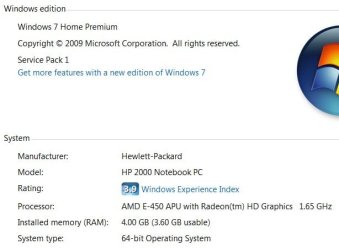
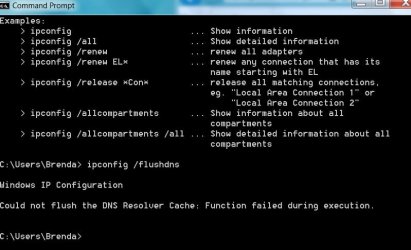
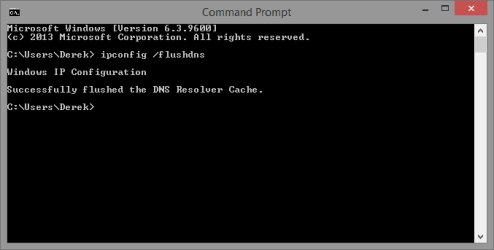
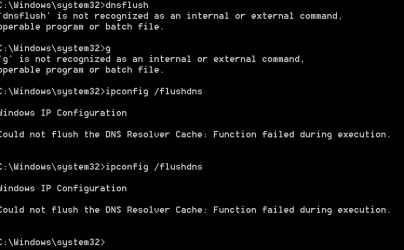
I have the administrator command prompt open. I need to know is if there is a space between cnnfig and the slash(/)? That is what figure one seems to show in derekimo's post and it did not work for me. I have the command window waiting for the correct command.
Anne
UI posted while I was posting this message. I need to do the command prompt for something I am doing.
Hello Anne, yes the command is ipconfig(space)/flushdns
That should work okay.
My Computer
At a glance
Win 7 Ultimate, Win 8.1 Pro, Linux Mint 19 Ci...Intel i5 4690KCorsair Vengeance LP 32GB DDR3MSI GTX 1060 GAMING X 6GB
Computer type
PC/Desktop
Computer Manufacturer/Model Number
Custom Build
OS
Win 7 Ultimate, Win 8.1 Pro, Linux Mint 19 Cinnamon (All 64-Bit)
CPU
Intel i5 4690K
Motherboard
Gigabyte Z97X-UD3H
Memory
Corsair Vengeance LP 32GB DDR3
Graphics Card(s)
MSI GTX 1060 GAMING X 6GB
Sound Card
Onboard
Hard Drives
Samsung 850 EVO 250GB SSD (x2)
Samsung 860 EVO 1TB SSD (x2)
Crucial MX300 525GB SSD
WD Blue 2TB 5400rpm Intellipark Disabled (x2)
PSU
Corsair HX750i
Case
Phanteks Enthoo Pro
Cooling
CM Hyper 212 EVO on CPU, Noctua Redux NF-P14S 1500rpm (x6)
Keyboard
Corsair K70 RGB LUX
Mouse
Corsair Sabre RGB
Antivirus
Avast Free, MalwareBytes, SAS & CryptoPrevent
Browser
Chrome
Other Info
StarTech PEXESAT322I 2 Port PCI-E SATA Card
ASUS PCE-AC56 Dual-band AC1300 Wireless Card
Akasa FC.Six Manual Fan Controller
And a Partridge in a Pear Tree!
Is this the same computer as the one being cleaned up for malware here?
If so, it is confusing, inefficient, counter-productive, and potentially harmful to work on the same computer simultaneously in 2 different venues ("too many cooks...").
I respectfully suggest that you choose one forum or the other, but not both.
>> If you prefer to work here at sevenforums.com, then I suggest that you please notify your helper at the other forum, so that he can close your thread there and devote his time to helping other users.
Just a friendly suggestion and thanks for your understanding,
MM
Wow! I had no idea that it would be wrong to try to fix two different issues on the same machine. I will keep this topic open and get back to it when the Sluggish computer issue is resolved at MBAM.
It is confusing, inefficient, counter-productive, and potentially harmful to work on the same computer simultaneously in 2 (EDIT: or 3) different venues.
Changes/modifications made in one venue can alter the system in such a way that they interfere with remedial actions being taken in the other venue.
The helpers here don't know the changes/corrections being made at the other forum, and vice versa.
Moreover, the helpers at both places are volunteers -- it drains scant resources for one user to be working on the same computer SIMULTANEOUSLY in two venues.
That is all.
I will keep this topic open and get back to it when the Sluggish computer issue is resolved at MBAM.
Thank you for your thoughtful and patient explanation. You gave me good advice and I will take it. You are quite right that I should do one task at a time to avoid confusion and possible damage to my machine.
I realize that there are multiple threads open. You should take no action (make no changes) based on this thread while working with other threads. Just FYI: the screenshot that you posted (quoted above) indicates that the DNS Client service is not running. [I keep that service disabled.]
By the way:
The space is optional for many commands.
ipconfig/flushdns
ipconfig /flushdns
both work.
Thank you for your response. I knew that the dns flush was not successful. At this time, I am going to put this thread on the back burner so I can take care of a more serious issue with my laptop. I am getting assistance from Malwarebytes and will return when I am done there.