Solved How to check,if GPU Stock Thermal Paste needs a replacement or NOT...

fahadhum

New member
Member
VIP
Local time
12:17 PM
Messages
201
Location
Doha Qatar
Is it possible to check via a Software like , " Real Temp " to know if i need to replace stock thermal paste and apply a new one.

The software " Real Temp " has an option of showing the status of the Thermal paste as "OK".Is it really accurate and can i just rely this software i.e " Real Temp " to let me decide when i need to remove the stock Thermal Paste and apply a new one....

I have been using my rig for almost 11 Months now & i have not cleaned my GPU by Unscrewing it or similar.
So,i was wondering if i can use software's like " Real Temp " to make sure if i need cleaning and removing the stock Thermal paste or not....
 

My Computer My Computer

At a glance

Windows 7 Home Premium 64 biti716 GBNvidia GFORCE GTX 960 2 GB
Computer type
PC/Desktop
Computer Manufacturer/Model Number
Asus
OS
Windows 7 Home Premium 64 bit
CPU
i7
Motherboard
Gigabyte H97-D3H
Memory
16 GB
Graphics Card(s)
Nvidia GFORCE GTX 960 2 GB
Screen Resolution
1280*720
Cooling
CORSAIR Liquid Fan + One Built in FAN
Antivirus
Avast Free Anti Virus 2015
Browser
Google Chrome
Only way to find out if the thermal paste is still doing it's job is when it's still keeping the consistency of the temperature of not going way too hotter than usual.
 

My Computer My Computer

At a glance

Windows 7 Home Premium 64-BITAMD A8 7200P8GB 1600mhzRadeon R5 (APU) + Radeon R5 M230 2GB Dual Gra...
Computer type
PC/Desktop
Computer Manufacturer/Model Number
ASUS X550ZE
OS
Windows 7 Home Premium 64-BIT
CPU
AMD A8 7200P
Motherboard
N/A
Memory
8GB 1600mhz
Graphics Card(s)
Radeon R5 (APU) + Radeon R5 M230 2GB Dual Graphics
Sound Card
Realtek ALC269 with SonicMaster
Monitor(s) Displays
Laptop Display
Screen Resolution
1920 x 1080 @60hz
Hard Drives
WDC WD50 00LPVX-80V0TT0 (500GB)
PSU
Laptop Charger
Mouse
ARMAGGEDON TEXTRON SCORPION 7
Internet Speed
100 mbps DOWN / 50 mbps UP
Antivirus
Windows Defender
Browser
Mozzila FireFox, Valve Steam in-game internet browser
RealTemp reads the temp of the cpu and gpu if you set it to do so.

RealTemp only reads temps. It does not tell you anything about anything else.

RealTemp doesn't know thermal compound from mashed potatoes.

It is always wise to monitor your temps and check now and again to see how clean things are in your system. I change my gpu thermal paste on my gpu if my temps start to run high compared to ambient temp and I can't find any other problems.
I have had 1 gpu last 5 years and never had to do anything except keep the fan and grill clean.

Is your system specs correct and your system only has one case fan?

Cooling CORSAIR Liquid Fan + One Built in FAN
 

My Computer My Computer

At a glance

Windows 10 Pro. 64/ version 1709 Windows 7 Pr...Intel i7-6800K @ 4.3Corsair Platinum 16 gig @2400EVGA GTX 1070 OC
Computer type
PC/Desktop
Computer Manufacturer/Model Number
Home made Desktop
OS
Windows 10 Pro. 64/ version 1709 Windows 7 Pro/64
CPU
Intel i7-6800K @ 4.3
Motherboard
ASUS X-99 Deluxe II
Memory
Corsair Platinum 16 gig @2400
Graphics Card(s)
EVGA GTX 1070 OC
Monitor(s) Displays
Asus 27" LED LCD/VE278Q
Screen Resolution
1920-1080 or 1280-720 HDMI
Hard Drives
INTEL SSD 730-240 Gb Sata 3.0/
PSU
EVGA Platium 1200W
Case
Phanteks Luxe Tempered Glass 8 fans/ one radiator
Cooling
XSPC/ Water Cooled CPU
Keyboard
Das 4 Professional
Mouse
Logitech M705/MX Anywhere 2-S
Internet Speed
100 mbits
Antivirus
Microsoft Security Essentials/ Malwarebytes Premium 3.0/ SAS
Browser
I.E. 11 default/Firefox/ ISP Time Warner Cable/Spectrum
Other Info
LG BluRay Burner/
Sound system-KLipsch-THX/
Icy Dock ssd Hot Swap bays.
Yes

RealTemp reads the temp of the cpu and gpu if you set it to do so.

RealTemp only reads temps. It does not tell you anything about anything else.

RealTemp doesn't know thermal compound from mashed potatoes.

It is always wise to monitor your temps and check now and again to see how clean things are in your system. I change my gpu thermal paste on my gpu if my temps start to run high compared to ambient temp and I can't find any other problems.
I have had 1 gpu last 5 years and never had to do anything except keep the fan and grill clean.

Is your system specs correct and your system only has one case fan?

Cooling CORSAIR Liquid Fan + One Built in FAN

Yes , my system specs are correct.

Actually i am getting 50 fps MAX in 80% of the games that i ran.And i have a 16 gb RAM..

So i was wondering that may be cleaning the GPU will give me some more fps.Since i won't overclock,so i need to get all the benefits that i can from the stock clock speeds & everything.

It's been 11 months now and i have not unscrewed and opened my GPU anyways.It has been like that since i bought it.

Problem is , i fear doing something wrong while handling the Thermal Paste area & i do not even know how to remove and apply a new paste.And unscrew and unplug all the wires and stuff ..

I wonder if the shop guys who made my pc , may agree to do this for me.Don't know how much it will cost me though. ..
 

My Computer My Computer

At a glance

Windows 7 Home Premium 64 biti716 GBNvidia GFORCE GTX 960 2 GB
Computer type
PC/Desktop
Computer Manufacturer/Model Number
Asus
OS
Windows 7 Home Premium 64 bit
CPU
i7
Motherboard
Gigabyte H97-D3H
Memory
16 GB
Graphics Card(s)
Nvidia GFORCE GTX 960 2 GB
Screen Resolution
1280*720
Cooling
CORSAIR Liquid Fan + One Built in FAN
Antivirus
Avast Free Anti Virus 2015
Browser
Google Chrome
 

My Computer My Computer

At a glance

Windows 7 Home Premium 64-BITAMD A8 7200P8GB 1600mhzRadeon R5 (APU) + Radeon R5 M230 2GB Dual Gra...
Computer type
PC/Desktop
Computer Manufacturer/Model Number
ASUS X550ZE
OS
Windows 7 Home Premium 64-BIT
CPU
AMD A8 7200P
Motherboard
N/A
Memory
8GB 1600mhz
Graphics Card(s)
Radeon R5 (APU) + Radeon R5 M230 2GB Dual Graphics
Sound Card
Realtek ALC269 with SonicMaster
Monitor(s) Displays
Laptop Display
Screen Resolution
1920 x 1080 @60hz
Hard Drives
WDC WD50 00LPVX-80V0TT0 (500GB)
PSU
Laptop Charger
Mouse
ARMAGGEDON TEXTRON SCORPION 7
Internet Speed
100 mbps DOWN / 50 mbps UP
Antivirus
Windows Defender
Browser
Mozzila FireFox, Valve Steam in-game internet browser
Thank You


Thank you for sharing this video.I have seen it before though.I hope , i will do good when i will open my case up and unscrew the GPU.

I am usually cautious when dealing with such electronic matters.But i suppose , i will have to inevitable do some cleaning if i want to get some more fps.

The tricky part to me is the THERMAL PASTE section.I read somewhere , a user who had to apply and re-apply thermal paste several times as his temps started going TOO HIGH or TOO LOW due to PERHAPS wrongly applying the paste.So,i fear not to do the same.

I am dying to open my case though and just clean the dust of the FANS & HEAT SINK of my GPU.I hope i can do that without touching or disturbing the Thermal Paste area..
 

My Computer My Computer

At a glance

Windows 7 Home Premium 64 biti716 GBNvidia GFORCE GTX 960 2 GB
Computer type
PC/Desktop
Computer Manufacturer/Model Number
Asus
OS
Windows 7 Home Premium 64 bit
CPU
i7
Motherboard
Gigabyte H97-D3H
Memory
16 GB
Graphics Card(s)
Nvidia GFORCE GTX 960 2 GB
Screen Resolution
1280*720
Cooling
CORSAIR Liquid Fan + One Built in FAN
Antivirus
Avast Free Anti Virus 2015
Browser
Google Chrome
Please put in your system specs the case (tower) you have.
Tell us exactly how many case fans you have.

If you don't have proper air flow through the case the video card will run hotter.
 

My Computer My Computer

At a glance

Windows 10 Pro. 64/ version 1709 Windows 7 Pr...Intel i7-6800K @ 4.3Corsair Platinum 16 gig @2400EVGA GTX 1070 OC
Computer type
PC/Desktop
Computer Manufacturer/Model Number
Home made Desktop
OS
Windows 10 Pro. 64/ version 1709 Windows 7 Pro/64
CPU
Intel i7-6800K @ 4.3
Motherboard
ASUS X-99 Deluxe II
Memory
Corsair Platinum 16 gig @2400
Graphics Card(s)
EVGA GTX 1070 OC
Monitor(s) Displays
Asus 27" LED LCD/VE278Q
Screen Resolution
1920-1080 or 1280-720 HDMI
Hard Drives
INTEL SSD 730-240 Gb Sata 3.0/
PSU
EVGA Platium 1200W
Case
Phanteks Luxe Tempered Glass 8 fans/ one radiator
Cooling
XSPC/ Water Cooled CPU
Keyboard
Das 4 Professional
Mouse
Logitech M705/MX Anywhere 2-S
Internet Speed
100 mbits
Antivirus
Microsoft Security Essentials/ Malwarebytes Premium 3.0/ SAS
Browser
I.E. 11 default/Firefox/ ISP Time Warner Cable/Spectrum
Other Info
LG BluRay Burner/
Sound system-KLipsch-THX/
Icy Dock ssd Hot Swap bays.
Actually i am getting 50 fps MAX in 80% of the games that i ran.And i have a 16 gb RAM..

So i was wondering that may be cleaning the GPU will give me some more fps.Since i won't overclock,so i need to get all the benefits that i can from the stock clock speeds & everything.

It's been 11 months now and i have not unscrewed and opened my GPU anyways.It has been like that since i bought it.

Problem is , i fear doing something wrong while handling the Thermal Paste area & i do not even know how to remove and apply a new paste.And unscrew and unplug all the wires and stuff ..

I wonder if the shop guys who made my pc , may agree to do this for me.Don't know how much it will cost me though. ..
First of all, cleaning the GPU won't give you more FPS, unless the card is seriously overheating. Your problem, if it is overheating, is likely due to the single case fan that you have not providing enough airflow through the case.

Your card is too new to be worrying about thermal paste. It's just an expense and a hassle to change it if you don't need to, and in my opinion, you don't need to.

As for the 50 FPS in games, that's actually pretty good for a 128 bit data bus video card with only 2 GB of VRAM.
 

My Computer My Computer

At a glance

Win 7 Pro x64/Win 10 Pro x64 dual bootAMD FX 8350 Vishera @ 420016 GB Mushkin Blackline DDR3-2400 @ 1866 (9-1...XFX Radeon R9 280 Double D Black Edition
Computer type
PC/Desktop
Computer Manufacturer/Model Number
Mellon Labs (custom build)
OS
Win 7 Pro x64/Win 10 Pro x64 dual boot
CPU
AMD FX 8350 Vishera @ 4200
Motherboard
ASUS M5A97 R2.0
Memory
16 GB Mushkin Blackline DDR3-2400 @ 1866 (9-10-10-10-31)
Graphics Card(s)
XFX Radeon R9 280 Double D Black Edition
Sound Card
Realtek HD Audio on MB. Sounds great.
Monitor(s) Displays
Acer 24", Acer 22"
Screen Resolution
3840 x 1080
Hard Drives
1 x Mushkin Chronos 120 GB SSD (Win 10)
1 x Samsung 850 EVO 250 GB SSD (Win 7)
1 x WD 1TB SATA Blue
1 x WD 1TB SATA Green
PSU
Corsair TX-750
Case
CoolerMaster HAF 912+
Cooling
Coolermaster Seidon 240M Liquid AIO. 6 case fans
Keyboard
Logitech G710+
Mouse
Logitech G500s
Internet Speed
Much better since I got fiber, but still way overpriced.
Antivirus
MSE, Malware Bytes for scanning
Browser
Firefox
Other Info
Corsair VOID USB headphones.

A Mellon Labs X-1 - LCD Smartie driven system status display.

Brought to you by the letter E
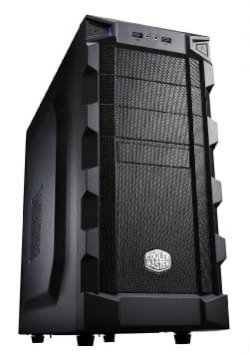
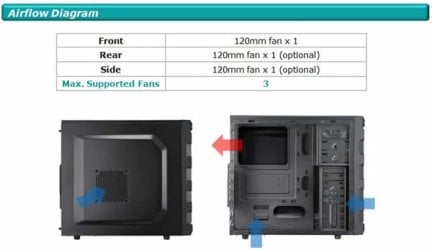
Please put in your system specs the case (tower) you have.
Tell us exactly how many case fans you have.

If you don't have proper air flow through the case the video card will run hotter.

My System Specs are as follows :

Computer type : PC/Desktop
System Manufacturer/Model Number : Asus
OS : Windows 7 Home Premium 64 bit
CPU : i7
Motherboard Gigabyte : H97-D3H
Processor : Interl (R) Core(TM) i7-4790 CPU @ 3.60 GHZ 3.60 GHZ
Memory : 16 GB (RAM)
Graphics Card : Nvidia GFORCE GTX 960 2 GB
Screen Resolution : 1280*720 (i AM USING A SHARP 32 INCH Television as a screen via HDMI)
Cooling : CORSAIR Liquid Fan + One Built in FAN

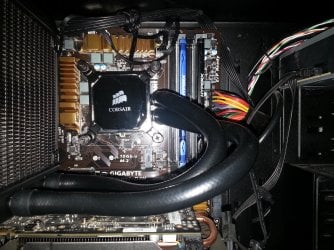
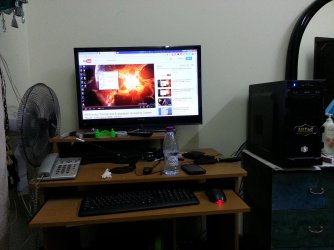
I have also attached my Case Model Type Picture,The Corsair Liquid Fan picture , as well as the picure of the Table showing how i have placed my case for AIR FLOW....
 

Attachments

  • Cooler Master K280 Case 1.jpg
    Cooler Master K280 Case 1.jpg
    14.2 KB · Views: 19
  • Cooler Master K280 Case 2.jpg
    Cooler Master K280 Case 2.jpg
    31.7 KB · Views: 20
  • Picture # 2.jpg
    Picture # 2.jpg
    870.5 KB · Views: 3
  • 1.jpg
    1.jpg
    680 KB · Views: 3

My Computer My Computer

At a glance

Windows 7 Home Premium 64 biti716 GBNvidia GFORCE GTX 960 2 GB
Computer type
PC/Desktop
Computer Manufacturer/Model Number
Asus
OS
Windows 7 Home Premium 64 bit
CPU
i7
Motherboard
Gigabyte H97-D3H
Memory
16 GB
Graphics Card(s)
Nvidia GFORCE GTX 960 2 GB
Screen Resolution
1280*720
Cooling
CORSAIR Liquid Fan + One Built in FAN
Antivirus
Avast Free Anti Virus 2015
Browser
Google Chrome
Actually i am getting 50 fps MAX in 80% of the games that i ran.And i have a 16 gb RAM..

So i was wondering that may be cleaning the GPU will give me some more fps.Since i won't overclock,so i need to get all the benefits that i can from the stock clock speeds & everything.

It's been 11 months now and i have not unscrewed and opened my GPU anyways.It has been like that since i bought it.

Problem is , i fear doing something wrong while handling the Thermal Paste area & i do not even know how to remove and apply a new paste.And unscrew and unplug all the wires and stuff ..

I wonder if the shop guys who made my pc , may agree to do this for me.Don't know how much it will cost me though. ..
First of all, cleaning the GPU won't give you more FPS, unless the card is seriously overheating. Your problem, if it is overheating, is likely due to the single case fan that you have not providing enough airflow through the case.

Your card is too new to be worrying about thermal paste. It's just an expense and a hassle to change it if you don't need to, and in my opinion, you don't need to.

As for the 50 FPS in games, that's actually pretty good for a 128 bit data bus video card with only 2 GB of VRAM.

I see , i did not know the true potential of my Graphics Card.May be this is the MAX it can deliver i.e 50 fps.
I bought this ASSEMBLED PC 11 months ago.

I initially had a stock Intel Fan on my Processor , which i replaced with a CORSAIR Liquid Cooler Fan.

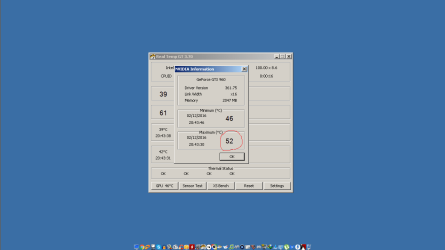
To give you a rough idea regarding if my Graphics Card is OVERHEATING or NOT,i have attached my GPU Minimum & Maximum Temps(WHILE GAMING) picture , below.I saved this picture after around 40 Minutes of Game play.
 

Attachments

  • Maximum GPU Temp.png
    Maximum GPU Temp.png
    13.8 KB · Views: 6

My Computer My Computer

At a glance

Windows 7 Home Premium 64 biti716 GBNvidia GFORCE GTX 960 2 GB
Computer type
PC/Desktop
Computer Manufacturer/Model Number
Asus
OS
Windows 7 Home Premium 64 bit
CPU
i7
Motherboard
Gigabyte H97-D3H
Memory
16 GB
Graphics Card(s)
Nvidia GFORCE GTX 960 2 GB
Screen Resolution
1280*720
Cooling
CORSAIR Liquid Fan + One Built in FAN
Antivirus
Avast Free Anti Virus 2015
Browser
Google Chrome
52C is a more than excellent temperature after 40 minutes of game play. You have no problems there at all. I wouldn't worry about the temps, or the thermal paste. I think your issue with the medium FPS is just the limitation of your card. There isn't much you can do about that, other than to buy something like a GTX 970, or a Radeon 390X, both similar in capabilities, though the Nvidia card will outperform the 390X by a small margin.
 

My Computer My Computer

At a glance

Win 7 Pro x64/Win 10 Pro x64 dual bootAMD FX 8350 Vishera @ 420016 GB Mushkin Blackline DDR3-2400 @ 1866 (9-1...XFX Radeon R9 280 Double D Black Edition
Computer type
PC/Desktop
Computer Manufacturer/Model Number
Mellon Labs (custom build)
OS
Win 7 Pro x64/Win 10 Pro x64 dual boot
CPU
AMD FX 8350 Vishera @ 4200
Motherboard
ASUS M5A97 R2.0
Memory
16 GB Mushkin Blackline DDR3-2400 @ 1866 (9-10-10-10-31)
Graphics Card(s)
XFX Radeon R9 280 Double D Black Edition
Sound Card
Realtek HD Audio on MB. Sounds great.
Monitor(s) Displays
Acer 24", Acer 22"
Screen Resolution
3840 x 1080
Hard Drives
1 x Mushkin Chronos 120 GB SSD (Win 10)
1 x Samsung 850 EVO 250 GB SSD (Win 7)
1 x WD 1TB SATA Blue
1 x WD 1TB SATA Green
PSU
Corsair TX-750
Case
CoolerMaster HAF 912+
Cooling
Coolermaster Seidon 240M Liquid AIO. 6 case fans
Keyboard
Logitech G710+
Mouse
Logitech G500s
Internet Speed
Much better since I got fiber, but still way overpriced.
Antivirus
MSE, Malware Bytes for scanning
Browser
Firefox
Other Info
Corsair VOID USB headphones.

A Mellon Labs X-1 - LCD Smartie driven system status display.

Brought to you by the letter E
There is no reason to ever replace the TIM on a 960, it`s too new, the fans only spinup when it hits a certain temprature, your GPU is fine, don`t worry about a thing.

It would be nice if you put the manufacturer in your specs :)

What game are you playing that the GPU temp only hits 52c ?

52c is nothing, in GPU terms that`s sub polar temps ;)
 

My Computer My Computer

At a glance

Windows 10 Pro x64Intel Core i7 6700KGSkill TridentZ RGB 16GB 3600 16-16-16-36EVGA GTX 980 Ti SC x2
Computer type
PC/Desktop
Computer Manufacturer/Model Number
Skylake Special #666
OS
Windows 10 Pro x64
CPU
Intel Core i7 6700K
Motherboard
Asus Sabertooth Z170 Mark 1
Memory
GSkill TridentZ RGB 16GB 3600 16-16-16-36
Graphics Card(s)
EVGA GTX 980 Ti SC x2
Sound Card
Realtek High Definition
Monitor(s) Displays
AOC G2460PG
Screen Resolution
1920 x 1080 144Hz
Hard Drives
Samsung 860 Pro 256GB, Seagate Barracuda 4TB x2
PSU
EVGA 1000 P2, EVGA White Custom Braided Cables
Case
Corsair Vengeance C70 Gunmetal Black
Cooling
Corsair H100i v2, Corsair ML120 x2, Thermal Grizzly Kryonaut
Keyboard
Logitech G910 Orion Spectrum
Mouse
Logitech G700s
Internet Speed
Verizon Fios Quantum Gateway 75/75
Antivirus
Windows Defender, Malwarebytes Free 3.8.3
Browser
Chrome
Other Info
Corsair SP120 x4, LG Blu-ray Drive, Durabrand HT-395 100 Watt Dolby Digital Amp, Corsair H2100 Wireless 7.1 Headset
52C is a more than excellent temperature after 40 minutes of game play. You have no problems there at all. I wouldn't worry about the temps, or the thermal paste. I think your issue with the medium FPS is just the limitation of your card. There isn't much you can do about that, other than to buy something like a GTX 970, or a Radeon 390X, both similar in capabilities, though the Nvidia card will outperform the 390X by a small margin.

Glad to know that this a more than excellent temperature :)

Perhaps this is due to the Corsair Liquid Cooler Fan that i have installed in place of the Stock Intel fan.

I will buy a new Nvidia Gtx Graphics card some day once i get some money.May be i will get a Gtx 970 or 980 depending on my budget.

I do not want to sound like a PRESISTENT BORE :) , but i have one more question regarding this CLEANING MATTER.That is : what about the fact that i have not cleaned my GPU for almost 11 months now & when i do MILDLY clean my case weekly,i can see dust on the GPU fans.But i can not clean it , as i have not opened / unscrewed my GPU yet...
 

My Computer My Computer

At a glance

Windows 7 Home Premium 64 biti716 GBNvidia GFORCE GTX 960 2 GB
Computer type
PC/Desktop
Computer Manufacturer/Model Number
Asus
OS
Windows 7 Home Premium 64 bit
CPU
i7
Motherboard
Gigabyte H97-D3H
Memory
16 GB
Graphics Card(s)
Nvidia GFORCE GTX 960 2 GB
Screen Resolution
1280*720
Cooling
CORSAIR Liquid Fan + One Built in FAN
Antivirus
Avast Free Anti Virus 2015
Browser
Google Chrome
I do not want to sound like a PRESISTENT BORE :) , but i have one more question regarding this CLEANING MATTER.That is : what about the fact that i have not cleaned my GPU for almost 11 months now & when i do MILDLY clean my case weekly,i can see dust on the GPU fans.But i can not clean it , as i have not opened / unscrewed my GPU yet...
You don't actually have to take your GPU all apart to clean it...

I usually remove mine from the case (make sure you have grounded yourself by touching the case when it is plugged in, but make sure the power is not on when you take the GPU out. Don't do this on carpet), and I use a can of compressed air to blow through the fins on the heatsink under the fan. Make sure you stick a finger in the fan blades so the fan won't turn while you do this. Spray the compressed air on the fan blades to clean the dust off (while holding your finger in the fan blades so it won't turn). If the fan blades are still dusty after this, you can use a moistened cotton swab or small cloth to gently wipe off the excess dust on the blades. Then put the GPU back.

Do NOT use a vacuum cleaner to clean the card - ever.

It's very important that you don't spray compressed air directly on the fan blades and make them spin. Doing so will make them spin too fast and the bearings on the fan will wear prematurely. At the very least, you could damage the fan's bearings. That's why you stick your finger into the fan blades when using the compressed air.
 

My Computer My Computer

At a glance

Win 7 Pro x64/Win 10 Pro x64 dual bootAMD FX 8350 Vishera @ 420016 GB Mushkin Blackline DDR3-2400 @ 1866 (9-1...XFX Radeon R9 280 Double D Black Edition
Computer type
PC/Desktop
Computer Manufacturer/Model Number
Mellon Labs (custom build)
OS
Win 7 Pro x64/Win 10 Pro x64 dual boot
CPU
AMD FX 8350 Vishera @ 4200
Motherboard
ASUS M5A97 R2.0
Memory
16 GB Mushkin Blackline DDR3-2400 @ 1866 (9-10-10-10-31)
Graphics Card(s)
XFX Radeon R9 280 Double D Black Edition
Sound Card
Realtek HD Audio on MB. Sounds great.
Monitor(s) Displays
Acer 24", Acer 22"
Screen Resolution
3840 x 1080
Hard Drives
1 x Mushkin Chronos 120 GB SSD (Win 10)
1 x Samsung 850 EVO 250 GB SSD (Win 7)
1 x WD 1TB SATA Blue
1 x WD 1TB SATA Green
PSU
Corsair TX-750
Case
CoolerMaster HAF 912+
Cooling
Coolermaster Seidon 240M Liquid AIO. 6 case fans
Keyboard
Logitech G710+
Mouse
Logitech G500s
Internet Speed
Much better since I got fiber, but still way overpriced.
Antivirus
MSE, Malware Bytes for scanning
Browser
Firefox
Other Info
Corsair VOID USB headphones.

A Mellon Labs X-1 - LCD Smartie driven system status display.

Brought to you by the letter E
:)

There is no reason to ever replace the TIM on a 960, it`s too new, the fans only spinup when it hits a certain temprature, your GPU is fine, don`t worry about a thing.

It would be nice if you put the manufacturer in your specs :)

What game ar/e you playing that the GPU temp only hits 52c ?

52c is nothing, in GPU terms that`s sub polar temps ;)

I will post a link here which contains information regarding all of the hardware in my RIG.Drivers,models and everything else.I think , it also contains the manufacturer's name.

What is a TIM? What are sub polar tems ? I am not very knowledagle in this area , so i am being inquisitive about it.

The game that i was playing is an old one , it is Hitman Absolution.I have tried playing many modern games too on my system , like , GTA 5 , Metal Gear Solid Ground Zeroes , Metal Gear Solid :The Phantom Pain , Call of Duty Advanced Warfare , Batman Arkahm Knight , Assasin's Creed Unity ....

Amongst all of the names that i just mentioned , i was getting 60 fps in one game only i.e Metal Gear Solid Ground Zeroes.The rest of the Games are running on 50 FPS.

I doubt,what temps ,other games will give.I have only checked Hitman Absolution yet.

And 52c is also becasue of the Corsair Liquid Cooler Fan perhaps.Otherwise , my case used to get very hot when i had placed it in a tight place under my Computer Table & i had Stock Intel fan installed at the time.Afterwords i learned that i need to give my case some air and then i installed Corsair Liquid Fan and removed the Stock Intel fan .
 

My Computer My Computer

At a glance

Windows 7 Home Premium 64 biti716 GBNvidia GFORCE GTX 960 2 GB
Computer type
PC/Desktop
Computer Manufacturer/Model Number
Asus
OS
Windows 7 Home Premium 64 bit
CPU
i7
Motherboard
Gigabyte H97-D3H
Memory
16 GB
Graphics Card(s)
Nvidia GFORCE GTX 960 2 GB
Screen Resolution
1280*720
Cooling
CORSAIR Liquid Fan + One Built in FAN
Antivirus
Avast Free Anti Virus 2015
Browser
Google Chrome
What is a TIM? What are sub polar tems ? I am not very knowledagle in this area , so i am being inquisitive about it.
TIM is Thermal Interface Material = thermal paste.

His term "sub-polar temps" is a (brilliant) joke. He means that your graphics card is cold enough to be operating just south of the north pole (like outdoors in Sweden). The temp is very cold for a graphics card playing games. You're doing well.
 

My Computer My Computer

At a glance

Win 7 Pro x64/Win 10 Pro x64 dual bootAMD FX 8350 Vishera @ 420016 GB Mushkin Blackline DDR3-2400 @ 1866 (9-1...XFX Radeon R9 280 Double D Black Edition
Computer type
PC/Desktop
Computer Manufacturer/Model Number
Mellon Labs (custom build)
OS
Win 7 Pro x64/Win 10 Pro x64 dual boot
CPU
AMD FX 8350 Vishera @ 4200
Motherboard
ASUS M5A97 R2.0
Memory
16 GB Mushkin Blackline DDR3-2400 @ 1866 (9-10-10-10-31)
Graphics Card(s)
XFX Radeon R9 280 Double D Black Edition
Sound Card
Realtek HD Audio on MB. Sounds great.
Monitor(s) Displays
Acer 24", Acer 22"
Screen Resolution
3840 x 1080
Hard Drives
1 x Mushkin Chronos 120 GB SSD (Win 10)
1 x Samsung 850 EVO 250 GB SSD (Win 7)
1 x WD 1TB SATA Blue
1 x WD 1TB SATA Green
PSU
Corsair TX-750
Case
CoolerMaster HAF 912+
Cooling
Coolermaster Seidon 240M Liquid AIO. 6 case fans
Keyboard
Logitech G710+
Mouse
Logitech G500s
Internet Speed
Much better since I got fiber, but still way overpriced.
Antivirus
MSE, Malware Bytes for scanning
Browser
Firefox
Other Info
Corsair VOID USB headphones.

A Mellon Labs X-1 - LCD Smartie driven system status display.

Brought to you by the letter E
Thank you so much...

I do not want to sound like a PRESISTENT BORE :) , but i have one more question regarding this CLEANING MATTER.That is : what about the fact that i have not cleaned my GPU for almost 11 months now & when i do MILDLY clean my case weekly,i can see dust on the GPU fans.But i can not clean it , as i have not opened / unscrewed my GPU yet...
You don't actually have to take your GPU all apart to clean it...

I usually remove mine from the case (make sure you have grounded yourself by touching the case when it is plugged in, but make sure the power is not on when you take the GPU out. Don't do this on carpet), and I use a can of compressed air to blow through the fins on the heatsink under the fan. Make sure you stick a finger in the fan blades so the fan won't turn while you do this. Spray the compressed air on the fan blades to clean the dust off (while holding your finger in the fan blades so it won't turn). If the fan blades are still dusty after this, you can use a moistened cotton swab or small cloth to gently wipe off the excess dust on the blades. Then put the GPU back.

Do NOT use a vacuum cleaner to clean the card - ever.

It's very important that you don't spray compressed air directly on the fan blades and make them spin. Doing so will make them spin too fast and the bearings on the fan will wear prematurely. At the very least, you could damage the fan's bearings. That's why you stick your finger into the fan blades when using the compressed air.

I will clean my GPU soon.I just need to buy a pack of Screw Drivers first , small enough to open the screws of my GPU.

I am a bit worried :) I actually blowed some air using my mouth twice or thrice directly on the gpu fans , in an effort to clean the dust of of them.And when i did , they spinned due to the force of my blow of wind.But the dust was still there , since i was doing this when my GPU was not unscrewed and i was just trying to blow air in to my case on everything that had dust.Silly me , i shoud have not blowed air directly on the blades.Well, BETTER LATE THEN NEVER .For now on , i am not gonna bow air on the fan blades EVER...

And i generaly do not use a Compressed Air Can :) I saw a youtuber doing this KINDA FUNNY thing of using a STRAW abd blowing air through that :D

It looked cool in the video removing all of the dust and everything else.In practise , i was left tired by blowing through the straw 30 or may be 40 times.So it was not that fun and some saliva drops also come out of the straw along with the wind lolzzz
 

My Computer My Computer

At a glance

Windows 7 Home Premium 64 biti716 GBNvidia GFORCE GTX 960 2 GB
Computer type
PC/Desktop
Computer Manufacturer/Model Number
Asus
OS
Windows 7 Home Premium 64 bit
CPU
i7
Motherboard
Gigabyte H97-D3H
Memory
16 GB
Graphics Card(s)
Nvidia GFORCE GTX 960 2 GB
Screen Resolution
1280*720
Cooling
CORSAIR Liquid Fan + One Built in FAN
Antivirus
Avast Free Anti Virus 2015
Browser
Google Chrome
Thank you all for giving such a thorough explanation and step by step instructions to clean the GPU.

And also , not to get too worried about certain things...

I consider this POST , solved ....
 

My Computer My Computer

At a glance

Windows 7 Home Premium 64 biti716 GBNvidia GFORCE GTX 960 2 GB
Computer type
PC/Desktop
Computer Manufacturer/Model Number
Asus
OS
Windows 7 Home Premium 64 bit
CPU
i7
Motherboard
Gigabyte H97-D3H
Memory
16 GB
Graphics Card(s)
Nvidia GFORCE GTX 960 2 GB
Screen Resolution
1280*720
Cooling
CORSAIR Liquid Fan + One Built in FAN
Antivirus
Avast Free Anti Virus 2015
Browser
Google Chrome
Back
Top