Solved Do I have to uninstall a hd before swapping to a new one

ididntdoit

New member
Member
Local time
6:15 PM
Messages
72
Its not my main HDD SSD but I am needing to swap my 2nd spinny drive with a new one, my question is do I first have to go - divice manager- right click the drive and uninstall. Or do i just take it out after turning off and put the new one in its place.
Would the new Hdds drivers be auto installed over the old or would the old drivers still be on the system if I did not first uninstall the hd.
Thanks
 

My Computer My Computer

At a glance

Windows 7 professionali516gb290
Computer type
PC/Desktop
Computer Manufacturer/Model Number
HP 8200 tower
OS
Windows 7 professional
CPU
i5
Memory
16gb
Graphics Card(s)
290
Hard Drives
samsung 850 evo ssd
WD blue 1tb
Just power off the PC, remove the old drive, install the new drive. When you power on, Windows will detect and install it. The only drivers for internal drives are the default built in Windows drivers.

If it doesn't install you will have to go to Control Panel/System and Security and finally Create and Format Hard disk partitions, to activate the drive.
 

My Computer My Computer

At a glance

Windows 10 64 bitIntel i7 6700K16GB Corsair DominatorIntel CPU Graphics
Computer type
PC/Desktop
Computer Manufacturer/Model Number
My Own Build
OS
Windows 10 64 bit
CPU
Intel i7 6700K
Motherboard
ASUS ROG Maximus VIII Hero
Memory
16GB Corsair Dominator
Graphics Card(s)
Intel CPU Graphics
Sound Card
RealTek
Monitor(s) Displays
27" Dell S2719dgf
Screen Resolution
2560X1440
Hard Drives
1 TB Samsung 850 EVO SSD for Win 10 Pro
500GB Samsung 850 EVO SSD for Win 10 Insider
2 TB drive for backup
PSU
EVGA Supernova 750G2
Case
BeQuiet Silent Base 600
Cooling
Deepcool Captain 120EX
Keyboard
Microsoft Wireless 2000
Mouse
Microsoft wireless
Internet Speed
100 MB/sec (Cable)
Antivirus
Microsoft Defender and Malwarebytes
Browser
Edge/Firefox
Other Info
Cakewalk (Sonar) by BandLab and Studio One 4.1 Pro recording studio software. MOTU 896Mk3 Hybrid recording interface, Frontier Tranzport wireless control unit, Behringer X-Touch Control Surface.
Five USB connected optical drives for CD Audio production using Nero BurningROM
Thank you for your help.
Looks like I should mark this as solved --- that was quick !
 

My Computer My Computer

At a glance

Windows 7 professionali516gb290
Computer type
PC/Desktop
Computer Manufacturer/Model Number
HP 8200 tower
OS
Windows 7 professional
CPU
i5
Memory
16gb
Graphics Card(s)
290
Hard Drives
samsung 850 evo ssd
WD blue 1tb
Ok, so far so good, drivers were installed but the disc is not yet seen in the my computer.
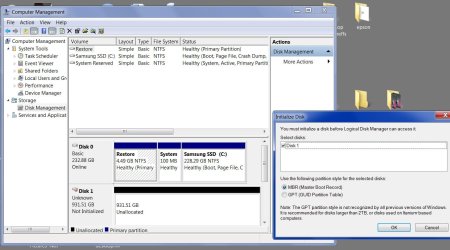
So I go computer/right click/manage go to storage and then this pops up havent read on here anywhere to expect that extra step - do I just carry on with the default that is set (mbr) -worried that it says master boot record when i thought that my ssd was that.
If i choose mbr will that mean that i cannot create partitions later
 

Attachments

  • Untitled-2.jpg
    Untitled-2.jpg
    127.4 KB · Views: 3

My Computer My Computer

At a glance

Windows 7 professionali516gb290
Computer type
PC/Desktop
Computer Manufacturer/Model Number
HP 8200 tower
OS
Windows 7 professional
CPU
i5
Memory
16gb
Graphics Card(s)
290
Hard Drives
samsung 850 evo ssd
WD blue 1tb
I don't know what a MMR is
Because your disk #1 is less than 2 TB you can choose MBR with no problems.
After the format you will still be able to add new partitions if you so desire.
What it look like to me all you have to do is format Disk #1 and choose a partition letter.

I also suggest not choosing A, B, C, or D.
 
Last edited:

My Computer My Computer

At a glance

Windows 10 Pro. 64/ version 1709 Windows 7 Pr...Intel i7-6800K @ 4.3Corsair Platinum 16 gig @2400EVGA GTX 1070 OC
Computer type
PC/Desktop
Computer Manufacturer/Model Number
Home made Desktop
OS
Windows 10 Pro. 64/ version 1709 Windows 7 Pro/64
CPU
Intel i7-6800K @ 4.3
Motherboard
ASUS X-99 Deluxe II
Memory
Corsair Platinum 16 gig @2400
Graphics Card(s)
EVGA GTX 1070 OC
Monitor(s) Displays
Asus 27" LED LCD/VE278Q
Screen Resolution
1920-1080 or 1280-720 HDMI
Hard Drives
INTEL SSD 730-240 Gb Sata 3.0/
PSU
EVGA Platium 1200W
Case
Phanteks Luxe Tempered Glass 8 fans/ one radiator
Cooling
XSPC/ Water Cooled CPU
Keyboard
Das 4 Professional
Mouse
Logitech M705/MX Anywhere 2-S
Internet Speed
100 mbits
Antivirus
Microsoft Security Essentials/ Malwarebytes Premium 3.0/ SAS
Browser
I.E. 11 default/Firefox/ ISP Time Warner Cable/Spectrum
Other Info
LG BluRay Burner/
Sound system-KLipsch-THX/
Icy Dock ssd Hot Swap bays.
I don't know what a MMR is
Because your disk #1 is less than 2 gb you can choose MBR with no problems.
After the format you will still be a to add new partitions if you so desire.
What it look like to me all you have to do is format Disk #1 and choose a partition letter.
Did you mean to say less than 2TB
 

My Computer My Computer

At a glance

Windows 7 professionali516gb290
Computer type
PC/Desktop
Computer Manufacturer/Model Number
HP 8200 tower
OS
Windows 7 professional
CPU
i5
Memory
16gb
Graphics Card(s)
290
Hard Drives
samsung 850 evo ssd
WD blue 1tb
Yes I did mean less the 2 TB. I will correct my post.
Please when you quote me, do not change anything in my quote.
 

My Computer My Computer

At a glance

Windows 10 Pro. 64/ version 1709 Windows 7 Pr...Intel i7-6800K @ 4.3Corsair Platinum 16 gig @2400EVGA GTX 1070 OC
Computer type
PC/Desktop
Computer Manufacturer/Model Number
Home made Desktop
OS
Windows 10 Pro. 64/ version 1709 Windows 7 Pro/64
CPU
Intel i7-6800K @ 4.3
Motherboard
ASUS X-99 Deluxe II
Memory
Corsair Platinum 16 gig @2400
Graphics Card(s)
EVGA GTX 1070 OC
Monitor(s) Displays
Asus 27" LED LCD/VE278Q
Screen Resolution
1920-1080 or 1280-720 HDMI
Hard Drives
INTEL SSD 730-240 Gb Sata 3.0/
PSU
EVGA Platium 1200W
Case
Phanteks Luxe Tempered Glass 8 fans/ one radiator
Cooling
XSPC/ Water Cooled CPU
Keyboard
Das 4 Professional
Mouse
Logitech M705/MX Anywhere 2-S
Internet Speed
100 mbits
Antivirus
Microsoft Security Essentials/ Malwarebytes Premium 3.0/ SAS
Browser
I.E. 11 default/Firefox/ ISP Time Warner Cable/Spectrum
Other Info
LG BluRay Burner/
Sound system-KLipsch-THX/
Icy Dock ssd Hot Swap bays.
What did I change
A good reminder about the letters not to choose -thanks
 

My Computer My Computer

At a glance

Windows 7 professionali516gb290
Computer type
PC/Desktop
Computer Manufacturer/Model Number
HP 8200 tower
OS
Windows 7 professional
CPU
i5
Memory
16gb
Graphics Card(s)
290
Hard Drives
samsung 850 evo ssd
WD blue 1tb
The blue is not necessary. A quote is not a quote if anything is changed in any way.
Thank you for understanding.
 

My Computer My Computer

At a glance

Windows 10 Pro. 64/ version 1709 Windows 7 Pr...Intel i7-6800K @ 4.3Corsair Platinum 16 gig @2400EVGA GTX 1070 OC
Computer type
PC/Desktop
Computer Manufacturer/Model Number
Home made Desktop
OS
Windows 10 Pro. 64/ version 1709 Windows 7 Pro/64
CPU
Intel i7-6800K @ 4.3
Motherboard
ASUS X-99 Deluxe II
Memory
Corsair Platinum 16 gig @2400
Graphics Card(s)
EVGA GTX 1070 OC
Monitor(s) Displays
Asus 27" LED LCD/VE278Q
Screen Resolution
1920-1080 or 1280-720 HDMI
Hard Drives
INTEL SSD 730-240 Gb Sata 3.0/
PSU
EVGA Platium 1200W
Case
Phanteks Luxe Tempered Glass 8 fans/ one radiator
Cooling
XSPC/ Water Cooled CPU
Keyboard
Das 4 Professional
Mouse
Logitech M705/MX Anywhere 2-S
Internet Speed
100 mbits
Antivirus
Microsoft Security Essentials/ Malwarebytes Premium 3.0/ SAS
Browser
I.E. 11 default/Firefox/ ISP Time Warner Cable/Spectrum
Other Info
LG BluRay Burner/
Sound system-KLipsch-THX/
Icy Dock ssd Hot Swap bays.
MBR would be a good choice.

MBR refers not only to the Master boot Record but also to a partitioning scheme. Until the introduction of GPT it was the only Windows partitioning scheme and is still widely used. GPT would be necessary if the drive was larger than 2 TB but otherwise it has no major advantages.

MBR allows up to 4 primary partitions. By using logical partitions you can have more but that is usually not necessary. If you have more than 1 partition there is always the possibility that one becomes too small while others have space to spare. Create as many partitions as necessary, but no more.
 

My Computer My Computer

At a glance

Windows 7 Pro 64 bitXeon W35208 GBNvidia Geforce 210
Computer type
PC/Desktop
Computer Manufacturer/Model Number
HP
OS
Windows 7 Pro 64 bit
CPU
Xeon W3520
Memory
8 GB
Graphics Card(s)
Nvidia Geforce 210
Thank you LMiller7 that is very helpfull, I will do that

Edit - all done now to see if it all works
 

My Computer My Computer

At a glance

Windows 7 professionali516gb290
Computer type
PC/Desktop
Computer Manufacturer/Model Number
HP 8200 tower
OS
Windows 7 professional
CPU
i5
Memory
16gb
Graphics Card(s)
290
Hard Drives
samsung 850 evo ssd
WD blue 1tb
Back
Top