Solved Upgrade To Windows 7

Did you choose the upgrade, not the custom install? That may cause that, but the Partition magic disk will do everything you need, and is a good tool to keep for future partition work on any PC, or OS :)

Custom Install as instructed.
 

My Computer My Computer

At a glance

Windows 104 GB
Computer type
Laptop
Computer Manufacturer/Model Number
Dell Inspiron 1545 / Toshiba Satellite
OS
Windows 10
Memory
4 GB
Antivirus
Windows Defender
Browser
Microsoft Edge
You can also wipe the disk clean with this method:

Boot from the Windows 7 installation disc.

Hit Shift F10 at the first screen where you are asked to choose a language.

A command prompt will appear. Type diskpart at that prompt.

Type in the following commands one by one, followed by the Enter key to create a partition (text in parentheses are comments only):

list disk (to show the ID number of the hard disk to partition, normally Disk 0)

select disk 0 (change 0 to another number if applicable)

clean (this wipes the drive of anything on it; not needed on a brand new drive)

create partition primary (this will create one primary partition covering the entire drive)

select partition 1 (this selects the partition you just made)

active (this marks that partition active)

format fs=ntfs quick (this formats that partition)

exit (this quits the diskpart program)

exit (this closes the command prompt window)

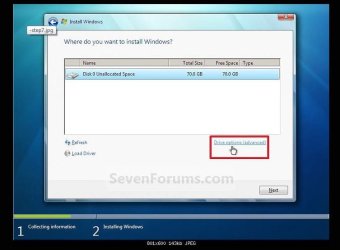
Continue Windows 7 installation as usual. Remember to highlight and select the partition just created when you come to the partition screen asking you "where do you want to install Windows?”.
 

My Computer My Computer

At a glance

Windows 7 Home Premium SP1, 64-bitIntel Skylake i5-6600K, not overclocked8 GB HyperX DDR4-2666 (2 x 4 GB)none; graphics are integrated on CPU
Computer type
PC/Desktop
Computer Manufacturer/Model Number
Ignatz Special; 4 speed manual gearbox; factory air conditioning; one of one
OS
Windows 7 Home Premium SP1, 64-bit
CPU
Intel Skylake i5-6600K, not overclocked
Motherboard
AsRock Z170M Extreme 4, micro ATX
Memory
8 GB HyperX DDR4-2666 (2 x 4 GB)
Graphics Card(s)
none; graphics are integrated on CPU
Sound Card
onboard: Realtek ALC1150; external: USB Behringer UF0-202
Monitor(s) Displays
Dell S2340M 23 inch IPS
Screen Resolution
1600 x 900
Hard Drives
System: Crucial MX100 series SSD, 128 GB;
Data: Samsung Spinpoint 103SJ, 1 TB;
Backup: WD Caviar Green WD30EZRX-00D8PB0, 3 TB
PSU
Rosewill SilentNight 500 watt fanless, semi-modular
Case
Antec Solo II
Cooling
Noctua NH-U12S; Noctua F12 intake, Noctua S12A exhaust
Keyboard
Microsoft 200 6JH-00001 USB
Mouse
Dell or Microsoft optical wired; USB
Antivirus
Microsoft Security Essentials and Malwarebytes Premium
Browser
Pale Moon
Other Info
All fans PWM; speeds at idle: CPU circa 500 rpm; intake circa 600 rpm; exhaust circa 600 rpm; CPU temps 27 idle and 47 C load in a warm room (27 C/81 F) when running Intel Extreme Tuning Utility stress test.
O,k.....Thanks for that.....have now wiped the disc, and reinstalled Windows 7......everything seems fine, apart from it is still not updating.......how long does this take ?......also I was all set to put the Dell drivers disc in and run it, but every thing is working o.k......a friend reckons I don't need to do this, any thoughts on it ?.....Del........:D ;)
 

My Computer My Computer

At a glance

Windows 104 GB
Computer type
Laptop
Computer Manufacturer/Model Number
Dell Inspiron 1545 / Toshiba Satellite
OS
Windows 10
Memory
4 GB
Antivirus
Windows Defender
Browser
Microsoft Edge
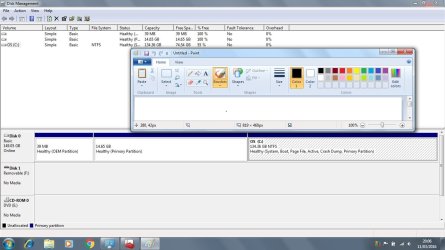
Post a screen shot of Windows Disk Management so we can confirm all looks OK.

It may take many hours to complete Windows Update, even longer if your installation disk did not include SP1.

But that's a one time thing. After that's done, it shouldn't take long when you go back to Windows Update say once a month.

I would NOT use the Dell disk if everything is looking OK.

Now you will have to deal with the Windows 10 issue--Microsoft will do what it can to get you to upgrade to it and you will have to fight that off if you want to stay with Windows 7.

Get anti-virus running.

Get Macrium back on your mind so you can make backups of your good Windows 7 installation.

Make sure you are activated and have no issues.

Then start installing whatever applications you need.
 

My Computer My Computer

At a glance

Windows 7 Home Premium SP1, 64-bitIntel Skylake i5-6600K, not overclocked8 GB HyperX DDR4-2666 (2 x 4 GB)none; graphics are integrated on CPU
Computer type
PC/Desktop
Computer Manufacturer/Model Number
Ignatz Special; 4 speed manual gearbox; factory air conditioning; one of one
OS
Windows 7 Home Premium SP1, 64-bit
CPU
Intel Skylake i5-6600K, not overclocked
Motherboard
AsRock Z170M Extreme 4, micro ATX
Memory
8 GB HyperX DDR4-2666 (2 x 4 GB)
Graphics Card(s)
none; graphics are integrated on CPU
Sound Card
onboard: Realtek ALC1150; external: USB Behringer UF0-202
Monitor(s) Displays
Dell S2340M 23 inch IPS
Screen Resolution
1600 x 900
Hard Drives
System: Crucial MX100 series SSD, 128 GB;
Data: Samsung Spinpoint 103SJ, 1 TB;
Backup: WD Caviar Green WD30EZRX-00D8PB0, 3 TB
PSU
Rosewill SilentNight 500 watt fanless, semi-modular
Case
Antec Solo II
Cooling
Noctua NH-U12S; Noctua F12 intake, Noctua S12A exhaust
Keyboard
Microsoft 200 6JH-00001 USB
Mouse
Dell or Microsoft optical wired; USB
Antivirus
Microsoft Security Essentials and Malwarebytes Premium
Browser
Pale Moon
Other Info
All fans PWM; speeds at idle: CPU circa 500 rpm; intake circa 600 rpm; exhaust circa 600 rpm; CPU temps 27 idle and 47 C load in a warm room (27 C/81 F) when running Intel Extreme Tuning Utility stress test.
Thanks for that......Got anti-virus up and running.....Windows 7 activated o.k..... SP 1 is installed and everything seems fine.....I actually prefer 7 to 10, so may stay with it, not sure if this old girl would run 10 anyway......screenshot to follow.......Del.
 

My Computer My Computer

At a glance

Windows 104 GB
Computer type
Laptop
Computer Manufacturer/Model Number
Dell Inspiron 1545 / Toshiba Satellite
OS
Windows 10
Memory
4 GB
Antivirus
Windows Defender
Browser
Microsoft Edge
How's it looking ??Untitled.jpg
 

My Computer My Computer

At a glance

Windows 104 GB
Computer type
Laptop
Computer Manufacturer/Model Number
Dell Inspiron 1545 / Toshiba Satellite
OS
Windows 10
Memory
4 GB
Antivirus
Windows Defender
Browser
Microsoft Edge
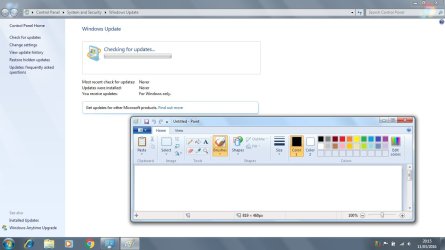
Untitled.jpg What is a little concerning, is that although SP 1 is supposed to be installed, it does not show up in updates.
 

My Computer My Computer

At a glance

Windows 104 GB
Computer type
Laptop
Computer Manufacturer/Model Number
Dell Inspiron 1545 / Toshiba Satellite
OS
Windows 10
Memory
4 GB
Antivirus
Windows Defender
Browser
Microsoft Edge
The screen shot in post 126 is NOT what I expected to see.

You still have 3 partitions when I expected 1.

Two of your 3 partitions are empty.

If you entered the clean command in diskpart, that alone should have wiped out ALL partitions. Either it did not or you did not issue the clean command. When you continued with the installation after leaving diskpart, Windows should have created exactly 1 (one) partition, namely C.

You've still got 2 useless partitions with nothing on them.

Personally, I would delete those 2 partitions in Windows Disk Management and then add the free space that creates to C.

You'd have to use an application such as Partition Wizard to add the space to C. You cannot do it in Windows Disk Management.


You can leave it alone if you want--it's just that you have 2 unnecessary partitions.

Or you can start over.
 

My Computer My Computer

At a glance

Windows 7 Home Premium SP1, 64-bitIntel Skylake i5-6600K, not overclocked8 GB HyperX DDR4-2666 (2 x 4 GB)none; graphics are integrated on CPU
Computer type
PC/Desktop
Computer Manufacturer/Model Number
Ignatz Special; 4 speed manual gearbox; factory air conditioning; one of one
OS
Windows 7 Home Premium SP1, 64-bit
CPU
Intel Skylake i5-6600K, not overclocked
Motherboard
AsRock Z170M Extreme 4, micro ATX
Memory
8 GB HyperX DDR4-2666 (2 x 4 GB)
Graphics Card(s)
none; graphics are integrated on CPU
Sound Card
onboard: Realtek ALC1150; external: USB Behringer UF0-202
Monitor(s) Displays
Dell S2340M 23 inch IPS
Screen Resolution
1600 x 900
Hard Drives
System: Crucial MX100 series SSD, 128 GB;
Data: Samsung Spinpoint 103SJ, 1 TB;
Backup: WD Caviar Green WD30EZRX-00D8PB0, 3 TB
PSU
Rosewill SilentNight 500 watt fanless, semi-modular
Case
Antec Solo II
Cooling
Noctua NH-U12S; Noctua F12 intake, Noctua S12A exhaust
Keyboard
Microsoft 200 6JH-00001 USB
Mouse
Dell or Microsoft optical wired; USB
Antivirus
Microsoft Security Essentials and Malwarebytes Premium
Browser
Pale Moon
Other Info
All fans PWM; speeds at idle: CPU circa 500 rpm; intake circa 600 rpm; exhaust circa 600 rpm; CPU temps 27 idle and 47 C load in a warm room (27 C/81 F) when running Intel Extreme Tuning Utility stress test.
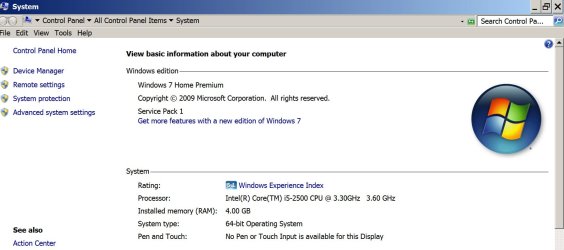
check it via Control panel >> system. it will say at the top
That last screenshot shows a virgin install, SP1 may not have been included in the reinstall.
suggest you also include the system reserved Boot manager partition
Roy
 

Attachments

  • serv1.PNG
    serv1.PNG
    8.8 KB · Views: 17

My Computer My Computer

At a glance

W7 home premium 32bit/W7HP 64bit/w10 tp insid...E5300 dual core3gbNvidia Geforce 7100 Nforce 630i
Computer type
PC/Desktop
Computer Manufacturer/Model Number
medionl/Aspire 6930G/acer x55a
OS
W7 home premium 32bit/W7HP 64bit/w10 tp insider ring
CPU
E5300 dual core
Motherboard
medion MS7366
Memory
3gb
Graphics Card(s)
Nvidia Geforce 7100 Nforce 630i
Monitor(s) Displays
avixc
Internet Speed
n (isp resticted to 72)
Antivirus
mse/pands
Browser
palemoon
Other Info
Belkin Fd7050 n USB using Railink RT2870 drivers, more upto date
It tells me that I have SP 1 ......very strange.......regarding the empty spaces I will amend that later.
 

My Computer My Computer

At a glance

Windows 104 GB
Computer type
Laptop
Computer Manufacturer/Model Number
Dell Inspiron 1545 / Toshiba Satellite
OS
Windows 10
Memory
4 GB
Antivirus
Windows Defender
Browser
Microsoft Edge
It tells me that I have SP 1 ......very strange.......

What is "it"?

Why is it strange?

It's entirely possible that SP1 was included on the installation disc you used. If you in fact have SP1, you either got it from the installation disc or you downloaded it as part of Windows Update after you finished the install.

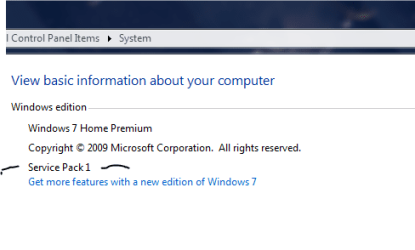
Do you see a mention of "Service Pack 1" when you right click "computer" from the start button and choose "properties"??

Like this:
 

Attachments

  • Untitled-1.jpg
    Untitled-1.jpg
    113.4 KB · Views: 0

My Computer My Computer

At a glance

Windows 7 Home Premium SP1, 64-bitIntel Skylake i5-6600K, not overclocked8 GB HyperX DDR4-2666 (2 x 4 GB)none; graphics are integrated on CPU
Computer type
PC/Desktop
Computer Manufacturer/Model Number
Ignatz Special; 4 speed manual gearbox; factory air conditioning; one of one
OS
Windows 7 Home Premium SP1, 64-bit
CPU
Intel Skylake i5-6600K, not overclocked
Motherboard
AsRock Z170M Extreme 4, micro ATX
Memory
8 GB HyperX DDR4-2666 (2 x 4 GB)
Graphics Card(s)
none; graphics are integrated on CPU
Sound Card
onboard: Realtek ALC1150; external: USB Behringer UF0-202
Monitor(s) Displays
Dell S2340M 23 inch IPS
Screen Resolution
1600 x 900
Hard Drives
System: Crucial MX100 series SSD, 128 GB;
Data: Samsung Spinpoint 103SJ, 1 TB;
Backup: WD Caviar Green WD30EZRX-00D8PB0, 3 TB
PSU
Rosewill SilentNight 500 watt fanless, semi-modular
Case
Antec Solo II
Cooling
Noctua NH-U12S; Noctua F12 intake, Noctua S12A exhaust
Keyboard
Microsoft 200 6JH-00001 USB
Mouse
Dell or Microsoft optical wired; USB
Antivirus
Microsoft Security Essentials and Malwarebytes Premium
Browser
Pale Moon
Other Info
All fans PWM; speeds at idle: CPU circa 500 rpm; intake circa 600 rpm; exhaust circa 600 rpm; CPU temps 27 idle and 47 C load in a warm room (27 C/81 F) when running Intel Extreme Tuning Utility stress test.
It tells me that I have SP 1 ......very strange.......

What is "it"?

Why is it strange?

It's entirely possible that SP1 was included on the installation disc you used. If you in fact have SP1, you either got it from the installation disc or you downloaded it as part of Windows Update after you finished the install.
What I mean is that system information says that I have it.......but it does not show in installed updates.
 

My Computer My Computer

At a glance

Windows 104 GB
Computer type
Laptop
Computer Manufacturer/Model Number
Dell Inspiron 1545 / Toshiba Satellite
OS
Windows 10
Memory
4 GB
Antivirus
Windows Defender
Browser
Microsoft Edge
What I mean is that system information says that I have it.......but it does not show in installed updates.

I think that's normal.

As far as I know, you cannot uninstall SP1.

It presumably was on the disc you used for the install.
 

My Computer My Computer

At a glance

Windows 7 Home Premium SP1, 64-bitIntel Skylake i5-6600K, not overclocked8 GB HyperX DDR4-2666 (2 x 4 GB)none; graphics are integrated on CPU
Computer type
PC/Desktop
Computer Manufacturer/Model Number
Ignatz Special; 4 speed manual gearbox; factory air conditioning; one of one
OS
Windows 7 Home Premium SP1, 64-bit
CPU
Intel Skylake i5-6600K, not overclocked
Motherboard
AsRock Z170M Extreme 4, micro ATX
Memory
8 GB HyperX DDR4-2666 (2 x 4 GB)
Graphics Card(s)
none; graphics are integrated on CPU
Sound Card
onboard: Realtek ALC1150; external: USB Behringer UF0-202
Monitor(s) Displays
Dell S2340M 23 inch IPS
Screen Resolution
1600 x 900
Hard Drives
System: Crucial MX100 series SSD, 128 GB;
Data: Samsung Spinpoint 103SJ, 1 TB;
Backup: WD Caviar Green WD30EZRX-00D8PB0, 3 TB
PSU
Rosewill SilentNight 500 watt fanless, semi-modular
Case
Antec Solo II
Cooling
Noctua NH-U12S; Noctua F12 intake, Noctua S12A exhaust
Keyboard
Microsoft 200 6JH-00001 USB
Mouse
Dell or Microsoft optical wired; USB
Antivirus
Microsoft Security Essentials and Malwarebytes Premium
Browser
Pale Moon
Other Info
All fans PWM; speeds at idle: CPU circa 500 rpm; intake circa 600 rpm; exhaust circa 600 rpm; CPU temps 27 idle and 47 C load in a warm room (27 C/81 F) when running Intel Extreme Tuning Utility stress test.
What I mean is that system information says that I have it.......but it does not show in installed updates.

I think that's normal.

As far as I know, you cannot uninstall SP1.

It presumably was on the disc you used for the install.

That would make sense.......also although it says updates installed----never, there are two updates showing.....a Windows defender one, and an update agent one.
 

My Computer My Computer

At a glance

Windows 104 GB
Computer type
Laptop
Computer Manufacturer/Model Number
Dell Inspiron 1545 / Toshiba Satellite
OS
Windows 10
Memory
4 GB
Antivirus
Windows Defender
Browser
Microsoft Edge
There is another strange thing......although I have been checking for updates all day, and presumably it is doing it in the background, it says last check for updates.....never.........also when I installed the ''pirate'' copy, it updated straight away......until it came up,''running out of disc space''.
 

My Computer My Computer

At a glance

Windows 104 GB
Computer type
Laptop
Computer Manufacturer/Model Number
Dell Inspiron 1545 / Toshiba Satellite
OS
Windows 10
Memory
4 GB
Antivirus
Windows Defender
Browser
Microsoft Edge
Yu should have left well enough alone, if the 1st version you installed ever showed as non genuine, then all you`d have to do is enter the key from Amazon.
 

My Computer My Computer

At a glance

Windows 10 Pro x64Intel Core i7 6700KGSkill TridentZ RGB 16GB 3600 16-16-16-36EVGA GTX 980 Ti SC x2
Computer type
PC/Desktop
Computer Manufacturer/Model Number
Skylake Special #666
OS
Windows 10 Pro x64
CPU
Intel Core i7 6700K
Motherboard
Asus Sabertooth Z170 Mark 1
Memory
GSkill TridentZ RGB 16GB 3600 16-16-16-36
Graphics Card(s)
EVGA GTX 980 Ti SC x2
Sound Card
Realtek High Definition
Monitor(s) Displays
AOC G2460PG
Screen Resolution
1920 x 1080 144Hz
Hard Drives
Samsung 860 Pro 256GB, Seagate Barracuda 4TB x2
PSU
EVGA 1000 P2, EVGA White Custom Braided Cables
Case
Corsair Vengeance C70 Gunmetal Black
Cooling
Corsair H100i v2, Corsair ML120 x2, Thermal Grizzly Kryonaut
Keyboard
Logitech G910 Orion Spectrum
Mouse
Logitech G700s
Internet Speed
Verizon Fios Quantum Gateway 75/75
Antivirus
Windows Defender, Malwarebytes Free 3.8.3
Browser
Chrome
Other Info
Corsair SP120 x4, LG Blu-ray Drive, Durabrand HT-395 100 Watt Dolby Digital Amp, Corsair H2100 Wireless 7.1 Headset
Yu should have left well enough alone, if the 1st version you installed ever showed as non genuine, then all you`d have to do is enter the key from Amazon.

Yep.....Reckon you are right......just wanted to do ''the decent thing''
 

My Computer My Computer

At a glance

Windows 104 GB
Computer type
Laptop
Computer Manufacturer/Model Number
Dell Inspiron 1545 / Toshiba Satellite
OS
Windows 10
Memory
4 GB
Antivirus
Windows Defender
Browser
Microsoft Edge
Why do you keep calling it a pirate disc ? An install disc is an install disc, it doesn`t matter, the only thing that can be pirated is the way it`s activated.

You have a legitimate key now, so don`t worry about that.

But you do need to start all over and delete all partitions down to unallocated space, then start the install.

http://www.sevenforums.com/tutorials/1649-clean-install-windows-7-a.html
 

Attachments

  • Capture.JPG
    Capture.JPG
    41.3 KB · Views: 0

My Computer My Computer

At a glance

Windows 10 Pro x64Intel Core i7 6700KGSkill TridentZ RGB 16GB 3600 16-16-16-36EVGA GTX 980 Ti SC x2
Computer type
PC/Desktop
Computer Manufacturer/Model Number
Skylake Special #666
OS
Windows 10 Pro x64
CPU
Intel Core i7 6700K
Motherboard
Asus Sabertooth Z170 Mark 1
Memory
GSkill TridentZ RGB 16GB 3600 16-16-16-36
Graphics Card(s)
EVGA GTX 980 Ti SC x2
Sound Card
Realtek High Definition
Monitor(s) Displays
AOC G2460PG
Screen Resolution
1920 x 1080 144Hz
Hard Drives
Samsung 860 Pro 256GB, Seagate Barracuda 4TB x2
PSU
EVGA 1000 P2, EVGA White Custom Braided Cables
Case
Corsair Vengeance C70 Gunmetal Black
Cooling
Corsair H100i v2, Corsair ML120 x2, Thermal Grizzly Kryonaut
Keyboard
Logitech G910 Orion Spectrum
Mouse
Logitech G700s
Internet Speed
Verizon Fios Quantum Gateway 75/75
Antivirus
Windows Defender, Malwarebytes Free 3.8.3
Browser
Chrome
Other Info
Corsair SP120 x4, LG Blu-ray Drive, Durabrand HT-395 100 Watt Dolby Digital Amp, Corsair H2100 Wireless 7.1 Headset
But you do need to start all over and delete all partitions down to unallocated space, then start the install.

AddRAM:

He claims the "drive options/advanced" is never seen and is simply not there. So I directed him to diskpart and told him to run "clean" there.

Maybe he did. Maybe he didn't.

He now has 3 partitions when he should have 1 if he used "clean".
 

My Computer My Computer

At a glance

Windows 7 Home Premium SP1, 64-bitIntel Skylake i5-6600K, not overclocked8 GB HyperX DDR4-2666 (2 x 4 GB)none; graphics are integrated on CPU
Computer type
PC/Desktop
Computer Manufacturer/Model Number
Ignatz Special; 4 speed manual gearbox; factory air conditioning; one of one
OS
Windows 7 Home Premium SP1, 64-bit
CPU
Intel Skylake i5-6600K, not overclocked
Motherboard
AsRock Z170M Extreme 4, micro ATX
Memory
8 GB HyperX DDR4-2666 (2 x 4 GB)
Graphics Card(s)
none; graphics are integrated on CPU
Sound Card
onboard: Realtek ALC1150; external: USB Behringer UF0-202
Monitor(s) Displays
Dell S2340M 23 inch IPS
Screen Resolution
1600 x 900
Hard Drives
System: Crucial MX100 series SSD, 128 GB;
Data: Samsung Spinpoint 103SJ, 1 TB;
Backup: WD Caviar Green WD30EZRX-00D8PB0, 3 TB
PSU
Rosewill SilentNight 500 watt fanless, semi-modular
Case
Antec Solo II
Cooling
Noctua NH-U12S; Noctua F12 intake, Noctua S12A exhaust
Keyboard
Microsoft 200 6JH-00001 USB
Mouse
Dell or Microsoft optical wired; USB
Antivirus
Microsoft Security Essentials and Malwarebytes Premium
Browser
Pale Moon
Other Info
All fans PWM; speeds at idle: CPU circa 500 rpm; intake circa 600 rpm; exhaust circa 600 rpm; CPU temps 27 idle and 47 C load in a warm room (27 C/81 F) when running Intel Extreme Tuning Utility stress test.
I always create and use a Partition Wizard Boot CD to delete the drive to unallocated space, then create a Primary partition out of the entire drive (depending on it`s size of course) format it, set it Active and Align it. Remove the PW boot cd, then drop in your install dvd and install windows on the partition you created, It will then look like this when you`re done.
 

Attachments

  • Capture.JPG
    Capture.JPG
    30 KB · Views: 0

My Computer My Computer

At a glance

Windows 10 Pro x64Intel Core i7 6700KGSkill TridentZ RGB 16GB 3600 16-16-16-36EVGA GTX 980 Ti SC x2
Computer type
PC/Desktop
Computer Manufacturer/Model Number
Skylake Special #666
OS
Windows 10 Pro x64
CPU
Intel Core i7 6700K
Motherboard
Asus Sabertooth Z170 Mark 1
Memory
GSkill TridentZ RGB 16GB 3600 16-16-16-36
Graphics Card(s)
EVGA GTX 980 Ti SC x2
Sound Card
Realtek High Definition
Monitor(s) Displays
AOC G2460PG
Screen Resolution
1920 x 1080 144Hz
Hard Drives
Samsung 860 Pro 256GB, Seagate Barracuda 4TB x2
PSU
EVGA 1000 P2, EVGA White Custom Braided Cables
Case
Corsair Vengeance C70 Gunmetal Black
Cooling
Corsair H100i v2, Corsair ML120 x2, Thermal Grizzly Kryonaut
Keyboard
Logitech G910 Orion Spectrum
Mouse
Logitech G700s
Internet Speed
Verizon Fios Quantum Gateway 75/75
Antivirus
Windows Defender, Malwarebytes Free 3.8.3
Browser
Chrome
Other Info
Corsair SP120 x4, LG Blu-ray Drive, Durabrand HT-395 100 Watt Dolby Digital Amp, Corsair H2100 Wireless 7.1 Headset
Back
Top