
Are USB3 controller cards and/or add-ons a probelm?

videobruce

New member
Member
VIP
Local time
5:12 PM
Messages
182
I wasn't sure how to title this.

I ran into a problem installing the USB3 drivers when I swapped MB's with the same chipset (AMD 970). All the other devices were handled Ok, along with loading drivers for new devices, but the on board USB3 ports.

Long story short, there were registry entries left over from the older MB (AS media) that apparently stopped the loading of the USB3 drivers (Via VL805) for the new MB. After 'disabling' those registry entries using DevMan from NirSoft, the install went ok (finally).

It was a two step process. The Northbridge chipset drivers had to be loaded first (XHCI driver), then the Via drivers.

To the current problem. I picked up a spare USB3 PCI card and I'm running into the same problem. A yellow ! in Device Manager like I had before and a failed install (locking up the system they 1st try).

So the question is; is there a problem using more than one USB3 port device (either on-board or an add-on card??

Below is the view w/o the add on problem card:
 

Attachments
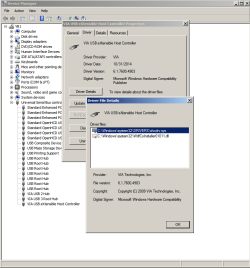
  • Device Manager Via USB entries.png
    Device Manager Via USB entries.png
    29.3 KB · Views: 0
Last edited:

My Computers My Computers

  • At a glance

    Win7 x64AMD
    Computer type
    Laptop
    Computer Manufacturer/Model Number
    Toshiba
    OS
    Win7 x64
    CPU
    AMD
  • At a glance

    Win 7 Pro x64AMD FX-835016GBnVidia GeForce 1060
    Computer type
    PC/Desktop
    System Manufacturer/Model Number
    AMD based MB
    OS
    Win 7 Pro x64
    CPU
    AMD FX-8350
    Motherboard
    Gigabyte GA-970A-D3P
    Memory
    16GB
    Graphics Card(s)
    nVidia GeForce 1060
    Monitor(s) Displays
    25"
    Screen Resolution
    1920x1200
    Hard Drives
    two SSD;
    two 4TB HDD
    PSU
    700watt Seasonic
    Internet Speed
    300MB up & down
    Browser
    Firefox
    Other Info
    BD Recorder
You should be able to use as many as you want, do you have the driver cd or Did you download and install fresh USB 3.0 drivers ?

Did you reinstall windows on this new board ? Doesn`t matter if it`s the same chipset.
 

My Computer My Computer

At a glance

Windows 10 Pro x64Intel Core i7 6700KGSkill TridentZ RGB 16GB 3600 16-16-16-36EVGA GTX 980 Ti SC x2
Computer type
PC/Desktop
Computer Manufacturer/Model Number
Skylake Special #666
OS
Windows 10 Pro x64
CPU
Intel Core i7 6700K
Motherboard
Asus Sabertooth Z170 Mark 1
Memory
GSkill TridentZ RGB 16GB 3600 16-16-16-36
Graphics Card(s)
EVGA GTX 980 Ti SC x2
Sound Card
Realtek High Definition
Monitor(s) Displays
AOC G2460PG
Screen Resolution
1920 x 1080 144Hz
Hard Drives
Samsung 860 Pro 256GB, Seagate Barracuda 4TB x2
PSU
EVGA 1000 P2, EVGA White Custom Braided Cables
Case
Corsair Vengeance C70 Gunmetal Black
Cooling
Corsair H100i v2, Corsair ML120 x2, Thermal Grizzly Kryonaut
Keyboard
Logitech G910 Orion Spectrum
Mouse
Logitech G700s
Internet Speed
Verizon Fios Quantum Gateway 75/75
Antivirus
Windows Defender, Malwarebytes Free 3.8.3
Browser
Chrome
Other Info
Corsair SP120 x4, LG Blu-ray Drive, Durabrand HT-395 100 Watt Dolby Digital Amp, Corsair H2100 Wireless 7.1 Headset
I used the supplied CD (for convenience which I usually don't do). This card uses the Etron EJ168A chipset, not the Via VL805.

When I did a search here, I came across a couple of other threads, but the apparent problem as the users didn't know what the chipset was on their cards. (I found this by looking at the card itself which was far easier trying to extract a "setup" file). ;)

Where would this add on card 'tie in' to the existing MB 'bridges'?
 

Attachments

  • AMD 970 MB block diag.png
    AMD 970 MB block diag.png
    21.5 KB · Views: 22

My Computers My Computers

  • At a glance

    Win7 x64AMD
    Computer type
    Laptop
    Computer Manufacturer/Model Number
    Toshiba
    OS
    Win7 x64
    CPU
    AMD
  • At a glance

    Win 7 Pro x64AMD FX-835016GBnVidia GeForce 1060
    Computer type
    PC/Desktop
    System Manufacturer/Model Number
    AMD based MB
    OS
    Win 7 Pro x64
    CPU
    AMD FX-8350
    Motherboard
    Gigabyte GA-970A-D3P
    Memory
    16GB
    Graphics Card(s)
    nVidia GeForce 1060
    Monitor(s) Displays
    25"
    Screen Resolution
    1920x1200
    Hard Drives
    two SSD;
    two 4TB HDD
    PSU
    700watt Seasonic
    Internet Speed
    300MB up & down
    Browser
    Firefox
    Other Info
    BD Recorder
The make of the card is StarTech with their slogan :
Hard-to-find made easy
The bold print is theirs. :rolleyes:
 

My Computers My Computers

  • At a glance

    Win7 x64AMD
    Computer type
    Laptop
    Computer Manufacturer/Model Number
    Toshiba
    OS
    Win7 x64
    CPU
    AMD
  • At a glance

    Win 7 Pro x64AMD FX-835016GBnVidia GeForce 1060
    Computer type
    PC/Desktop
    System Manufacturer/Model Number
    AMD based MB
    OS
    Win 7 Pro x64
    CPU
    AMD FX-8350
    Motherboard
    Gigabyte GA-970A-D3P
    Memory
    16GB
    Graphics Card(s)
    nVidia GeForce 1060
    Monitor(s) Displays
    25"
    Screen Resolution
    1920x1200
    Hard Drives
    two SSD;
    two 4TB HDD
    PSU
    700watt Seasonic
    Internet Speed
    300MB up & down
    Browser
    Firefox
    Other Info
    BD Recorder
I picked up a spare USB3 PCI card and I'm running into the same problem. A yellow ! in Device Manager like I had before and a failed install (locking up the system they 1st try).
You don't show us the yellow ! so I'm not sure where it is in DevMgr. As a PCI card your mobo diagram doesn't really help you. It's on the PCI bus. If you can't find it in DevMgr, unplug the card and go thru DM with a fine tooth comb, then re-plug the card and check again looking for different or "Unknown device" I suppose.

An add-in PCI card may indeed require a driver that is not already in Windows so you "simply" have to get the right one from the mfr and if the CD-supplied one doesn't work then you need the one for W7x64.
 

My Computer My Computer

At a glance

Windows 7 Professional 64bitIntel Core i7 4600M @ 2.90GHz16.0GB Dual-Channel DDR3 @ 797MHz (11-11-11-28)Intel HD Graphics 4600 (Dell) 2048MB ATI AMD ...
Computer type
Laptop
Computer Manufacturer/Model Number
Dell Latitude E6540 Laptop
OS
Windows 7 Professional 64bit
CPU
Intel Core i7 4600M @ 2.90GHz
Motherboard
Dell Inc. 0CYT5F (SOCKET 0)
Memory
16.0GB Dual-Channel DDR3 @ 797MHz (11-11-11-28)
Graphics Card(s)
Intel HD Graphics 4600 (Dell) 2048MB ATI AMD Radeon HD 8790M
Sound Card
Realtek High Definition Audio
Monitor(s) Displays
HP ZR30w (2560x1600@60Hz)
Hard Drives
256GB LITEONIT LMT-256M6M-41 mm SATA (SSD)
1TB Samsung SSD 860 EVO mSATA SATA (SSD)
2TB USB 3.0 USB Device
115GB SanDisk Ultra Fit USB
Other Info
Multiple Dell E-Port Plus II Port Replicator/Docking Stations 0Y72NH USB 3.0 + 130W AC Adapters
Until you re install windows on the new board, you are going to continue to have problems.
 

My Computer My Computer

At a glance

Windows 10 Pro x64Intel Core i7 6700KGSkill TridentZ RGB 16GB 3600 16-16-16-36EVGA GTX 980 Ti SC x2
Computer type
PC/Desktop
Computer Manufacturer/Model Number
Skylake Special #666
OS
Windows 10 Pro x64
CPU
Intel Core i7 6700K
Motherboard
Asus Sabertooth Z170 Mark 1
Memory
GSkill TridentZ RGB 16GB 3600 16-16-16-36
Graphics Card(s)
EVGA GTX 980 Ti SC x2
Sound Card
Realtek High Definition
Monitor(s) Displays
AOC G2460PG
Screen Resolution
1920 x 1080 144Hz
Hard Drives
Samsung 860 Pro 256GB, Seagate Barracuda 4TB x2
PSU
EVGA 1000 P2, EVGA White Custom Braided Cables
Case
Corsair Vengeance C70 Gunmetal Black
Cooling
Corsair H100i v2, Corsair ML120 x2, Thermal Grizzly Kryonaut
Keyboard
Logitech G910 Orion Spectrum
Mouse
Logitech G700s
Internet Speed
Verizon Fios Quantum Gateway 75/75
Antivirus
Windows Defender, Malwarebytes Free 3.8.3
Browser
Chrome
Other Info
Corsair SP120 x4, LG Blu-ray Drive, Durabrand HT-395 100 Watt Dolby Digital Amp, Corsair H2100 Wireless 7.1 Headset
You don't show us the yellow ! so I'm not sure where it is in DevMgr.
I removed the card when I took that screen shot. It gets entered under "Other Devices" as a USB controller.
Until you re install windows on the new board, you are going to continue to have problems.
My point is, why just this with nothing else?? It seems to be a problem with USB3 add-ons. I might buy problems with an add-on card, but surely not anything native on the MB.

I also noticed, both devices just had a single 'setup' file that I couldn't install using the unpacked files thru DM.
 

My Computers My Computers

  • At a glance

    Win7 x64AMD
    Computer type
    Laptop
    Computer Manufacturer/Model Number
    Toshiba
    OS
    Win7 x64
    CPU
    AMD
  • At a glance

    Win 7 Pro x64AMD FX-835016GBnVidia GeForce 1060
    Computer type
    PC/Desktop
    System Manufacturer/Model Number
    AMD based MB
    OS
    Win 7 Pro x64
    CPU
    AMD FX-8350
    Motherboard
    Gigabyte GA-970A-D3P
    Memory
    16GB
    Graphics Card(s)
    nVidia GeForce 1060
    Monitor(s) Displays
    25"
    Screen Resolution
    1920x1200
    Hard Drives
    two SSD;
    two 4TB HDD
    PSU
    700watt Seasonic
    Internet Speed
    300MB up & down
    Browser
    Firefox
    Other Info
    BD Recorder
It gets entered under "Other Devices" as a USB controller.
That says Windows can't find a suitable driver for the hardware. Typically means whatever driver you loaded isn't a match for the add-on card. (Drivers can, optionally, get very specific as to "what they'll match". Can be down to the device hardware version, your Windows OS and architecture (32 vs 64 bit).
I also noticed, both devices just had a single 'setup' file that I couldn't install using the unpacked files thru DM
When installing using DM you must point windows to the driver INF file. If you pointed it to a directory with a setup.exe OR to the wrong INF file, Windows won't be happy
Where would this add on card 'tie in' to the existing MB 'bridges'?
By default, DM displays "Devices by type". You want to view your devices by connection (to see how devices connect to each other). Open DM
> Click View->Devices by connection
> Expand the ACPI devices (usually 2 levels) till you see the PCI bus
> Expand everything under PCI bus. You'll likely find the add-on card under a PCI Express controller or similar

With the add-on card connected, list any Problem devices
  • Make sure devices are connected and powered on
  • Click the Start Orb, type msinfo32 in the search box. Hit Enter
  • Click the + sign next to Components to expand it
  • Click Problem Devices. Anything appear?
  • If yes, click on it, Ctrl-A to select all, Ctrl-C to copy it, Ctrl-V to paste into next post
  • On the other hand, if no devices are listed, tell me so

Then
  • Rename C:\WINDOWS\inf\setupapi.dev.log to C:\WINDOWS\inf\setupapi.dev.log.OLD
  • In DM, right click the device and tell Windows to update the driver
  • After it fails, a new C:\WINDOWS\inf\setupapi.dev.log will have been created. Zip it up and attach to next post
 
Last edited:

My Computer My Computer

At a glance

Desk 1: Win 7 Pro x32; Desk 2: Windows 10 x64
Computer type
PC/Desktop
Computer Manufacturer/Model Number
Dell Optiplex 360 and Optiplex 755
OS
Desk 1: Win 7 Pro x32; Desk 2: Windows 10 x64
Hard Drives
500GB Crucial SSD in both Desktops
Other Info
Buffalo 6TB NAS, Raid 1
Back
Top