Clean O/S install from external SSD

charlee

New member
Local time
8:54 AM
Messages
4
I just bought a new PC that has Windows 10 on it. I want to downgrade to Windows 7 from my external SSD. How do I make it bootable for this? Or, if there's another way, suggestions would be appreciated!
 

My Computer My Computer

Computer type
PC/Desktop
Computer Manufacturer/Model Number
CyberPowerPC
OS
64 bit Windows 10
CPU
4 GHz Intel i7
Motherboard
Gigabyte Technology Z170-HD3P-CF
Memory
32 GB
Graphics Card(s)
nVIDIA gEfORCE gtx 980
Hard Drives
SanDisk SD8SBAT256G1122
Antivirus
Avast
Browser
Edge
Hi and welcome to SevenForums,
Was this ssd with win-7 on it coming from another computer ?
If so did it come preinstalled on this other machine using another manufactures oem activation key ?

If so it is locked to the original machine and can't be moved to another machine you'd have to buy another oem/ system builders to legally use it again

If it was a retail win-7 on the ssd you could move it to another machine
Just clean install it afterwards just copy and paste your personal files from the ssd to the new install

You can use Chrome to get a new iso file for win-7 if you don't have the dvd anymore
Download Windows 7 and 8.1 ISO Images from Microsoft - gHacks Tech News
 

My Computer My Computer

Computer type
PC/Desktop
Computer Manufacturer/Model Number
Custom assembled by me :}
OS
Win-7-Pro64bit 7-H-Prem-64bit
CPU
i7-5930K 2nd i9-9940x both water blocked VRM's too
Motherboard
ASUS SABERTOOTH X99 2nd ASUS x299 Apex
Memory
Trident-z 3200C14 2nd Trident-z 3600C16
Graphics Card(s)
EVGA 1080ti ftw3 2nd Titan Xp both water blocked
Sound Card
Built-in Realtek
Monitor(s) Displays
1-AOC G2460PG 24"G-Sync 144Hz/ 2nd 1-ASUS VG248QE 24" 144Hz
Screen Resolution
1920 x 1080 144Hz
Hard Drives
2-Samsung M.2 Evo & Evo Plus
2-Samsung 850 EVO 500GB SSD's/ 3-2.5 W.D. Black 1tb-&3-1tb/3-3.5 WD Black 1tb hdd's
PSU
EVGA SuperNOVA 1000-P2 2nd 1200-P2
Case
2-Corsair Obsidian Series 450D Black ATX Mid Tower
Cooling
Custom water loops
Keyboard
Logitech G710+/ 2nd Logitech G910
Mouse
2-RedDragon M901 Perdition 16400 dpi Gaming mouse = wired
Internet Speed
Comcast Ping 19ms 89.31mbps download speed 6.12mbps upload
Antivirus
Malwarebytes Pro/ Superantispyware Pro
Browser
FireFox & Pale moon
Other Info
2nd ASUS X299 Apex/Intel i9-9940x with Custom water loop/7H-Prem-x64/Corsair 450D case/Ram Trident-z 3600C16 4x8gb / Samsung970Evo plus 500gb SSD/Dual ssd EZ swap evo/PSU EVGA SuperNova 1200w-P2 80+Platinum/GPU Titan Xp /8-ML-140 on push-pull on 2-280GTX rads
What I have on the external SSD are the files from the original DVD I purchased of Windows 7. I have the product key. The PC does not have an internal DVD drive. I tried using the DVD from an external DVD player and it got so far loading the OS then it stops saying it can't find the files it was already using. That's why I formatted my external and copied the contents of the DVD to it. I can't seem to get anything to work. Any suggestions are greatly appreciated.
 

My Computer My Computer

Computer type
PC/Desktop
Computer Manufacturer/Model Number
CyberPowerPC
OS
64 bit Windows 10
CPU
4 GHz Intel i7
Motherboard
Gigabyte Technology Z170-HD3P-CF
Memory
32 GB
Graphics Card(s)
nVIDIA gEfORCE gtx 980
Hard Drives
SanDisk SD8SBAT256G1122
Antivirus
Avast
Browser
Edge

My Computer My Computer

Computer type
PC/Desktop
Computer Manufacturer/Model Number
Custom assembled by me :}
OS
Win-7-Pro64bit 7-H-Prem-64bit
CPU
i7-5930K 2nd i9-9940x both water blocked VRM's too
Motherboard
ASUS SABERTOOTH X99 2nd ASUS x299 Apex
Memory
Trident-z 3200C14 2nd Trident-z 3600C16
Graphics Card(s)
EVGA 1080ti ftw3 2nd Titan Xp both water blocked
Sound Card
Built-in Realtek
Monitor(s) Displays
1-AOC G2460PG 24"G-Sync 144Hz/ 2nd 1-ASUS VG248QE 24" 144Hz
Screen Resolution
1920 x 1080 144Hz
Hard Drives
2-Samsung M.2 Evo & Evo Plus
2-Samsung 850 EVO 500GB SSD's/ 3-2.5 W.D. Black 1tb-&3-1tb/3-3.5 WD Black 1tb hdd's
PSU
EVGA SuperNOVA 1000-P2 2nd 1200-P2
Case
2-Corsair Obsidian Series 450D Black ATX Mid Tower
Cooling
Custom water loops
Keyboard
Logitech G710+/ 2nd Logitech G910
Mouse
2-RedDragon M901 Perdition 16400 dpi Gaming mouse = wired
Internet Speed
Comcast Ping 19ms 89.31mbps download speed 6.12mbps upload
Antivirus
Malwarebytes Pro/ Superantispyware Pro
Browser
FireFox & Pale moon
Other Info
2nd ASUS X299 Apex/Intel i9-9940x with Custom water loop/7H-Prem-x64/Corsair 450D case/Ram Trident-z 3600C16 4x8gb / Samsung970Evo plus 500gb SSD/Dual ssd EZ swap evo/PSU EVGA SuperNova 1200w-P2 80+Platinum/GPU Titan Xp /8-ML-140 on push-pull on 2-280GTX rads
Did you download the iso file you needed ?

If not, what do you need I`ll post the link.
 

My Computer My Computer

Computer type
PC/Desktop
Computer Manufacturer/Model Number
Skylake Special #666
OS
Windows 10 Pro x64
CPU
Intel Core i7 6700K
Motherboard
Asus Sabertooth Z170 Mark 1
Memory
GSkill TridentZ RGB 16GB 3600 16-16-16-36
Graphics Card(s)
EVGA GTX 980 Ti SC x2
Sound Card
Realtek High Definition
Monitor(s) Displays
AOC G2460PG
Screen Resolution
1920 x 1080 144Hz
Hard Drives
Samsung 860 Pro 256GB, Seagate Barracuda 4TB x2
PSU
EVGA 1000 P2, EVGA White Custom Braided Cables
Case
Corsair Vengeance C70 Gunmetal Black
Cooling
Corsair H100i v2, Corsair ML120 x2, Thermal Grizzly Kryonaut
Keyboard
Logitech G910 Orion Spectrum
Mouse
Logitech G700s
Internet Speed
Verizon Fios Quantum Gateway 75/75
Antivirus
Windows Defender, Malwarebytes Free 3.8.3
Browser
Chrome
Other Info
Corsair SP120 x4, LG Blu-ray Drive, Durabrand HT-395 100 Watt Dolby Digital Amp, Corsair H2100 Wireless 7.1 Headset
I followed the directions TrashZone provided me. I went to Microsoft Tech Bench with Firefox and hit the Ctrl-Shift-K to open the console. I then went to Pastebin and copied the code there. Then I pasted it into the console at Microsoft Tech Bench. I then tried to select edition version and all that is listed is Windows 10. I want Windows 7 Pro. I have the dvd for Windows 7 Pro. Can I make that into an ISO image? Or is there an easier way to download Windows 7 Pro ISO? Thank you all for your help.
 

My Computer My Computer

Computer type
PC/Desktop
Computer Manufacturer/Model Number
CyberPowerPC
OS
64 bit Windows 10
CPU
4 GHz Intel i7
Motherboard
Gigabyte Technology Z170-HD3P-CF
Memory
32 GB
Graphics Card(s)
nVIDIA gEfORCE gtx 980
Hard Drives
SanDisk SD8SBAT256G1122
Antivirus
Avast
Browser
Edge
Hi,
The instruction were for Chrome not Firefox users :confused:
 

My Computer My Computer

Computer type
PC/Desktop
Computer Manufacturer/Model Number
Custom assembled by me :}
OS
Win-7-Pro64bit 7-H-Prem-64bit
CPU
i7-5930K 2nd i9-9940x both water blocked VRM's too
Motherboard
ASUS SABERTOOTH X99 2nd ASUS x299 Apex
Memory
Trident-z 3200C14 2nd Trident-z 3600C16
Graphics Card(s)
EVGA 1080ti ftw3 2nd Titan Xp both water blocked
Sound Card
Built-in Realtek
Monitor(s) Displays
1-AOC G2460PG 24"G-Sync 144Hz/ 2nd 1-ASUS VG248QE 24" 144Hz
Screen Resolution
1920 x 1080 144Hz
Hard Drives
2-Samsung M.2 Evo & Evo Plus
2-Samsung 850 EVO 500GB SSD's/ 3-2.5 W.D. Black 1tb-&3-1tb/3-3.5 WD Black 1tb hdd's
PSU
EVGA SuperNOVA 1000-P2 2nd 1200-P2
Case
2-Corsair Obsidian Series 450D Black ATX Mid Tower
Cooling
Custom water loops
Keyboard
Logitech G710+/ 2nd Logitech G910
Mouse
2-RedDragon M901 Perdition 16400 dpi Gaming mouse = wired
Internet Speed
Comcast Ping 19ms 89.31mbps download speed 6.12mbps upload
Antivirus
Malwarebytes Pro/ Superantispyware Pro
Browser
FireFox & Pale moon
Other Info
2nd ASUS X299 Apex/Intel i9-9940x with Custom water loop/7H-Prem-x64/Corsair 450D case/Ram Trident-z 3600C16 4x8gb / Samsung970Evo plus 500gb SSD/Dual ssd EZ swap evo/PSU EVGA SuperNova 1200w-P2 80+Platinum/GPU Titan Xp /8-ML-140 on push-pull on 2-280GTX rads
What Windows do you want ?

You can download Windows 7 Ultimate 32 or 64 bit from Download Windows 7 Free Full Version
The ISO is already bootable but remember to change those settings in BIOS regarding booting from usb man. I hope you have an activation code also.
 

My Computer My Computer

Computer type
PC/Desktop
OS
Windows 7 Ultimate 32bit
Monitor(s) Displays
LG E2250V
Antivirus
Kaspersky Internet Security 2016
Browser
Opera Browser
What Windows do you want ?

You can download Windows 7 Ultimate 32 or 64 bit from Download Windows 7 Free Full Version
The ISO is already bootable but remember to change those settings in BIOS regarding booting from usb man. I hope you have an activation code also.

I've found it's not a good idea to change the boot order to USB first - when windows restarts during the install process, it often boots from the USB again and starts over with the install. If you're quick, you can pull the usb at the 1st restart, but it's a lot easier to leave the BIOS boot order 'as is' and just select the USB from the one-time boot menu when the machine is powered up initially.

Also saves having to put the BIOS back to normal after the install.
 

My Computer My Computer

Computer type
PC/Desktop
Computer Manufacturer/Model Number
self build
OS
W10 Pro x64, W7 Pro x64 in VMware
CPU
i7 2600K @ 4.4GHz
Motherboard
MSI Z68A-GD80
Memory
8GB Mushkin @ 1600MHz
Graphics Card(s)
Nvidia GTX 750 Ti
Monitor(s) Displays
27" Benq + 27" LG
Screen Resolution
1080p
Hard Drives
500GB 850 Evo SSD + 3 * 2TB Seagate
PSU
EVGA 650 GS modular
Case
Antec 300
Cooling
Seidon 120V v2
Internet Speed
62/18 Mbps
Antivirus
Defender (W10) + MSE (W7)
Browser
Firefox
What Windows do you want ?

You can download Windows 7 Ultimate 32 or 64 bit from Download Windows 7 Free Full Version
The ISO is already bootable but remember to change those settings in BIOS regarding booting from usb man. I hope you have an activation code also.

I've found it's not a good idea to change the boot order to USB first - when windows restarts during the install process, it often boots from the USB again and starts over with the install. If you're quick, you can pull the usb at the 1st restart, but it's a lot easier to leave the BIOS boot order 'as is' and just select the USB from the one-time boot menu when the machine is powered up initially.

Also saves having to put the BIOS back to normal after the install.
I do that sometimes, but my problem is that i'm stubborn and i always go with my old method.:p
I think he also should go with Legacy Mode.
 

My Computer My Computer

Computer type
PC/Desktop
OS
Windows 7 Ultimate 32bit
Monitor(s) Displays
LG E2250V
Antivirus
Kaspersky Internet Security 2016
Browser
Opera Browser
I just bought a new PC that has Windows 10 on it. I want to downgrade to Windows 7 from my external SSD. How do I make it bootable for this? Or, if there's another way, suggestions would be appreciated!

Why are you even trying to do this, just install 7 on your PC if you don`t want 10, if you have the iso file now, just use rufus to put it on a 4 GB flash drive and install 7 that way.

You can not just copy windows files to a ssd and have it work. As per what you said in a later post.

http://www.sevenforums.com/tutorials/1649-clean-install-windows-7-a.html

https://rufus.akeo.ie/

Also, you do not change any boot order in the bios, you use the one time boot menu to choose the stick one time and that`s it.

If you still need to download a windows 7 iso file, let us know what version you need. I don`t see it mentioned anywhere.
 

My Computer My Computer

Computer type
PC/Desktop
Computer Manufacturer/Model Number
Skylake Special #666
OS
Windows 10 Pro x64
CPU
Intel Core i7 6700K
Motherboard
Asus Sabertooth Z170 Mark 1
Memory
GSkill TridentZ RGB 16GB 3600 16-16-16-36
Graphics Card(s)
EVGA GTX 980 Ti SC x2
Sound Card
Realtek High Definition
Monitor(s) Displays
AOC G2460PG
Screen Resolution
1920 x 1080 144Hz
Hard Drives
Samsung 860 Pro 256GB, Seagate Barracuda 4TB x2
PSU
EVGA 1000 P2, EVGA White Custom Braided Cables
Case
Corsair Vengeance C70 Gunmetal Black
Cooling
Corsair H100i v2, Corsair ML120 x2, Thermal Grizzly Kryonaut
Keyboard
Logitech G910 Orion Spectrum
Mouse
Logitech G700s
Internet Speed
Verizon Fios Quantum Gateway 75/75
Antivirus
Windows Defender, Malwarebytes Free 3.8.3
Browser
Chrome
Other Info
Corsair SP120 x4, LG Blu-ray Drive, Durabrand HT-395 100 Watt Dolby Digital Amp, Corsair H2100 Wireless 7.1 Headset
I have an .iso image of Windows 7 now. But, I tried to use Rufus to make the drive bootable and it did not give me any dropdown choices or the ability to type in the info needed. The directions for all this was written for Chrome and Firefox according to the article. I used Firefox because that's what I already have. Any other software programs that can help me make the external ssd bootable?
 

My Computer My Computer

Computer type
PC/Desktop
Computer Manufacturer/Model Number
CyberPowerPC
OS
64 bit Windows 10
CPU
4 GHz Intel i7
Motherboard
Gigabyte Technology Z170-HD3P-CF
Memory
32 GB
Graphics Card(s)
nVIDIA gEfORCE gtx 980
Hard Drives
SanDisk SD8SBAT256G1122
Antivirus
Avast
Browser
Edge
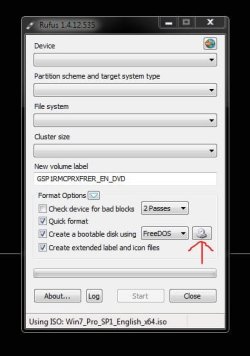
There`s no drop down in Rufus,You do not type any info into Rufus, there`s no need to, you just choose the iso file then let rufus do it`s thing.

Click where I have indicated and browse to your iso file. Then just click start.
 

Attachments

  • Capture.JPG
    Capture.JPG
    32.4 KB · Views: 5

My Computer My Computer

Computer type
PC/Desktop
Computer Manufacturer/Model Number
Skylake Special #666
OS
Windows 10 Pro x64
CPU
Intel Core i7 6700K
Motherboard
Asus Sabertooth Z170 Mark 1
Memory
GSkill TridentZ RGB 16GB 3600 16-16-16-36
Graphics Card(s)
EVGA GTX 980 Ti SC x2
Sound Card
Realtek High Definition
Monitor(s) Displays
AOC G2460PG
Screen Resolution
1920 x 1080 144Hz
Hard Drives
Samsung 860 Pro 256GB, Seagate Barracuda 4TB x2
PSU
EVGA 1000 P2, EVGA White Custom Braided Cables
Case
Corsair Vengeance C70 Gunmetal Black
Cooling
Corsair H100i v2, Corsair ML120 x2, Thermal Grizzly Kryonaut
Keyboard
Logitech G910 Orion Spectrum
Mouse
Logitech G700s
Internet Speed
Verizon Fios Quantum Gateway 75/75
Antivirus
Windows Defender, Malwarebytes Free 3.8.3
Browser
Chrome
Other Info
Corsair SP120 x4, LG Blu-ray Drive, Durabrand HT-395 100 Watt Dolby Digital Amp, Corsair H2100 Wireless 7.1 Headset
I seriously doubt a new Windows 10 computer will even let you install Windows 7, unless you really know what you`re doing.

You should be removing the windows 10 drive, installing your other ssd, and installing Windows 7 on that.

"I want to downgrade to Windows 7 from my external SSD"

You can not do this.
 

My Computer My Computer

Computer type
PC/Desktop
Computer Manufacturer/Model Number
Skylake Special #666
OS
Windows 10 Pro x64
CPU
Intel Core i7 6700K
Motherboard
Asus Sabertooth Z170 Mark 1
Memory
GSkill TridentZ RGB 16GB 3600 16-16-16-36
Graphics Card(s)
EVGA GTX 980 Ti SC x2
Sound Card
Realtek High Definition
Monitor(s) Displays
AOC G2460PG
Screen Resolution
1920 x 1080 144Hz
Hard Drives
Samsung 860 Pro 256GB, Seagate Barracuda 4TB x2
PSU
EVGA 1000 P2, EVGA White Custom Braided Cables
Case
Corsair Vengeance C70 Gunmetal Black
Cooling
Corsair H100i v2, Corsair ML120 x2, Thermal Grizzly Kryonaut
Keyboard
Logitech G910 Orion Spectrum
Mouse
Logitech G700s
Internet Speed
Verizon Fios Quantum Gateway 75/75
Antivirus
Windows Defender, Malwarebytes Free 3.8.3
Browser
Chrome
Other Info
Corsair SP120 x4, LG Blu-ray Drive, Durabrand HT-395 100 Watt Dolby Digital Amp, Corsair H2100 Wireless 7.1 Headset
Back
Top