Upgrading my PC's Memory+Cooling Fans & Cleaning it Out

Ophaq

New member
Member
Local time
6:05 PM
Messages
50
I have been thinking of upgrading my memory as I feel it may not be sufficient as games are becoming more demanding. I have two 4GB Gskill ripjaw memory sticks (and I'm thinking they may be failing on me due to Bsods). Link for Bsods is here if anyone wants to help: http://www.sevenforums.com/bsod-hel...e-non-executable-memory-bsod-whats-cause.html

I was thinking of getting these Gskill Ripjaw 8gb on Newegg. My main concern is whether or not I should get the two or an additional 8GB stick and install that as they are DDR3 and I think I read somewhere it's better to have three sticks than two because it's faster. I'm not really sure if these are memory sticks worth getting for my gaming PC or not. There is also 2666MHz memory but I don't know if my board supports that and if it's worth it compared to 1600MHz. These are some things where I would like some clarification on. XD

Also, My motherboard is a Gigabyte z77x UD3H. It can support up to 32GB of memory and has 4 slots. I'm not entirely sure of its exact specifications so if anyone could tell me if the board can actually handle all of this memory I'd appreciate it.

Here's a list of my specs:
Mobo - Gigabyte z77x UD3H.
Memory: 2x 4GB Gskill Ripjaws-X 1600MHZ.
SSD: 256GB OCZ Agility 4 SATA III.
HDD: 1TB SATA III 7200 3.5".
Wi-Fi Adapter: Gigabyte PCI-E 802.11.
GPU: Radeon HD7970 3GB PCIE.
CPU: Intel 3570k (Safe OC via mobo to 4.2Ghz)
PSU: Corsair CMPSU-850TX V2.
Cooling Unit: Corsair Hydro Series H60 120MM Liquid Cooling.
Fans: I have about 3-4 or so fans in my case as well. Maybe 5, I forgot.
Age: Bought and ran since January 2013.

I was thinking of getting at least 2 Noctua NF-F12 fans to put onto my radiator as well since my fans are practically chugging every day like a washing machine where my radiator is and I'm getting about 80C on my CPU during high intense Games. I don't know of any better fan that's both powerful and silent so if anyone knows, just tell me what they are or if I should just stick with the Noctuas.

I'm also wondering if I should get these cans of compressed air to clean out the dust. I haven't cleaned my PC out once as I've been too lazy/busy to do so and was afraid I'd do something bad and mess something up. I have no hands on experience with cleaning PCs or installing hardware after all. I'm also planning on getting an anti static bracelet with all this stuff if I do decide to get it.

I read a bit online and found that the Noctua NF-F12 was more superior than the NF-P12 in terms of using it for a radiator. Should I get two of these or one NF-P12 for the outside exhaust pushing out and a NF-F12 for the inside exhaust pushing in?
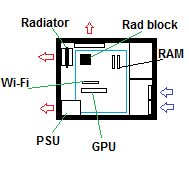
D2t5uLG.png

This is an image of what my current fan setup is (I think) or how I will get it to be when I upgrade. Is this alright or could it be better? I have another intake fan in front of the GPU as well. I was thinking of putting some kind of kneesock mesh or something in front of a few fans up front behind the case's wire mesh to help prevent dust build up but I don't know if that's worth it.

If anyone has any recommendations on good but cheap $15 or less 120mm + 140mm fans I'd appreciate it as well.
 
Last edited:

My Computer My Computer

At a glance

Windows 7 64 biti5 3570k (Mobo onboard safe OC to 4.2ghz)(8GB total) GSKILL x2 4GB Ripjaws-X 1600GHz m...AMD Radeon HD7970
Computer type
PC/Desktop
Computer Manufacturer/Model Number
Cyber Power
OS
Windows 7 64 bit
CPU
i5 3570k (Mobo onboard safe OC to 4.2ghz)
Motherboard
Gigabyte z77x UD3H
Memory
(8GB total) GSKILL x2 4GB Ripjaws-X 1600GHz memory
Graphics Card(s)
AMD Radeon HD7970
Hard Drives
SSD: 256GB OCZ Agility 4 SATA III.
HDD: 1TB SATA III 7200 3.5".
PSU
Corsair CMPSU-850TX V2.
Cooling
Cooling Unit: Corsair Hydro Series H60 120MM Liquid Cooling.
There is also 2666MHz memory but I don't know if my board supports that and if it's worth it compared to 1600MHz. These are some things where I would like some clarification on. XD

Also, My motherboard is a Gigabyte z77x UD3H. It can support up to 32GB of memory and has 4 slots. I'm not entirely sure of its exact specifications so if anyone could tell me if the board can actually handle all of this memory I'd appreciate it.

GIGABYTE - Motherboard - Socket 1155 - GA-Z77X-UD3H (rev. 1.0)


Above Gigabyte link says:


4 x 1.5V DDR3 DIMM sockets supporting up to 32 GB of system memory

Dual channel memory architecture

Support for DDR3 2800(OC)/1600/1333/1066 MHz memory modules

Support for non-ECC memory modules

Support for Extreme Memory Profile (XMP) memory modules

You can download the qualified memory list at this link:

GIGABYTE - Motherboard - Socket 1155 - GA-Z77X-UD3H (rev. 1.0)


I looked it over and there are NO Gskill 8 GB modules listed. That doesn't necessarily mean the Gskill you chose won't work, but I'd prefer to get something from the list. There are only a few 8 GB modules on the list.

Whether or not it will solve your problems or make any noticeable difference is another question, which I can't answer.

I have some Noctual F12s and have no problems with them, but you have to decide how much 80 degrees bothers you and how important low noise is. Noctua makes some higher RPM fans that might be better if you aren't fussy about noise. The higher speed Noctuas would be quiet for their RPM category, but anytime you get above 1000 RPM, fans tend to be audible.

You aren't likely to find Noctuas at 15 or less. If noise is a factor for you and you want something cheaper, consider Antec TrueQuiets. They are very low noise and have a low/high switch for 2 speed operation.

If you are intent on driving that 80 degrees down, you may have to make a concession on noise level, but I don't know how noisy your current fans are.

Fan setup generally requires some degree of experimentation. It's very hard to make judgements without trial and error. You may find that, for instance, that the top exhaust fan you have hurts rather than helps. Experimentation is particularly true for controlling dust buildup.
 

My Computer My Computer

At a glance

Windows 7 Home Premium SP1, 64-bitIntel Skylake i5-6600K, not overclocked8 GB HyperX DDR4-2666 (2 x 4 GB)none; graphics are integrated on CPU
Computer type
PC/Desktop
Computer Manufacturer/Model Number
Ignatz Special; 4 speed manual gearbox; factory air conditioning; one of one
OS
Windows 7 Home Premium SP1, 64-bit
CPU
Intel Skylake i5-6600K, not overclocked
Motherboard
AsRock Z170M Extreme 4, micro ATX
Memory
8 GB HyperX DDR4-2666 (2 x 4 GB)
Graphics Card(s)
none; graphics are integrated on CPU
Sound Card
onboard: Realtek ALC1150; external: USB Behringer UF0-202
Monitor(s) Displays
Dell S2340M 23 inch IPS
Screen Resolution
1600 x 900
Hard Drives
System: Crucial MX100 series SSD, 128 GB;
Data: Samsung Spinpoint 103SJ, 1 TB;
Backup: WD Caviar Green WD30EZRX-00D8PB0, 3 TB
PSU
Rosewill SilentNight 500 watt fanless, semi-modular
Case
Antec Solo II
Cooling
Noctua NH-U12S; Noctua F12 intake, Noctua S12A exhaust
Keyboard
Microsoft 200 6JH-00001 USB
Mouse
Dell or Microsoft optical wired; USB
Antivirus
Microsoft Security Essentials and Malwarebytes Premium
Browser
Pale Moon
Other Info
All fans PWM; speeds at idle: CPU circa 500 rpm; intake circa 600 rpm; exhaust circa 600 rpm; CPU temps 27 idle and 47 C load in a warm room (27 C/81 F) when running Intel Extreme Tuning Utility stress test.
Thanks for replying!

I made a list of fans I was debating on getting. Here they are:

120mm - I kind of like those cougar orange ones but I'm not sure which of these is best performance-wise. I was also thinking about getting some kind of pressurized front fans like the Corsair SP120 because of the wire mesh in the front of my PC. Or I will just stick with the AF120 fans instead. The back of the PC near the rad is going to have a Noctua NF-P12 exhausting air through the rad and through a Noctua NF-F12. I felt that it might not be necessary to have to P12's since the one on the outside of the radiator blowing air out of the case isn't going to need all that pressure.

Corsair Air Series AF120 Performance Edition CO-9050004-WW 120mm Twin Pack High Airflow Case Fan - Newegg.com
COUGAR CF-V12H Vortex Hydro-Dynamic-Bearing (Fluid) 300,000 Hours 12CM Silent Cooling Fan - Newegg.com
Scythe SY1225SL12M 120mm "Slipstream" Case Fan - Newegg.com
Antec 75003 120mm Case Cooling Fan - Newegg.com
Corsair Air Series SP120 High Performance Edition CO-9050008-WW 120mm Twin Pack High Static Pressure Case Fan - Newegg.com

140mm:
Corsair Air Series AF140 Quiet Edition CO-9050009-WW Case Fan - Newegg.com

The 140mm is the only one I could think of and found that might be good. I don't know of any others. Since I decided to replace ALL of my fans, I decided the budget for the three 120mm should be $10-15 and for the 140mm $10-20. When my PC was new, all of my temperatures were around 40% less than what I posted even in intense gaming scenarios. I really think it's just all the dust built up and the age of the PC hardware that has affected the temperatures.

That's why I'm planning on cleaning out my PC and replacing all of the not-so-great fans that came when I bought the PC from CyberPower. I'm hoping to get a cooling factor at least equivalent or similar to when I got my PC new. Sound isn't too big of an issue. It doesn't need to be SUPER quiet but I don't want to hear my fans across the room or through my near-sound proof headphones like my current fans are like. One of my fans is actually dead in front of the case grill on my radiator while the other one still spins slower than it used to and my PC still sounds like a washing machine. It even goes VRRRRRRRRrrrrRRRRrrr like the fans suddenly pick up speed because they're so stressed out. This can be heard across the room.

So yeah, I really need fan replacements as I've neglected the cleaning.

Anyhow, onto memory. So I shouldn't get the 8GB Gskill correct? I was even considering getting the 1866MHz version but I wasn't sure if my mobo could support it. What memory and memory configuration should I get then? I don't want to drop $70-80 on memory and find out I can't use it. I'm planning to get 16GB of memory but it would be really nice if I could get two 8GB sticks instead of four 4GB as the memory would be easier to test with two if any problems occured.

EDIT: I found a list of supported memory on https://pcpartpicker.com/parts/memory/?compatible_with=gigabyte-motherboard-gaz77xud3h and it says that the Gskill Ripjaws X series 2x 8GB is compatible but I'm not sure if I'm looking at the same mobo and if the website is accurate.
 

My Computer My Computer

At a glance

Windows 7 64 biti5 3570k (Mobo onboard safe OC to 4.2ghz)(8GB total) GSKILL x2 4GB Ripjaws-X 1600GHz m...AMD Radeon HD7970
Computer type
PC/Desktop
Computer Manufacturer/Model Number
Cyber Power
OS
Windows 7 64 bit
CPU
i5 3570k (Mobo onboard safe OC to 4.2ghz)
Motherboard
Gigabyte z77x UD3H
Memory
(8GB total) GSKILL x2 4GB Ripjaws-X 1600GHz memory
Graphics Card(s)
AMD Radeon HD7970
Hard Drives
SSD: 256GB OCZ Agility 4 SATA III.
HDD: 1TB SATA III 7200 3.5".
PSU
Corsair CMPSU-850TX V2.
Cooling
Cooling Unit: Corsair Hydro Series H60 120MM Liquid Cooling.
see comments in bold

Thanks for replying!

I made a list of fans I was debating on getting. Here they are:

Scythe SY1225SL12M 120mm "Slipstream" Case Fan - Newegg.com


This is the only one on your list that I have personal experience with.

Scythe Slipstreams are among the quietest fans in their rpm and price range. Quite good overall performance. The one in your link is a 1200 rpm model. I think there are 2 other models with lower RPM and at least one more with higher RPM. If noise is not much of an issue to you, I'd probably seek out the higher RPM model in the interest of knocking down temps. Personally--I have successfully used the 800 RPM model as I am noise-conscious and don't have any temperature issues.


The 140mm is the only one I could think of and found that might be good. I don't know of any others. Since I decided to replace ALL of my fans, I decided the budget for the three 120mm should be $10-15 and for the 140mm $10-20. When my PC was new, all of my temperatures were around 40% less than what I posted even in intense gaming scenarios. I really think it's just all the dust built up and the age of the PC hardware that has affected the temperatures.

You should confirm your case will in fact accept 140 mm fans. Maybe you have done that already. I really would not expect quality fans on a typical CyberPower machine.

You could do a lot worse than Scythe Slipstreams of several different RPMs. Maybe put the higher speed ones as front intakes and the lower speed ones as exhaust. That might help a bit on dust buildup.

I would avoid the Slipstream 500 rpm model as it moves very very little air.

Lastly: you should consider PWM fans if your motherboard fan headers support PWM. And of course you should have some degree of direct control of non-PWM fans via BIOS settings.


Anyhow, onto memory. So I shouldn't get the 8GB Gskill correct?

I'm not saying it won't work. I am saying it is not on the list. That's all. There are several 8 GB modules on the list. Why take a chance unless you are after looks or something other than functionality?


I was even considering getting the 1866MHz version but I wasn't sure if my mobo could support it. What memory and memory configuration should I get then? I don't want to drop $70-80 on memory and find out I can't use it. I'm planning to get 16GB of memory but it would be really nice if I could get two 8GB sticks instead of four 4GB as the memory would be easier to test with two if any problems occured.

To minimize the "can't use it" problem, stay on the list from Gigabyte.

The benefit of faster RAM is minimal other than in benchmarks. Sometimes you can get faster RAM on sale for less than standard speed. It's not going to be a night and day difference regardless.

RAM amount is much more important than RAM speed. BUT.................what makes you think you need more? Have you been monitoring RAM usage via Task Manager. Normally, 8 GB is enough for gaming, but you may have some unusually demanding games.


EDIT: I found a list of supported memory on https://pcpartpicker.com/parts/memory/?compatible_with=gigabyte-motherboard-gaz77xud3h and it says that the Gskill Ripjaws X series 2x 8GB is compatible but I'm not sure if I'm looking at the same mobo and if the website is accurate.

When in doubt, stick with the Gigabyte official list. I don't know where PCpartpicker gets it's information, but I doubt if there is any source superior to Gigabyte itself. As I said, the Ripjaws X may work fine, but you said you don't want to possibly be stuck with RAM you can't use. It's up to you entirely. Do you have any reason to think that Ripjaws would provide superior performance to something off the list?
 

My Computer My Computer

At a glance

Windows 7 Home Premium SP1, 64-bitIntel Skylake i5-6600K, not overclocked8 GB HyperX DDR4-2666 (2 x 4 GB)none; graphics are integrated on CPU
Computer type
PC/Desktop
Computer Manufacturer/Model Number
Ignatz Special; 4 speed manual gearbox; factory air conditioning; one of one
OS
Windows 7 Home Premium SP1, 64-bit
CPU
Intel Skylake i5-6600K, not overclocked
Motherboard
AsRock Z170M Extreme 4, micro ATX
Memory
8 GB HyperX DDR4-2666 (2 x 4 GB)
Graphics Card(s)
none; graphics are integrated on CPU
Sound Card
onboard: Realtek ALC1150; external: USB Behringer UF0-202
Monitor(s) Displays
Dell S2340M 23 inch IPS
Screen Resolution
1600 x 900
Hard Drives
System: Crucial MX100 series SSD, 128 GB;
Data: Samsung Spinpoint 103SJ, 1 TB;
Backup: WD Caviar Green WD30EZRX-00D8PB0, 3 TB
PSU
Rosewill SilentNight 500 watt fanless, semi-modular
Case
Antec Solo II
Cooling
Noctua NH-U12S; Noctua F12 intake, Noctua S12A exhaust
Keyboard
Microsoft 200 6JH-00001 USB
Mouse
Dell or Microsoft optical wired; USB
Antivirus
Microsoft Security Essentials and Malwarebytes Premium
Browser
Pale Moon
Other Info
All fans PWM; speeds at idle: CPU circa 500 rpm; intake circa 600 rpm; exhaust circa 600 rpm; CPU temps 27 idle and 47 C load in a warm room (27 C/81 F) when running Intel Extreme Tuning Utility stress test.
Then get yourself 2 8GB sticks of GSkill Trident X 2400 MHz :) I had it, it`s great stuff.

I had the 4 x 4GB kit on my Z87 and it performed flawlessly.

TridentX - F3-2400C10D-16GTX - G.SKILL DDR3 Memory

But I always recommend getting the entire kit at the same time, but if you should ever choose to get the other 16GB later on, you`ll be fine.

Not sure where you read that 3 sticks is faster then 2, it`s always best to have 2 or 4, although some boards can still run in dual channel with 3 sticks, you have to read the manual, I just would not do it, install 2 or all 4.
 

My Computer My Computer

At a glance

Windows 10 Pro x64Intel Core i7 6700KGSkill TridentZ RGB 16GB 3600 16-16-16-36EVGA GTX 980 Ti SC x2
Computer type
PC/Desktop
Computer Manufacturer/Model Number
Skylake Special #666
OS
Windows 10 Pro x64
CPU
Intel Core i7 6700K
Motherboard
Asus Sabertooth Z170 Mark 1
Memory
GSkill TridentZ RGB 16GB 3600 16-16-16-36
Graphics Card(s)
EVGA GTX 980 Ti SC x2
Sound Card
Realtek High Definition
Monitor(s) Displays
AOC G2460PG
Screen Resolution
1920 x 1080 144Hz
Hard Drives
Samsung 860 Pro 256GB, Seagate Barracuda 4TB x2
PSU
EVGA 1000 P2, EVGA White Custom Braided Cables
Case
Corsair Vengeance C70 Gunmetal Black
Cooling
Corsair H100i v2, Corsair ML120 x2, Thermal Grizzly Kryonaut
Keyboard
Logitech G910 Orion Spectrum
Mouse
Logitech G700s
Internet Speed
Verizon Fios Quantum Gateway 75/75
Antivirus
Windows Defender, Malwarebytes Free 3.8.3
Browser
Chrome
Other Info
Corsair SP120 x4, LG Blu-ray Drive, Durabrand HT-395 100 Watt Dolby Digital Amp, Corsair H2100 Wireless 7.1 Headset
Thanks for the replies! I guess I'll just have to get more opinions on fans before I decide I guess. The choice of fans shouldn't matter too much if I stick with the good reviewed ones on newegg and see which has the best RPM/airflow. I heard the corsair AF/PF were pretty good. As for the 140mm, I have a 140mm in the top of my case so that's why I chose to replace that as well.

For the memory, I guess I'll just take a look at the list then. I don't like PDFs much, though. XD
Also, at @AddRAM why the 2400MHz? Isn't there not too much of a difference performance-wise between that and 1866?

Edit: Would you guys recommend any good brands for memory? I'm looking at the list and there's few 8GB 1600 and 1866 listed.

For 1866 there is these and I don't know the difference:
CORSAIR 8GB CMZ32GX3M4X1866C10
CORSAIR 8GB CMT32GX3M4X1866C9

For 1600 there is just:
CORSAIR 8GB CMZ32GX3M4X1600C10

Is Corsair a good brand? Corsair seems to be the only brand listed on the list that is supported in 8GB and 8GB sticks only go up to 1866. I only mentioned Gskill because it's the only brand I trust since it's the only brand I've used... XD

Would it be better to just roll with 4x 4GB models of some really good memory brand?

Edit 2: I found this CORSAIR Vengeance 32GB (4 x 8GB) 240-Pin DDR3 SDRAM DDR3 1866 (PC3 14900) Desktop Memory Model CMZ32GX3M4X1866C10 - Newegg.com Corsair 8GB x2 which is supported by my mobo. If I got this, what speed do I get? It mentions PC3 14900 and PC3 15000 on the website. The main reason why I'm choosing 1866 is because I have the option to overclock it with XMP if I choose to do so and get slightly better performance for a little bit more. The serial # for the card also changes a bit
from "CMZ32GX3M4X1866C10" to something similar when I select the 16GB version instead of 32GB. Is that alright? Will it still be compatible? I would imagine so if the list said that specific memory is OK but you never know.
 
Last edited:

My Computer My Computer

At a glance

Windows 7 64 biti5 3570k (Mobo onboard safe OC to 4.2ghz)(8GB total) GSKILL x2 4GB Ripjaws-X 1600GHz m...AMD Radeon HD7970
Computer type
PC/Desktop
Computer Manufacturer/Model Number
Cyber Power
OS
Windows 7 64 bit
CPU
i5 3570k (Mobo onboard safe OC to 4.2ghz)
Motherboard
Gigabyte z77x UD3H
Memory
(8GB total) GSKILL x2 4GB Ripjaws-X 1600GHz memory
Graphics Card(s)
AMD Radeon HD7970
Hard Drives
SSD: 256GB OCZ Agility 4 SATA III.
HDD: 1TB SATA III 7200 3.5".
PSU
Corsair CMPSU-850TX V2.
Cooling
Cooling Unit: Corsair Hydro Series H60 120MM Liquid Cooling.
Bump. :x
 

My Computer My Computer

At a glance

Windows 7 64 biti5 3570k (Mobo onboard safe OC to 4.2ghz)(8GB total) GSKILL x2 4GB Ripjaws-X 1600GHz m...AMD Radeon HD7970
Computer type
PC/Desktop
Computer Manufacturer/Model Number
Cyber Power
OS
Windows 7 64 bit
CPU
i5 3570k (Mobo onboard safe OC to 4.2ghz)
Motherboard
Gigabyte z77x UD3H
Memory
(8GB total) GSKILL x2 4GB Ripjaws-X 1600GHz memory
Graphics Card(s)
AMD Radeon HD7970
Hard Drives
SSD: 256GB OCZ Agility 4 SATA III.
HDD: 1TB SATA III 7200 3.5".
PSU
Corsair CMPSU-850TX V2.
Cooling
Cooling Unit: Corsair Hydro Series H60 120MM Liquid Cooling.
Corsair is an OK brand, along with Crucial, Kingston, HyperX, and Gskill.

RAM is pretty much a commodity. You have some chance of getting bad sticks due to poor quality control from any brand. In that case, you are forced to return the sticks to either the dealer or the manufacturer. Most likely, the dealer won't take them back after 30 days.

I've heard some bad things about Gskill's return policies, but I'd imagine any brand will have some horror stories.

I think Crucial has a lifetime warranty. Other brands may as well--I haven't kept up lately.

We still don't know why you think you need more than 8 GB of RAM.

CORSAIR 8GB CMZ32GX3M4X1866C10
CORSAIR 8GB CMT32GX3M4X1866C9

Regarding the above 2 sticks; you'd have to go to Corsair web site and drill into the specs, but my offhand guess is that the first one has slightly higher CAS latency (the C10) than the second one (C9).

Lower CAS latency is better.

Generally, the faster the RAM speed, the higher the latency.

If you did not know what RAM you had, it's very unlikely you could tell the difference in performance between 8 GB of RAM X and 8 GB of RAM Y.

And you certainly would not notice any difference between 8 GB of RAM and 16 GB of RAM unless you knew for a fact that you were using ALL of the 8 GB in the first machine. Which we do not know in your case as far as I know.
 

My Computer My Computer

At a glance

Windows 7 Home Premium SP1, 64-bitIntel Skylake i5-6600K, not overclocked8 GB HyperX DDR4-2666 (2 x 4 GB)none; graphics are integrated on CPU
Computer type
PC/Desktop
Computer Manufacturer/Model Number
Ignatz Special; 4 speed manual gearbox; factory air conditioning; one of one
OS
Windows 7 Home Premium SP1, 64-bit
CPU
Intel Skylake i5-6600K, not overclocked
Motherboard
AsRock Z170M Extreme 4, micro ATX
Memory
8 GB HyperX DDR4-2666 (2 x 4 GB)
Graphics Card(s)
none; graphics are integrated on CPU
Sound Card
onboard: Realtek ALC1150; external: USB Behringer UF0-202
Monitor(s) Displays
Dell S2340M 23 inch IPS
Screen Resolution
1600 x 900
Hard Drives
System: Crucial MX100 series SSD, 128 GB;
Data: Samsung Spinpoint 103SJ, 1 TB;
Backup: WD Caviar Green WD30EZRX-00D8PB0, 3 TB
PSU
Rosewill SilentNight 500 watt fanless, semi-modular
Case
Antec Solo II
Cooling
Noctua NH-U12S; Noctua F12 intake, Noctua S12A exhaust
Keyboard
Microsoft 200 6JH-00001 USB
Mouse
Dell or Microsoft optical wired; USB
Antivirus
Microsoft Security Essentials and Malwarebytes Premium
Browser
Pale Moon
Other Info
All fans PWM; speeds at idle: CPU circa 500 rpm; intake circa 600 rpm; exhaust circa 600 rpm; CPU temps 27 idle and 47 C load in a warm room (27 C/81 F) when running Intel Extreme Tuning Utility stress test.
Oh OK. I'll go with the Corsair brand then. The main reason why I want to upgrade my memory is that the games I play are getting more demanding and I like to have other applications that use memory in the backround such as Mozilla. Another reason is that my memory is about 3 or so years old and I figured they should get replaced. So hey, why not upgrade my current memory and help future proof my PC while I'm doing maintenance on it for the first time in three years? XD

As such, I decided to get this memory because the C9 was out of stock. The difference between C9 and C10 isn't huge anyway, right?
CORSAIR Vengeance 16GB (2 x 8GB) 240-Pin DDR3 SDRAM DDR3 1866 (PC3 15000) Desktop Memory Model CMZ16GX3M2A1866C10 - Newegg.com

For fans, I decided on these:
120mm Fans -
1x Noctua NF-F12 and NF-P12 (P12 for pushing air through radiator and F12 for pushing it out of the case).
3x in total of these Corsair Air Series AF120 Performance Edition CO-9050004-WW 120mm Twin Pack High Airflow Case Fan - Newegg.com I figured I'd get a double pack and one single to make 3 total. I read these are kind of difficult to install but I'll wing it.

140mm Fan -
Corsair Air Series AF140 Quiet Edition CO-9050009-WW Case Fan - Newegg.com

I'm also going to give replacing the thermal paste between the cooling block and CPU with some Arctic MX-4. I watched online that using 99% alcohol with a coffee filter is best to rub off the old paste. Is this correct? Also, I'm not sure if my cooling block is a unscrewable + twist one or if I actually have to go to the back of my CPU and unscrew the bracket. I hope I don't have to unscrew the bracket to take off the block lol. I also plan on using the pea method when I do this but I might try to use a little less than a pea.

And another thing is how I'm going to set up my fans. All of the fans are 3 pin except the Noctua NF-F12 which is 4 pin and also PWM. I wish to use SpeedFan to adjust my fan speeds if necessary.

Is it alright to setup my fans like this where I just plug them all into the motherboard?

Will SpeedFan be able to control all of my fans with this setup? If not, how do I make it do so?

How am I going to set up plugging in the fans if I do decide to use almost all splitters. Maybe the 140mm fan in the CPU fan header? Because it's closest to the top and I'm unsure of its cable length if I plugged it in elsewhere...

In the rest I could put a fan splitter in two of them starting with the front 2 on the case being in FAN2, the side panel fan in FAN3, and another splitter in FAN4 with the radiator fans?
1-confused.gif


Here's a diagram in case the above got confusing:


ApS052q.png


And here is how my PC is laid out again:
D2t5uLG.png
 

My Computer My Computer

At a glance

Windows 7 64 biti5 3570k (Mobo onboard safe OC to 4.2ghz)(8GB total) GSKILL x2 4GB Ripjaws-X 1600GHz m...AMD Radeon HD7970
Computer type
PC/Desktop
Computer Manufacturer/Model Number
Cyber Power
OS
Windows 7 64 bit
CPU
i5 3570k (Mobo onboard safe OC to 4.2ghz)
Motherboard
Gigabyte z77x UD3H
Memory
(8GB total) GSKILL x2 4GB Ripjaws-X 1600GHz memory
Graphics Card(s)
AMD Radeon HD7970
Hard Drives
SSD: 256GB OCZ Agility 4 SATA III.
HDD: 1TB SATA III 7200 3.5".
PSU
Corsair CMPSU-850TX V2.
Cooling
Cooling Unit: Corsair Hydro Series H60 120MM Liquid Cooling.
see comments in bold

Another reason is that my memory is about 3 or so years old and I figured they should get replaced.

That's not a good reason. Would you replace the gas tank in your car because it was 3 years old?

If you want to replace RAM for whatever reason, be my guest.


As such, I decided to get this memory because the C9 was out of stock. The difference between C9 and C10 isn't huge anyway, right?

Right


For fans, I decided on these:
120mm Fans -
1x Noctua NF-F12 and NF-P12 (P12 for pushing air through radiator and F12 for pushing it out of the case).
3x in total of these Corsair Air Series AF120 Performance Edition CO-9050004-WW 120mm Twin Pack High Airflow Case Fan - Newegg.com I figured I'd get a double pack and one single to make 3 total. I read these are kind of difficult to install but I'll wing it.

I know nothing at all about Corsair fans, but you should be able to find a lot of info on the net.


I'm also going to give replacing the thermal paste between the cooling block and CPU with some Arctic MX-4. I watched online that using 99% alcohol with a coffee filter is best to rub off the old paste. Is this correct?

Alcohol and a clean white dishrag or T shirt is fine. Coffee filters are for the obsessive who lay awake at night worrying about lint under their cooler.

MX-4 is fine.


Also, I'm not sure if my cooling block is a unscrewable + twist one or if I actually have to go to the back of my CPU and unscrew the bracket. I hope I don't have to unscrew the bracket to take off the block lol. I also plan on using the pea method when I do this but I might try to use a little less than a pea.

I know nothing at all about your cooling block or any type of liquid cooling.

The normal tendency for people is to use too much paste. I'd think more of a BB size glob rather than a common green pea. Go to the Arctic Silver site and look up the application method for your processor. Maybe a glob, maybe a line. Line or glob isn't a big deal as long as you don't use too much.


Will SpeedFan be able to control all of my fans with this setup? If not, how do I make it do so?

I've never had good luck with Speedfan. Too much trouble and finicky. I just use BIOS settings and/or PWM fans.

How am I going to set up plugging in the fans if I do decide to use almost all splitters. Maybe the 140mm fan in the CPU fan header? Because it's closest to the top and I'm unsure of its cable length if I plugged it in elsewhere...

In the rest I could put a fan splitter in two of them starting with the front 2 on the case being in FAN2, the side panel fan in FAN3, and another splitter in FAN4 with the radiator fans?

Experiment. Trial and error. Take notes of various setups. Retry with a different setup, etc, etc. Monitor fans speeds and heat with something like HWinfo 64. If you have 2 fans on a splitter, I'd expect them to run at the same speed if they are capable of that.

I don't know how many PWM-capable fan headers you have on your motherboard. Most likely the CPU fan header is PWM and maybe others? Obviously, put any PWM fans on PWM headers and confirm to your own satisfaction with HWinfo that they in fact move up and down in RPM depending on load.

Non-PWM fans can just go on a random 3 pin header, with a splitter if necessary. You will have some degree of control over the speed of these non-PWM fans through the BIOS and you may well find that better than dealing with Speedfan. I did.

Non-PWM fans will generally operate OK on PWM headers, but why waste a valuable PWM header on a non-PWM fan? That's a rhetorical question.


My Computer My Computer

At a glance

Windows 7 Home Premium SP1, 64-bitIntel Skylake i5-6600K, not overclocked8 GB HyperX DDR4-2666 (2 x 4 GB)none; graphics are integrated on CPU
Computer type
PC/Desktop
Computer Manufacturer/Model Number
Ignatz Special; 4 speed manual gearbox; factory air conditioning; one of one
OS
Windows 7 Home Premium SP1, 64-bit
CPU
Intel Skylake i5-6600K, not overclocked
Motherboard
AsRock Z170M Extreme 4, micro ATX
Memory
8 GB HyperX DDR4-2666 (2 x 4 GB)
Graphics Card(s)
none; graphics are integrated on CPU
Sound Card
onboard: Realtek ALC1150; external: USB Behringer UF0-202
Monitor(s) Displays
Dell S2340M 23 inch IPS
Screen Resolution
1600 x 900
Hard Drives
System: Crucial MX100 series SSD, 128 GB;
Data: Samsung Spinpoint 103SJ, 1 TB;
Backup: WD Caviar Green WD30EZRX-00D8PB0, 3 TB
PSU
Rosewill SilentNight 500 watt fanless, semi-modular
Case
Antec Solo II
Cooling
Noctua NH-U12S; Noctua F12 intake, Noctua S12A exhaust
Keyboard
Microsoft 200 6JH-00001 USB
Mouse
Dell or Microsoft optical wired; USB
Antivirus
Microsoft Security Essentials and Malwarebytes Premium
Browser
Pale Moon
Other Info
All fans PWM; speeds at idle: CPU circa 500 rpm; intake circa 600 rpm; exhaust circa 600 rpm; CPU temps 27 idle and 47 C load in a warm room (27 C/81 F) when running Intel Extreme Tuning Utility stress test.
Thanks for the input! As far as I know, my board doesn't have any PWM headers. I'm not really sure though as the website doesn't specify nor does this: Gigabyte GA-Z77X-UD3H - Overview, Visual Inspection and Board Features - Intel Z77 Motherboard Review with Ivy Bridge - ASRock, ASUS, Gigabyte, and MSI

I watched a tutorial on how to use speedfan but I just wasn't sure if speedfan would recognize the fans on my motherboard unless they were plugged in certain headers or something.

I guess I will have to do an open-case trial and error test but that will prove difficult with the side panel fan. But that's only if I can't get the fans the way I want them.
 

My Computer My Computer

At a glance

Windows 7 64 biti5 3570k (Mobo onboard safe OC to 4.2ghz)(8GB total) GSKILL x2 4GB Ripjaws-X 1600GHz m...AMD Radeon HD7970
Computer type
PC/Desktop
Computer Manufacturer/Model Number
Cyber Power
OS
Windows 7 64 bit
CPU
i5 3570k (Mobo onboard safe OC to 4.2ghz)
Motherboard
Gigabyte z77x UD3H
Memory
(8GB total) GSKILL x2 4GB Ripjaws-X 1600GHz memory
Graphics Card(s)
AMD Radeon HD7970
Hard Drives
SSD: 256GB OCZ Agility 4 SATA III.
HDD: 1TB SATA III 7200 3.5".
PSU
Corsair CMPSU-850TX V2.
Cooling
Cooling Unit: Corsair Hydro Series H60 120MM Liquid Cooling.
Look at your own board.

The 3 pin fan headers are NOT PWM.

The CPU fan header is almost certainly 4 pin PWM. If you had 2 PWM fans, you could run both off this header via a splitter.

It looks to me like you will have only 1 PWM fan--the Noctua. It should work in non-PWM mode on a 3 pin header, but it's kinda pointless to buy it for a 3 pin header. You are paying for PWM and then not using that capability.
 

My Computer My Computer

At a glance

Windows 7 Home Premium SP1, 64-bitIntel Skylake i5-6600K, not overclocked8 GB HyperX DDR4-2666 (2 x 4 GB)none; graphics are integrated on CPU
Computer type
PC/Desktop
Computer Manufacturer/Model Number
Ignatz Special; 4 speed manual gearbox; factory air conditioning; one of one
OS
Windows 7 Home Premium SP1, 64-bit
CPU
Intel Skylake i5-6600K, not overclocked
Motherboard
AsRock Z170M Extreme 4, micro ATX
Memory
8 GB HyperX DDR4-2666 (2 x 4 GB)
Graphics Card(s)
none; graphics are integrated on CPU
Sound Card
onboard: Realtek ALC1150; external: USB Behringer UF0-202
Monitor(s) Displays
Dell S2340M 23 inch IPS
Screen Resolution
1600 x 900
Hard Drives
System: Crucial MX100 series SSD, 128 GB;
Data: Samsung Spinpoint 103SJ, 1 TB;
Backup: WD Caviar Green WD30EZRX-00D8PB0, 3 TB
PSU
Rosewill SilentNight 500 watt fanless, semi-modular
Case
Antec Solo II
Cooling
Noctua NH-U12S; Noctua F12 intake, Noctua S12A exhaust
Keyboard
Microsoft 200 6JH-00001 USB
Mouse
Dell or Microsoft optical wired; USB
Antivirus
Microsoft Security Essentials and Malwarebytes Premium
Browser
Pale Moon
Other Info
All fans PWM; speeds at idle: CPU circa 500 rpm; intake circa 600 rpm; exhaust circa 600 rpm; CPU temps 27 idle and 47 C load in a warm room (27 C/81 F) when running Intel Extreme Tuning Utility stress test.
Alrighty, so the Noctua PWM fan comes with a PWM splitter. I will change the P12 which is non-PWM for a PWM version like this:
Noctua NF-P12 PWM 120mm Two Speed 1300/900 RPM SSO2 Bearing - Newegg.com

That way, both PWM fans will be on the splitter together where the CPU fan header is at. Another peculiar thing that I want to mention is that if you look at the motherboard picture, you will see that all of the headers have 4 pins. Does this mean all of them are PWM? If so, then perhaps I should replace all of my fans with PWM fans. Also, do you think that my H60 is already connected into my CPU header? I read somewhere that that's what is how the power for it is controlled.
 

My Computer My Computer

At a glance

Windows 7 64 biti5 3570k (Mobo onboard safe OC to 4.2ghz)(8GB total) GSKILL x2 4GB Ripjaws-X 1600GHz m...AMD Radeon HD7970
Computer type
PC/Desktop
Computer Manufacturer/Model Number
Cyber Power
OS
Windows 7 64 bit
CPU
i5 3570k (Mobo onboard safe OC to 4.2ghz)
Motherboard
Gigabyte z77x UD3H
Memory
(8GB total) GSKILL x2 4GB Ripjaws-X 1600GHz memory
Graphics Card(s)
AMD Radeon HD7970
Hard Drives
SSD: 256GB OCZ Agility 4 SATA III.
HDD: 1TB SATA III 7200 3.5".
PSU
Corsair CMPSU-850TX V2.
Cooling
Cooling Unit: Corsair Hydro Series H60 120MM Liquid Cooling.
I have no idea how your H60 is connected. You'd have to look.

I would NOT assume that all 4 pin headers do in fact deliver PWM functionality to a PWM fan. Trial and error will tell you.
 

My Computer My Computer

At a glance

Windows 7 Home Premium SP1, 64-bitIntel Skylake i5-6600K, not overclocked8 GB HyperX DDR4-2666 (2 x 4 GB)none; graphics are integrated on CPU
Computer type
PC/Desktop
Computer Manufacturer/Model Number
Ignatz Special; 4 speed manual gearbox; factory air conditioning; one of one
OS
Windows 7 Home Premium SP1, 64-bit
CPU
Intel Skylake i5-6600K, not overclocked
Motherboard
AsRock Z170M Extreme 4, micro ATX
Memory
8 GB HyperX DDR4-2666 (2 x 4 GB)
Graphics Card(s)
none; graphics are integrated on CPU
Sound Card
onboard: Realtek ALC1150; external: USB Behringer UF0-202
Monitor(s) Displays
Dell S2340M 23 inch IPS
Screen Resolution
1600 x 900
Hard Drives
System: Crucial MX100 series SSD, 128 GB;
Data: Samsung Spinpoint 103SJ, 1 TB;
Backup: WD Caviar Green WD30EZRX-00D8PB0, 3 TB
PSU
Rosewill SilentNight 500 watt fanless, semi-modular
Case
Antec Solo II
Cooling
Noctua NH-U12S; Noctua F12 intake, Noctua S12A exhaust
Keyboard
Microsoft 200 6JH-00001 USB
Mouse
Dell or Microsoft optical wired; USB
Antivirus
Microsoft Security Essentials and Malwarebytes Premium
Browser
Pale Moon
Other Info
All fans PWM; speeds at idle: CPU circa 500 rpm; intake circa 600 rpm; exhaust circa 600 rpm; CPU temps 27 idle and 47 C load in a warm room (27 C/81 F) when running Intel Extreme Tuning Utility stress test.
Oh, I see. But on the safe side, perhaps I should get all PWM fans anyway? I googled about 4 pin headers and read that any 4 pin header is PWM but that may be wrong. I know that my CPU fan header is PWM from what it looks like in SpeedFan but I'm unsure about the others. There's no data I can find on my specific motherboard that tells me whether or not the rest are PWM.
 

My Computer My Computer

At a glance

Windows 7 64 biti5 3570k (Mobo onboard safe OC to 4.2ghz)(8GB total) GSKILL x2 4GB Ripjaws-X 1600GHz m...AMD Radeon HD7970
Computer type
PC/Desktop
Computer Manufacturer/Model Number
Cyber Power
OS
Windows 7 64 bit
CPU
i5 3570k (Mobo onboard safe OC to 4.2ghz)
Motherboard
Gigabyte z77x UD3H
Memory
(8GB total) GSKILL x2 4GB Ripjaws-X 1600GHz memory
Graphics Card(s)
AMD Radeon HD7970
Hard Drives
SSD: 256GB OCZ Agility 4 SATA III.
HDD: 1TB SATA III 7200 3.5".
PSU
Corsair CMPSU-850TX V2.
Cooling
Cooling Unit: Corsair Hydro Series H60 120MM Liquid Cooling.
Oh, I see. But on the safe side, perhaps I should get all PWM fans anyway? I googled about 4 pin headers and read that any 4 pin header is PWM but that may be wrong. I know that my CPU fan header is PWM from what it looks like in SpeedFan but I'm unsure about the others.

All you can do is pound google and see if you can get a review of your specific board by a reliable source that addresses the PWM headers question completely.

You'll never know otherwise, other than by trial and error. There are too many instances of 4 pin headers NOT supplying PWM functionality, despite what you may read.

It would be very rare for ALL fan headers to be PWM--not to be confused with 4 pin.

It's certainly premature to go all PWM fans without that knowledge.

Even if you KNEW that all headers were PWM, there's still little reason to go all PWM fans.

The attraction of PWM fans is that they spin slower when the PC is loafing, thereby making less noise. When load comes, they spin faster.

There's no need for PWM at all if you don't much care about the noise level. Particularly when the BIOS gives you some degree of fan control on 3 pin fans.

"PWM" by itself certainly doesn't mean you are getting a high-quality reliable fan.
 

My Computer My Computer

At a glance

Windows 7 Home Premium SP1, 64-bitIntel Skylake i5-6600K, not overclocked8 GB HyperX DDR4-2666 (2 x 4 GB)none; graphics are integrated on CPU
Computer type
PC/Desktop
Computer Manufacturer/Model Number
Ignatz Special; 4 speed manual gearbox; factory air conditioning; one of one
OS
Windows 7 Home Premium SP1, 64-bit
CPU
Intel Skylake i5-6600K, not overclocked
Motherboard
AsRock Z170M Extreme 4, micro ATX
Memory
8 GB HyperX DDR4-2666 (2 x 4 GB)
Graphics Card(s)
none; graphics are integrated on CPU
Sound Card
onboard: Realtek ALC1150; external: USB Behringer UF0-202
Monitor(s) Displays
Dell S2340M 23 inch IPS
Screen Resolution
1600 x 900
Hard Drives
System: Crucial MX100 series SSD, 128 GB;
Data: Samsung Spinpoint 103SJ, 1 TB;
Backup: WD Caviar Green WD30EZRX-00D8PB0, 3 TB
PSU
Rosewill SilentNight 500 watt fanless, semi-modular
Case
Antec Solo II
Cooling
Noctua NH-U12S; Noctua F12 intake, Noctua S12A exhaust
Keyboard
Microsoft 200 6JH-00001 USB
Mouse
Dell or Microsoft optical wired; USB
Antivirus
Microsoft Security Essentials and Malwarebytes Premium
Browser
Pale Moon
Other Info
All fans PWM; speeds at idle: CPU circa 500 rpm; intake circa 600 rpm; exhaust circa 600 rpm; CPU temps 27 idle and 47 C load in a warm room (27 C/81 F) when running Intel Extreme Tuning Utility stress test.
If you want to believe this,

Pulse-width modulation[edit]
Pulse-width modulation (PWM) is a common method of controlling computer fans. A PWM-capable fan is usually connected to a 4-pin connector (pinout: Ground, +12 V, sense, control). The sense pin is used to relay the rotation speed of the fan and the control pin is an open-drain or open-collector output, which requires a pull-up to 5 V or 3.3 V in the fan. Unlike linear voltage regulation, where the fan voltage is proportional to the speed, the fan is driven with a constant supply voltage; the speed control is performed by the fan based on the control signal.

The control signal is a square wave operating at 25 kHz, with the duty cycle determining the fan speed. Typically a fan can be driven between about 30% and 100% of the rated fan speed, using a signal with up to 100% duty cycle. The exact speed behavior (linear, off until a threshold value, or a minimum speed until a threshold) at low control levels is manufacturer dependent.[7]

Many motherboards feature firmware and software that regulates these fans based on processor and computer case temperatures.

https://en.wikipedia.org/wiki/Computer_fan_control#Pulse-width_modulation

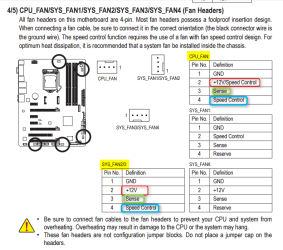
And compare it to your manual,

2016-04-13_20h58_30.png

Three of those headers fit the criteria.
 

My Computer My Computer

At a glance

Win 10 Pro x64Intel I5-2500K @3.3GHz16GB G.Skill Ripjaws X (4x4GB)EVGA GeForce 750 Ti SC 2GB
Computer type
PC/Desktop
Computer Manufacturer/Model Number
Self Built
OS
Win 10 Pro x64
CPU
Intel I5-2500K @3.3GHz
Motherboard
Asrock P67 Extreme4
Memory
16GB G.Skill Ripjaws X (4x4GB)
Graphics Card(s)
EVGA GeForce 750 Ti SC 2GB
Sound Card
ASUS Xonar DG 5.1 Channels 24-bit 96KHz PCI Interface Sound
Monitor(s) Displays
auria eq2367
Screen Resolution
1920 x 1080
Hard Drives
250GB Samsung 850 EVO SSD
1TB WD Blue
1TB Hitachi
PSU
SeaSonic X 650W 80 Plus Gold
Case
Corsair Obsidian 750D
Cooling
Corsair H60, Three 140mm case fans
Keyboard
Logitech Wireless Keyboard K520
Mouse
Logitech Wireless Mouse M310
Internet Speed
Wave Broadband ~ 100 dn 5 up
Antivirus
Windows Defender, Malwarebytes Premium
Browser
Edge, IE11, Chrome
Other Info
Laptop specs: HP g7-1365dx /
CPU: AMD A6-3420M APU with Radeon(tm) HD Graphics /
RAM: Crucial 8Gb (2x4Gb) /
SSD: Crucial M4-CT128M4SSD2 ATA Device/ FW 000F /
GFX: AMD Radeon HD 6520G /
OS: Windows 10 Pro x64
Oh... OK. XD
Well, even if they aren't all PWM, I decided I will use all PWM fans anyway just to be on the safe side unless I find out sometime tomorrow through the internet that they aren't all PWM headers.

I found this 140mm PWM fan by Noctua which looked better than my Corsair so I decided it would probably be more worth it anyway to get it. Noctua NF-A14 PWM 140mm Case Fan - Newegg.com

I also decided on getting 3 of these instead of the Corsair ones as like the 140mm ones, I read they were hard to install and these actually get better airflow. COUGAR CF-V12HPB Vortex Hydro-Dynamic-Bearing (Fluid) 300,000 Hours 12CM Silent Cooling Fan with Pulse Width Modulation (Black) - Newegg.com

The 4 pin fans will also match the 4 pin headers so there's that too... which isn't really a big deal or anything. XD
One main reason why I'm hoping all the headers are PWM is exactly as you explained it: "They spin slower when the PC is loafing, thereby making less noise. When load comes, they spin faster."

I would like to have my fans automatically adjusted to the necessary fan speed for the right temperatures. SpeedFan works with PWM fans as well so if I needed to further modify the speeds for higher or slower then that's great. The silence factor from it is a nice bonus I certainly don't mind at all either. Maybe it would motivate me to actually leave my PC on all night for testing things instead of hearing a grinding noise like my current fans that makes me want to turn it off lol.

EDIT:
@Derekimo thank you for the information! I may be a bit dull (or just too tired) to understand the full brunt of the information you posted but does it mean that 3/4 of my motherboard headers are PWM compatible? If so, then the above still applies then. Which header(s) # aren't compatible if the others are?
 

My Computer My Computer

At a glance

Windows 7 64 biti5 3570k (Mobo onboard safe OC to 4.2ghz)(8GB total) GSKILL x2 4GB Ripjaws-X 1600GHz m...AMD Radeon HD7970
Computer type
PC/Desktop
Computer Manufacturer/Model Number
Cyber Power
OS
Windows 7 64 bit
CPU
i5 3570k (Mobo onboard safe OC to 4.2ghz)
Motherboard
Gigabyte z77x UD3H
Memory
(8GB total) GSKILL x2 4GB Ripjaws-X 1600GHz memory
Graphics Card(s)
AMD Radeon HD7970
Hard Drives
SSD: 256GB OCZ Agility 4 SATA III.
HDD: 1TB SATA III 7200 3.5".
PSU
Corsair CMPSU-850TX V2.
Cooling
Cooling Unit: Corsair Hydro Series H60 120MM Liquid Cooling.
see comments in bold

Oh... OK. XD
Well, even if they aren't all PWM, I decided I will use all PWM fans anyway just to be on the safe side unless I find out sometime tomorrow through the internet that they aren't all PWM headers.

You just found out from Derekimo's examination of your manual that not all are PWM.

sysfan 1 and sysfan 4 are NOT.


The others SHOULD be PWM, according to the manual.


BUT BUT BUT---it's possibly that Gigabyte has done a fouled up implementation of PWM on your board and that you can't trust the manual.

I have heard of some complaints about Gigabyte's PWM implementation and fan control generally.

I have no idea if the complaints apply to your board.

What would I do?

I'd build the thing with a minimal number of fans--say one good Noctua PWM and one or two good non-PWM 3 pins.

Then evaluate it for heat, noise, and fan speed for a few days or weeks and then possibly revisit this and purchase more fans only if necessary. Evaluate Speedfan during this period also. You may find it hopeless.

I would NOT buy 50 dollars plus of fans on RANK SPECULATION that I might need them---unless you are a fan collector who gets a big enjoy from having a bunch of unused fans in a drawer.
 

My Computer My Computer

At a glance

Windows 7 Home Premium SP1, 64-bitIntel Skylake i5-6600K, not overclocked8 GB HyperX DDR4-2666 (2 x 4 GB)none; graphics are integrated on CPU
Computer type
PC/Desktop
Computer Manufacturer/Model Number
Ignatz Special; 4 speed manual gearbox; factory air conditioning; one of one
OS
Windows 7 Home Premium SP1, 64-bit
CPU
Intel Skylake i5-6600K, not overclocked
Motherboard
AsRock Z170M Extreme 4, micro ATX
Memory
8 GB HyperX DDR4-2666 (2 x 4 GB)
Graphics Card(s)
none; graphics are integrated on CPU
Sound Card
onboard: Realtek ALC1150; external: USB Behringer UF0-202
Monitor(s) Displays
Dell S2340M 23 inch IPS
Screen Resolution
1600 x 900
Hard Drives
System: Crucial MX100 series SSD, 128 GB;
Data: Samsung Spinpoint 103SJ, 1 TB;
Backup: WD Caviar Green WD30EZRX-00D8PB0, 3 TB
PSU
Rosewill SilentNight 500 watt fanless, semi-modular
Case
Antec Solo II
Cooling
Noctua NH-U12S; Noctua F12 intake, Noctua S12A exhaust
Keyboard
Microsoft 200 6JH-00001 USB
Mouse
Dell or Microsoft optical wired; USB
Antivirus
Microsoft Security Essentials and Malwarebytes Premium
Browser
Pale Moon
Other Info
All fans PWM; speeds at idle: CPU circa 500 rpm; intake circa 600 rpm; exhaust circa 600 rpm; CPU temps 27 idle and 47 C load in a warm room (27 C/81 F) when running Intel Extreme Tuning Utility stress test.
"Three of those headers fit the criteria." - Doesn't this mean that 3 out of 4 of the headers are PWM ready then? I compared it to the manual (and as I was searching for the page I randomly opened it up and there it was), and the information he posted matched it.
 

My Computer My Computer

At a glance

Windows 7 64 biti5 3570k (Mobo onboard safe OC to 4.2ghz)(8GB total) GSKILL x2 4GB Ripjaws-X 1600GHz m...AMD Radeon HD7970
Computer type
PC/Desktop
Computer Manufacturer/Model Number
Cyber Power
OS
Windows 7 64 bit
CPU
i5 3570k (Mobo onboard safe OC to 4.2ghz)
Motherboard
Gigabyte z77x UD3H
Memory
(8GB total) GSKILL x2 4GB Ripjaws-X 1600GHz memory
Graphics Card(s)
AMD Radeon HD7970
Hard Drives
SSD: 256GB OCZ Agility 4 SATA III.
HDD: 1TB SATA III 7200 3.5".
PSU
Corsair CMPSU-850TX V2.
Cooling
Cooling Unit: Corsair Hydro Series H60 120MM Liquid Cooling.
Back
Top