Upgrading my PC's Memory+Cooling Fans & Cleaning it Out

EDIT:
@Derekimo thank you for the information! I may be a bit dull (or just too tired) to understand the full brunt of the information you posted but does it mean that 3/4 of my motherboard headers are PWM compatible? If so, then the above still applies then. Which header(s) # aren't compatible if the others are?

I would say only the CPU and 2 and 3 are capable from the info I found, which leaves 1 and 4 out of the capable list.

"Three of those headers fit the criteria." - Doesn't this mean that 3 out of 4 of the headers are PWM ready then? I compared it to the manual (and as I was searching for the page I randomly opened it up and there it was), and the information he posted matched it.


There are 5 total headers I see, so 3 of the 5 fit the criteria.

2016-04-13_21h32_32.png
 

My Computer My Computer

At a glance

Win 10 Pro x64Intel I5-2500K @3.3GHz16GB G.Skill Ripjaws X (4x4GB)EVGA GeForce 750 Ti SC 2GB
Computer type
PC/Desktop
Computer Manufacturer/Model Number
Self Built
OS
Win 10 Pro x64
CPU
Intel I5-2500K @3.3GHz
Motherboard
Asrock P67 Extreme4
Memory
16GB G.Skill Ripjaws X (4x4GB)
Graphics Card(s)
EVGA GeForce 750 Ti SC 2GB
Sound Card
ASUS Xonar DG 5.1 Channels 24-bit 96KHz PCI Interface Sound
Monitor(s) Displays
auria eq2367
Screen Resolution
1920 x 1080
Hard Drives
250GB Samsung 850 EVO SSD
1TB WD Blue
1TB Hitachi
PSU
SeaSonic X 650W 80 Plus Gold
Case
Corsair Obsidian 750D
Cooling
Corsair H60, Three 140mm case fans
Keyboard
Logitech Wireless Keyboard K520
Mouse
Logitech Wireless Mouse M310
Internet Speed
Wave Broadband ~ 100 dn 5 up
Antivirus
Windows Defender, Malwarebytes Premium
Browser
Edge, IE11, Chrome
Other Info
Laptop specs: HP g7-1365dx /
CPU: AMD A6-3420M APU with Radeon(tm) HD Graphics /
RAM: Crucial 8Gb (2x4Gb) /
SSD: Crucial M4-CT128M4SSD2 ATA Device/ FW 000F /
GFX: AMD Radeon HD 6520G /
OS: Windows 10 Pro x64
"Three of those headers fit the criteria." - Doesn't this mean that 3 out of 4 of the headers are PWM ready then? I compared it to the manual (and as I was searching for the page I randomly opened it up and there it was), and the information he posted matched it.

There are 5, count 'em, 5 headers.

CPU plus 4 for the case.

2 of the 4 case fan headers are supposedly, I say supposedly, PWM. 2 are not.
 

My Computer My Computer

At a glance

Windows 7 Home Premium SP1, 64-bitIntel Skylake i5-6600K, not overclocked8 GB HyperX DDR4-2666 (2 x 4 GB)none; graphics are integrated on CPU
Computer type
PC/Desktop
Computer Manufacturer/Model Number
Ignatz Special; 4 speed manual gearbox; factory air conditioning; one of one
OS
Windows 7 Home Premium SP1, 64-bit
CPU
Intel Skylake i5-6600K, not overclocked
Motherboard
AsRock Z170M Extreme 4, micro ATX
Memory
8 GB HyperX DDR4-2666 (2 x 4 GB)
Graphics Card(s)
none; graphics are integrated on CPU
Sound Card
onboard: Realtek ALC1150; external: USB Behringer UF0-202
Monitor(s) Displays
Dell S2340M 23 inch IPS
Screen Resolution
1600 x 900
Hard Drives
System: Crucial MX100 series SSD, 128 GB;
Data: Samsung Spinpoint 103SJ, 1 TB;
Backup: WD Caviar Green WD30EZRX-00D8PB0, 3 TB
PSU
Rosewill SilentNight 500 watt fanless, semi-modular
Case
Antec Solo II
Cooling
Noctua NH-U12S; Noctua F12 intake, Noctua S12A exhaust
Keyboard
Microsoft 200 6JH-00001 USB
Mouse
Dell or Microsoft optical wired; USB
Antivirus
Microsoft Security Essentials and Malwarebytes Premium
Browser
Pale Moon
Other Info
All fans PWM; speeds at idle: CPU circa 500 rpm; intake circa 600 rpm; exhaust circa 600 rpm; CPU temps 27 idle and 47 C load in a warm room (27 C/81 F) when running Intel Extreme Tuning Utility stress test.
Okay, so the highlighted in yellow are the ones that support PWM right? Will they be able to support fan splitters for two different PWM fans without making me not able to POST? I read that that can happen with split fans.

As for the CPU header, that may be occupied by my H60. If it isn't then its a bonus header to work PWM with. And that's like if you said, the other 2 are supposedly PWM.
 

My Computer My Computer

At a glance

Windows 7 64 biti5 3570k (Mobo onboard safe OC to 4.2ghz)(8GB total) GSKILL x2 4GB Ripjaws-X 1600GHz m...AMD Radeon HD7970
Computer type
PC/Desktop
Computer Manufacturer/Model Number
Cyber Power
OS
Windows 7 64 bit
CPU
i5 3570k (Mobo onboard safe OC to 4.2ghz)
Motherboard
Gigabyte z77x UD3H
Memory
(8GB total) GSKILL x2 4GB Ripjaws-X 1600GHz memory
Graphics Card(s)
AMD Radeon HD7970
Hard Drives
SSD: 256GB OCZ Agility 4 SATA III.
HDD: 1TB SATA III 7200 3.5".
PSU
Corsair CMPSU-850TX V2.
Cooling
Cooling Unit: Corsair Hydro Series H60 120MM Liquid Cooling.
see comments in bold

Okay, so the highlighted in yellow are the ones that support PWM right?

If, as Derekimo said in post 17, you want to believe the manual.


Will they be able to support fan splitters for two different PWM fans without making me not able to POST? I read that that can happen with split fans.

To repeat, you will need trial and error. I use 2 Noctua NF-F12 fans off the same PWM header without any problems on a Gigabyte board.

That doesn't mean you won't be tearing your hair out.


As for the CPU header, that may be occupied by my H60. If it isn't then its a bonus header to work PWM with. And that's like if you said, the other 2 are supposedly PWM.


The key word in your last sentence is "supposedly". I'd do what I said a couple of posts back--build it with minimal fannage and evaluate.
 

My Computer My Computer

At a glance

Windows 7 Home Premium SP1, 64-bitIntel Skylake i5-6600K, not overclocked8 GB HyperX DDR4-2666 (2 x 4 GB)none; graphics are integrated on CPU
Computer type
PC/Desktop
Computer Manufacturer/Model Number
Ignatz Special; 4 speed manual gearbox; factory air conditioning; one of one
OS
Windows 7 Home Premium SP1, 64-bit
CPU
Intel Skylake i5-6600K, not overclocked
Motherboard
AsRock Z170M Extreme 4, micro ATX
Memory
8 GB HyperX DDR4-2666 (2 x 4 GB)
Graphics Card(s)
none; graphics are integrated on CPU
Sound Card
onboard: Realtek ALC1150; external: USB Behringer UF0-202
Monitor(s) Displays
Dell S2340M 23 inch IPS
Screen Resolution
1600 x 900
Hard Drives
System: Crucial MX100 series SSD, 128 GB;
Data: Samsung Spinpoint 103SJ, 1 TB;
Backup: WD Caviar Green WD30EZRX-00D8PB0, 3 TB
PSU
Rosewill SilentNight 500 watt fanless, semi-modular
Case
Antec Solo II
Cooling
Noctua NH-U12S; Noctua F12 intake, Noctua S12A exhaust
Keyboard
Microsoft 200 6JH-00001 USB
Mouse
Dell or Microsoft optical wired; USB
Antivirus
Microsoft Security Essentials and Malwarebytes Premium
Browser
Pale Moon
Other Info
All fans PWM; speeds at idle: CPU circa 500 rpm; intake circa 600 rpm; exhaust circa 600 rpm; CPU temps 27 idle and 47 C load in a warm room (27 C/81 F) when running Intel Extreme Tuning Utility stress test.
Okay, so I will build it with minimal fannage then. How many fans do you recommend I start with? The two on the radiator, one side panel fan to blow air onto my GPU and maybe one front intake fan?

So maybe I'll take off the 140mm and a 120mm to be safe?
 

My Computer My Computer

At a glance

Windows 7 64 biti5 3570k (Mobo onboard safe OC to 4.2ghz)(8GB total) GSKILL x2 4GB Ripjaws-X 1600GHz m...AMD Radeon HD7970
Computer type
PC/Desktop
Computer Manufacturer/Model Number
Cyber Power
OS
Windows 7 64 bit
CPU
i5 3570k (Mobo onboard safe OC to 4.2ghz)
Motherboard
Gigabyte z77x UD3H
Memory
(8GB total) GSKILL x2 4GB Ripjaws-X 1600GHz memory
Graphics Card(s)
AMD Radeon HD7970
Hard Drives
SSD: 256GB OCZ Agility 4 SATA III.
HDD: 1TB SATA III 7200 3.5".
PSU
Corsair CMPSU-850TX V2.
Cooling
Cooling Unit: Corsair Hydro Series H60 120MM Liquid Cooling.
Okay, so I will build it with minimal fannage then. How many fans do you recommend I start with? The two on the radiator, one side panel fan to blow air onto my GPU and maybe one front intake fan?

So maybe I'll take off the 140mm and a 120mm to be safe?

I have no idea whether your water cooler is designed for 1, 2, or 33 fans.

Ignoring the water cooler, I'd build it with 2 more: one intake on the front and one exhaust at the rear. Evaluate that. Then maybe swap those 2 around to the top or side to see if temps and noise change appreciably.

I probably would NOT buy a 140 mm fan to start with because there's only 1 place you can use it and you can't really evaluate that until you get a couple of good standard 120s installed to test. The 140 might be unneeded even after evaluation and why have a 140 laying around if you don't need it. At least unused 120s can eventually be used if an existing fan fails.

There's a point of diminishing returns on fans--4 isn't necessarily better than 3.

But you may be a fanaholic--a common disease.

Or you may like incessant fiddling--an even more common disease.

Or you may be indifferent to expense.

Etc.

The thing isn't going to explode with minimal fannage.

If temps don't go above 80, I wouldn't much worry.

But you may think that 65 degrees is always better than 70. Intel CPUs can run indefinitely at 70 and higher.

I have no idea how much your GPU will contribute to case heat and you wont' either until you do a base evaluation with minimal fans.

Maybe you then decide PWM is useless to you and buy one more 3 pin. Maybe you decide the side fan is much more important than the top fan. Maybe you decide 2 fans up front is better than 1 up front and 1 on the side.

And so on and so forth.

Only experimentation can give you answers.

Ambient temp is highly important. You'll likely run near 10 degrees cooler at 70 ambient rather than 80 ambient.

I use 1 intake, 1 exhaust, and 1 on my air cooler. Ambient about 80. No graphics card. Severe load temps are never above 65. Your situation will be different, but you have to develop a baseline with minimal good fannage and re-adjust if necessary.
 

My Computer My Computer

At a glance

Windows 7 Home Premium SP1, 64-bitIntel Skylake i5-6600K, not overclocked8 GB HyperX DDR4-2666 (2 x 4 GB)none; graphics are integrated on CPU
Computer type
PC/Desktop
Computer Manufacturer/Model Number
Ignatz Special; 4 speed manual gearbox; factory air conditioning; one of one
OS
Windows 7 Home Premium SP1, 64-bit
CPU
Intel Skylake i5-6600K, not overclocked
Motherboard
AsRock Z170M Extreme 4, micro ATX
Memory
8 GB HyperX DDR4-2666 (2 x 4 GB)
Graphics Card(s)
none; graphics are integrated on CPU
Sound Card
onboard: Realtek ALC1150; external: USB Behringer UF0-202
Monitor(s) Displays
Dell S2340M 23 inch IPS
Screen Resolution
1600 x 900
Hard Drives
System: Crucial MX100 series SSD, 128 GB;
Data: Samsung Spinpoint 103SJ, 1 TB;
Backup: WD Caviar Green WD30EZRX-00D8PB0, 3 TB
PSU
Rosewill SilentNight 500 watt fanless, semi-modular
Case
Antec Solo II
Cooling
Noctua NH-U12S; Noctua F12 intake, Noctua S12A exhaust
Keyboard
Microsoft 200 6JH-00001 USB
Mouse
Dell or Microsoft optical wired; USB
Antivirus
Microsoft Security Essentials and Malwarebytes Premium
Browser
Pale Moon
Other Info
All fans PWM; speeds at idle: CPU circa 500 rpm; intake circa 600 rpm; exhaust circa 600 rpm; CPU temps 27 idle and 47 C load in a warm room (27 C/81 F) when running Intel Extreme Tuning Utility stress test.
Yeah, I think I will have to fiddle with it but at the moment, I found those PWM fans that I linked earlier which got good reviews and airflow so I will stick with those and just get them all. I want a bunch of fans in my PC and I don't really mind having so many in there, as long as there's good cooling. If some need to be taken out then so be it. XD

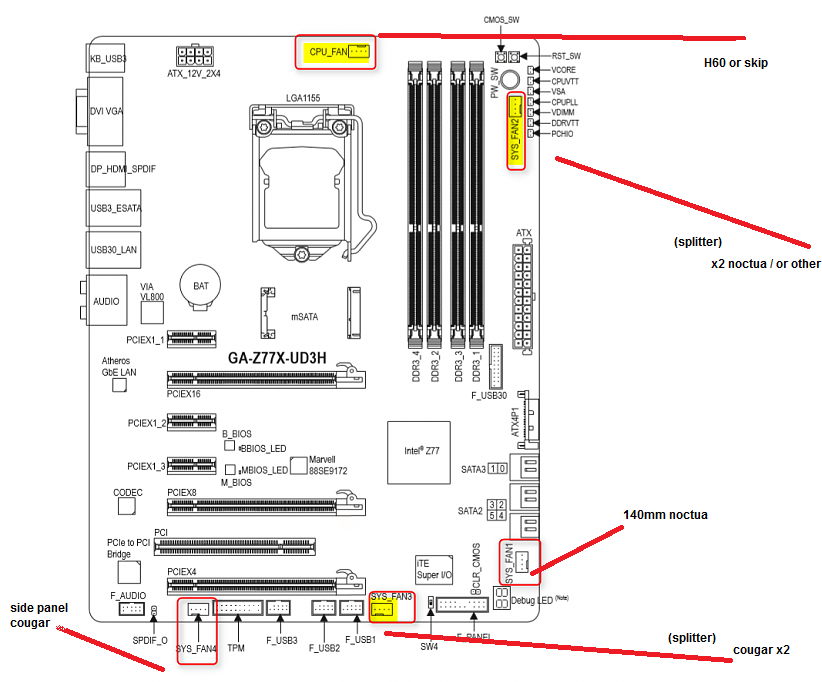
I made this diagram based off of what Derekimo made highlighting the "possible" PWM headers. Even if the headers aren't PWM, the fans are still good fans to use as is.

VPvWIab.png


The x2 noctua on the radiator are exhaust.
The x2 cougar are intake up front.
The side panel cougar is intake as well.
The 140mm is exhaust.
 

My Computer My Computer

At a glance

Windows 7 64 biti5 3570k (Mobo onboard safe OC to 4.2ghz)(8GB total) GSKILL x2 4GB Ripjaws-X 1600GHz m...AMD Radeon HD7970
Computer type
PC/Desktop
Computer Manufacturer/Model Number
Cyber Power
OS
Windows 7 64 bit
CPU
i5 3570k (Mobo onboard safe OC to 4.2ghz)
Motherboard
Gigabyte z77x UD3H
Memory
(8GB total) GSKILL x2 4GB Ripjaws-X 1600GHz memory
Graphics Card(s)
AMD Radeon HD7970
Hard Drives
SSD: 256GB OCZ Agility 4 SATA III.
HDD: 1TB SATA III 7200 3.5".
PSU
Corsair CMPSU-850TX V2.
Cooling
Cooling Unit: Corsair Hydro Series H60 120MM Liquid Cooling.
Hello all, just an update. I cleaned everything out and did as described above. All of the fans work great and my PC does too luckily! XD

So, a few questions to any who know an answer to them:
1. The Sys_fan4 header causes any fan to run at max which is 4000rpm according to hwmonitor. Is there any way to change this? I looked at SpeedFan and in my BIOS and found nothing.
2. I attached an LNA to the 140mm noctua fan (which is running at 4000rpm) and it still runs at 4000rpm. Should I just take the LNA off then? Why does it not reduce the RPM? I also attached an extension to the LNA because the fan can't reach the header without the extension. Is this double extension safe?

Thanks in advance. :)
 

My Computer My Computer

At a glance

Windows 7 64 biti5 3570k (Mobo onboard safe OC to 4.2ghz)(8GB total) GSKILL x2 4GB Ripjaws-X 1600GHz m...AMD Radeon HD7970
Computer type
PC/Desktop
Computer Manufacturer/Model Number
Cyber Power
OS
Windows 7 64 bit
CPU
i5 3570k (Mobo onboard safe OC to 4.2ghz)
Motherboard
Gigabyte z77x UD3H
Memory
(8GB total) GSKILL x2 4GB Ripjaws-X 1600GHz memory
Graphics Card(s)
AMD Radeon HD7970
Hard Drives
SSD: 256GB OCZ Agility 4 SATA III.
HDD: 1TB SATA III 7200 3.5".
PSU
Corsair CMPSU-850TX V2.
Cooling
Cooling Unit: Corsair Hydro Series H60 120MM Liquid Cooling.
Hello all, just an update. I cleaned everything out and did as described above. All of the fans work great and my PC does too luckily! XD

So, a few questions to any who know an answer to them:
1. The Sys_fan4 header causes any fan to run at max which is 4000rpm according to hwmonitor. Is there any way to change this? I looked at SpeedFan and in my BIOS and found nothing.
2. I attached an LNA to the 140mm noctua fan (which is running at 4000rpm) and it still runs at 4000rpm. Should I just take the LNA off then? Why does it not reduce the RPM? I also attached an extension to the LNA because the fan can't reach the header without the extension. Is this double extension safe?

Thanks in advance. :)

What does XD mean? I see it in nearly all of your posts.

Re 1: I'd be very surprised if you had no BIOS control over that fan speed, but you are the one looking in the BIOS. You could also buy an adapter to cut the voltage from 12 volts down to 10 or 7. Or you could buy a slower fan. Or you could likely buy a fan controller to control voltage that way.

2: The LNA makes very very little difference even if it works. The extension should be safe. You'd have to experiment with it on other fans and headers to come to a conclusion. It's typically used by those obsessed with the lowest possible noise, but I couldn't tell the difference when I tried it.

Not sure why you intentionally bought a 4000 rpm Noctua fan if you wanted it to run slower than that.

You may find that HWinfo doesn't correctly identify fans by name (location). It should be accurate for the CPU fan, but I'd stop each fan manually with my finger and then see which fan in HWinfo was then shown as 0 rpm to be sure you and HWinfo are on the same page.

Or even try a different monitoring tool entirely.
 

My Computer My Computer

At a glance

Windows 7 Home Premium SP1, 64-bitIntel Skylake i5-6600K, not overclocked8 GB HyperX DDR4-2666 (2 x 4 GB)none; graphics are integrated on CPU
Computer type
PC/Desktop
Computer Manufacturer/Model Number
Ignatz Special; 4 speed manual gearbox; factory air conditioning; one of one
OS
Windows 7 Home Premium SP1, 64-bit
CPU
Intel Skylake i5-6600K, not overclocked
Motherboard
AsRock Z170M Extreme 4, micro ATX
Memory
8 GB HyperX DDR4-2666 (2 x 4 GB)
Graphics Card(s)
none; graphics are integrated on CPU
Sound Card
onboard: Realtek ALC1150; external: USB Behringer UF0-202
Monitor(s) Displays
Dell S2340M 23 inch IPS
Screen Resolution
1600 x 900
Hard Drives
System: Crucial MX100 series SSD, 128 GB;
Data: Samsung Spinpoint 103SJ, 1 TB;
Backup: WD Caviar Green WD30EZRX-00D8PB0, 3 TB
PSU
Rosewill SilentNight 500 watt fanless, semi-modular
Case
Antec Solo II
Cooling
Noctua NH-U12S; Noctua F12 intake, Noctua S12A exhaust
Keyboard
Microsoft 200 6JH-00001 USB
Mouse
Dell or Microsoft optical wired; USB
Antivirus
Microsoft Security Essentials and Malwarebytes Premium
Browser
Pale Moon
Other Info
All fans PWM; speeds at idle: CPU circa 500 rpm; intake circa 600 rpm; exhaust circa 600 rpm; CPU temps 27 idle and 47 C load in a warm room (27 C/81 F) when running Intel Extreme Tuning Utility stress test.

My Computers My Computers

  • At a glance

    Windows 11 Pro x64 [Latest Release and Releas...Ryzen 9 5950X, 3.8 - 5.2 MHz64GB [2 x 32GB] DDR4 3200MHz4GB NVIDIA GEFORCE GTX 1650 Ti
    Computer type
    PC/Desktop
    Computer Manufacturer/Model Number
    ChillBlast - Custom to my design
    OS
    Windows 11 Pro x64 [Latest Release and Release Preview]
    CPU
    Ryzen 9 5950X, 3.8 - 5.2 MHz
    Motherboard
    Asus Prime X570-Pro
    Memory
    64GB [2 x 32GB] DDR4 3200MHz
    Graphics Card(s)
    4GB NVIDIA GEFORCE GTX 1650 Ti
    Sound Card
    On-board SPDIF to 5.1 System + HDMI [5.1 system]
    Monitor(s) Displays
    32" UHD 32 Bit HDR Monitor + 43" UHD 4K 32Bit HDR TV
    Screen Resolution
    2 x 3840 x 2160 @60Hz
    Hard Drives
    1TB M2 SSD OS, 500GB Fast Access SSD, 2 x 8TB Data + Various Externals from 1TB to 4TB, 10TB NAS
    PSU
    NZXT C750 80 PLUS Gold 750W Modular PSU
    Case
    Workstation Case [Matt Black]
    Cooling
    NZXT Kraken X63 280mm CPU Cooler +2x Quiet Case fans
    Keyboard
    Logitech Wireless MX Keys & K400 + others
    Mouse
    Logitech Wireless MX Master 3S
    Internet Speed
    920 MB Down 50 MB Up
    Antivirus
    BitDefender Total Security Pro
    Browser
    Chrome (always run latest Non-Beta)
    Other Info
    Also run ...
    Laptop - Quad 8GB - Windows 10 Pro x64
    Nexus 7 Android tablet x2
    Samsung 10.2" tablet
    Blackview TAB 8 4G Android Tablet c/w Keyboard
    Wacom Intuos Pro Medium Pen Pad
    Wacom Intuos Pro Small Pen Pad
    Wacom Expresskeys Remote
    Loopdeck+ Graphics Controller
    Shuttle Pro v2 Control
  • At a glance

    Windows 11 Pro x64 Latest RPIntel I7 10750H 5.0GHz32GB [2x16GB] DDR4 2933 MHznVidia GTX1650Ti 4 GB GDDR6
    Computer type
    Laptop
    System Manufacturer/Model Number
    Dell XPS 17 10750H
    OS
    Windows 11 Pro x64 Latest RP
    CPU
    Intel I7 10750H 5.0GHz
    Motherboard
    Dell XPS
    Memory
    32GB [2x16GB] DDR4 2933 MHz
    Graphics Card(s)
    nVidia GTX1650Ti 4 GB GDDR6
    Sound Card
    Stock [Realtek] 4 Speaker
    Monitor(s) Displays
    17" IPS UHD+ Infinity Edge Touchscreen
    Screen Resolution
    3840 x 2400
    Hard Drives
    2TB M2 NVMe, 4TB External + various 500GB & 1TB External NVMe (also have access to spinner HDD from
    PSU
    Stock
    Case
    Stock XPS Aluminium & Carbon Fibre
    Cooling
    Stock - Active Fan Control
    Keyboard
    Backlit + Various Logitech
    Mouse
    Stock Track Pad + Logitech MX Trackball
    Internet Speed
    72 MB Down 18MB Up
    Browser
    Chrome
    Other Info
    Also run ...
    Laptop - Quad 8GB - Windows 10 Pro x64
    Nexus 7 Android tablet x2
    10.2" tablet
    Sony Z3 Android Smartphone
    Wacom Intuos Pro Medium Pen Pad
    Wacom Intuos Pro Small Pen Pad
    Wacom Expresskeys Remote
    Loopdeck+ Graphics Controller
    Shuttle Pro v2 Control Pad
    10TB NAS
Hello all, just an update. I cleaned everything out and did as described above. All of the fans work great and my PC does too luckily! XD

So, a few questions to any who know an answer to them:
1. The Sys_fan4 header causes any fan to run at max which is 4000rpm according to hwmonitor. Is there any way to change this? I looked at SpeedFan and in my BIOS and found nothing.
2. I attached an LNA to the 140mm noctua fan (which is running at 4000rpm) and it still runs at 4000rpm. Should I just take the LNA off then? Why does it not reduce the RPM? I also attached an extension to the LNA because the fan can't reach the header without the extension. Is this double extension safe?

Thanks in advance. :)

What does XD mean? I see it in nearly all of your posts.

Re 1: I'd be very surprised if you had no BIOS control over that fan speed, but you are the one looking in the BIOS. You could also buy an adapter to cut the voltage from 12 volts down to 10 or 7. Or you could buy a slower fan. Or you could likely buy a fan controller to control voltage that way.

2: The LNA makes very very little difference even if it works. The extension should be safe. You'd have to experiment with it on other fans and headers to come to a conclusion. It's typically used by those obsessed with the lowest possible noise, but I couldn't tell the difference when I tried it.

Not sure why you intentionally bought a 4000 rpm Noctua fan if you wanted it to run slower than that.

You may find that HWinfo doesn't correctly identify fans by name (location). It should be accurate for the CPU fan, but I'd stop each fan manually with my finger and then see which fan in HWinfo was then shown as 0 rpm to be sure you and HWinfo are on the same page.

Or even try a different monitoring tool entirely.
Thanks for answering! XD is basically an emoticon, just look at the X as squinty eyes and the D as a smile.

When I got this fan: Noctua NF-A14 PWM 140mm Case Fan - Newegg.com

I didn't know it would be running at 4000 rpm or whatever speeds its running at as the website said it would run at 1500 rpm. Both SpeedFan and HWmonitor say 4k but it could just be some random number. The fan is spinning to be audible compared to the rest of my fans.

In my Bios, it only gives me control over all the headers except #4 which the fan is attached to.

Where can I find an adapter that will cut the voltage down to 7 or so? Doesn't an LNA do something similar or is the difference not very big from default voltage?
 

My Computer My Computer

At a glance

Windows 7 64 biti5 3570k (Mobo onboard safe OC to 4.2ghz)(8GB total) GSKILL x2 4GB Ripjaws-X 1600GHz m...AMD Radeon HD7970
Computer type
PC/Desktop
Computer Manufacturer/Model Number
Cyber Power
OS
Windows 7 64 bit
CPU
i5 3570k (Mobo onboard safe OC to 4.2ghz)
Motherboard
Gigabyte z77x UD3H
Memory
(8GB total) GSKILL x2 4GB Ripjaws-X 1600GHz memory
Graphics Card(s)
AMD Radeon HD7970
Hard Drives
SSD: 256GB OCZ Agility 4 SATA III.
HDD: 1TB SATA III 7200 3.5".
PSU
Corsair CMPSU-850TX V2.
Cooling
Cooling Unit: Corsair Hydro Series H60 120MM Liquid Cooling.
see comments in bold

When I got this fan: Noctua NF-A14 PWM 140mm Case Fan - Newegg.com

I didn't know it would be running at 4000 rpm or whatever speeds its running at as the website said it would run at 1500 rpm. Both SpeedFan and HWmonitor say 4k but it could just be some random number. The fan is spinning to be audible compared to the rest of my fans.

I'd be suspicious of that 4000 number. It's rated at 1500 max by Noctua. 4000 should be noisy, period. 1500 should be easily audible, but not noisy. None of the monitoring tools are flawless.

Noctua support by email is typically very good---responses within a day or so. I'd email them and ask them if 4k can be believed with that EXACT fan model.

Regardless, why do you want to reduce the speed? Temps are too low? Noise is too high?


In my Bios, it only gives me control over all the headers except #4 which the fan is attached to.

Taking your word for it, you'd then need to use another header, possibly with a splitter if necessary. If fan 4 has no control, then put a fan on it that you are willing to let run at some fixed speed.


Where can I find an adapter that will cut the voltage down to 7 or so? Doesn't an LNA do something similar or is the difference not very big from default voltage?


As far as I know, the LNAs reduce voltage. That's how they work. I wouldn't expect the difference to be audible, particularly when you've got several other fans spinning and making noise.

If you google around, you can probably find a wiring adapter that will convert 12 to 7 volts. Might cost 5 bucks. I think I still have a couple of them. But those things have gone out of style because BIOSes of the last 5 or 10 years offer direct fan speed control, rendering the adapters pointless.

I'm surprised you've got a header that has no control, but I have no experience with your board.

My idea would be to use header 4 for a fan that would just spin at a constant speed--typically a front intake or a rear exhaust. Get the PWM fans on a PWM header. Use splitters where you have to. Use as few fans as possible. Use multiple monitoring programs to confirm RPM and temps. Utilize board and fan manufacturer support to confirm that header 4 is uncontrollable and that your Noctua can spin at 4000. Expect audible noise on any fan spinning above 1000. Decide if you want temp X with noisy fans or temp X plus 5 or 10 with quiet fans. Decide how anguished you will be with CPU temps constantly in the 70s. Decide if you are willing to buy more fans on mere speculation that they will resolve any perceived issue.
 

My Computer My Computer

At a glance

Windows 7 Home Premium SP1, 64-bitIntel Skylake i5-6600K, not overclocked8 GB HyperX DDR4-2666 (2 x 4 GB)none; graphics are integrated on CPU
Computer type
PC/Desktop
Computer Manufacturer/Model Number
Ignatz Special; 4 speed manual gearbox; factory air conditioning; one of one
OS
Windows 7 Home Premium SP1, 64-bit
CPU
Intel Skylake i5-6600K, not overclocked
Motherboard
AsRock Z170M Extreme 4, micro ATX
Memory
8 GB HyperX DDR4-2666 (2 x 4 GB)
Graphics Card(s)
none; graphics are integrated on CPU
Sound Card
onboard: Realtek ALC1150; external: USB Behringer UF0-202
Monitor(s) Displays
Dell S2340M 23 inch IPS
Screen Resolution
1600 x 900
Hard Drives
System: Crucial MX100 series SSD, 128 GB;
Data: Samsung Spinpoint 103SJ, 1 TB;
Backup: WD Caviar Green WD30EZRX-00D8PB0, 3 TB
PSU
Rosewill SilentNight 500 watt fanless, semi-modular
Case
Antec Solo II
Cooling
Noctua NH-U12S; Noctua F12 intake, Noctua S12A exhaust
Keyboard
Microsoft 200 6JH-00001 USB
Mouse
Dell or Microsoft optical wired; USB
Antivirus
Microsoft Security Essentials and Malwarebytes Premium
Browser
Pale Moon
Other Info
All fans PWM; speeds at idle: CPU circa 500 rpm; intake circa 600 rpm; exhaust circa 600 rpm; CPU temps 27 idle and 47 C load in a warm room (27 C/81 F) when running Intel Extreme Tuning Utility stress test.
5FwpYUg.png

I tried using EasyTune6 to see if I could control my fan that way. The CPU fan says its 4k even though that's where the H60 is. There's nothing else attached to the header there except the water block on the CPU which is strange. I'm guessing sys4 is header 4. When I lowered the fan speed on that bar I didn't notice any difference in speed even at 0 unless I'm supposed to hit save first.

I also ran 10 passes of memtest86 last night but it was the blue screened version and not the black screen. AKA I ran it in boot priority mode instead of the program letting itself boot from the flash drive from the POST. They're the same thing but one has a better interface than the other. The test between the two doesn't make a difference though, right? All 10 passes passed.

My previously turned off Turbo Boost OC is back on as well. 4.2Ghz seems stable now as I tried running DS3 in fullscreen mode at max settings and leaving it in an intense area for 30-40 minutes -- which would have caused a blue screen prior to the upgrade.

The PC's temperatures are a good 10-25C cooler too except for my GPU which is about 10C cooler during heavy load. I couldn't get all the dust off of the heat sink behind the fans as that would require disassembly. I did however get a ton of dust off any parts shown and the two fans it has.

Also, when I moved some wires around in my PC because the wiring was horrible, I cut a lot of zip ties. To make it neat again I used some regular string to tie the wire bundles back together. Is this alright?

Anyhow, aside from the above, my main problem is how I'm going to adjust this fan speed to see if I can lower the noise a bit. It's a bit higher than I'd like and has a bit of a buzzing noise.
 

My Computer My Computer

At a glance

Windows 7 64 biti5 3570k (Mobo onboard safe OC to 4.2ghz)(8GB total) GSKILL x2 4GB Ripjaws-X 1600GHz m...AMD Radeon HD7970
Computer type
PC/Desktop
Computer Manufacturer/Model Number
Cyber Power
OS
Windows 7 64 bit
CPU
i5 3570k (Mobo onboard safe OC to 4.2ghz)
Motherboard
Gigabyte z77x UD3H
Memory
(8GB total) GSKILL x2 4GB Ripjaws-X 1600GHz memory
Graphics Card(s)
AMD Radeon HD7970
Hard Drives
SSD: 256GB OCZ Agility 4 SATA III.
HDD: 1TB SATA III 7200 3.5".
PSU
Corsair CMPSU-850TX V2.
Cooling
Cooling Unit: Corsair Hydro Series H60 120MM Liquid Cooling.
Back
Top