Can a DELL Re-installation Disk be used on a Non-Dell PC

ALPHA PRO4

New member
Local time
6:40 PM
Messages
7
I had a custom PC built, and a Dell Re-installation Disk was used initially
to Install Windows. The System worked about 30 days, and started getting BSOD's.

After a Clean Re-Install of Windows Pro 64 bit on a New Hard Drive,
Windows updates will not complete, and seems to be in a loop of Failure:
Reverting Configuration Changes. Sometimes the system gets to the
Desk top, but soon as an action is attempted [like installing IE-11] it throws
BSOD's. There are NO Dell components in the system build. Could the Dell
Re-installation Disk be causing the problem, even though the Disk was
Validated as Genuine Windows? I questioned the builder as to why he used that
particular Dell Re-installation Disk, and he denies purchasing & installing it.
That's another issue, but I want to know if the Dell disk is giving me the headaches?
Most components are ASUS.
Thanks!
 

My Computer My Computer

At a glance

Windows 7 Professional 64 BitAMD FX-4350 VISHERA 4.2 Ghz Socket AM3+CORSAIR DDR3 1333 MHz, 4 Modules @ 2 GB Each ...ASUS GT630-2GD3 NVIDIA GeFORCE GT 630 2 GB DDR
Computer type
PC/Desktop
Computer Manufacturer/Model Number
Custom Build
OS
Windows 7 Professional 64 Bit
CPU
AMD FX-4350 VISHERA 4.2 Ghz Socket AM3+
Motherboard
ASUS MSA97 R2.0
Memory
CORSAIR DDR3 1333 MHz, 4 Modules @ 2 GB Each = 8 GB Total
Graphics Card(s)
ASUS GT630-2GD3 NVIDIA GeFORCE GT 630 2 GB DDR
Hard Drives
Western Digital Black 2 TB WD2003FZEX [Basic] Primary
Western Digital Green 2 TB WD20EARS [Basic] Storage
Western Digital 500 GB WD5000AAKS-00YGAO [Dynamic] Storage
Antivirus
Microsoft Essentials
Browser
IE & Google Chrome
Whether it works or not, its illegal to use a Dell OEM on non-Dell units.

Dell OEM disks used to check for a Dell BIOS and if it wasn't there it wouldn't install. Later ones apparently do not check.

But, I doubt that the Dell OEM OS is the direct cause of your problems.
 

My Computer My Computer

At a glance

Windows 10 64 bitIntel i7 6700K16GB Corsair DominatorIntel CPU Graphics
Computer type
PC/Desktop
Computer Manufacturer/Model Number
My Own Build
OS
Windows 10 64 bit
CPU
Intel i7 6700K
Motherboard
ASUS ROG Maximus VIII Hero
Memory
16GB Corsair Dominator
Graphics Card(s)
Intel CPU Graphics
Sound Card
RealTek
Monitor(s) Displays
27" Dell S2719dgf
Screen Resolution
2560X1440
Hard Drives
1 TB Samsung 850 EVO SSD for Win 10 Pro
500GB Samsung 850 EVO SSD for Win 10 Insider
2 TB drive for backup
PSU
EVGA Supernova 750G2
Case
BeQuiet Silent Base 600
Cooling
Deepcool Captain 120EX
Keyboard
Microsoft Wireless 2000
Mouse
Microsoft wireless
Internet Speed
100 MB/sec (Cable)
Antivirus
Microsoft Defender and Malwarebytes
Browser
Edge/Firefox
Other Info
Cakewalk (Sonar) by BandLab and Studio One 4.1 Pro recording studio software. MOTU 896Mk3 Hybrid recording interface, Frontier Tranzport wireless control unit, Behringer X-Touch Control Surface.
Five USB connected optical drives for CD Audio production using Nero BurningROM
Yeah, if it doesn't see the matching Dell BIOS SLIC table it should prompt for a key. If you have the Dell disk, and want to make it a stock disk. Remove the $OEM$ folder from the sources folder. And the ei.cfg file in the sources folder. That should turn it into a stock universal disk. Deleting the $OEM$ folder gets ride of the custom DELL install scripts and any Dell drivers etc. Deleting the ei.cfg file will give you a menu to pick which version to install, instead of being locked into one version. Pick the version that matches the key you plan on using. A simple way to do this is to create a bootable thumb drive, then just delete those items from the thumb drive.
 

My Computer My Computer

At a glance

Windows 10 Education 64 bitAMD Phenom II X4 980 Black Edition Deneb 3.7GHz8GB 4GBx2 Kingston PC10600 DDR3 1333 MemoryZotac NVIDIA Geforce GT640 2 Gig DDR3 PCIe
Computer type
PC/Desktop
Computer Manufacturer/Model Number
Home Built
OS
Windows 10 Education 64 bit
CPU
AMD Phenom II X4 980 Black Edition Deneb 3.7GHz
Motherboard
Asus M4N68T-M V2 µATX Motherboard
Memory
8GB 4GBx2 Kingston PC10600 DDR3 1333 Memory
Graphics Card(s)
Zotac NVIDIA Geforce GT640 2 Gig DDR3 PCIe
Sound Card
VIA VT1708s High Definition Audio 8-channel Onboard
Monitor(s) Displays
22" LG E2242 1080p and 2 19" I-INC AG191D
Screen Resolution
1280x1024 - 1920x1080 - 1280x1024
Hard Drives
Crucial M100 256 GB SSD and 500 GB WD Blue SATA
PSU
Thermaltake TR 620
Case
Power Up Black ATX Mid-Tower Case
Cooling
Stock heatsink and fan
Keyboard
Logitech Wireless K350 Wave
Mouse
Logitech Wireless M570 Trackman Wheel
Internet Speed
80 Mbps Down 30 Mbps Up
Antivirus
Windows Defender
Browser
Internet Explorer 11
Other Info
HP DVD1040e Lightscribe - External USB2
fireberd: Thanks for the "Legal reminder." The disk will be replaced.
I'm hearing there are "Dell Drivers" on the disk, wouldn't that
contribute to BSOD's and Updates?
 

My Computer My Computer

At a glance

Windows 7 Professional 64 BitAMD FX-4350 VISHERA 4.2 Ghz Socket AM3+CORSAIR DDR3 1333 MHz, 4 Modules @ 2 GB Each ...ASUS GT630-2GD3 NVIDIA GeFORCE GT 630 2 GB DDR
Computer type
PC/Desktop
Computer Manufacturer/Model Number
Custom Build
OS
Windows 7 Professional 64 Bit
CPU
AMD FX-4350 VISHERA 4.2 Ghz Socket AM3+
Motherboard
ASUS MSA97 R2.0
Memory
CORSAIR DDR3 1333 MHz, 4 Modules @ 2 GB Each = 8 GB Total
Graphics Card(s)
ASUS GT630-2GD3 NVIDIA GeFORCE GT 630 2 GB DDR
Hard Drives
Western Digital Black 2 TB WD2003FZEX [Basic] Primary
Western Digital Green 2 TB WD20EARS [Basic] Storage
Western Digital 500 GB WD5000AAKS-00YGAO [Dynamic] Storage
Antivirus
Microsoft Essentials
Browser
IE & Google Chrome
alphanumeric: Thanks for that information!
 

My Computer My Computer

At a glance

Windows 7 Professional 64 BitAMD FX-4350 VISHERA 4.2 Ghz Socket AM3+CORSAIR DDR3 1333 MHz, 4 Modules @ 2 GB Each ...ASUS GT630-2GD3 NVIDIA GeFORCE GT 630 2 GB DDR
Computer type
PC/Desktop
Computer Manufacturer/Model Number
Custom Build
OS
Windows 7 Professional 64 Bit
CPU
AMD FX-4350 VISHERA 4.2 Ghz Socket AM3+
Motherboard
ASUS MSA97 R2.0
Memory
CORSAIR DDR3 1333 MHz, 4 Modules @ 2 GB Each = 8 GB Total
Graphics Card(s)
ASUS GT630-2GD3 NVIDIA GeFORCE GT 630 2 GB DDR
Hard Drives
Western Digital Black 2 TB WD2003FZEX [Basic] Primary
Western Digital Green 2 TB WD20EARS [Basic] Storage
Western Digital 500 GB WD5000AAKS-00YGAO [Dynamic] Storage
Antivirus
Microsoft Essentials
Browser
IE & Google Chrome
The Dell drivers wouldn't install unless the hardware device(s) are compatible.
 

My Computer My Computer

At a glance

Windows 10 64 bitIntel i7 6700K16GB Corsair DominatorIntel CPU Graphics
Computer type
PC/Desktop
Computer Manufacturer/Model Number
My Own Build
OS
Windows 10 64 bit
CPU
Intel i7 6700K
Motherboard
ASUS ROG Maximus VIII Hero
Memory
16GB Corsair Dominator
Graphics Card(s)
Intel CPU Graphics
Sound Card
RealTek
Monitor(s) Displays
27" Dell S2719dgf
Screen Resolution
2560X1440
Hard Drives
1 TB Samsung 850 EVO SSD for Win 10 Pro
500GB Samsung 850 EVO SSD for Win 10 Insider
2 TB drive for backup
PSU
EVGA Supernova 750G2
Case
BeQuiet Silent Base 600
Cooling
Deepcool Captain 120EX
Keyboard
Microsoft Wireless 2000
Mouse
Microsoft wireless
Internet Speed
100 MB/sec (Cable)
Antivirus
Microsoft Defender and Malwarebytes
Browser
Edge/Firefox
Other Info
Cakewalk (Sonar) by BandLab and Studio One 4.1 Pro recording studio software. MOTU 896Mk3 Hybrid recording interface, Frontier Tranzport wireless control unit, Behringer X-Touch Control Surface.
Five USB connected optical drives for CD Audio production using Nero BurningROM
Technically it's not legal to use it on a non Dell PC. The way OEM-SLP activation works though, there has to be a Dell SLIC table in the BIOS for it to do the OEM-SLP activation. If the correct SLIC table is not found it will fail activation. As far as I know with Windows 7 custom OEM install media, there is no not looking for it. My guess, is they used the key on the COA sticker to activate your PC.

I'm no expert on it, but some drivers and OEM apps may be installed with scripts, even if the hardware isn't there. The assumption is, its only ever going to used on the PC it was created for. I think It could be possible some of that is causing your issues.

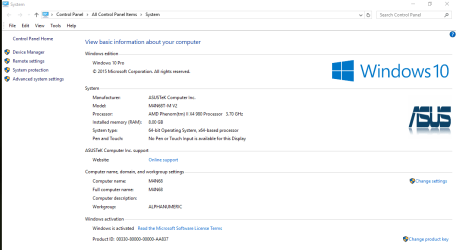
Another side effect of using branded OEM media like that is you'll end up with Dell logo's etc hidden in Windows. Like on the system screen. I add an $OEM$ folder to my install media to add the Logo's and Manufacturer system info.

Like this.
system Capture.PNG
 

My Computer My Computer

At a glance

Windows 10 Education 64 bitAMD Phenom II X4 980 Black Edition Deneb 3.7GHz8GB 4GBx2 Kingston PC10600 DDR3 1333 MemoryZotac NVIDIA Geforce GT640 2 Gig DDR3 PCIe
Computer type
PC/Desktop
Computer Manufacturer/Model Number
Home Built
OS
Windows 10 Education 64 bit
CPU
AMD Phenom II X4 980 Black Edition Deneb 3.7GHz
Motherboard
Asus M4N68T-M V2 µATX Motherboard
Memory
8GB 4GBx2 Kingston PC10600 DDR3 1333 Memory
Graphics Card(s)
Zotac NVIDIA Geforce GT640 2 Gig DDR3 PCIe
Sound Card
VIA VT1708s High Definition Audio 8-channel Onboard
Monitor(s) Displays
22" LG E2242 1080p and 2 19" I-INC AG191D
Screen Resolution
1280x1024 - 1920x1080 - 1280x1024
Hard Drives
Crucial M100 256 GB SSD and 500 GB WD Blue SATA
PSU
Thermaltake TR 620
Case
Power Up Black ATX Mid-Tower Case
Cooling
Stock heatsink and fan
Keyboard
Logitech Wireless K350 Wave
Mouse
Logitech Wireless M570 Trackman Wheel
Internet Speed
80 Mbps Down 30 Mbps Up
Antivirus
Windows Defender
Browser
Internet Explorer 11
Other Info
HP DVD1040e Lightscribe - External USB2
I used my wife's Dell disc on my Gateway computer, because my own disc for that computer was defective, and made this loud whirring noise. sometimes it worked, sometimes it didn't. So I popped her disc in, and it worked. At first I got a message that it was illegal, but when I put in my code for that computer, it authorized fine and I have no problems. As a bonus, the Dell disc had SP1, which saved me a lot of updating.

I should point out that I tried to take my defective disc back to Walmart, but of course they told me to contact Gateway. Which doesn't exist anymore. So I really had no choice. If Dell wants to come after my ass, so be it.
 

My Computer My Computer

At a glance

Windows 7 x64 SP1AMD Athlon 64 X2 6000+ / 3.0 GHz6 GB
Computer type
PC/Desktop
Computer Manufacturer/Model Number
Gateway GT5656
OS
Windows 7 x64 SP1
CPU
AMD Athlon 64 X2 6000+ / 3.0 GHz
Motherboard
NVIDIA GeForce 6150 SE
Memory
6 GB
Monitor(s) Displays
Lenovo LED
Screen Resolution
1920 X 1080
Hard Drives
Windows on 500 GB spinner; Ubuntu 16 on Sandisk 250GB SSD; Bodhi5 on Samsung 250GB SSD; another old spinner for fooling around.
PSU
Original that came with computer
Keyboard
Logitech wireless
Mouse
Logitech wireless
Antivirus
Microsoft Sec Essentials
Browser
Vivaldi
Once the OEM-SLP activations fails, it reverts to the standard enter a key to activate. Your PC is legally activated. Some would debate that, but me personally, I wouldn't lose any sleep over it. It might have some excess Dell baggage in the mix though. Strip the $OEM$ folder out and its stock install media. The other gotcha with doing that is if the versions don't match, your key won't work. That's why I recommend striping out the ei.cfg file too.
 

My Computer My Computer

At a glance

Windows 10 Education 64 bitAMD Phenom II X4 980 Black Edition Deneb 3.7GHz8GB 4GBx2 Kingston PC10600 DDR3 1333 MemoryZotac NVIDIA Geforce GT640 2 Gig DDR3 PCIe
Computer type
PC/Desktop
Computer Manufacturer/Model Number
Home Built
OS
Windows 10 Education 64 bit
CPU
AMD Phenom II X4 980 Black Edition Deneb 3.7GHz
Motherboard
Asus M4N68T-M V2 µATX Motherboard
Memory
8GB 4GBx2 Kingston PC10600 DDR3 1333 Memory
Graphics Card(s)
Zotac NVIDIA Geforce GT640 2 Gig DDR3 PCIe
Sound Card
VIA VT1708s High Definition Audio 8-channel Onboard
Monitor(s) Displays
22" LG E2242 1080p and 2 19" I-INC AG191D
Screen Resolution
1280x1024 - 1920x1080 - 1280x1024
Hard Drives
Crucial M100 256 GB SSD and 500 GB WD Blue SATA
PSU
Thermaltake TR 620
Case
Power Up Black ATX Mid-Tower Case
Cooling
Stock heatsink and fan
Keyboard
Logitech Wireless K350 Wave
Mouse
Logitech Wireless M570 Trackman Wheel
Internet Speed
80 Mbps Down 30 Mbps Up
Antivirus
Windows Defender
Browser
Internet Explorer 11
Other Info
HP DVD1040e Lightscribe - External USB2
I'm inclined to believe your scenario concerning the origin Dell PC.
One of the things that puzzles me is, Windows was "Activated" and
gave me a "Genuine" Windows stamp. When the ASUS motherboard
Drivers were installed, I later got error Device Driver Software was not
successfully Installed. Driver for Universal Serial Bus (USB) Controller
is not installed. Could that be at least one of the culprits to BSOD?
 

My Computer My Computer

At a glance

Windows 7 Professional 64 BitAMD FX-4350 VISHERA 4.2 Ghz Socket AM3+CORSAIR DDR3 1333 MHz, 4 Modules @ 2 GB Each ...ASUS GT630-2GD3 NVIDIA GeFORCE GT 630 2 GB DDR
Computer type
PC/Desktop
Computer Manufacturer/Model Number
Custom Build
OS
Windows 7 Professional 64 Bit
CPU
AMD FX-4350 VISHERA 4.2 Ghz Socket AM3+
Motherboard
ASUS MSA97 R2.0
Memory
CORSAIR DDR3 1333 MHz, 4 Modules @ 2 GB Each = 8 GB Total
Graphics Card(s)
ASUS GT630-2GD3 NVIDIA GeFORCE GT 630 2 GB DDR
Hard Drives
Western Digital Black 2 TB WD2003FZEX [Basic] Primary
Western Digital Green 2 TB WD20EARS [Basic] Storage
Western Digital 500 GB WD5000AAKS-00YGAO [Dynamic] Storage
Antivirus
Microsoft Essentials
Browser
IE & Google Chrome
You can enter a valid product code manually and it will activate and show as genuine. The other scenario is they modified it to use the Dell OEM-SLP. That would be illegal. This utility should tell you what is going on. Showkey - Windows 10 Forums If it shows OEM marker in the firmware, they illegally modified it to cheat activation. Or if you see a grub boot loader installed, that's another tip off that something isn't on the up and up.
 

My Computer My Computer

At a glance

Windows 10 Education 64 bitAMD Phenom II X4 980 Black Edition Deneb 3.7GHz8GB 4GBx2 Kingston PC10600 DDR3 1333 MemoryZotac NVIDIA Geforce GT640 2 Gig DDR3 PCIe
Computer type
PC/Desktop
Computer Manufacturer/Model Number
Home Built
OS
Windows 10 Education 64 bit
CPU
AMD Phenom II X4 980 Black Edition Deneb 3.7GHz
Motherboard
Asus M4N68T-M V2 µATX Motherboard
Memory
8GB 4GBx2 Kingston PC10600 DDR3 1333 Memory
Graphics Card(s)
Zotac NVIDIA Geforce GT640 2 Gig DDR3 PCIe
Sound Card
VIA VT1708s High Definition Audio 8-channel Onboard
Monitor(s) Displays
22" LG E2242 1080p and 2 19" I-INC AG191D
Screen Resolution
1280x1024 - 1920x1080 - 1280x1024
Hard Drives
Crucial M100 256 GB SSD and 500 GB WD Blue SATA
PSU
Thermaltake TR 620
Case
Power Up Black ATX Mid-Tower Case
Cooling
Stock heatsink and fan
Keyboard
Logitech Wireless K350 Wave
Mouse
Logitech Wireless M570 Trackman Wheel
Internet Speed
80 Mbps Down 30 Mbps Up
Antivirus
Windows Defender
Browser
Internet Explorer 11
Other Info
HP DVD1040e Lightscribe - External USB2
How long have you had this PC? I think I'd take it back and ask for my money back. If they refuse tell them your going to contact Microsoft about the install media used.
 

My Computer My Computer

At a glance

Windows 10 Education 64 bitAMD Phenom II X4 980 Black Edition Deneb 3.7GHz8GB 4GBx2 Kingston PC10600 DDR3 1333 MemoryZotac NVIDIA Geforce GT640 2 Gig DDR3 PCIe
Computer type
PC/Desktop
Computer Manufacturer/Model Number
Home Built
OS
Windows 10 Education 64 bit
CPU
AMD Phenom II X4 980 Black Edition Deneb 3.7GHz
Motherboard
Asus M4N68T-M V2 µATX Motherboard
Memory
8GB 4GBx2 Kingston PC10600 DDR3 1333 Memory
Graphics Card(s)
Zotac NVIDIA Geforce GT640 2 Gig DDR3 PCIe
Sound Card
VIA VT1708s High Definition Audio 8-channel Onboard
Monitor(s) Displays
22" LG E2242 1080p and 2 19" I-INC AG191D
Screen Resolution
1280x1024 - 1920x1080 - 1280x1024
Hard Drives
Crucial M100 256 GB SSD and 500 GB WD Blue SATA
PSU
Thermaltake TR 620
Case
Power Up Black ATX Mid-Tower Case
Cooling
Stock heatsink and fan
Keyboard
Logitech Wireless K350 Wave
Mouse
Logitech Wireless M570 Trackman Wheel
Internet Speed
80 Mbps Down 30 Mbps Up
Antivirus
Windows Defender
Browser
Internet Explorer 11
Other Info
HP DVD1040e Lightscribe - External USB2
Once the OEM-SLP activations fails, it reverts to the standard enter a key to activate. Your PC is legally activated. Some would debate that, but me personally, I wouldn't lose any sleep over it. It might have some excess Dell baggage in the mix though. Strip the $OEM$ folder out and its stock install media. The other gotcha with doing that is if the versions don't match, your key won't work. That's why I recommend striping out the ei.cfg file too.

I actually ended up with considerably less Dell-bloat than my wife's Dell laptop, which came with the usual bells and whistles. (Since I reinstalled Windows on her computer, however that is all, thankfully, gone). The only things I seem to have picked up on my install are the very cool Dell start screens. Much better than that goofy Windows 7 viny thing.
 

My Computer My Computer

At a glance

Windows 7 x64 SP1AMD Athlon 64 X2 6000+ / 3.0 GHz6 GB
Computer type
PC/Desktop
Computer Manufacturer/Model Number
Gateway GT5656
OS
Windows 7 x64 SP1
CPU
AMD Athlon 64 X2 6000+ / 3.0 GHz
Motherboard
NVIDIA GeForce 6150 SE
Memory
6 GB
Monitor(s) Displays
Lenovo LED
Screen Resolution
1920 X 1080
Hard Drives
Windows on 500 GB spinner; Ubuntu 16 on Sandisk 250GB SSD; Bodhi5 on Samsung 250GB SSD; another old spinner for fooling around.
PSU
Original that came with computer
Keyboard
Logitech wireless
Mouse
Logitech wireless
Antivirus
Microsoft Sec Essentials
Browser
Vivaldi
Once the OEM-SLP activations fails, it reverts to the standard enter a key to activate. Your PC is legally activated. Some would debate that, but me personally, I wouldn't lose any sleep over it. It might have some excess Dell baggage in the mix though. Strip the $OEM$ folder out and its stock install media. The other gotcha with doing that is if the versions don't match, your key won't work. That's why I recommend striping out the ei.cfg file too.

I actually ended up with considerably less Dell-bloat than my wife's Dell laptop, which came with the usual bells and whistles. (Since I reinstalled Windows on her computer, however that is all, thankfully, gone). The only things I seem to have picked up on my install are the very cool Dell start screens. Much better than that goofy Windows 7 viny thing.

That's some of the stuff I'm talking about. They'll add screen savers, Logo's here and there. Some OEM's go way overboard cramming your system with stuff, some hardly touch it. My OEM bloat is long gone. There are just few little items I put back myself. The system page is where you usually see it. Manufacturer, Model, the Logo won't be the Microsoft logo, etc. It always makes me chuckle when I'm on say and Acer and it has an HP Logo on the System page. You know somebody used the wrong disk.
 

My Computer My Computer

At a glance

Windows 10 Education 64 bitAMD Phenom II X4 980 Black Edition Deneb 3.7GHz8GB 4GBx2 Kingston PC10600 DDR3 1333 MemoryZotac NVIDIA Geforce GT640 2 Gig DDR3 PCIe
Computer type
PC/Desktop
Computer Manufacturer/Model Number
Home Built
OS
Windows 10 Education 64 bit
CPU
AMD Phenom II X4 980 Black Edition Deneb 3.7GHz
Motherboard
Asus M4N68T-M V2 µATX Motherboard
Memory
8GB 4GBx2 Kingston PC10600 DDR3 1333 Memory
Graphics Card(s)
Zotac NVIDIA Geforce GT640 2 Gig DDR3 PCIe
Sound Card
VIA VT1708s High Definition Audio 8-channel Onboard
Monitor(s) Displays
22" LG E2242 1080p and 2 19" I-INC AG191D
Screen Resolution
1280x1024 - 1920x1080 - 1280x1024
Hard Drives
Crucial M100 256 GB SSD and 500 GB WD Blue SATA
PSU
Thermaltake TR 620
Case
Power Up Black ATX Mid-Tower Case
Cooling
Stock heatsink and fan
Keyboard
Logitech Wireless K350 Wave
Mouse
Logitech Wireless M570 Trackman Wheel
Internet Speed
80 Mbps Down 30 Mbps Up
Antivirus
Windows Defender
Browser
Internet Explorer 11
Other Info
HP DVD1040e Lightscribe - External USB2
I apologize for the slow response time. I have been digesting the
information you provided. To make it a little clearer, my responses
are generated from my HP Notebook. The computer with the problem
is a Desktop Custom Build of which I provided the hardware components.
The system was built in July 2013, the following month I was hospitalized
and didn't interact with the system, for a period of time it just wasn't being
used. Somewhere in 2014 it was running, and one day through a BSOD.
This continued every time the PC was booted, it might run a while and boom
a BSOD. Then it sat a very long time, before I attempted again. I thought
maybe it got corrupted somehow, so I replaced the hard drive with a new one.
I used the Dell disk which was used when it was first built and installed. So, the
drive was Clean. When the updates started installing they wouldn't complete, and
went into a Loop of Failures to configure updates. 2 programs were installed before
the updates [Internet Explorer & Windows Essentials]. A BSOD showed up again
when I attempted to open IE-11. Presently, the system is still down from the last
BSOD, and my questioning the Dell Disk as a possible contribution to the problems.
 

My Computer My Computer

At a glance

Windows 7 Professional 64 BitAMD FX-4350 VISHERA 4.2 Ghz Socket AM3+CORSAIR DDR3 1333 MHz, 4 Modules @ 2 GB Each ...ASUS GT630-2GD3 NVIDIA GeFORCE GT 630 2 GB DDR
Computer type
PC/Desktop
Computer Manufacturer/Model Number
Custom Build
OS
Windows 7 Professional 64 Bit
CPU
AMD FX-4350 VISHERA 4.2 Ghz Socket AM3+
Motherboard
ASUS MSA97 R2.0
Memory
CORSAIR DDR3 1333 MHz, 4 Modules @ 2 GB Each = 8 GB Total
Graphics Card(s)
ASUS GT630-2GD3 NVIDIA GeFORCE GT 630 2 GB DDR
Hard Drives
Western Digital Black 2 TB WD2003FZEX [Basic] Primary
Western Digital Green 2 TB WD20EARS [Basic] Storage
Western Digital 500 GB WD5000AAKS-00YGAO [Dynamic] Storage
Antivirus
Microsoft Essentials
Browser
IE & Google Chrome
I personally wouldn't trust the Dell Disk. Also, if you were not asked to enter a product key during the Install, it is almost certainly an illegal install with cheated activation. Is there a COA sticker on that PC? By law there should have been.
A BSOD is usually a driver issue. If the Dell disk is the only one you have, make an install thumb drive and delete the $OEM$ folder in the Sources folder. Then try one more install to see if the issues go away.
http://www.sevenforums.com/tutorials/2432-usb-windows-7-installation-key-drive-create.html
 

My Computer My Computer

At a glance

Windows 10 Education 64 bitAMD Phenom II X4 980 Black Edition Deneb 3.7GHz8GB 4GBx2 Kingston PC10600 DDR3 1333 MemoryZotac NVIDIA Geforce GT640 2 Gig DDR3 PCIe
Computer type
PC/Desktop
Computer Manufacturer/Model Number
Home Built
OS
Windows 10 Education 64 bit
CPU
AMD Phenom II X4 980 Black Edition Deneb 3.7GHz
Motherboard
Asus M4N68T-M V2 µATX Motherboard
Memory
8GB 4GBx2 Kingston PC10600 DDR3 1333 Memory
Graphics Card(s)
Zotac NVIDIA Geforce GT640 2 Gig DDR3 PCIe
Sound Card
VIA VT1708s High Definition Audio 8-channel Onboard
Monitor(s) Displays
22" LG E2242 1080p and 2 19" I-INC AG191D
Screen Resolution
1280x1024 - 1920x1080 - 1280x1024
Hard Drives
Crucial M100 256 GB SSD and 500 GB WD Blue SATA
PSU
Thermaltake TR 620
Case
Power Up Black ATX Mid-Tower Case
Cooling
Stock heatsink and fan
Keyboard
Logitech Wireless K350 Wave
Mouse
Logitech Wireless M570 Trackman Wheel
Internet Speed
80 Mbps Down 30 Mbps Up
Antivirus
Windows Defender
Browser
Internet Explorer 11
Other Info
HP DVD1040e Lightscribe - External USB2
Hi Alpha,
Dell discs are a pain, especially if not used on a Dell motherboard, BSOD are a side effect.
Please can you tell me what your installation media quotes, (NOT THE CODE), the description please, see what i can do to get you a non Dell one.

Roy
 

My Computer My Computer

At a glance

W7 home premium 32bit/W7HP 64bit/w10 tp insid...E5300 dual core3gbNvidia Geforce 7100 Nforce 630i
Computer type
PC/Desktop
Computer Manufacturer/Model Number
medionl/Aspire 6930G/acer x55a
OS
W7 home premium 32bit/W7HP 64bit/w10 tp insider ring
CPU
E5300 dual core
Motherboard
medion MS7366
Memory
3gb
Graphics Card(s)
Nvidia Geforce 7100 Nforce 630i
Monitor(s) Displays
avixc
Internet Speed
n (isp resticted to 72)
Antivirus
mse/pands
Browser
palemoon
Other Info
Belkin Fd7050 n USB using Railink RT2870 drivers, more upto date
Hi Alpha,
Dell discs are a pain, especially if not used on a Dell motherboard, BSOD are a side effect.
Please can you tell me what your installation media quotes, (NOT THE CODE), the description please, see what i can do to get you a non Dell one.

Roy

All I can show you is what its listed as on MSDN, and that depends on what version the DVD is for. Any version can be made into a universal install disk though.
http://www.sevenforums.com/tutorials/85813-windows-7-universal-installation-disc-create.html

If you know anybody with a Retail disk, make an ISO of that. Then modify it to be a universal disk. Or post the exact version you need and I'll post what Microsoft lists it as on MSDN. There are some here than know tricks to get the ISO without having to enter a product code. I thought I saved it but can't find that info at the moment.
 

My Computer My Computer

At a glance

Windows 10 Education 64 bitAMD Phenom II X4 980 Black Edition Deneb 3.7GHz8GB 4GBx2 Kingston PC10600 DDR3 1333 MemoryZotac NVIDIA Geforce GT640 2 Gig DDR3 PCIe
Computer type
PC/Desktop
Computer Manufacturer/Model Number
Home Built
OS
Windows 10 Education 64 bit
CPU
AMD Phenom II X4 980 Black Edition Deneb 3.7GHz
Motherboard
Asus M4N68T-M V2 µATX Motherboard
Memory
8GB 4GBx2 Kingston PC10600 DDR3 1333 Memory
Graphics Card(s)
Zotac NVIDIA Geforce GT640 2 Gig DDR3 PCIe
Sound Card
VIA VT1708s High Definition Audio 8-channel Onboard
Monitor(s) Displays
22" LG E2242 1080p and 2 19" I-INC AG191D
Screen Resolution
1280x1024 - 1920x1080 - 1280x1024
Hard Drives
Crucial M100 256 GB SSD and 500 GB WD Blue SATA
PSU
Thermaltake TR 620
Case
Power Up Black ATX Mid-Tower Case
Cooling
Stock heatsink and fan
Keyboard
Logitech Wireless K350 Wave
Mouse
Logitech Wireless M570 Trackman Wheel
Internet Speed
80 Mbps Down 30 Mbps Up
Antivirus
Windows Defender
Browser
Internet Explorer 11
Other Info
HP DVD1040e Lightscribe - External USB2
OK, I have new information. I Uninstalled the DELL DISK, don't want to see it again!
Installed New Windows 7 Pro 64 with a New Disk: 4/17/16
Windows was not Activated, I chose not to @ the time it asked for the Key.

After Windows completed, and on First Desktop, I next Installed:

ASUS MB Drivers
Graphics Card Driver
Wireless Adapter Driver

Rebooted then:
Downloaded Microsoft Security Essentials via IE-8
Updated Definitions & Performed First Scan [OK].


Got a BSOD When attempting to Setup First BACKUP.
System Rebooted Automatically back to Desktop.
[This is prior to Any Windows Updates].

Next I checked for Windows Updates @ 8:30 PM 4/17/16
Windows Stopped checking @ 11:58 PM 4/17/16
Found 211 Updates Ready for Download \ I Selected the First
33 Important Updates.

Download Started then threw a BSOD @13% Complete.


REBOOTED & another BSOD

I SHUT IT DOWN AFTER THAT ONE.


................................................
DEVICE MANAGER CHECK:

No BANGS [!] were shown, but these messages were shown when going
through the SYSTEM DEVICES:

Direct Memory Access Controller

ATI-I/O Communication Processor

High Precision Event Timer

Numeric Data Processor

Programmable Interrupt Controller

System Speaker

System Timer

........................................................
Everything else: showed "Working Properly"
This is BEFORE ANY Windows Updates.

Best I could do with the BSOD IMAGE.
 

Attachments

  • BSOD 4-17-16.jpg
    BSOD 4-17-16.jpg
    60.5 KB · Views: 1

My Computer My Computer

At a glance

Windows 7 Professional 64 BitAMD FX-4350 VISHERA 4.2 Ghz Socket AM3+CORSAIR DDR3 1333 MHz, 4 Modules @ 2 GB Each ...ASUS GT630-2GD3 NVIDIA GeFORCE GT 630 2 GB DDR
Computer type
PC/Desktop
Computer Manufacturer/Model Number
Custom Build
OS
Windows 7 Professional 64 Bit
CPU
AMD FX-4350 VISHERA 4.2 Ghz Socket AM3+
Motherboard
ASUS MSA97 R2.0
Memory
CORSAIR DDR3 1333 MHz, 4 Modules @ 2 GB Each = 8 GB Total
Graphics Card(s)
ASUS GT630-2GD3 NVIDIA GeFORCE GT 630 2 GB DDR
Hard Drives
Western Digital Black 2 TB WD2003FZEX [Basic] Primary
Western Digital Green 2 TB WD20EARS [Basic] Storage
Western Digital 500 GB WD5000AAKS-00YGAO [Dynamic] Storage
Antivirus
Microsoft Essentials
Browser
IE & Google Chrome
Don't install any drivers manually, yourself. Unless you have to for Internet access. Let Windows do it. Only install drivers manually if you have hardware that needs one after doing all the Windows updates. A BSOD is almost always a driver issue. My guess is it's the motherboard drivers. If it happens again, with the stock Windows drivers, you most likely have a hardware issue of some kind.
 

My Computer My Computer

At a glance

Windows 10 Education 64 bitAMD Phenom II X4 980 Black Edition Deneb 3.7GHz8GB 4GBx2 Kingston PC10600 DDR3 1333 MemoryZotac NVIDIA Geforce GT640 2 Gig DDR3 PCIe
Computer type
PC/Desktop
Computer Manufacturer/Model Number
Home Built
OS
Windows 10 Education 64 bit
CPU
AMD Phenom II X4 980 Black Edition Deneb 3.7GHz
Motherboard
Asus M4N68T-M V2 µATX Motherboard
Memory
8GB 4GBx2 Kingston PC10600 DDR3 1333 Memory
Graphics Card(s)
Zotac NVIDIA Geforce GT640 2 Gig DDR3 PCIe
Sound Card
VIA VT1708s High Definition Audio 8-channel Onboard
Monitor(s) Displays
22" LG E2242 1080p and 2 19" I-INC AG191D
Screen Resolution
1280x1024 - 1920x1080 - 1280x1024
Hard Drives
Crucial M100 256 GB SSD and 500 GB WD Blue SATA
PSU
Thermaltake TR 620
Case
Power Up Black ATX Mid-Tower Case
Cooling
Stock heatsink and fan
Keyboard
Logitech Wireless K350 Wave
Mouse
Logitech Wireless M570 Trackman Wheel
Internet Speed
80 Mbps Down 30 Mbps Up
Antivirus
Windows Defender
Browser
Internet Explorer 11
Other Info
HP DVD1040e Lightscribe - External USB2
Back
Top