"Secure Boot Violation" Invalid signature detected. Check Secure Boot

texmaster

New member
Local time
5:45 PM
Messages
18
"Secure Boot Violation" Invalid signature detected. Check Secure Boot

Never seen this message before but I can't get around it. All I did was reboot for a game and this popped up.

I've gone into bios and secure boot is greyed out.

How do I get around this?

Running win 7 64 bit with an Asus x99-A motherboard. Specs updated below
 

My Computer My Computer

At a glance

Windows 7 64i7 582032GB Corsair DominatorAsus 980
Computer type
PC/Desktop
OS
Windows 7 64
CPU
i7 5820
Motherboard
Asus x99
Memory
32GB Corsair Dominator
Graphics Card(s)
Asus 980
Monitor(s) Displays
2 U3011 Dell
Screen Resolution
1900X1200
Hard Drives
2x Samsung SSD 1TB in Raid 0 (OS)
2x 256 Samsung SSD in Raid 0
Corsair Force series 90GB
3x 4TB Hitachi Drives Raid 5
PSU
EVGA 1300
Case
Corsair 900D
Cooling
Air
Keyboard
Logitch G19
Mouse
Logitech MX
Internet Speed
Cable 190down 10 up
Antivirus
Bitdefender
Other Info
Malwarebytes Premium

My Computer My Computer

At a glance

Windows 10 Pro x64 (UPGRADED - 10/20/2016)AMD FX 8350 (OC: 4.48GHz)14GB DDR3 Corsair VengeanceAsus AMD Radeon R9 280X 3GB
Computer type
PC/Desktop
Computer Manufacturer/Model Number
Custom Built
OS
Windows 10 Pro x64 (UPGRADED - 10/20/2016)
CPU
AMD FX 8350 (OC: 4.48GHz)
Motherboard
ASUS Crosshair V Formula-Z AM3+
Memory
14GB DDR3 Corsair Vengeance
Graphics Card(s)
Asus AMD Radeon R9 280X 3GB
Sound Card
N/A
Monitor(s) Displays
BenQ G2420HD
Screen Resolution
1920x1080
Hard Drives
Internal: 1x 500GB WD Blue SSD | 1TB WD Caviar Black | 3x 500GB WD Caviar Green
External: 500GB Seagate
PSU
Corsair AX1200i
Case
CoolerMaster HAF X
Cooling
Corsair Hydro H90 Water Cooling
Keyboard
Microsoft SideWinder X6 Keyboard
Mouse
Microsoft SideWinder X8 Mouse
Antivirus
MSE / Malwarebytes Anti-Malware
Browser
Mozilla Firefox + Google Chrome
I haven't flashed it no. I tried the usb flashing but couldn't get it to work. Yeah I saw the same article dealing with win 8.

My biggest problem is that in the bois that secure boot is grayed out so I'm stuck

And I already have Launch CSM enabled
 

My Computer My Computer

At a glance

Windows 7 64i7 582032GB Corsair DominatorAsus 980
Computer type
PC/Desktop
OS
Windows 7 64
CPU
i7 5820
Motherboard
Asus x99
Memory
32GB Corsair Dominator
Graphics Card(s)
Asus 980
Monitor(s) Displays
2 U3011 Dell
Screen Resolution
1900X1200
Hard Drives
2x Samsung SSD 1TB in Raid 0 (OS)
2x 256 Samsung SSD in Raid 0
Corsair Force series 90GB
3x 4TB Hitachi Drives Raid 5
PSU
EVGA 1300
Case
Corsair 900D
Cooling
Air
Keyboard
Logitch G19
Mouse
Logitech MX
Internet Speed
Cable 190down 10 up
Antivirus
Bitdefender
Other Info
Malwarebytes Premium
It seems a recent "recommended" update could be the one causing the issue:
https://support.microsoft.com/en-us/kb/3133977
Can you get into the Startup tools at all?
If so you could run system restore to before the update was installed.
I don't use secure boot on Windows 7 so I'm not sure.
Do you have an earlier system image available?
 

My Computer My Computer

At a glance

Win 7 Ultimate, Win 8.1 Pro, Linux Mint 19 Ci...Intel i5 4690KCorsair Vengeance LP 32GB DDR3MSI GTX 1060 GAMING X 6GB
Computer type
PC/Desktop
Computer Manufacturer/Model Number
Custom Build
OS
Win 7 Ultimate, Win 8.1 Pro, Linux Mint 19 Cinnamon (All 64-Bit)
CPU
Intel i5 4690K
Motherboard
Gigabyte Z97X-UD3H
Memory
Corsair Vengeance LP 32GB DDR3
Graphics Card(s)
MSI GTX 1060 GAMING X 6GB
Sound Card
Onboard
Hard Drives
Samsung 850 EVO 250GB SSD (x2)
Samsung 860 EVO 1TB SSD (x2)
Crucial MX300 525GB SSD
WD Blue 2TB 5400rpm Intellipark Disabled (x2)
PSU
Corsair HX750i
Case
Phanteks Enthoo Pro
Cooling
CM Hyper 212 EVO on CPU, Noctua Redux NF-P14S 1500rpm (x6)
Keyboard
Corsair K70 RGB LUX
Mouse
Corsair Sabre RGB
Antivirus
Avast Free, MalwareBytes, SAS & CryptoPrevent
Browser
Chrome
Other Info
StarTech PEXESAT322I 2 Port PCI-E SATA Card
ASUS PCE-AC56 Dual-band AC1300 Wireless Card
Akasa FC.Six Manual Fan Controller
And a Partridge in a Pear Tree!
Hi,
Yea although secure boot might be like that you should still be able to see and change OS type to Other OS without any problems.
 

My Computer My Computer

At a glance

Win-7-Pro64bit 7-H-Prem-64biti7-5930K 2nd i9-9940x both water blocked VRM'...Trident-z 3200C14 2nd Trident-z 3600C16EVGA 1080ti ftw3 2nd Titan Xp both water blocked
Computer type
PC/Desktop
Computer Manufacturer/Model Number
Custom assembled by me :}
OS
Win-7-Pro64bit 7-H-Prem-64bit
CPU
i7-5930K 2nd i9-9940x both water blocked VRM's too
Motherboard
ASUS SABERTOOTH X99 2nd ASUS x299 Apex
Memory
Trident-z 3200C14 2nd Trident-z 3600C16
Graphics Card(s)
EVGA 1080ti ftw3 2nd Titan Xp both water blocked
Sound Card
Built-in Realtek
Monitor(s) Displays
1-AOC G2460PG 24"G-Sync 144Hz/ 2nd 1-ASUS VG248QE 24" 144Hz
Screen Resolution
1920 x 1080 144Hz
Hard Drives
2-Samsung M.2 Evo & Evo Plus
2-Samsung 850 EVO 500GB SSD's/ 3-2.5 W.D. Black 1tb-&3-1tb/3-3.5 WD Black 1tb hdd's
PSU
EVGA SuperNOVA 1000-P2 2nd 1200-P2
Case
2-Corsair Obsidian Series 450D Black ATX Mid Tower
Cooling
Custom water loops
Keyboard
Logitech G710+/ 2nd Logitech G910
Mouse
2-RedDragon M901 Perdition 16400 dpi Gaming mouse = wired
Internet Speed
Comcast Ping 19ms 89.31mbps download speed 6.12mbps upload
Antivirus
Malwarebytes Pro/ Superantispyware Pro
Browser
FireFox & Pale moon
Other Info
2nd ASUS X299 Apex/Intel i9-9940x with Custom water loop/7H-Prem-x64/Corsair 450D case/Ram Trident-z 3600C16 4x8gb / Samsung970Evo plus 500gb SSD/Dual ssd EZ swap evo/PSU EVGA SuperNova 1200w-P2 80+Platinum/GPU Titan Xp /8-ML-140 on push-pull on 2-280GTX rads

My Computer My Computer

At a glance

Win-7-Pro64bit 7-H-Prem-64biti7-5930K 2nd i9-9940x both water blocked VRM'...Trident-z 3200C14 2nd Trident-z 3600C16EVGA 1080ti ftw3 2nd Titan Xp both water blocked
Computer type
PC/Desktop
Computer Manufacturer/Model Number
Custom assembled by me :}
OS
Win-7-Pro64bit 7-H-Prem-64bit
CPU
i7-5930K 2nd i9-9940x both water blocked VRM's too
Motherboard
ASUS SABERTOOTH X99 2nd ASUS x299 Apex
Memory
Trident-z 3200C14 2nd Trident-z 3600C16
Graphics Card(s)
EVGA 1080ti ftw3 2nd Titan Xp both water blocked
Sound Card
Built-in Realtek
Monitor(s) Displays
1-AOC G2460PG 24"G-Sync 144Hz/ 2nd 1-ASUS VG248QE 24" 144Hz
Screen Resolution
1920 x 1080 144Hz
Hard Drives
2-Samsung M.2 Evo & Evo Plus
2-Samsung 850 EVO 500GB SSD's/ 3-2.5 W.D. Black 1tb-&3-1tb/3-3.5 WD Black 1tb hdd's
PSU
EVGA SuperNOVA 1000-P2 2nd 1200-P2
Case
2-Corsair Obsidian Series 450D Black ATX Mid Tower
Cooling
Custom water loops
Keyboard
Logitech G710+/ 2nd Logitech G910
Mouse
2-RedDragon M901 Perdition 16400 dpi Gaming mouse = wired
Internet Speed
Comcast Ping 19ms 89.31mbps download speed 6.12mbps upload
Antivirus
Malwarebytes Pro/ Superantispyware Pro
Browser
FireFox & Pale moon
Other Info
2nd ASUS X299 Apex/Intel i9-9940x with Custom water loop/7H-Prem-x64/Corsair 450D case/Ram Trident-z 3600C16 4x8gb / Samsung970Evo plus 500gb SSD/Dual ssd EZ swap evo/PSU EVGA SuperNova 1200w-P2 80+Platinum/GPU Titan Xp /8-ML-140 on push-pull on 2-280GTX rads
It seems a recent "recommended" update could be the one causing the issue:
https://support.microsoft.com/en-us/kb/3133977
Can you get into the Startup tools at all?
If so you could run system restore to before the update was installed.
I don't use secure boot on Windows 7 so I'm not sure.
Do you have an earlier system image available?

I can't get past the boot screens. Or should I say the on board RAID screen. Haven't tried booting directly off the CD though.
 

My Computer My Computer

At a glance

Windows 7 64i7 582032GB Corsair DominatorAsus 980
Computer type
PC/Desktop
OS
Windows 7 64
CPU
i7 5820
Motherboard
Asus x99
Memory
32GB Corsair Dominator
Graphics Card(s)
Asus 980
Monitor(s) Displays
2 U3011 Dell
Screen Resolution
1900X1200
Hard Drives
2x Samsung SSD 1TB in Raid 0 (OS)
2x 256 Samsung SSD in Raid 0
Corsair Force series 90GB
3x 4TB Hitachi Drives Raid 5
PSU
EVGA 1300
Case
Corsair 900D
Cooling
Air
Keyboard
Logitch G19
Mouse
Logitech MX
Internet Speed
Cable 190down 10 up
Antivirus
Bitdefender
Other Info
Malwarebytes Premium

My Computer My Computer

At a glance

Windows 7 64i7 582032GB Corsair DominatorAsus 980
Computer type
PC/Desktop
OS
Windows 7 64
CPU
i7 5820
Motherboard
Asus x99
Memory
32GB Corsair Dominator
Graphics Card(s)
Asus 980
Monitor(s) Displays
2 U3011 Dell
Screen Resolution
1900X1200
Hard Drives
2x Samsung SSD 1TB in Raid 0 (OS)
2x 256 Samsung SSD in Raid 0
Corsair Force series 90GB
3x 4TB Hitachi Drives Raid 5
PSU
EVGA 1300
Case
Corsair 900D
Cooling
Air
Keyboard
Logitch G19
Mouse
Logitech MX
Internet Speed
Cable 190down 10 up
Antivirus
Bitdefender
Other Info
Malwarebytes Premium
I'm uploading some pics now and a short video of what I'm seeing if it helps.

As you can see secure boot is grayed out.

https://www.youtube.com/watch?v=cfMeFcUTLeg

20160423_143751_zpssfovmp89.jpg


20160423_143850_zpsycluue1x.jpg
 

My Computer My Computer

At a glance

Windows 7 64i7 582032GB Corsair DominatorAsus 980
Computer type
PC/Desktop
OS
Windows 7 64
CPU
i7 5820
Motherboard
Asus x99
Memory
32GB Corsair Dominator
Graphics Card(s)
Asus 980
Monitor(s) Displays
2 U3011 Dell
Screen Resolution
1900X1200
Hard Drives
2x Samsung SSD 1TB in Raid 0 (OS)
2x 256 Samsung SSD in Raid 0
Corsair Force series 90GB
3x 4TB Hitachi Drives Raid 5
PSU
EVGA 1300
Case
Corsair 900D
Cooling
Air
Keyboard
Logitch G19
Mouse
Logitech MX
Internet Speed
Cable 190down 10 up
Antivirus
Bitdefender
Other Info
Malwarebytes Premium
How was win-7 installed by the factory or by you ?

Other os would work if not you'd have to try the CSM section of Boot and switch it to uefi only or Legacy only would apply to if you used Other OS.

Switching to Other os would make the showing of PK State show Not loaded.
 

My Computer My Computer

At a glance

Win-7-Pro64bit 7-H-Prem-64biti7-5930K 2nd i9-9940x both water blocked VRM'...Trident-z 3200C14 2nd Trident-z 3600C16EVGA 1080ti ftw3 2nd Titan Xp both water blocked
Computer type
PC/Desktop
Computer Manufacturer/Model Number
Custom assembled by me :}
OS
Win-7-Pro64bit 7-H-Prem-64bit
CPU
i7-5930K 2nd i9-9940x both water blocked VRM's too
Motherboard
ASUS SABERTOOTH X99 2nd ASUS x299 Apex
Memory
Trident-z 3200C14 2nd Trident-z 3600C16
Graphics Card(s)
EVGA 1080ti ftw3 2nd Titan Xp both water blocked
Sound Card
Built-in Realtek
Monitor(s) Displays
1-AOC G2460PG 24"G-Sync 144Hz/ 2nd 1-ASUS VG248QE 24" 144Hz
Screen Resolution
1920 x 1080 144Hz
Hard Drives
2-Samsung M.2 Evo & Evo Plus
2-Samsung 850 EVO 500GB SSD's/ 3-2.5 W.D. Black 1tb-&3-1tb/3-3.5 WD Black 1tb hdd's
PSU
EVGA SuperNOVA 1000-P2 2nd 1200-P2
Case
2-Corsair Obsidian Series 450D Black ATX Mid Tower
Cooling
Custom water loops
Keyboard
Logitech G710+/ 2nd Logitech G910
Mouse
2-RedDragon M901 Perdition 16400 dpi Gaming mouse = wired
Internet Speed
Comcast Ping 19ms 89.31mbps download speed 6.12mbps upload
Antivirus
Malwarebytes Pro/ Superantispyware Pro
Browser
FireFox & Pale moon
Other Info
2nd ASUS X299 Apex/Intel i9-9940x with Custom water loop/7H-Prem-x64/Corsair 450D case/Ram Trident-z 3600C16 4x8gb / Samsung970Evo plus 500gb SSD/Dual ssd EZ swap evo/PSU EVGA SuperNova 1200w-P2 80+Platinum/GPU Titan Xp /8-ML-140 on push-pull on 2-280GTX rads
How was win-7 installed by the factory or by you ?

By me Yes. I have an MSDN license.

Other os would work if not you'd have to try the CSM section of Boot and switch it to uefi only or Legacy only would apply to if you used Other OS.

Switching to Other os would make the showing of PK State show Not loaded.

I did what you recommended changing from uefi to other OS under boot secure and it worked!!

One question however. The cause. Is this the result of some nasty Microsoft patch? Any harm in leaving the computer in that setting?

Thank you so much!
 

My Computer My Computer

At a glance

Windows 7 64i7 582032GB Corsair DominatorAsus 980
Computer type
PC/Desktop
OS
Windows 7 64
CPU
i7 5820
Motherboard
Asus x99
Memory
32GB Corsair Dominator
Graphics Card(s)
Asus 980
Monitor(s) Displays
2 U3011 Dell
Screen Resolution
1900X1200
Hard Drives
2x Samsung SSD 1TB in Raid 0 (OS)
2x 256 Samsung SSD in Raid 0
Corsair Force series 90GB
3x 4TB Hitachi Drives Raid 5
PSU
EVGA 1300
Case
Corsair 900D
Cooling
Air
Keyboard
Logitch G19
Mouse
Logitech MX
Internet Speed
Cable 190down 10 up
Antivirus
Bitdefender
Other Info
Malwarebytes Premium
Hi,
No problems I know of
As far as the patch or Recommended update that caused the issue
That all depends
Do you use Bitlocker ?

I don't ever intend on using bitlocker so I did not load the recommended update
I would however research recommended updates before even thinking of downloading and installing them
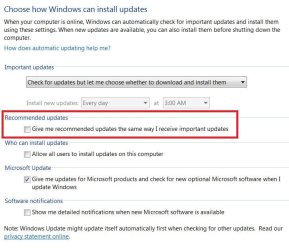
These settings separate the trouble maker recommended updates or at least keeps them from being mixed up with real Important updates
update settings.JPG
 

My Computer My Computer

At a glance

Win-7-Pro64bit 7-H-Prem-64biti7-5930K 2nd i9-9940x both water blocked VRM'...Trident-z 3200C14 2nd Trident-z 3600C16EVGA 1080ti ftw3 2nd Titan Xp both water blocked
Computer type
PC/Desktop
Computer Manufacturer/Model Number
Custom assembled by me :}
OS
Win-7-Pro64bit 7-H-Prem-64bit
CPU
i7-5930K 2nd i9-9940x both water blocked VRM's too
Motherboard
ASUS SABERTOOTH X99 2nd ASUS x299 Apex
Memory
Trident-z 3200C14 2nd Trident-z 3600C16
Graphics Card(s)
EVGA 1080ti ftw3 2nd Titan Xp both water blocked
Sound Card
Built-in Realtek
Monitor(s) Displays
1-AOC G2460PG 24"G-Sync 144Hz/ 2nd 1-ASUS VG248QE 24" 144Hz
Screen Resolution
1920 x 1080 144Hz
Hard Drives
2-Samsung M.2 Evo & Evo Plus
2-Samsung 850 EVO 500GB SSD's/ 3-2.5 W.D. Black 1tb-&3-1tb/3-3.5 WD Black 1tb hdd's
PSU
EVGA SuperNOVA 1000-P2 2nd 1200-P2
Case
2-Corsair Obsidian Series 450D Black ATX Mid Tower
Cooling
Custom water loops
Keyboard
Logitech G710+/ 2nd Logitech G910
Mouse
2-RedDragon M901 Perdition 16400 dpi Gaming mouse = wired
Internet Speed
Comcast Ping 19ms 89.31mbps download speed 6.12mbps upload
Antivirus
Malwarebytes Pro/ Superantispyware Pro
Browser
FireFox & Pale moon
Other Info
2nd ASUS X299 Apex/Intel i9-9940x with Custom water loop/7H-Prem-x64/Corsair 450D case/Ram Trident-z 3600C16 4x8gb / Samsung970Evo plus 500gb SSD/Dual ssd EZ swap evo/PSU EVGA SuperNova 1200w-P2 80+Platinum/GPU Titan Xp /8-ML-140 on push-pull on 2-280GTX rads
Hi,
No problems I know of
As far as the patch or Recommended update that caused the issue
That all depends
Do you use Bitlocker ?

I don't ever intend on using bitlocker so I did not load the recommended update
I would however research recommended updates before even thinking of downloading and installing them
These settings separate the trouble maker recommended updates or at least keeps them from being mixed up with real Important updates
View attachment 385581

No I do not use bitlocker and I have updated the automatic updates to letting me choose next time.

Thank you again :)
 

My Computer My Computer

At a glance

Windows 7 64i7 582032GB Corsair DominatorAsus 980
Computer type
PC/Desktop
OS
Windows 7 64
CPU
i7 5820
Motherboard
Asus x99
Memory
32GB Corsair Dominator
Graphics Card(s)
Asus 980
Monitor(s) Displays
2 U3011 Dell
Screen Resolution
1900X1200
Hard Drives
2x Samsung SSD 1TB in Raid 0 (OS)
2x 256 Samsung SSD in Raid 0
Corsair Force series 90GB
3x 4TB Hitachi Drives Raid 5
PSU
EVGA 1300
Case
Corsair 900D
Cooling
Air
Keyboard
Logitch G19
Mouse
Logitech MX
Internet Speed
Cable 190down 10 up
Antivirus
Bitdefender
Other Info
Malwarebytes Premium
Hi,
Yea the only problem with auto download and install it gives you no time to create a system image before the updates download....
Otherwise just so the Give me recommended updates the same way is unchecked auto is okay except for the system image deal.

I've had issues with updates hanging on install
With a system image created before I can simply bailout of the installation and restore the system image and try again
Without a system image created you'd possibly be stuck in limbo waiting for updates to install indefinitely
Bailing out without a system image could corrupt the entire os causing you to clean install.
http://www.sevenforums.com/tutorials/73828-imaging-free-macrium.html
 

My Computer My Computer

At a glance

Win-7-Pro64bit 7-H-Prem-64biti7-5930K 2nd i9-9940x both water blocked VRM'...Trident-z 3200C14 2nd Trident-z 3600C16EVGA 1080ti ftw3 2nd Titan Xp both water blocked
Computer type
PC/Desktop
Computer Manufacturer/Model Number
Custom assembled by me :}
OS
Win-7-Pro64bit 7-H-Prem-64bit
CPU
i7-5930K 2nd i9-9940x both water blocked VRM's too
Motherboard
ASUS SABERTOOTH X99 2nd ASUS x299 Apex
Memory
Trident-z 3200C14 2nd Trident-z 3600C16
Graphics Card(s)
EVGA 1080ti ftw3 2nd Titan Xp both water blocked
Sound Card
Built-in Realtek
Monitor(s) Displays
1-AOC G2460PG 24"G-Sync 144Hz/ 2nd 1-ASUS VG248QE 24" 144Hz
Screen Resolution
1920 x 1080 144Hz
Hard Drives
2-Samsung M.2 Evo & Evo Plus
2-Samsung 850 EVO 500GB SSD's/ 3-2.5 W.D. Black 1tb-&3-1tb/3-3.5 WD Black 1tb hdd's
PSU
EVGA SuperNOVA 1000-P2 2nd 1200-P2
Case
2-Corsair Obsidian Series 450D Black ATX Mid Tower
Cooling
Custom water loops
Keyboard
Logitech G710+/ 2nd Logitech G910
Mouse
2-RedDragon M901 Perdition 16400 dpi Gaming mouse = wired
Internet Speed
Comcast Ping 19ms 89.31mbps download speed 6.12mbps upload
Antivirus
Malwarebytes Pro/ Superantispyware Pro
Browser
FireFox & Pale moon
Other Info
2nd ASUS X299 Apex/Intel i9-9940x with Custom water loop/7H-Prem-x64/Corsair 450D case/Ram Trident-z 3600C16 4x8gb / Samsung970Evo plus 500gb SSD/Dual ssd EZ swap evo/PSU EVGA SuperNova 1200w-P2 80+Platinum/GPU Titan Xp /8-ML-140 on push-pull on 2-280GTX rads
Something the game installed for DRM messing things up maybe?
 

My Computer My Computer

At a glance

Windows 10 Education 64 bitAMD Phenom II X4 980 Black Edition Deneb 3.7GHz8GB 4GBx2 Kingston PC10600 DDR3 1333 MemoryZotac NVIDIA Geforce GT640 2 Gig DDR3 PCIe
Computer type
PC/Desktop
Computer Manufacturer/Model Number
Home Built
OS
Windows 10 Education 64 bit
CPU
AMD Phenom II X4 980 Black Edition Deneb 3.7GHz
Motherboard
Asus M4N68T-M V2 µATX Motherboard
Memory
8GB 4GBx2 Kingston PC10600 DDR3 1333 Memory
Graphics Card(s)
Zotac NVIDIA Geforce GT640 2 Gig DDR3 PCIe
Sound Card
VIA VT1708s High Definition Audio 8-channel Onboard
Monitor(s) Displays
22" LG E2242 1080p and 2 19" I-INC AG191D
Screen Resolution
1280x1024 - 1920x1080 - 1280x1024
Hard Drives
Crucial M100 256 GB SSD and 500 GB WD Blue SATA
PSU
Thermaltake TR 620
Case
Power Up Black ATX Mid-Tower Case
Cooling
Stock heatsink and fan
Keyboard
Logitech Wireless K350 Wave
Mouse
Logitech Wireless M570 Trackman Wheel
Internet Speed
80 Mbps Down 30 Mbps Up
Antivirus
Windows Defender
Browser
Internet Explorer 11
Other Info
HP DVD1040e Lightscribe - External USB2
Hi,
Never know but probably a coincidence and windows was waiting to restart to finish installing the last round of updates too.
 

My Computer My Computer

At a glance

Win-7-Pro64bit 7-H-Prem-64biti7-5930K 2nd i9-9940x both water blocked VRM'...Trident-z 3200C14 2nd Trident-z 3600C16EVGA 1080ti ftw3 2nd Titan Xp both water blocked
Computer type
PC/Desktop
Computer Manufacturer/Model Number
Custom assembled by me :}
OS
Win-7-Pro64bit 7-H-Prem-64bit
CPU
i7-5930K 2nd i9-9940x both water blocked VRM's too
Motherboard
ASUS SABERTOOTH X99 2nd ASUS x299 Apex
Memory
Trident-z 3200C14 2nd Trident-z 3600C16
Graphics Card(s)
EVGA 1080ti ftw3 2nd Titan Xp both water blocked
Sound Card
Built-in Realtek
Monitor(s) Displays
1-AOC G2460PG 24"G-Sync 144Hz/ 2nd 1-ASUS VG248QE 24" 144Hz
Screen Resolution
1920 x 1080 144Hz
Hard Drives
2-Samsung M.2 Evo & Evo Plus
2-Samsung 850 EVO 500GB SSD's/ 3-2.5 W.D. Black 1tb-&3-1tb/3-3.5 WD Black 1tb hdd's
PSU
EVGA SuperNOVA 1000-P2 2nd 1200-P2
Case
2-Corsair Obsidian Series 450D Black ATX Mid Tower
Cooling
Custom water loops
Keyboard
Logitech G710+/ 2nd Logitech G910
Mouse
2-RedDragon M901 Perdition 16400 dpi Gaming mouse = wired
Internet Speed
Comcast Ping 19ms 89.31mbps download speed 6.12mbps upload
Antivirus
Malwarebytes Pro/ Superantispyware Pro
Browser
FireFox & Pale moon
Other Info
2nd ASUS X299 Apex/Intel i9-9940x with Custom water loop/7H-Prem-x64/Corsair 450D case/Ram Trident-z 3600C16 4x8gb / Samsung970Evo plus 500gb SSD/Dual ssd EZ swap evo/PSU EVGA SuperNova 1200w-P2 80+Platinum/GPU Titan Xp /8-ML-140 on push-pull on 2-280GTX rads
Hi,
Never know but probably a coincidence and windows was waiting to restart to finish installing the last round of updates too.

I did check the Asus forums as well and a few other folks over the last few days have been reporting a similar issue with their rigs with 7.

The conspiracy theorist in me says this is Microsoft trying once again to move us onto their new spyware OS. :picnic:
 

My Computer My Computer

At a glance

Windows 7 64i7 582032GB Corsair DominatorAsus 980
Computer type
PC/Desktop
OS
Windows 7 64
CPU
i7 5820
Motherboard
Asus x99
Memory
32GB Corsair Dominator
Graphics Card(s)
Asus 980
Monitor(s) Displays
2 U3011 Dell
Screen Resolution
1900X1200
Hard Drives
2x Samsung SSD 1TB in Raid 0 (OS)
2x 256 Samsung SSD in Raid 0
Corsair Force series 90GB
3x 4TB Hitachi Drives Raid 5
PSU
EVGA 1300
Case
Corsair 900D
Cooling
Air
Keyboard
Logitch G19
Mouse
Logitech MX
Internet Speed
Cable 190down 10 up
Antivirus
Bitdefender
Other Info
Malwarebytes Premium
Hi,
Well it's been well known that Recommended updates should be rightfully ignored and that has been the case for a lot of years
I learned that when Windows Live Essentials 2011 was first released and caused nothing but problems and actually removed software and replaced it with inferior software mainly 2009 photo gallery.

After that it was Never again before researching all Recommended updates well before downloading and installing them
So the update that caused the booting errors just verifies why recommended updates should be avoided :)
 

My Computer My Computer

At a glance

Win-7-Pro64bit 7-H-Prem-64biti7-5930K 2nd i9-9940x both water blocked VRM'...Trident-z 3200C14 2nd Trident-z 3600C16EVGA 1080ti ftw3 2nd Titan Xp both water blocked
Computer type
PC/Desktop
Computer Manufacturer/Model Number
Custom assembled by me :}
OS
Win-7-Pro64bit 7-H-Prem-64bit
CPU
i7-5930K 2nd i9-9940x both water blocked VRM's too
Motherboard
ASUS SABERTOOTH X99 2nd ASUS x299 Apex
Memory
Trident-z 3200C14 2nd Trident-z 3600C16
Graphics Card(s)
EVGA 1080ti ftw3 2nd Titan Xp both water blocked
Sound Card
Built-in Realtek
Monitor(s) Displays
1-AOC G2460PG 24"G-Sync 144Hz/ 2nd 1-ASUS VG248QE 24" 144Hz
Screen Resolution
1920 x 1080 144Hz
Hard Drives
2-Samsung M.2 Evo & Evo Plus
2-Samsung 850 EVO 500GB SSD's/ 3-2.5 W.D. Black 1tb-&3-1tb/3-3.5 WD Black 1tb hdd's
PSU
EVGA SuperNOVA 1000-P2 2nd 1200-P2
Case
2-Corsair Obsidian Series 450D Black ATX Mid Tower
Cooling
Custom water loops
Keyboard
Logitech G710+/ 2nd Logitech G910
Mouse
2-RedDragon M901 Perdition 16400 dpi Gaming mouse = wired
Internet Speed
Comcast Ping 19ms 89.31mbps download speed 6.12mbps upload
Antivirus
Malwarebytes Pro/ Superantispyware Pro
Browser
FireFox & Pale moon
Other Info
2nd ASUS X299 Apex/Intel i9-9940x with Custom water loop/7H-Prem-x64/Corsair 450D case/Ram Trident-z 3600C16 4x8gb / Samsung970Evo plus 500gb SSD/Dual ssd EZ swap evo/PSU EVGA SuperNova 1200w-P2 80+Platinum/GPU Titan Xp /8-ML-140 on push-pull on 2-280GTX rads
Back
Top