
Cant reinstall program after HDD it was on failed.

Cmate

New member
Local time
11:53 PM
Messages
18
Trying to reinstall an audio program (Steven Slate Drums 3.5) after HDD failure. Installer only gives the option to uninstall. Will not uninstall because the drive it was on is not available (F:/ invalid drive message) . Trying the install again still has only the option to uninstall. I have tried going through the registry to delete the entries for the program but still get the same message. The manufacturer no longer supports the program and will not help me. Anyone have any suggestions?
Thanks, Jeff
 

My Computer

OS
MS Windows 7 Home Premium 64-bit
CPU
AMD Athlon 7750 Black Edition Kuma 65nm Technology
Motherboard
ASUSTeK Computer INC. M4A78-EM (AM2)
Memory
Crucial Ballistix 8GB (4 x 2GB) 240-Pin DDR2 SDRAM DDR2 800
Graphics Card(s)
ATI Radeon HD 3200 Graphics (ASUStek Computer Inc)
Sound Card
M-Audio Delta Audiophile
Monitor(s) Displays
DELL E207WFP
Screen Resolution
1680x1050
Hard Drives
391GB SAMSUNG SAMSUNG HD403LJ SATA Device (IDE)
244GB Western Digital WDC WD2500AAKS-22B3A0 (IDE)
488GB Western Digital WDC WD5000AACS-00ZUB0 SATA (IDE)
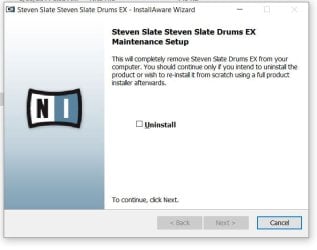
Trying to reinstall an audio program (Steven Slate Drums 3.5) after HDD failure. Installer only gives the option to uninstall. Will not uninstall because the drive it was on is not available (F:/ invalid drive message) . Trying the install again still has only the option to uninstall. I have tried going through the registry to delete the entries for the program but still get the same message. The manufacturer no longer supports the program and will not help me. Anyone have any suggestions?
Thanks, Jeff

Hi dear
May i see some screenshots abt that?

tnx
 

My Computer

Computer type
PC/Desktop
OS
windows 10 x64
CPU
AMD athlon x3 450
Motherboard
Foxconn A78AX
Memory
4GB DDR3
Graphics Card(s)
nvidia geforce GT430
Sound Card
Onboard
Monitor(s) Displays
LG T710BH
Antivirus
Mcafee Virus Scan Enterprise 8.8
Sure thing.
 

Attachments

  • SSD1.JPG
    SSD1.JPG
    50.4 KB · Views: 15
  • SSD2.JPG
    SSD2.JPG
    45.7 KB · Views: 15
  • SSD3.JPG
    SSD3.JPG
    45.9 KB · Views: 15

My Computer

OS
MS Windows 7 Home Premium 64-bit
CPU
AMD Athlon 7750 Black Edition Kuma 65nm Technology
Motherboard
ASUSTeK Computer INC. M4A78-EM (AM2)
Memory
Crucial Ballistix 8GB (4 x 2GB) 240-Pin DDR2 SDRAM DDR2 800
Graphics Card(s)
ATI Radeon HD 3200 Graphics (ASUStek Computer Inc)
Sound Card
M-Audio Delta Audiophile
Monitor(s) Displays
DELL E207WFP
Screen Resolution
1680x1050
Hard Drives
391GB SAMSUNG SAMSUNG HD403LJ SATA Device (IDE)
244GB Western Digital WDC WD2500AAKS-22B3A0 (IDE)
488GB Western Digital WDC WD5000AACS-00ZUB0 SATA (IDE)
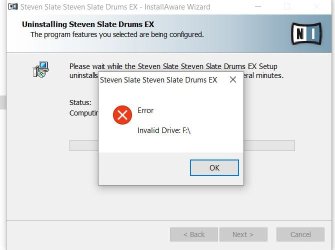
This is a long shot...was the program originally installed from cd-dvd drive assigned letter F? Reason for asking: many of my cd-dvd installs, when needing to be reinstalled, were looking for the cd-drvd drive's original drive letter assignment; for example: during the early days, my cd-dvd would be assigned whatever drive letter was available and I had to force-tree-climb the installs to look for the current drive letter. Finally, my internal cd-dvd drive was hard-wired as I. From then on, whatever was installed via I-assigned cd-dvd drive could be reinstalled that same way. If this is not the case, simply ignore my long shot.
I get the impression that you were able to full-image OS partition onto replacement hard-drive, is that correct? And, this Steven Slate Drums was on the original hard-drive's partition F? If so, you may have to temporarily reassign present partition drive letter F, complete the uninstall via Revo Uninstaller or Windows uninstall; put back the correct partition drive letter and install Steven Slate Drums from scratch.
The above worked for me from Windows For Workgroups 3.11 - Windows 7 Pro.
 

My Computer

Computer type
PC/Desktop
Computer Manufacturer/Model Number
Antec desktop; Acer Aspire laptops
OS
Windows 7 Professional 64-bit
CPU
Desktop i5; Acers i5 & i7
Memory
desktop 16GB; 1 Acer 8GB & 1 Acer 16GB
Hard Drives
1TB split into 2 equal partitions [OS and data] usable by RJS
Internet Speed
AT&T DSL
Browser
FF, GChrome, msIE
Other Info
Windows 7 Firewall, Emsisoft AM/AV, MSE [scan-only], SpywareBlaster, Ruiware/BillP combine
RolandJS
Thanks for the reply,
The program was installed from an installer downloaded from the manufacturers web site ( the same installer I am using now to try and re-install it). Per the instructions it was installed on a separate physical drive than the one the OS is installed on (F in this case). That drive is the one that failed, my c: drive was not affected at all and is still operating normally. I believe there is still some file that is telling the installer that the program is already installed and to look to the F drive for the uninstaller. I have deleted all the registry entries and all the related folders and files I could find but the problem persists.

Thanks again for the effort,
Jeff
 

My Computer

OS
MS Windows 7 Home Premium 64-bit
CPU
AMD Athlon 7750 Black Edition Kuma 65nm Technology
Motherboard
ASUSTeK Computer INC. M4A78-EM (AM2)
Memory
Crucial Ballistix 8GB (4 x 2GB) 240-Pin DDR2 SDRAM DDR2 800
Graphics Card(s)
ATI Radeon HD 3200 Graphics (ASUStek Computer Inc)
Sound Card
M-Audio Delta Audiophile
Monitor(s) Displays
DELL E207WFP
Screen Resolution
1680x1050
Hard Drives
391GB SAMSUNG SAMSUNG HD403LJ SATA Device (IDE)
244GB Western Digital WDC WD2500AAKS-22B3A0 (IDE)
488GB Western Digital WDC WD5000AACS-00ZUB0 SATA (IDE)
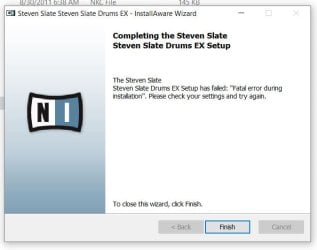
Well u must to find an original setup file .
It's better than other ways i guess...:D
 

My Computer

Computer type
PC/Desktop
OS
windows 10 x64
CPU
AMD athlon x3 450
Motherboard
Foxconn A78AX
Memory
4GB DDR3
Graphics Card(s)
nvidia geforce GT430
Sound Card
Onboard
Monitor(s) Displays
LG T710BH
Antivirus
Mcafee Virus Scan Enterprise 8.8
Back
Top