Are flash drives reliable for storing photos and documents?

atikovi

New member
Member
VIP
Local time
6:59 AM
Messages
103
I have about 16GB of photos and documents to store outside my computer in case the hard drive dies. Currently I keep copies on an old external hard drive, on two older laptops, and on a 16GB flash drive that is maxed out. I just picked up a 32GB one to replace it. At $11, are they a good place to store copies of your files?
 

My Computer My Computer

At a glance

W7P64
Computer type
PC/Desktop
OS
W7P64
hi best place to store would be an external hard drive. used to be that flash drives where so you could move files to one computer to another and was not ment to use a reliable backup. they where prone to fail more then cd/dvd. if you wan to use flash drives then I would have two of them with same stuff on them in case one fails you have another to make copies of. you should always have two copies anyways cause you never know when one going to fail.
 

My Computer My Computer

At a glance

win 10
Computer type
PC/Desktop
Computer Manufacturer/Model Number
dell xps 9000
OS
win 10
Hi,
The worst problem with flash drives is they are easily dropped
Cheap ones are cheap for a reason :)
 

My Computer My Computer

At a glance

Win-7-Pro64bit 7-H-Prem-64biti7-5930K 2nd i9-9940x both water blocked VRM'...Trident-z 3200C14 2nd Trident-z 3600C16EVGA 1080ti ftw3 2nd Titan Xp both water blocked
Computer type
PC/Desktop
Computer Manufacturer/Model Number
Custom assembled by me :}
OS
Win-7-Pro64bit 7-H-Prem-64bit
CPU
i7-5930K 2nd i9-9940x both water blocked VRM's too
Motherboard
ASUS SABERTOOTH X99 2nd ASUS x299 Apex
Memory
Trident-z 3200C14 2nd Trident-z 3600C16
Graphics Card(s)
EVGA 1080ti ftw3 2nd Titan Xp both water blocked
Sound Card
Built-in Realtek
Monitor(s) Displays
1-AOC G2460PG 24"G-Sync 144Hz/ 2nd 1-ASUS VG248QE 24" 144Hz
Screen Resolution
1920 x 1080 144Hz
Hard Drives
2-Samsung M.2 Evo & Evo Plus
2-Samsung 850 EVO 500GB SSD's/ 3-2.5 W.D. Black 1tb-&3-1tb/3-3.5 WD Black 1tb hdd's
PSU
EVGA SuperNOVA 1000-P2 2nd 1200-P2
Case
2-Corsair Obsidian Series 450D Black ATX Mid Tower
Cooling
Custom water loops
Keyboard
Logitech G710+/ 2nd Logitech G910
Mouse
2-RedDragon M901 Perdition 16400 dpi Gaming mouse = wired
Internet Speed
Comcast Ping 19ms 89.31mbps download speed 6.12mbps upload
Antivirus
Malwarebytes Pro/ Superantispyware Pro
Browser
FireFox & Pale moon
Other Info
2nd ASUS X299 Apex/Intel i9-9940x with Custom water loop/7H-Prem-x64/Corsair 450D case/Ram Trident-z 3600C16 4x8gb / Samsung970Evo plus 500gb SSD/Dual ssd EZ swap evo/PSU EVGA SuperNova 1200w-P2 80+Platinum/GPU Titan Xp /8-ML-140 on push-pull on 2-280GTX rads
Well, that's 4 devices I have backup copies stored on right now.
 

My Computer My Computer

At a glance

W7P64
Computer type
PC/Desktop
OS
W7P64
Hi,
The worst problem with flash drives is they are easily dropped
Cheap ones are cheap for a reason :)

Never dropped one but they weigh nothing and wouldn't suffer any damage if you did. What reason? Bought a Sandisk 32GB for $11, what's wrong with it?
 

My Computer My Computer

At a glance

W7P64
Computer type
PC/Desktop
OS
W7P64
Backup is a complicated topic. In my experience the only universal rules are:
1) Test your backups. Among other things this means data integrity, not just "the files are there".
2) Have at least two backups, and store them in different [geographical] locations.

Beyond that it comes down to how much the information is worth to you, and how much you will spend protecting it.

WRT USB flash as backup medium, I've never known a well-treated flash drive to work fine one day and not work after weeks or months of non-use. In my experience flash dies during write. OTOH I have never used flash as long term storage. I'm sure there are studies, but I'm similarly certain it's not considered good practice. At the very least, don't use no-name flash media from China off eBay.

As for me, I use magnetic tape. Yes, that's still a thing, but it's not practical for the average Joe. Thing is I have access to my employer's full inventory of LTO tape drives. I also have a lot of experience with them, so I know how to test for problems. So I bought a used drive on eBay, knowing I could borrow one if it ever came to that.

Otherwise, I would probably just upload to the cloud, probably pre-encrypted. I don't know the standards for privacy, security, and disclosure on the average cloud provider, but I know of at least one that offers seamless encryption that even they can't break*. Or maybe I'd be using M-Disc.

* Tarsnap, "Online backups for the truly paranoid". It's primarily targeted at Unix/Linux users though.

 

My Computer My Computer

At a glance

Windows 7 Professional x64, Arch Linux
Computer type
PC/Desktop
OS
Windows 7 Professional x64, Arch Linux
1) Test your backups. Among other things this means data integrity, not just "the files are there".

With 16,000 photos is there an effective way?
 

My Computer My Computer

At a glance

W7P64
Computer type
PC/Desktop
OS
W7P64
Oh, absolutely. Basically, you use a tool to compare files at the binary level. Google "windows file compare tools" for starters. BeyondCompare is my favorite tool for Windows, but it's quite complex and might not be a good starting point.

Another method is checksumming. Generally, you generate checksums of the original files and store them to a text file. Then you copy the files to the backup location and generate checksums again, comparing the new checksums to the originals. The advantage here is that you can store the file containing the checksums along with the backup (or elsewhere) to ensure the data is still "intact" years later. Again, there are tools for this. I do most of my backups from Linux these days, but I used to use md5summer for checksumming in Windows.
 

My Computer My Computer

At a glance

Windows 7 Professional x64, Arch Linux
Computer type
PC/Desktop
OS
Windows 7 Professional x64, Arch Linux
Hi,
Dropping on a hard surface it doesn't matter.
Only a feather wouldn't mind :)
 

My Computer My Computer

At a glance

Win-7-Pro64bit 7-H-Prem-64biti7-5930K 2nd i9-9940x both water blocked VRM'...Trident-z 3200C14 2nd Trident-z 3600C16EVGA 1080ti ftw3 2nd Titan Xp both water blocked
Computer type
PC/Desktop
Computer Manufacturer/Model Number
Custom assembled by me :}
OS
Win-7-Pro64bit 7-H-Prem-64bit
CPU
i7-5930K 2nd i9-9940x both water blocked VRM's too
Motherboard
ASUS SABERTOOTH X99 2nd ASUS x299 Apex
Memory
Trident-z 3200C14 2nd Trident-z 3600C16
Graphics Card(s)
EVGA 1080ti ftw3 2nd Titan Xp both water blocked
Sound Card
Built-in Realtek
Monitor(s) Displays
1-AOC G2460PG 24"G-Sync 144Hz/ 2nd 1-ASUS VG248QE 24" 144Hz
Screen Resolution
1920 x 1080 144Hz
Hard Drives
2-Samsung M.2 Evo & Evo Plus
2-Samsung 850 EVO 500GB SSD's/ 3-2.5 W.D. Black 1tb-&3-1tb/3-3.5 WD Black 1tb hdd's
PSU
EVGA SuperNOVA 1000-P2 2nd 1200-P2
Case
2-Corsair Obsidian Series 450D Black ATX Mid Tower
Cooling
Custom water loops
Keyboard
Logitech G710+/ 2nd Logitech G910
Mouse
2-RedDragon M901 Perdition 16400 dpi Gaming mouse = wired
Internet Speed
Comcast Ping 19ms 89.31mbps download speed 6.12mbps upload
Antivirus
Malwarebytes Pro/ Superantispyware Pro
Browser
FireFox & Pale moon
Other Info
2nd ASUS X299 Apex/Intel i9-9940x with Custom water loop/7H-Prem-x64/Corsair 450D case/Ram Trident-z 3600C16 4x8gb / Samsung970Evo plus 500gb SSD/Dual ssd EZ swap evo/PSU EVGA SuperNova 1200w-P2 80+Platinum/GPU Titan Xp /8-ML-140 on push-pull on 2-280GTX rads
I switched to USB flash drives after 10+ years of using DVD+RW for my backups. It was not an easy decision, juggling brand reputation, reliability, price, write speed, and size. I ended up with a Lexar 128GB USB 3.0 drive for $30 from Amazon.
 

My Computer My Computer

At a glance

Win10 Pro 64-bitAMD Ryzen 7 3800X32 GB Kingston DDR4-2666MSI nVidia GT 710 (2GB)
Computer type
PC/Desktop
Computer Manufacturer/Model Number
Self-Built
OS
Win10 Pro 64-bit
CPU
AMD Ryzen 7 3800X
Motherboard
Gigabyte X570 UD
Memory
32 GB Kingston DDR4-2666
Graphics Card(s)
MSI nVidia GT 710 (2GB)
Sound Card
Creative Audigy FX 5.1
Monitor(s) Displays
ViewSonic VG2439Smh 24"
Screen Resolution
1920x1080
Hard Drives
3xWD1TB; 1xSeagate 1TB... all spinning rust
PSU
EVGA 100-W1-0500-KR (500w)
Case
SilverStone PS10 (modified)
Cooling
CPU:AMD Wraith Prism. Case:3x Noctua 120mm
Keyboard
Compaq Professional PS/2
Mouse
Microsoft Basic Optical Mouse 2.0
Internet Speed
Fiber 1Gbit/sec down/up
Antivirus
Avast Free
Browser
FF, Chrome
Other Info
2x LG GH24NSC0 DVD burners, Mackie CR3 monitor speakers
The worst thing about flash drives in my experience is the construction of the case and connector.

They are just glued together. The casing can just come apart in your hands. Leaving aside the memory cells inside, they are just too flimsy to be taken very seriously---but I do use them casually.

Alphaniner--thanks for the link to that Windows checksumming tool. I'm going to have to get serious with that. Checksummer's latest version is 10 years old yesterday---do you know if it is fully compatible with 64-bit Win 7, 8, and 10?

I've got close to 100,000 data files of one type or another. I'd guess 90% of them have not been accessed in several years other than to copy. The text files haven't been read by my own eyes, most of the pictures haven't been looked at, and probably 3/4 of the mp3s haven't been played.

If 1/10 of 1% of them are in fact bad (unopenable, distorted, corrupted, unplayable), that's 100 bad files.

When I do a "backup", I'd just be backing up 100 bad files from point A to point B---without knowing those 100 files were totally useless.

Is there any way out of that dilemma? I'd guess not, if you don't have known good copies to compare to. And who can say they have personally actually opened and looked at or heard all of their tens of thousands of data files since they were first made over the last 20 plus years?
 

My Computer My Computer

At a glance

Windows 7 Home Premium SP1, 64-bitIntel Skylake i5-6600K, not overclocked8 GB HyperX DDR4-2666 (2 x 4 GB)none; graphics are integrated on CPU
Computer type
PC/Desktop
Computer Manufacturer/Model Number
Ignatz Special; 4 speed manual gearbox; factory air conditioning; one of one
OS
Windows 7 Home Premium SP1, 64-bit
CPU
Intel Skylake i5-6600K, not overclocked
Motherboard
AsRock Z170M Extreme 4, micro ATX
Memory
8 GB HyperX DDR4-2666 (2 x 4 GB)
Graphics Card(s)
none; graphics are integrated on CPU
Sound Card
onboard: Realtek ALC1150; external: USB Behringer UF0-202
Monitor(s) Displays
Dell S2340M 23 inch IPS
Screen Resolution
1600 x 900
Hard Drives
System: Crucial MX100 series SSD, 128 GB;
Data: Samsung Spinpoint 103SJ, 1 TB;
Backup: WD Caviar Green WD30EZRX-00D8PB0, 3 TB
PSU
Rosewill SilentNight 500 watt fanless, semi-modular
Case
Antec Solo II
Cooling
Noctua NH-U12S; Noctua F12 intake, Noctua S12A exhaust
Keyboard
Microsoft 200 6JH-00001 USB
Mouse
Dell or Microsoft optical wired; USB
Antivirus
Microsoft Security Essentials and Malwarebytes Premium
Browser
Pale Moon
Other Info
All fans PWM; speeds at idle: CPU circa 500 rpm; intake circa 600 rpm; exhaust circa 600 rpm; CPU temps 27 idle and 47 C load in a warm room (27 C/81 F) when running Intel Extreme Tuning Utility stress test.
Never rely on one medium. Any HD will fail in time.
So keep it where you want it, but still burn one or two DVD's in case one crashes.
Flash drives are easily lost or they crash.
Your pictures may be much more valuable then a DVD or Flash drive.
I have lost often information on flash-drives who for unknown reasons wouldn't read any-more.
So I always back them up with Acronis on a seperate HD
 

My Computer My Computer

At a glance

Microsoft Windows 7 Ultimate 64-bits 7601 Mul...Intel(R) Core(TM)2 Duo CPU E8400 @ 3.00GHz8,00 GB(1) Intel(R) G41 Express Chipset (2) Intel(R)...
Computer type
PC/Desktop
OS
Microsoft Windows 7 Ultimate 64-bits 7601 Multiprocessor Free Service Pack 1
CPU
Intel(R) Core(TM)2 Duo CPU E8400 @ 3.00GHz
Motherboard
ASRock G41MH/USB3.
Memory
8,00 GB
Graphics Card(s)
(1) Intel(R) G41 Express Chipset (2) Intel(R) G41 Express
Sound Card
(1) VIA High Definition Audio (2) Intel(R) High Definition
Monitor(s) Displays
S24B350 Samsung
Screen Resolution
1920 x 1080 x 32 bits (4294967296 colors) @ 60 Hz
Hard Drives
(1) ST31000528AS ATA Device (2) Generic- Compact Flash USB Device (3) Generic- MS/MS-Pro USB Device (4) Generic- SD/MMC USB Device (5) Generic- SM/xD-Picture USB Device
Antivirus
ZoneAlarm Free Antivirus + Firewall version: 12.0.104.000 Vs
The worst thing about flash drives in my experience is the construction of the case and connector.

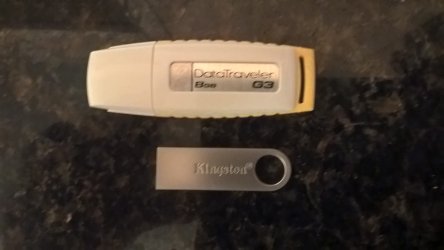
I just got one of these,


Nice metal case, small size too, these are both 8GB Data Travelers,

WP_20160505_23_51_41_Pro.jpg

As for the topic of this thread, I've never lost anything on flash drives but I only use them for installers or transferring files, myself.
 

My Computer My Computer

At a glance

Win 10 Pro x64Intel I5-2500K @3.3GHz16GB G.Skill Ripjaws X (4x4GB)EVGA GeForce 750 Ti SC 2GB
Computer type
PC/Desktop
Computer Manufacturer/Model Number
Self Built
OS
Win 10 Pro x64
CPU
Intel I5-2500K @3.3GHz
Motherboard
Asrock P67 Extreme4
Memory
16GB G.Skill Ripjaws X (4x4GB)
Graphics Card(s)
EVGA GeForce 750 Ti SC 2GB
Sound Card
ASUS Xonar DG 5.1 Channels 24-bit 96KHz PCI Interface Sound
Monitor(s) Displays
auria eq2367
Screen Resolution
1920 x 1080
Hard Drives
250GB Samsung 850 EVO SSD
1TB WD Blue
1TB Hitachi
PSU
SeaSonic X 650W 80 Plus Gold
Case
Corsair Obsidian 750D
Cooling
Corsair H60, Three 140mm case fans
Keyboard
Logitech Wireless Keyboard K520
Mouse
Logitech Wireless Mouse M310
Internet Speed
Wave Broadband ~ 100 dn 5 up
Antivirus
Windows Defender, Malwarebytes Premium
Browser
Edge, IE11, Chrome
Other Info
Laptop specs: HP g7-1365dx /
CPU: AMD A6-3420M APU with Radeon(tm) HD Graphics /
RAM: Crucial 8Gb (2x4Gb) /
SSD: Crucial M4-CT128M4SSD2 ATA Device/ FW 000F /
GFX: AMD Radeon HD 6520G /
OS: Windows 10 Pro x64
I've lost data on flash drives a few times in the past. Mostly due to being unable to safely eject due to something locking files on the flash drive like a buggy shell extension.

See:

How to Use Safely Remove Hardware to Eject a Device in Windows 7 and Windows 8

Any time you have a problem with "Safely Remove Hardware" option to eject a flash drive - the way to remove it without loosing / corrupting data is to switch off the computer before removing the drive.
 

My Computer My Computer

At a glance

Microsoft Windows 7 Home Premium 64-bit 7601 ...AMD C-60 APU with Radeon(tm) HD Graphics4.00 GBAMD Radeon HD 6290 Graphics
Computer type
Laptop
Computer Manufacturer/Model Number
ASUS
OS
Microsoft Windows 7 Home Premium 64-bit 7601 Multiprocessor Free Service Pack 1
CPU
AMD C-60 APU with Radeon(tm) HD Graphics
Motherboard
ASUSTeK COMPUTER INC. X501U
Memory
4.00 GB
Graphics Card(s)
AMD Radeon HD 6290 Graphics
Sound Card
(1) AMD High Definition Audio Device (2) Realtek High Defi
Screen Resolution
1366 x 768 x 32 bits (4294967296 colors) @ 60 Hz
Hard Drives
Hitachi HTS545050A7E380 SATA Disk Device
Antivirus
Comodo CIS & FW, SecureAplus App Whitelisting, Threatfire
Browser
Cyberfox 64bit, Opera 64bit, Airfox
Other Info
Spy-The-Spy, HitmanPro.Alert, Norton Connect Safe, MJRegWatcher, BitDefender TrafficLight, Voodoo Shield, Zemana AntiMalware
Alphaniner--thanks for the link to that Windows checksumming tool. I'm going to have to get serious with that. Checksummer's latest version is 10 years old yesterday---do you know if it is fully compatible with 64-bit Win 7, 8, and 10?

You might be interested in DataHealthCheck:

DataHealthCheck Download

The first time a folder is scanned it adds all files MD5 and last modification date to a database. For subsequent runs it will rescan the folder and build a list of all the files and if a file previously existed it will compare the current "hash/modification date" with the old "hash/modification date" from the database to determine if the file is unchanged/changed/corrupt. If the file is changed it will add the new MD5 hash to the database and if new files are found their hashes will be added to the database.

So basically you have to scan your files at least once before subsequent scans at a later time will show problems.

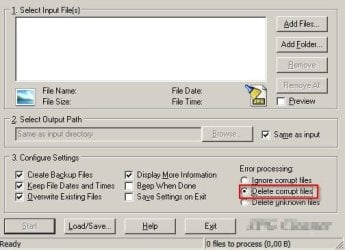
For .jpg files I use a certain utility:

JPG Check.jpg

For corrupt video file detection take a look at the thread here:

http://www.sevenforums.com/software/393567-where-most-recently-used-lists-3.html#post3234325

Quote from Post #30 in the above thread:

But I tried out Media Preview anyway. And guess what? Besides seemingly working good, it allows Explorer to show thumbnails for .flv files. And I quickly discovered that it doesn't build a thumbnail for a corrupt file! It turns out I had a lot of corrupt .flv files!

And it was a breeze deleting them all, too. I just set Explorer to show medium icons and deleted all that didn't have a preview thumbnail. Boom, done! So it turns out to also be a good tool for finding corrupt files, too.

So if you try it - set Explorer to show video thumbnails and only check those videos where no thumbnail i displayed. It saves having to play them all to test for corruption.
 
Last edited:

My Computer My Computer

At a glance

Microsoft Windows 7 Home Premium 64-bit 7601 ...AMD C-60 APU with Radeon(tm) HD Graphics4.00 GBAMD Radeon HD 6290 Graphics
Computer type
Laptop
Computer Manufacturer/Model Number
ASUS
OS
Microsoft Windows 7 Home Premium 64-bit 7601 Multiprocessor Free Service Pack 1
CPU
AMD C-60 APU with Radeon(tm) HD Graphics
Motherboard
ASUSTeK COMPUTER INC. X501U
Memory
4.00 GB
Graphics Card(s)
AMD Radeon HD 6290 Graphics
Sound Card
(1) AMD High Definition Audio Device (2) Realtek High Defi
Screen Resolution
1366 x 768 x 32 bits (4294967296 colors) @ 60 Hz
Hard Drives
Hitachi HTS545050A7E380 SATA Disk Device
Antivirus
Comodo CIS & FW, SecureAplus App Whitelisting, Threatfire
Browser
Cyberfox 64bit, Opera 64bit, Airfox
Other Info
Spy-The-Spy, HitmanPro.Alert, Norton Connect Safe, MJRegWatcher, BitDefender TrafficLight, Voodoo Shield, Zemana AntiMalware
Any time you have a problem with "Safely Remove Hardware" option to eject a flash drive - the way to remove it without loosing / corrupting data is to switch off the computer before removing the drive.
In win-7 shut down is easy
In win-8 and 10 not so much seeing fast start does not shut down the system it only hibernates
I've only had the issue in 8 and 10 with errors reconnecting flash drives or even exterior hard drives becoming or being seen as Raw or getting the well known Must initialize disk before you can use it :)
Fast Startup - Turn On or Off in Windows 10 - Windows 10 Forums
 

My Computer My Computer

At a glance

Win-7-Pro64bit 7-H-Prem-64biti7-5930K 2nd i9-9940x both water blocked VRM'...Trident-z 3200C14 2nd Trident-z 3600C16EVGA 1080ti ftw3 2nd Titan Xp both water blocked
Computer type
PC/Desktop
Computer Manufacturer/Model Number
Custom assembled by me :}
OS
Win-7-Pro64bit 7-H-Prem-64bit
CPU
i7-5930K 2nd i9-9940x both water blocked VRM's too
Motherboard
ASUS SABERTOOTH X99 2nd ASUS x299 Apex
Memory
Trident-z 3200C14 2nd Trident-z 3600C16
Graphics Card(s)
EVGA 1080ti ftw3 2nd Titan Xp both water blocked
Sound Card
Built-in Realtek
Monitor(s) Displays
1-AOC G2460PG 24"G-Sync 144Hz/ 2nd 1-ASUS VG248QE 24" 144Hz
Screen Resolution
1920 x 1080 144Hz
Hard Drives
2-Samsung M.2 Evo & Evo Plus
2-Samsung 850 EVO 500GB SSD's/ 3-2.5 W.D. Black 1tb-&3-1tb/3-3.5 WD Black 1tb hdd's
PSU
EVGA SuperNOVA 1000-P2 2nd 1200-P2
Case
2-Corsair Obsidian Series 450D Black ATX Mid Tower
Cooling
Custom water loops
Keyboard
Logitech G710+/ 2nd Logitech G910
Mouse
2-RedDragon M901 Perdition 16400 dpi Gaming mouse = wired
Internet Speed
Comcast Ping 19ms 89.31mbps download speed 6.12mbps upload
Antivirus
Malwarebytes Pro/ Superantispyware Pro
Browser
FireFox & Pale moon
Other Info
2nd ASUS X299 Apex/Intel i9-9940x with Custom water loop/7H-Prem-x64/Corsair 450D case/Ram Trident-z 3600C16 4x8gb / Samsung970Evo plus 500gb SSD/Dual ssd EZ swap evo/PSU EVGA SuperNova 1200w-P2 80+Platinum/GPU Titan Xp /8-ML-140 on push-pull on 2-280GTX rads
The worst thing about flash drives in my experience is the construction of the case and connector.

That became my main concern. Also just spending money does not always guarantee reliability. My first flash drive was a Sandisk Titanium. All great revues but it turned out the "sliding guts" was not very solid. It died after about a dozen insertions. Fortunately I got a warning with intermittent contact and got my data off.

My preferred drive now as a price/performance/ruggedness standby is AData s102 USB 3.0. The body is corrugated aluminum and the connection seems solid with no moving parts. I bought some AData and Kingston "cheapies" just for copying files on to plug into another machine(a PC on a wired network for cheaper printing as example) but generally my warning would be avoid moving parts. Especially the "sliding guts" design. My first s102 I kept in my pocket and it had to absorb my weight on the body. The little cap on the back end falls off since I am too lazy to super glue it. But it still works fine. Of course I haven't tried dozens of brands because I try to avoid throwing money away. But I do like the s102. It comes in capacities 16GB all the way up to 256GB.
 

My Computer My Computer

At a glance

Windows 7 32 bitAMD 5200+ dual core2 GBNVidia GeForce 6150SE 128 MB
Computer Manufacturer/Model Number
HP Media Center
OS
Windows 7 32 bit
CPU
AMD 5200+ dual core
Memory
2 GB
Graphics Card(s)
NVidia GeForce 6150SE 128 MB
Monitor(s) Displays
CRT
Screen Resolution
1280x1024
Hard Drives
500 GB Sata internal :

SIIG USB 3.0 docking stations w/WD Caviar Black 6 Gb/s drives
Keyboard
PS/2
Mouse
PS/2 Wheel Mouse
Other Info
SIIG USB 3.0 PCIexpress card.
@MilesAhead: I have a couple AData s102 Pros, and I definitely agree WRT price and ruggedness. However, write speeds aren't impressive: I barely see any difference if plugged into USB 3 slot vs USB 2 slot. I have the 16GB model, and the advertised speeds of 100MB/s write are based on the 256GB model. What size do you have, and what kind of speeds do you see?

Mine also get quite warm just sitting idle while plugged in, but that could be normal for USB 3 drives for all I know.

Edit: I just found the "datasheet". The 16 and 32GB models are advertised as 25MB/s write.
 

My Computer My Computer

At a glance

Windows 7 Professional x64, Arch Linux
Computer type
PC/Desktop
OS
Windows 7 Professional x64, Arch Linux
I have 2 all-metal flash drives which live on my key-ring. The 32 gb Sandisk Cruzer Force is my everyday workhorse, containing my most used tools and utilities for working on client machines. Over the 3 or 4 years I've had it, it has survived multiple reformats, hundreds of improper disconnects and thousands of read/write cycles. It has been absolutely bullet proof. I just bought the 32 gb Samsung USB3, so it hasn't seen much use yet.

One cautionary tale. I had a client who was using a flash drive (Lexar, iirc) for backup and left it plugged in at all times. It died. For so many reasons, remove/disconnect whatever your backup media is when not in use.
 

My Computer My Computer

At a glance

Windows 7 Ultimate x86 and x64
Computer type
PC/Desktop
Computer Manufacturer/Model Number
Dell, HP, Toshiba, Compaq
OS
Windows 7 Ultimate x86 and x64
Yes I've never had a problem with flash drives loaded with repair tools. Only problems with corrupted personal files.
 

My Computer My Computer

At a glance

Microsoft Windows 7 Home Premium 64-bit 7601 ...AMD C-60 APU with Radeon(tm) HD Graphics4.00 GBAMD Radeon HD 6290 Graphics
Computer type
Laptop
Computer Manufacturer/Model Number
ASUS
OS
Microsoft Windows 7 Home Premium 64-bit 7601 Multiprocessor Free Service Pack 1
CPU
AMD C-60 APU with Radeon(tm) HD Graphics
Motherboard
ASUSTeK COMPUTER INC. X501U
Memory
4.00 GB
Graphics Card(s)
AMD Radeon HD 6290 Graphics
Sound Card
(1) AMD High Definition Audio Device (2) Realtek High Defi
Screen Resolution
1366 x 768 x 32 bits (4294967296 colors) @ 60 Hz
Hard Drives
Hitachi HTS545050A7E380 SATA Disk Device
Antivirus
Comodo CIS & FW, SecureAplus App Whitelisting, Threatfire
Browser
Cyberfox 64bit, Opera 64bit, Airfox
Other Info
Spy-The-Spy, HitmanPro.Alert, Norton Connect Safe, MJRegWatcher, BitDefender TrafficLight, Voodoo Shield, Zemana AntiMalware
Back
Top