Solved PC Freezes then HDD makes clicking sounds.

Devadip

New member
Member
Local time
10:25 AM
Messages
82
Hi!

I created this post because I'm worried about the fact that my PC seems to kill my HDDs. I bought it about 4 years ago and I had to replace the HDD two times in about 3 years. My SSD drive also broke down for some reason...

Lately, I started experiencing some minor freezes when I open applications such as Google Chrome and even some folders in Windows Explorer. Shortly after the freezes (about 2-3 seconds) you can hear the HDD ticking lightly and everything comes back to normal.

The entire PC never really freezes. It's more like a software thing. Google Chrome and windows explorer would hang for 2-3 seconds until you can hear the ticking and then everything is back. It's not very frequent but when it happens it's kinda annoying.

It never freezes when I play games or when I'm using an application. It seems like it's sometimes triggered when I open a program.

I felt like I was cursed lol. I lost 3 disks in 4 years (Kingston, WD and Seagate). My PC is a Gateway FX6860 and It's a good thing I got a 3 year warranty... What would be the problem? Thanks for your time.


-Devadip
 

My Computer My Computer

At a glance

Windows 7 Home Premium 64bit.Intel Core i7-2600 CPU @ 3.40GHz - Sandy Bridge16GB DDR3Sapphire Dual-x Radeon R9 280, 3GB.
Computer type
PC/Desktop
Computer Manufacturer/Model Number
Gateway FX6860
OS
Windows 7 Home Premium 64bit.
CPU
Intel Core i7-2600 CPU @ 3.40GHz - Sandy Bridge
Motherboard
FX6860 ef30p
Memory
16GB DDR3
Graphics Card(s)
Sapphire Dual-x Radeon R9 280, 3GB.
Hard Drives
120GB SSD and 2TB HDD
PSU
FSP750-80APG 750W
Internet Speed
25 Mbps Up & Down
Antivirus
Microsoft Security Essentials, Malwarebytes Premium
Browser
Google Chrome
I have only a couple of wild guesses: either the desktop needs some cooling help [we added a room fan to our den because the AC is weakest there] and/or the powersupply is underpowering the desktop somewhat. Meanwhile, this hard-drive is close to failing, I hope you have current restorable OS partition and data partition backups.
 

My Computer My Computer

At a glance

Windows 7 Professional 64-bitDesktop i5; Acers i5 & i7desktop 16GB; 1 Acer 8GB & 1 Acer 16GB
Computer type
PC/Desktop
Computer Manufacturer/Model Number
Antec desktop; Acer Aspire laptops
OS
Windows 7 Professional 64-bit
CPU
Desktop i5; Acers i5 & i7
Memory
desktop 16GB; 1 Acer 8GB & 1 Acer 16GB
Hard Drives
1TB split into 2 equal partitions [OS and data] usable by RJS
Internet Speed
AT&T DSL
Browser
FF, GChrome, msIE
Other Info
Windows 7 Firewall, Emsisoft AM/AV, MSE [scan-only], SpywareBlaster, Ruiware/BillP combine
Unfortunately, I think your current disk is on its way out. Clicking from an HDD is never good or normal. Most HDD vendors offer a utility for testing their drives. I'd look into that right away... after backing up any valuable data.

Things like browsing folders and opening applications generally involve reading from disk, so it's not too surprising those actions could "cause" freezes if the disk is going bad. OTOH all but the simplest games need to read from disk from time to time while they're running, so it's surprising you never see issues when gaming.

If your PC is killing drives, it's probably not in a way you'd expect. Temperature is the prime suspect as it can seriously affect the lifespan of HDDs. It's not such a big deal with SSDs, but one failed SSD isn't enough to draw any conclusions. Most modern HDDs and SSDs permanently record the highest temperature they experience. The diagnostics should allow you to access that information.

Otherwise, well, the only things connected to drives are the motherboard and power supply. I've never heard of a motherboard being the cause of disk failure (that doesn't mean it's never happened or can't happen!) and power supply issues would probably have other symptoms.
 

My Computer My Computer

At a glance

Windows 7 Professional x64, Arch Linux
Computer type
PC/Desktop
OS
Windows 7 Professional x64, Arch Linux
At one time I kept having a hard drive go out which thoroughly confused WD. It turned out to be a bad power supply. I changed that and had no more fried hard drives. A bad PSU could also cause freezing and random shutdowns. But yes a ticking sound on a hard drive is a bad sign. Backup your data and download the manufacturer's diagnostic tests making sure to run the most comprehensive one.
 

My Computers My Computers

  • At a glance

    Windows 7 pro/Windows 10 ProIntel i7 860 Quad core 2.8 ghz8 gbATI Radeon HD 5770 1 gb ram
    Computer type
    PC/Desktop
    Computer Manufacturer/Model Number
    HP Pavillion Elite HPE-250f
    OS
    Windows 7 pro/Windows 10 Pro
    CPU
    Intel i7 860 Quad core 2.8 ghz
    Memory
    8 gb
    Graphics Card(s)
    ATI Radeon HD 5770 1 gb ram
    Monitor(s) Displays
    Alienware 25 AW2521HF & Viewsonic
    Screen Resolution
    1920 x1080 & 1680x1050
    Hard Drives
    WD blue 1 tb & 500 gb.
    Browser
    FF of course.
    Other Info
    https://www.bestbuy.com/site/hp-pavilion-elite-desktop-intel-core-i7-processor-8gb-memory-1tb-hard-drive/9921493.p?skuId=9921493
  • At a glance

    Windows 2012 R2 Data center/Linux Minti3 9100 3.6GHz, 8M cache, 4C/4T8GB 2666MT/s DDR4 ECC UDIMM
    Computer type
    PC/Desktop
    System Manufacturer/Model Number
    Dell Poweredge T140
    OS
    Windows 2012 R2 Data center/Linux Mint
    CPU
    i3 9100 3.6GHz, 8M cache, 4C/4T
    Memory
    8GB 2666MT/s DDR4 ECC UDIMM
    Monitor(s) Displays
    Viewsonic
    Screen Resolution
    1680x1050
    Hard Drives
    1 TB & 750 GB
    Other Info
    https://www.dell.com/en-us/work/shop/productdetailstxn/poweredge-t140?~ck=bt
Hmmm... I suspect my PSU is to blame. However, I replaced my old GPU for a Sapphire Dual-X Radeon R9 280 about a year ago. My old GPU was a GeForce GTX 560 Ti (a blower GPU) and my new one is an open air double fan GPU.

The new GPU was generating much more heat due to it's design, but I didn't really care back then. After noticing that my GPU temp stayed at 77-78 while under load, I decided to install a side fan who worked as an intake. I did some minor modifications to the side pannel because my case was not designed for a side fan.

I should've done something about the air flow earlier. I kept using my PC even if I had no intake fan (only the rear exhaust fan and my mounted cpu cooler). It must've damaged my HDD because of the heat my new GPU was generating...

What bothers me is the fact that my failing HDD problem goes back to the time I had my older GPU (and unmodified system). This is what makes me wonder if my PSU is the main cause...
 

My Computer My Computer

At a glance

Windows 7 Home Premium 64bit.Intel Core i7-2600 CPU @ 3.40GHz - Sandy Bridge16GB DDR3Sapphire Dual-x Radeon R9 280, 3GB.
Computer type
PC/Desktop
Computer Manufacturer/Model Number
Gateway FX6860
OS
Windows 7 Home Premium 64bit.
CPU
Intel Core i7-2600 CPU @ 3.40GHz - Sandy Bridge
Motherboard
FX6860 ef30p
Memory
16GB DDR3
Graphics Card(s)
Sapphire Dual-x Radeon R9 280, 3GB.
Hard Drives
120GB SSD and 2TB HDD
PSU
FSP750-80APG 750W
Internet Speed
25 Mbps Up & Down
Antivirus
Microsoft Security Essentials, Malwarebytes Premium
Browser
Google Chrome
With multiple hard drives from multiple manufacturers going out I'd say it's a safe bet that it is your psu. Now that I think about it in my case I had 2 hard drives and only one of them kept going out.
 

My Computers My Computers

  • At a glance

    Windows 7 pro/Windows 10 ProIntel i7 860 Quad core 2.8 ghz8 gbATI Radeon HD 5770 1 gb ram
    Computer type
    PC/Desktop
    Computer Manufacturer/Model Number
    HP Pavillion Elite HPE-250f
    OS
    Windows 7 pro/Windows 10 Pro
    CPU
    Intel i7 860 Quad core 2.8 ghz
    Memory
    8 gb
    Graphics Card(s)
    ATI Radeon HD 5770 1 gb ram
    Monitor(s) Displays
    Alienware 25 AW2521HF & Viewsonic
    Screen Resolution
    1920 x1080 & 1680x1050
    Hard Drives
    WD blue 1 tb & 500 gb.
    Browser
    FF of course.
    Other Info
    https://www.bestbuy.com/site/hp-pavilion-elite-desktop-intel-core-i7-processor-8gb-memory-1tb-hard-drive/9921493.p?skuId=9921493
  • At a glance

    Windows 2012 R2 Data center/Linux Minti3 9100 3.6GHz, 8M cache, 4C/4T8GB 2666MT/s DDR4 ECC UDIMM
    Computer type
    PC/Desktop
    System Manufacturer/Model Number
    Dell Poweredge T140
    OS
    Windows 2012 R2 Data center/Linux Mint
    CPU
    i3 9100 3.6GHz, 8M cache, 4C/4T
    Memory
    8GB 2666MT/s DDR4 ECC UDIMM
    Monitor(s) Displays
    Viewsonic
    Screen Resolution
    1680x1050
    Hard Drives
    1 TB & 750 GB
    Other Info
    https://www.dell.com/en-us/work/shop/productdetailstxn/poweredge-t140?~ck=bt
I'll back up my data and I'll scan all my drives I guess. If everything comes up fine, I'll have to test my PSU.

My HDD does not "click" really... It's more like a 0.5 seconds subtle spinning/buzzing noise. I'll still back up my data though. Backing up is life lol.

Btw, how do you effectively test a PSU anyways?
 

My Computer My Computer

At a glance

Windows 7 Home Premium 64bit.Intel Core i7-2600 CPU @ 3.40GHz - Sandy Bridge16GB DDR3Sapphire Dual-x Radeon R9 280, 3GB.
Computer type
PC/Desktop
Computer Manufacturer/Model Number
Gateway FX6860
OS
Windows 7 Home Premium 64bit.
CPU
Intel Core i7-2600 CPU @ 3.40GHz - Sandy Bridge
Motherboard
FX6860 ef30p
Memory
16GB DDR3
Graphics Card(s)
Sapphire Dual-x Radeon R9 280, 3GB.
Hard Drives
120GB SSD and 2TB HDD
PSU
FSP750-80APG 750W
Internet Speed
25 Mbps Up & Down
Antivirus
Microsoft Security Essentials, Malwarebytes Premium
Browser
Google Chrome
I'm not aware of any way to effectively test a PSU without specialized equipment. A multimeter is the bare minimum, but you can't get a whole lot with just that. See the "Basic power supply troubleshooting" section of JonnyGuru's Power Supply FAQ. But even at that basic level, it can be dangerous if you have no experience working with electricity.

Check out some power supply reviews there at JG if you want an idea of what's involved in effective testing.
 

My Computer My Computer

At a glance

Windows 7 Professional x64, Arch Linux
Computer type
PC/Desktop
OS
Windows 7 Professional x64, Arch Linux
I have used Everest Home Edition from time to time, however, I do not remember if it really tests the power supply per se. Again, I mention: add a room fan if the room is somewhat warm throughout the year. You did good adding an extra fan! In my Pentium III MMX [we start bombing in five minutes], I added two or three small fans, it was noisy, and it was cool!
 

My Computer My Computer

At a glance

Windows 7 Professional 64-bitDesktop i5; Acers i5 & i7desktop 16GB; 1 Acer 8GB & 1 Acer 16GB
Computer type
PC/Desktop
Computer Manufacturer/Model Number
Antec desktop; Acer Aspire laptops
OS
Windows 7 Professional 64-bit
CPU
Desktop i5; Acers i5 & i7
Memory
desktop 16GB; 1 Acer 8GB & 1 Acer 16GB
Hard Drives
1TB split into 2 equal partitions [OS and data] usable by RJS
Internet Speed
AT&T DSL
Browser
FF, GChrome, msIE
Other Info
Windows 7 Firewall, Emsisoft AM/AV, MSE [scan-only], SpywareBlaster, Ruiware/BillP combine
Ok so I did an extended test on my HDD with Western Digital Data LifeGuard Diagnostics and everything came up fine.

Again, I doubt that heat is the problem. My PC is in the basement so it's always cool. The only thing I don't like about my case design is the fact that it has no exhaust on the top. I would've added a fan to evacuate the hot air, but I can't really make room for a fan + I'm out of 3 and 4 pin connectors AND molex.

I've also monitored my temps and everything seems ok, thanks to the intake side fan I installed. Now I have to test my PSU. I'll check out the options you proposed and I'll keep you in touch.
 

My Computer My Computer

At a glance

Windows 7 Home Premium 64bit.Intel Core i7-2600 CPU @ 3.40GHz - Sandy Bridge16GB DDR3Sapphire Dual-x Radeon R9 280, 3GB.
Computer type
PC/Desktop
Computer Manufacturer/Model Number
Gateway FX6860
OS
Windows 7 Home Premium 64bit.
CPU
Intel Core i7-2600 CPU @ 3.40GHz - Sandy Bridge
Motherboard
FX6860 ef30p
Memory
16GB DDR3
Graphics Card(s)
Sapphire Dual-x Radeon R9 280, 3GB.
Hard Drives
120GB SSD and 2TB HDD
PSU
FSP750-80APG 750W
Internet Speed
25 Mbps Up & Down
Antivirus
Microsoft Security Essentials, Malwarebytes Premium
Browser
Google Chrome
I doubt that it is heat and I'm glad that the diagnostic checks passed however it sounds like your psu is bad. If I where you I would just go ahead and replace it. You keep having hard drives fail and that is the most likely reason.
 

My Computers My Computers

  • At a glance

    Windows 7 pro/Windows 10 ProIntel i7 860 Quad core 2.8 ghz8 gbATI Radeon HD 5770 1 gb ram
    Computer type
    PC/Desktop
    Computer Manufacturer/Model Number
    HP Pavillion Elite HPE-250f
    OS
    Windows 7 pro/Windows 10 Pro
    CPU
    Intel i7 860 Quad core 2.8 ghz
    Memory
    8 gb
    Graphics Card(s)
    ATI Radeon HD 5770 1 gb ram
    Monitor(s) Displays
    Alienware 25 AW2521HF & Viewsonic
    Screen Resolution
    1920 x1080 & 1680x1050
    Hard Drives
    WD blue 1 tb & 500 gb.
    Browser
    FF of course.
    Other Info
    https://www.bestbuy.com/site/hp-pavilion-elite-desktop-intel-core-i7-processor-8gb-memory-1tb-hard-drive/9921493.p?skuId=9921493
  • At a glance

    Windows 2012 R2 Data center/Linux Minti3 9100 3.6GHz, 8M cache, 4C/4T8GB 2666MT/s DDR4 ECC UDIMM
    Computer type
    PC/Desktop
    System Manufacturer/Model Number
    Dell Poweredge T140
    OS
    Windows 2012 R2 Data center/Linux Mint
    CPU
    i3 9100 3.6GHz, 8M cache, 4C/4T
    Memory
    8GB 2666MT/s DDR4 ECC UDIMM
    Monitor(s) Displays
    Viewsonic
    Screen Resolution
    1680x1050
    Hard Drives
    1 TB & 750 GB
    Other Info
    https://www.dell.com/en-us/work/shop/productdetailstxn/poweredge-t140?~ck=bt
DLG would have informed you if the drive had ever recorded excessive temps, so that's definitely out. That said, ambient temps aren't all that matters. Depending on the model and usage, direct airflow can be necessary. If I were you I'd check the relevant SMART attribute to see how close (or not) the drive got to the threshold. Just FYI.
 

My Computer My Computer

At a glance

Windows 7 Professional x64, Arch Linux
Computer type
PC/Desktop
OS
Windows 7 Professional x64, Arch Linux
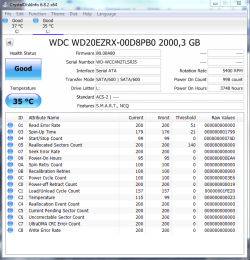
I managed to get the S.M.A.R.T. status of my HDD, but I'm not sure what the temperature numbers mean. How come the "worst" temp seems to be lower than the "current" one? It must be an arbitrary value refering to an actual temperature reading but I can't get any more information.

Also, there is no record under "threshold". From my point of view, everything seems fine.

Is it possible that my PSU is not supplying enough power to the system? I would be very suprised if it were the case though. I have a 750W PSU and my GPU only needs a 500W PSU. I have an SSD and HDD drive and I added a Molex fan + upgrades my rear exhaust fan for a 120mm.
 

Attachments

  • Disk info.png
    Disk info.png
    40 KB · Views: 2

My Computer My Computer

At a glance

Windows 7 Home Premium 64bit.Intel Core i7-2600 CPU @ 3.40GHz - Sandy Bridge16GB DDR3Sapphire Dual-x Radeon R9 280, 3GB.
Computer type
PC/Desktop
Computer Manufacturer/Model Number
Gateway FX6860
OS
Windows 7 Home Premium 64bit.
CPU
Intel Core i7-2600 CPU @ 3.40GHz - Sandy Bridge
Motherboard
FX6860 ef30p
Memory
16GB DDR3
Graphics Card(s)
Sapphire Dual-x Radeon R9 280, 3GB.
Hard Drives
120GB SSD and 2TB HDD
PSU
FSP750-80APG 750W
Internet Speed
25 Mbps Up & Down
Antivirus
Microsoft Security Essentials, Malwarebytes Premium
Browser
Google Chrome
SMART attributes work differently to what you'd expect. Higher is better. Values "decrease with/towards failure" and if an attribute reaches its threshold* the device is considered failed. Some values (such as "Reallocated Sectors Count") will only decrease, others like Temp and "Spin-Up Time" can go up and down.

I thought Temperature would have a non-zero threshold, clearly I was mistaken. Now that I think about it, the only time I've seen a past over-temp condition reported was with the Seagate utility when testing a Seagate drive. :/

* I believe only non-zero thresholds are meaningful.
 

My Computer My Computer

At a glance

Windows 7 Professional x64, Arch Linux
Computer type
PC/Desktop
OS
Windows 7 Professional x64, Arch Linux
As you can see, my HDD was replaced about 156 days ago. It's kinda new. What do you think of my temperature readings?

If everything is fine, it must be my PSU. I've never been so unlucky with hardware failures since I bought this PC... I had an HDD back when I was at high school about 7 years ago and it died last year. With my actual PC, I lost 3 disks in 4 years. At this point, it can't be bad luck lol.

Are there any more tests I can run on my HDD?
 

My Computer My Computer

At a glance

Windows 7 Home Premium 64bit.Intel Core i7-2600 CPU @ 3.40GHz - Sandy Bridge16GB DDR3Sapphire Dual-x Radeon R9 280, 3GB.
Computer type
PC/Desktop
Computer Manufacturer/Model Number
Gateway FX6860
OS
Windows 7 Home Premium 64bit.
CPU
Intel Core i7-2600 CPU @ 3.40GHz - Sandy Bridge
Motherboard
FX6860 ef30p
Memory
16GB DDR3
Graphics Card(s)
Sapphire Dual-x Radeon R9 280, 3GB.
Hard Drives
120GB SSD and 2TB HDD
PSU
FSP750-80APG 750W
Internet Speed
25 Mbps Up & Down
Antivirus
Microsoft Security Essentials, Malwarebytes Premium
Browser
Google Chrome
Current temp is absolutely nothing to worry about. But I'm not sure how to interpret the "Worst" value. I think it works like this: Current value of 115 = 35°, and each decrease in SMART value corresponds to a one degree increase in temp, so the "Worst" value would be 35 + (115 - 99) or 51°. The spec sheet indicates Environmental tolerance of 0-60° so again there's nothing to worry about.

One thing about WD Greens, there was a big scandal a while back about them failing prematurely due to excessive spin-down. Notice the "Power Cycle Count" is 998 but the "Power-off Retract Count" is 130592 (from hex 1FE20). This would also account for the clicking you hear. I remember WD released a tool to modify the behaviour, google "wd idle".
 

My Computer My Computer

At a glance

Windows 7 Professional x64, Arch Linux
Computer type
PC/Desktop
OS
Windows 7 Professional x64, Arch Linux
I think you found the problem! Some WD Cavillar users are noticing symptoms of "excessive load cycles". Brian Beeler from the storage review website is talking about a side effect of excessive load cycles resulting in "a small delay added into a data retrieval command as the head hones in on its intended spot". It's exactly what happens when I open an app or a folder once in a while.

I'm not sure if "WDIDLE3" is compatible with my HDD though. They list a couple of products on the Storage Review website, but they do not mention if It's safe to use on a WD20EZRX product...
 

My Computer My Computer

At a glance

Windows 7 Home Premium 64bit.Intel Core i7-2600 CPU @ 3.40GHz - Sandy Bridge16GB DDR3Sapphire Dual-x Radeon R9 280, 3GB.
Computer type
PC/Desktop
Computer Manufacturer/Model Number
Gateway FX6860
OS
Windows 7 Home Premium 64bit.
CPU
Intel Core i7-2600 CPU @ 3.40GHz - Sandy Bridge
Motherboard
FX6860 ef30p
Memory
16GB DDR3
Graphics Card(s)
Sapphire Dual-x Radeon R9 280, 3GB.
Hard Drives
120GB SSD and 2TB HDD
PSU
FSP750-80APG 750W
Internet Speed
25 Mbps Up & Down
Antivirus
Microsoft Security Essentials, Malwarebytes Premium
Browser
Google Chrome

My Computer My Computer

At a glance

Windows 10 Pro x64Intel Core i7 6700KGSkill TridentZ RGB 16GB 3600 16-16-16-36EVGA GTX 980 Ti SC x2
Computer type
PC/Desktop
Computer Manufacturer/Model Number
Skylake Special #666
OS
Windows 10 Pro x64
CPU
Intel Core i7 6700K
Motherboard
Asus Sabertooth Z170 Mark 1
Memory
GSkill TridentZ RGB 16GB 3600 16-16-16-36
Graphics Card(s)
EVGA GTX 980 Ti SC x2
Sound Card
Realtek High Definition
Monitor(s) Displays
AOC G2460PG
Screen Resolution
1920 x 1080 144Hz
Hard Drives
Samsung 860 Pro 256GB, Seagate Barracuda 4TB x2
PSU
EVGA 1000 P2, EVGA White Custom Braided Cables
Case
Corsair Vengeance C70 Gunmetal Black
Cooling
Corsair H100i v2, Corsair ML120 x2, Thermal Grizzly Kryonaut
Keyboard
Logitech G910 Orion Spectrum
Mouse
Logitech G700s
Internet Speed
Verizon Fios Quantum Gateway 75/75
Antivirus
Windows Defender, Malwarebytes Free 3.8.3
Browser
Chrome
Other Info
Corsair SP120 x4, LG Blu-ray Drive, Durabrand HT-395 100 Watt Dolby Digital Amp, Corsair H2100 Wireless 7.1 Headset
@AddRam I'm pretty sure I have a load cycle problem. All the HDDs I had were WD Cavillar. I believe the stalling heads problem on the WD drives I had reduced their lifespan. I have no way of testing my current PSU and I'm not planning on upgrading anything for now unless it's needed.

I can modify the HDD firmware with a specific tool. It'll probably fix my problem. I would change my PSU, but I'm not even sure if it's failing. Also, I don't have a multimeter and I've never tested a PSU before.
 

My Computer My Computer

At a glance

Windows 7 Home Premium 64bit.Intel Core i7-2600 CPU @ 3.40GHz - Sandy Bridge16GB DDR3Sapphire Dual-x Radeon R9 280, 3GB.
Computer type
PC/Desktop
Computer Manufacturer/Model Number
Gateway FX6860
OS
Windows 7 Home Premium 64bit.
CPU
Intel Core i7-2600 CPU @ 3.40GHz - Sandy Bridge
Motherboard
FX6860 ef30p
Memory
16GB DDR3
Graphics Card(s)
Sapphire Dual-x Radeon R9 280, 3GB.
Hard Drives
120GB SSD and 2TB HDD
PSU
FSP750-80APG 750W
Internet Speed
25 Mbps Up & Down
Antivirus
Microsoft Security Essentials, Malwarebytes Premium
Browser
Google Chrome
WD Caviar has been around since the 90s or earlier, and is presently composed of the Green, Blue, and Black lines.* AFAIK only the Green line had this issue. Point being, the fact your previous drives were Caviar doesn't mean much on its own.

I would really expect a bad PSU to have other symptoms, but it can't be completely ruled out. If you're not prepared to replace it right away, backup vital data regularly (granted, you should be doing that anyway) and keep an eye out for good deals. Keep that up for at least a while even after you apply the fix.

* At least that was the case until recently; based on their webpage, it looks like they may have discontinued the Greens...
 

My Computer My Computer

At a glance

Windows 7 Professional x64, Arch Linux
Computer type
PC/Desktop
OS
Windows 7 Professional x64, Arch Linux
Back
Top