Installing Win7 x64 on Samsung 950 Pro NVMe

CarloR

New member
Local time
3:09 PM
Messages
5
Hello everyone,
I am having trouble in installing Windows 7 x64 on my Samsung 950 Pro. My configuration is the following:

Asus P9X79 Deluxe, Intel i7 SB-E 3930k @ 4500 Mhz, 64GB Corsair Dominator DDR3 1600 Mhz, Corsair AX1200i PSU, x2 Gigabyte 980ti SLI, Intel 750 Nvme 400Gb, Samsung 950 Pro Nvme 512 Gb, Samsung 850 Pro 256 Gb, Noctua NH-D15.

I possess both the Intel 750 400gb NVMe and the Samsung 950 Pro. Both of them can install Win 8.1 and 10 without problems, but I would need to use Windows 7.

What I tried so far:
-Created a bootable USB drive with Rufus.
-Created another usb with the Samsung NVMe drivers on it.
-Removed all the other drives from the system.
-Removed the "secure boot" option from the bios.

The problems are the following:
-My Win 7 iso is x64, but when I try to create a bootable usb with Rufus in GPT, it says that the ISO file is Larger than 4Gb so I cannot select FAT32.
-If I use MBR partition scheme the installation does not even load when I reboot, saying "insert media disk".
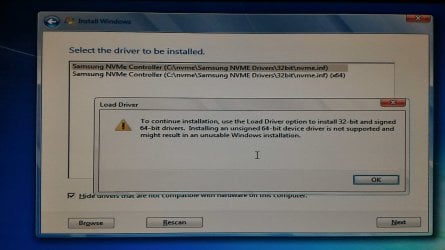
-If I create a bootable usb with the Windows 7 USB DVD tool, the installation starts but fails to accept the NVMe drivers, saying "they are not signed".

I read several threads and don't know exactly what I am missing here. I know there is the possibility to install Win 7 onto a standard ssd (I also have a 850 Pro so I could use that one) and then clone it to the 950, but if possible would prefer sticking with a normal installation.

Do you guys have any suggestions?
Thanks in advance.
 

My Computer My Computer

At a glance

Windows 7 Ultimate x64i7 3930K @ 4500 Mhz64 Gb Corsair Dominator 1600 Mhz2x GTX 980Ti SLI
Computer type
PC/Desktop
Computer Manufacturer/Model Number
Custom build
OS
Windows 7 Ultimate x64
CPU
i7 3930K @ 4500 Mhz
Motherboard
Asus P9X79 Deluxe (bios 4801)
Memory
64 Gb Corsair Dominator 1600 Mhz
Graphics Card(s)
2x GTX 980Ti SLI
Hard Drives
Intel 750 400 Gb NVMe
Samsung 950 Pro 512 Gb NVMe
Samsung 850 Pro 512 Gb SSD
The fact that the drivers are refused as unsigned is concerning. Where did you get them?

Best guess is that you need to integrate certain updates (in particular there is an NVMe update, and some driver framework updates) into the install images.
 

My Computer My Computer

At a glance

Windows 7 Professional x64, Arch Linux
Computer type
PC/Desktop
OS
Windows 7 Professional x64, Arch Linux
My Win 7 iso is x64, but when I try to create a bootable usb with Rufus in GPT, it says that the ISO file is larger than 4Gb so I cannot select FAT32.

You should use the official Windows 7 ISO from Microsoft.

Do you guys have any suggestions?

Asus UEFI BIOS - Use the following settings when you install Windows 7 (UEFI mode or Legacy BIOS mode).
- Boot > CSM (Compatibility Support Module) > Launch CSM > Enabled (Default)
- Boot > Secure Boot > OS Type > Other OS (default: Windows UEFI mode) https://www.asus.com/support/faq/1016356/

If you have a Samsung M.2 SSD (for example, Samsung 950 PRO) then you will need to download the Samsung NVMe drivers. You can download drivers from the link below.

Recommended AHCI/RAID and NVMe Drivers

"Samsung NVMe Drivers"
- Note: Get the pure driver files, not the installer set.
- Open your Windows 7 USB flash drive and create a folder named “nvme” in the root of the drive.
- Copy all of the NVME driver files you just downloaded to this folder.

You must boot the installation media as a UEFI device, if you want to use GPT instead of MBR in system disk.
- Reboot PC and enter the Boot Menu by pressing F8.
- Select the name of your Windows 7 USB flash drive. When you have CSM enabled in UEFI BIOS you will see it twice, but one will have a UEFI: prefix, select that.

1. Click through the initial windows setup pages, selecting your language and then press “Install Now”.
2. After accepting the License Terms, under “What type of installation do you want”, select ‘Custom (advanced)’.
3. You’ll now see a list of drives and partitions on your computer. If you have a non-NVME secondary drive, it will be listed here – but since Windows 7 does not yet have drivers installed for NVME, it won’t recognize any NVME SSDs. Let’s fix that.
4. Click: ‘Load Driver’ below the list of drives.
5. Select Browse, and then expand the thumb drive (Likely labeled ‘Removable Disk’).
6. Select the ‘nvme’ folder, and press OK.
7. You should now see a Samsung NVME Controller. Select this driver and press ‘Next’. The driver will be installed.
8. Once complete, and you’ll return to the disk selection screen and should see the NVME SSD (you may have to click refresh).
 

My Computer My Computer

At a glance

Windows 7/10
Computer type
PC/Desktop
OS
Windows 7/10
I was just told installing to an M.2 card will lower the bandwidth on your video cards.
 

My Computer My Computer

At a glance

Windows 10 Pro x64Intel Core i7 6700KGSkill TridentZ RGB 16GB 3600 16-16-16-36EVGA GTX 980 Ti SC x2
Computer type
PC/Desktop
Computer Manufacturer/Model Number
Skylake Special #666
OS
Windows 10 Pro x64
CPU
Intel Core i7 6700K
Motherboard
Asus Sabertooth Z170 Mark 1
Memory
GSkill TridentZ RGB 16GB 3600 16-16-16-36
Graphics Card(s)
EVGA GTX 980 Ti SC x2
Sound Card
Realtek High Definition
Monitor(s) Displays
AOC G2460PG
Screen Resolution
1920 x 1080 144Hz
Hard Drives
Samsung 860 Pro 256GB, Seagate Barracuda 4TB x2
PSU
EVGA 1000 P2, EVGA White Custom Braided Cables
Case
Corsair Vengeance C70 Gunmetal Black
Cooling
Corsair H100i v2, Corsair ML120 x2, Thermal Grizzly Kryonaut
Keyboard
Logitech G910 Orion Spectrum
Mouse
Logitech G700s
Internet Speed
Verizon Fios Quantum Gateway 75/75
Antivirus
Windows Defender, Malwarebytes Free 3.8.3
Browser
Chrome
Other Info
Corsair SP120 x4, LG Blu-ray Drive, Durabrand HT-395 100 Watt Dolby Digital Amp, Corsair H2100 Wireless 7.1 Headset
@ alphaniner: Thanks for the reply alphaniner. The drivers I am using are the official Samsung NVME, I do not know why it gives me that message.

@ Osprey: My ISo is an AIO but the Windows I would like to install is 64 bit Ultimate. Thanks so much for the detailed instructions, I will try and follow that process.

@ AddRAM: Thanks for the reply and the suggestion AddRAM. I generally do not game on this pc. I am aware of the problem you are mentioning, and it is definitely correct in general for some motherboard with a limited number of pci lanes. However, the X79 motherboard I have has 40 pcie lanes, which should be more than enough considering that the 2 nvme are x4 and the cards x8 each. The two drives are going full speed under Windows 10 and no problems are detected while rendering with the two cards (using one disk as source and the other as destination for instance). Maybe the bandwidth is probably somewhat lowered, but nothing that with the applications I run I can notice.

EDIT: Do you think it would be best using another SATA as system and using these two nvme drives as "data drives" from where I run my softwares?
 

My Computer My Computer

At a glance

Windows 7 Ultimate x64i7 3930K @ 4500 Mhz64 Gb Corsair Dominator 1600 Mhz2x GTX 980Ti SLI
Computer type
PC/Desktop
Computer Manufacturer/Model Number
Custom build
OS
Windows 7 Ultimate x64
CPU
i7 3930K @ 4500 Mhz
Motherboard
Asus P9X79 Deluxe (bios 4801)
Memory
64 Gb Corsair Dominator 1600 Mhz
Graphics Card(s)
2x GTX 980Ti SLI
Hard Drives
Intel 750 400 Gb NVMe
Samsung 950 Pro 512 Gb NVMe
Samsung 850 Pro 512 Gb SSD
The drivers I am using are the official Samsung NVME, I do not know why it gives me that message.

That's good to know, but in a way it makes the situation more confusing. I mainly brought it up because my Googling didn't turn up any official links, and one of the top results was a Reddit thread that had a link to drivers uploaded to Mega... :confused:
 

My Computer My Computer

At a glance

Windows 7 Professional x64, Arch Linux
Computer type
PC/Desktop
OS
Windows 7 Professional x64, Arch Linux
Yes, it is strange indeed. I will try with the process above.

I am also debating on which hard drive between the Intel 750 and Samsung 950 Pro would be better to install the system on and which one to run applications from. Their speed is almost the same in real world tasks, but the Samsung is slightly faster.
 

My Computer My Computer

At a glance

Windows 7 Ultimate x64i7 3930K @ 4500 Mhz64 Gb Corsair Dominator 1600 Mhz2x GTX 980Ti SLI
Computer type
PC/Desktop
Computer Manufacturer/Model Number
Custom build
OS
Windows 7 Ultimate x64
CPU
i7 3930K @ 4500 Mhz
Motherboard
Asus P9X79 Deluxe (bios 4801)
Memory
64 Gb Corsair Dominator 1600 Mhz
Graphics Card(s)
2x GTX 980Ti SLI
Hard Drives
Intel 750 400 Gb NVMe
Samsung 950 Pro 512 Gb NVMe
Samsung 850 Pro 512 Gb SSD
Thanks for the replies all.
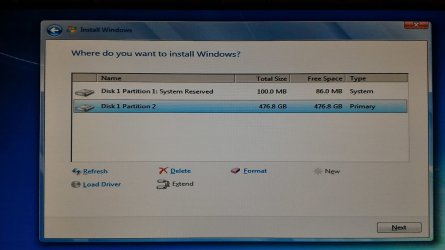
The one in the image attached is the error I was receiving before. Now I have been able to follow the instructions and to enter the installation process. The second image I attached is where I am currently.

I cleaned the 950 Pro with diskpart and created a new partition. The system automatically creates two of them: the first one is 100 MB reserved for system, and the second one 476 GB. My question is: what I should do now taking into account that this is a nvme drive? Does it change something from the ahci type?

In another forum I read something along the lines of:" leave about 20% unpartitioned space for over provisioning, or garbage collection". What does this mean exactly? And, above all, is this really necessary and what are the advantages of doing so? These drives are pretty expensive and "wasting" 20% of the space leaves me a bit worried.

Thanks again for the help,
Carlo
 

Attachments

  • P_20160528_163308.jpg
    P_20160528_163308.jpg
    188 KB · Views: 4
  • P_20160528_174307.jpg
    P_20160528_174307.jpg
    172.2 KB · Views: 2

My Computer My Computer

At a glance

Windows 7 Ultimate x64i7 3930K @ 4500 Mhz64 Gb Corsair Dominator 1600 Mhz2x GTX 980Ti SLI
Computer type
PC/Desktop
Computer Manufacturer/Model Number
Custom build
OS
Windows 7 Ultimate x64
CPU
i7 3930K @ 4500 Mhz
Motherboard
Asus P9X79 Deluxe (bios 4801)
Memory
64 Gb Corsair Dominator 1600 Mhz
Graphics Card(s)
2x GTX 980Ti SLI
Hard Drives
Intel 750 400 Gb NVMe
Samsung 950 Pro 512 Gb NVMe
Samsung 850 Pro 512 Gb SSD
The 100MB Reserved partition is normal for Win7. You can avoid it if you want (with a bit of effort), but I'm not aware of any good reason to do so.

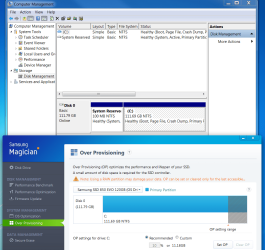
Regarding over-provisioning, I thought we were past that with TRIM and other wear leveling technologies. But in fact, Samsung Magician has an option to configure over-provisioning, and for my drive (850 EVO 120GB) recommends 10%. I don't know what to tell you here.
 

Attachments

  • overprov.png
    overprov.png
    69.6 KB · Views: 2

My Computer My Computer

At a glance

Windows 7 Professional x64, Arch Linux
Computer type
PC/Desktop
OS
Windows 7 Professional x64, Arch Linux
I was just told installing to an M.2 card will lower the bandwidth on your video cards.

That would depend on how many video cards and other cards and the CPU the OP is using. The P9X79 Deluxe has 40 lanes even when using the earlier Sandybridge-e processor so he should still have enough bandwidth for one GPU and two M.2 devices on an add-on card (the latter using only x8 lanes).
 

My Computer My Computer

At a glance

Win 7 Ultimate 64 bitIntel i7-3930KKingston HyperX Genesis 32GB Kit (8x4GB Modul...MSI R7850 Twin Frozr 2GD5/OC Radeon HD 7850 2...
Computer type
PC/Desktop
Computer Manufacturer/Model Number
Custom Build
OS
Win 7 Ultimate 64 bit
CPU
Intel i7-3930K
Motherboard
ASUS P9X79 WS
Memory
Kingston HyperX Genesis 32GB Kit (8x4GB Modules) 1600MHz DDR
Graphics Card(s)
MSI R7850 Twin Frozr 2GD5/OC Radeon HD 7850 2GB 256-bit GDDR
Sound Card
Asus Xonar Essence STX
Monitor(s) Displays
3x Asus VG248QE 24", Vizio 32" TV
Screen Resolution
1920 x 1080, ?
Hard Drives
Samsung 128GB 840 Pro SSD (1),
Samsung 4TB 850 EVO SSDs (4)
Samsung 4TB 850 EVO SSDs (16) external backup drives used in 2.5" hot swap bays in the computer.
PSU
Corsair HX750w
Case
Antec Two Hundred v2 (modified)
Cooling
Cooler Master GeminII S524 120mm (fan replaced with a 140mm)
Keyboard
Logitech G510s
Mouse
Logitech M525 (two in use)
Internet Speed
=< 32Mbps down, 8Mbps up
Antivirus
AVAST!, MBAM, SAS, Spybot S&D (all but MBAM free) Glary Util
Browser
IE11
Other Info
LSI 9211-8i HBA card (8 SATA III ports), 2.5" & 3.5" Hot Swap Bays, HooToo HT-CR001 PCI-E to USB 3.0 Internal Hub + 6 Slot Card Reader, and LG Model CH12LS28 BD-ROM Optical Drive. Also, ScanSnap S1500 ADF duplexing scanner, Canon 9000F flat bed scanner, Corsair SP2500 2.1 speakers, Samsung CLP 415nw laser color printer, Cyberpower PP2200SW UPS
I have been able to install Windows 10 and Windows 7 thanks to your instructions, guys.

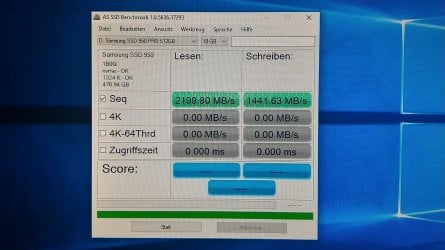
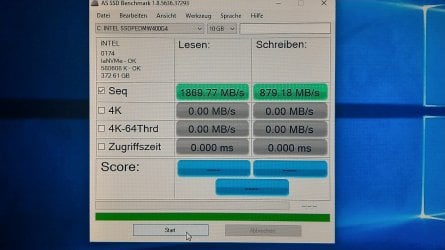
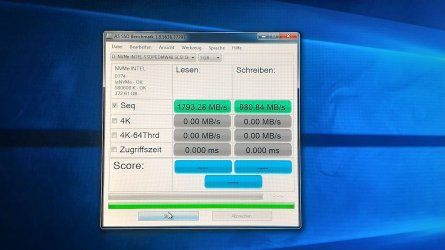
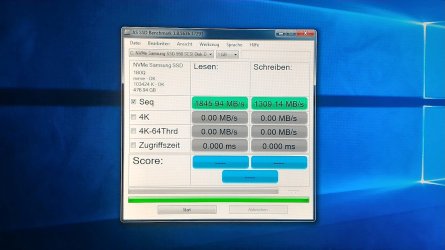
I would have a question though, mainly concerning the performances of these two disks (Intel 750 and Samsung 950 Pro): the difference I am referring to is between Windows 10 and Windows 7. The first two images are the speed of the two drives in Windows 10, while the second two are the speeds I obtain in Windows 7. As we can see, both drives are slower in Win 7, particularly the Samsung 950 Pro.

To clarify, it must be stated that in both OS I installed the last version of the relative official NVMe drivers and in Windows 7 I also installed the NVMe hotfix (but the results are the same with or without). Any thoughts on why this is happening? I know Win 10 has a better (native) management for these drives, but I would like to understand better the issue here. I would be also curious to see how Win 8.1 behaves.
 

Attachments

  • P_20160524_184324.jpg
    P_20160524_184324.jpg
    211 KB · Views: 3
  • P_20160524_184405.jpg
    P_20160524_184405.jpg
    224.2 KB · Views: 2
  • P_20160529_100940.jpg
    P_20160529_100940.jpg
    207.9 KB · Views: 2
  • P_20160529_102701.jpg
    P_20160529_102701.jpg
    185.7 KB · Views: 2

My Computer My Computer

At a glance

Windows 7 Ultimate x64i7 3930K @ 4500 Mhz64 Gb Corsair Dominator 1600 Mhz2x GTX 980Ti SLI
Computer type
PC/Desktop
Computer Manufacturer/Model Number
Custom build
OS
Windows 7 Ultimate x64
CPU
i7 3930K @ 4500 Mhz
Motherboard
Asus P9X79 Deluxe (bios 4801)
Memory
64 Gb Corsair Dominator 1600 Mhz
Graphics Card(s)
2x GTX 980Ti SLI
Hard Drives
Intel 750 400 Gb NVMe
Samsung 950 Pro 512 Gb NVMe
Samsung 850 Pro 512 Gb SSD
I was just told installing to an M.2 card will lower the bandwidth on your video cards.

That would depend on how many video cards and other cards and the CPU the OP is using. The P9X79 Deluxe has 40 lanes even when using the earlier Sandybridge-e processor so he should still have enough bandwidth for one GPU and two M.2 devices on an add-on card (the latter using only x8 lanes).

Yes, I`m sure you`re correct LF :)

Those numbers are off the hook, beautiful :D
 

My Computer My Computer

At a glance

Windows 10 Pro x64Intel Core i7 6700KGSkill TridentZ RGB 16GB 3600 16-16-16-36EVGA GTX 980 Ti SC x2
Computer type
PC/Desktop
Computer Manufacturer/Model Number
Skylake Special #666
OS
Windows 10 Pro x64
CPU
Intel Core i7 6700K
Motherboard
Asus Sabertooth Z170 Mark 1
Memory
GSkill TridentZ RGB 16GB 3600 16-16-16-36
Graphics Card(s)
EVGA GTX 980 Ti SC x2
Sound Card
Realtek High Definition
Monitor(s) Displays
AOC G2460PG
Screen Resolution
1920 x 1080 144Hz
Hard Drives
Samsung 860 Pro 256GB, Seagate Barracuda 4TB x2
PSU
EVGA 1000 P2, EVGA White Custom Braided Cables
Case
Corsair Vengeance C70 Gunmetal Black
Cooling
Corsair H100i v2, Corsair ML120 x2, Thermal Grizzly Kryonaut
Keyboard
Logitech G910 Orion Spectrum
Mouse
Logitech G700s
Internet Speed
Verizon Fios Quantum Gateway 75/75
Antivirus
Windows Defender, Malwarebytes Free 3.8.3
Browser
Chrome
Other Info
Corsair SP120 x4, LG Blu-ray Drive, Durabrand HT-395 100 Watt Dolby Digital Amp, Corsair H2100 Wireless 7.1 Headset
Back
Top