Prevent phantom folders from coming back

genetics73

New member
Member
Local time
6:20 PM
Messages
50
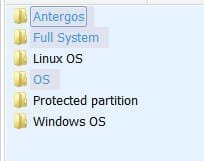
Some time ago, I emptied and deleted several folders; but like zombies, they come back. I can delete them, but they return, time and time again. How do I get rid of those folders, permanently? The attached screenshot shows the list, the light blue names indicating the empty folders.
 

Attachments
  • Screenshot_1.jpg
    Screenshot_1.jpg
    4.6 KB · Views: 53

My Computer My Computer

Computer type
PC/Desktop
Computer Manufacturer/Model Number
Dell
OS
Windows 7 Ultimate 64 bit
CPU
i7 Intel
Memory
8 GB
Graphics Card(s)
nVidia GeForce
Hard Drives
Seagate; WesternDigital
Antivirus
Panda
Browser
Firefox
Where do the folders reside?
 

My Computer My Computer

Computer type
PC/Desktop
Computer Manufacturer/Model Number
Lenovo IdeaCenter 450
OS
Windows 10 Pro X64
CPU
Intel Quad Core i7-4770 @ 3.4Ghz
Memory
16.0GB PC3-12800 DDR3 SDRAM 1600 MHz
Graphics Card(s)
Intel Integrated HD Graphics
Sound Card
Realtek HD Audio
Monitor(s) Displays
HP 22" LCD
Screen Resolution
1680 x 1050
Hard Drives
250GB Samsung EVO SATA-3 SSD
2TB Seagate ST2000DM001 SATA-2
1.5TB Seagate ST3150041AS SATA
Keyboard
Dell USB
Mouse
Lenovo USB
Internet Speed
Cable via Road Runner 3MB Upload, 30MB Download
Antivirus
Windows Defender, MBAM Pro, MBAE
Browser
Seamonkey
Other Info
UEFI/GPT
PLDS DVD-RW DH16AERSH

My Computer My Computer

Computer type
PC/Desktop
Computer Manufacturer/Model Number
Dell
OS
Windows 7 Ultimate 64 bit
CPU
i7 Intel
Memory
8 GB
Graphics Card(s)
nVidia GeForce
Hard Drives
Seagate; WesternDigital
Antivirus
Panda
Browser
Firefox
Something is re-creating those folders. The only way to stop them reappearing is to figure out what's creating them.
 

My Computer My Computer

Computer type
PC/Desktop
OS
Windows 7 Professional x64, Arch Linux

My Computer My Computer

Computer type
PC/Desktop
Computer Manufacturer/Model Number
Dell
OS
Windows 7 Ultimate 64 bit
CPU
i7 Intel
Memory
8 GB
Graphics Card(s)
nVidia GeForce
Hard Drives
Seagate; WesternDigital
Antivirus
Panda
Browser
Firefox
Y u laf?
 

My Computer My Computer

Computer type
PC/Desktop
OS
Windows 7 Professional x64, Arch Linux
Probably because that's why he asked the question in the first place :)

Can you connect the external drive to a different system and try deleting them, see what happens?
Or try booting to Safe Mode and delete them, see how that works.
 

My Computer My Computer

Computer type
PC/Desktop
Computer Manufacturer/Model Number
Lenovo IdeaCenter 450
OS
Windows 10 Pro X64
CPU
Intel Quad Core i7-4770 @ 3.4Ghz
Memory
16.0GB PC3-12800 DDR3 SDRAM 1600 MHz
Graphics Card(s)
Intel Integrated HD Graphics
Sound Card
Realtek HD Audio
Monitor(s) Displays
HP 22" LCD
Screen Resolution
1680 x 1050
Hard Drives
250GB Samsung EVO SATA-3 SSD
2TB Seagate ST2000DM001 SATA-2
1.5TB Seagate ST3150041AS SATA
Keyboard
Dell USB
Mouse
Lenovo USB
Internet Speed
Cable via Road Runner 3MB Upload, 30MB Download
Antivirus
Windows Defender, MBAM Pro, MBAE
Browser
Seamonkey
Other Info
UEFI/GPT
PLDS DVD-RW DH16AERSH
Yeah, I was being snarky, because he's making no effort to help us help him; it seems like he's hoping someone will just stumble upon the thread already knowing the answer.
 

My Computer My Computer

Computer type
PC/Desktop
OS
Windows 7 Professional x64, Arch Linux
Alphaniner, you have to admit your first reply IS funny!

Regards,
GEWB
 

My Computer My Computer

Computer type
PC/Desktop
Computer Manufacturer/Model Number
(7 different computers booting up to 10 systems)
OS
Linux Mint / XP / Win7 Home, Pro, Ultimate / Win8.1 / Win10
Other Info
Four desktops, two laptops, one notebook and one tablet
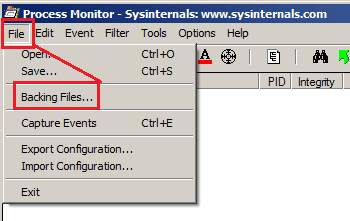
Process Monitor should be able to tell you exactly what app creates those folders.

If you can tell us a bit more about when they show up, I might be able to tell you how best to use Process Monitor to hunt down the offending app(s). (e.g. Do they show up immediately after a reboot? Or do they show up hours after a reboot?)

If you need to run Process Monitor for a long time, then change the settings within Process Monitor so that it uses Backing files.

PM-BF.png

If Process Monitor cannot find the culprit, then an AutoIt script can keep an eye out for the creation of those folders and notify you exactly when they appear. Maybe then, you can figure out what app you started.
 

My Computer My Computer

Computer type
Laptop
Computer Manufacturer/Model Number
Employer provided Dell Latitude
OS
W7 Pro SP1 64bit
CPU
i7
Memory
8GB
Graphics Card(s)
Intel HD Graphics
Hard Drives
crappy SSD
Antivirus
Employer mandated Symantec Endpoint Protection
Browser
Pale Moon 64bit, IE11 64bit & Chrome 64bit
Alphaniner, you have to admit your first reply IS funny!

Regards,
GEWB

I don't see it, TBH. Maybe I took OP too literaly and didn't realize he was fully aware something was re-creating them (based on him saying "How do I get rid of those folders, permanently?" instead of "How do I prevent those folders from coming back?"), but I really don't see any humour in it. :huh:
 

My Computer My Computer

Computer type
PC/Desktop
OS
Windows 7 Professional x64, Arch Linux

My Computer My Computer

Computer type
PC/Desktop
Computer Manufacturer/Model Number
(7 different computers booting up to 10 systems)
OS
Linux Mint / XP / Win7 Home, Pro, Ultimate / Win8.1 / Win10
Other Info
Four desktops, two laptops, one notebook and one tablet
Back
Top