Can't upgrade IE10 to IE11. Can't uninstall IE 10.

jojorubi2

New member
Local time
2:48 PM
Messages
13
Hi,

I have windows 7, IE10.
When trying update to ie11 I got an error something with c947, so I tried to go to the basics and remove IE completely (control panel->uninstal programs->

uninstall updates->unistall windows internet explorer 10) and got an error (without a specific number).
Quick googling led me to make an sfc/ scannow which informed me I have corrupt files but it can't fix them. I then tried to remove these KB:

http://www.sevenforums.com/performa...-fix-corrupted-files-found-sfc-scannow-4.html

Didn't help.

I then tried to safe mode and to Dism /Online /Cleanup-Image /RestoreHealth bot to no avail (error 87 not recognized command in this context).


Not sure what's next and would appreciate help.
thank you very much.
 

My Computer My Computer

At a glance

win7
Computer type
PC/Desktop
OS
win7

My Computer My Computer

At a glance

Windows 10 Pro x64Intel Core i7 6700KGSkill TridentZ RGB 16GB 3600 16-16-16-36EVGA GTX 980 Ti SC x2
Computer type
PC/Desktop
Computer Manufacturer/Model Number
Skylake Special #666
OS
Windows 10 Pro x64
CPU
Intel Core i7 6700K
Motherboard
Asus Sabertooth Z170 Mark 1
Memory
GSkill TridentZ RGB 16GB 3600 16-16-16-36
Graphics Card(s)
EVGA GTX 980 Ti SC x2
Sound Card
Realtek High Definition
Monitor(s) Displays
AOC G2460PG
Screen Resolution
1920 x 1080 144Hz
Hard Drives
Samsung 860 Pro 256GB, Seagate Barracuda 4TB x2
PSU
EVGA 1000 P2, EVGA White Custom Braided Cables
Case
Corsair Vengeance C70 Gunmetal Black
Cooling
Corsair H100i v2, Corsair ML120 x2, Thermal Grizzly Kryonaut
Keyboard
Logitech G910 Orion Spectrum
Mouse
Logitech G700s
Internet Speed
Verizon Fios Quantum Gateway 75/75
Antivirus
Windows Defender, Malwarebytes Free 3.8.3
Browser
Chrome
Other Info
Corsair SP120 x4, LG Blu-ray Drive, Durabrand HT-395 100 Watt Dolby Digital Amp, Corsair H2100 Wireless 7.1 Headset
Thank you, indeed I have (and I just tried again now, using your link). The message I get from direct installing is : :internet explorer did not finish installing. for more information see the troubleshooter..."
 

My Computer My Computer

At a glance

win7
Computer type
PC/Desktop
OS
win7
and the last word is log,
so lets have a copy of it.

Roy
 

My Computer My Computer

At a glance

W7 home premium 32bit/W7HP 64bit/w10 tp insid...E5300 dual core3gbNvidia Geforce 7100 Nforce 630i
Computer type
PC/Desktop
Computer Manufacturer/Model Number
medionl/Aspire 6930G/acer x55a
OS
W7 home premium 32bit/W7HP 64bit/w10 tp insider ring
CPU
E5300 dual core
Motherboard
medion MS7366
Memory
3gb
Graphics Card(s)
Nvidia Geforce 7100 Nforce 630i
Monitor(s) Displays
avixc
Internet Speed
n (isp resticted to 72)
Antivirus
mse/pands
Browser
palemoon
Other Info
Belkin Fd7050 n USB using Railink RT2870 drivers, more upto date
Thank you.
You mean the CBS.log right? it's somewhat large so tell me if i need to trim it...
 

My Computer My Computer

At a glance

win7
Computer type
PC/Desktop
OS
win7
Thank you, indeed I have (and I just tried again now, using your link). The message I get from direct installing is : :internet explorer did not finish installing. for more information see the troubleshooter..."

and the last word is log,
so lets have a copy of it.

Roy

Roy,

I think that the message being seen is this one:

FileDownloadHandler.ashx


I'll go back to lurking now.
 

My Computer My Computer

At a glance

W7 Pro SP1 64biti78GBIntel HD Graphics
Computer type
Laptop
Computer Manufacturer/Model Number
Employer provided Dell Latitude
OS
W7 Pro SP1 64bit
CPU
i7
Memory
8GB
Graphics Card(s)
Intel HD Graphics
Hard Drives
crappy SSD
Antivirus
Employer mandated Symantec Endpoint Protection
Browser
Pale Moon 64bit, IE11 64bit & Chrome 64bit
haha, yep that's the one.
 

My Computer My Computer

At a glance

win7
Computer type
PC/Desktop
OS
win7
open the link in that screenshot copy/paste the details.


and use this to remove ie10/11
Uninstall IE11 from Command Prompt
Follow the below steps to uninstall IE 10 from Command Prompt:

  1. Click on Start. `
  2. Type CMD in Search.
  3. Right click on CMD and select Run as administrator.
  4. In Command prompt run the following command:
FORFILES /P %WINDIR%\servicing\Packages /M Microsoft-Windows-InternetExplorer-*11.*.mum /c “cmd /c echo Uninstalling package @fname && start /w pkgmgr /up:@fname /norestart”

REBOOT

And run it again for IE10, change the 11 to 10

reboot


Roy
 

My Computer My Computer

At a glance

W7 home premium 32bit/W7HP 64bit/w10 tp insid...E5300 dual core3gbNvidia Geforce 7100 Nforce 630i
Computer type
PC/Desktop
Computer Manufacturer/Model Number
medionl/Aspire 6930G/acer x55a
OS
W7 home premium 32bit/W7HP 64bit/w10 tp insider ring
CPU
E5300 dual core
Motherboard
medion MS7366
Memory
3gb
Graphics Card(s)
Nvidia Geforce 7100 Nforce 630i
Monitor(s) Displays
avixc
Internet Speed
n (isp resticted to 72)
Antivirus
mse/pands
Browser
palemoon
Other Info
Belkin Fd7050 n USB using Railink RT2870 drivers, more upto date
hi,
thank you.

The link doesn't provide any specific details but rather leads me to a general 'How To' page: https://support.microsoft.com/en-us/kb/2872074

As for the command, when I entered it, at first, I got errors as per this guide: http://www.sevenforums.com/tutorials/313358-internet-explorer-11-uninstall-windows-7-a.html ,but then after the first three notifications, I got more for every line. Some said "access denied" and one said "the parameter is incorrect". Rebooted, just in case, but nope.


Umm, do you think that perhaps it might be related with 3d party embedded addons such as flash and java? perhaps I should uninstall them?


Thank you.


PS. for curiosity sake, just to understand the syntax of the command...
In FORFILES /P %WINDIR%\servicing\Packages /M Microsoft-Windows-InternetExplorer-*11.*.mum /c “cmd /c echo Uninstalling package @fname && start /w pkgmgr /up:@fname /norestart” , why do you have stars aroun 11? Why is the .mum file is the only one involved? are there no other (maybe .exe) files related to the installation of IE? is an "Uninstalling package" a proper batch command (googled it , but the results are tad confusing)? can you say what this does "@fname && start /w pkgmgr /up:@fname "?
 

My Computer My Computer

At a glance

win7
Computer type
PC/Desktop
OS
win7
Hi Jo,
Not exactly sure about the * syntex, suspect its a DOS requirement,way before my time:sarc:.

I wasn't sure if IE11 had been completely uninstalled as it didn't install in the first place.
Trying to clean up before removing IE10.

Did you try the same on IE10..

Can you go to the Windows update log (C>>Windows>>Windowsupdate).
and post that days entries when you tried to install IE11, I need to see the specific error code and what happened just before.

Roy
 

My Computer My Computer

At a glance

W7 home premium 32bit/W7HP 64bit/w10 tp insid...E5300 dual core3gbNvidia Geforce 7100 Nforce 630i
Computer type
PC/Desktop
Computer Manufacturer/Model Number
medionl/Aspire 6930G/acer x55a
OS
W7 home premium 32bit/W7HP 64bit/w10 tp insider ring
CPU
E5300 dual core
Motherboard
medion MS7366
Memory
3gb
Graphics Card(s)
Nvidia Geforce 7100 Nforce 630i
Monitor(s) Displays
avixc
Internet Speed
n (isp resticted to 72)
Antivirus
mse/pands
Browser
palemoon
Other Info
Belkin Fd7050 n USB using Railink RT2870 drivers, more upto date
> why do you have stars aroun 11?

Your wording implies that torchwood authored/created the command line text pasted into that post :-)

Perhaps a better way to word your question would be:
Why are there stars (asterisks) around 11.?

This method for uninstalling IE has been around for quite a while.
Here is one website that mentions this method:
https://blogs.msdn.microsoft.com/as...ons-available-to-uninstall-internet-explorer/

But - to answer your question:
Microsoft-Windows-InternetExplorer-*11.*.mum
is the search mask for the FORFILES command.
The asterisks (stars) are wildcards.


> Why is the .mum file is the only one involved?

The search (with its wildcards) will find than one MUM file.

If you use Windows (file) Explorer to search that path (%WINDIR%\servicing\Packages) using the search term of...
Microsoft-Windows-InternetExplorer-
...you should see several MUM and CAT files.
Here are some files found by that search:
Code:
Microsoft-Windows-InternetExplorer[COLOR=Red][COLOR=Black]-[/COLOR]Package-MiniLP~31bf3856ad364e35~amd64~en-US~[/COLOR]11.[COLOR=Red]2.9600.16428[/COLOR].mum
Microsoft-Windows-InternetExplorer[COLOR=Red][COLOR=Black]-[/COLOR]Package-TopLevel~31bf3856ad364e35~amd64~~[/COLOR]11.[COLOR=Red]2.9600.16428[/COLOR].mum
Microsoft-Windows-InternetExplorer[COLOR=Red][COLOR=Black]-[/COLOR]Optional-Package~31bf3856ad364e35~amd64~en-US~[/COLOR]11.[COLOR=Red]2.9600.16428[/COLOR].mum
The part in red letters is handled by the wild card asterisks. It allows the command line operation to find (and eventually act on) multiple MUM files without having to know the exact file name for each MUM file of interest. In this case, the operation want to act on MUM files that are associated with IE11.

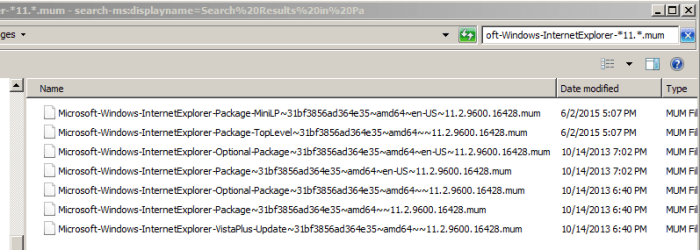
If you search for...
Microsoft-Windows-InternetExplorer-*11.*.mum
...you might see something like this:

search.PNG

Notice that the CAT files no longer show in the search results.


> are there no other (maybe .exe) files related to the installation of IE?

Parts of IE are built into the operating system. IE11 is an update/upgrade/patch. It is not quite the same as installing/uninstalling an application. MUM files contain info on the installation of Windows patches/updates. In this case, the IE11 update MUM files are used to try and uninstall the IE11 update(s). More about this later.


> is an "Uninstalling package" a proper batch command (googled it , but the results are tad confusing)?

The words "Uninstalling package" are just text to tell the person running the commands that packages are being uninstalled. Notice the echo command just before the words "Uninstalling package".

Open a command prompt window and type...
echo any text
...then press enter.

The result should be that "any text" will be shown in the next line. "Uninstalling package" is nothing special. It is just FYI text. It could have been "Currently acting on this file:" if the author/creator of these commands had opted for that FYI text.


> can you say what this does "@fname && start /w pkgmgr /up:@fname "?

The name of each file found by the FORFILES command is stored in the variable named @fname." The person that put together these commands decided that it would be nice to tell the user the name of each file being acted on.
e.g.
Uninstalling package (name of the first file found)
Uninstalling package (name of the next file found)
~~~


The first part of these commands...
Code:
FORFILES /P %WINDIR%\servicing\Packages /M Microsoft-Windows-InternetExplorer-*11.*.mum /c “cmd /c echo Uninstalling package @fname
...finds files (and informs the user).

The last part (pkgmgr /up:@fname) does the actual work.
Code:
start /w pkgmgr /up:@fname /norestart”
That tells the package manager app to UP (Uninstall Package) for each file name stored in the @fname variable. I'm guessing that the package manager app also starts/uses the trusted installer app to remove the IE update(s). This might further answer your question, "are there no other (maybe .exe) files related to the installation of IE?".


The "&&" joins the two command lines into one. This lets people copy/paste/run the command lines without having to create/run a batch file.


Caveat to all of the above: I'm not a programmer. The info presented above might be wrong or leave you with the wrong impression.

 

My Computer My Computer

At a glance

W7 Pro SP1 64biti78GBIntel HD Graphics
Computer type
Laptop
Computer Manufacturer/Model Number
Employer provided Dell Latitude
OS
W7 Pro SP1 64bit
CPU
i7
Memory
8GB
Graphics Card(s)
Intel HD Graphics
Hard Drives
crappy SSD
Antivirus
Employer mandated Symantec Endpoint Protection
Browser
Pale Moon 64bit, IE11 64bit & Chrome 64bit
Hi Jo,
Not exactly sure about the * syntex, suspect its a DOS requirement,way before my time:sarc:.

I wasn't sure if IE11 had been completely uninstalled as it didn't install in the first place.
Trying to clean up before removing IE10.

Did you try the same on IE10..

Can you go to the Windows update log (C>>Windows>>Windowsupdate).
and post that days entries when you tried to install IE11, I need to see the specific error code and what happened just before.

Roy


Thank you,
Yeah, I did replace "11" with "10" (actually when I accidentally placed the command unaltered, cmd reacted with "11.mum does not exist").

I just tried to make an update so I attached the log with todays attempt.


> why do you have stars aroun 11?

Your wording implies that torchwood authored/created the command line text pasted into that post :-)

Perhaps a better way to word your question would be:
Why are there stars (asterisks) around 11.?

This method for uninstalling IE has been around for quite a while.
Here is one website that mentions this method:
https://blogs.msdn.microsoft.com/as...ons-available-to-uninstall-internet-explorer/

But - to answer your question:
Microsoft-Windows-InternetExplorer-*11.*.mum
is the search mask for the FORFILES command.
The asterisks (stars) are wildcards.


> Why is the .mum file is the only one involved?

The search (with its wildcards) will find than one MUM file.

If you use Windows (file) Explorer to search that path (%WINDIR%\servicing\Packages) using the search term of...
Microsoft-Windows-InternetExplorer-
...you should see several MUM and CAT files.
Here are some files found by that search:
Code:
Microsoft-Windows-InternetExplorer-Package-MiniLP~31bf3856ad364e35~amd64~en-US~11.2.9600.16428.mum
Microsoft-Windows-InternetExplorer-Package-TopLevel~31bf3856ad364e35~amd64~~11.2.9600.16428.mum
Microsoft-Windows-InternetExplorer-Optional-Package~31bf3856ad364e35~amd64~en-US~11.2.9600.16428.mum
The part in red letters is handled by the wild card asterisks. It allows the command line operation to find (and eventually act on) multiple MUM files without having to know the exact file name for each MUM file of interest. In this case, the operation want to act on MUM files that are associated with IE11.

If you search for...
Microsoft-Windows-InternetExplorer-*11.*.mum
...you might see something like this:

View attachment 387577

Notice that the CAT files no longer show in the search results.


> are there no other (maybe .exe) files related to the installation of IE?

Parts of IE are built into the operating system. IE11 is an update/upgrade/patch. It is not quite the same as installing/uninstalling an application. MUM files contain info on the installation of Windows patches/updates. In this case, the IE11 update MUM files are used to try and uninstall the IE11 update(s). More about this later.


> is an "Uninstalling package" a proper batch command (googled it , but the results are tad confusing)?

The words "Uninstalling package" are just text to tell the person running the commands that packages are being uninstalled. Notice the echo command just before the words "Uninstalling package".

Open a command prompt window and type...
echo any text
...then press enter.

The result should be that "any text" will be shown in the next line. "Uninstalling package" is nothing special. It is just FYI text. It could have been "Currently acting on this file:" if the author/creator of these commands had opted for that FYI text.


> can you say what this does "@fname && start /w pkgmgr /up:@fname "?

The name of each file found by the FORFILES command is stored in the variable named @fname." The person that put together these commands decided that it would be nice to tell the user the name of each file being acted on.
e.g.
Uninstalling package (name of the first file found)
Uninstalling package (name of the next file found)
~~~


The first part of these commands...
Code:
FORFILES /P %WINDIR%\servicing\Packages /M Microsoft-Windows-InternetExplorer-*11.*.mum /c “cmd /c echo Uninstalling package @fname
...finds files (and informs the user).

The last part (pkgmgr /up:@fname) does the actual work.
Code:
start /w pkgmgr /up:@fname /norestart”
That tells the package manager app to UP (Uninstall Package) for each file name stored in the @fname variable. I'm guessing that the package manager app also starts/uses the trusted installer app to remove the IE update(s). This might further answer your question, "are there no other (maybe .exe) files related to the installation of IE?".


The "&&" joins the two command lines into one. This lets people copy/paste/run the command lines without having to create/run a batch file.


Caveat to all of the above: I'm not a programmer. The info presented above might be wrong or leave you with the wrong impression.


Thank you very much for the explicative and detailed answer.
First of all, yeah, I thought that he authored that command or a native DOS speakers quoting a convo with another native :P.


Second, Ohhhhh.
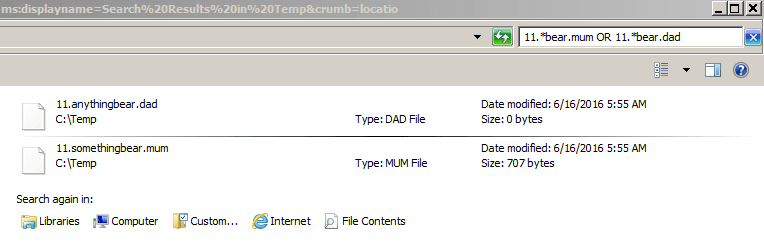
So the asterisks are like a quotation and if I wanted to sift through the data and find anything that also has "bear" in it- I'd write *11.**bear* .mum.
but then why isnt .mum in asterisks? and if I wanted to find ".mum" and ".dad" but leave ".cat" and ".dog" alone, should I encase them in said asteriks?


As for the rest, thanks, I still need some time to figure those commands (in the last line) and follow that algorithm through, but you pretty much explained it!
 
Last edited:

My Computer My Computer

At a glance

win7
Computer type
PC/Desktop
OS
win7
Second, Ohhhhh.
So the asterisks are like a quotation and if I wanted to sift through the data and find anything that also has "bear" in it- I'd write *11.**bear* .mum.
but then why isnt .mum in asterisks? and if I wanted to find ".mum" and ".dad" but leave ".cat" and ".dog" alone, should I encase them in said asteriks?

*11.**bear*.mum should be
*11.*bear*.mum

There is no value in putting two asterisks side by side.

The asterisks are not like quotations.

A search term of 11.*bear.mum will match:
11.anythingbear.mum
11.anyonebear.mum
11.anycharacterbear.mum
11.anywordbear.mum
11.anyphrasebear.mum
11.bear.mum

You are telling the search engine that you don't know what character(s) (if any) might be where the asterisk is located.

A search term of *11.*bear.mum will match:
ThingsHere11.anythingbear.mum
ThingsBeforeTheEleven11.anyonebear.mum
211.anycharacterbear.mum
AnyGibberish11.anywordbear.mum
anything11.anyphrasebear.mum
11.bear.mum


> if I wanted to find ".mum" and ".dad" but leave ".cat" and ".dog" alone
Then the search term could be 11.*bear.mum OR 11.*bear.dad
Windows (file) Explorer searches support Boolean Operators.
I'm not sure if that extends to the FORFILES command.
 

My Computer My Computer

At a glance

W7 Pro SP1 64biti78GBIntel HD Graphics
Computer type
Laptop
Computer Manufacturer/Model Number
Employer provided Dell Latitude
OS
W7 Pro SP1 64bit
CPU
i7
Memory
8GB
Graphics Card(s)
Intel HD Graphics
Hard Drives
crappy SSD
Antivirus
Employer mandated Symantec Endpoint Protection
Browser
Pale Moon 64bit, IE11 64bit & Chrome 64bit
Hi Jojo,
Think i've found the problem.
WU is trying to update your Intel graphics card, and failing, causing a cascade error in the IE11 install, there are some pre-requisites, (graphics card being upto date).

Can you update it from either the comp manufacturers website, or directly from Intel.

Temporarily stop Windows update.

Then see if the standalone IE11 installer works.

Roy
 

My Computer My Computer

At a glance

W7 home premium 32bit/W7HP 64bit/w10 tp insid...E5300 dual core3gbNvidia Geforce 7100 Nforce 630i
Computer type
PC/Desktop
Computer Manufacturer/Model Number
medionl/Aspire 6930G/acer x55a
OS
W7 home premium 32bit/W7HP 64bit/w10 tp insider ring
CPU
E5300 dual core
Motherboard
medion MS7366
Memory
3gb
Graphics Card(s)
Nvidia Geforce 7100 Nforce 630i
Monitor(s) Displays
avixc
Internet Speed
n (isp resticted to 72)
Antivirus
mse/pands
Browser
palemoon
Other Info
Belkin Fd7050 n USB using Railink RT2870 drivers, more upto date
Hi Jojo,
Think i've found the problem.
WU is trying to update your Intel graphics card, and failing, causing a cascade error in the IE11 install, there are some pre-requisites, (graphics card being upto date).

Can you update it from either the comp manufacturers website, or directly from Intel.

Temporarily stop Windows update.

Then see if the standalone IE11 installer works.

Roy

Where do you see that (the error cascade)?

*sigh*.
ok, i'm not sure if the rest of the process should be in this thread or if it is even possible.
I juxt downloaded the latest driver for my built in graphics card but that didn't help the update. here is the log from just now.


Neither disabling updates ("never check for updates") and instaling ie11 directly.


Second, Ohhhhh.
So the asterisks are like a quotation and if I wanted to sift through the data and find anything that also has "bear" in it- I'd write *11.**bear* .mum.
but then why isnt .mum in asterisks? and if I wanted to find ".mum" and ".dad" but leave ".cat" and ".dog" alone, should I encase them in said asteriks?

*11.**bear*.mum should be
*11.*bear*.mum

There is no value in putting two asterisks side by side.

The asterisks are not like quotations.

A search term of 11.*bear.mum will match:
11.anythingbear.mum
11.anyonebear.mum
11.anycharacterbear.mum
11.anywordbear.mum
11.anyphrasebear.mum
11.bear.mum

You are telling the search engine that you don't know what character(s) (if any) might be where the asterisk is located.

A search term of *11.*bear.mum will match:
ThingsHere11.anythingbear.mum
ThingsBeforeTheEleven11.anyonebear.mum
211.anycharacterbear.mum
AnyGibberish11.anywordbear.mum
anything11.anyphrasebear.mum
11.bear.mum


> if I wanted to find ".mum" and ".dad" but leave ".cat" and ".dog" alone
Then the search term could be 11.*bear.mum OR 11.*bear.dad
Windows (file) Explorer searches support Boolean Operators.
I'm not sure if that extends to the FORFILES command.


oh, ok cool.
but did you mean file explorer does not support boolean? (your link says that boolean includes 'and' commands) I just tried *.exe *.txt and it didn't work.

thank you very much.
 

My Computer My Computer

At a glance

win7
Computer type
PC/Desktop
OS
win7
The thread has gone far down so i'll just up it.

To clarify, my main questions at the moment are: 1) where on the log I can see the error cascade? (couldn't identify by myself).
2) where should I approach next? it seems like updating my intel graphic drivers does not help.

thank you!
 

My Computer My Computer

At a glance

win7
Computer type
PC/Desktop
OS
win7
oh, ok cool.
but did you mean file explorer does not support boolean? (your link says that boolean includes 'and' commands) I just tried *.exe *.txt and it didn't work.

thank you very much.

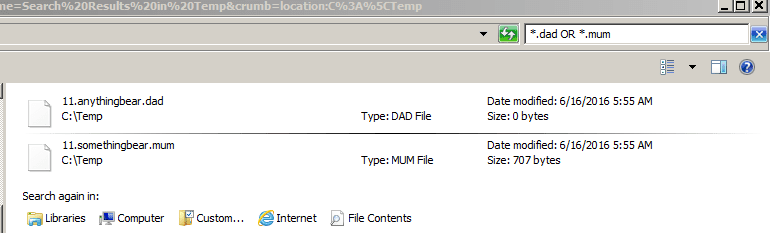
Windows (file) Explorer does support Boolean Operators in the search terms:

BO1.PNG

BO2.PNG

If you searched using...
*.exe and *.txt
...then the returns should be empty.

The Boolean Operator "AND" means that each file listed in the search returns matches the search terms on each side of the "AND". No files have exe and txt extensions at the same time. You probably meant to use "OR".

It can be a bit confusing. Using...
*.exe or *.txt
...returns exe and txt files.
 
Last edited:

My Computer My Computer

At a glance

W7 Pro SP1 64biti78GBIntel HD Graphics
Computer type
Laptop
Computer Manufacturer/Model Number
Employer provided Dell Latitude
OS
W7 Pro SP1 64bit
CPU
i7
Memory
8GB
Graphics Card(s)
Intel HD Graphics
Hard Drives
crappy SSD
Antivirus
Employer mandated Symantec Endpoint Protection
Browser
Pale Moon 64bit, IE11 64bit & Chrome 64bit
Ohhhhh. D'oh.

Of course you are right.

I think at the moment I have no more questions (about that issue).
Man, that knowledge really did help me out this past week. I used to pluck some files I use regularly by hand (too lazy for other means) but now... yeah, found what I want in seconds.


Thank you very much man!
 

My Computer My Computer

At a glance

win7
Computer type
PC/Desktop
OS
win7
Hi, so this is an update for whomever. :D
It seems like the problem was resolved (mostly).
I went into Control panel-> device manager, and removed all of the Intel drivers I had.
I then inserted my win7 disc and did installation repair (http://www.sevenforums.com/tutorials/3413-repair-install.html?ltr=R ) which has deleted all of my updates and reverted windows back to its incipient state.

I then chose to update my system and did it by order where the security patches came first, then I updated all of the IE versions, and finally all else.

At the moment IE11 is successfully on.

I now have a new problem where my Intel driver updates and my NET Framework, refuse to go on, but I'll try a similar treatment on them.


Many thanks to all the helpers!
 

My Computer My Computer

At a glance

win7
Computer type
PC/Desktop
OS
win7
Back
Top