AppData/Roaming directory exists but cant be found (it is not hidden)

nevadaVK

New member
Local time
12:22 AM
Messages
3
I simply need to transfer a file to the roaming directory. This can and has already been done successfully.

What is confusing me is it can only be done when the exact directory is "searched" for and its location revealed in windows. If I attempt to manually navigate to the username/AppData/Roaming dir, its just not there. To clarify Roaming dir isnt there, despite being able to freely transfer files between it.

This is mostly just annoying because Im still able to work around the issue by simply remembering to search its location instead of just clicking my way there as I usually do.

If it helps, there is a users/default/AppData, then a users/defaultAppPool within both which is another Appdata with a Roaming directory but nothing of use. But under users/username/AppData there is no Roaming even though I can search and transfer files between it.

hope I explained this right. Thanks
 

My Computer My Computer

At a glance

Win 7 Basic 64
Computer type
PC/Desktop
OS
Win 7 Basic 64

My Computer My Computer

At a glance

Win 10 Pro x64Intel I5-2500K @3.3GHz16GB G.Skill Ripjaws X (4x4GB)EVGA GeForce 750 Ti SC 2GB
Computer type
PC/Desktop
Computer Manufacturer/Model Number
Self Built
OS
Win 10 Pro x64
CPU
Intel I5-2500K @3.3GHz
Motherboard
Asrock P67 Extreme4
Memory
16GB G.Skill Ripjaws X (4x4GB)
Graphics Card(s)
EVGA GeForce 750 Ti SC 2GB
Sound Card
ASUS Xonar DG 5.1 Channels 24-bit 96KHz PCI Interface Sound
Monitor(s) Displays
auria eq2367
Screen Resolution
1920 x 1080
Hard Drives
250GB Samsung 850 EVO SSD
1TB WD Blue
1TB Hitachi
PSU
SeaSonic X 650W 80 Plus Gold
Case
Corsair Obsidian 750D
Cooling
Corsair H60, Three 140mm case fans
Keyboard
Logitech Wireless Keyboard K520
Mouse
Logitech Wireless Mouse M310
Internet Speed
Wave Broadband ~ 100 dn 5 up
Antivirus
Windows Defender, Malwarebytes Premium
Browser
Edge, IE11, Chrome
Other Info
Laptop specs: HP g7-1365dx /
CPU: AMD A6-3420M APU with Radeon(tm) HD Graphics /
RAM: Crucial 8Gb (2x4Gb) /
SSD: Crucial M4-CT128M4SSD2 ATA Device/ FW 000F /
GFX: AMD Radeon HD 6520G /
OS: Windows 10 Pro x64
Thanks. I always run my OSs with hidden files shown, so that is what makes the issue confusing to me. The directory that is usually always visible is not there when I click, click, click my way to the specific folder within the Roaming dir.

Opening users, searching "Steam" in the bar (yeah game file transfer stuff), yields "C:\Users\username\Appdata\Roaming" (wherein is the folder i want). However, if I manually follow that path there there is no such thing no matter how deep I dig.

Its not crucial that I figure this out, but it is nonsensical and annoying because its hasn't and isn't supposed to work like that.
 

My Computer My Computer

At a glance

Win 7 Basic 64
Computer type
PC/Desktop
OS
Win 7 Basic 64
Yeah, [Roaming] is normally a hidden folder
Are you certain about this? The Roaming folder is not marked as Hidden or anything on my Windows 8.1 or 10 installs. Please assert your claim.


NevadaVK, you may quickly examine the file attributes of an item using the command prompt, entering a command such as the below.
Code:
attrib "C:\Users\%username%\Appdata\Roaming"


Note that items marked as System are also hidden by default.
 

My Computer My Computer

At a glance

Windows 10, Windows 8.1 Pro, Windows 7 Profes...
Computer type
PC/Desktop
OS
Windows 10, Windows 8.1 Pro, Windows 7 Professional, OS X El Capitan
Well, the cmd prompt doesnt want to cooperate and I get a common error that many also seem to encounter. I cant even test turning on and off hidden files with a simple attrib +h +s path file command so Im doing something wrong.
This puts me on the right track though and I'll be able to learn how to figure this out, and then actually figure it out. For now Im just going to think that the computer literally harbours contempt towards me so 5444444444444444444uhhhhhhhhhhhhhhhhhhhhhhhhhhhhhhhhhhhhhhhhhhgbv ijurfcc (that was a cat leaping on another KB) I dont feel so helpless for the moment. But Im gonna punch the monitor and teach this machine a lesson!

Thanks though this helped.
 

My Computer My Computer

At a glance

Win 7 Basic 64
Computer type
PC/Desktop
OS
Win 7 Basic 64
Yeah, [Roaming] is normally a hidden folder
Are you certain about this? The Roaming folder is not marked as Hidden or anything on my Windows 8.1 or 10 installs. Please assert your claim.

I'm certain I was talking about Appdata which is normally hidden. Not Roaming that you edited in.

That wasn't clear obviously so that's my fault.

My "claim" was only to point out it (Appdata) is hidden, so to navigate manually to Roaming, one would need to unhide hidden folders.

About the roaming folder, mine isn't marked as hidden either.
 

My Computer My Computer

At a glance

Win 10 Pro x64Intel I5-2500K @3.3GHz16GB G.Skill Ripjaws X (4x4GB)EVGA GeForce 750 Ti SC 2GB
Computer type
PC/Desktop
Computer Manufacturer/Model Number
Self Built
OS
Win 10 Pro x64
CPU
Intel I5-2500K @3.3GHz
Motherboard
Asrock P67 Extreme4
Memory
16GB G.Skill Ripjaws X (4x4GB)
Graphics Card(s)
EVGA GeForce 750 Ti SC 2GB
Sound Card
ASUS Xonar DG 5.1 Channels 24-bit 96KHz PCI Interface Sound
Monitor(s) Displays
auria eq2367
Screen Resolution
1920 x 1080
Hard Drives
250GB Samsung 850 EVO SSD
1TB WD Blue
1TB Hitachi
PSU
SeaSonic X 650W 80 Plus Gold
Case
Corsair Obsidian 750D
Cooling
Corsair H60, Three 140mm case fans
Keyboard
Logitech Wireless Keyboard K520
Mouse
Logitech Wireless Mouse M310
Internet Speed
Wave Broadband ~ 100 dn 5 up
Antivirus
Windows Defender, Malwarebytes Premium
Browser
Edge, IE11, Chrome
Other Info
Laptop specs: HP g7-1365dx /
CPU: AMD A6-3420M APU with Radeon(tm) HD Graphics /
RAM: Crucial 8Gb (2x4Gb) /
SSD: Crucial M4-CT128M4SSD2 ATA Device/ FW 000F /
GFX: AMD Radeon HD 6520G /
OS: Windows 10 Pro x64
I'm not understanding editing in or out or anything else that is marked as a quote.

A quote is a quote and should not be edited.

A quote is a quote and should not be edited.

Yes I know it is off topic. I will go away and hide.
 

My Computer My Computer

At a glance

Windows 10 Pro. 64/ version 1709 Windows 7 Pr...Intel i7-6800K @ 4.3Corsair Platinum 16 gig @2400EVGA GTX 1070 OC
Computer type
PC/Desktop
Computer Manufacturer/Model Number
Home made Desktop
OS
Windows 10 Pro. 64/ version 1709 Windows 7 Pro/64
CPU
Intel i7-6800K @ 4.3
Motherboard
ASUS X-99 Deluxe II
Memory
Corsair Platinum 16 gig @2400
Graphics Card(s)
EVGA GTX 1070 OC
Monitor(s) Displays
Asus 27" LED LCD/VE278Q
Screen Resolution
1920-1080 or 1280-720 HDMI
Hard Drives
INTEL SSD 730-240 Gb Sata 3.0/
PSU
EVGA Platium 1200W
Case
Phanteks Luxe Tempered Glass 8 fans/ one radiator
Cooling
XSPC/ Water Cooled CPU
Keyboard
Das 4 Professional
Mouse
Logitech M705/MX Anywhere 2-S
Internet Speed
100 mbits
Antivirus
Microsoft Security Essentials/ Malwarebytes Premium 3.0/ SAS
Browser
I.E. 11 default/Firefox/ ISP Time Warner Cable/Spectrum
Other Info
LG BluRay Burner/
Sound system-KLipsch-THX/
Icy Dock ssd Hot Swap bays.
I'm certain I was talking about Appdata which is normally hidden.
I’m sure you were.

I'm not understanding editing in or out or anything else that is marked as a quote.

A quote is a quote and should not be edited.
Although I have edited the quote, Layback, I have not strictly altered its meaning; that is the purpose of brackets when used in the context of quotes, i.e., to provide contextual clarity. I’d rather prefer not to read a quote and then have to locate what words such as “that” would mean.


NevadaVK, perhaps you could describe the issue you are facing and we can provide further aid on your problem. I’m interested in knowing about this “common error” you’re experiencing. Might save you a monitor.
 

My Computer My Computer

At a glance

Windows 10, Windows 8.1 Pro, Windows 7 Profes...
Computer type
PC/Desktop
OS
Windows 10, Windows 8.1 Pro, Windows 7 Professional, OS X El Capitan
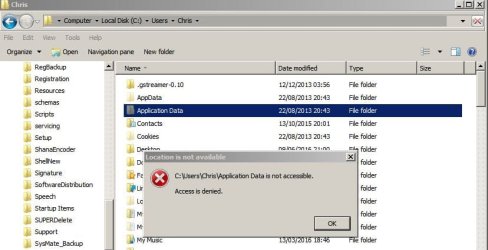
Well the correct way to access Appdata (Roaming) is via the following path:

Application Data - C:\Users\{user name}\AppData\Roaming

What you're not supposed to get access to is:

C:Users\username\Application Data

Application Data.jpg

Access is blocked and that's the way it should be. If you "Take Ownership" to access it you are asking for trouble.

Same goes for C:\Users\Username\AppData\Local\Application Data it's supposed be hidden.

See: http://www.sevenforums.com/general-discussion/115149-stop-application-data-folder-replicating.html
 

My Computer My Computer

At a glance

Microsoft Windows 7 Home Premium 64-bit 7601 ...AMD C-60 APU with Radeon(tm) HD Graphics4.00 GBAMD Radeon HD 6290 Graphics
Computer type
Laptop
Computer Manufacturer/Model Number
ASUS
OS
Microsoft Windows 7 Home Premium 64-bit 7601 Multiprocessor Free Service Pack 1
CPU
AMD C-60 APU with Radeon(tm) HD Graphics
Motherboard
ASUSTeK COMPUTER INC. X501U
Memory
4.00 GB
Graphics Card(s)
AMD Radeon HD 6290 Graphics
Sound Card
(1) AMD High Definition Audio Device (2) Realtek High Defi
Screen Resolution
1366 x 768 x 32 bits (4294967296 colors) @ 60 Hz
Hard Drives
Hitachi HTS545050A7E380 SATA Disk Device
Antivirus
Comodo CIS & FW, SecureAplus App Whitelisting, Threatfire
Browser
Cyberfox 64bit, Opera 64bit, Airfox
Other Info
Spy-The-Spy, HitmanPro.Alert, Norton Connect Safe, MJRegWatcher, BitDefender TrafficLight, Voodoo Shield, Zemana AntiMalware
Back
Top