Error message at boot : Hard Disk:SMART Status Bad, Backup and replace

shank

New member
Member
Local time
4:59 AM
Messages
68
Hi everyone.

Recently, I've had problems with my computer running Windows 7 64-bit SP1. It took a long time to get from Starting Windows to my desktop. And it was extremely slow when using the computer. It took forever to open a folder or a file. This morning, I switched on my computer and I got this error message at boot:

3rd Master Hard Disk:S.M.A.R.T. Status BAD, Backup and Replace

I'm guessing my hard drive is damaged? Any way of repairing the hard drive? What are the next steps I should take? And in the event that it can't be repaired, any way to salvage the files inside?

Thank you for reading and hope you can help!
 

My Computer

Computer type
PC/Desktop
OS
Windows 7 Professional 64 bit SP1
CPU
AMD Athlon II X4 620 2.6GHz
Motherboard
Biostar TA 790GX A3+
Memory
8GB DDR3 RAM
Graphics Card(s)
Sapphire Radeon HD6850
Monitor(s) Displays
Dell Ultrasharp U2312HM
Screen Resolution
1920x1080
PSU
Scythe Gouriki-2 600W
Case
NZXT Beta Evo
Back up the drive and replace it. It may run long enough for you to get your data off of it. I would recommend that you put a fresh install of Windows on your new drive. Yours is probably corrupt from the bad drive. I would just back up important data anyway, never mind the programs. You'll need to reinstall them anyway.

There's no real way to fix the drive, and even if you could, it would be uneconomical. Throw it away.
 

My Computer

Computer type
PC/Desktop
Computer Manufacturer/Model Number
Mellon Labs (custom build)
OS
Win 7 Pro x64/Win 10 Pro x64 dual boot
CPU
AMD FX 8350 Vishera @ 4200
Motherboard
ASUS M5A97 R2.0
Memory
16 GB Mushkin Blackline DDR3-2400 @ 1866 (9-10-10-10-31)
Graphics Card(s)
XFX Radeon R9 280 Double D Black Edition
Sound Card
Realtek HD Audio on MB. Sounds great.
Monitor(s) Displays
Acer 24", Acer 22"
Screen Resolution
3840 x 1080
Hard Drives
1 x Mushkin Chronos 120 GB SSD (Win 10)
1 x Samsung 850 EVO 250 GB SSD (Win 7)
1 x WD 1TB SATA Blue
1 x WD 1TB SATA Green
PSU
Corsair TX-750
Case
CoolerMaster HAF 912+
Cooling
Coolermaster Seidon 240M Liquid AIO. 6 case fans
Keyboard
Logitech G710+
Mouse
Logitech G500s
Internet Speed
Much better since I got fiber, but still way overpriced.
Antivirus
MSE, Malware Bytes for scanning
Browser
Firefox
Other Info
Corsair VOID USB headphones.

A Mellon Labs X-1 - LCD Smartie driven system status display.

Brought to you by the letter E
+1 for Mellon Head! Follow MH's advice accurately and quickly. Time's running out on this hard-drive.
 

My Computer

Computer type
PC/Desktop
Computer Manufacturer/Model Number
Antec desktop; Acer Aspire laptops
OS
Windows 7 Professional 64-bit
CPU
Desktop i5; Acers i5 & i7
Memory
desktop 16GB; 1 Acer 8GB & 1 Acer 16GB
Hard Drives
1TB split into 2 equal partitions [OS and data] usable by RJS
Internet Speed
AT&T DSL
Browser
FF, GChrome, msIE
Other Info
Windows 7 Firewall, Emsisoft AM/AV, MSE [scan-only], SpywareBlaster, Ruiware/BillP combine
Thank you for the replies, Mellon Head and RolandJS.

I'm going to try what you suggested. The thing is, how do I go about backing up? Do I have to do it using a system repair disc and access it from there? Or I try to boot into Windows on the damaged drive?

Also, would you advise making an image of this drive using Acronis? Or would that be corrupted like you mentioned?
 

My Computer

Computer type
PC/Desktop
OS
Windows 7 Professional 64 bit SP1
CPU
AMD Athlon II X4 620 2.6GHz
Motherboard
Biostar TA 790GX A3+
Memory
8GB DDR3 RAM
Graphics Card(s)
Sapphire Radeon HD6850
Monitor(s) Displays
Dell Ultrasharp U2312HM
Screen Resolution
1920x1080
PSU
Scythe Gouriki-2 600W
Case
NZXT Beta Evo
First unhook the bad drive. If you have a drive with Windows on it, boot from that and copy all of your pictures, documents, etc. to another drive. Just the stuff you want to save.

Don't bother copying Windows or any of your programs. They are likely corrupted anyway. That's why you shouldn't bother doing a system image or an Acronis backup. There's no point in copying a potentially corrupted drive.

Just save what's important if you are able to.
 

My Computer

Computer type
PC/Desktop
Computer Manufacturer/Model Number
Mellon Labs (custom build)
OS
Win 7 Pro x64/Win 10 Pro x64 dual boot
CPU
AMD FX 8350 Vishera @ 4200
Motherboard
ASUS M5A97 R2.0
Memory
16 GB Mushkin Blackline DDR3-2400 @ 1866 (9-10-10-10-31)
Graphics Card(s)
XFX Radeon R9 280 Double D Black Edition
Sound Card
Realtek HD Audio on MB. Sounds great.
Monitor(s) Displays
Acer 24", Acer 22"
Screen Resolution
3840 x 1080
Hard Drives
1 x Mushkin Chronos 120 GB SSD (Win 10)
1 x Samsung 850 EVO 250 GB SSD (Win 7)
1 x WD 1TB SATA Blue
1 x WD 1TB SATA Green
PSU
Corsair TX-750
Case
CoolerMaster HAF 912+
Cooling
Coolermaster Seidon 240M Liquid AIO. 6 case fans
Keyboard
Logitech G710+
Mouse
Logitech G500s
Internet Speed
Much better since I got fiber, but still way overpriced.
Antivirus
MSE, Malware Bytes for scanning
Browser
Firefox
Other Info
Corsair VOID USB headphones.

A Mellon Labs X-1 - LCD Smartie driven system status display.

Brought to you by the letter E
Too late now but the best time to backup your data is BEFORE problems develop. After may be too late.

You are fortunate to have SMART warnings. Not everyone is do lucky. Many drives fail with no warning or apparent cause. In some cases there is no user recovery of data, at least not without a great deal of work. This includes relatively new drives that were not abused in any way.

I had one drive that was working fine one day, the next it was not even recognized by the BIOS. There is no software that can recover data from such a drive. I had backups of all important data and did not investigate further.
 

My Computer

Computer type
PC/Desktop
Computer Manufacturer/Model Number
HP
OS
Windows 7 Pro 64 bit
CPU
Xeon W3520
Memory
8 GB
Graphics Card(s)
Nvidia Geforce 210
First unhook the bad drive. If you have a drive with Windows on it, boot from that and copy all of your pictures, documents, etc. to another drive. Just the stuff you want to save.

Don't bother copying Windows or any of your programs. They are likely corrupted anyway. That's why you shouldn't bother doing a system image or an Acronis backup. There's no point in copying a potentially corrupted drive.

Just save what's important if you are able to.

Unfortunately this is my only drive with Windows on it. Would I be able to do the copy and paste from recovery console method that is posted in one of the tutorials ? I was thinking of buying a new drive and doing that. Important thing is I want to minimise any further damage to the drive.

Too late now but the best time to backup your data is BEFORE problems develop. After may be too late.

You are fortunate to have SMART warnings. Not everyone is do lucky. Many drives fail with no warning or apparent cause. In some cases there is no user recovery of data, at least not without a great deal of work. This includes relatively new drives that were not abused in any way.

I had one drive that was working fine one day, the next it was not even recognized by the BIOS. There is no software that can recover data from such a drive. I had backups of all important data and did not investigate further.

Yes I was too complacent about backing up. Always kept putting it off and I've learnt my lesson.now many main aim is just to save the most important stuff.
 

My Computer

Computer type
PC/Desktop
OS
Windows 7 Professional 64 bit SP1
CPU
AMD Athlon II X4 620 2.6GHz
Motherboard
Biostar TA 790GX A3+
Memory
8GB DDR3 RAM
Graphics Card(s)
Sapphire Radeon HD6850
Monitor(s) Displays
Dell Ultrasharp U2312HM
Screen Resolution
1920x1080
PSU
Scythe Gouriki-2 600W
Case
NZXT Beta Evo
Unfortunately this is my only drive with Windows on it. Would I be able to do the copy and paste from recovery console method that is posted in one of the tutorials ? I was thinking of buying a new drive and doing that. Important thing is I want to minimise any further damage to the drive.
Buy a new drive, and install a fresh copy of Windows on it With the Windows key from the computer. Do all of the updates and get it completely ready. Then plug in the old drive and pull just the data off of it that you are able to salvage. No Windows files, no programs, just the data. Once you've done that, throw the old drive away. Re-install your programs onto the new drive and you're good to go.

Remember, you want to use the old drive as little as possible until you get your data off of it. You have a better chance of recovering the data that way.
 

My Computer

Computer type
PC/Desktop
Computer Manufacturer/Model Number
Mellon Labs (custom build)
OS
Win 7 Pro x64/Win 10 Pro x64 dual boot
CPU
AMD FX 8350 Vishera @ 4200
Motherboard
ASUS M5A97 R2.0
Memory
16 GB Mushkin Blackline DDR3-2400 @ 1866 (9-10-10-10-31)
Graphics Card(s)
XFX Radeon R9 280 Double D Black Edition
Sound Card
Realtek HD Audio on MB. Sounds great.
Monitor(s) Displays
Acer 24", Acer 22"
Screen Resolution
3840 x 1080
Hard Drives
1 x Mushkin Chronos 120 GB SSD (Win 10)
1 x Samsung 850 EVO 250 GB SSD (Win 7)
1 x WD 1TB SATA Blue
1 x WD 1TB SATA Green
PSU
Corsair TX-750
Case
CoolerMaster HAF 912+
Cooling
Coolermaster Seidon 240M Liquid AIO. 6 case fans
Keyboard
Logitech G710+
Mouse
Logitech G500s
Internet Speed
Much better since I got fiber, but still way overpriced.
Antivirus
MSE, Malware Bytes for scanning
Browser
Firefox
Other Info
Corsair VOID USB headphones.

A Mellon Labs X-1 - LCD Smartie driven system status display.

Brought to you by the letter E
Buy a new drive, and install a fresh copy of Windows on it With the Windows key from the computer. Do all of the updates and get it completely ready. Then plug in the old drive and pull just the data off of it that you are able to salvage. No Windows files, no programs, just the data. Once you've done that, throw the old drive away. Re-install your programs onto the new drive and you're good to go.

Remember, you want to use the old drive as little as possible until you get your data off of it. You have a better chance of recovering the data that way.

Thanks! I just bought a new ssd and finished installing windows on it. It runs so fast! Now comes the problem. If I plug in my old drive, it stops at starting windows for a long time, even though boot device is set to my new ssd. If I unplug it, windows starts normally. And when I plug in my old drive once it's booted to windows, it doesn't get recognised. Does it have anything to o do with ahci?
 

My Computer

Computer type
PC/Desktop
OS
Windows 7 Professional 64 bit SP1
CPU
AMD Athlon II X4 620 2.6GHz
Motherboard
Biostar TA 790GX A3+
Memory
8GB DDR3 RAM
Graphics Card(s)
Sapphire Radeon HD6850
Monitor(s) Displays
Dell Ultrasharp U2312HM
Screen Resolution
1920x1080
PSU
Scythe Gouriki-2 600W
Case
NZXT Beta Evo
Any help? I don't understand why Windows doesn't boot when the old drive is plugged in. Is it because it's got errors and that's affecting the boot up? Because a few years ago I had another drive which had issues and when I installed Windows on another drive, Windows booted up fine and then I was able to access the files that were on that old hard drive. Not sure why this time it gets stuck on starting Windows.
 

My Computer

Computer type
PC/Desktop
OS
Windows 7 Professional 64 bit SP1
CPU
AMD Athlon II X4 620 2.6GHz
Motherboard
Biostar TA 790GX A3+
Memory
8GB DDR3 RAM
Graphics Card(s)
Sapphire Radeon HD6850
Monitor(s) Displays
Dell Ultrasharp U2312HM
Screen Resolution
1920x1080
PSU
Scythe Gouriki-2 600W
Case
NZXT Beta Evo
It's getting stuck because the two drives probably have the same drive letter and that's causing some confusion with the Windows bootloader.

There are some options to fix this, maybe even including a linux live distro.

I will have someone look into this thread who knows more about that. Stay tuned, we haven't forgotten you. :)
 

My Computer

Computer type
PC/Desktop
Computer Manufacturer/Model Number
Mellon Labs (custom build)
OS
Win 7 Pro x64/Win 10 Pro x64 dual boot
CPU
AMD FX 8350 Vishera @ 4200
Motherboard
ASUS M5A97 R2.0
Memory
16 GB Mushkin Blackline DDR3-2400 @ 1866 (9-10-10-10-31)
Graphics Card(s)
XFX Radeon R9 280 Double D Black Edition
Sound Card
Realtek HD Audio on MB. Sounds great.
Monitor(s) Displays
Acer 24", Acer 22"
Screen Resolution
3840 x 1080
Hard Drives
1 x Mushkin Chronos 120 GB SSD (Win 10)
1 x Samsung 850 EVO 250 GB SSD (Win 7)
1 x WD 1TB SATA Blue
1 x WD 1TB SATA Green
PSU
Corsair TX-750
Case
CoolerMaster HAF 912+
Cooling
Coolermaster Seidon 240M Liquid AIO. 6 case fans
Keyboard
Logitech G710+
Mouse
Logitech G500s
Internet Speed
Much better since I got fiber, but still way overpriced.
Antivirus
MSE, Malware Bytes for scanning
Browser
Firefox
Other Info
Corsair VOID USB headphones.

A Mellon Labs X-1 - LCD Smartie driven system status display.

Brought to you by the letter E

My Computer

Computer type
PC/Desktop
Computer Manufacturer/Model Number
Custom assembled by me :}
OS
Win-7-Pro64bit 7-H-Prem-64bit
CPU
i7-5930K 2nd i9-9940x both water blocked VRM's too
Motherboard
ASUS SABERTOOTH X99 2nd ASUS x299 Apex
Memory
Trident-z 3200C14 2nd Trident-z 3600C16
Graphics Card(s)
EVGA 1080ti ftw3 2nd Titan Xp both water blocked
Sound Card
Built-in Realtek
Monitor(s) Displays
1-AOC G2460PG 24"G-Sync 144Hz/ 2nd 1-ASUS VG248QE 24" 144Hz
Screen Resolution
1920 x 1080 144Hz
Hard Drives
2-Samsung M.2 Evo & Evo Plus
2-Samsung 850 EVO 500GB SSD's/ 3-2.5 W.D. Black 1tb-&3-1tb/3-3.5 WD Black 1tb hdd's
PSU
EVGA SuperNOVA 1000-P2 2nd 1200-P2
Case
2-Corsair Obsidian Series 450D Black ATX Mid Tower
Cooling
Custom water loops
Keyboard
Logitech G710+/ 2nd Logitech G910
Mouse
2-RedDragon M901 Perdition 16400 dpi Gaming mouse = wired
Internet Speed
Comcast Ping 19ms 89.31mbps download speed 6.12mbps upload
Antivirus
Malwarebytes Pro/ Superantispyware Pro
Browser
FireFox & Pale moon
Other Info
2nd ASUS X299 Apex/Intel i9-9940x with Custom water loop/7H-Prem-x64/Corsair 450D case/Ram Trident-z 3600C16 4x8gb / Samsung970Evo plus 500gb SSD/Dual ssd EZ swap evo/PSU EVGA SuperNova 1200w-P2 80+Platinum/GPU Titan Xp /8-ML-140 on push-pull on 2-280GTX rads
It's getting stuck because the two drives probably have the same drive letter and that's causing some confusion with the Windows bootloader.

There are some options to fix this, maybe even including a linux live distro.

I will have someone look into this thread who knows more about that. Stay tuned, we haven't forgotten you. :)


Thank you! Before Mellon head replied I was actually in the midst of doing the lucid puppy method. Managed to mount the bad hdd after waiting for a few minutes. Currently copying over the files I need, but some files are showing an input/output error and not getting copied over. Does this signify that the drive is quite badly damaged? Given the fact that it took quite long to mount and some of the files can't be copied over.
 

My Computer

Computer type
PC/Desktop
OS
Windows 7 Professional 64 bit SP1
CPU
AMD Athlon II X4 620 2.6GHz
Motherboard
Biostar TA 790GX A3+
Memory
8GB DDR3 RAM
Graphics Card(s)
Sapphire Radeon HD6850
Monitor(s) Displays
Dell Ultrasharp U2312HM
Screen Resolution
1920x1080
PSU
Scythe Gouriki-2 600W
Case
NZXT Beta Evo
Thank you! Before Mellon head replied I was actually in the midst of doing the lucid puppy method. Managed to mount the bad hdd after waiting for a few minutes. Currently copying over the files I need, but some files are showing an input/output error and not getting copied over. Does this signify that the drive is quite badly damaged? Given the fact that it took quite long to mount and some of the files can't be copied over.
You're likely to find that some of the files will not be able to be copied over, unfortunately. There isn't much you can do about that, I'm afraid.
 

My Computer

Computer type
PC/Desktop
Computer Manufacturer/Model Number
Mellon Labs (custom build)
OS
Win 7 Pro x64/Win 10 Pro x64 dual boot
CPU
AMD FX 8350 Vishera @ 4200
Motherboard
ASUS M5A97 R2.0
Memory
16 GB Mushkin Blackline DDR3-2400 @ 1866 (9-10-10-10-31)
Graphics Card(s)
XFX Radeon R9 280 Double D Black Edition
Sound Card
Realtek HD Audio on MB. Sounds great.
Monitor(s) Displays
Acer 24", Acer 22"
Screen Resolution
3840 x 1080
Hard Drives
1 x Mushkin Chronos 120 GB SSD (Win 10)
1 x Samsung 850 EVO 250 GB SSD (Win 7)
1 x WD 1TB SATA Blue
1 x WD 1TB SATA Green
PSU
Corsair TX-750
Case
CoolerMaster HAF 912+
Cooling
Coolermaster Seidon 240M Liquid AIO. 6 case fans
Keyboard
Logitech G710+
Mouse
Logitech G500s
Internet Speed
Much better since I got fiber, but still way overpriced.
Antivirus
MSE, Malware Bytes for scanning
Browser
Firefox
Other Info
Corsair VOID USB headphones.

A Mellon Labs X-1 - LCD Smartie driven system status display.

Brought to you by the letter E
Here is a little ditty for something I have used for years - a bit simpler I find but there always a few files/data that are not accessible.

BOOTABLE UBUNTU
Make a bootable Ubuntu disk Get Ubuntu | Download | Ubuntu
Set the BIOS to boot from the optical when the machine boots it will show you a screen with TRY or INSTALL > select TRY not INSTALL
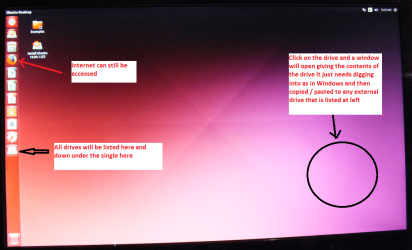
When it is finished - it takes very little time you will get a screen like in the pic .
Open the drive you want > User and dig down until you get to the data / settings you may be able to copy / paste the material you want to an external source or other installed drive doing this.
I am not sure if it will but I have recovered tons of data etc using this method both on "dead" or just plain drives that you cannot get data from using Windows. It is also good for retrieving stuff from drives you may have forgotten the password for
 

Attachments

  • UBUNTU SCREEN X2.PNG
    UBUNTU SCREEN X2.PNG
    1.1 MB · Views: 0

My Computer

Computer type
PC/Desktop
Computer Manufacturer/Model Number
Own build (new) Desk1 / Asus ROG Win 7 / Desk2 1st build
OS
Desk1 7 Home Prem / Desk2 10 Pro / Main lap Asus ROG 10 Pro 2 laptop Toshiba 7 Pro Asus P2520 7 & 10
CPU
Desk1 i5 3750K / Laptop i7 GTX 860M / Desk2 i5 2500
Motherboard
Desk1 Asus P877-V / Desk2 Gigabyte H67 UD3H / Laptop ?
Memory
Desk1 8GB (1866) / Desk2 16GB (1333) / Laptop 8Gb DDR3
Graphics Card(s)
Desk 1& 2NVidia GTX 650 & Laptops on board Intel
Sound Card
Desk 1 & 2 -XONAR DG Realtek High Def audio Laptop
Monitor(s) Displays
Desk 1 Benq HD 2450 / Desk2 Philips 24" / Laptop 17.5"
Screen Resolution
1920x1080 D1 & D2 & Laptop 1
Hard Drives
Desk1 Samsung 120GB 830 SSD
Asus ROG 256GB 850 Pro SSD
Desk2 Samsung 840 256 SSD
Toshiba 120GB EVO
PSU
Desk 1 Corsair HX 1050/ Laptop ? / Desk 2 Corsair HX 650
Case
Desk 1 Cooler HAF XM ? Toshiba laptop / Desk2 Coolermaster
Cooling
Fans on all Desk1 -2 Desk2 - all Coolermasters 5 Laptop ?
Keyboard
Desk 1 MS Sidewinder X6 Desk 2 MS Sidewinder X 4
Mouse
Desk 1&2 - Gigabyte MS 900 gamer - laptop - Logitec wireless
Internet Speed
ADSL2+
Other Info
One other Desktop (tester) and spare Toshba laptop both with SSD's
Running Kaspersky 2016 ISS on all machines config'd identically
Logitec audio stereo systems on each machine (x3)
Canon MG5250MFC
Router/modem TP-Link running WPA2SK
....... Currently copying over the files I need, but some files are showing an input/output error and not getting copied over. Does this signify that the drive is quite badly damaged? Given the fact that it took quite long to mount and some of the files can't be copied over.

Glad to note you were able to recover most of the files using the Live Linux Lucid Puppy. And yes, the data on bad sectors that cannot be read/read with errors is already lost. So invariably the files with that data are lost.You have to be happy that you were able to recover most of the files in the good sectors.

If you are keen to recover some of the files in bad sectors, you may try to clone your drive with ddrescue. On the first scan ddrescue will scan and clone all the good sectors. On the subsequent scans it will repeatedly read the bad sectors only and try to recover the data in it. Depending upon the extent and severity of the bad sectors, it may take days/weeks and even months to complete the cloning.If some of the files lost in the bad sectors are so important that you cannot live without that you may try it. In your case I shall put the risk/reward ratio almost nil - on recovering the data in bad sectors - judging from the fact the bad sectors are so severe, Lucid Puppy took sometime to mount the HDD.

http://www.sevenforums.com/general-...d-tool-cloning-failing-hdd-data-recovery.html
 
Last edited:

My Computer

OS
Windows 7 Home Premium 32 bit
Here is a little ditty for something I have used for years - a bit simpler I find but there always a few files/data that are not accessible.

BOOTABLE UBUNTU
Make a bootable Ubuntu disk Get Ubuntu | Download | Ubuntu
Set the BIOS to boot from the optical when the machine boots it will show you a screen with TRY or INSTALL > select TRY not INSTALL
When it is finished - it takes very little time you will get a screen like in the pic .
Open the drive you want > User and dig down until you get to the data / settings you may be able to copy / paste the material you want to an external source or other installed drive doing this.
I am not sure if it will but I have recovered tons of data etc using this method both on "dead" or just plain drives that you cannot get data from using Windows. It is also good for retrieving stuff from drives you may have forgotten the password for

Thanks for that mate! I shall try that if all else fails.

....... Currently copying over the files I need, but some files are showing an input/output error and not getting copied over. Does this signify that the drive is quite badly damaged? Given the fact that it took quite long to mount and some of the files can't be copied over.

Glad to note you were able to recover most of the files using the Live Linux Lucid Puppy. And yes, the data on bad sectors that cannot be read/read with errors is already lost. So invariably the files with that data are lost.You have to be happy that you were able to recover most of the files in the good sectors.

If you are keen to recover some of the files in bad sectors, you may try to clone your drive with ddrescue. On the first scan ddrescue will scan and clone all the good sectors. On the subsequent scans it will repeatedly read the bad sectors only and try to recover the data in it. Depending upon the extent and severity of the bad sectors, it may take days/weeks and even months to complete the cloning.If some of the files lost in the bad sectors are so important that you cannot live without that you may try it. In your case I shall put the risk/reward ratio almost nil - on recovering the data in bad sectors - judging from the fact the bad sectors are so severe, Lucid Puppy took sometime to mount the HDD.

http://www.sevenforums.com/general-...d-tool-cloning-failing-hdd-data-recovery.html

Thanks a lot jumanji! I am thinking of doing that by following the instructions in that thread. However, I have one question. Is it possible to tell ddrescue to stop once it has scanned and cloned just the good sectors? If I reckon correctly, r1 means infinite according to one of your posts in that thread. And also, instead of cloning any way to get an image done?
 

My Computer

Computer type
PC/Desktop
OS
Windows 7 Professional 64 bit SP1
CPU
AMD Athlon II X4 620 2.6GHz
Motherboard
Biostar TA 790GX A3+
Memory
8GB DDR3 RAM
Graphics Card(s)
Sapphire Radeon HD6850
Monitor(s) Displays
Dell Ultrasharp U2312HM
Screen Resolution
1920x1080
PSU
Scythe Gouriki-2 600W
Case
NZXT Beta Evo
We recommend r3. That is 3 passes. Also ddrescue is under continuous development.There may be some changes.For example what was logfile is now mapfile or something like that. I have completely lost touch with it and so can't say much unless I refresh myself by going through it all over again.. So go to the author's website and get details of various commands. There are atleast three members who have successfully cloned. You can fish out their threads from the reference thread I had given and check what commands they have used.

After the first run ddrescue would have only cloned the good sectors and the files you get will not be anything else than what you have got with LUCID Puppy. So there is no point in running ddrescue for one single pass or stopping it after that.

Just try cloning a good drive first ( you can clone a 4GB/8GB/16GB pen drive to another empty larger pendrive ),to get a feel of how things go with it.( Of course with a good drive ddrescue will stop cloning after the first pass since it wouldn't have found any bad sectors.:)) But you can see how the other chosen commands work and whether you can successfully clone the good drive. Once you have established the validity of the chosen command options, and got a feel of how it works you can go ahead with cloning the bad drive with those commands with r3.
 

My Computer

OS
Windows 7 Home Premium 32 bit
Hmm should have added in that ditty that not all files can be opened and maybe they are encrypted ones or cannot be recognised by the Ubuntu but most of the important stuff is usually recoverable.;)
 

My Computer

Computer type
PC/Desktop
Computer Manufacturer/Model Number
Own build (new) Desk1 / Asus ROG Win 7 / Desk2 1st build
OS
Desk1 7 Home Prem / Desk2 10 Pro / Main lap Asus ROG 10 Pro 2 laptop Toshiba 7 Pro Asus P2520 7 & 10
CPU
Desk1 i5 3750K / Laptop i7 GTX 860M / Desk2 i5 2500
Motherboard
Desk1 Asus P877-V / Desk2 Gigabyte H67 UD3H / Laptop ?
Memory
Desk1 8GB (1866) / Desk2 16GB (1333) / Laptop 8Gb DDR3
Graphics Card(s)
Desk 1& 2NVidia GTX 650 & Laptops on board Intel
Sound Card
Desk 1 & 2 -XONAR DG Realtek High Def audio Laptop
Monitor(s) Displays
Desk 1 Benq HD 2450 / Desk2 Philips 24" / Laptop 17.5"
Screen Resolution
1920x1080 D1 & D2 & Laptop 1
Hard Drives
Desk1 Samsung 120GB 830 SSD
Asus ROG 256GB 850 Pro SSD
Desk2 Samsung 840 256 SSD
Toshiba 120GB EVO
PSU
Desk 1 Corsair HX 1050/ Laptop ? / Desk 2 Corsair HX 650
Case
Desk 1 Cooler HAF XM ? Toshiba laptop / Desk2 Coolermaster
Cooling
Fans on all Desk1 -2 Desk2 - all Coolermasters 5 Laptop ?
Keyboard
Desk 1 MS Sidewinder X6 Desk 2 MS Sidewinder X 4
Mouse
Desk 1&2 - Gigabyte MS 900 gamer - laptop - Logitec wireless
Internet Speed
ADSL2+
Other Info
One other Desktop (tester) and spare Toshba laptop both with SSD's
Running Kaspersky 2016 ISS on all machines config'd identically
Logitec audio stereo systems on each machine (x3)
Canon MG5250MFC
Router/modem TP-Link running WPA2SK
We recommend r3. That is 3 passes. Also ddrescue is under continuous development.There may be some changes.For example what was logfile is now mapfile or something like that. I have completely lost touch with it and so can't say much unless I refresh myself by going through it all over again.. So go to the author's website and get details of various commands. There are atleast three members who have successfully cloned. You can fish out their threads from the reference thread I had given and check what commands they have used.

After the first run ddrescue would have only cloned the good sectors and the files you get will not be anything else than what you have got with LUCID Puppy. So there is no point in running ddrescue for one single pass or stopping it after that.

Just try cloning a good drive first ( you can clone a 4GB/8GB/16GB pen drive to another empty larger pendrive ),to get a feel of how things go with it.( Of course with a good drive ddrescue will stop cloning after the first pass since it wouldn't have found any bad sectors.:)) But you can see how the other chosen commands work and whether you can successfully clone the good drive. Once you have established the validity of the chosen command options, and got a feel of how it works you can go ahead with cloning the bad drive with those commands with r3.

Thanks a lot for your help Jumanji. I shall try out the ddrescue to clone my damaged hard drive, and will update here once it's done.

Hmm should have added in that ditty that not all files can be opened and maybe they are encrypted ones or cannot be recognised by the Ubuntu but most of the important stuff is usually recoverable.;)

Yes in LucidPuppy I was able to recover some of the files, but the rest of the files I'm going to attempt the ddrescue method.
 

My Computer

Computer type
PC/Desktop
OS
Windows 7 Professional 64 bit SP1
CPU
AMD Athlon II X4 620 2.6GHz
Motherboard
Biostar TA 790GX A3+
Memory
8GB DDR3 RAM
Graphics Card(s)
Sapphire Radeon HD6850
Monitor(s) Displays
Dell Ultrasharp U2312HM
Screen Resolution
1920x1080
PSU
Scythe Gouriki-2 600W
Case
NZXT Beta Evo
Back
Top