Wild cards in registry .reg file?

martinlest

New member
Power User
VIP
Local time
8:59 PM
Messages
661
Hi. I want certain keys in the registry to be deleted automatically, if present, at every boot. So I made a very simple batch script to run an .reg file. The .reg file is:

Windows Registry Editor Version 5.00

[-HKEY_CURRENT_USER\System\CurrentControlSet\Control\MediaProperties\PrivateProperties\DirectInput\VID_06A3&PID_075C]
[-HKEY_CURRENT_USER\System\CurrentControlSet\Control\MediaProperties\PrivateProperties\DirectInput\VID_06A3&PID_5081]
[-HKEY_LOCAL_MACHINE\SYSTEM\CurrentControlSet\Control\MediaProperties\PrivateProperties\Joystick\OEM\VID_06A3&PID_075C]

and the batch file to run it (with a shortcut in the Windows 7 startup folder) is:

Echo making Registry edits....
Echo .
regedit.exe /S "C:\Users\Martin\AppData\Roaming\Microsoft\Internet Explorer\Quick Launch\Batch Files\Scripts\X52.reg"

My question is this: I want all subkeys which begin VID_06A3 in the above locations to be deleted, whatever their name. Putting an asterisk doesn't work, nothing is deleted. Is it possible to have a wild card in an .reg file? Or a similarly simple way to achieve this?

Thanks.
 

My Computer My Computer

At a glance

Windows 7 Home Premium SP1 64-bitIntel Core i7-4790K CPU @ 4.5GHz16GB KINGSTON HYPER-X FURY DUAL-DDR3 1600MHz8GB NVIDIA GEFORCE GTX 1070
Computer type
PC/Desktop
Computer Manufacturer/Model Number
Custom Build
OS
Windows 7 Home Premium SP1 64-bit
CPU
Intel Core i7-4790K CPU @ 4.5GHz
Motherboard
Asus H97I-PLUS
Memory
16GB KINGSTON HYPER-X FURY DUAL-DDR3 1600MHz
Graphics Card(s)
8GB NVIDIA GEFORCE GTX 1070
Monitor(s) Displays
HannsG 28" & Dell 24"
Screen Resolution
1920x1200
Hard Drives
1 x 2TB Samsung Evo 860 SSD
2 x 500GB Samsung Evo 850 SSD
PSU
CORSAIR 650W CS SERIES
Case
Thermaltake Core V1 Mini ITX Cube
Cooling
NOCTUA NH-L12
Browser
Firefox
Other Info
Custom PC used for X-Plane 11
Looks as if wild cards aren't accepted in reg files. The issue is that the PID values in the sub-keys may change over time. I suppose the easiest way is for me to monitor what appears and just add any new values to the .reg delete file as new sub-keys come up (if they do - so far I have only seen the ones I wrote in the script above, so I may be OK!).
 

My Computer My Computer

At a glance

Windows 7 Home Premium SP1 64-bitIntel Core i7-4790K CPU @ 4.5GHz16GB KINGSTON HYPER-X FURY DUAL-DDR3 1600MHz8GB NVIDIA GEFORCE GTX 1070
Computer type
PC/Desktop
Computer Manufacturer/Model Number
Custom Build
OS
Windows 7 Home Premium SP1 64-bit
CPU
Intel Core i7-4790K CPU @ 4.5GHz
Motherboard
Asus H97I-PLUS
Memory
16GB KINGSTON HYPER-X FURY DUAL-DDR3 1600MHz
Graphics Card(s)
8GB NVIDIA GEFORCE GTX 1070
Monitor(s) Displays
HannsG 28" & Dell 24"
Screen Resolution
1920x1200
Hard Drives
1 x 2TB Samsung Evo 860 SSD
2 x 500GB Samsung Evo 850 SSD
PSU
CORSAIR 650W CS SERIES
Case
Thermaltake Core V1 Mini ITX Cube
Cooling
NOCTUA NH-L12
Browser
Firefox
Other Info
Custom PC used for X-Plane 11
A PID will not change while the process is running but will almost certainly change in the next session, or if the process terminates and is then restarted. There is no way to control this.

What are you trying to accomplish with this?
 

My Computer My Computer

At a glance

Windows 7 Pro 64 bitXeon W35208 GBNvidia Geforce 210
Computer type
PC/Desktop
Computer Manufacturer/Model Number
HP
OS
Windows 7 Pro 64 bit
CPU
Xeon W3520
Memory
8 GB
Graphics Card(s)
Nvidia Geforce 210
I don't know if this meets your needs but you can prevent changes to any registry key using MJRegWatcher.

Tested like this.

Set: Block changes to the following key

hkey_lmus\software\microsoft\windows nt\currentversion\image file execution options\

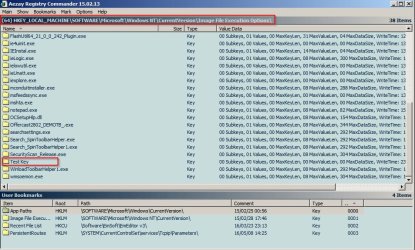
Then create a new "Test Key" (in image file execution options key) and see if it gets deleted.

Results:

Add Test Key Created (by me)

Test Key.jpg

The change is blocked:

MJRegWatcher Test Key.jpg

The key is quarantined:

MJRegWatcher Quarantine,jpg.jpg

I know that's not the same as deleting on boot but those keys would be deleted soon after boot.

So the idea is to delete the required sub keys here then block changes:

HKEY_CURRENT_USER\System\CurrentControlSet\Control\MediaProperties\PrivateProperties\DirectInput\
HKEY_LOCAL_MACHINE\SYSTEM\CurrentControlSet\Control\MediaProperties\PrivateProperties\Joystick\OEM\

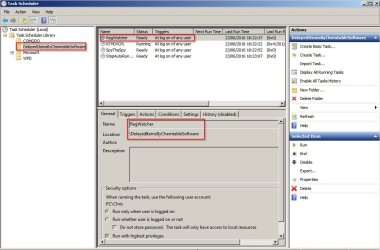
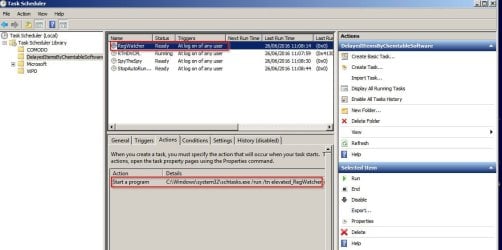
You need to know how to launch MJRegWatcher (Elevated) soon after boot. I've found that on my machine it needs to be launched delayed to give other security software a chance to load first.

Task Scheduler.jpg

EDIT:

Note that I use this application just to monitor important registry keys with the option to allow/ block changes when prompted rather than setting it to auto quarantine keys when found. I just experimented to see if it was possible to auto quarantine certain registry keys.
 

My Computer My Computer

At a glance

Microsoft Windows 7 Home Premium 64-bit 7601 ...AMD C-60 APU with Radeon(tm) HD Graphics4.00 GBAMD Radeon HD 6290 Graphics
Computer type
Laptop
Computer Manufacturer/Model Number
ASUS
OS
Microsoft Windows 7 Home Premium 64-bit 7601 Multiprocessor Free Service Pack 1
CPU
AMD C-60 APU with Radeon(tm) HD Graphics
Motherboard
ASUSTeK COMPUTER INC. X501U
Memory
4.00 GB
Graphics Card(s)
AMD Radeon HD 6290 Graphics
Sound Card
(1) AMD High Definition Audio Device (2) Realtek High Defi
Screen Resolution
1366 x 768 x 32 bits (4294967296 colors) @ 60 Hz
Hard Drives
Hitachi HTS545050A7E380 SATA Disk Device
Antivirus
Comodo CIS & FW, SecureAplus App Whitelisting, Threatfire
Browser
Cyberfox 64bit, Opera 64bit, Airfox
Other Info
Spy-The-Spy, HitmanPro.Alert, Norton Connect Safe, MJRegWatcher, BitDefender TrafficLight, Voodoo Shield, Zemana AntiMalware

My Computers My Computers

  • At a glance

    7 X64i5 84002x8gb 3200mhz
    Computer type
    PC/Desktop
    OS
    7 X64
    CPU
    i5 8400
    Motherboard
    gigabyte b365m ds3h
    Memory
    2x8gb 3200mhz
    Hard Drives
    various
    PSU
    pure power 11 400w cm
    Case
    Coolermaster
    Cooling
    cryorig m9i
  • At a glance

    7x64g54008gb ddr4 2400
    Computer type
    PC/Desktop
    OS
    7x64
    CPU
    g5400
    Motherboard
    ga b365m ds3h
    Memory
    8gb ddr4 2400
    PSU
    xfx pro 450w
Hi. I want certain keys in the registry to be deleted automatically, if present, at every boot.

What are you trying to accomplish with this?

I would like to see LMiller7's question answered before I spend much time seeing if AutoIt will do this for you. If we knew more about why you need to do this, we might find a solution that prevents the keys from being a problem.

AutoIt supports Perl-Compatible Regular Expressions and can enumerate registry keys. Unfortunately, I'm not good with Regular Expressions syntax... but I'm pretty sure that I could sort this out using "string in string" searches. Such searches are less elegant than Regular Expressions, but are functional and easier to read/understand.
 

My Computer My Computer

At a glance

W7 Pro SP1 64biti78GBIntel HD Graphics
Computer type
Laptop
Computer Manufacturer/Model Number
Employer provided Dell Latitude
OS
W7 Pro SP1 64bit
CPU
i7
Memory
8GB
Graphics Card(s)
Intel HD Graphics
Hard Drives
crappy SSD
Antivirus
Employer mandated Symantec Endpoint Protection
Browser
Pale Moon 64bit, IE11 64bit & Chrome 64bit
Looks as if wild cards aren't accepted in reg files.
Correct. Unfortunately there’s no wildcard specification for reg files. What you can do is use a batch file instead.

The Reg command allows you to do a wildcard key search: switches /f and /k.
E.g.
Code:
reg query "HKLM\SOFTWARE\somewhere" /f "search*string" /k

However, this will perform a non exact search (i.e., like *searchstring*), though you can always pipe to Findstr to refine your searches with regex.

If you are familiar with batch, Martinlest, it would become apparent that you can loop against the results the command and delete the found keys.

Code:
@echo off

for /f "delims=" %%I in ('
	reg query "HKLM\SOFTWARE\somewhere" /f "key*name" /k
') do (
	echo "%%~I"| findstr /v "End of search:" >NUL && (
		ECHO reg delete "%%~I" /f
	)
)
 

My Computer My Computer

At a glance

Windows 10, Windows 8.1 Pro, Windows 7 Profes...
Computer type
PC/Desktop
OS
Windows 10, Windows 8.1 Pro, Windows 7 Professional, OS X El Capitan
Callender, does MJRegWatcher launch via a shortcut on the desktop and/or pinned to taskbar? And, I have to "load" stuff to protect in some sort of input file, correct?
 

My Computer My Computer

At a glance

Windows 7 Professional 64-bitDesktop i5; Acers i5 & i7desktop 16GB; 1 Acer 8GB & 1 Acer 16GB
Computer type
PC/Desktop
Computer Manufacturer/Model Number
Antec desktop; Acer Aspire laptops
OS
Windows 7 Professional 64-bit
CPU
Desktop i5; Acers i5 & i7
Memory
desktop 16GB; 1 Acer 8GB & 1 Acer 16GB
Hard Drives
1TB split into 2 equal partitions [OS and data] usable by RJS
Internet Speed
AT&T DSL
Browser
FF, GChrome, msIE
Other Info
Windows 7 Firewall, Emsisoft AM/AV, MSE [scan-only], SpywareBlaster, Ruiware/BillP combine
Callender, does MJRegWatcher launch via a shortcut on the desktop and/or pinned to taskbar? And, I have to "load" stuff to protect in some sort of input file, correct?

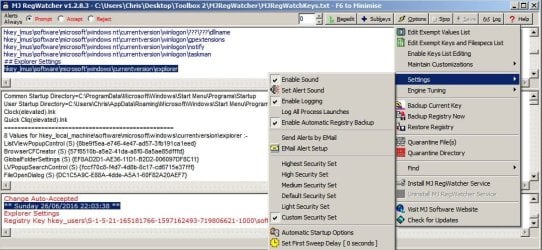
I launch it delayed on boot from an elevated shortcut via a scheduled task.

MJ RegWatcher.jpg

MJ RegWatcher 2.jpg

You don't have to load anything but there are some changes you can make to improve performance or to exempt/ include certain keys/ subkeys if you need to. As reported you can also auto block changes to any specified key. Personally I just like to be prompted when something changes. There's also a decent log that contains all changes so if you forget exactly what changed you can inspect the log. I've found that useful a few times where I haven't noticed a problem say for a week or so after a change was made.

MJRegWatcher_Config.jpg
 

My Computer My Computer

At a glance

Microsoft Windows 7 Home Premium 64-bit 7601 ...AMD C-60 APU with Radeon(tm) HD Graphics4.00 GBAMD Radeon HD 6290 Graphics
Computer type
Laptop
Computer Manufacturer/Model Number
ASUS
OS
Microsoft Windows 7 Home Premium 64-bit 7601 Multiprocessor Free Service Pack 1
CPU
AMD C-60 APU with Radeon(tm) HD Graphics
Motherboard
ASUSTeK COMPUTER INC. X501U
Memory
4.00 GB
Graphics Card(s)
AMD Radeon HD 6290 Graphics
Sound Card
(1) AMD High Definition Audio Device (2) Realtek High Defi
Screen Resolution
1366 x 768 x 32 bits (4294967296 colors) @ 60 Hz
Hard Drives
Hitachi HTS545050A7E380 SATA Disk Device
Antivirus
Comodo CIS & FW, SecureAplus App Whitelisting, Threatfire
Browser
Cyberfox 64bit, Opera 64bit, Airfox
Other Info
Spy-The-Spy, HitmanPro.Alert, Norton Connect Safe, MJRegWatcher, BitDefender TrafficLight, Voodoo Shield, Zemana AntiMalware
Back
Top