How can I avoid my hardware and system information being collected?

shevchenko99

New member
Local time
4:57 PM
Messages
4
I know that when I access a website, it's possible that the website collects my hardware details and system information. I have a couples of questions about this.

1. Usually why they are collecting my hardware details and system information?

2. Could they also get my OEM or registration code e.g. of my windows system and gets to know my persoanl registration information from Microsoft?

3. How can I stop my hardware details and system information being collected?

Many thanks.
 

My Computer My Computer

At a glance

Windows 7 Home 64 bits
Computer type
PC/Desktop
OS
Windows 7 Home 64 bits
What security programs do you have installed?

It would be handy if you included them in your (My System Specs)/
 

My Computer My Computer

At a glance

Windows 10 Pro. 64/ version 1709 Windows 7 Pr...Intel i7-6800K @ 4.3Corsair Platinum 16 gig @2400EVGA GTX 1070 OC
Computer type
PC/Desktop
Computer Manufacturer/Model Number
Home made Desktop
OS
Windows 10 Pro. 64/ version 1709 Windows 7 Pro/64
CPU
Intel i7-6800K @ 4.3
Motherboard
ASUS X-99 Deluxe II
Memory
Corsair Platinum 16 gig @2400
Graphics Card(s)
EVGA GTX 1070 OC
Monitor(s) Displays
Asus 27" LED LCD/VE278Q
Screen Resolution
1920-1080 or 1280-720 HDMI
Hard Drives
INTEL SSD 730-240 Gb Sata 3.0/
PSU
EVGA Platium 1200W
Case
Phanteks Luxe Tempered Glass 8 fans/ one radiator
Cooling
XSPC/ Water Cooled CPU
Keyboard
Das 4 Professional
Mouse
Logitech M705/MX Anywhere 2-S
Internet Speed
100 mbits
Antivirus
Microsoft Security Essentials/ Malwarebytes Premium 3.0/ SAS
Browser
I.E. 11 default/Firefox/ ISP Time Warner Cable/Spectrum
Other Info
LG BluRay Burner/
Sound system-KLipsch-THX/
Icy Dock ssd Hot Swap bays.
What security programs do you have installed?

It would be handy if you included them in your (My System Specs)/

Sorry what do you mean by security programs? Anti-Virus? Firewall?

As for Anti-Virus, possibly Avira (free version)

Firewall, I guess I do not have a particular one. Possibly the windows default firewall is enabled.
 

My Computer My Computer

At a glance

Windows 7 Home 64 bits
Computer type
PC/Desktop
OS
Windows 7 Home 64 bits
From post #3
Sorry what do you mean by security programs?
That is scary.
What anti virus, anti malware, firewall are you using?

I have no way of dealing with (I don't know, maybe or possibly).

A free program (Ccleaner) will show you what programs you have installed.

https://www.piriform.com/ccleaner/download

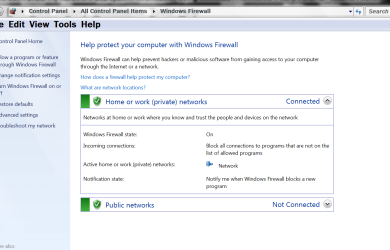
If you have not installed a 3rd party Firewall the Windows 7 Default firewall should be running.

**It should be located:**

Control Panel\All Control Panel Items\Windows Firewall


Capture.PNGfire wall today.PNG


My Computer My Computer

At a glance

Windows 10 Pro. 64/ version 1709 Windows 7 Pr...Intel i7-6800K @ 4.3Corsair Platinum 16 gig @2400EVGA GTX 1070 OC
Computer type
PC/Desktop
Computer Manufacturer/Model Number
Home made Desktop
OS
Windows 10 Pro. 64/ version 1709 Windows 7 Pro/64
CPU
Intel i7-6800K @ 4.3
Motherboard
ASUS X-99 Deluxe II
Memory
Corsair Platinum 16 gig @2400
Graphics Card(s)
EVGA GTX 1070 OC
Monitor(s) Displays
Asus 27" LED LCD/VE278Q
Screen Resolution
1920-1080 or 1280-720 HDMI
Hard Drives
INTEL SSD 730-240 Gb Sata 3.0/
PSU
EVGA Platium 1200W
Case
Phanteks Luxe Tempered Glass 8 fans/ one radiator
Cooling
XSPC/ Water Cooled CPU
Keyboard
Das 4 Professional
Mouse
Logitech M705/MX Anywhere 2-S
Internet Speed
100 mbits
Antivirus
Microsoft Security Essentials/ Malwarebytes Premium 3.0/ SAS
Browser
I.E. 11 default/Firefox/ ISP Time Warner Cable/Spectrum
Other Info
LG BluRay Burner/
Sound system-KLipsch-THX/
Icy Dock ssd Hot Swap bays.
A website can obtain quite a bit of information but unless specific software was installed (which would be considered malicious) it would not include personal or hardware information. Some is used for targeted advertising and some is needed to provide website data in a form suitable for your hardware, such as a hand held device or computer. Your public IP address is also sent as a matter of necessity. How else would the site know where to send the data? This IP address does not provide personal information.

See this for more information:
What can a website I visit tell about me?
 

My Computer My Computer

At a glance

Windows 7 Pro 64 bitXeon W35208 GBNvidia Geforce 210
Computer type
PC/Desktop
Computer Manufacturer/Model Number
HP
OS
Windows 7 Pro 64 bit
CPU
Xeon W3520
Memory
8 GB
Graphics Card(s)
Nvidia Geforce 210
A website can obtain quite a bit of information but unless specific software was installed (which would be considered malicious) it would not include personal or hardware information. Some is used for targeted advertising and some is needed to provide website data in a form suitable for your hardware, such as a hand held device or computer. Your public IP address is also sent as a matter of necessity. How else would the site know where to send the data? This IP address does not provide personal information.

See this for more information:
What can a website I visit tell about me?

How can I eliminate the amount of information that a website can tell about me??
 

My Computer My Computer

At a glance

Windows 7 Home 64 bits
Computer type
PC/Desktop
OS
Windows 7 Home 64 bits
A website can obtain quite a bit of information but unless specific software was installed (which would be considered malicious) it would not include personal or hardware information. Some is used for targeted advertising and some is needed to provide website data in a form suitable for your hardware, such as a hand held device or computer. Your public IP address is also sent as a matter of necessity. How else would the site know where to send the data? This IP address does not provide personal information.

See this for more information:
What can a website I visit tell about me?

From post #3
Sorry what do you mean by security programs?
That is scary.
What anti virus, anti malware, firewall are you using?

I have no way of dealing with (I don't know, maybe or possibly).

A free program (Ccleaner) will show you what programs you have installed.

https://www.piriform.com/ccleaner/download

If you have not installed a 3rd party Firewall the Windows 7 Default firewall should be running.

**It should be located:**

Control Panel\All Control Panel Items\Windows Firewall


View attachment 389065


and then?
 

My Computer My Computer

At a glance

Windows 7 Home 64 bits
Computer type
PC/Desktop
OS
Windows 7 Home 64 bits
I have no idea what (and then?) means.
 

My Computer My Computer

At a glance

Windows 10 Pro. 64/ version 1709 Windows 7 Pr...Intel i7-6800K @ 4.3Corsair Platinum 16 gig @2400EVGA GTX 1070 OC
Computer type
PC/Desktop
Computer Manufacturer/Model Number
Home made Desktop
OS
Windows 10 Pro. 64/ version 1709 Windows 7 Pro/64
CPU
Intel i7-6800K @ 4.3
Motherboard
ASUS X-99 Deluxe II
Memory
Corsair Platinum 16 gig @2400
Graphics Card(s)
EVGA GTX 1070 OC
Monitor(s) Displays
Asus 27" LED LCD/VE278Q
Screen Resolution
1920-1080 or 1280-720 HDMI
Hard Drives
INTEL SSD 730-240 Gb Sata 3.0/
PSU
EVGA Platium 1200W
Case
Phanteks Luxe Tempered Glass 8 fans/ one radiator
Cooling
XSPC/ Water Cooled CPU
Keyboard
Das 4 Professional
Mouse
Logitech M705/MX Anywhere 2-S
Internet Speed
100 mbits
Antivirus
Microsoft Security Essentials/ Malwarebytes Premium 3.0/ SAS
Browser
I.E. 11 default/Firefox/ ISP Time Warner Cable/Spectrum
Other Info
LG BluRay Burner/
Sound system-KLipsch-THX/
Icy Dock ssd Hot Swap bays.
Back
Top