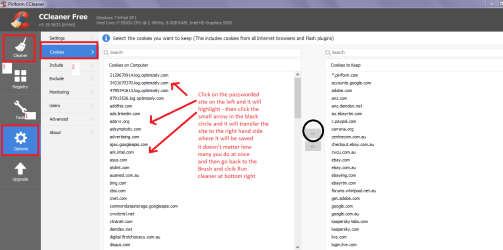
This started happening I think maybe a week or 2 ago? Whenever I download .exe files from any browsers (I mainly use Chrome, but I've also tried Firefox and Internet Explorer) and open them, it either:
a) does absolutely nothing and I have to pull up the Task Manager to end the process,
b) causes my entire laptop to freeze, leaving me no choice but to force my laptop to shut down by hold down the power button (which I feel isn't going to help my poor laptop).
Now every other .exe file that I've downloaded/installed before this can run fine on my laptop, and I can also download images, music, and gaming-mod files from Chrome without issue. It's just the .exe files that I download that's causing me issues. And the .exe files I try to download I know work, because I've download them in the past without issue (example is CCleaner; I tried to reinstall it recently and attempting to do so caused my laptop to crash).
Also I noticed that when I try to run .exe files, I can hear a faint but distinct ticking/grinding (it's hard to describe) from my laptop that sounds like, "Tch, tchtchtch tch, tch ... Tch, tchtchtch tch, tch ...". I'm not sure what that means, but I think I should bring that up.
I've had Norton run a full scan, but it didn't find anything (and don't suggest I try a different anti-virus tool, because it won't work because of said issue), and I tried doing a Disk Clean Up and Disk Defragment just to see if maybe it might help, but it doesn't. I even tried clearing up space on my laptop (not that I used up a lot to begin with) by uninstalling any video games that I haven't played for a long time.
a) does absolutely nothing and I have to pull up the Task Manager to end the process,
b) causes my entire laptop to freeze, leaving me no choice but to force my laptop to shut down by hold down the power button (which I feel isn't going to help my poor laptop).
Now every other .exe file that I've downloaded/installed before this can run fine on my laptop, and I can also download images, music, and gaming-mod files from Chrome without issue. It's just the .exe files that I download that's causing me issues. And the .exe files I try to download I know work, because I've download them in the past without issue (example is CCleaner; I tried to reinstall it recently and attempting to do so caused my laptop to crash).
Also I noticed that when I try to run .exe files, I can hear a faint but distinct ticking/grinding (it's hard to describe) from my laptop that sounds like, "Tch, tchtchtch tch, tch ... Tch, tchtchtch tch, tch ...". I'm not sure what that means, but I think I should bring that up.
I've had Norton run a full scan, but it didn't find anything (and don't suggest I try a different anti-virus tool, because it won't work because of said issue), and I tried doing a Disk Clean Up and Disk Defragment just to see if maybe it might help, but it doesn't. I even tried clearing up space on my laptop (not that I used up a lot to begin with) by uninstalling any video games that I haven't played for a long time.
My Computer
At a glance
Microsoft Windows 7 Professional 64-bit 7601 ...Intel(R) Core(TM) i7-6700 CPU @ 3.40GHz16.00 GBNVIDIA GeForce GTX 1080
- Computer type
- PC/Desktop
- Computer Manufacturer/Model Number
- Custom Build
- OS
- Microsoft Windows 7 Professional 64-bit 7601 Multiprocessor Free Service Pack 1
- CPU
- Intel(R) Core(TM) i7-6700 CPU @ 3.40GHz
- Motherboard
- Gigabyte Technology Co., Ltd. B150M-D3H-CF
- Memory
- 16.00 GB
- Graphics Card(s)
- NVIDIA GeForce GTX 1080
- Sound Card
- (1) NVIDIA High Definition Audio(2) Realtek High Definition
- Monitor(s) Displays
- 1
- Screen Resolution
- 1920 x 1080 x 32 bits (4294967296 colors) @ 60 Hz
- Hard Drives
- (1) ADATA SP600 ATA Device (2) WDC WD20EZRZ-00Z5HB0 ATA Device
- Case
- NZXT H440 (Matte Black) ATX Mid Tower Case
- Keyboard
- Microsoft Sculpt Ergonomic Keyboard
- Mouse
- Microsoft Sculpt Ergonomic Mouse
- Browser
- Google Chrome